Ein Tag eines Chef 2.0 bei der SAP 
26.11.2014, 
Thomas Jenewein – Business Development Manager, SAP Education
Vorstellung und Intro 
© 2014 SAP SE or an SAP affiliate company. All rights reserved. Customer 2
Agenda 
• Wie beeinflusst mich als Manager Technologie bei der Arbeit? 
• Wie sieht ein „normaler“ Tag aus? 
• Was sind meine Top 10 Tools? 
• Reflektion 
• Appendix 
© 2014 SAP SE or an SAP affiliate company. All rights reserved. Customer 3
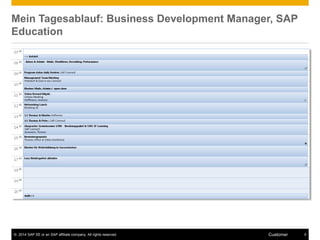
Mein Tagesablauf: Business Development Manager, SAP 
Education 
© 2014 SAP SE or an SAP affiliate company. All rights reserved. Customer 4
Kurzumfragen 
Wie stark beeinflussen digitale Medien Ihre tägliche Arbeit? 
Wie virtuell ist Ihre tägliche Arbeit? 
• Stark 
• Weniger Stark 
© 2014 SAP SE or an SAP affiliate company. All rights reserved. Customer 5
Lernen auf dem Weg zur Arbeit mit Podcasts 
iTunes App sowie SAP internes Videoapp (SAP Mediashare) 
Blogs-Tips: Einführen von Podcasts / meine Top 10 Lieblingspodcasts 
© 2014 SAP SE or an SAP affiliate company. All rights reserved. Customer 6
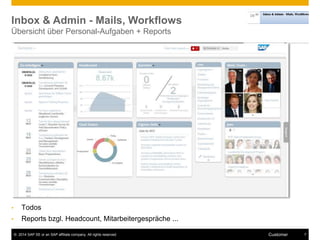
Inbox & Admin - Mails, Workflows 
Übersicht über Personal-Aufgaben + Reports 
• Todos 
• Reports bzgl. Headcount, Mitarbeitergespräche ... 
© 2014 SAP SE or an SAP affiliate company. All rights reserved. Customer 7
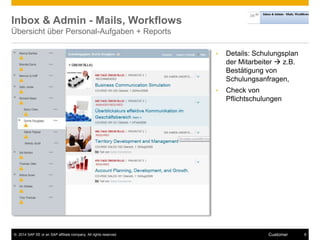
Inbox & Admin - Mails, Workflows 
Übersicht über Personal-Aufgaben + Reports 
• Details: Schulungsplan 
der Mitarbeiter  z.B. 
Bestätigung von 
Schulungsanfragen, 
• Check von 
Pflichtschulungen 
© 2014 SAP SE or an SAP affiliate company. All rights reserved. Customer 8
Inbox & Admin - Mails, Workflows 
Übersicht über Personal-Aufgaben + Reports 
• KPI Dashboard 
© 2014 SAP SE or an SAP affiliate company. All rights reserved. Customer 9
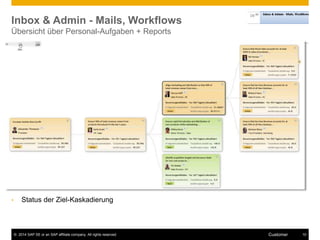
Inbox & Admin - Mails, Workflows 
Übersicht über Personal-Aufgaben + Reports 
• Status der Ziel-Kaskadierung 
© 2014 SAP SE or an SAP affiliate company. All rights reserved. Customer 10
Inbox & Admin - Mails, Workflows 
Einfache Apps z.B. zur Bestätigung von Urlaubsanträgen, Schulungen, Zielplänen 
• Ähnlich wie für Endkonsumenten (consumerization) 
• Gekapselt je nach Aufgabe 
© 2014 SAP SE or an SAP affiliate company. All rights reserved. Customer 11
Statusmeetings 
Virtuelles Meeting incl. Teilen von Dokumenten (ToDo Listen, Präsentationen) 
 Agiles Program Management: 
Täglicher Status Report / Review 
des Backlog 
 Social Media Gruppen für größere 
Projekte 
 Büro oder zuhause 
© 2014 SAP SE or an SAP affiliate company. All rights reserved. Customer 12
Statusmeetings 
Virtuelles + Physisches Meeting incl. Teilen von Dokumenten (ToDo Listen, Präsentationen) 
 Agiles Program Management: 
Review des Backlog 
 Chat-Gruppe fürs Management 
Team 
© 2014 SAP SE or an SAP affiliate company. All rights reserved. Customer 13
Mails/ Admin 
E-mails + social Media zur internen/ externen Kommunikation & Zusammenarbeit 
 Arbeiten an Action Items 
 Crowdsourcing in SAP Jam (Frage 
in die Runde) oder Chat 
© 2014 SAP SE or an SAP affiliate company. All rights reserved. Customer 14
Mails/ Admin 
E-mails + social Media zur internen/ externen Kommunikation & Zusammenarbeit 
 Arbeiten an Action Items 
 externe Kommunikation von Event 
Twitter/ Linkedin/ Xing 
© 2014 SAP SE or an SAP affiliate company. All rights reserved. Customer 15
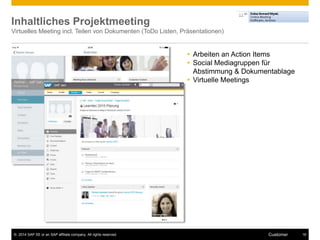
Inhaltliches Projektmeeting 
Virtuelles Meeting incl. Teilen von Dokumenten (ToDo Listen, Präsentationen) 
 Arbeiten an Action Items 
 Social Mediagruppen für 
Abstimmung & Dokumentablage 
 Virtuelle Meetings 
© 2014 SAP SE or an SAP affiliate company. All rights reserved. Customer 16
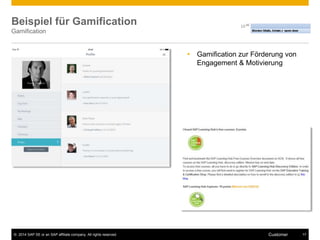
Beispiel für Gamification 
Gamification 
 Gamification zur Förderung von 
Engagement & Motivierung 
© 2014 SAP SE or an SAP affiliate company. All rights reserved. Customer 17
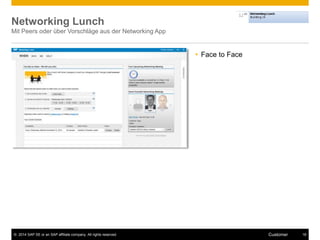
Networking Lunch 
Mit Peers oder über Vorschläge aus der Networking App 
 Face to Face 
© 2014 SAP SE or an SAP affiliate company. All rights reserved. Customer 18
1:1 
in der Kaffeeecke incl. Laptop/ Tablet & Kaffee 
 Face to Face 
 Excel Action Backlog als 
Tool 
© 2014 SAP SE or an SAP affiliate company. All rights reserved. Customer 19
Bewerbergespräch/ Recruiting 
Vorbereitung: Check der Pipeline 
© 2014 SAP SE or an SAP affiliate company. All rights reserved. Customer 20
Bewerbergespräch/ Recruiting 
Vorbereitung: Ausdruck v. Unterlagen / Nachbereitung mit Rating 
© 2014 SAP SE or an SAP affiliate company. All rights reserved. Customer 21
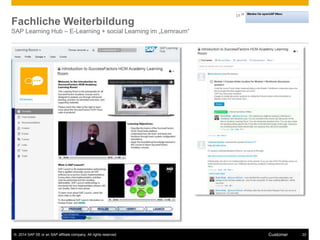
Fachliche Weiterbildung 
SAP Learning Hub – E-Learning + social Learning im „Lernraum“ 
© 2014 SAP SE or an SAP affiliate company. All rights reserved. Customer 22
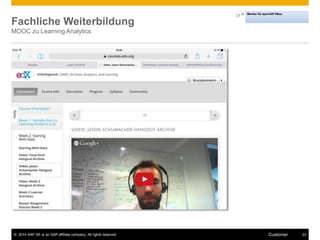
Fachliche Weiterbildung 
MOOC zu Learning Analytics 
© 2014 SAP SE or an SAP affiliate company. All rights reserved. Customer 23
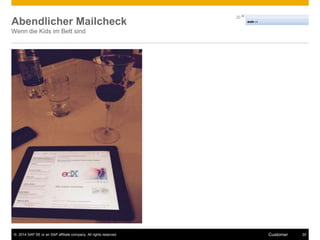
Abendlicher Mailcheck 
Wenn die Kids im Bett sind 
© 2014 SAP SE or an SAP affiliate company. All rights reserved. Customer 24
Top 10 Tools für Lernen, Arbeiten und persönliches 
Wissensmanagement 
Meine Top 10 
1. Immer noch Outlook  
2. Adobe Connect (virtuelle Meetings) 
3. Twitter (Info-updates) 
4. SAP Jam (SAP internes soziales Netzwerk – Austausch, 
Crowdsourcing, Projekte) 
5. SAP Community Network (externes soziales Netzwerk ) 
6. Powerpoint 
7. Xing (deutsch) 
Linkedin (international) 
8. iTunes (Podcasts) 
9. Workforce Performance Builder (Demos, E-Learning) 
10. SuccessMap (Successfacors - HR Aufgaben, LMS...) 
11. Sonstige: Slideshare, SAPWire (SAP Whatsapp), SAP 
Mediashare (Videos) 
http://c4lpt.co.uk/top100tools/analysis-2014/ 
© 2014 SAP SE or an SAP affiliate company. All rights reserved. Customer 25
Reflektion: Technologie & meine Arbeit heute und morgen 
Was bestimmt meinen Alltag heute 
• Virtualität (Telefon & virtuelle Meetings) 
• Viel Zusammenarbeit, Abstimmung & Austausch 
• Mobil (Unterwegs & Homeoffice) 
• Transparente & demokratische Kommunikation 
• Verteilung von Informationen “Multikanal” = Netzwerkeffekte 
• Multitasking 
Wo sehe ich Trends 
• Immer weiter zunehmende Digitalisierung = erfordert Transformation + 
Medienkompetenz + Selbstorganisation 
• Medienkonvergenz (Smartphone, Tablet, Desktop) 
• Social Media integriert in Arbeitsprozesse 
• Förderung von Engagement durch Gamification 
• Noch bessere Analysen zur Entscheidungsunterstützung 
• Big Data & Wearables 
© 2014 SAP SE or an SAP affiliate company. All rights reserved. Customer 26
Weitere Informationen & Links 
• SAP Education Communities – u.a. mit Infos zu Produkten & Services SAP Community Netzwerk I XING 
• SAP Jam Infos im Web (SAPs social Plattform) 
• Design Thinking in Action - Kategorie der SAPinfo mit verschiedenen Artikeln, Interviews, Case Studies 
zu Design Thinking. 
• SAP Gamification Community sowie ein Video zum Thema 
• Enterprise Gamification Infos und Beispiele (enterprise-gamification.com) 
• Lernräume im SAP Learning Hub – Blog & Folien von der Learntec 2014: 
• Blogbeitrag: Social Media in Learning and Talent Development 
MOOCS 
• OpenSAP – SAPs Enterprise MOOC 
• Udacity 
• Edx 
• Coursera 
• Social Media Guidelines: Übersicht (deutsch), englisch (incl. SAP) 
© 2014 SAP SE or an SAP affiliate company. All rights reserved. Customer 27
Was sind erste Schritte? 
1. Profil & Brand aufbauen 
• Erstellung/ update XING-/ LinkedIn- / Unternehmens Profil 
• Visibel & erreichbar sein, 
• Keywords zur Selbstbeschreibung - ( keyword planner von Google) 
• Check der eigener Social Media Guideline 
2. Zuhören & verstehen 
• Monitoring des eigenen Netzwerks & Wettbewerb 
• Experten & Gruppen (Xing/ LinkedIn) folgen 
• Google Alerts oder Flipbook für sehr einfaches Webmonitoring 
• Filter / Abos regelmässig optimieren 
3. Engagement 
• Eigene use cases intern / extern definieren (Marketing / Strategische Updates / Crowdsourcing ) 
• Starten von Mitteilungen, z.B. Blog posts 
• Interessante Inhalte teilen (blogs, videos, external links) zum Weiterteilen & Folgen 
© 2014 SAP SE or an SAP affiliate company. All rights reserved. Customer 28
Übung und Diskussion 
für 
© 2014 SAP SE or an SAP affiliate company. All rights reserved. Customer 29
Dankeschön! 
Thomas Jenewein, SAP AG 
SAP Education 
thomas.jenewein@sap.com 
http://twitter.com/saplearn 
https://www.xing.com/net/sapeducation 
https://www.xing.com/net/pe20 
© 2014 SAP SE or an SAP affiliate company. All rights reserved. 
Weitere Ressourcen 
• Blog mit Beiträgen, Infos zu Webinaren etc. 
• Social Media in Learning and Talent Development 
Personalentwicklung 2.0 mit Prof. A. Trost mit Artikeln & 29 
Authors like Josh Bersin, Prof. Seufert, Jochen Robes etc.
Appendix 
© 2014 SAP SE or an SAP affiliate company. All rights reserved. Customer 31
Input: Selbsterfahrung mit Social Media 
• Verfolgen von Weiterbildungsexperten auf Twitter und Lesen ihrer Blogartikel und 
Aktualisierungen (Liste von PE-Experten auf Twitter von Jane Hart). 
• Netzwerken mit Experten-Kollegen (z. B. über XING oder Linkedin). 
• Diskussion in Diskussionsgruppen rund um Personalentwicklung, (z. B. über XING oder 
Linkedin). 
• Hören von Podcasts, sei es zum Thema HR oder social Learning (z. B. Manager Tools). 
• Regelmässiges Bloggen zur Selbstreflektion sowie zum internen und externen Marketing 
(z. B. über Twitter, Facebook oder einem eigenen Blog). 
• Nutzen von Social Media beim Suchen von Antworten auf akute fachliche Fragen, z. B. 
durch Stellen von Fragen in einem Fach-Forum (z. B. Linkedin oder auf Xing), auf 
Slideshare oder Wikipedia. 
• Nutzen weiterer Tools - eine sehr gute Auswahl bietet die Liste der Top 100 Tools for 
Learning von Jane Hart. 
© 2014 SAP SE or an SAP affiliate company. All rights reserved. Customer 32
Input: Selbsterfahrung mit Social Media 
• Einsetzen im eigenen Team z. B. indem man Standardmailings abschafft und die Info dafür 
auf einem Wiki oder Blog ablegt. 
• Weiterbildungsexperten auf Twitter – Liste von Jane Hart: 
http://c4lpt.co.uk/connexions/wpl.html 
• Top 100 Tools for Learning: http://c4lpt.co.uk/recommended/top100-2010.html 
• Kostenloses Material von Universitäten wie Vorlesungen, Übungen etc.: 
MIT Open Course Ware Projekt::/ http://ocw.mit.edu/index.htm 
iTunes University: http://www.apple.com/education/itunes-u/ 
• Weiterbildungsblog von J. Robes mit vielen Informationen auch zu Social Media in der 
Weiterbildung: http://www.weiterbildungsblog.de/ 
• Interessante Podcasts: Manager tools – Themen rund um Management: 
http://www.manager-tools.com/ - ; 
• Weitere Social Media Tools: 
- Slideshare: Folien Austauschplattform: http://www.slideshare.com 
- Doodle, das Abstimmungstool: http://www.doodle.com 
© 2014 SAP SE or an SAP affiliate company. All rights reserved. Customer 33
Six social-media skills every leader needs 
(McKinsey) 
http://www.mckinsey.com/insights/high_tech_telecoms_internet/six_social-media_skills_every_leader_needs 
© 2014 SAP SE or an SAP affiliate company. All rights reserved. Customer 34

Chef 2.0 bei der SAP

  • 1.
    Ein Tag einesChef 2.0 bei der SAP 26.11.2014, Thomas Jenewein – Business Development Manager, SAP Education
  • 2.
    Vorstellung und Intro © 2014 SAP SE or an SAP affiliate company. All rights reserved. Customer 2
  • 3.
    Agenda • Wiebeeinflusst mich als Manager Technologie bei der Arbeit? • Wie sieht ein „normaler“ Tag aus? • Was sind meine Top 10 Tools? • Reflektion • Appendix © 2014 SAP SE or an SAP affiliate company. All rights reserved. Customer 3
  • 4.
    Mein Tagesablauf: BusinessDevelopment Manager, SAP Education © 2014 SAP SE or an SAP affiliate company. All rights reserved. Customer 4
  • 5.
    Kurzumfragen Wie starkbeeinflussen digitale Medien Ihre tägliche Arbeit? Wie virtuell ist Ihre tägliche Arbeit? • Stark • Weniger Stark © 2014 SAP SE or an SAP affiliate company. All rights reserved. Customer 5
  • 6.
    Lernen auf demWeg zur Arbeit mit Podcasts iTunes App sowie SAP internes Videoapp (SAP Mediashare) Blogs-Tips: Einführen von Podcasts / meine Top 10 Lieblingspodcasts © 2014 SAP SE or an SAP affiliate company. All rights reserved. Customer 6
  • 7.
    Inbox & Admin- Mails, Workflows Übersicht über Personal-Aufgaben + Reports • Todos • Reports bzgl. Headcount, Mitarbeitergespräche ... © 2014 SAP SE or an SAP affiliate company. All rights reserved. Customer 7
  • 8.
    Inbox & Admin- Mails, Workflows Übersicht über Personal-Aufgaben + Reports • Details: Schulungsplan der Mitarbeiter  z.B. Bestätigung von Schulungsanfragen, • Check von Pflichtschulungen © 2014 SAP SE or an SAP affiliate company. All rights reserved. Customer 8
  • 9.
    Inbox & Admin- Mails, Workflows Übersicht über Personal-Aufgaben + Reports • KPI Dashboard © 2014 SAP SE or an SAP affiliate company. All rights reserved. Customer 9
  • 10.
    Inbox & Admin- Mails, Workflows Übersicht über Personal-Aufgaben + Reports • Status der Ziel-Kaskadierung © 2014 SAP SE or an SAP affiliate company. All rights reserved. Customer 10
  • 11.
    Inbox & Admin- Mails, Workflows Einfache Apps z.B. zur Bestätigung von Urlaubsanträgen, Schulungen, Zielplänen • Ähnlich wie für Endkonsumenten (consumerization) • Gekapselt je nach Aufgabe © 2014 SAP SE or an SAP affiliate company. All rights reserved. Customer 11
  • 12.
    Statusmeetings Virtuelles Meetingincl. Teilen von Dokumenten (ToDo Listen, Präsentationen)  Agiles Program Management: Täglicher Status Report / Review des Backlog  Social Media Gruppen für größere Projekte  Büro oder zuhause © 2014 SAP SE or an SAP affiliate company. All rights reserved. Customer 12
  • 13.
    Statusmeetings Virtuelles +Physisches Meeting incl. Teilen von Dokumenten (ToDo Listen, Präsentationen)  Agiles Program Management: Review des Backlog  Chat-Gruppe fürs Management Team © 2014 SAP SE or an SAP affiliate company. All rights reserved. Customer 13
  • 14.
    Mails/ Admin E-mails+ social Media zur internen/ externen Kommunikation & Zusammenarbeit  Arbeiten an Action Items  Crowdsourcing in SAP Jam (Frage in die Runde) oder Chat © 2014 SAP SE or an SAP affiliate company. All rights reserved. Customer 14
  • 15.
    Mails/ Admin E-mails+ social Media zur internen/ externen Kommunikation & Zusammenarbeit  Arbeiten an Action Items  externe Kommunikation von Event Twitter/ Linkedin/ Xing © 2014 SAP SE or an SAP affiliate company. All rights reserved. Customer 15
  • 16.
    Inhaltliches Projektmeeting VirtuellesMeeting incl. Teilen von Dokumenten (ToDo Listen, Präsentationen)  Arbeiten an Action Items  Social Mediagruppen für Abstimmung & Dokumentablage  Virtuelle Meetings © 2014 SAP SE or an SAP affiliate company. All rights reserved. Customer 16
  • 17.
    Beispiel für Gamification Gamification  Gamification zur Förderung von Engagement & Motivierung © 2014 SAP SE or an SAP affiliate company. All rights reserved. Customer 17
  • 18.
    Networking Lunch MitPeers oder über Vorschläge aus der Networking App  Face to Face © 2014 SAP SE or an SAP affiliate company. All rights reserved. Customer 18
  • 19.
    1:1 in derKaffeeecke incl. Laptop/ Tablet & Kaffee  Face to Face  Excel Action Backlog als Tool © 2014 SAP SE or an SAP affiliate company. All rights reserved. Customer 19
  • 20.
    Bewerbergespräch/ Recruiting Vorbereitung:Check der Pipeline © 2014 SAP SE or an SAP affiliate company. All rights reserved. Customer 20
  • 21.
    Bewerbergespräch/ Recruiting Vorbereitung:Ausdruck v. Unterlagen / Nachbereitung mit Rating © 2014 SAP SE or an SAP affiliate company. All rights reserved. Customer 21
  • 22.
    Fachliche Weiterbildung SAPLearning Hub – E-Learning + social Learning im „Lernraum“ © 2014 SAP SE or an SAP affiliate company. All rights reserved. Customer 22
  • 23.
    Fachliche Weiterbildung MOOCzu Learning Analytics © 2014 SAP SE or an SAP affiliate company. All rights reserved. Customer 23
  • 24.
    Abendlicher Mailcheck Wenndie Kids im Bett sind © 2014 SAP SE or an SAP affiliate company. All rights reserved. Customer 24
  • 25.
    Top 10 Toolsfür Lernen, Arbeiten und persönliches Wissensmanagement Meine Top 10 1. Immer noch Outlook  2. Adobe Connect (virtuelle Meetings) 3. Twitter (Info-updates) 4. SAP Jam (SAP internes soziales Netzwerk – Austausch, Crowdsourcing, Projekte) 5. SAP Community Network (externes soziales Netzwerk ) 6. Powerpoint 7. Xing (deutsch) Linkedin (international) 8. iTunes (Podcasts) 9. Workforce Performance Builder (Demos, E-Learning) 10. SuccessMap (Successfacors - HR Aufgaben, LMS...) 11. Sonstige: Slideshare, SAPWire (SAP Whatsapp), SAP Mediashare (Videos) http://c4lpt.co.uk/top100tools/analysis-2014/ © 2014 SAP SE or an SAP affiliate company. All rights reserved. Customer 25
  • 26.
    Reflektion: Technologie &meine Arbeit heute und morgen Was bestimmt meinen Alltag heute • Virtualität (Telefon & virtuelle Meetings) • Viel Zusammenarbeit, Abstimmung & Austausch • Mobil (Unterwegs & Homeoffice) • Transparente & demokratische Kommunikation • Verteilung von Informationen “Multikanal” = Netzwerkeffekte • Multitasking Wo sehe ich Trends • Immer weiter zunehmende Digitalisierung = erfordert Transformation + Medienkompetenz + Selbstorganisation • Medienkonvergenz (Smartphone, Tablet, Desktop) • Social Media integriert in Arbeitsprozesse • Förderung von Engagement durch Gamification • Noch bessere Analysen zur Entscheidungsunterstützung • Big Data & Wearables © 2014 SAP SE or an SAP affiliate company. All rights reserved. Customer 26
  • 27.
    Weitere Informationen &Links • SAP Education Communities – u.a. mit Infos zu Produkten & Services SAP Community Netzwerk I XING • SAP Jam Infos im Web (SAPs social Plattform) • Design Thinking in Action - Kategorie der SAPinfo mit verschiedenen Artikeln, Interviews, Case Studies zu Design Thinking. • SAP Gamification Community sowie ein Video zum Thema • Enterprise Gamification Infos und Beispiele (enterprise-gamification.com) • Lernräume im SAP Learning Hub – Blog & Folien von der Learntec 2014: • Blogbeitrag: Social Media in Learning and Talent Development MOOCS • OpenSAP – SAPs Enterprise MOOC • Udacity • Edx • Coursera • Social Media Guidelines: Übersicht (deutsch), englisch (incl. SAP) © 2014 SAP SE or an SAP affiliate company. All rights reserved. Customer 27
  • 28.
    Was sind ersteSchritte? 1. Profil & Brand aufbauen • Erstellung/ update XING-/ LinkedIn- / Unternehmens Profil • Visibel & erreichbar sein, • Keywords zur Selbstbeschreibung - ( keyword planner von Google) • Check der eigener Social Media Guideline 2. Zuhören & verstehen • Monitoring des eigenen Netzwerks & Wettbewerb • Experten & Gruppen (Xing/ LinkedIn) folgen • Google Alerts oder Flipbook für sehr einfaches Webmonitoring • Filter / Abos regelmässig optimieren 3. Engagement • Eigene use cases intern / extern definieren (Marketing / Strategische Updates / Crowdsourcing ) • Starten von Mitteilungen, z.B. Blog posts • Interessante Inhalte teilen (blogs, videos, external links) zum Weiterteilen & Folgen © 2014 SAP SE or an SAP affiliate company. All rights reserved. Customer 28
  • 29.
    Übung und Diskussion für © 2014 SAP SE or an SAP affiliate company. All rights reserved. Customer 29
  • 30.
    Dankeschön! Thomas Jenewein,SAP AG SAP Education thomas.jenewein@sap.com http://twitter.com/saplearn https://www.xing.com/net/sapeducation https://www.xing.com/net/pe20 © 2014 SAP SE or an SAP affiliate company. All rights reserved. Weitere Ressourcen • Blog mit Beiträgen, Infos zu Webinaren etc. • Social Media in Learning and Talent Development Personalentwicklung 2.0 mit Prof. A. Trost mit Artikeln & 29 Authors like Josh Bersin, Prof. Seufert, Jochen Robes etc.
  • 31.
    Appendix © 2014SAP SE or an SAP affiliate company. All rights reserved. Customer 31
  • 32.
    Input: Selbsterfahrung mitSocial Media • Verfolgen von Weiterbildungsexperten auf Twitter und Lesen ihrer Blogartikel und Aktualisierungen (Liste von PE-Experten auf Twitter von Jane Hart). • Netzwerken mit Experten-Kollegen (z. B. über XING oder Linkedin). • Diskussion in Diskussionsgruppen rund um Personalentwicklung, (z. B. über XING oder Linkedin). • Hören von Podcasts, sei es zum Thema HR oder social Learning (z. B. Manager Tools). • Regelmässiges Bloggen zur Selbstreflektion sowie zum internen und externen Marketing (z. B. über Twitter, Facebook oder einem eigenen Blog). • Nutzen von Social Media beim Suchen von Antworten auf akute fachliche Fragen, z. B. durch Stellen von Fragen in einem Fach-Forum (z. B. Linkedin oder auf Xing), auf Slideshare oder Wikipedia. • Nutzen weiterer Tools - eine sehr gute Auswahl bietet die Liste der Top 100 Tools for Learning von Jane Hart. © 2014 SAP SE or an SAP affiliate company. All rights reserved. Customer 32
  • 33.
    Input: Selbsterfahrung mitSocial Media • Einsetzen im eigenen Team z. B. indem man Standardmailings abschafft und die Info dafür auf einem Wiki oder Blog ablegt. • Weiterbildungsexperten auf Twitter – Liste von Jane Hart: http://c4lpt.co.uk/connexions/wpl.html • Top 100 Tools for Learning: http://c4lpt.co.uk/recommended/top100-2010.html • Kostenloses Material von Universitäten wie Vorlesungen, Übungen etc.: MIT Open Course Ware Projekt::/ http://ocw.mit.edu/index.htm iTunes University: http://www.apple.com/education/itunes-u/ • Weiterbildungsblog von J. Robes mit vielen Informationen auch zu Social Media in der Weiterbildung: http://www.weiterbildungsblog.de/ • Interessante Podcasts: Manager tools – Themen rund um Management: http://www.manager-tools.com/ - ; • Weitere Social Media Tools: - Slideshare: Folien Austauschplattform: http://www.slideshare.com - Doodle, das Abstimmungstool: http://www.doodle.com © 2014 SAP SE or an SAP affiliate company. All rights reserved. Customer 33
  • 34.
    Six social-media skillsevery leader needs (McKinsey) http://www.mckinsey.com/insights/high_tech_telecoms_internet/six_social-media_skills_every_leader_needs © 2014 SAP SE or an SAP affiliate company. All rights reserved. Customer 34