Citrix XenDesktop 4
und die
Microsoft Virtual Desktop Infrastructure


Hans.Schermer @ citrix.com
Senior Systems Engineer, Citrix Systems
Der Desktop
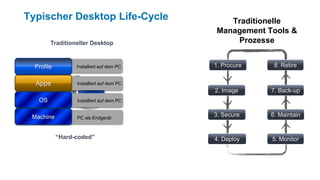
Typischer Desktop Life-Cycle                  Traditionelle
                                           Management Tools &
        Traditioneller Desktop                 Prozesse


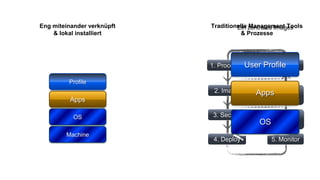
  Profile         Installiert auf dem PC   1. Procure    8. Retire


  Apps            Installiert auf dem PC
                                           2. Image     7. Back-up
   OS             Installiert auf dem PC


 Machine          PC als Endgerät
                                           3. Secure    6. Maintain


            “Hard-coded”                   4. Deploy    5. Monitor
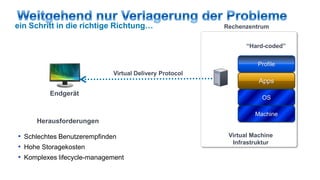
gehostete virtuelle Desktops
ein Schritt in die richtige Richtung…                   Rechenzentrum


                                                               “Hard-coded”


                                                                  Profile
                            Virtual Delivery Protocol
                                                                   Apps
                                                                VM1         VM2
         Endgerät
                                                                      OS

                                                                VM3         VM4
                                                                  Machine
     Herausforderungen

• Schlechtes Benutzerempfinden                           Virtual Machine
                                                          Infrastruktur
• Hohe Storagekosten
• Komplexes lifecycle-management
1
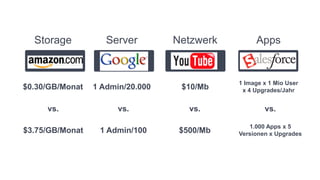
Storage           Server        Netzwerk        Apps


                                             1 Image x 1 Mio User
$0.30/GB/Monat   1 Admin/20.000    $10/Mb     x 4 Upgrades/Jahr


     vs.               vs.           vs.             vs.

                                                1.000 Apps x 5
$3.75/GB/Monat    1 Admin/100      $500/Mb   Versionen x Upgrades
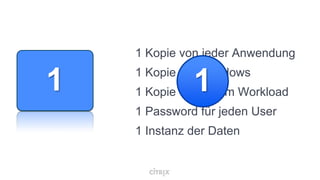
1 Kopie von jeder Anwendung

1   1 Kopie von Windows
              1
    1 Kopie von jedem Workload
    1 Password für jeden User
    1 Instanz der Daten
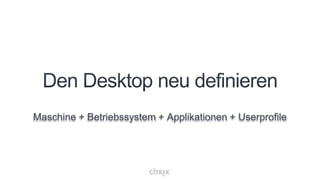
Maschine + Betriebssystem + Applikationen + Userprofile
Eng miteinander verknüpft   Traditionelle zentrales Images
                                     Ein Management Tools
    & lokal installiert               & Prozesse


                                       User
                            1. Procedure      Profile
                                                8. Retire

         Profile
                             2. Image     Apps7. Back-
          Apps                                      up

           OS               3. Secure              6.
                                           OS    Maintain
        Machine
                             4. Deploy          5. Monitor
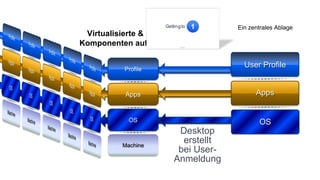
Ein zentrales Ablage
 Virtualisierte & isolierte
Komponenten auf Endgerät


           Profile
                                       User Profile


            Apps                           Apps


             OS                             OS
                         Desktop
           Machine
                          erstellt
                         bei User-
                        Anmeldung
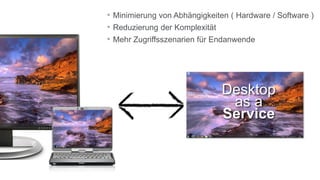
• Minimierung von Abhängigkeiten ( Hardware / Software )
• Reduzierung der Komplexität
• Mehr Zugriffsszenarien für Endanwende


                              Desktop
                              Desktop
                                as a
                                as a
                              Service
                              Device
Citrix XenDesktop 4
Die Revolution bei virtuellen Desktops ist da …
        für alle Arten von Benutzern
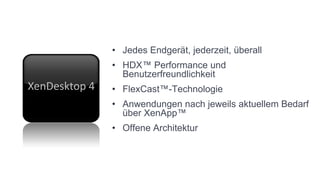
• Jedes Endgerät, jederzeit, überall
               • HDX™ Performance und
                 Benutzerfreundlichkeit
XenDesktop 4   • FlexCast™-Technologie
                                                      Apps

               • Anwendungen nach jeweils aktuellem Bedarf
                 über XenApp™
               • Offene Architektur
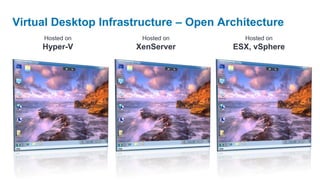
Virtual Desktop Infrastructure – Open Architecture
     Hosted on         Hosted on          Hosted on
     Hyper-V          XenServer         ESX, vSphere
Citrix XenServer Momentum
Free XenServer launch
  • 250,000+ Downloads
  • 60,000+ Aktivierungen
  • 40,000+ unterschiedliche Firmen


            “XenServer 5.5 now meets 100% of our enterprise
                             requirements”
                                                  -Burton Group, 2009


              “Citrix is a proven choice…large enterprises are
                addressed by [only] Citrix and VMware….”
                                                  -Gartner, 2009
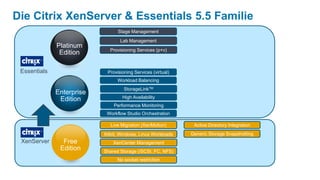
Die Citrix XenServer & Essentials 5.5 Familie
                                 Stage Management
                                  Lab Management
              Platinum
                             Provisioning Services (p+v)
               Edition

 Essentials                 Provisioning Services (virtual)
                                 Workload Balancing
                                    StorageLinkTM
              Enterprise
               Edition             High Availability
                               Performance Monitoring
                            Workflow Studio Orchestration

                             Live Migration (XenMotion)        Active Directory Integration
                           64bit, Windows, Linux Workloads    Generic Storage Snapshotting
 XenServer      Free           XenCenter Management
               Edition     Shared Storage (iSCSI, FC, NFS)
                                 No socket restriction
Project Midnight Ride
Citrix XenServer 5.6

Public Beta ist bereits gestartet…
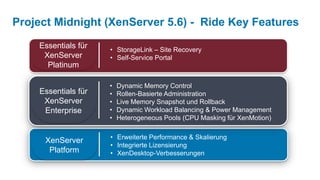
Project Midnight (XenServer 5.6) - Ride Key Features
    Essentials für   • StorageLink – Site Recovery
     XenServer       • Self-Service Portal
      Platinum

                     •   Dynamic Memory Control
    Essentials für   •   Rollen-Basierte Administration
     XenServer       •   Live Memory Snapshot und Rollback
     Enterprise      •   Dynamic Workload Balancing & Power Management
                     •   Heterogeneous Pools (CPU Masking für XenMotion)

                     • Erweiterte Performance & Skalierung
     XenServer
                     • Integrierte Lizensierung
      Platform       • XenDesktop-Verbesserungen
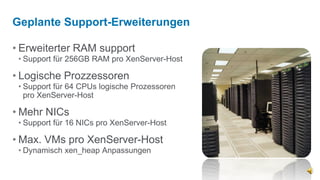
Geplante Support-Erweiterungen

• Erweiterter RAM support
 • Support für 256GB RAM pro XenServer-Host

• Logische Prozzessoren
 • Support für 64 CPUs logische Prozessoren
   pro XenServer-Host

• Mehr NICs
 • Support für 16 NICs pro XenServer-Host

• Max. VMs pro XenServer-Host
 • Dynamisch xen_heap Anpassungen
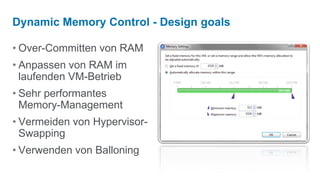
Dynamic Memory Control - Design goals

• Over-Committen von RAM
• Anpassen von RAM im
  laufenden VM-Betrieb
• Sehr performantes
  Memory-Management
• Vermeiden von Hypervisor-
  Swapping
• Verwenden von Balloning
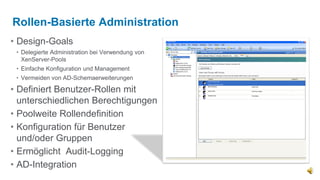
Rollenbasierte Administration
Rollen-Basierte Administration
• Design-Goals
 • Delegierte Administration bei Verwendung von
   XenServer-Pools
 • Einfache Konfiguration und Management
 • Vermeiden von AD-Schemaerweiterungen

• Definiert Benutzer-Rollen mit
  unterschiedlichen Berechtigungen
• Poolweite Rollendefinition
• Konfiguration für Benutzer
  und/oder Gruppen
• Ermöglicht Audit-Logging
• AD-Integration
• Applikations-Virtualisierung RDS-
                      gehostet, VM-gehostet & gestreamt
  XenApp            • Bewährte Skalierbarkeit auch in sehr
Anwendungen nach
                      großen Umgebungen
 aktuellem Bedarf   • Granulare Zugriffskontrolle
                    • Self-Service App Store für
                      Unternehmensanwendungen –
                      Citrix Dazzle
Citrix XenApp 6


                  • De-facto-Standard für Anwendungs-Bereitstellung
                  • Abgestimmt für Microsoft Windows Server 2008 R2:
                    verbessertes Management und Skalierbarkeit
                  • Arbeiten von jedem Ort über jedes Endgerät
                  • Benutzer-Selbstbedienung (Dazzle)
                  • HDX: optimale Nutzung von Multimedia, Sprache,
                    Video und 3D-Grafiken über jedes Netzwerk
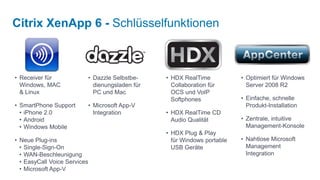
Citrix XenApp 6 - Schlüsselfunktionen


• Receiver für            • Dazzle Selbstbe-    • HDX RealTime           • Optimiert für Windows
  Windows, MAC              dienungsladen für     Collaboration für        Server 2008 R2
  & Linux                   PC und Mac            OCS und VoIP
                                                  Softphones             • Einfache, schnelle
• SmartPhone Support      • Microsoft App-V                                Produkt-Installation
  • iPhone 2.0              Integration         • HDX RealTime CD
  • Android                                       Audio Qualität         • Zentrale, intuitive
  • Windows Mobile                                                         Management-Konsole
                                                • HDX Plug & Play
• Neue Plug-ins                                   für Windows portable   • Nahtlose Microsoft
  • Single-Sign-On                                USB Geräte               Management
  • WAN-Beschleunigung                                                     Integration
  • EasyCall Voice Services
  • Microsoft App-V
High Definition eXperience


Arbeiten wie am gewohnten PC - mit noch mehr Flexibilität
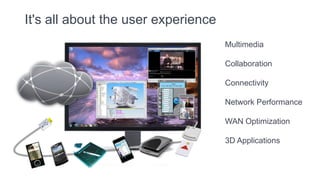
It's all about the user experience
                                     Multimedia

                                     Collaboration

                                     Connectivity

                                     Network Performance

                                     WAN Optimization

                                     3D Applications
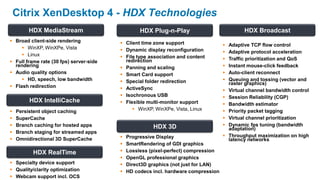
Citrix XenDesktop 4 - HDX Technologies
         HDX MediaStream                          HDX Plug-n-Play                           HDX Broadcast
 Broad client-side rendering             Client time zone support                  Adaptive TCP flow control
      WinXP, WinXPe, Vista               Dynamic display reconfiguration           Adaptive protocol acceleration
      Linux                              File type association and content         Traffic prioritization and QoS
 Full frame rate (30 fps) server-side     redirection
  rendering                               Panning and scaling                       Instant mouse-click feedback
 Audio quality options                   Smart Card support                        Auto-client reconnect
      HD, speech, low bandwidth          Special folder redirection                Queuing and tossing (vector and
                                                                                      raster graphics)
 Flash redirection                       ActiveSync                                Virtual channel bandwidth control
                                          Isochronous USB                           Session Reliability (CGP)
         HDX IntelliCache                 Flexible multi-monitor support            Bandwidth estimator
   Persistent object caching                  WinXP, WinXPe, Vista, Linux          Priority packet tagging
   SuperCache                                                                       Virtual channel prioritization
   Branch caching for hosted apps                     HDX 3D                        Dynamic fps tuning (bandwidth
                                                                                      adaptation)
   Branch staging for streamed apps
                                            Progressive Display                     Throughput maximization on high
   Omnidirectional 3D SuperCache                                                     latency networks
                                            SmartRendering of GDI graphics
          HDX RealTime                      Lossless (pixel-perfect) compression
                                            OpenGL professional graphics
 Specialty device support                  Direct3D graphics (not just for LAN)
 Quality/clarity optimization              HD codecs incl. hardware compression
 Webcam support incl. OCS
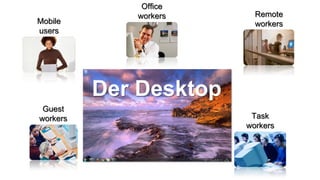
Office
             workers      Remote
Mobile                    workers
users


          Der Desktop
 Guest
workers                  Task
                        workers
Any user                                       Any type of
any device                                    virtual desktop


             One centrally managed solution
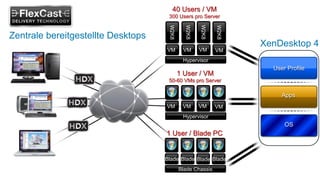
40 Users / VM
                                     300 Users pro Server


                                                     W2K8
                                              W2K8
                                     W2K8


                                                            W2K8
Zentrale bereitgestellte Desktops
                                                                   XenDesktop 4
                                    VM       VM      VM     VM
                                             Hypervisor
                                                                     User Profile
                                            1 User / VM
                                     50-60 VMs pro Server

                                                                        Apps
                                    VM       VM      VM     VM
                                             Hypervisor
                                                                         OS
                                    1 User / Blade PC


                                    Blade Blade Blade Blade
                                            Blade Chassis
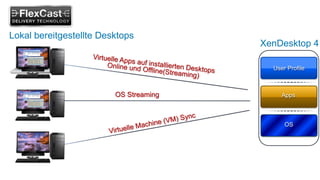
Lokal bereitgestellte Desktops
                                        XenDesktop 4

                                          User Profile


                         OS Streaming        Apps


                                              OS
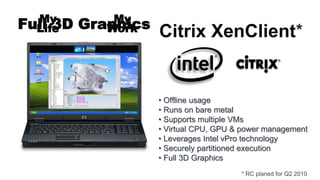
My          My
Full 3D
  Life    Graphics
             Work    Citrix XenClient*


                     • Offline usage
                     • Runs on bare metal
                     • Supports multiple VMs
                     • Virtual CPU, GPU & power management
                     • Leverages Intel vPro technology
                     • Securely partitioned execution
                     • Full 3D Graphics
                                         * RC planed for Q2 2010
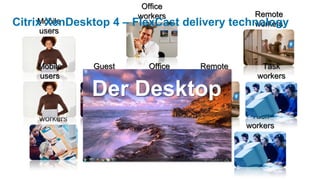
Office
                        workers                  Remote
Citrix XenDesktop 4 – FlexCast delivery
     Mobile                                  technology
                                                 workers
    users


    Mobile     Guest      Office   Remote          Task
    users     workers    workers   workers        workers

              Der Desktop
     Guest
    workers                                      Task
                                                workers
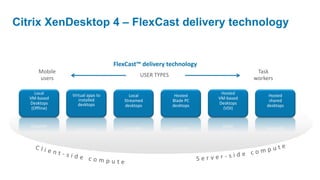
Citrix XenDesktop 4 – FlexCast delivery technology
Virtual desktops…for every user


                                   FlexCast™ delivery technology
        Mobile                                                                  Task
                                            USER TYPES
        users                                                                  workers

       Local     Virtual apps to                                     Hosted
                                        Local             Hosted                    Hosted
    VM-based        installed                                       VM-based
                                      Streamed           Blade PC                   shared
    Desktops        desktops                                        Desktops
                                      desktops           desktops                  desktops
     (Offline)                                                        (VDI)
Citrix XenDesktop 4

Citrix XenDesktop 4

  • 1.
    Citrix XenDesktop 4 unddie Microsoft Virtual Desktop Infrastructure Hans.Schermer @ citrix.com Senior Systems Engineer, Citrix Systems
  • 2.
  • 3.
    Typischer Desktop Life-Cycle Traditionelle Management Tools & Traditioneller Desktop Prozesse Profile Installiert auf dem PC 1. Procure 8. Retire Apps Installiert auf dem PC 2. Image 7. Back-up OS Installiert auf dem PC Machine PC als Endgerät 3. Secure 6. Maintain “Hard-coded” 4. Deploy 5. Monitor
  • 4.
    gehostete virtuelle Desktops einSchritt in die richtige Richtung… Rechenzentrum “Hard-coded” Profile Virtual Delivery Protocol Apps VM1 VM2 Endgerät OS VM3 VM4 Machine Herausforderungen • Schlechtes Benutzerempfinden Virtual Machine Infrastruktur • Hohe Storagekosten • Komplexes lifecycle-management
  • 5.
  • 6.
    Storage Server Netzwerk Apps 1 Image x 1 Mio User $0.30/GB/Monat 1 Admin/20.000 $10/Mb x 4 Upgrades/Jahr vs. vs. vs. vs. 1.000 Apps x 5 $3.75/GB/Monat 1 Admin/100 $500/Mb Versionen x Upgrades
  • 7.
    1 Kopie vonjeder Anwendung 1 1 Kopie von Windows 1 1 Kopie von jedem Workload 1 Password für jeden User 1 Instanz der Daten
  • 8.
    Maschine + Betriebssystem+ Applikationen + Userprofile
  • 9.
    Eng miteinander verknüpft Traditionelle zentrales Images Ein Management Tools & lokal installiert & Prozesse User 1. Procedure Profile 8. Retire Profile 2. Image Apps7. Back- Apps up OS 3. Secure 6. OS Maintain Machine 4. Deploy 5. Monitor
  • 10.
    Ein zentrales Ablage Virtualisierte & isolierte Komponenten auf Endgerät Profile User Profile Apps Apps OS OS Desktop Machine erstellt bei User- Anmeldung
  • 11.
    • Minimierung vonAbhängigkeiten ( Hardware / Software ) • Reduzierung der Komplexität • Mehr Zugriffsszenarien für Endanwende Desktop Desktop as a as a Service Device
  • 13.
    Citrix XenDesktop 4 DieRevolution bei virtuellen Desktops ist da … für alle Arten von Benutzern
  • 14.
    • Jedes Endgerät,jederzeit, überall • HDX™ Performance und Benutzerfreundlichkeit XenDesktop 4 • FlexCast™-Technologie Apps • Anwendungen nach jeweils aktuellem Bedarf über XenApp™ • Offene Architektur
  • 15.
    Virtual Desktop Infrastructure– Open Architecture Hosted on Hosted on Hosted on Hyper-V XenServer ESX, vSphere
  • 16.
    Citrix XenServer Momentum FreeXenServer launch • 250,000+ Downloads • 60,000+ Aktivierungen • 40,000+ unterschiedliche Firmen “XenServer 5.5 now meets 100% of our enterprise requirements” -Burton Group, 2009 “Citrix is a proven choice…large enterprises are addressed by [only] Citrix and VMware….” -Gartner, 2009
  • 17.
    Die Citrix XenServer& Essentials 5.5 Familie Stage Management Lab Management Platinum Provisioning Services (p+v) Edition Essentials Provisioning Services (virtual) Workload Balancing StorageLinkTM Enterprise Edition High Availability Performance Monitoring Workflow Studio Orchestration Live Migration (XenMotion) Active Directory Integration 64bit, Windows, Linux Workloads Generic Storage Snapshotting XenServer Free XenCenter Management Edition Shared Storage (iSCSI, FC, NFS) No socket restriction
  • 18.
    Project Midnight Ride CitrixXenServer 5.6 Public Beta ist bereits gestartet…
  • 19.
    Project Midnight (XenServer5.6) - Ride Key Features Essentials für • StorageLink – Site Recovery XenServer • Self-Service Portal Platinum • Dynamic Memory Control Essentials für • Rollen-Basierte Administration XenServer • Live Memory Snapshot und Rollback Enterprise • Dynamic Workload Balancing & Power Management • Heterogeneous Pools (CPU Masking für XenMotion) • Erweiterte Performance & Skalierung XenServer • Integrierte Lizensierung Platform • XenDesktop-Verbesserungen
  • 20.
    Geplante Support-Erweiterungen • ErweiterterRAM support • Support für 256GB RAM pro XenServer-Host • Logische Prozzessoren • Support für 64 CPUs logische Prozessoren pro XenServer-Host • Mehr NICs • Support für 16 NICs pro XenServer-Host • Max. VMs pro XenServer-Host • Dynamisch xen_heap Anpassungen
  • 21.
    Dynamic Memory Control- Design goals • Over-Committen von RAM • Anpassen von RAM im laufenden VM-Betrieb • Sehr performantes Memory-Management • Vermeiden von Hypervisor- Swapping • Verwenden von Balloning
  • 22.
  • 23.
    Rollen-Basierte Administration • Design-Goals • Delegierte Administration bei Verwendung von XenServer-Pools • Einfache Konfiguration und Management • Vermeiden von AD-Schemaerweiterungen • Definiert Benutzer-Rollen mit unterschiedlichen Berechtigungen • Poolweite Rollendefinition • Konfiguration für Benutzer und/oder Gruppen • Ermöglicht Audit-Logging • AD-Integration
  • 24.
    • Applikations-Virtualisierung RDS- gehostet, VM-gehostet & gestreamt XenApp • Bewährte Skalierbarkeit auch in sehr Anwendungen nach großen Umgebungen aktuellem Bedarf • Granulare Zugriffskontrolle • Self-Service App Store für Unternehmensanwendungen – Citrix Dazzle
  • 25.
    Citrix XenApp 6 • De-facto-Standard für Anwendungs-Bereitstellung • Abgestimmt für Microsoft Windows Server 2008 R2: verbessertes Management und Skalierbarkeit • Arbeiten von jedem Ort über jedes Endgerät • Benutzer-Selbstbedienung (Dazzle) • HDX: optimale Nutzung von Multimedia, Sprache, Video und 3D-Grafiken über jedes Netzwerk
  • 26.
    Citrix XenApp 6- Schlüsselfunktionen • Receiver für • Dazzle Selbstbe- • HDX RealTime • Optimiert für Windows Windows, MAC dienungsladen für Collaboration für Server 2008 R2 & Linux PC und Mac OCS und VoIP Softphones • Einfache, schnelle • SmartPhone Support • Microsoft App-V Produkt-Installation • iPhone 2.0 Integration • HDX RealTime CD • Android Audio Qualität • Zentrale, intuitive • Windows Mobile Management-Konsole • HDX Plug & Play • Neue Plug-ins für Windows portable • Nahtlose Microsoft • Single-Sign-On USB Geräte Management • WAN-Beschleunigung Integration • EasyCall Voice Services • Microsoft App-V
  • 27.
    High Definition eXperience Arbeitenwie am gewohnten PC - mit noch mehr Flexibilität
  • 28.
    It's all aboutthe user experience Multimedia Collaboration Connectivity Network Performance WAN Optimization 3D Applications
  • 29.
    Citrix XenDesktop 4- HDX Technologies HDX MediaStream HDX Plug-n-Play HDX Broadcast  Broad client-side rendering  Client time zone support  Adaptive TCP flow control  WinXP, WinXPe, Vista  Dynamic display reconfiguration  Adaptive protocol acceleration  Linux  File type association and content  Traffic prioritization and QoS  Full frame rate (30 fps) server-side redirection rendering  Panning and scaling  Instant mouse-click feedback  Audio quality options  Smart Card support  Auto-client reconnect  HD, speech, low bandwidth  Special folder redirection  Queuing and tossing (vector and raster graphics)  Flash redirection  ActiveSync  Virtual channel bandwidth control  Isochronous USB  Session Reliability (CGP) HDX IntelliCache  Flexible multi-monitor support  Bandwidth estimator  Persistent object caching  WinXP, WinXPe, Vista, Linux  Priority packet tagging  SuperCache  Virtual channel prioritization  Branch caching for hosted apps HDX 3D  Dynamic fps tuning (bandwidth adaptation)  Branch staging for streamed apps  Progressive Display  Throughput maximization on high  Omnidirectional 3D SuperCache latency networks  SmartRendering of GDI graphics HDX RealTime  Lossless (pixel-perfect) compression  OpenGL professional graphics  Specialty device support  Direct3D graphics (not just for LAN)  Quality/clarity optimization  HD codecs incl. hardware compression  Webcam support incl. OCS
  • 30.
    Office workers Remote Mobile workers users Der Desktop Guest workers Task workers
  • 31.
    Any user Any type of any device virtual desktop One centrally managed solution
  • 32.
    40 Users /VM 300 Users pro Server W2K8 W2K8 W2K8 W2K8 Zentrale bereitgestellte Desktops XenDesktop 4 VM VM VM VM Hypervisor User Profile 1 User / VM 50-60 VMs pro Server Apps VM VM VM VM Hypervisor OS 1 User / Blade PC Blade Blade Blade Blade Blade Chassis
  • 33.
    Lokal bereitgestellte Desktops XenDesktop 4 User Profile OS Streaming Apps OS
  • 34.
    My My Full 3D Life Graphics Work Citrix XenClient* • Offline usage • Runs on bare metal • Supports multiple VMs • Virtual CPU, GPU & power management • Leverages Intel vPro technology • Securely partitioned execution • Full 3D Graphics * RC planed for Q2 2010
  • 35.
    Office workers Remote Citrix XenDesktop 4 – FlexCast delivery Mobile technology workers users Mobile Guest Office Remote Task users workers workers workers workers Der Desktop Guest workers Task workers
  • 36.
    Citrix XenDesktop 4– FlexCast delivery technology Virtual desktops…for every user FlexCast™ delivery technology Mobile Task USER TYPES users workers Local Virtual apps to Hosted Local Hosted Hosted VM-based installed VM-based Streamed Blade PC shared Desktops desktops Desktops desktops desktops desktops (Offline) (VDI)