Fit4CloudCitrix OpenCloudStephan PfisterCitrix Certified Instructor Conapro GmbH , Zug
XenServer in der CloudDer beste Hypervisor für Desktop VirtualisierungWeb-basierter Zugriff auf VMs in der CloudPlattformfürvirtuelle Networking Appliances (VPX)Live Demo IDesktop-Optimierungen in Citrix XenServerZugriff über Web Self-ServicePowering VPXAgenda Teil 1
Networking für die CloudEinbindung von SaaS Anwendungen in bestehende Umgebungen und Auslagern von Diensten mittels OpenCloudAccess / OpenCloudBridgeSicherheit und Hochverfügbarkeit mit Citrix NetScalerSicherer Zugriff, Hochverfügbarkeit aller Komponenten und Bereitstellung von Web AnwendungenCitrix Receiver für jedes Endgerät - Zugriff auf virtuelle Desktops & Apps mit iPad, Blackberry, Android & Co.HDX Technologien: WAN-Optimierung mit Branch Repeater - Integration in bestehende Citrix UmgebungenLive Demo IIWAN-OptimierungZugriff mit Citrix ReceiverProduktvorstellung: OpenCloud Access / OpenCloud BridgeAgenda Teil 2
Hybrid CloudHybrid CloudPublicCloudPublicCloudHerkömmlichesRechenzentrumHerkömmlichesRechenzentrum Fremdes RZ (Off Premise)
 günstigste Kosten
 Self-service
 Erweiterbarkeit
Eigenes RZ (On Premise)
Hohe Fixkosten
Volle Kontrolle
Bekannte Sicher-heitskonzepte On/off premise
 geringe Kosten
 Self-service
Erweiterbarkeit
 Vertraute Sicherheitskonzepte
 Eigene KontrollmechanismenOpen CloudClouds sollten offen seinEnterprise Kunden:“Lasst mich einfach wechseln”Cloud Providers:“Auszeichnen durch eigene IP”Für Alle:“keine Bindung an einen Hypervisor”“Freiheit die beste Technik auszuwählen ermöglicht Cloud Wirtschaftlichkeit”
Citrix OpenCloudTMDISASTERRECOVERYON-DEMANDAPPSON-DEMANDDEMOSON-DEMANDDESKTOPSDEV AND TESTONBOARDINGCITRIX OPENCLOUD™COMPLIANCELIFECYCLE MANAGEMENTSELF SERVICEOPEN ORCHESTRATIONOPEN APIFokus imFit4CloudWorkshopBRIDGEACCESSAPPLICATION AND DESKTOP DELIVERY SERVICESEDGE NETWORKING SERVICESPLATFORM VIRTUALIZATION SERVICES
Fit4CloudServer VirtualisierungmitXenServer
   BILLING       SERVICE CATALOGS       ENTERPRISE MGMTDISASTERRECOVERYON-DEMANDDEMOSON-DEMANDAPPSDEVELOPANDTESTON-DEMANDDESKTOPSCITRIX OPENCLOUD™COMPLIANCEONBOARDINGPLATFORM VIRTUALIZATIONSERVICESLIFECYCLE MANAGEMENTSELF SERVICEOPEN ORCHESTRATIONOPEN APIBRIDGEACCESSAPPLICATION AND DESKTOP DELIVERY SERVICESEDGE NETWORKING SERVICESPLATFORM VIRTUALIZATION SERVICESPLATFORM VIRTUALIZATION SERVICES
13%11%3%200920102008
Market Share Trend (estimated)
XenServer Facts XenServeristeiner von zwei "Enterprise Production Ready" Hypervisoren#2 Cloud weltweit (Rackspace) wird von XenServerbetriebenDie meistenXenDesktop-KundennutzenXenServer"AllenotwendigenFunktionenzueinemBruchteil der Kosten"
XenServer – Zukunftsorientierte Architektur
XenServer ArchitekturBare Metal Hypervisor mitParavirtualisierung
Management-ArchitekturAndereLösungenCitrix XenServerTraditional ManagementArchitectureSingle backend management serverNext Generation Management ArchitectureClustered management layer
Windows 7 SP1, Windows Server 2008 R2 SP1RHEL 6.0 (incl. CentOSund OEL 6.0)SLES 11 SP1Debian Squeeze (32 und 64-bit)Updates Gastsysteme
512 GB RAM supportMulti-CPU Dom0 erhöhtSkalierbarkeit16 vCPUs, 64GB RAM (pro VM)(Technical Preview)Brocade HBAsTreiberfür Brocade HBAsBrocade Command Line Utility in Dom0 (bcu)Platform Skalierbarkeit
XenServerErweiterte Funktionen
Heterogene Pools (CPU Masking)Gleichzeitige Nutzung unterschiedlicher Prozessorgenerationen innerhalb eines Pools
Basierend auf Intel Flex Migration / AMD Extended Migration
Ideal für nachträgliche Pool-Erweiterung
CPU Kombinationensind in HCLhinterlegtPoolIntelX55xxIntelX55xxIntelX56xxBeispiel:
StorageLink Basis-ArchitekturXenServer(s)Management-KommunikationManagement-KommunikationFast cloningSnapshotsDeduplicationRecovery...Daten-Kommunikation...
XenCenterStorageLink Integration
Distributed Virtual SwitchDVS Controller ist als Appliance verfügbarKann mehrere Switches steuernHypervisorHypervisorHypervisorHypervisorVMVMVMVMVMVMVMVMVMVMVMDistributed Virtual Switch
Sicherung und Archivierung von VMs überRichtlinienSnapshot und Archivierungmitseparaten Scheduling-MöglichkeitenPolicy-Konfiguration per AssistentMehrere VMs nutzen 1 PolicySuchfilter1 VM kannnurzu 1 Policy gehörenXenCenteroder CLIVM Protection & Recovery
Die optimale Plattform virtuelle Desktops aus der Cloud
Wie werden die gepoolten Desktops ausgerollt?Provisioning ServicesXenDesktop 4Hoch skalierbareBewährte TechnologieErfordert umfassendes DesignAnforderungen an NetzwerkFür VDI und andere Workloads wie z.B. XenAppLeicht zu implementierenNeue TechnologieUnabhängig vom LANBenötigt Storage-KapazitätenVDI onlyLANNetworkXenDesktop 5Machine Creation ServicesXenDesktop 5StorageNetwork
XenDesktop 5 MCSVM1Shared storageVM2WriteCacheLocal storageWriteCacheMasterHypervisor
XenDesktop 5 MCS + IntelliCacheTMVM1Shared storageVM2local storageWriteCacheWriteCacheMastercacheMasterXenServer IntelliCacheTM
Lokales Caching von XenDesktop ImagesWeniger Storage-KostenWeniger IOPS auf shared storage Weniger(teurer) shared storage Platzbenötigtdurch offload der WriteCaches auf lokale(preisgünstige) ServerfestplattenXenDesktopOptimierungen–IntelliCacheTMTechnology Preview in XD 5, full support early Q2/2011
IntelliCacheTM – KonzeptXenDesktopBase Image – erstelltaus Master Template mitXenDesktop MCSVM wirdfür Base Image konfiguriertVM mit Base Image wirdgestartetXenServererstellt Lese-Cache auf lokalem StorageLesezugriffe von lokalem StorageZustätzlicheLesezugriffe auf shared storage wennerforderlichSchreibzugriffewerden in weitere VHD disk lokalvorgenommen (pro VM)Lokaler write cache wirdbei VM shutdown gelöschtWeitere VMs nutzen den gleichenLesecacheVMVM0110010011010100110101VMXenServerBase ImageCache00110101NFS Based Storage
NächsterSchrittfür HDX 3DExperimental: GPU PassthroughPower-User VMs kann 1:1 eineGrafikkartezugewiesenwerdenFunktioniertmitnVIDIA FX3800, 4800, 5800 GPUsXenDesktopOptimierungen–Graphik-Erweiterungen
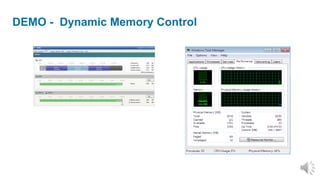
Best practice für Desktop-VirtualisierungVermeidung von Hypervisor SwappingVermeidung von Speicher OvercommitmentWie viel RAM benötigt ein Windows 7 Benutzer?Vorhersage kaum möglichabhängig von der eigentlichen BenutzungWindows RAM muss vor Boot konfiguriert werdenOptimale Konfiguration nicht möglichKeine Veränderung unter Windows während des Betriebes möglichResultat: mangelhafte User-Experience oder Verschwendung von RessourcenVirtuelle Desktops: RAM-ZuweisungWin71 GBWin71,5 GBWin72 GB
Anpassung von Dynamic Memory während des BetriebesReduzierung der DowntimeReduzierung von Pilotierungs- und TestaufwändenBallooning-TechnologieAutomatisierte RAM Anpassung durch HypervisorManuell Anpassung der Minimum-Werte während des BetriebesXenServer unterstützt Dynamic Memory Control
DEMO -  Dynamic Memory Control

Citrix Fit4Cloud Reihe: Citrix XenServer in der Cloud

Hinweis der Redaktion

  • #14 This is a slide that shows a blowup of the Xen virtualization engine and the virtualization stack “Domain 0” with a Windows and Linux virtual machine. The green arrows show memory and CPU access which goes through the Xen engine down to the hardware. In many cases Xen will get out of the way of the virtual machine and allow it to go right to the hardware.Xen is a thin layer of software that runs right on top of the hardware, Xen is only around 50,000 lines of code. The lines show the path of I/O traffic on the server. The storage and network I/O connect through a high performance memory bus in Xen to the Domain 0 environment. In the domain 0 these requests are sent through standard Linux device drivers to the hardware below.
  • #19 The inability to combine disparate host hardware into a resource pool makes it difficult for customers to expand their deployments over time. Anything that requires creation of an additional pool creates increased management costs for pool-based configuration settings, SRs, and templates, and limits migration agility.XenServer 5.5 requires host CPU models within a pool to be identical in order to ensure successful live migrations. However, major system vendors, HP, Dell, and IBM included, add and discontinue CPU offerings within the lifecycle of a server model, making it difficult to purchase truly identical servers over time.Both Intel (FlexMigration) and AMD (Extended Migration) offer technologies in their recent CPUs that provide CPU "masking" or "leveling". These features allow a CPU to be configured to appear as providing a different make, model, or functionality than it actually does, enabling pools of hosts with disparate CPUs to safely support live migrations.HCL will be extended to include CPU combinations that have been certified by partners or customers via the kits CPUs on the hosts to be masked have FlexMigration/Enhanced Migration capabilities CPUs of all hosts in the pool are from the same vendor (Intel or AMD, not mixed) The get and set functions are used correctly The host has been rebooted after setting the CPU configuration No other blocking aspects of host heterogeneity exist