© 2010 IBM Corporation
Social Media Praxisworkshop
Lars Basche (Text100) & Stefan Pfeiffer (IBM Deutschland)
DNUG Herbstkonferenz | 15. November 2010 | Frankfurt
© 2010 IBM Corporation2
Ziel des Workshops
● Spaß an Social Media vermitteln
● Unsicherheit nehmen und über Social Media Guidelines aufklären
● Fragen beantworten
● Aus der Praxis Tipps geben, wie man sich informiert, Themen
findet, wie man antwortet, schreibt, sich bewegt, welche Tools es
gibt
● Lars & Stefan informieren & bewegen sich ähnlich, aber informieren
sich auch unterschiedlich
● Lars eher Twitter-orientiert
● Stefan eher RSS Feed-orientiert
● Die Tipps sind deshalb auch mit Avataren versehen
● Motivieren, dass Ihr Euch beteiligt, zwitschert, bloggt und diskutiert
© 2010 IBM Corporation3
Agenda
● Ziele
● Vorstellungsrunde / Soziale Identität
● Social Media Guidelines – Sinn & Zweck und Beispiel IBM
● Tipps & Tricks
● Was kann ich tun?
● Monitoring – Immer horsche, immer gucke
● Tools
● Beispiele
© 2010 IBM Corporation4
Vorstellungsrunde
© 2010 IBM Corporation5
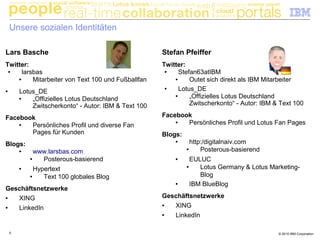
Unsere sozialen Identitäten
Stefan Pfeiffer
Twitter:
● Stefan63atIBM
● Outet sich direkt als IBM Mitarbeiter
● Lotus_DE
● „Offizielles Lotus Deutschland
Zwitscherkonto“ - Autor: IBM & Text 100
Facebook
● Persönliches Profil und Lotus Fan Pages
Blogs:
● http:/digitalnaiv.com
● Posterous-basierend
● EULUC
● Lotus Germany & Lotus Marketing-
Blog
● IBM BlueBlog
Geschäftsnetzwerke
● XING
● LinkedIn
Lars Basche
Twitter:
● larsbas
● Mitarbeiter von Text 100 und Fußballfan
● Lotus_DE
● „Offizielles Lotus Deutschland
Zwitscherkonto“ - Autor: IBM & Text 100
Facebook
● Persönliches Profil und diverse Fan
Pages für Kunden
Blogs:
● www.larsbas.com
● Posterous-basierend
● Hypertext
● Text 100 globales Blog
Geschäftsnetzwerke
● XING
● LinkedIn
© 2010 IBM Corporation6
Vorstellungsrunde
Fragen zu Social Media:
● Wieso werden Videos anders gehandhabt als Blog Einträge etc.?
● Wieso braucht man überhaupt Social Media Guidelines?
● Welche Ängste schwimmen da mit?
● Untegraben Guidelines nicht das gesamte Konzept von Web 2.0?
© 2010 IBM Corporation7
Social Media Guidelines
© 2010 IBM Corporation8
Social Media Guidelines – Tipps des Bitkom
1) Abgrenzung zwischen beruflicher und privater Nutzung
2) Eigenverantwortung
3) Transparenz
4) Kenntlichmachung einer privaten Meinung
5) Einhaltung gesetzlicher Vorgaben
6) Betriebsrat
7) Verbreitung unternehmensschädlicher Äußerungen
8) Respekt
9) Kontinuität & Kapazität
10)Monitoring & Expertise
© 2010 IBM Corporation9
Guidelines
© 2010 IBM Corporation10
IBM Social Media Guidelines
Online collaboration platforms are
fundamentally changing the way
IBMers work and engage with
each other, clients and partners.
© 2010 IBM Corporation11
IBM Social Media Guidelines
Therefore, it is very much in IBM's interest –
and, we believe, in each IBMer's own – to
be aware of and participate in this sphere of
information, interaction and idea exchange
© 2010 IBM Corporation12
IBM Social Media Guidelines
As an innovation-based company, we believe
in the importance of open exchange –
between IBM and its clients, and among the
many constituents of the emerging business
and societal ecosystem – for learning. Social
computing is an important arena for
organizational and individual development.
© 2010 IBM Corporation13
IBM Social Media Guidelines
Know and follow IBM's Business
Conduct Guidelines.
© 2010 IBM Corporation14
IBM Social Media Guidelines
IBMers are personally responsible
for the content they publish on-line.
© 2010 IBM Corporation15
IBM Social Media Guidelines
Identify yourself – name and, when
relevant, role at IBM – when you discuss
IBM or IBM-related matters, such as IBM
products or services. You must make it
clear that you are speaking for yourself
and not on behalf of IBM.
© 2010 IBM Corporation16
IBM Social Media Guidelines
If you publish content online relevant to IBM
in your personal capacity use a disclaimer
such as this: "The postings on this site are
my own and don't necessarily represent
IBM's positions, strategies or opinions."
© 2010 IBM Corporation17
IBM Social Media Guidelines
Respect copyright, fair use and financial
disclosure laws.
© 2010 IBM Corporation18
IBM Social Media Guidelines
Don't provide IBM's or another's
confidential or other proprietary
information and never discuss IBM
business performance or other
sensitive matters publicly.
© 2010 IBM Corporation19
IBM Social Media Guidelines
Don't cite or reference clients, partners or
suppliers without their approval. When
you do make a reference, link back to the
source. Don't publish anything that might
allow inferences to be drawn which could
embarrass or damage a client.
© 2010 IBM Corporation20
IBM Social Media Guidelines
Respect your audience. Don't use ethnic
slurs, personal insults, obscenity, or engage
in any conduct that would not be acceptable
in IBM's workplace. You should also show
proper consideration for others' privacy and
for topics that may be considered
objectionable or inflammatory – such as
politics and religion.
© 2010 IBM Corporation21
IBM Social Media Guidelines
Be aware of your association with IBM in
online social networks. If you identify
yourself as an IBMer, ensure your profile
and related content is consistent with how
you wish to present yourself with
colleagues and clients.
© 2010 IBM Corporation22
IBM Social Media Guidelines
Don't pick fights, be the first to correct
your own mistakes.
© 2010 IBM Corporation23
IBM Social Media Guidelines
Try to add value. Provide worthwhile
information and perspective. IBM's brand
is best represented by its people and what
you publish may reflect on IBM's brand.
© 2010 IBM Corporation24
IBM Social Media Guidelines
Don't use use IBM logos or trademarks
unless approved to do so.
© 2010 IBM Corporation25
IBM Social Media Guidelines
Don't forget your day job.
© 2010 IBM Corporation26
Tipps und Tricks
© 2010 IBM Corporation27
Was kann ich tun?
● Mich auf Twitter vernetzen und zwitschern
● Marketing: Veranstaltungshinweise,
Pressemitteilungen, Produktneuheiten
● Tipps & Tricks
● Tweets kommentieren und beantworten
● ReTweeten – meiner Ansicht nach wichtige
Tweets verbreiten
● Bloggen
● Einen eigenen Blog schreiben
● Mich am Firmenblog beteiligen (z.B. IBM Blue
Blog)
● In der Kunden Community bloggen (z.B.
EULUC)
© 2010 IBM Corporation28
Was kann ich tun?
● Mich in Communities engagieren
● XING Communities verfolgen und dort
kommentieren
● Facebook Fan Pages
● Eigene Beiträge in Communities verfassen
● Geschäftschancen identifizieren
●
● Netzwerken
● Mich vernetzen mit
● Gleichgesinnten
● (potientiellen) Kunden
● Medien & Journalisten
● Interessenten & Geschäftspartnern
© 2010 IBM Corporation29
„Immer horsche, immer gucke“
… dann klappt es auch mit den Inhalten
● Relevante Quellen identifizieren & folgen
● Sich informieren
● Ideen gewinnen für
● (Re)Tweets
● Blog-Beiträge
● Infoquellen:
● Google Alerts
● RSS Reader
● Relevants
● Twitter-Listen
● Twitter Alerts
● Kostenpflichtige Tools
© 2010 IBM Corporation30
„Immer horsche, immer gucke“
… Social Media Monitoring
● Relevante Beiträge & Tweets identifizieren & reagieren
●
●
© 2010 IBM Corporation31
Google Alerts
● Frei definierbare
Stichwortsuche
● Ergebnis als
E-Mail oder
Feed
© 2010 IBM Corporation32
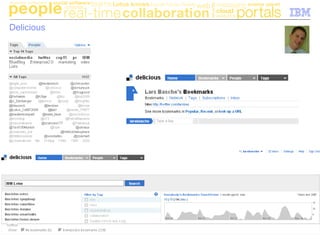
Delicious
© 2010 IBM Corporation33
SocialMention
… gerade im Test
© 2010 IBM Corporation34
relevANTS
Newsservice von IDC
●
●
●
●
●
●
●
●
●
●
● Lernt aus Interesse (Klicks) des Abonnenten
● Je mehr trainiert, desto bessere Ergebnisse
● Ergebnisse als E-Mail Newsletter oder RSS
Feed
© 2010 IBM Corporation35
Kostenpflichtiges Monitoring: Radian 6
© 2010 IBM Corporation36
Google Reader / RSS Reader
● Google Reader
als RSS Reader
● Sharing /
Empfehlen von
Beiträgen
● Clients für
Mobiles, Mac
etc. verfügbar
© 2010 IBM Corporation37
RSS Reader – Beispiel: Lotus-relevante Kanäle zum
ReTweeten oder Posten
● Lotus-relevante Blogs und Communities identifiziert & im RSS Reader zwecks einfacheren Zugriffs
gruppiert
© 2010 IBM Corporation38
Twitter-Listen
● Eigene Listen erstellen von Zwitscherern zu einem bestimmten
Thema
● um Ideen zu gewinnen
● um zu retweeten
● um zuzuhören
● um eine Twitter-Daily zu generieren
● Fremden Listen folgen (mit den gleichen Motiven)
© 2010 IBM Corporation39
Social Media Clients
Fortschrittliche Funktionen:
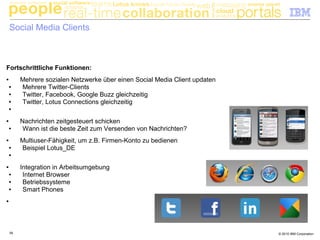
● Mehrere sozialen Netzwerke über einen Social Media Client updaten
● Mehrere Twitter-Clients
● Twitter, Facebook, Google Buzz gleichzeitig
● Twitter, Lotus Connections gleichzeitig
●
● Nachrichten zeitgesteuert schicken
● Wann ist die beste Zeit zum Versenden von Nachrichten?
● Multiuser-Fähigkeit, um z.B. Firmen-Konto zu bedienen
● Beispiel Lotus_DE
●
● Integration in Arbeitsumgebung
● Internet Browser
● Betriebssysteme
● Smart Phones
●
© 2010 IBM Corporation40
Beispiel: Hootsuite
● Mehrere Netze gezielt ansteuern
● Nachricht auf Termin
© 2010 IBM Corporation41
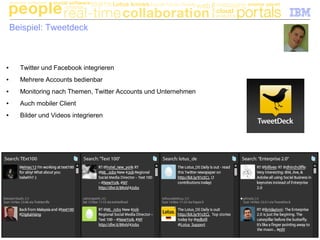
Beispiel: Tweetdeck
● Twitter und Facebook integrieren
● Mehrere Accounts bedienbar
● Monitoring nach Themen, Twitter Accounts und Unternehmen
● Auch mobiler Client
● Bilder und Videos integrieren
© 2010 IBM Corporation42
Beispiel: Cotweet
● Mehrere Accounts bedienbar
● Mehrere Autoren pro Account
● Einzelne Tweets bestimmten Autoren zuordnen
● Signaturen hinzufügen
© 2010 IBM Corporation43
Social Media Clients im Vergleich
Client
Soziale Netzwerke Lotus-Tools Mobiler Support Sonstige Funktionen
Twitter
MehrereTwitter-Konten
Facebook
GoogleBuzz
LinkedIn
Xing
LotusConnections
LotusSametime
Android
Iphone
Ipad
SendenaufTermin
Multi-Userfähig
BrowserPlugIn
Tweetdeck X X X X X X X X X X
Sessmic Desktop X X X X X X X X X X
Hootsuite X X X X X X X X X X
CoTweet Standard X X X X X
Integriert in Lotus Notes
X X X
Wildfire X X X X
Connections Glue X X
AnpassbareSpalten
(Suchen,Listen)
SocialMediaMessung
(z.B.Reichweite)
Status Updates (Open NTF
Version)
integriert mit Lotus
Connections
© 2010 IBM Corporation44
Filtern & Twitter-Suche
<< Filtern
nach
KloutScore
Alle Tweets
mit #E20 >>
© 2010 IBM Corporation45
Twitter-Listen & terminierte Tweets
<< Listen
anzeigen
Tweets
auf Termin >>
© 2010 IBM Corporation46
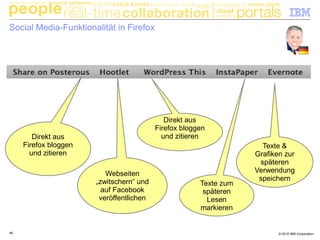
Social Media-Funktionalität in Firefox
Direkt aus
Firefox bloggen
und zitieren
Direkt aus
Firefox bloggen
und zitieren
Webseiten
„zwitschern“ und
auf Facebook
veröffentlichen
Texte &
Grafiken zur
späteren
Verwendung
speichern
Texte zum
späteren
Lesen
markieren
© 2010 IBM Corporation47
Social Media-Funktionalität in Firefox: Zwitschern und „facebooken“
●
●
●
●
●
●
● Interessante Webseiten gezielt auf
Twitter, Facebokk, Facebook Fan
Pages, LinkedIn und Foursquare
publizieren
● Nachrichten „auf Termin“ publizieren
© 2010 IBM Corporation48
Posterous: Blogbeiträge direkt aus dem Browser heraus
© 2010 IBM Corporation49
Beispiele
© 2010 IBM Corporation50
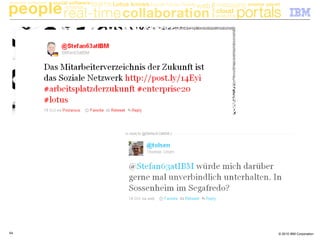
© 2010 IBM Corporation51
© 2010 IBM Corporation52
© 2010 IBM Corporation53
© 2010 IBM Corporation54

Social Media Praxisworkshop

  • 1.
    © 2010 IBMCorporation Social Media Praxisworkshop Lars Basche (Text100) & Stefan Pfeiffer (IBM Deutschland) DNUG Herbstkonferenz | 15. November 2010 | Frankfurt
  • 2.
    © 2010 IBMCorporation2 Ziel des Workshops ● Spaß an Social Media vermitteln ● Unsicherheit nehmen und über Social Media Guidelines aufklären ● Fragen beantworten ● Aus der Praxis Tipps geben, wie man sich informiert, Themen findet, wie man antwortet, schreibt, sich bewegt, welche Tools es gibt ● Lars & Stefan informieren & bewegen sich ähnlich, aber informieren sich auch unterschiedlich ● Lars eher Twitter-orientiert ● Stefan eher RSS Feed-orientiert ● Die Tipps sind deshalb auch mit Avataren versehen ● Motivieren, dass Ihr Euch beteiligt, zwitschert, bloggt und diskutiert
  • 3.
    © 2010 IBMCorporation3 Agenda ● Ziele ● Vorstellungsrunde / Soziale Identität ● Social Media Guidelines – Sinn & Zweck und Beispiel IBM ● Tipps & Tricks ● Was kann ich tun? ● Monitoring – Immer horsche, immer gucke ● Tools ● Beispiele
  • 4.
    © 2010 IBMCorporation4 Vorstellungsrunde
  • 5.
    © 2010 IBMCorporation5 Unsere sozialen Identitäten Stefan Pfeiffer Twitter: ● Stefan63atIBM ● Outet sich direkt als IBM Mitarbeiter ● Lotus_DE ● „Offizielles Lotus Deutschland Zwitscherkonto“ - Autor: IBM & Text 100 Facebook ● Persönliches Profil und Lotus Fan Pages Blogs: ● http:/digitalnaiv.com ● Posterous-basierend ● EULUC ● Lotus Germany & Lotus Marketing- Blog ● IBM BlueBlog Geschäftsnetzwerke ● XING ● LinkedIn Lars Basche Twitter: ● larsbas ● Mitarbeiter von Text 100 und Fußballfan ● Lotus_DE ● „Offizielles Lotus Deutschland Zwitscherkonto“ - Autor: IBM & Text 100 Facebook ● Persönliches Profil und diverse Fan Pages für Kunden Blogs: ● www.larsbas.com ● Posterous-basierend ● Hypertext ● Text 100 globales Blog Geschäftsnetzwerke ● XING ● LinkedIn
  • 6.
    © 2010 IBMCorporation6 Vorstellungsrunde Fragen zu Social Media: ● Wieso werden Videos anders gehandhabt als Blog Einträge etc.? ● Wieso braucht man überhaupt Social Media Guidelines? ● Welche Ängste schwimmen da mit? ● Untegraben Guidelines nicht das gesamte Konzept von Web 2.0?
  • 7.
    © 2010 IBMCorporation7 Social Media Guidelines
  • 8.
    © 2010 IBMCorporation8 Social Media Guidelines – Tipps des Bitkom 1) Abgrenzung zwischen beruflicher und privater Nutzung 2) Eigenverantwortung 3) Transparenz 4) Kenntlichmachung einer privaten Meinung 5) Einhaltung gesetzlicher Vorgaben 6) Betriebsrat 7) Verbreitung unternehmensschädlicher Äußerungen 8) Respekt 9) Kontinuität & Kapazität 10)Monitoring & Expertise
  • 9.
    © 2010 IBMCorporation9 Guidelines
  • 10.
    © 2010 IBMCorporation10 IBM Social Media Guidelines Online collaboration platforms are fundamentally changing the way IBMers work and engage with each other, clients and partners.
  • 11.
    © 2010 IBMCorporation11 IBM Social Media Guidelines Therefore, it is very much in IBM's interest – and, we believe, in each IBMer's own – to be aware of and participate in this sphere of information, interaction and idea exchange
  • 12.
    © 2010 IBMCorporation12 IBM Social Media Guidelines As an innovation-based company, we believe in the importance of open exchange – between IBM and its clients, and among the many constituents of the emerging business and societal ecosystem – for learning. Social computing is an important arena for organizational and individual development.
  • 13.
    © 2010 IBMCorporation13 IBM Social Media Guidelines Know and follow IBM's Business Conduct Guidelines.
  • 14.
    © 2010 IBMCorporation14 IBM Social Media Guidelines IBMers are personally responsible for the content they publish on-line.
  • 15.
    © 2010 IBMCorporation15 IBM Social Media Guidelines Identify yourself – name and, when relevant, role at IBM – when you discuss IBM or IBM-related matters, such as IBM products or services. You must make it clear that you are speaking for yourself and not on behalf of IBM.
  • 16.
    © 2010 IBMCorporation16 IBM Social Media Guidelines If you publish content online relevant to IBM in your personal capacity use a disclaimer such as this: "The postings on this site are my own and don't necessarily represent IBM's positions, strategies or opinions."
  • 17.
    © 2010 IBMCorporation17 IBM Social Media Guidelines Respect copyright, fair use and financial disclosure laws.
  • 18.
    © 2010 IBMCorporation18 IBM Social Media Guidelines Don't provide IBM's or another's confidential or other proprietary information and never discuss IBM business performance or other sensitive matters publicly.
  • 19.
    © 2010 IBMCorporation19 IBM Social Media Guidelines Don't cite or reference clients, partners or suppliers without their approval. When you do make a reference, link back to the source. Don't publish anything that might allow inferences to be drawn which could embarrass or damage a client.
  • 20.
    © 2010 IBMCorporation20 IBM Social Media Guidelines Respect your audience. Don't use ethnic slurs, personal insults, obscenity, or engage in any conduct that would not be acceptable in IBM's workplace. You should also show proper consideration for others' privacy and for topics that may be considered objectionable or inflammatory – such as politics and religion.
  • 21.
    © 2010 IBMCorporation21 IBM Social Media Guidelines Be aware of your association with IBM in online social networks. If you identify yourself as an IBMer, ensure your profile and related content is consistent with how you wish to present yourself with colleagues and clients.
  • 22.
    © 2010 IBMCorporation22 IBM Social Media Guidelines Don't pick fights, be the first to correct your own mistakes.
  • 23.
    © 2010 IBMCorporation23 IBM Social Media Guidelines Try to add value. Provide worthwhile information and perspective. IBM's brand is best represented by its people and what you publish may reflect on IBM's brand.
  • 24.
    © 2010 IBMCorporation24 IBM Social Media Guidelines Don't use use IBM logos or trademarks unless approved to do so.
  • 25.
    © 2010 IBMCorporation25 IBM Social Media Guidelines Don't forget your day job.
  • 26.
    © 2010 IBMCorporation26 Tipps und Tricks
  • 27.
    © 2010 IBMCorporation27 Was kann ich tun? ● Mich auf Twitter vernetzen und zwitschern ● Marketing: Veranstaltungshinweise, Pressemitteilungen, Produktneuheiten ● Tipps & Tricks ● Tweets kommentieren und beantworten ● ReTweeten – meiner Ansicht nach wichtige Tweets verbreiten ● Bloggen ● Einen eigenen Blog schreiben ● Mich am Firmenblog beteiligen (z.B. IBM Blue Blog) ● In der Kunden Community bloggen (z.B. EULUC)
  • 28.
    © 2010 IBMCorporation28 Was kann ich tun? ● Mich in Communities engagieren ● XING Communities verfolgen und dort kommentieren ● Facebook Fan Pages ● Eigene Beiträge in Communities verfassen ● Geschäftschancen identifizieren ● ● Netzwerken ● Mich vernetzen mit ● Gleichgesinnten ● (potientiellen) Kunden ● Medien & Journalisten ● Interessenten & Geschäftspartnern
  • 29.
    © 2010 IBMCorporation29 „Immer horsche, immer gucke“ … dann klappt es auch mit den Inhalten ● Relevante Quellen identifizieren & folgen ● Sich informieren ● Ideen gewinnen für ● (Re)Tweets ● Blog-Beiträge ● Infoquellen: ● Google Alerts ● RSS Reader ● Relevants ● Twitter-Listen ● Twitter Alerts ● Kostenpflichtige Tools
  • 30.
    © 2010 IBMCorporation30 „Immer horsche, immer gucke“ … Social Media Monitoring ● Relevante Beiträge & Tweets identifizieren & reagieren ● ●
  • 31.
    © 2010 IBMCorporation31 Google Alerts ● Frei definierbare Stichwortsuche ● Ergebnis als E-Mail oder Feed
  • 32.
    © 2010 IBMCorporation32 Delicious
  • 33.
    © 2010 IBMCorporation33 SocialMention … gerade im Test
  • 34.
    © 2010 IBMCorporation34 relevANTS Newsservice von IDC ● ● ● ● ● ● ● ● ● ● ● Lernt aus Interesse (Klicks) des Abonnenten ● Je mehr trainiert, desto bessere Ergebnisse ● Ergebnisse als E-Mail Newsletter oder RSS Feed
  • 35.
    © 2010 IBMCorporation35 Kostenpflichtiges Monitoring: Radian 6
  • 36.
    © 2010 IBMCorporation36 Google Reader / RSS Reader ● Google Reader als RSS Reader ● Sharing / Empfehlen von Beiträgen ● Clients für Mobiles, Mac etc. verfügbar
  • 37.
    © 2010 IBMCorporation37 RSS Reader – Beispiel: Lotus-relevante Kanäle zum ReTweeten oder Posten ● Lotus-relevante Blogs und Communities identifiziert & im RSS Reader zwecks einfacheren Zugriffs gruppiert
  • 38.
    © 2010 IBMCorporation38 Twitter-Listen ● Eigene Listen erstellen von Zwitscherern zu einem bestimmten Thema ● um Ideen zu gewinnen ● um zu retweeten ● um zuzuhören ● um eine Twitter-Daily zu generieren ● Fremden Listen folgen (mit den gleichen Motiven)
  • 39.
    © 2010 IBMCorporation39 Social Media Clients Fortschrittliche Funktionen: ● Mehrere sozialen Netzwerke über einen Social Media Client updaten ● Mehrere Twitter-Clients ● Twitter, Facebook, Google Buzz gleichzeitig ● Twitter, Lotus Connections gleichzeitig ● ● Nachrichten zeitgesteuert schicken ● Wann ist die beste Zeit zum Versenden von Nachrichten? ● Multiuser-Fähigkeit, um z.B. Firmen-Konto zu bedienen ● Beispiel Lotus_DE ● ● Integration in Arbeitsumgebung ● Internet Browser ● Betriebssysteme ● Smart Phones ●
  • 40.
    © 2010 IBMCorporation40 Beispiel: Hootsuite ● Mehrere Netze gezielt ansteuern ● Nachricht auf Termin
  • 41.
    © 2010 IBMCorporation41 Beispiel: Tweetdeck ● Twitter und Facebook integrieren ● Mehrere Accounts bedienbar ● Monitoring nach Themen, Twitter Accounts und Unternehmen ● Auch mobiler Client ● Bilder und Videos integrieren
  • 42.
    © 2010 IBMCorporation42 Beispiel: Cotweet ● Mehrere Accounts bedienbar ● Mehrere Autoren pro Account ● Einzelne Tweets bestimmten Autoren zuordnen ● Signaturen hinzufügen
  • 43.
    © 2010 IBMCorporation43 Social Media Clients im Vergleich Client Soziale Netzwerke Lotus-Tools Mobiler Support Sonstige Funktionen Twitter MehrereTwitter-Konten Facebook GoogleBuzz LinkedIn Xing LotusConnections LotusSametime Android Iphone Ipad SendenaufTermin Multi-Userfähig BrowserPlugIn Tweetdeck X X X X X X X X X X Sessmic Desktop X X X X X X X X X X Hootsuite X X X X X X X X X X CoTweet Standard X X X X X Integriert in Lotus Notes X X X Wildfire X X X X Connections Glue X X AnpassbareSpalten (Suchen,Listen) SocialMediaMessung (z.B.Reichweite) Status Updates (Open NTF Version) integriert mit Lotus Connections
  • 44.
    © 2010 IBMCorporation44 Filtern & Twitter-Suche << Filtern nach KloutScore Alle Tweets mit #E20 >>
  • 45.
    © 2010 IBMCorporation45 Twitter-Listen & terminierte Tweets << Listen anzeigen Tweets auf Termin >>
  • 46.
    © 2010 IBMCorporation46 Social Media-Funktionalität in Firefox Direkt aus Firefox bloggen und zitieren Direkt aus Firefox bloggen und zitieren Webseiten „zwitschern“ und auf Facebook veröffentlichen Texte & Grafiken zur späteren Verwendung speichern Texte zum späteren Lesen markieren
  • 47.
    © 2010 IBMCorporation47 Social Media-Funktionalität in Firefox: Zwitschern und „facebooken“ ● ● ● ● ● ● ● Interessante Webseiten gezielt auf Twitter, Facebokk, Facebook Fan Pages, LinkedIn und Foursquare publizieren ● Nachrichten „auf Termin“ publizieren
  • 48.
    © 2010 IBMCorporation48 Posterous: Blogbeiträge direkt aus dem Browser heraus
  • 49.
    © 2010 IBMCorporation49 Beispiele
  • 50.
    © 2010 IBMCorporation50
  • 51.
    © 2010 IBMCorporation51
  • 52.
    © 2010 IBMCorporation52
  • 53.
    © 2010 IBMCorporation53
  • 54.
    © 2010 IBMCorporation54

Hinweis der Redaktion

  • #51 http://www.flickr.com/photos/22240293@N05/3845692998/