Drive your life.


Scale-Out Fileserver

                 Matthias Gessenay
                 Matthias.gessenay@corporatesoftware.ch
Agenda
n    Das Problem
n    Die neuen Möglichkeiten
n    Verwendete Techniken
n    Integration mit System Center 2012


                                           2
DAS „PROBLEM“


                3
Das “Problem”
n    Hochverfügbare Dateiserver = Cluster
n    Aber Cluster = eine Instanz
n    Also kein Scale-Out
n    Vielleicht DFS-R?
      o  Locking
      o  Usw.


                                             4
DIE NEUEN MÖGLICHKEITEN


                          5
Beides!
n  Cluster Shared Volumes (CSV) sind jetzt auch für Fileserver
    freigegeben
    o  Haben eigenes Locking-System (“orchestrierte I/O Operations”)
    o  Multi-Subnet
    o  Brauchen ein NTFS-Drive (oft iSCSI)
n  Ungeschriebene Best Practice: 1 Share pro 1 CSV


                                                                        6
Scale-Out
n  Fixer Scale-Out mit Hyper-V möglich
    o  Scale-Out Fileserver-Rolle (SOF) läuft als Clusterservice
    o  Registriert alle IPs
    o  Benutzt Round Robin
    o  + 1 Clusternode = +1 Fileserver
n  Dynamischer Scale-Out mit System Center
    o  Service-Orientiert
    o  Integration mit SCOM


                                                                    7
VERWENDETE TECHNIKEN


                       8
Cluster Shared Volumes
n  Werden unter %SystemDrive%ClusterStorage als einzelne Volumes
    angezeigt
n  Locking ist nicht auf LUN, sondern auf File-Level
n  Jedes Volume hat einen Node als Coordinator (hält auch die NTFS-
    Metadaten)
n  Non-Coordinators machen einen Request beim Coordinator-Node
n  Windows Cache Manager Integration


                                                                       9
SMB v3
n    Erheblich verbesserte Performance
n    Better together mit Hyper-V v3
n    Encryption
n    SMB RDMA (Remote Direct Memory Access)


                                               10
Hyper-V
n  Viele Enterprise-Features jetzt im Server Standard
n  Mehr Features als SCVMM -> Replica
n  Sehr gute SMB-Anbindung (SMB3)


                                                         11
title
Anatomy of a Scale-
Out File Server
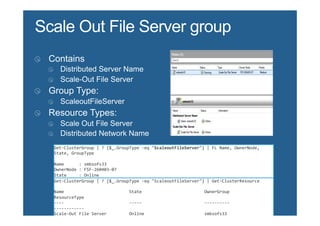
Get-­‐ClusterGroup	
  |	
  ?	
  {$_.GroupType	
  -­‐eq	
  "ScaleoutFileServer"}	
  |	
  FL	
  Name,	
  OwnerNode,	
  
State,	
  GroupType	


Name	


  :	
  smbsofs33	
  
OwnerNode	
  :	
  FSF-­‐260403-­‐07	
  
State	


  :	
  Online	
  
GroupType	
  :	
  ScaleoutFileServer	
  
Get-­‐ClusterGroup	
  |	
  ?	
  {$_.GroupType	
  -­‐eq	
  "ScaleoutFileServer"}	
  |	
  Get-­‐ClusterResource	


Name	


  State	


  OwnerGroup	


ResourceType	
  
-­‐-­‐-­‐-­‐	


  -­‐-­‐-­‐-­‐-­‐	


  -­‐-­‐-­‐-­‐-­‐-­‐-­‐-­‐-­‐-­‐	


-­‐-­‐-­‐-­‐-­‐-­‐-­‐-­‐-­‐-­‐-­‐-­‐	
  
Scale-­‐Out	
  File	
  Server	


  Online	


  smbsofs33	


Scale	
  Out	
  File	
  Server	
  
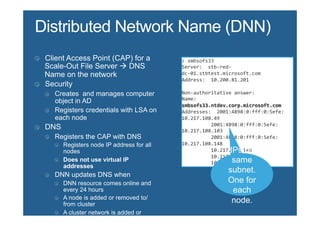
>	
  smbsofs33	
  
Server:	
  	
  stb-­‐red-­‐
dc-­‐01.stbtest.microsoft.com	
  
Address:	
  	
  10.200.81.201	


Non-­‐authoritative	
  answer:	
  
Name:	


smbsofs33.ntdev.corp.microsoft.com	
  
Addresses:	
  	
  2001:4898:0:fff:0:5efe:
10.217.108.49	


  2001:4898:0:fff:0:5efe:
10.217.108.103	


  2001:4898:0:fff:0:5efe:
10.217.108.148	


  10.217.108.148	


  10.217.108.49	


  10.217.108.103	
  
>	
  smbsofs33	
  
Server:	
  	
  stb-­‐red-­‐
dc-­‐01.stbtest.microsoft.com	
  
Address:	
  	
  10.200.81.201	


Non-­‐authoritative	
  answer:	
  
Name:	


smbsofs33.ntdev.corp.microsoft.com	
  
Addresses:	
  	
  2001:4898:0:fff:0:5efe:
10.217.108.49	


  2001:4898:0:fff:0:5efe:
10.217.108.103	


  2001:4898:0:fff:0:5efe:
10.217.108.148	


  10.217.108.148	


  10.217.108.49	


  10.217.108.103	


>	
  smbsofs33	
  
Server:	
  	
  stb-­‐red-­‐
dc-­‐01.stbtest.microsoft.com	
  
Address:	
  	
  10.200.81.201	


Non-­‐authoritative	
  answer:	
  
Name:	


smbsofs33.ntdev.corp.microsoft.com	
  
Addresses:	
  	
  2001:4898:0:fff:0:5efe:
10.217.108.103	


  2001:4898:0:fff:0:5efe:
10.217.108.148	


  2001:4898:0:fff:0:5efe:
10.217.108.49	
  
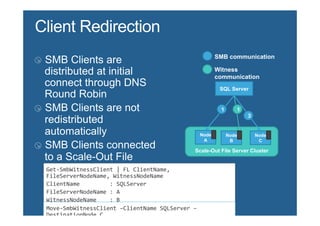
SQL Server


                                                                   Node     Node       Node
                                                                    A        B          C

                                                               Scale-Out File Server Cluster


Get-­‐SmbWitnessClient	
  |	
  FL	
  ClientName,	
  
FileServerNodeName,	
  WitnessNodeName	
  
ClientName	


  :	
  SQLServer	
  
FileServerNodeName	
  :	
  A	
  
WitnessNodeName	


  :	
  B	
  
Move-­‐SmbWitnessClient	
  –ClientName	
  SQLServer	
  –
DestinationNode	
  C	
  
title
SMB Transparent
Failover
Failovers are not transparent


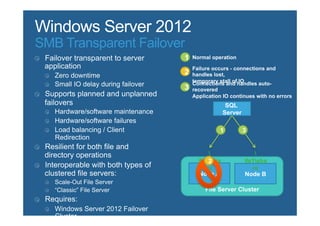
                                          SQL
                                         Server


                           fs1share            fs1share


                              Node A              Node B

                                 File Server Cluster
SMB Transparent Failover


                                       SQL
                                      Server


                           fs1sha            fs1sha
                              re                  re
                           Node A              Node B

                             File Server Cluster
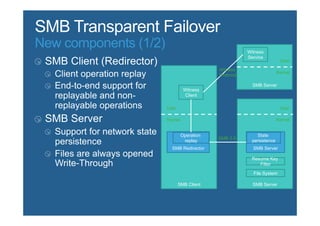
New components (1/2)                                   Witness
                                                       Service
                                                                        User
                                            Witness
                                                                       Kernel
                                            Protocol

                                                         SMB Server
                                 Witness
                                  Client

                       User                                             User

                       Kernel                                          Kernel


                                Operation                  State
                                            SMB 3.0
                                 replay                  persistence
                         SMB Redirector                  SMB Server

                                                        Resume Key
                                                           Filter

                                                         File System

                              SMB Client                 SMB Server
New components (2/2)                                   Witness
                                                       Service
                                                                        User
                                            Witness
                                                                       Kernel
                                            Protocol

                                                         SMB Server
                                 Witness
                                  Client

                       User                                             User

                       Kernel                                          Kernel


                                Operation                  State
                                            SMB 3.0
                                 replay                  persistence
                         SMB Redirector                  SMB Server

                                                        Resume Key
                                                           Filter

                                                         File System

                              SMB Client                 SMB Server
Overview


     continuous availability
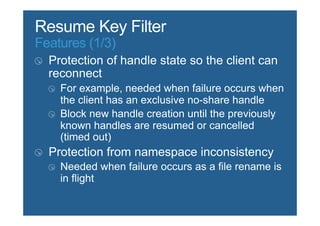
Features (1/3)
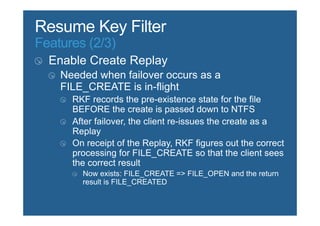
Features (2/3)
Features (3/3)
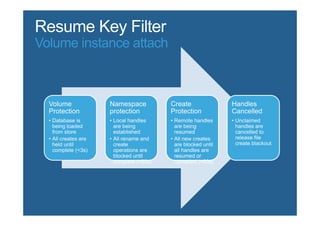
Volume instance attach


  Volume               Namespace            Create                 Handles
  Protection           protection           Protection             Cancelled
  •  Database is       •  Local handles     •  Remote handles      •  Unclaimed
     being loaded         are being            are being              handles are
     from store           established          resumed                cancelled to
  •  All creates are   •  All rename and    •  All new creates        release file
     held until           create               are blocked until      create blackout
     complete (<3s)       operations are       all handles are
                          blocked until        resumed or
                          complete (<60s)      cancelled (<60s)
Overview
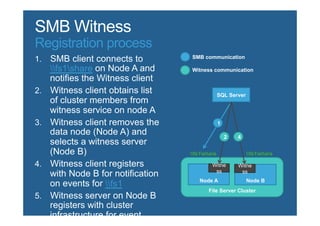
Registration process
  fs1share

                                      SQL Server


                        fs1share                fs1share


                           Node A                  Node B
                fs1
                               File Server Cluster
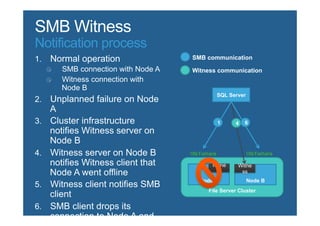
Notification process


                                     SQL Server


                       fs1share                fs1share


                          Node A                  Node B
                              File Server Cluster
DEMO


       33
INTEGRATION MIT SYSTEM
CENTER 2012
                         34
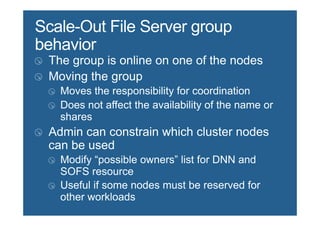
Scale-Out ist auch mit System Center möglich
n  Über ein Service Model lassen sich n Instanzen definieren
n  Diese Instanzen werden dynamisch skaliert, je nach Auslastung
n  Z. B. via ProTips vom SCOM


                                                                    35
Szenarien
n  Fileserver
    o  DFS-Namespace, z. B. mit Storage
    o  Cluster-Nodes (für CSV)


n  Hyper-V Storage
    o  Kann sich auf den SOF stützen


                                           36
DEMO


       37
FRAGEN?


          38

Scale-Out Fileserver

  • 1.
    Drive your life. Scale-OutFileserver Matthias Gessenay Matthias.gessenay@corporatesoftware.ch
  • 2.
    Agenda n  Das Problem n  Die neuen Möglichkeiten n  Verwendete Techniken n  Integration mit System Center 2012 2
  • 3.
  • 4.
    Das “Problem” n  Hochverfügbare Dateiserver = Cluster n  Aber Cluster = eine Instanz n  Also kein Scale-Out n  Vielleicht DFS-R? o  Locking o  Usw. 4
  • 5.
  • 6.
    Beides! n  Cluster SharedVolumes (CSV) sind jetzt auch für Fileserver freigegeben o  Haben eigenes Locking-System (“orchestrierte I/O Operations”) o  Multi-Subnet o  Brauchen ein NTFS-Drive (oft iSCSI) n  Ungeschriebene Best Practice: 1 Share pro 1 CSV 6
  • 7.
    Scale-Out n  Fixer Scale-Outmit Hyper-V möglich o  Scale-Out Fileserver-Rolle (SOF) läuft als Clusterservice o  Registriert alle IPs o  Benutzt Round Robin o  + 1 Clusternode = +1 Fileserver n  Dynamischer Scale-Out mit System Center o  Service-Orientiert o  Integration mit SCOM 7
  • 8.
  • 9.
    Cluster Shared Volumes n Werden unter %SystemDrive%ClusterStorage als einzelne Volumes angezeigt n  Locking ist nicht auf LUN, sondern auf File-Level n  Jedes Volume hat einen Node als Coordinator (hält auch die NTFS- Metadaten) n  Non-Coordinators machen einen Request beim Coordinator-Node n  Windows Cache Manager Integration 9
  • 10.
    SMB v3 n  Erheblich verbesserte Performance n  Better together mit Hyper-V v3 n  Encryption n  SMB RDMA (Remote Direct Memory Access) 10
  • 11.
    Hyper-V n  Viele Enterprise-Featuresjetzt im Server Standard n  Mehr Features als SCVMM -> Replica n  Sehr gute SMB-Anbindung (SMB3) 11
  • 12.
    title Anatomy of aScale- Out File Server
  • 13.
    Get-­‐ClusterGroup  |  ?  {$_.GroupType  -­‐eq  "ScaleoutFileServer"}  |  FL  Name,  OwnerNode,   State,  GroupType     Name            :  smbsofs33   OwnerNode  :  FSF-­‐260403-­‐07   State          :  Online   GroupType  :  ScaleoutFileServer   Get-­‐ClusterGroup  |  ?  {$_.GroupType  -­‐eq  "ScaleoutFileServer"}  |  Get-­‐ClusterResource     Name                                                    State                                                  OwnerGroup                                         ResourceType   -­‐-­‐-­‐-­‐                                                    -­‐-­‐-­‐-­‐-­‐                                                  -­‐-­‐-­‐-­‐-­‐-­‐-­‐-­‐-­‐-­‐                                         -­‐-­‐-­‐-­‐-­‐-­‐-­‐-­‐-­‐-­‐-­‐-­‐   Scale-­‐Out  File  Server                  Online                                                smbsofs33                                           Scale  Out  File  Server  
  • 14.
    >  smbsofs33   Server:    stb-­‐red-­‐ dc-­‐01.stbtest.microsoft.com   Address:    10.200.81.201     Non-­‐authoritative  answer:   Name:         smbsofs33.ntdev.corp.microsoft.com   Addresses:    2001:4898:0:fff:0:5efe: 10.217.108.49                      2001:4898:0:fff:0:5efe: 10.217.108.103                      2001:4898:0:fff:0:5efe: 10.217.108.148                      10.217.108.148                      10.217.108.49                      10.217.108.103  
  • 15.
    >  smbsofs33   Server:    stb-­‐red-­‐ dc-­‐01.stbtest.microsoft.com   Address:    10.200.81.201     Non-­‐authoritative  answer:   Name:         smbsofs33.ntdev.corp.microsoft.com   Addresses:    2001:4898:0:fff:0:5efe: 10.217.108.49                      2001:4898:0:fff:0:5efe: 10.217.108.103                      2001:4898:0:fff:0:5efe: 10.217.108.148                      10.217.108.148                      10.217.108.49                      10.217.108.103     >  smbsofs33   Server:    stb-­‐red-­‐ dc-­‐01.stbtest.microsoft.com   Address:    10.200.81.201     Non-­‐authoritative  answer:   Name:         smbsofs33.ntdev.corp.microsoft.com   Addresses:    2001:4898:0:fff:0:5efe: 10.217.108.103                      2001:4898:0:fff:0:5efe: 10.217.108.148                      2001:4898:0:fff:0:5efe: 10.217.108.49  
  • 18.
    SQL Server Node Node Node A B C Scale-Out File Server Cluster Get-­‐SmbWitnessClient  |  FL  ClientName,   FileServerNodeName,  WitnessNodeName   ClientName                  :  SQLServer   FileServerNodeName  :  A   WitnessNodeName        :  B   Move-­‐SmbWitnessClient  –ClientName  SQLServer  – DestinationNode  C  
  • 19.
  • 20.
    Failovers are nottransparent SQL Server fs1share fs1share Node A Node B File Server Cluster
  • 21.
    SMB Transparent Failover SQL Server fs1sha fs1sha re re Node A Node B File Server Cluster
  • 22.
    New components (1/2) Witness Service User Witness Kernel Protocol SMB Server Witness Client User User Kernel Kernel Operation State SMB 3.0 replay persistence SMB Redirector SMB Server Resume Key Filter File System SMB Client SMB Server
  • 23.
    New components (2/2) Witness Service User Witness Kernel Protocol SMB Server Witness Client User User Kernel Kernel Operation State SMB 3.0 replay persistence SMB Redirector SMB Server Resume Key Filter File System SMB Client SMB Server
  • 24.
    Overview continuous availability
  • 25.
  • 26.
  • 27.
  • 28.
    Volume instance attach Volume Namespace Create Handles Protection protection Protection Cancelled •  Database is •  Local handles •  Remote handles •  Unclaimed being loaded are being are being handles are from store established resumed cancelled to •  All creates are •  All rename and •  All new creates release file held until create are blocked until create blackout complete (<3s) operations are all handles are blocked until resumed or complete (<60s) cancelled (<60s)
  • 29.
  • 30.
    Registration process fs1share SQL Server fs1share fs1share Node A Node B fs1 File Server Cluster
  • 31.
    Notification process SQL Server fs1share fs1share Node A Node B File Server Cluster
  • 33.
  • 34.
  • 35.
    Scale-Out ist auchmit System Center möglich n  Über ein Service Model lassen sich n Instanzen definieren n  Diese Instanzen werden dynamisch skaliert, je nach Auslastung n  Z. B. via ProTips vom SCOM 35
  • 36.
    Szenarien n  Fileserver o  DFS-Namespace, z. B. mit Storage o  Cluster-Nodes (für CSV) n  Hyper-V Storage o  Kann sich auf den SOF stützen 36
  • 37.
  • 38.