SharePoint 2013/2016 das fliegen lernen
Tuning & Optimierung des SQL Servers
was jeder SP oder SQL Admin wissen sollte
Lars Platzdasch
SharePoint Days 08.12.2016 MUC
SharePoint Days 2016 MUC – Lars Platzdasch
Sprecher:
Lars Platzdasch
Twitter
@LarsPlatzdasch
Xing
/Lars_Platzdasch
LinkedIn
Larsplatzdasch
Web
www.platzdasch.de
www.3perspektiven.de
Microsoft Certified Trainer
Microsoft Certified Solutions Expert: SQL Server Data Platform
Microsoft Certified Solutions Expert: SharePoint
Microsoft Certified IT Professional: SharePoint 2010, Administrator
Microsoft Certified IT Professional: SharePoint 2010, Developer
Microsoft Certified Application Developer: .NET
platzdasch netConsult GmbH & Co. KG | ISV
24/7 Support für SQL / SharePoint
3 Perspektiven GmbH | MBS
>20 IT, >18 Jahre SQL Server, 13 Jahre SharePoint
SharePoint Days 2016 MUC – Lars Platzdasch
3 Perspektiven GmbH
www.3perspektiven.de
DIE SPEZIALISTEN FÜR
WISSENSMANAGEMENT UND
WISSENSTRANSFER
Wichtige Mitarbeiter scheiden aus?
Know-how muss gesichert werden?
Sie möchten ein Firmenwiki?
Sie wollen Wissensmanagement
einführen?
Sie wollen Microsoft SharePoint
nutzen?
Hierfür haben wir praxisnahe
Lösungen!
netConsult GmbH & Co.KG
www.platzdasch.de
Individual Software Entwicklung
24/7 Support
SQL Server, SharePoint, Power BI
24/7 Supportunterstützung für SQL
Server, SharePoint, Cluster und
Storage Systeme, Performance
Optimierung, Setup, Helpdesk
Microsoft Certified Partner (Gold/Silver ISV)
Microsoft SharePoint Solution Center
SAP SharePoint Integration
NetApp Certified Storage Silver Partner
DataCore Certified Storage Partner
Dell Server / Storage Service Partner
SharePoint Days 2016 MUC – Lars Platzdasch
ACHTUNG:
FALLS JEMAND ETWAS
NACH LESEN MÖCHTE
Hat du Kopp wie Sieb, muttu
auf schreiben ! ( oder … )
Slides sind auf http://www.slideshare.net/larspl , Sway
Konferenz Webseite
( ist voll kommen OK .. ( es ist auch schon 14:45 ++ ;-)
SharePoint Days 2016 MUC – Lars Platzdasch
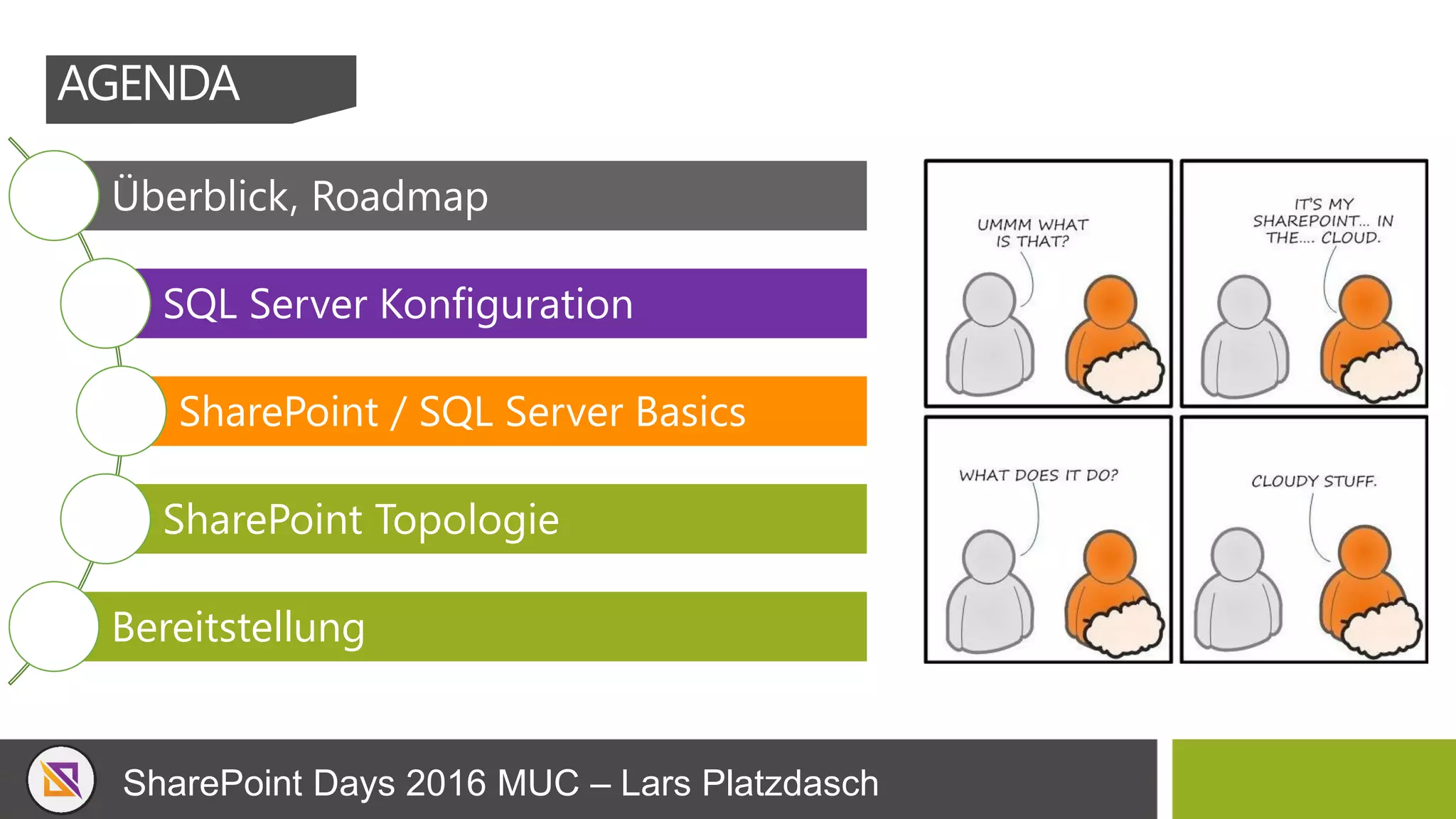
Überblick, Roadmap
SQL Server Konfiguration
SharePoint / SQL Server Basics
SharePoint Topologie
Bereitstellung
AGENDA
SharePoint Days 2016 MUC – Lars Platzdasch
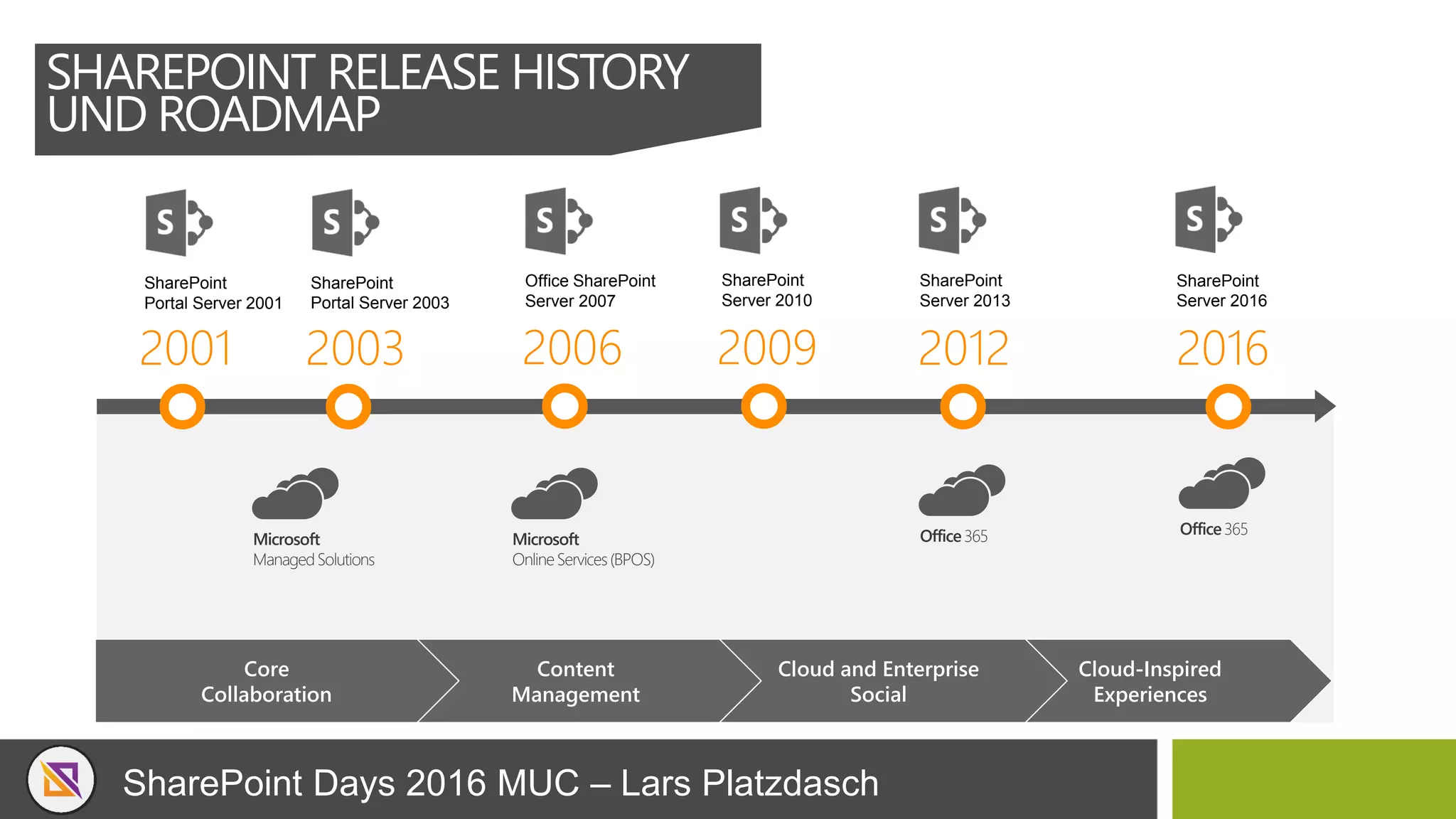
2001
SharePoint
Portal Server 2001
2003
SharePoint
Portal Server 2003
2006
Office SharePoint
Server 2007
2009
SharePoint
Server 2010
2012
SharePoint
Server 2013
2016
SharePoint
Server 2016
Cloud-Inspired
Experiences
Cloud and Enterprise
Social
Content
Management
Core
Collaboration
Microsoft
ManagedSolutions
Microsoft
OnlineServices(BPOS)
Office365
SHAREPOINT RELEASE HISTORY
UND ROADMAP
Office365
SharePoint Days 2016 MUC – Lars Platzdasch
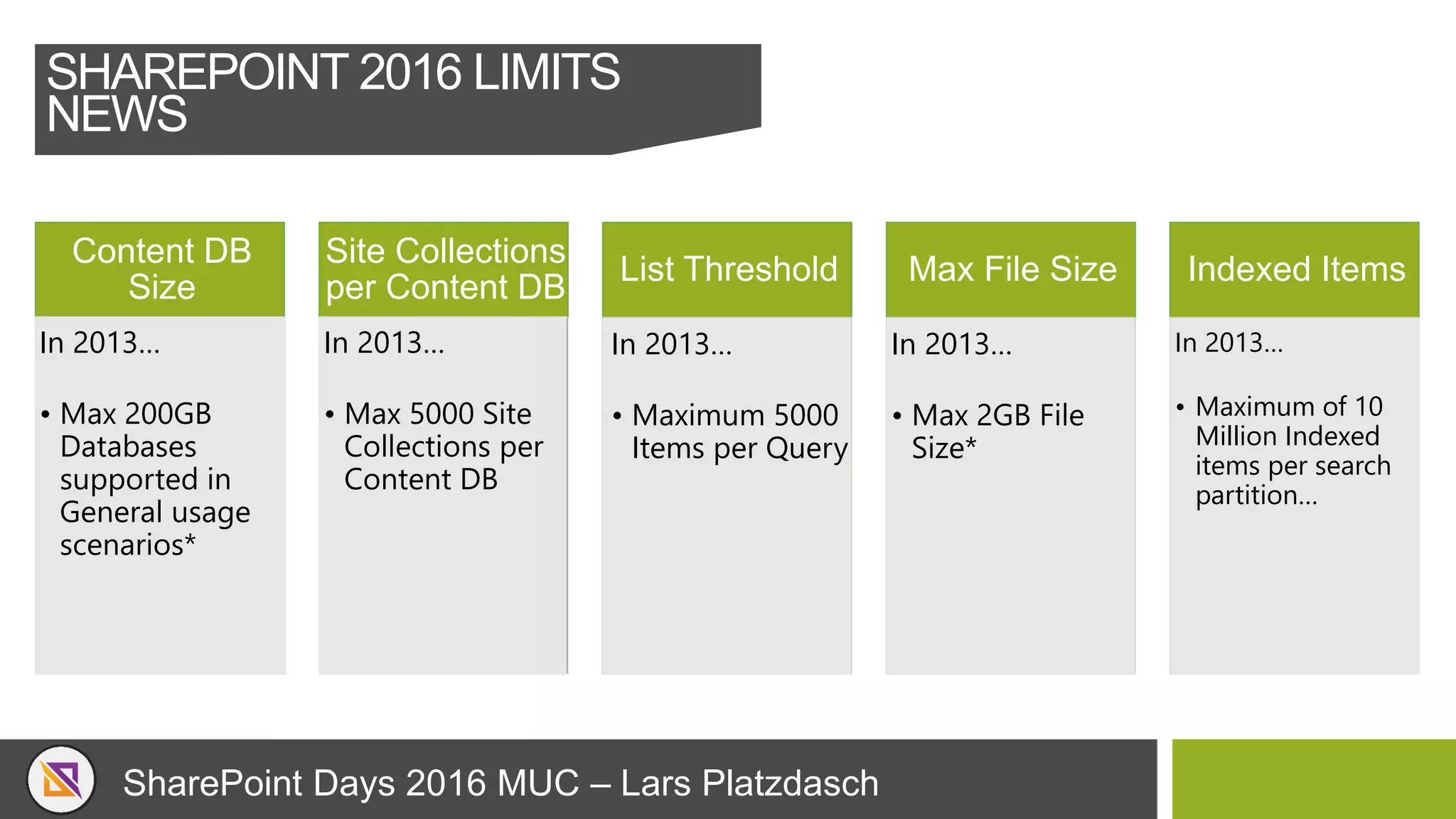
Content DB
Size
• TB-sized Databases
now Officially
Supported
Site Collections
per Content DB
• 100,000 Site
Collections per
Content Databases
List Threshold
• Increased List
Threshold >5000
Items
• No word yet on how
many more… 
Max File Size
• Maximum File Size
now 10GB
• No Character
Restrictions – Drag
& Drop files with ‘&’
in them!!!
Indexed Items
• Search scale
doubled to 500
Million items
in 2016… In 2016… In 2016… In 2016… In 2016…
In 2013…
• Maximum of 10
Million Indexed
items per search
partition…
In 2013…
• Max 200GB
Databases
supported in
General usage
scenarios*
In 2013…
• Max 5000 Site
Collections per
Content DB
In 2013…
• Maximum 5000
Items per Query
In 2013…
• Max 2GB File
Size*
SHAREPOINT 2016 LIMITS
NEWS
SharePoint Days 2016 MUC – Lars Platzdasch
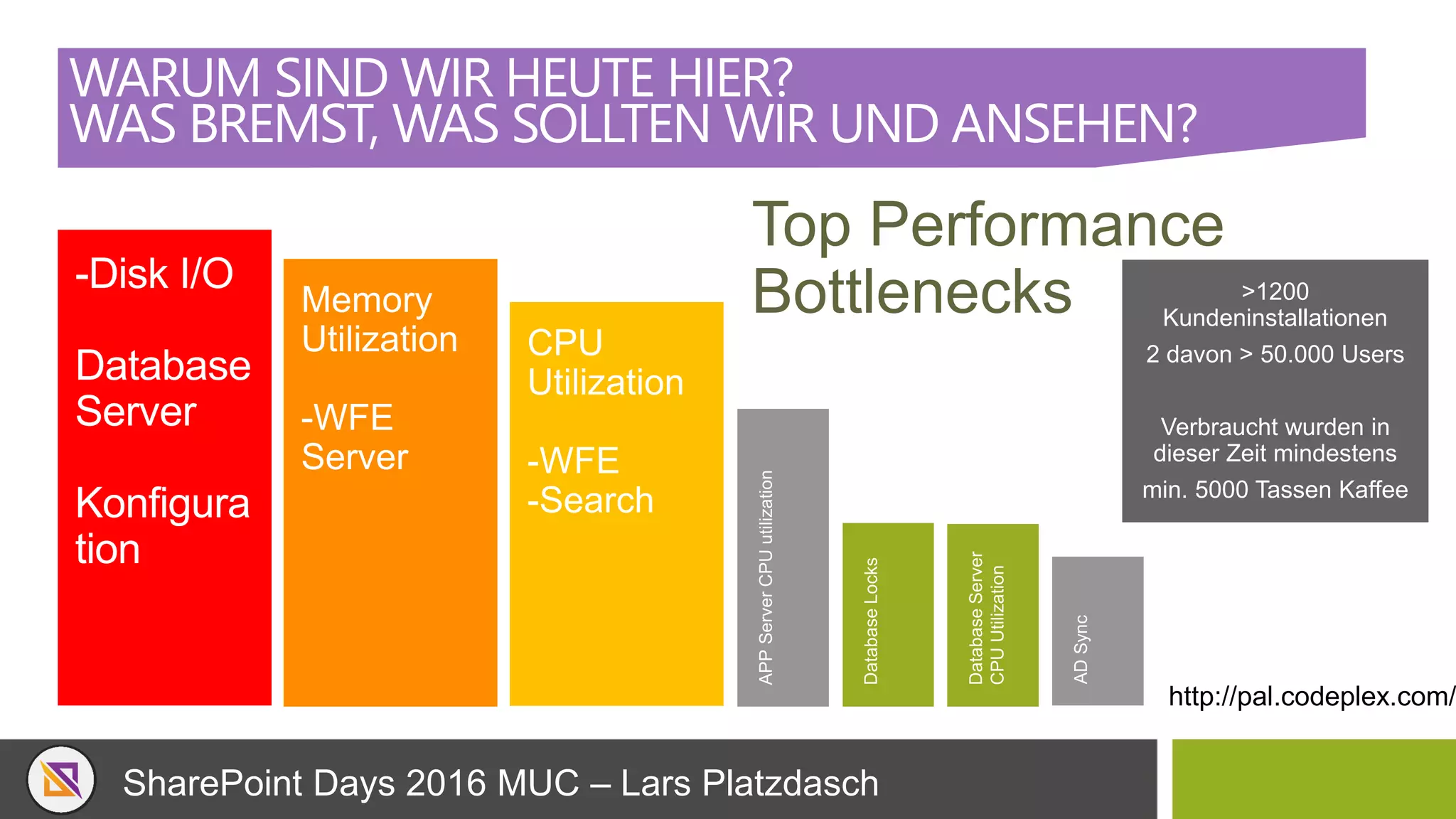
WARUM SIND WIR HEUTE HIER?
WAS BREMST, WAS SOLLTEN WIR UND ANSEHEN?
Top Performance
Bottlenecks >1200
Kundeninstallationen
2 davon > 50.000 Users
Verbraucht wurden in
dieser Zeit mindestens
min. 5000 Tassen Kaffee
http://pal.codeplex.com/
SharePoint Days 2016 MUC – Lars Platzdasch
SQL SERVER KONFIGURATION
SharePoint Days 2016 MUC – Lars Platzdasch
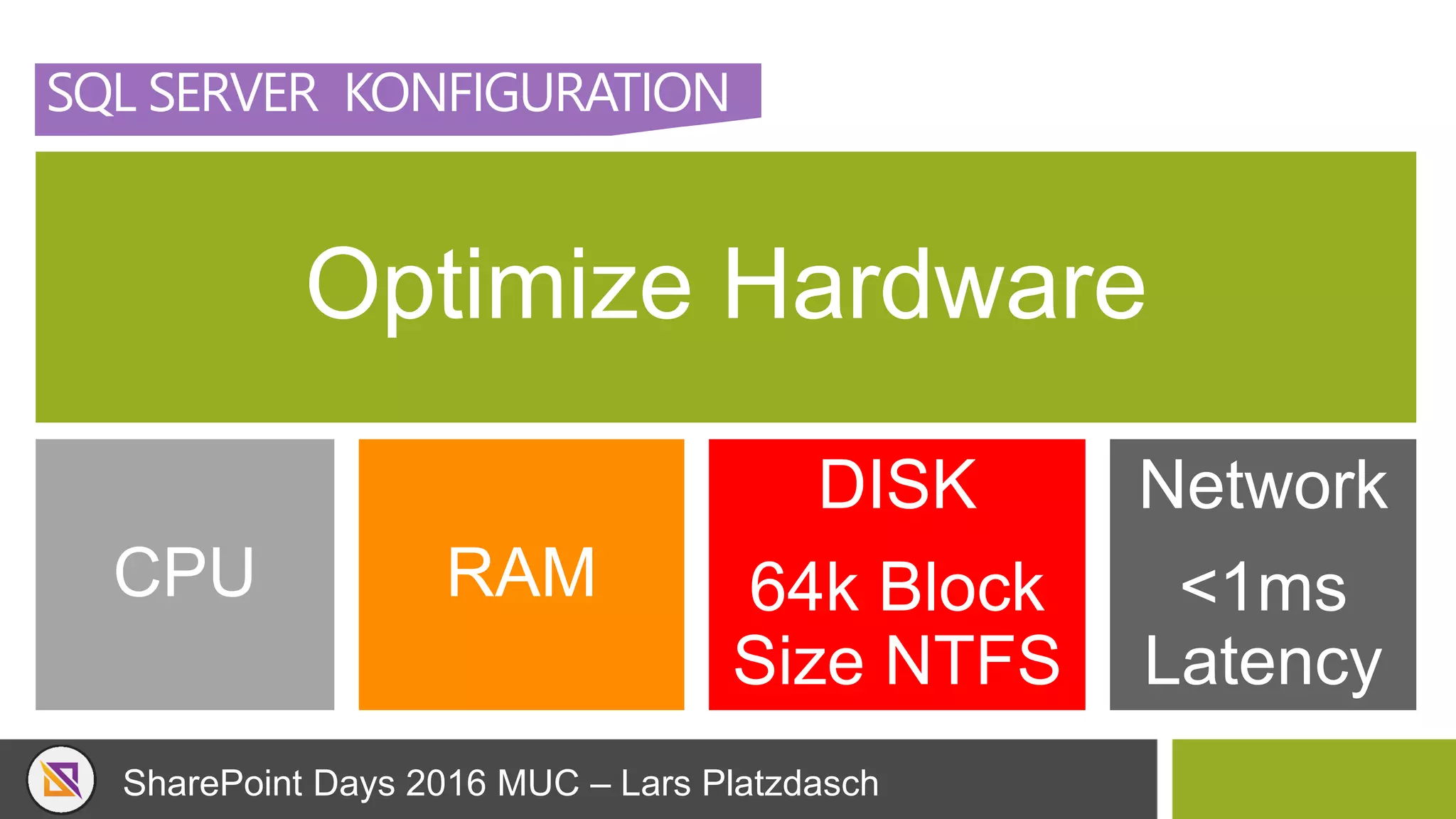
SQL SERVER KONFIGURATION
Optimize Hardware
CPU RAM
DISK
64k Block
Size NTFS
Network
<1ms
Latency
SharePoint Days 2016 MUC – Lars Platzdasch
SQL SERVER KONFIGURATION
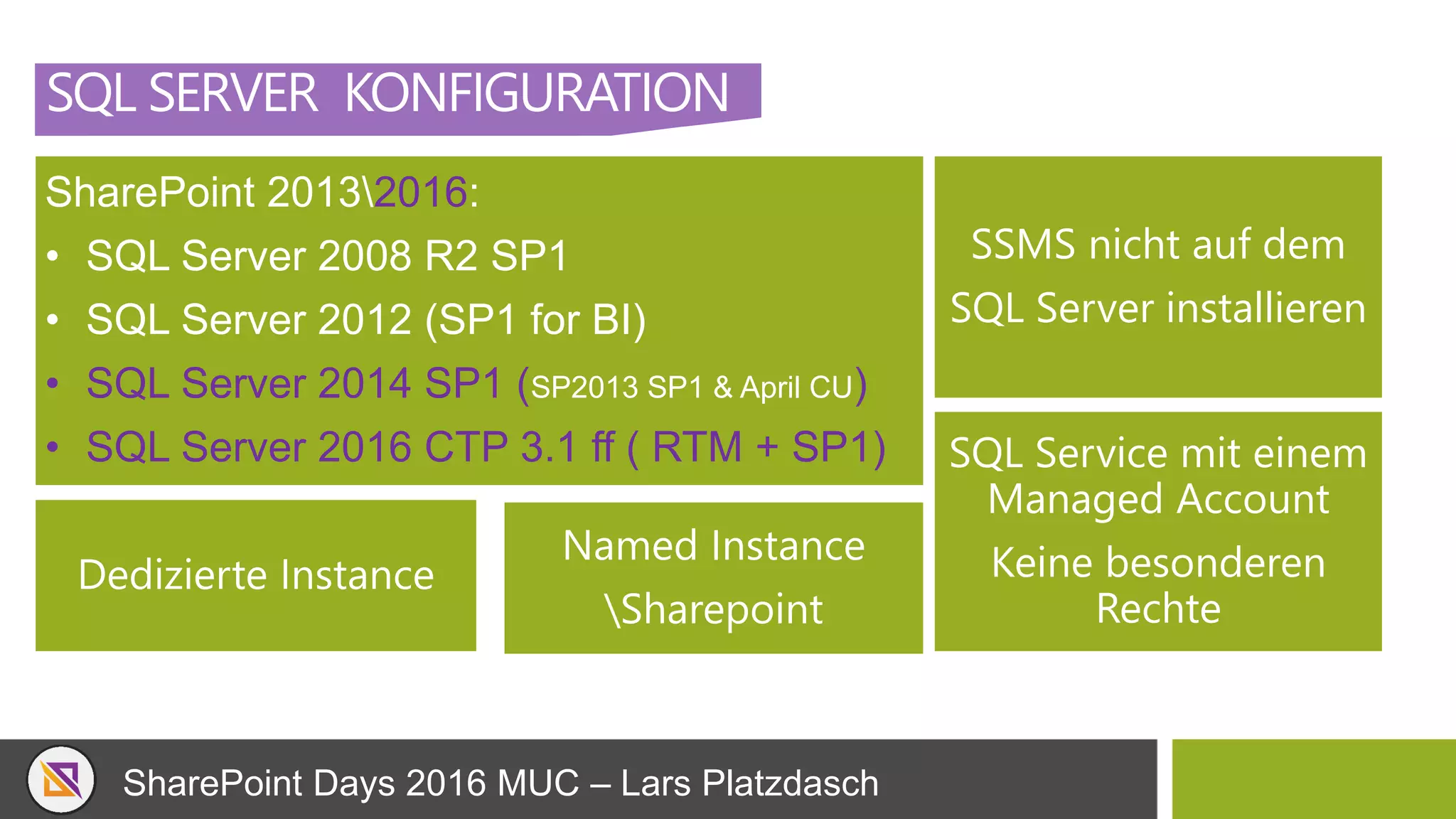
SharePoint 20132016:
• SQL Server 2008 R2 SP1
• SQL Server 2012 (SP1 for BI)
• SQL Server 2014 SP1 (SP2013 SP1 & April CU)
• SQL Server 2016 CTP 3.1 ff ( RTM + SP1)
SSMS nicht auf dem
SQL Server installieren
Dedizierte Instance
SQL Service mit einem
Managed Account
Keine besonderen
Rechte
Named Instance
Sharepoint
SharePoint Days 2016 MUC – Lars Platzdasch
SQL SERVER KONFIGURATION
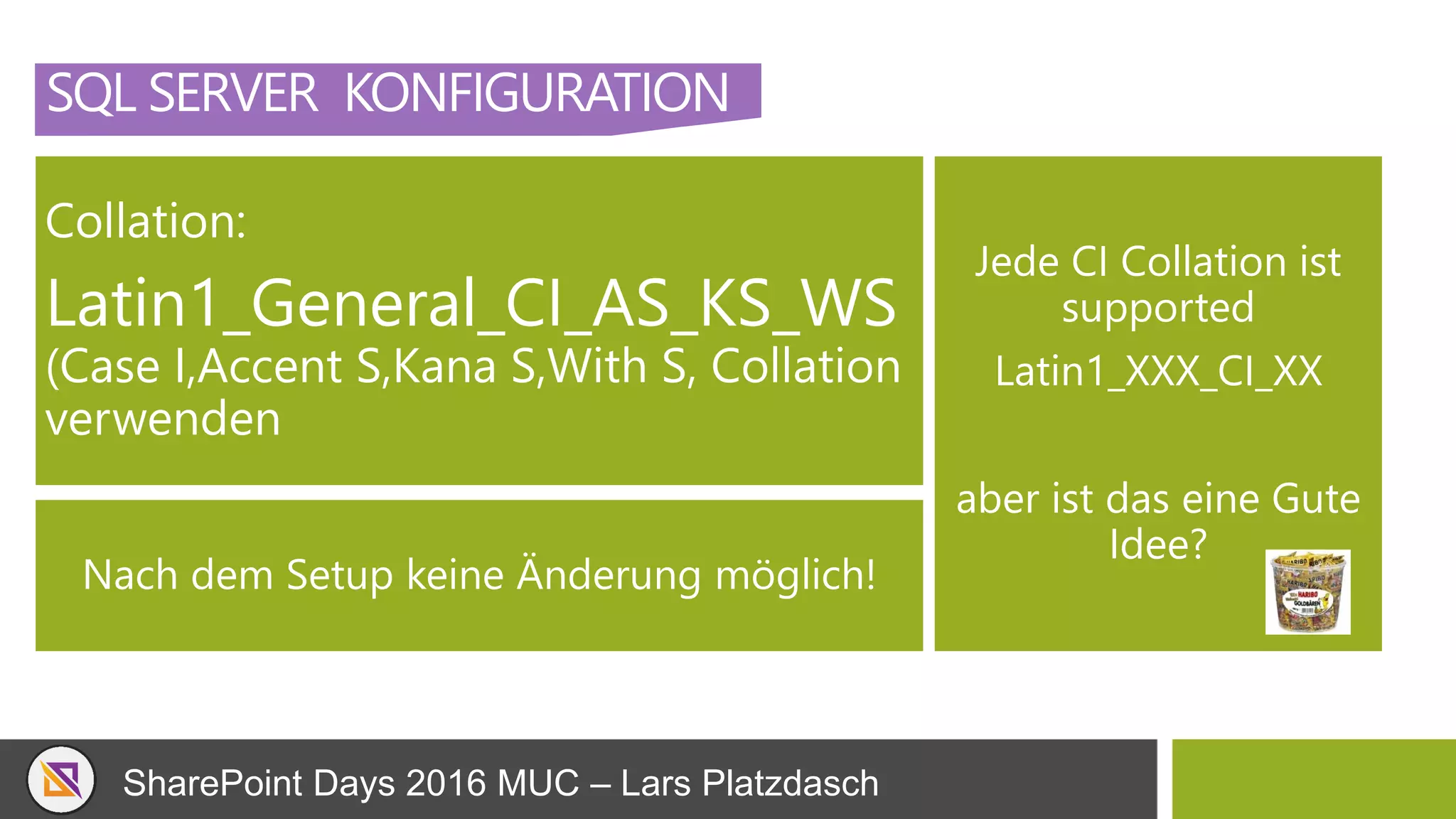
Collation:
Latin1_General_CI_AS_KS_WS
(Case I,Accent S,Kana S,With S, Collation
verwenden
Jede CI Collation ist
supported
Latin1_XXX_CI_XX
aber ist das eine Gute
Idee?
Nach dem Setup keine Änderung möglich!
SharePoint Days 2016 MUC – Lars Platzdasch
SQL SERVER KONFIGURATION
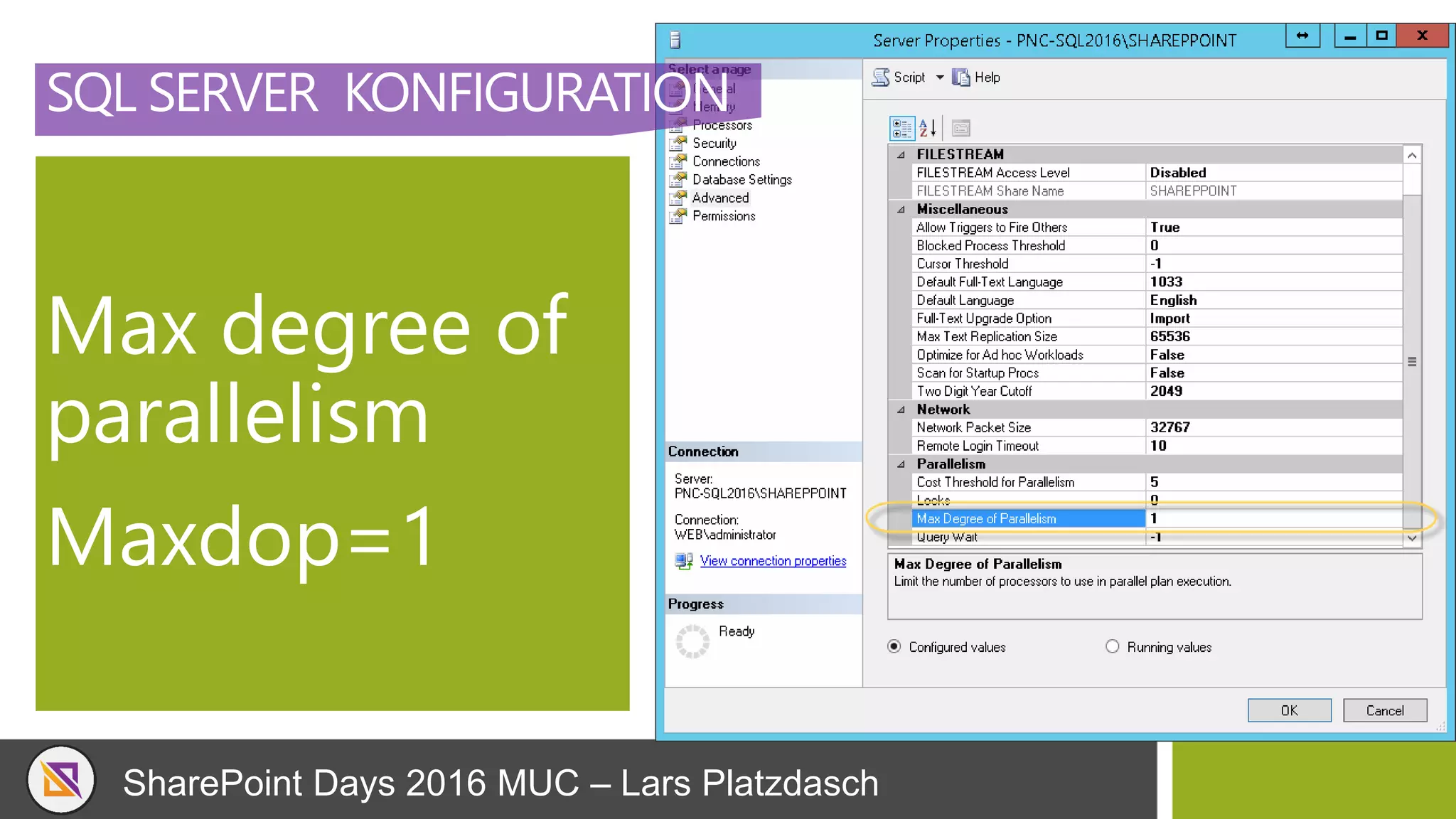
Max degree of
parallelism
Maxdop=1
SharePoint Days 2016 MUC – Lars Platzdasch
SQL SERVER KONFIGURATION
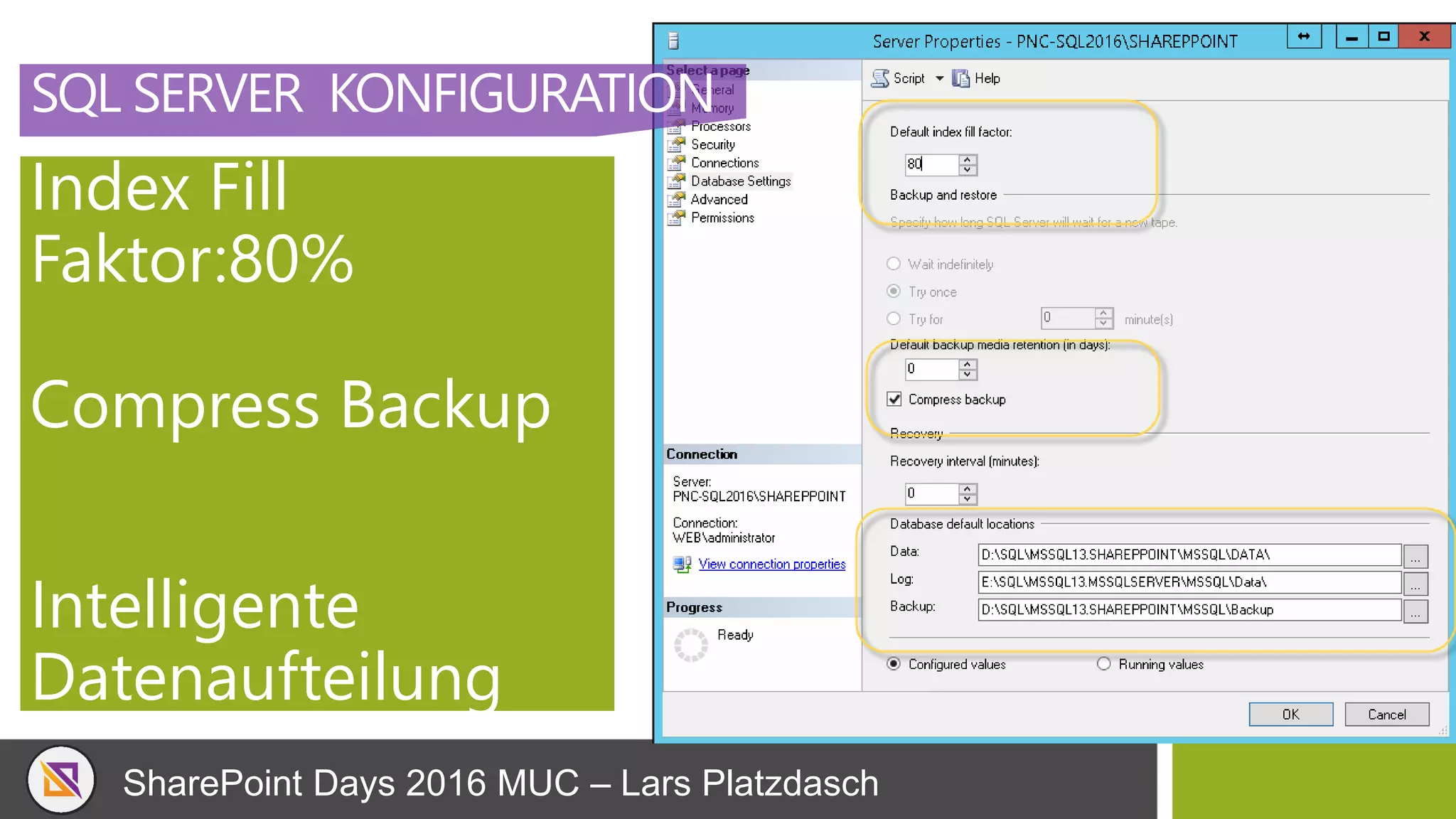
Index Fill
Faktor:80%
Compress Backup
Intelligente
Datenaufteilung
SharePoint Days 2016 MUC – Lars Platzdasch
SQL SERVER KONFIGURATION
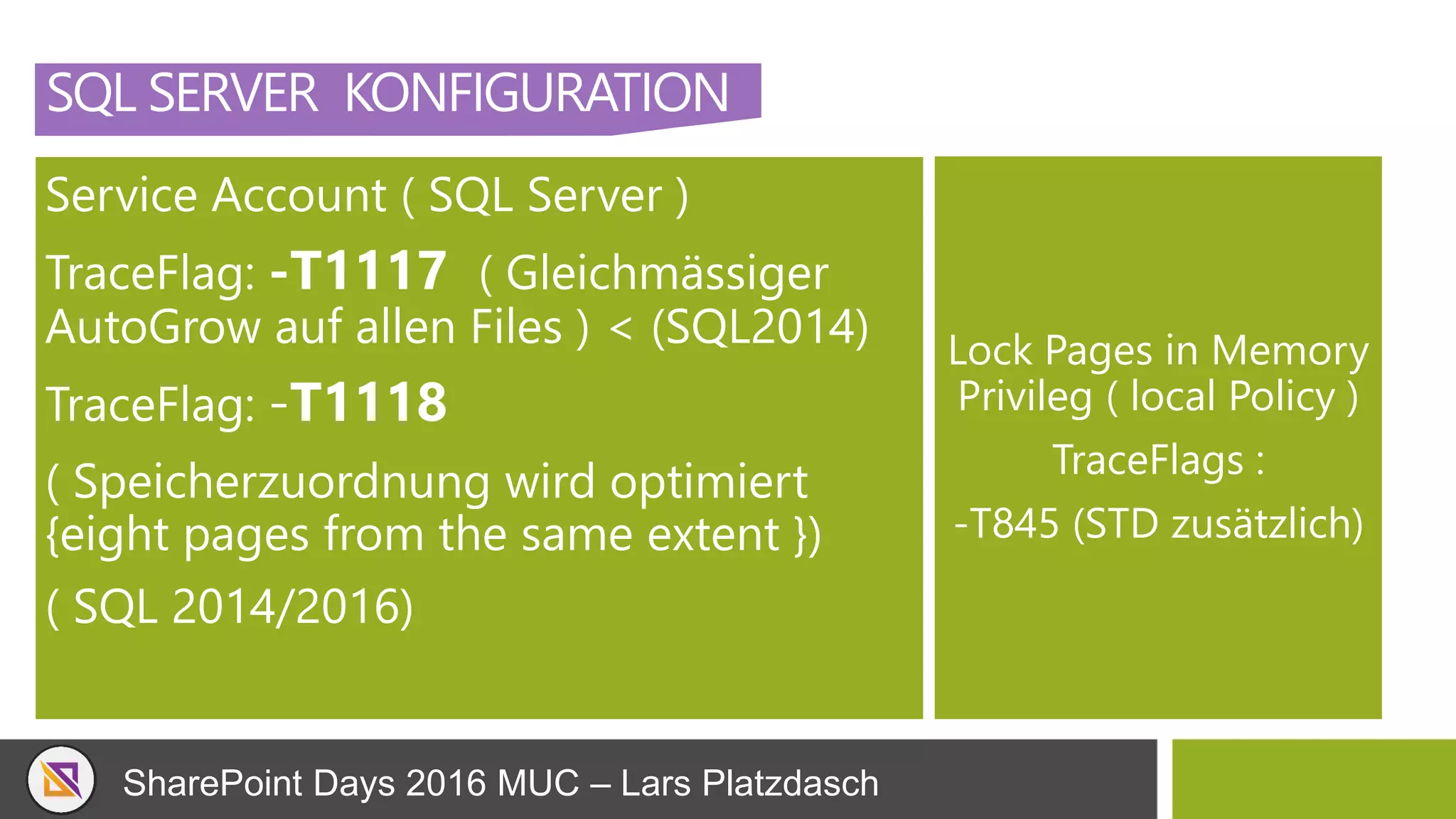
Service Account ( SQL Server )
TraceFlag: -T1117 ( Gleichmässiger
AutoGrow auf allen Files ) < (SQL2014)
TraceFlag: -T1118
( Speicherzuordnung wird optimiert
{eight pages from the same extent })
( SQL 2014/2016)
Lock Pages in Memory
Privileg ( local Policy )
TraceFlags :
-T845 (STD zusätzlich)
SharePoint Days 2016 MUC – Lars Platzdasch
SQL SERVER KONFIGURATION
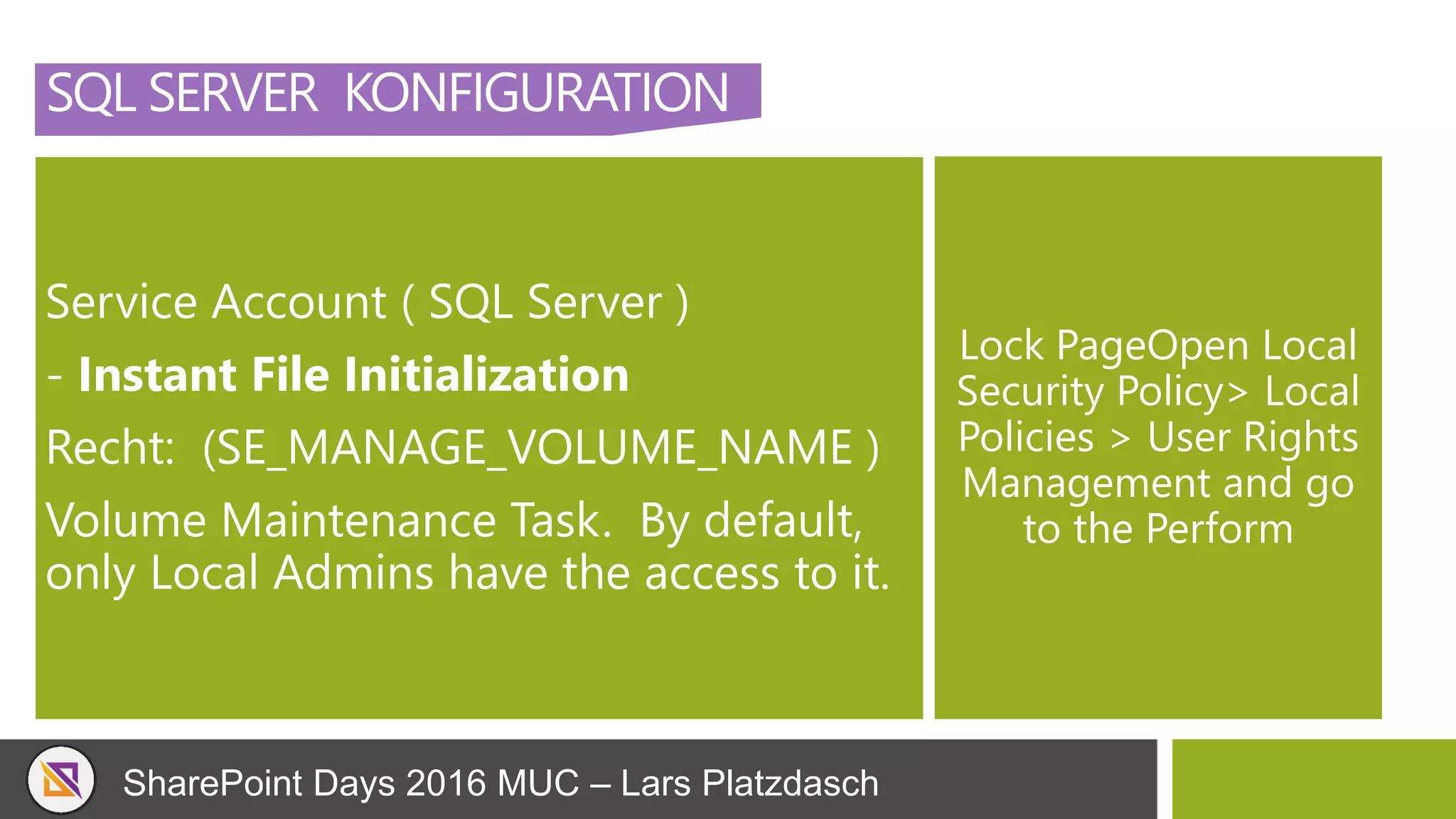
Service Account ( SQL Server )
- Instant File Initialization
Recht: (SE_MANAGE_VOLUME_NAME )
Volume Maintenance Task. By default,
only Local Admins have the access to it.
Lock PageOpen Local
Security Policy> Local
Policies > User Rights
Management and go
to the Perform
SharePoint Days 2016 MUC – Lars Platzdasch
SQL SERVER KONFIGURATION
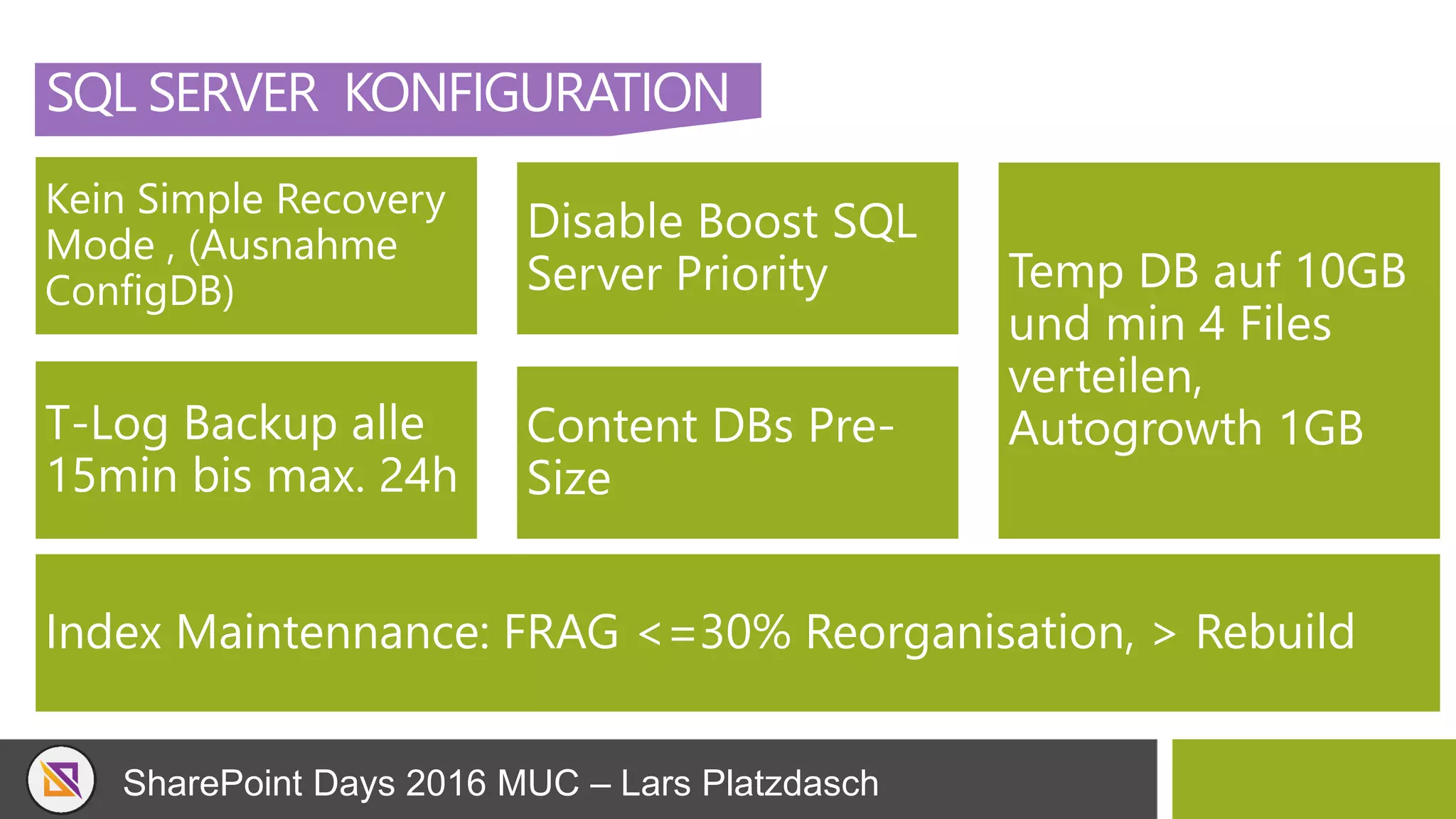
Kein Simple Recovery
Mode , (Ausnahme
ConfigDB)
Disable Boost SQL
Server Priority Temp DB auf 10GB
und min 4 Files
verteilen,
Autogrowth 1GBT-Log Backup alle
15min bis max. 24h
Content DBs Pre-
Size
Index Maintennance: FRAG <=30% Reorganisation, > Rebuild
SharePoint Days 2016 MUC – Lars Platzdasch
SQL SERVER KONFIGURATION
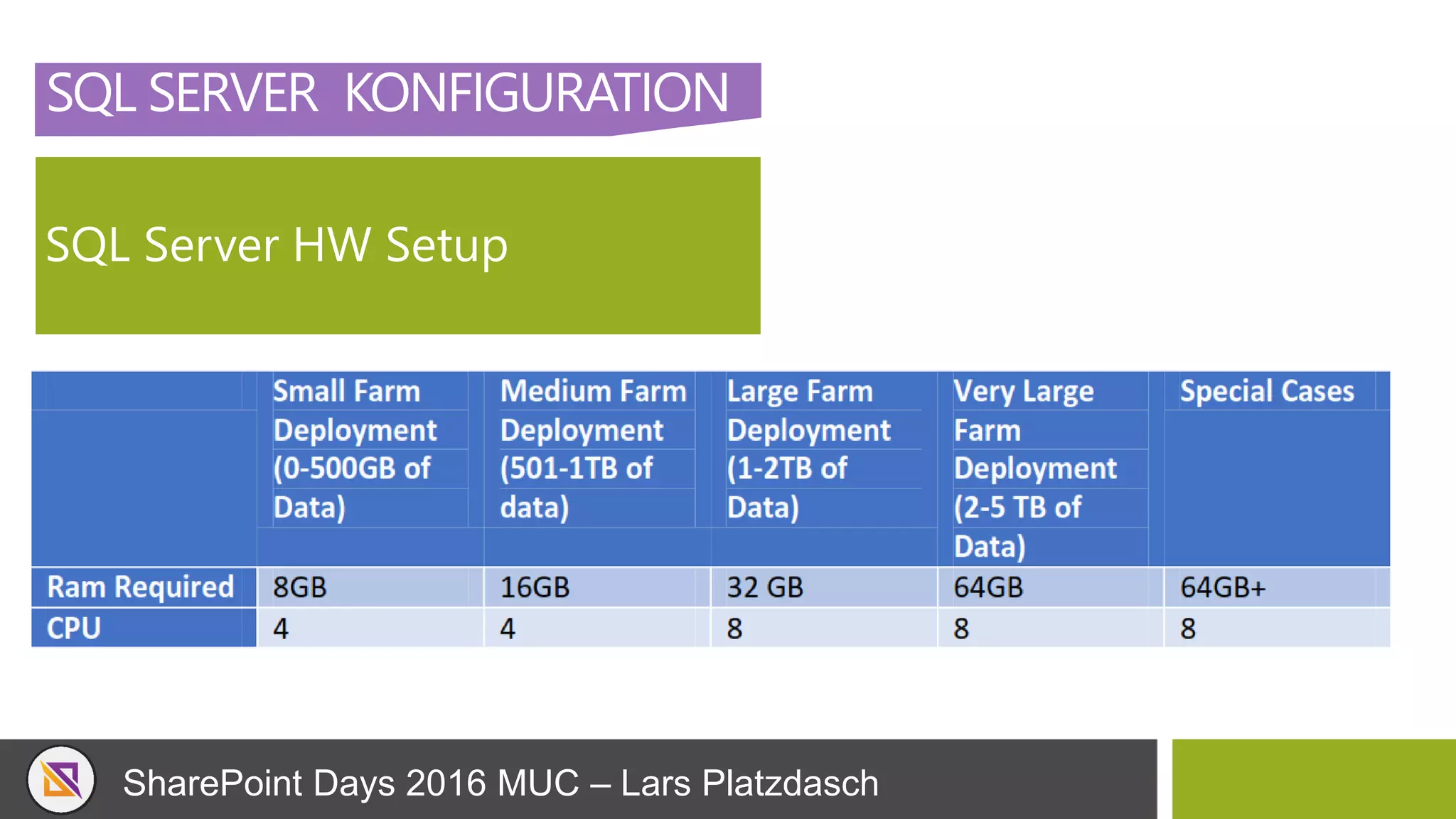
SQL Server HW Setup
SharePoint Days 2016 MUC – Lars Platzdasch
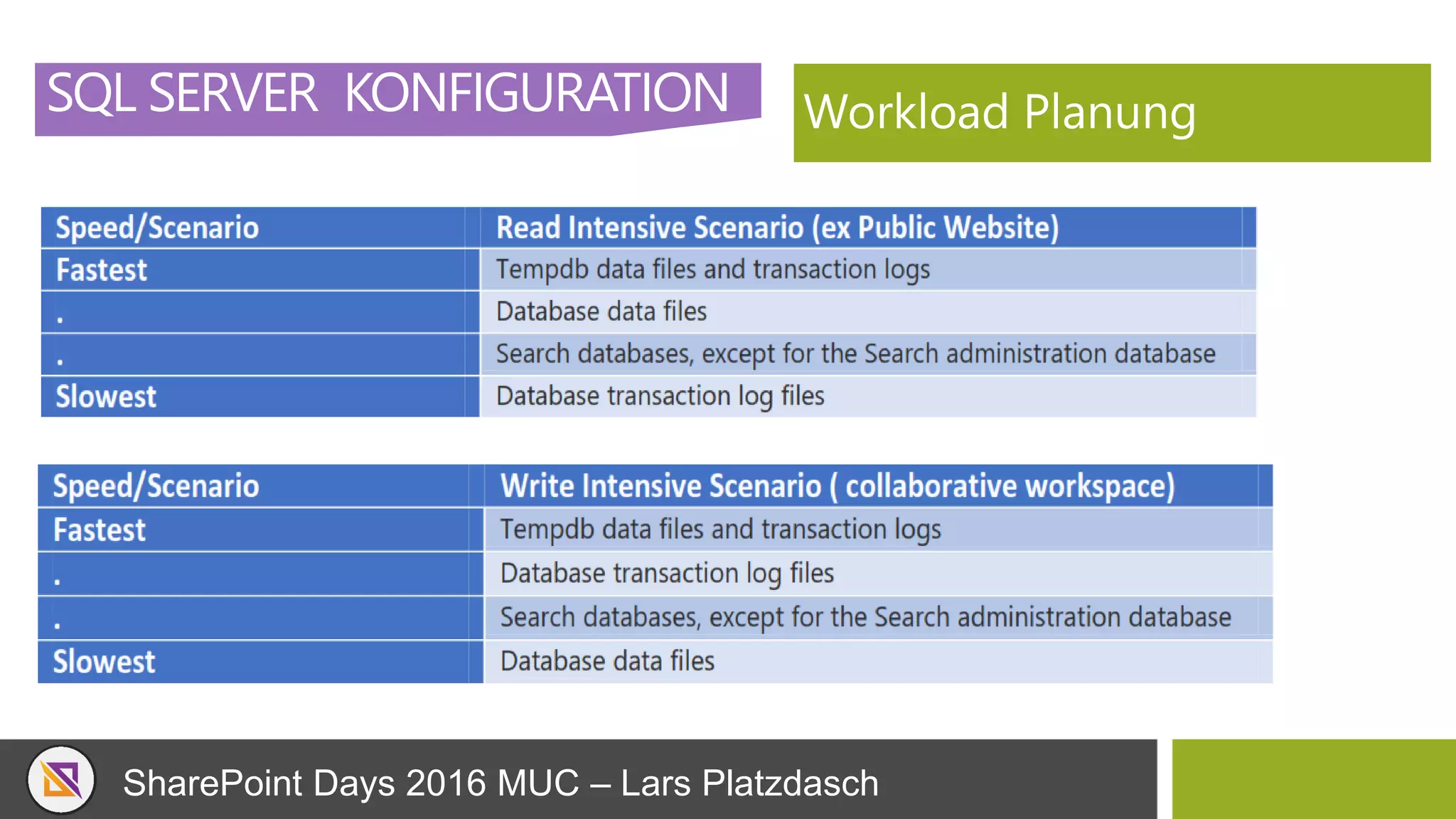
SQL SERVER KONFIGURATION Workload Planung
SharePoint Days 2016 MUC – Lars Platzdasch
SHAREPOINT
SQL SERVER BASICS
SharePoint Days 2016 MUC – Lars Platzdasch
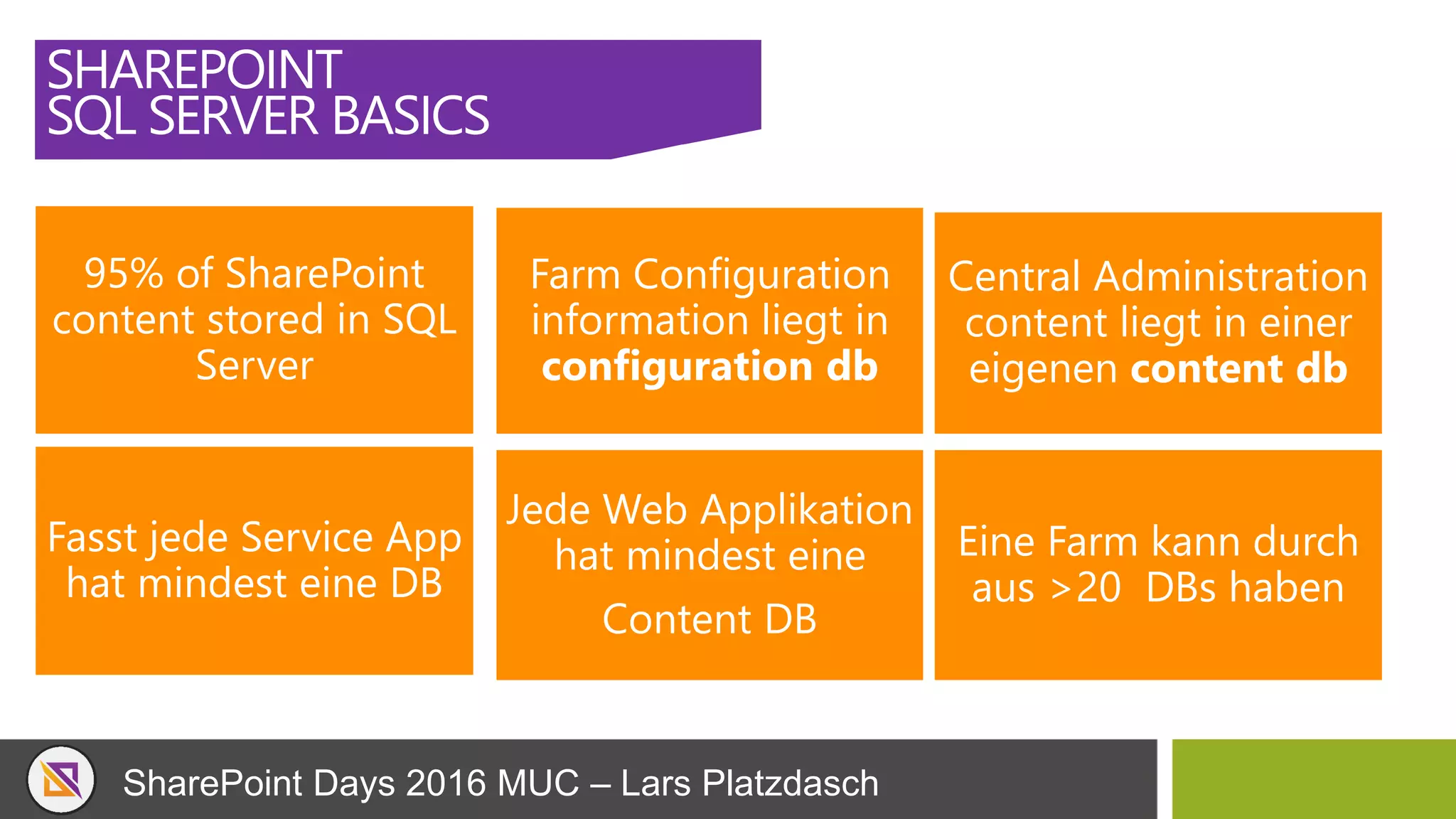
SHAREPOINT
SQL SERVER BASICS
95% of SharePoint
content stored in SQL
Server
Farm Configuration
information liegt in
configuration db
Central Administration
content liegt in einer
eigenen content db
Fasst jede Service App
hat mindest eine DB
Jede Web Applikation
hat mindest eine
Content DB
Eine Farm kann durch
aus >20 DBs haben
SharePoint Days 2016 MUC – Lars Platzdasch
SHAREPOINT
SQL SERVER BASICS
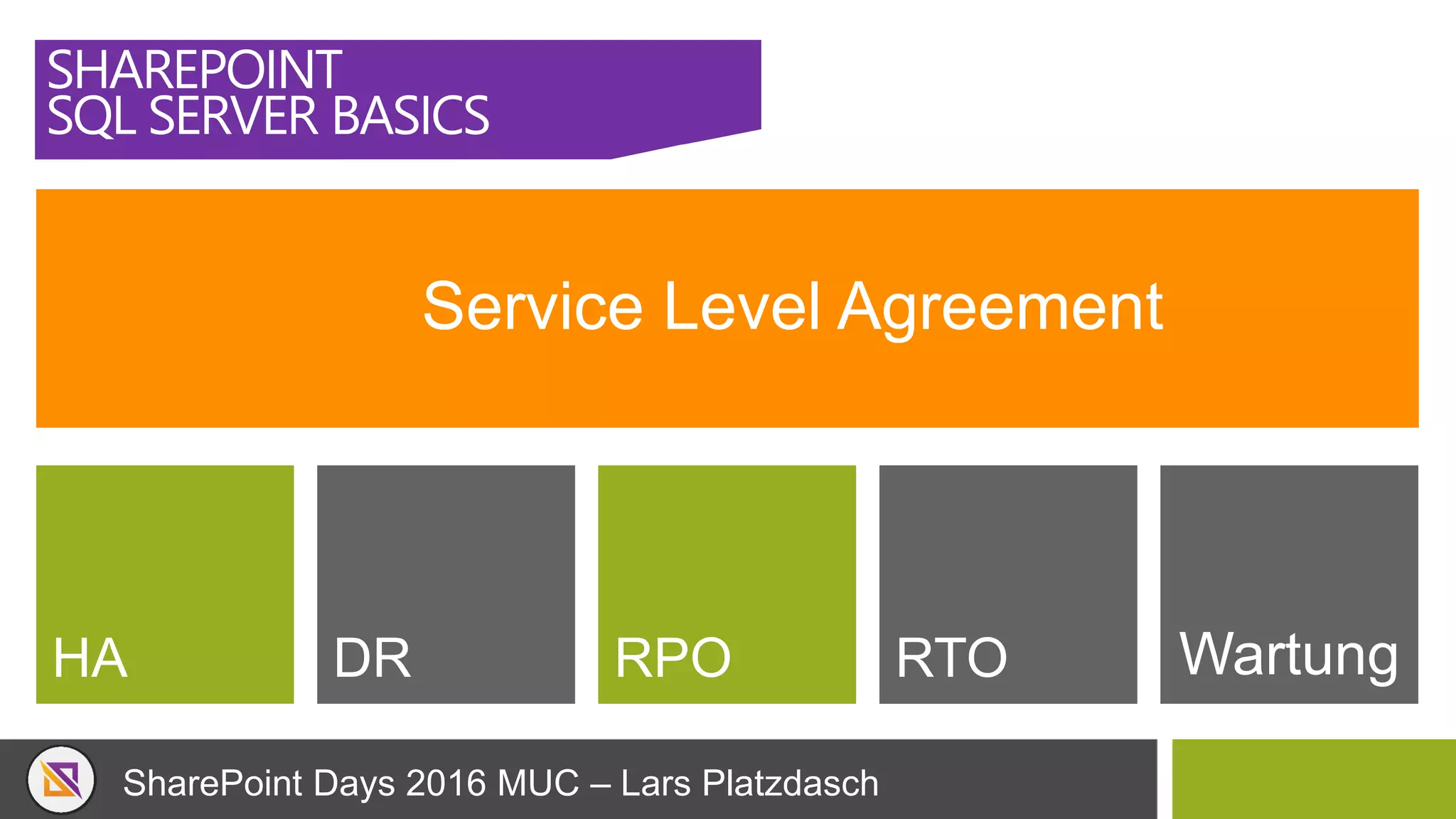
Service Level Agreement
HA DR RPO RTO Wartung
SharePoint Days 2016 MUC – Lars Platzdasch
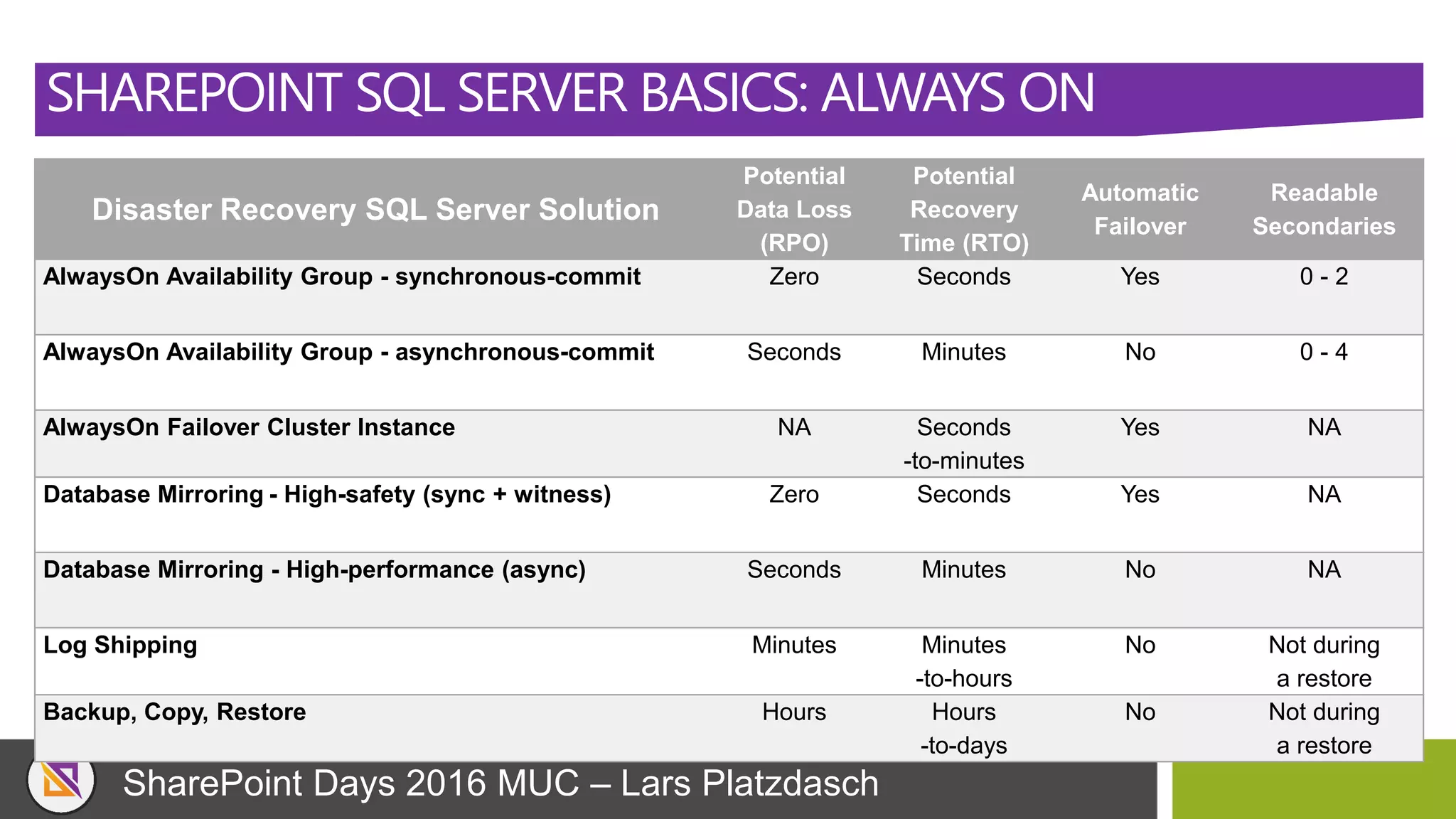
SHAREPOINT SQL SERVER BASICS: ALWAYS ON
Disaster Recovery SQL Server Solution
Potential
Data Loss
(RPO)
Potential
Recovery
Time (RTO)
Automatic
Failover
Readable
Secondaries
AlwaysOn Availability Group - synchronous-commit Zero Seconds Yes 0 - 2
AlwaysOn Availability Group - asynchronous-commit Seconds Minutes No 0 - 4
AlwaysOn Failover Cluster Instance NA Seconds
-to-minutes
Yes NA
Database Mirroring - High-safety (sync + witness) Zero Seconds Yes NA
Database Mirroring - High-performance (async) Seconds Minutes No NA
Log Shipping Minutes Minutes
-to-hours
No Not during
a restore
Backup, Copy, Restore Hours Hours
-to-days
No Not during
a restore
SharePoint Days 2016 MUC – Lars Platzdasch
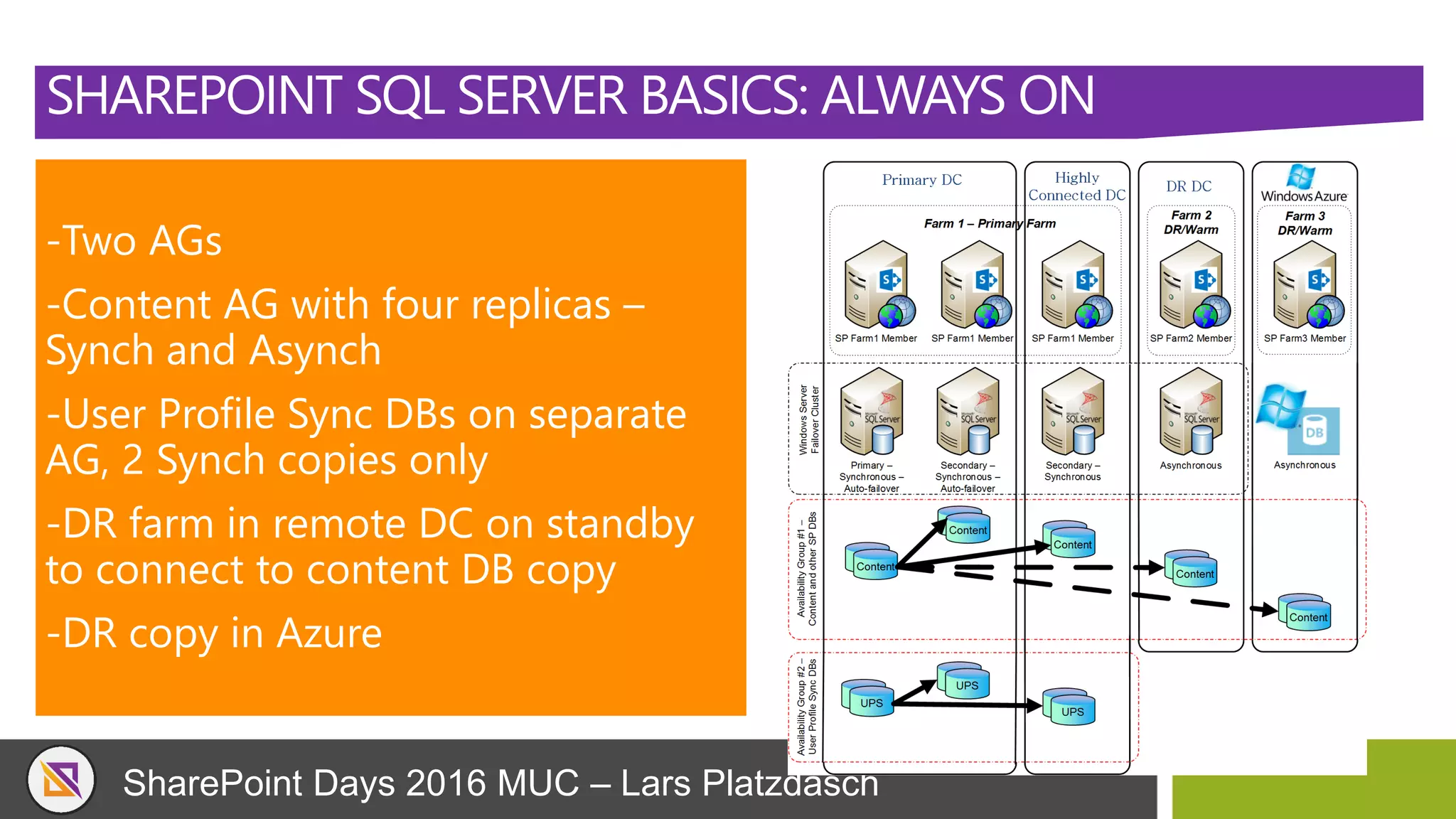
SHAREPOINT SQL SERVER BASICS: ALWAYS ON
-Two AGs
-Content AG with four replicas –
Synch and Asynch
-User Profile Sync DBs on separate
AG, 2 Synch copies only
-DR farm in remote DC on standby
to connect to content DB copy
-DR copy in Azure
SharePoint Days 2016 MUC – Lars Platzdasch
SHAREPOINT
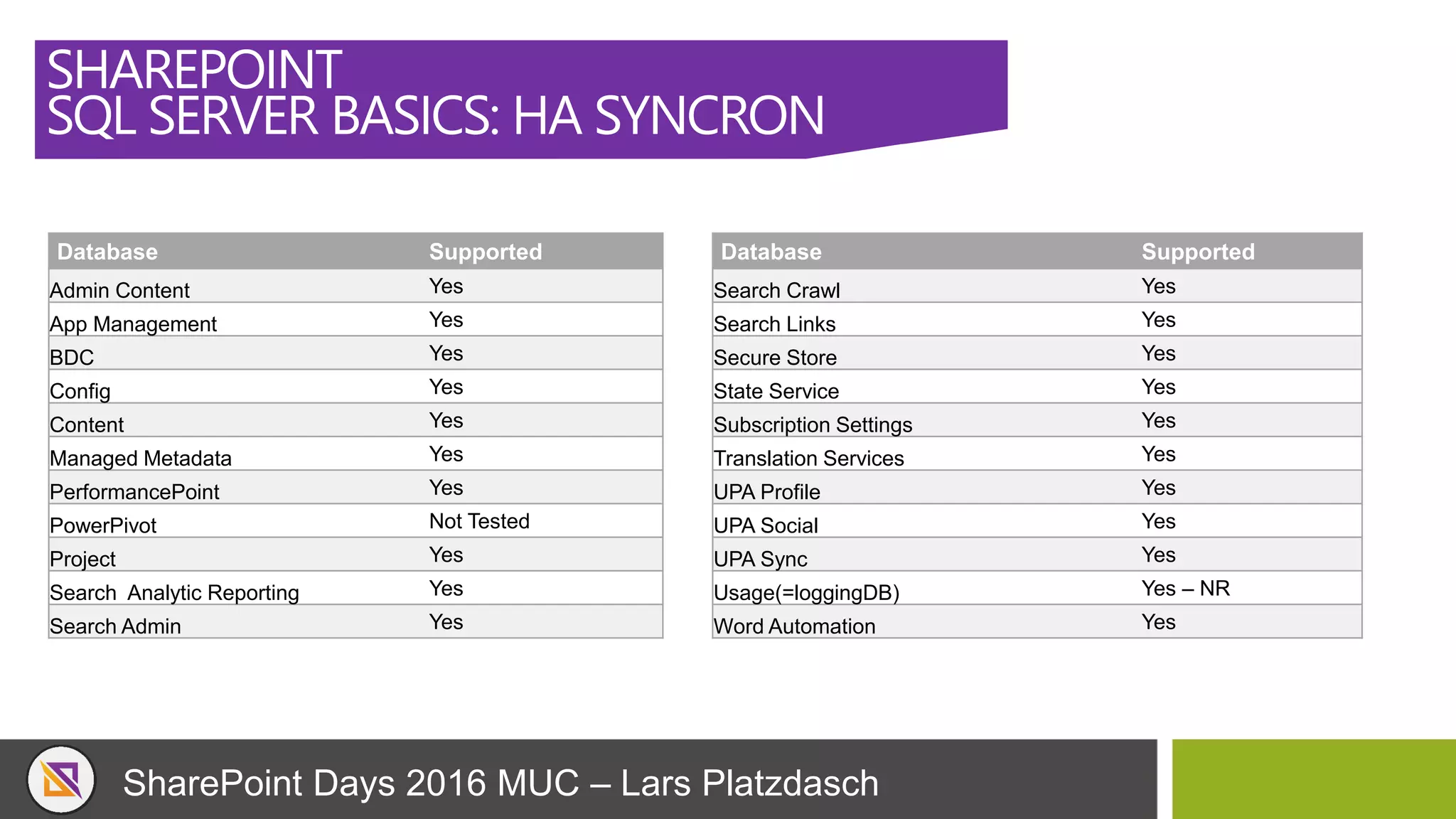
SQL SERVER BASICS: HA SYNCRON
Database Supported
Admin Content Yes
App Management Yes
BDC Yes
Config Yes
Content Yes
Managed Metadata Yes
PerformancePoint Yes
PowerPivot Not Tested
Project Yes
Search Analytic Reporting Yes
Search Admin Yes
Database Supported
Search Crawl Yes
Search Links Yes
Secure Store Yes
State Service Yes
Subscription Settings Yes
Translation Services Yes
UPA Profile Yes
UPA Social Yes
UPA Sync Yes
Usage(=loggingDB) Yes – NR
Word Automation Yes
SharePoint Days 2016 MUC – Lars Platzdasch
SHAREPOINT
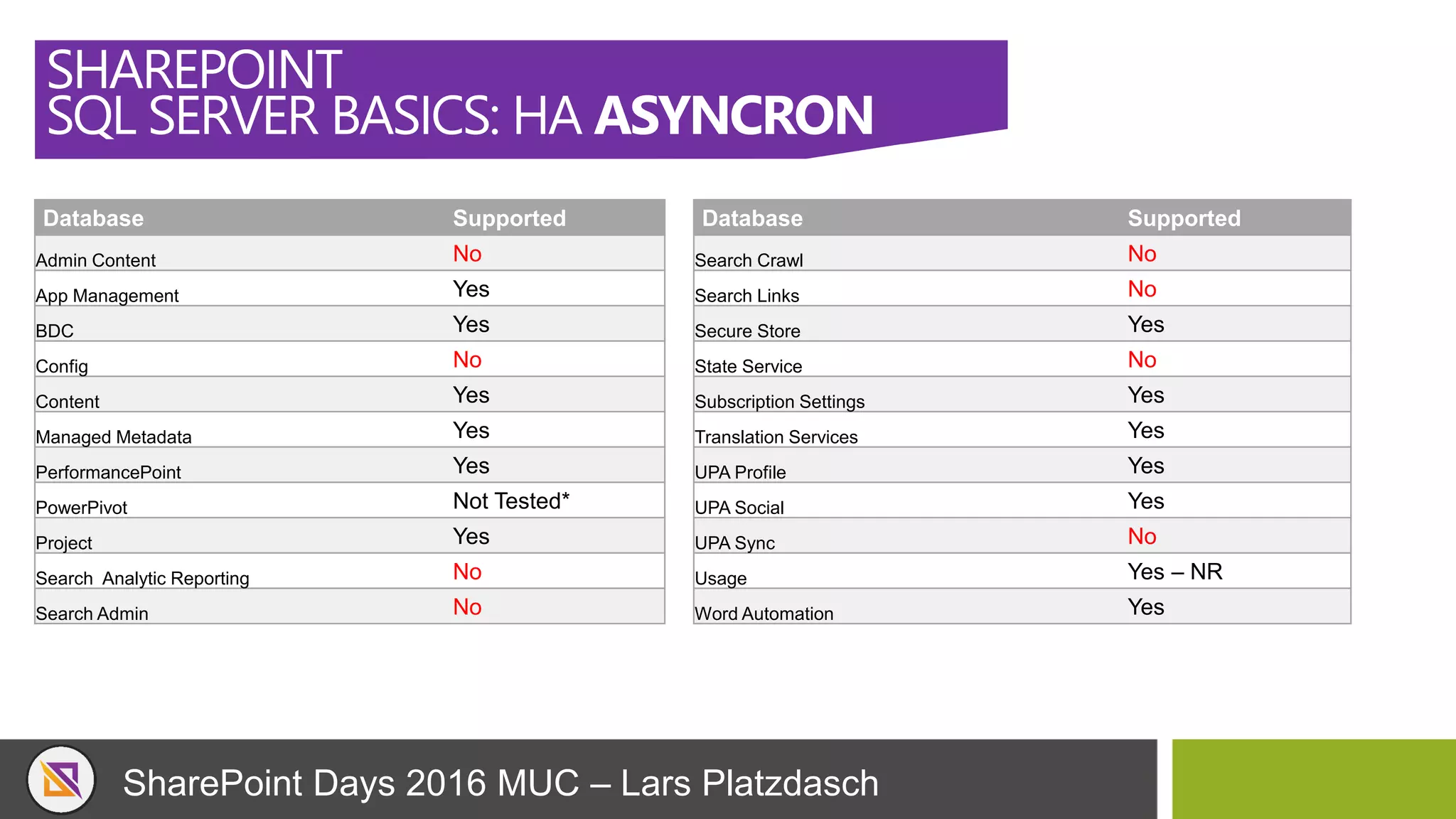
SQL SERVER BASICS: HA ASYNCRON
Database Supported
Admin Content No
App Management Yes
BDC Yes
Config No
Content Yes
Managed Metadata Yes
PerformancePoint Yes
PowerPivot Not Tested*
Project Yes
Search Analytic Reporting No
Search Admin No
Database Supported
Search Crawl No
Search Links No
Secure Store Yes
State Service No
Subscription Settings Yes
Translation Services Yes
UPA Profile Yes
UPA Social Yes
UPA Sync No
Usage Yes – NR
Word Automation Yes
SharePoint Days 2016 MUC – Lars Platzdasch
SHAREPOINT
SQL SERVER BASICS
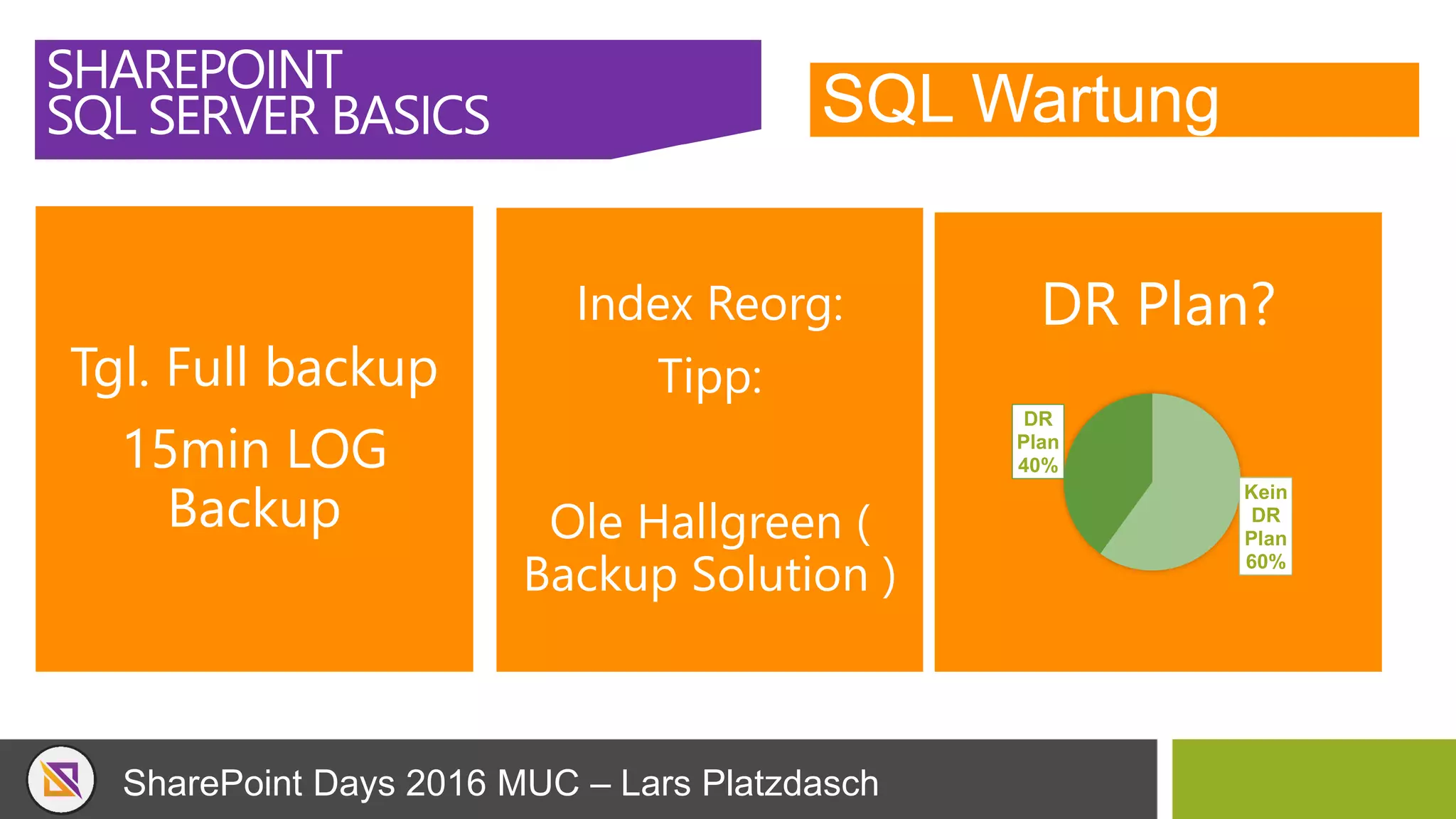
SQL Wartung
SharePoint Days 2016 MUC – Lars Platzdasch
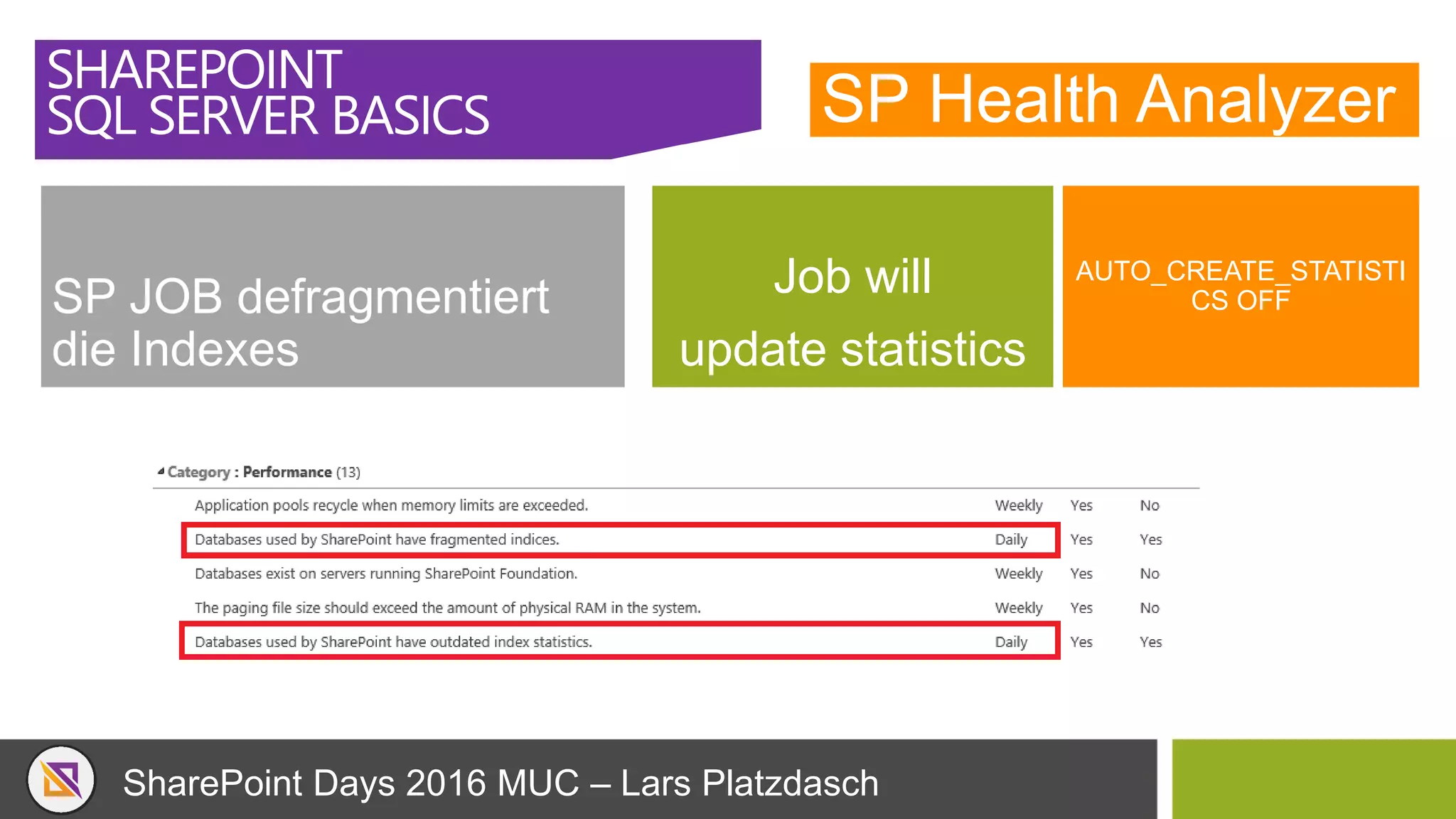
SP Health Analyzer
SP JOB defragmentiert
die Indexes
Job will
update statistics
AUTO_CREATE_STATISTI
CS OFF
SHAREPOINT
SQL SERVER BASICS
SharePoint Days 2016 MUC – Lars Platzdasch
SQL Wartung
SHAREPOINT
SQL SERVER BASICS
Tgl. Full backup
15min LOG
Backup
Index Reorg:
Tipp:
Ole Hallgreen (
Backup Solution )
DR Plan?
Kein
DR
Plan
60%
DR
Plan
40%
SharePoint Days 2016 MUC – Lars Platzdasch
SHAREPOINT TOPOLOGIE
SharePoint Days 2016 MUC – Lars Platzdasch
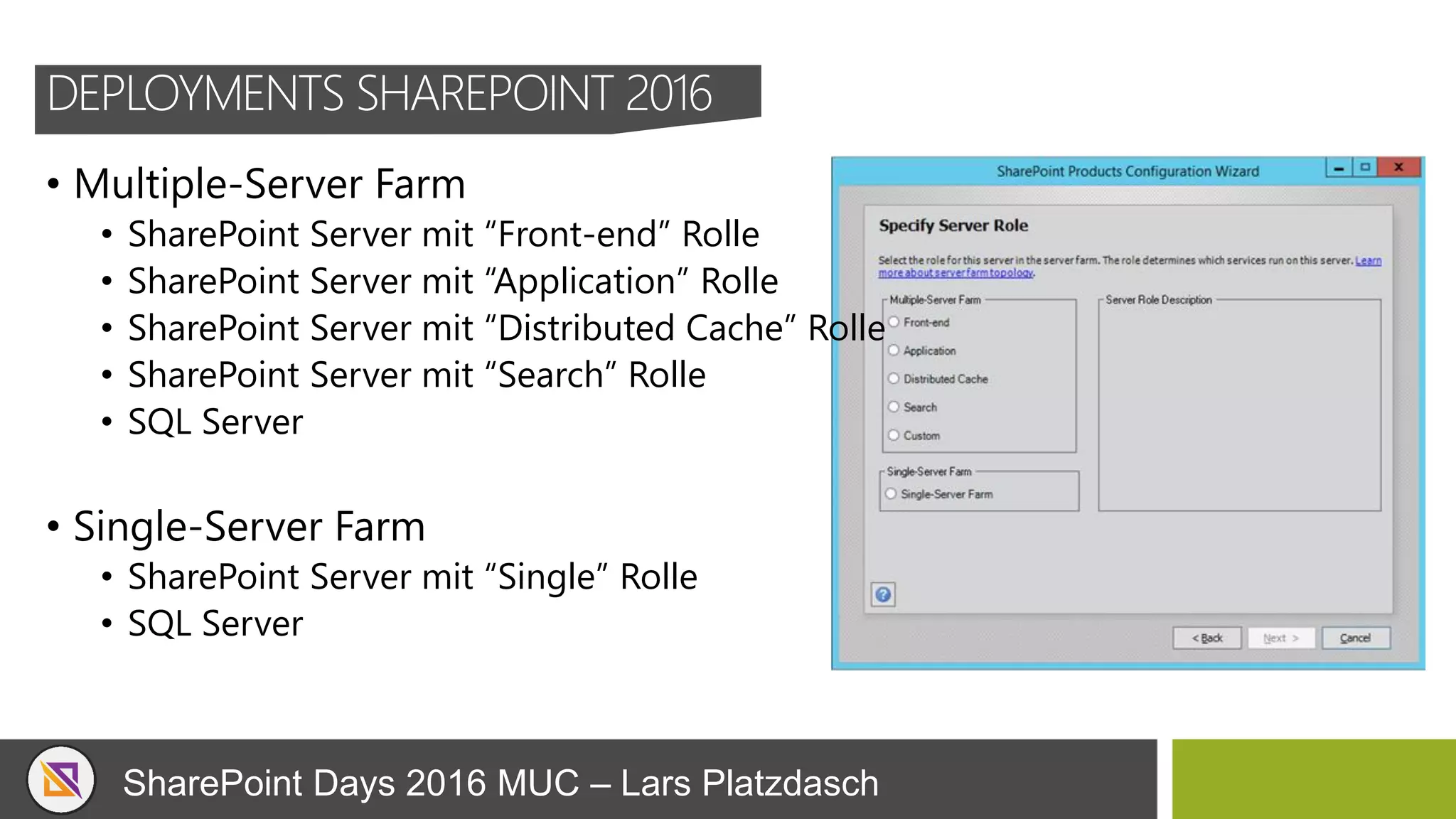
DEPLOYMENTS SHAREPOINT 2016
• Multiple-Server Farm
• SharePoint Server mit “Front-end” Rolle
• SharePoint Server mit “Application” Rolle
• SharePoint Server mit “Distributed Cache” Rolle
• SharePoint Server mit “Search” Rolle
• SQL Server
• Single-Server Farm
• SharePoint Server mit “Single” Rolle
• SQL Server
SharePoint Days 2016 MUC – Lars Platzdasch
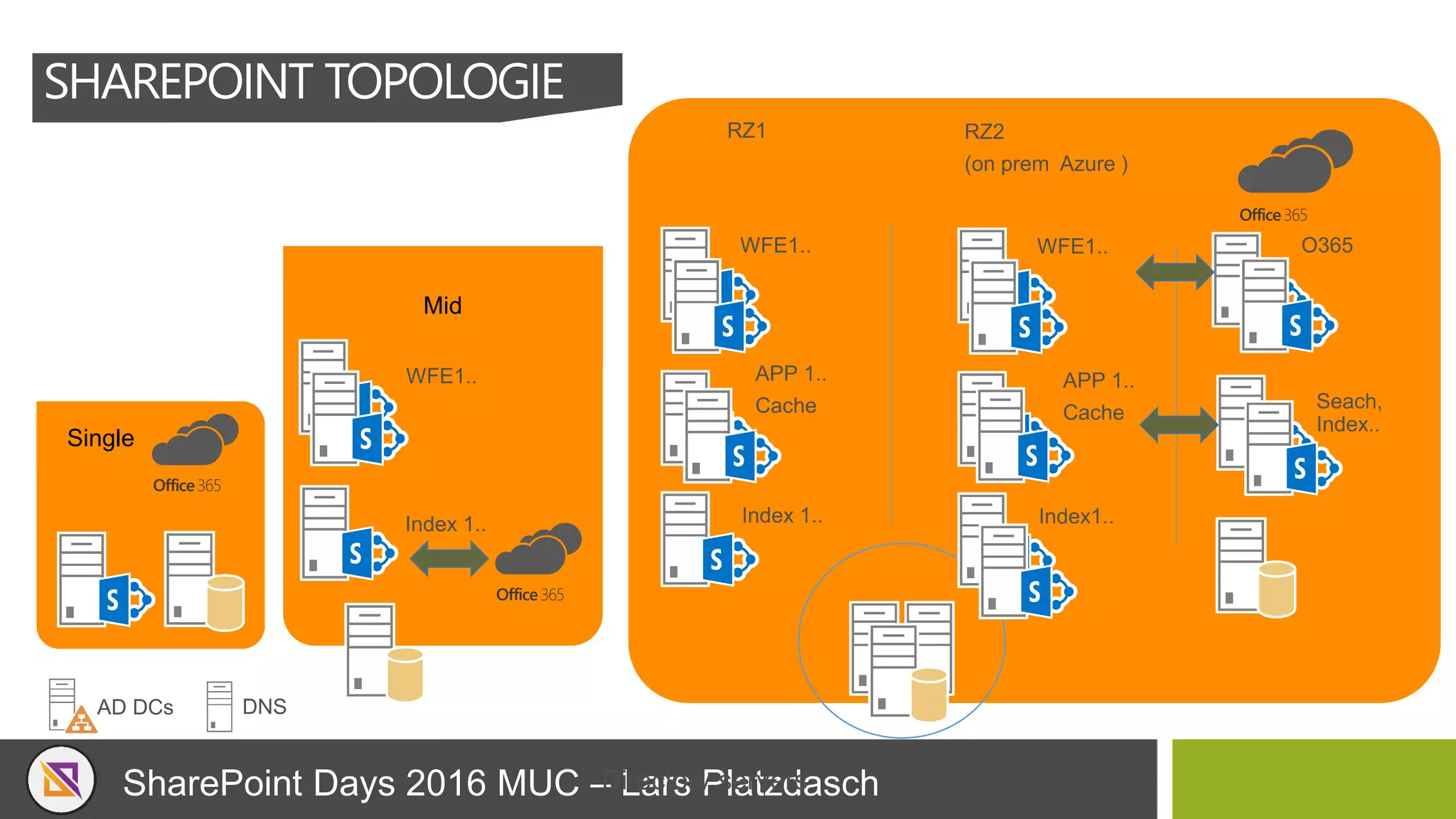
SHAREPOINT TOPOLOGIE
Single
Mid
Office365
Office365
Office365
SharePoint Days 2016 MUC – Lars Platzdasch
SHAREPOINT FARM SIZING
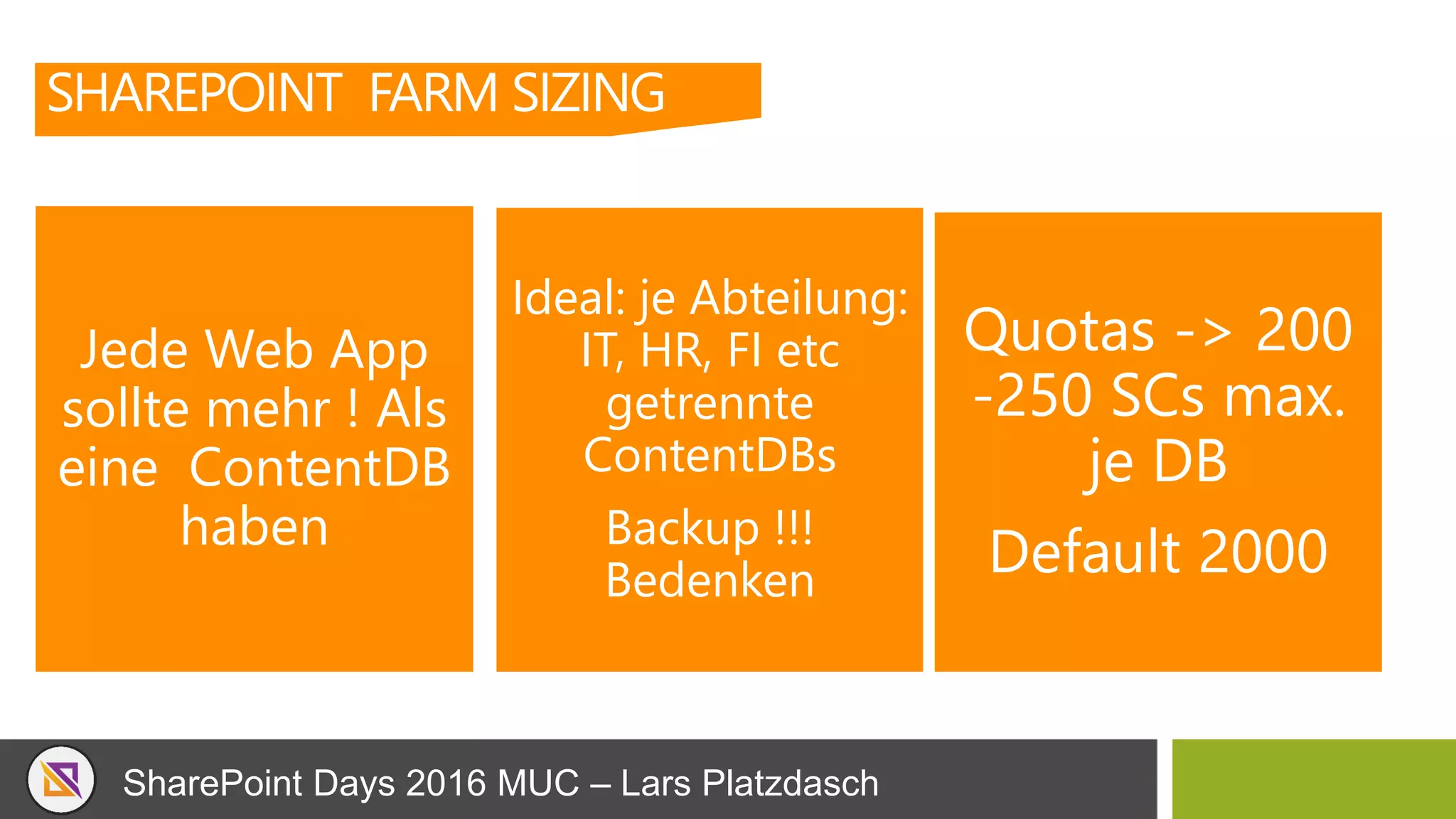
Jede Web App
sollte mehr ! Als
eine ContentDB
haben
Ideal: je Abteilung:
IT, HR, FI etc
getrennte
ContentDBs
Backup !!!
Bedenken
Quotas -> 200
-250 SCs max.
je DB
Default 2000
SharePoint Days 2016 MUC – Lars Platzdasch
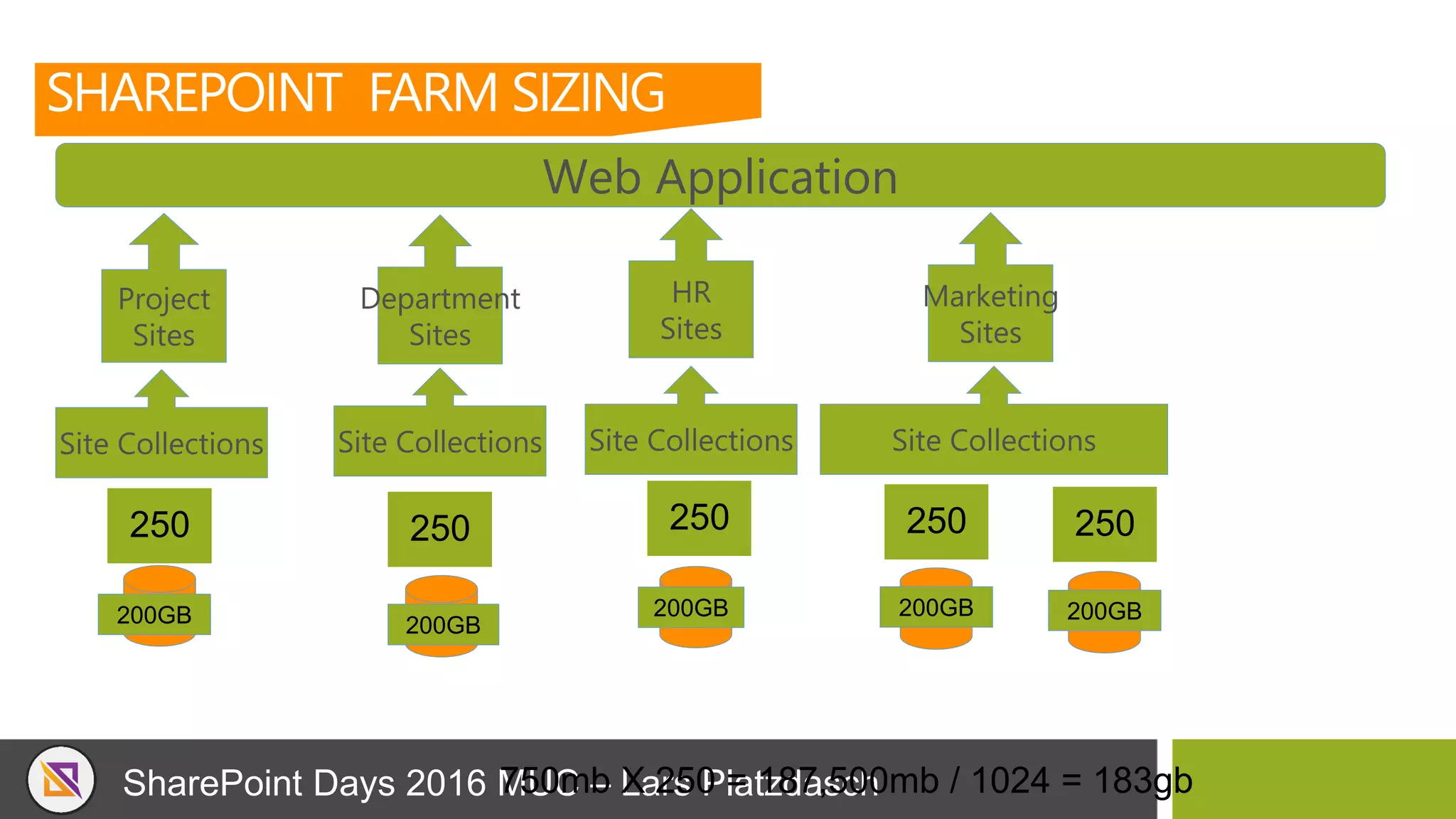
250 250 250
SHAREPOINT FARM SIZING
Web Application
200GB 200GB
200GB
Site Collections Site Collections Site Collections
Project
Sites
Department
Sites
250
200GB
Site Collections
HR
Sites
Marketing
Sites
750mb X 250 = 187,500mb / 1024 = 183gb
250
200GB
SharePoint Days 2016 MUC – Lars Platzdasch
SHAREPOINT FARM SIZING:
BEREITSTELLEN
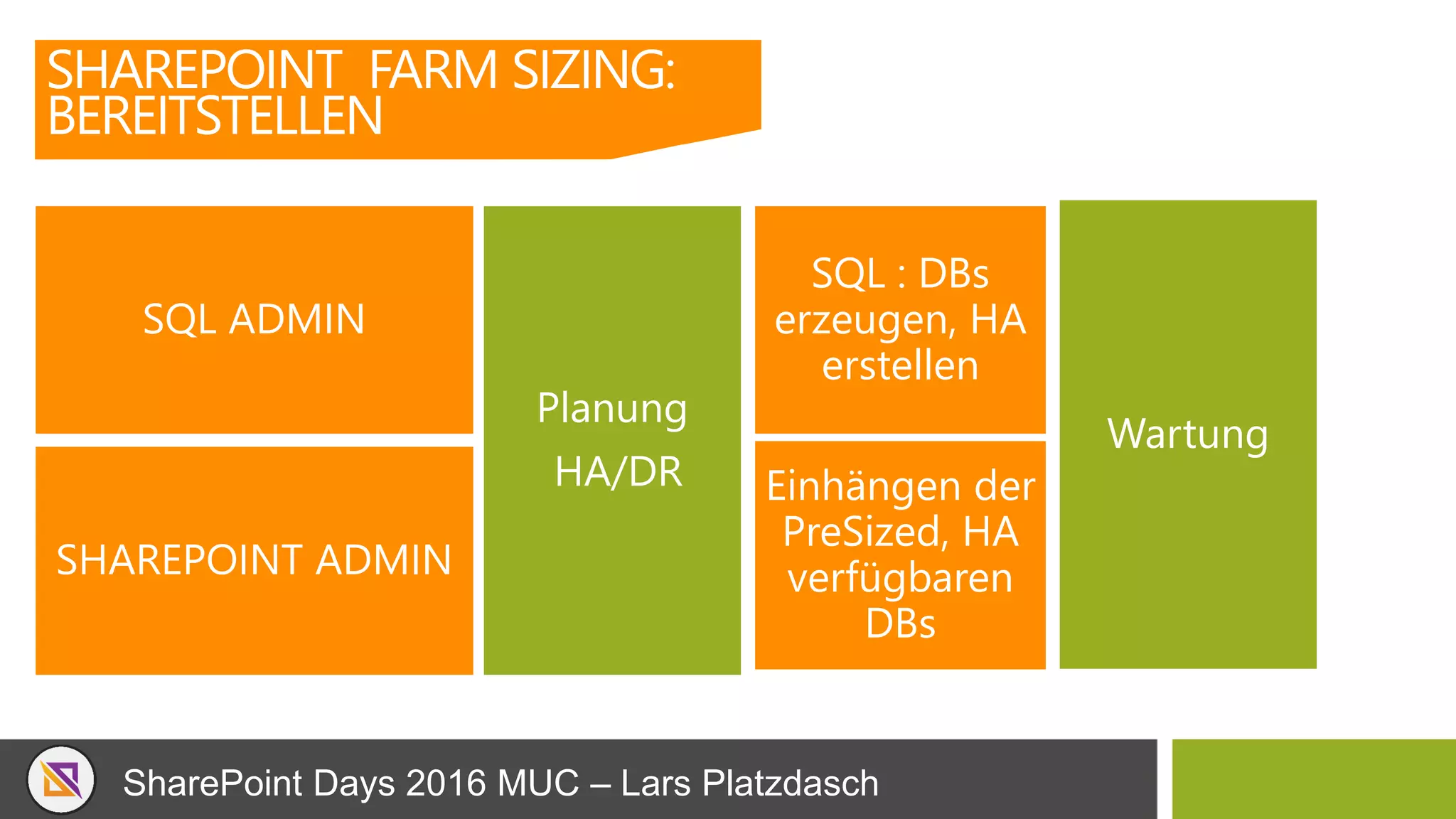
SQL ADMIN
SHAREPOINT ADMIN
SQL : DBs
erzeugen, HA
erstellen
Einhängen der
PreSized, HA
verfügbaren
DBs
Planung
HA/DR
Wartung
SharePoint Days 2016 MUC – Lars Platzdasch
Lars Platzdasch | SharePoint and SQL Server
VIELEN DANK FÜR IHRE ZEIT !
Q & A
Twitter
@LarsPlatzdasch
Xing
/Lars_Platzdasch
LinkedIn
Larsplatzdasch
SharePoint Days 2016 MUC – Lars Platzdasch
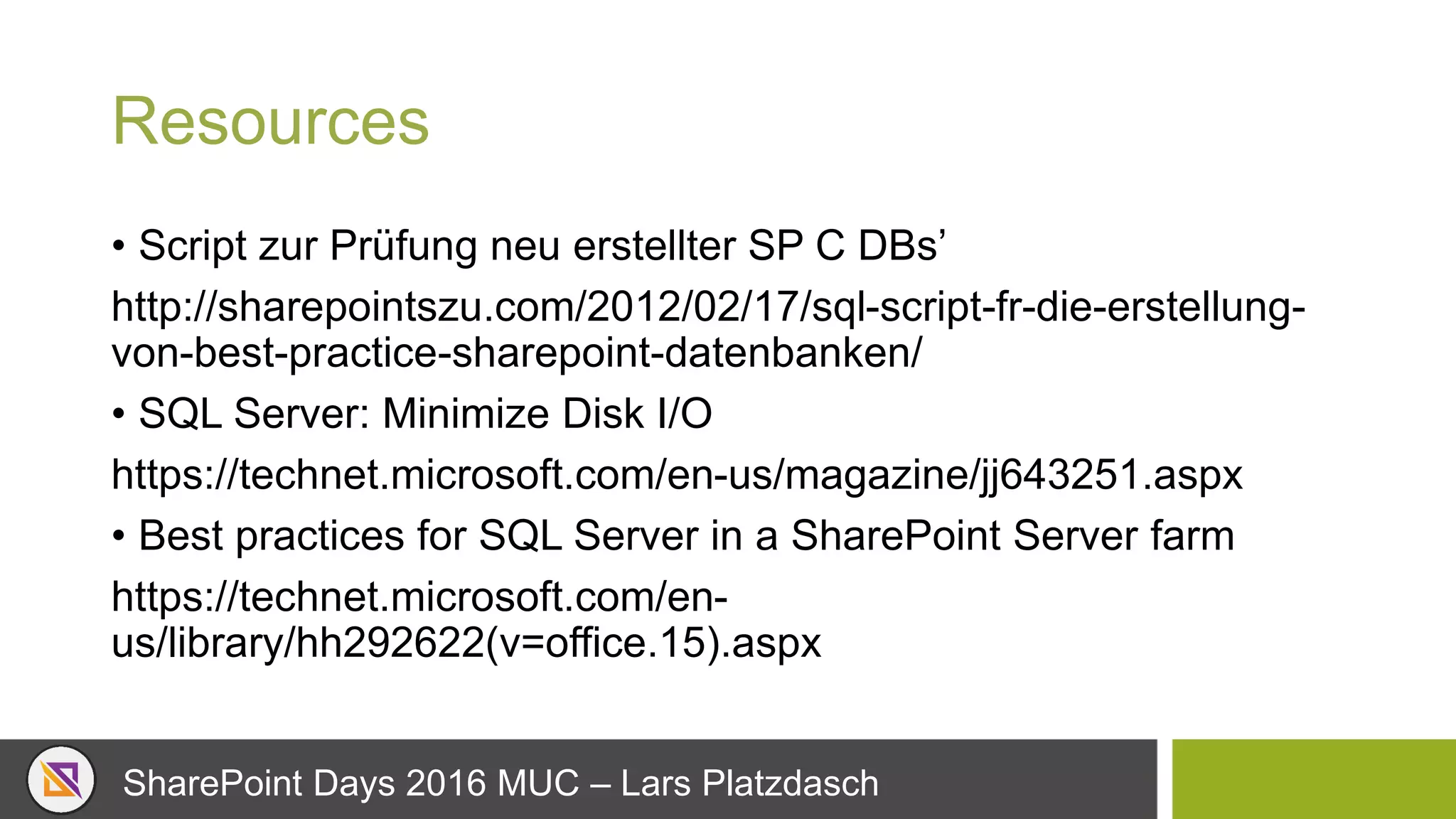
Resources
• Script zur Prüfung neu erstellter SP C DBs’
http://sharepointszu.com/2012/02/17/sql-script-fr-die-erstellung-
von-best-practice-sharepoint-datenbanken/
• SQL Server: Minimize Disk I/O
https://technet.microsoft.com/en-us/magazine/jj643251.aspx
• Best practices for SQL Server in a SharePoint Server farm
https://technet.microsoft.com/en-
us/library/hh292622(v=office.15).aspx
SharePoint Days 2016 MUC – Lars Platzdasch
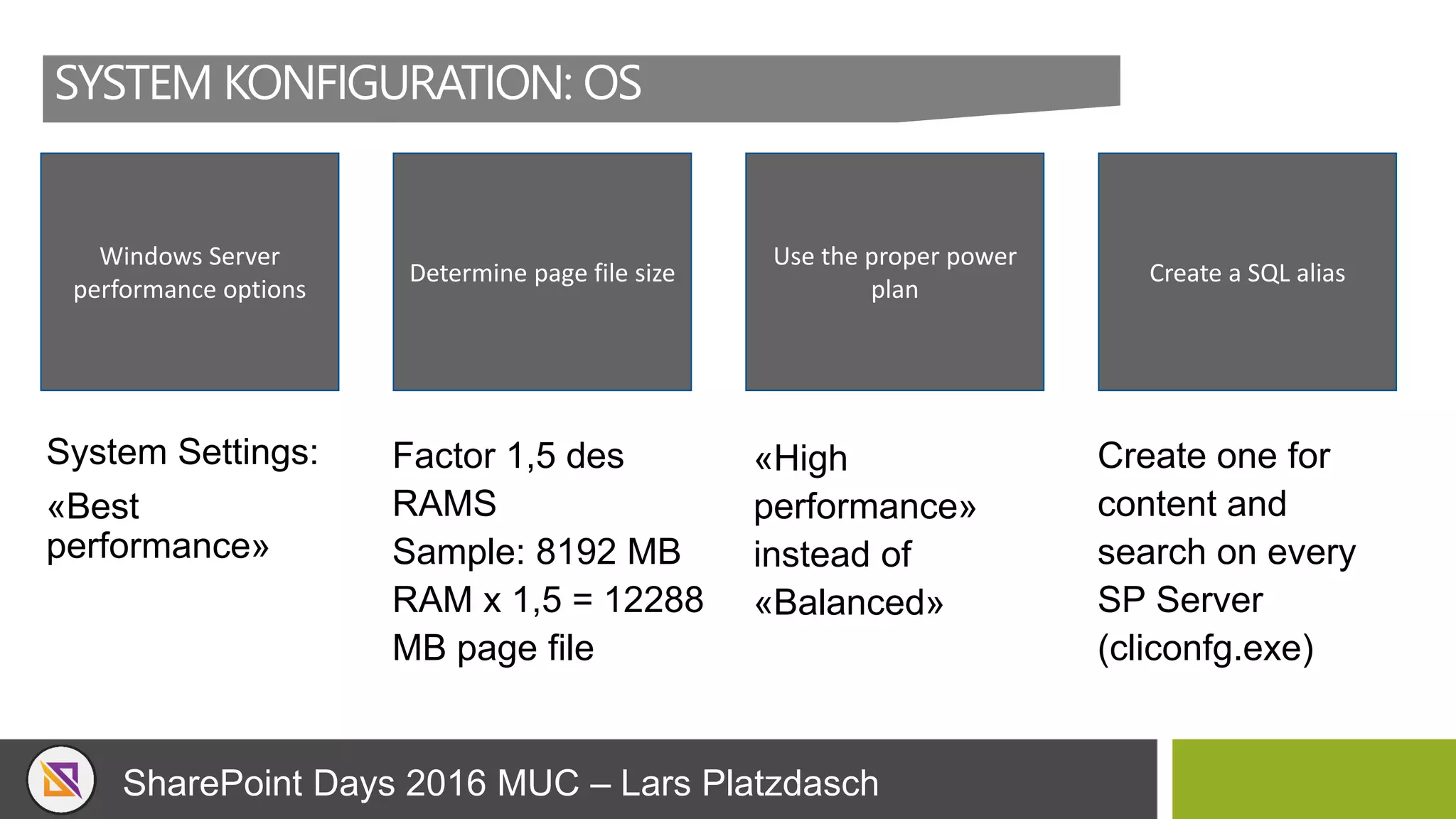
SYSTEM KONFIGURATION: OS
System Settings:
«Best
performance»
Windows Server
performance options
Determine page file size
Use the proper power
plan
Create a SQL alias
Factor 1,5 des
RAMS
Sample: 8192 MB
RAM x 1,5 = 12288
MB page file
«High
performance»
instead of
«Balanced»
Create one for
content and
search on every
SP Server
(cliconfg.exe)
SharePoint Days 2016 MUC – Lars Platzdasch

SharePoint 2016 das fliegen lernen - SQL Server Performance Optimierung

  • 1.
    SharePoint 2013/2016 dasfliegen lernen Tuning & Optimierung des SQL Servers was jeder SP oder SQL Admin wissen sollte Lars Platzdasch SharePoint Days 08.12.2016 MUC
  • 2.
    SharePoint Days 2016MUC – Lars Platzdasch Sprecher: Lars Platzdasch Twitter @LarsPlatzdasch Xing /Lars_Platzdasch LinkedIn Larsplatzdasch Web www.platzdasch.de www.3perspektiven.de Microsoft Certified Trainer Microsoft Certified Solutions Expert: SQL Server Data Platform Microsoft Certified Solutions Expert: SharePoint Microsoft Certified IT Professional: SharePoint 2010, Administrator Microsoft Certified IT Professional: SharePoint 2010, Developer Microsoft Certified Application Developer: .NET platzdasch netConsult GmbH & Co. KG | ISV 24/7 Support für SQL / SharePoint 3 Perspektiven GmbH | MBS >20 IT, >18 Jahre SQL Server, 13 Jahre SharePoint
  • 3.
    SharePoint Days 2016MUC – Lars Platzdasch 3 Perspektiven GmbH www.3perspektiven.de DIE SPEZIALISTEN FÜR WISSENSMANAGEMENT UND WISSENSTRANSFER Wichtige Mitarbeiter scheiden aus? Know-how muss gesichert werden? Sie möchten ein Firmenwiki? Sie wollen Wissensmanagement einführen? Sie wollen Microsoft SharePoint nutzen? Hierfür haben wir praxisnahe Lösungen! netConsult GmbH & Co.KG www.platzdasch.de Individual Software Entwicklung 24/7 Support SQL Server, SharePoint, Power BI 24/7 Supportunterstützung für SQL Server, SharePoint, Cluster und Storage Systeme, Performance Optimierung, Setup, Helpdesk Microsoft Certified Partner (Gold/Silver ISV) Microsoft SharePoint Solution Center SAP SharePoint Integration NetApp Certified Storage Silver Partner DataCore Certified Storage Partner Dell Server / Storage Service Partner
  • 4.
    SharePoint Days 2016MUC – Lars Platzdasch ACHTUNG: FALLS JEMAND ETWAS NACH LESEN MÖCHTE Hat du Kopp wie Sieb, muttu auf schreiben ! ( oder … ) Slides sind auf http://www.slideshare.net/larspl , Sway Konferenz Webseite ( ist voll kommen OK .. ( es ist auch schon 14:45 ++ ;-)
  • 5.
    SharePoint Days 2016MUC – Lars Platzdasch Überblick, Roadmap SQL Server Konfiguration SharePoint / SQL Server Basics SharePoint Topologie Bereitstellung AGENDA
  • 6.
    SharePoint Days 2016MUC – Lars Platzdasch 2001 SharePoint Portal Server 2001 2003 SharePoint Portal Server 2003 2006 Office SharePoint Server 2007 2009 SharePoint Server 2010 2012 SharePoint Server 2013 2016 SharePoint Server 2016 Cloud-Inspired Experiences Cloud and Enterprise Social Content Management Core Collaboration Microsoft ManagedSolutions Microsoft OnlineServices(BPOS) Office365 SHAREPOINT RELEASE HISTORY UND ROADMAP Office365
  • 7.
    SharePoint Days 2016MUC – Lars Platzdasch Content DB Size • TB-sized Databases now Officially Supported Site Collections per Content DB • 100,000 Site Collections per Content Databases List Threshold • Increased List Threshold >5000 Items • No word yet on how many more…  Max File Size • Maximum File Size now 10GB • No Character Restrictions – Drag & Drop files with ‘&’ in them!!! Indexed Items • Search scale doubled to 500 Million items in 2016… In 2016… In 2016… In 2016… In 2016… In 2013… • Maximum of 10 Million Indexed items per search partition… In 2013… • Max 200GB Databases supported in General usage scenarios* In 2013… • Max 5000 Site Collections per Content DB In 2013… • Maximum 5000 Items per Query In 2013… • Max 2GB File Size* SHAREPOINT 2016 LIMITS NEWS
  • 8.
    SharePoint Days 2016MUC – Lars Platzdasch WARUM SIND WIR HEUTE HIER? WAS BREMST, WAS SOLLTEN WIR UND ANSEHEN? Top Performance Bottlenecks >1200 Kundeninstallationen 2 davon > 50.000 Users Verbraucht wurden in dieser Zeit mindestens min. 5000 Tassen Kaffee http://pal.codeplex.com/
  • 9.
    SharePoint Days 2016MUC – Lars Platzdasch SQL SERVER KONFIGURATION
  • 10.
    SharePoint Days 2016MUC – Lars Platzdasch SQL SERVER KONFIGURATION Optimize Hardware CPU RAM DISK 64k Block Size NTFS Network <1ms Latency
  • 11.
    SharePoint Days 2016MUC – Lars Platzdasch SQL SERVER KONFIGURATION SharePoint 20132016: • SQL Server 2008 R2 SP1 • SQL Server 2012 (SP1 for BI) • SQL Server 2014 SP1 (SP2013 SP1 & April CU) • SQL Server 2016 CTP 3.1 ff ( RTM + SP1) SSMS nicht auf dem SQL Server installieren Dedizierte Instance SQL Service mit einem Managed Account Keine besonderen Rechte Named Instance Sharepoint
  • 12.
    SharePoint Days 2016MUC – Lars Platzdasch SQL SERVER KONFIGURATION Collation: Latin1_General_CI_AS_KS_WS (Case I,Accent S,Kana S,With S, Collation verwenden Jede CI Collation ist supported Latin1_XXX_CI_XX aber ist das eine Gute Idee? Nach dem Setup keine Änderung möglich!
  • 13.
    SharePoint Days 2016MUC – Lars Platzdasch SQL SERVER KONFIGURATION Max degree of parallelism Maxdop=1
  • 14.
    SharePoint Days 2016MUC – Lars Platzdasch SQL SERVER KONFIGURATION Index Fill Faktor:80% Compress Backup Intelligente Datenaufteilung
  • 15.
    SharePoint Days 2016MUC – Lars Platzdasch SQL SERVER KONFIGURATION Service Account ( SQL Server ) TraceFlag: -T1117 ( Gleichmässiger AutoGrow auf allen Files ) < (SQL2014) TraceFlag: -T1118 ( Speicherzuordnung wird optimiert {eight pages from the same extent }) ( SQL 2014/2016) Lock Pages in Memory Privileg ( local Policy ) TraceFlags : -T845 (STD zusätzlich)
  • 16.
    SharePoint Days 2016MUC – Lars Platzdasch SQL SERVER KONFIGURATION Service Account ( SQL Server ) - Instant File Initialization Recht: (SE_MANAGE_VOLUME_NAME ) Volume Maintenance Task. By default, only Local Admins have the access to it. Lock PageOpen Local Security Policy> Local Policies > User Rights Management and go to the Perform
  • 17.
    SharePoint Days 2016MUC – Lars Platzdasch SQL SERVER KONFIGURATION Kein Simple Recovery Mode , (Ausnahme ConfigDB) Disable Boost SQL Server Priority Temp DB auf 10GB und min 4 Files verteilen, Autogrowth 1GBT-Log Backup alle 15min bis max. 24h Content DBs Pre- Size Index Maintennance: FRAG <=30% Reorganisation, > Rebuild
  • 18.
    SharePoint Days 2016MUC – Lars Platzdasch SQL SERVER KONFIGURATION SQL Server HW Setup
  • 19.
    SharePoint Days 2016MUC – Lars Platzdasch SQL SERVER KONFIGURATION Workload Planung
  • 20.
    SharePoint Days 2016MUC – Lars Platzdasch SHAREPOINT SQL SERVER BASICS
  • 21.
    SharePoint Days 2016MUC – Lars Platzdasch SHAREPOINT SQL SERVER BASICS 95% of SharePoint content stored in SQL Server Farm Configuration information liegt in configuration db Central Administration content liegt in einer eigenen content db Fasst jede Service App hat mindest eine DB Jede Web Applikation hat mindest eine Content DB Eine Farm kann durch aus >20 DBs haben
  • 22.
    SharePoint Days 2016MUC – Lars Platzdasch SHAREPOINT SQL SERVER BASICS Service Level Agreement HA DR RPO RTO Wartung
  • 23.
    SharePoint Days 2016MUC – Lars Platzdasch SHAREPOINT SQL SERVER BASICS: ALWAYS ON Disaster Recovery SQL Server Solution Potential Data Loss (RPO) Potential Recovery Time (RTO) Automatic Failover Readable Secondaries AlwaysOn Availability Group - synchronous-commit Zero Seconds Yes 0 - 2 AlwaysOn Availability Group - asynchronous-commit Seconds Minutes No 0 - 4 AlwaysOn Failover Cluster Instance NA Seconds -to-minutes Yes NA Database Mirroring - High-safety (sync + witness) Zero Seconds Yes NA Database Mirroring - High-performance (async) Seconds Minutes No NA Log Shipping Minutes Minutes -to-hours No Not during a restore Backup, Copy, Restore Hours Hours -to-days No Not during a restore
  • 24.
    SharePoint Days 2016MUC – Lars Platzdasch SHAREPOINT SQL SERVER BASICS: ALWAYS ON -Two AGs -Content AG with four replicas – Synch and Asynch -User Profile Sync DBs on separate AG, 2 Synch copies only -DR farm in remote DC on standby to connect to content DB copy -DR copy in Azure
  • 25.
    SharePoint Days 2016MUC – Lars Platzdasch SHAREPOINT SQL SERVER BASICS: HA SYNCRON Database Supported Admin Content Yes App Management Yes BDC Yes Config Yes Content Yes Managed Metadata Yes PerformancePoint Yes PowerPivot Not Tested Project Yes Search Analytic Reporting Yes Search Admin Yes Database Supported Search Crawl Yes Search Links Yes Secure Store Yes State Service Yes Subscription Settings Yes Translation Services Yes UPA Profile Yes UPA Social Yes UPA Sync Yes Usage(=loggingDB) Yes – NR Word Automation Yes
  • 26.
    SharePoint Days 2016MUC – Lars Platzdasch SHAREPOINT SQL SERVER BASICS: HA ASYNCRON Database Supported Admin Content No App Management Yes BDC Yes Config No Content Yes Managed Metadata Yes PerformancePoint Yes PowerPivot Not Tested* Project Yes Search Analytic Reporting No Search Admin No Database Supported Search Crawl No Search Links No Secure Store Yes State Service No Subscription Settings Yes Translation Services Yes UPA Profile Yes UPA Social Yes UPA Sync No Usage Yes – NR Word Automation Yes
  • 27.
    SharePoint Days 2016MUC – Lars Platzdasch SHAREPOINT SQL SERVER BASICS SQL Wartung
  • 28.
    SharePoint Days 2016MUC – Lars Platzdasch SP Health Analyzer SP JOB defragmentiert die Indexes Job will update statistics AUTO_CREATE_STATISTI CS OFF SHAREPOINT SQL SERVER BASICS
  • 29.
    SharePoint Days 2016MUC – Lars Platzdasch SQL Wartung SHAREPOINT SQL SERVER BASICS Tgl. Full backup 15min LOG Backup Index Reorg: Tipp: Ole Hallgreen ( Backup Solution ) DR Plan? Kein DR Plan 60% DR Plan 40%
  • 30.
    SharePoint Days 2016MUC – Lars Platzdasch SHAREPOINT TOPOLOGIE
  • 31.
    SharePoint Days 2016MUC – Lars Platzdasch DEPLOYMENTS SHAREPOINT 2016 • Multiple-Server Farm • SharePoint Server mit “Front-end” Rolle • SharePoint Server mit “Application” Rolle • SharePoint Server mit “Distributed Cache” Rolle • SharePoint Server mit “Search” Rolle • SQL Server • Single-Server Farm • SharePoint Server mit “Single” Rolle • SQL Server
  • 32.
    SharePoint Days 2016MUC – Lars Platzdasch SHAREPOINT TOPOLOGIE Single Mid Office365 Office365 Office365
  • 33.
    SharePoint Days 2016MUC – Lars Platzdasch SHAREPOINT FARM SIZING Jede Web App sollte mehr ! Als eine ContentDB haben Ideal: je Abteilung: IT, HR, FI etc getrennte ContentDBs Backup !!! Bedenken Quotas -> 200 -250 SCs max. je DB Default 2000
  • 34.
    SharePoint Days 2016MUC – Lars Platzdasch 250 250 250 SHAREPOINT FARM SIZING Web Application 200GB 200GB 200GB Site Collections Site Collections Site Collections Project Sites Department Sites 250 200GB Site Collections HR Sites Marketing Sites 750mb X 250 = 187,500mb / 1024 = 183gb 250 200GB
  • 35.
    SharePoint Days 2016MUC – Lars Platzdasch SHAREPOINT FARM SIZING: BEREITSTELLEN SQL ADMIN SHAREPOINT ADMIN SQL : DBs erzeugen, HA erstellen Einhängen der PreSized, HA verfügbaren DBs Planung HA/DR Wartung
  • 36.
    SharePoint Days 2016MUC – Lars Platzdasch Lars Platzdasch | SharePoint and SQL Server VIELEN DANK FÜR IHRE ZEIT ! Q & A Twitter @LarsPlatzdasch Xing /Lars_Platzdasch LinkedIn Larsplatzdasch
  • 37.
    SharePoint Days 2016MUC – Lars Platzdasch Resources • Script zur Prüfung neu erstellter SP C DBs’ http://sharepointszu.com/2012/02/17/sql-script-fr-die-erstellung- von-best-practice-sharepoint-datenbanken/ • SQL Server: Minimize Disk I/O https://technet.microsoft.com/en-us/magazine/jj643251.aspx • Best practices for SQL Server in a SharePoint Server farm https://technet.microsoft.com/en- us/library/hh292622(v=office.15).aspx
  • 38.
    SharePoint Days 2016MUC – Lars Platzdasch SYSTEM KONFIGURATION: OS System Settings: «Best performance» Windows Server performance options Determine page file size Use the proper power plan Create a SQL alias Factor 1,5 des RAMS Sample: 8192 MB RAM x 1,5 = 12288 MB page file «High performance» instead of «Balanced» Create one for content and search on every SP Server (cliconfg.exe)
  • 39.
    SharePoint Days 2016MUC – Lars Platzdasch