Copyright © 2019, Oracle and/or its affiliates. All rights reserved. |
(Die Oracle) NoSQL DB für DBAs
Nicht nur was für Mutige
Karin Patenge | karin.patenge@oracle.com | @kpatenge
Principal Solution Engineer | BU Cloud & Core Technologies
Oracle Deutschland B.V. & Co. KG
DOAG 2019 Database | Düsseldorf | 3.-4. Juni 2019 | #DOAGDB19
Copyright © 2019, Oracle and/or its affiliates. All rights reserved. |
Safe Harbor Statement
The preceding is intended to outline our general product direction. It is intended for
information purposes only, and may not be incorporated into any contract. It is not a
commitment to deliver any material, code, or functionality, and should not be relied upon
in making purchasing decisions. The development, release, and timing of any features or
functionality described for Oracle’s products remains at the sole discretion of Oracle.
3
Copyright © 2019, Oracle and/or its affiliates. All rights reserved. |
Agenda
Kurze Einführung in die Oracle NoSQL DB
Durch die DBA Brille auf die Oracle NoSQL DB geschaut
Was wir heute nicht mehr besprechen (können)
Ihre Fragen
1
2
3
4
4
Copyright © 2019, Oracle and/or its affiliates. All rights reserved. |
Kurze Einführung in die Oracle NoSQL DB
Durch die DBA Brille auf die Oracle NoSQL DB geschaut
Was wir heute nicht mehr besprechen (können)
Ihre Fragen
1
2
3
4
5
Copyright © 2019, Oracle and/or its affiliates. All rights reserved. | 6
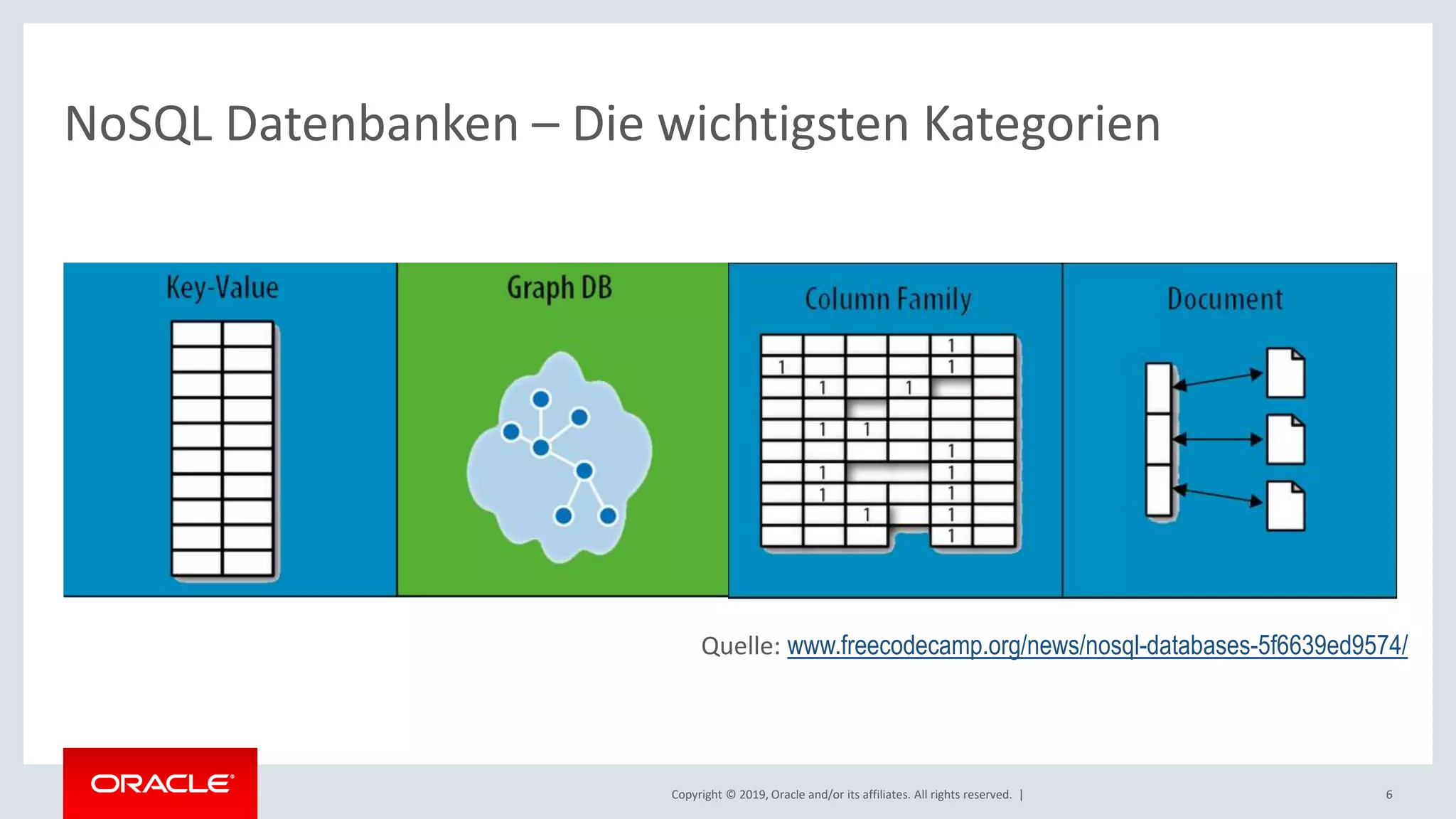
NoSQL Datenbanken – Die wichtigsten Kategorien
Quelle: www.freecodecamp.org/news/nosql-databases-5f6639ed9574/
Copyright © 2019, Oracle and/or its affiliates. All rights reserved. |
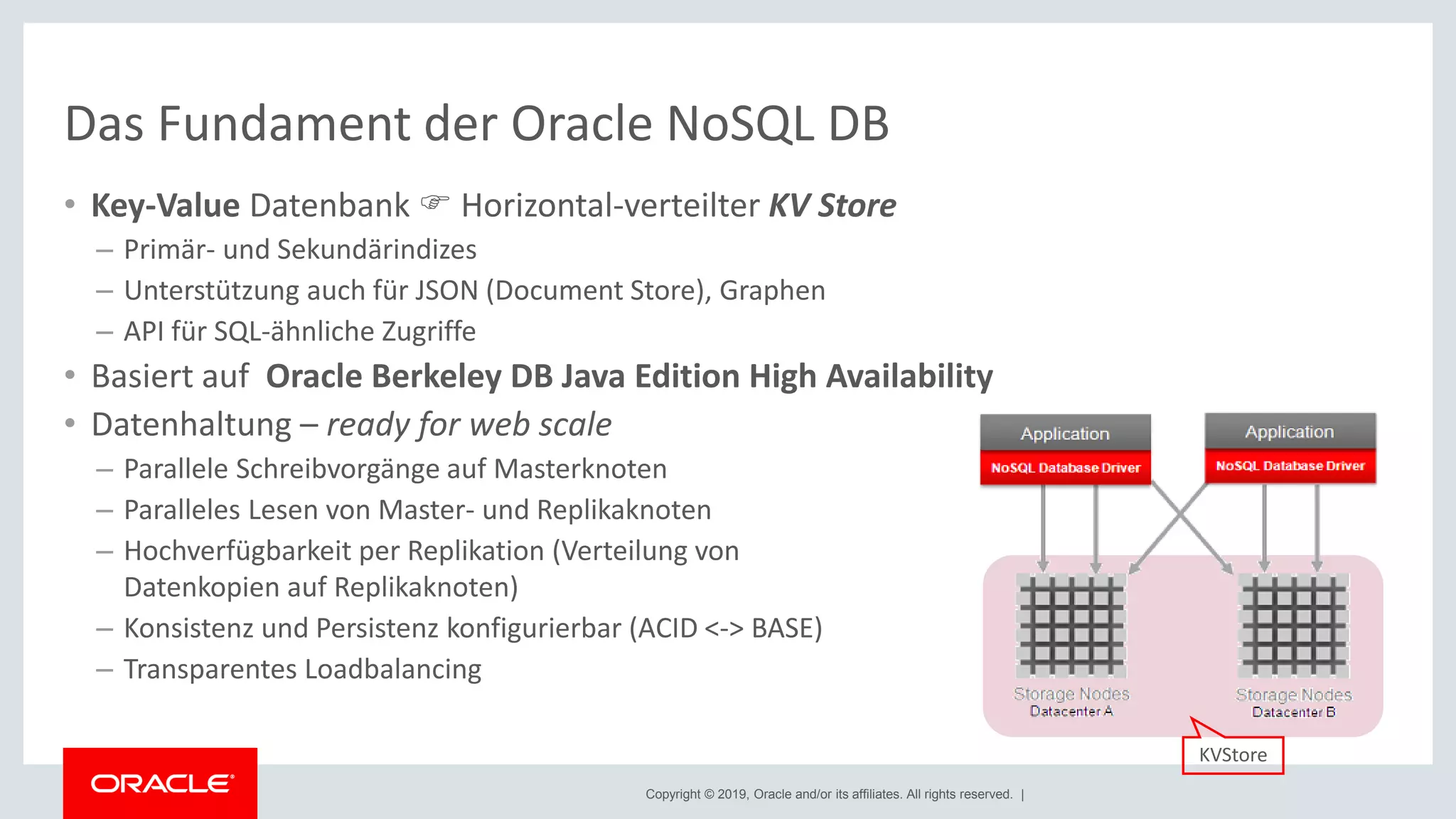
Das Fundament der Oracle NoSQL DB
• Key-Value Datenbank  Horizontal-verteilter KV Store
– Primär- und Sekundärindizes
– Unterstützung auch für JSON (Document Store), Graphen
– API für SQL-ähnliche Zugriffe
• Basiert auf Oracle Berkeley DB Java Edition High Availability
• Datenhaltung – ready for web scale
– Parallele Schreibvorgänge auf Masterknoten
– Paralleles Lesen von Master- und Replikaknoten
– Hochverfügbarkeit per Replikation (Verteilung von
Datenkopien auf Replikaknoten)
– Konsistenz und Persistenz konfigurierbar (ACID <-> BASE)
– Transparentes Loadbalancing
KVStore
Copyright © 2019, Oracle and/or its affiliates. All rights reserved. |
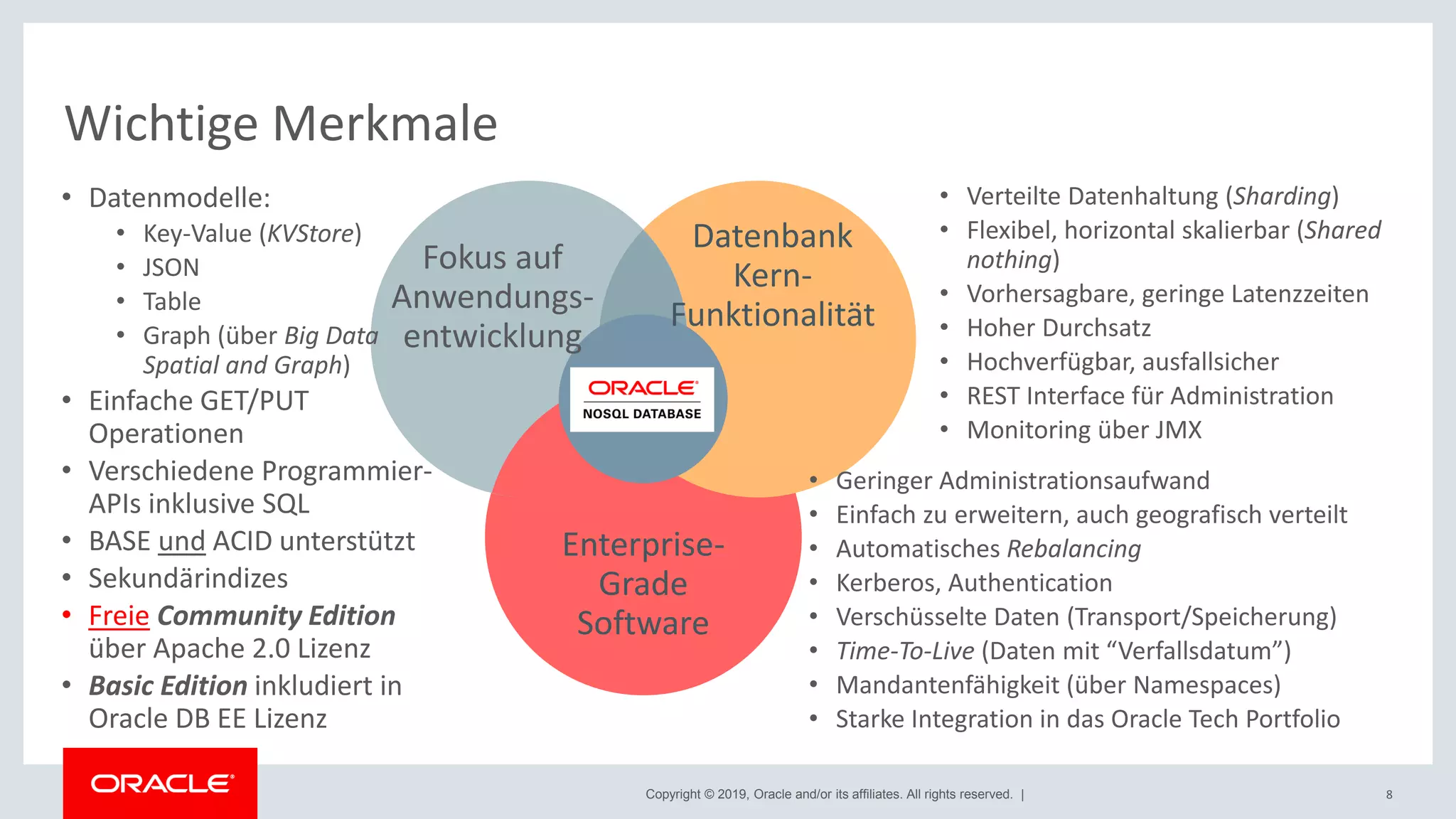
Wichtige Merkmale
Text
Datenbank
Kern-
Funktionalität
Fokus auf
Anwendungs-
entwicklung
Enterprise-
Grade
Software
• Verteilte Datenhaltung (Sharding)
• Flexibel, horizontal skalierbar (Shared
nothing)
• Vorhersagbare, geringe Latenzzeiten
• Hoher Durchsatz
• Hochverfügbar, ausfallsicher
• REST Interface für Administration
• Monitoring über JMX
• Geringer Administrationsaufwand
• Einfach zu erweitern, auch geografisch verteilt
• Automatisches Rebalancing
• Kerberos, Authentication
• Verschüsselte Daten (Transport/Speicherung)
• Time-To-Live (Daten mit “Verfallsdatum”)
• Mandantenfähigkeit (über Namespaces)
• Starke Integration in das Oracle Tech Portfolio
8
• Datenmodelle:
• Key-Value (KVStore)
• JSON
• Table
• Graph (über Big Data
Spatial and Graph)
• Einfache GET/PUT
Operationen
• Verschiedene Programmier-
APIs inklusive SQL
• BASE und ACID unterstützt
• Sekundärindizes
• Freie Community Edition
über Apache 2.0 Lizenz
• Basic Edition inkludiert in
Oracle DB EE Lizenz
Copyright © 2019, Oracle and/or its affiliates. All rights reserved. |
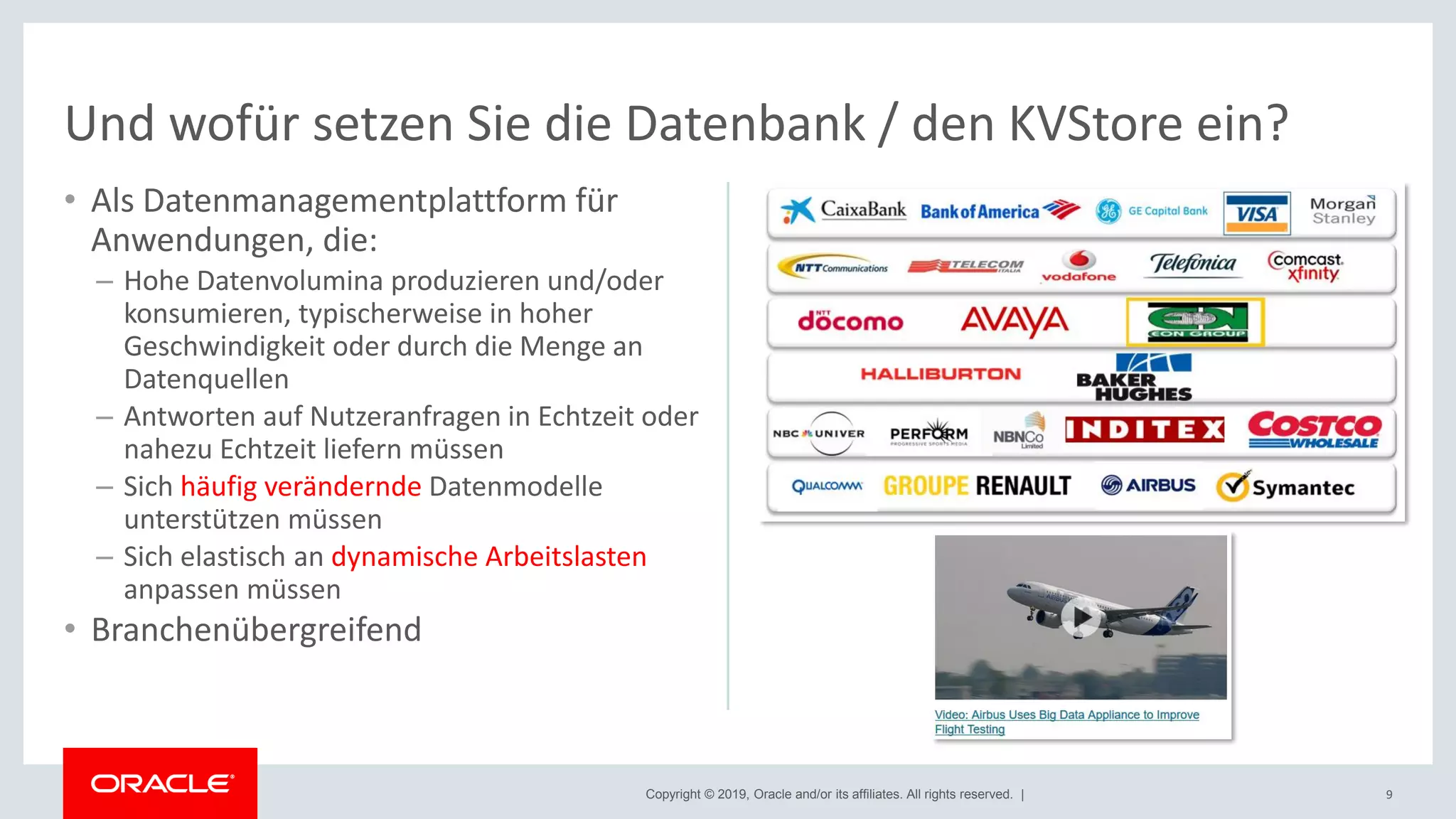
• Als Datenmanagementplattform für
Anwendungen, die:
– Hohe Datenvolumina produzieren und/oder
konsumieren, typischerweise in hoher
Geschwindigkeit oder durch die Menge an
Datenquellen
– Antworten auf Nutzeranfragen in Echtzeit oder
nahezu Echtzeit liefern müssen
– Sich häufig verändernde Datenmodelle
unterstützen müssen
– Sich elastisch an dynamische Arbeitslasten
anpassen müssen
• Branchenübergreifend
9
Und wofür setzen Sie die Datenbank / den KVStore ein?
Copyright © 2019, Oracle and/or its affiliates. All rights reserved. |
Informationen und Download
• Aktuelle Version 19.1.8
– Anpassungen an Release Cycle und Versionierung analog der Oracle DB
• Oracle Technology Network (OTN)
– Download (als .zip bzw. .tar.gz – Server, Examples, Treiber)
• Enterprise und Community Edition
www.oracle.com/technetwork/database/database-technologies/nosqldb/downloads
• Basic Edition
edelivery.oracle.com
– Dokumentation (Server, Treiber, Get started, Tutorials, Videos, APIs, ...)
docs.oracle.com/en/database/other-databases/nosql-database
– Community
community.oracle.com/community/groundbreakers/database/nosql_database
10
Copyright © 2019, Oracle and/or its affiliates. All rights reserved. |
Agenda
Kurze Einführung in die Oracle NoSQL DB
Durch die DBA Brille auf die Oracle NoSQL DB geschaut
Was wir heute nicht mehr besprechen (können)
Ihre Fragen
1
2
3
4
11
Copyright © 2019, Oracle and/or its affiliates. All rights reserved. |
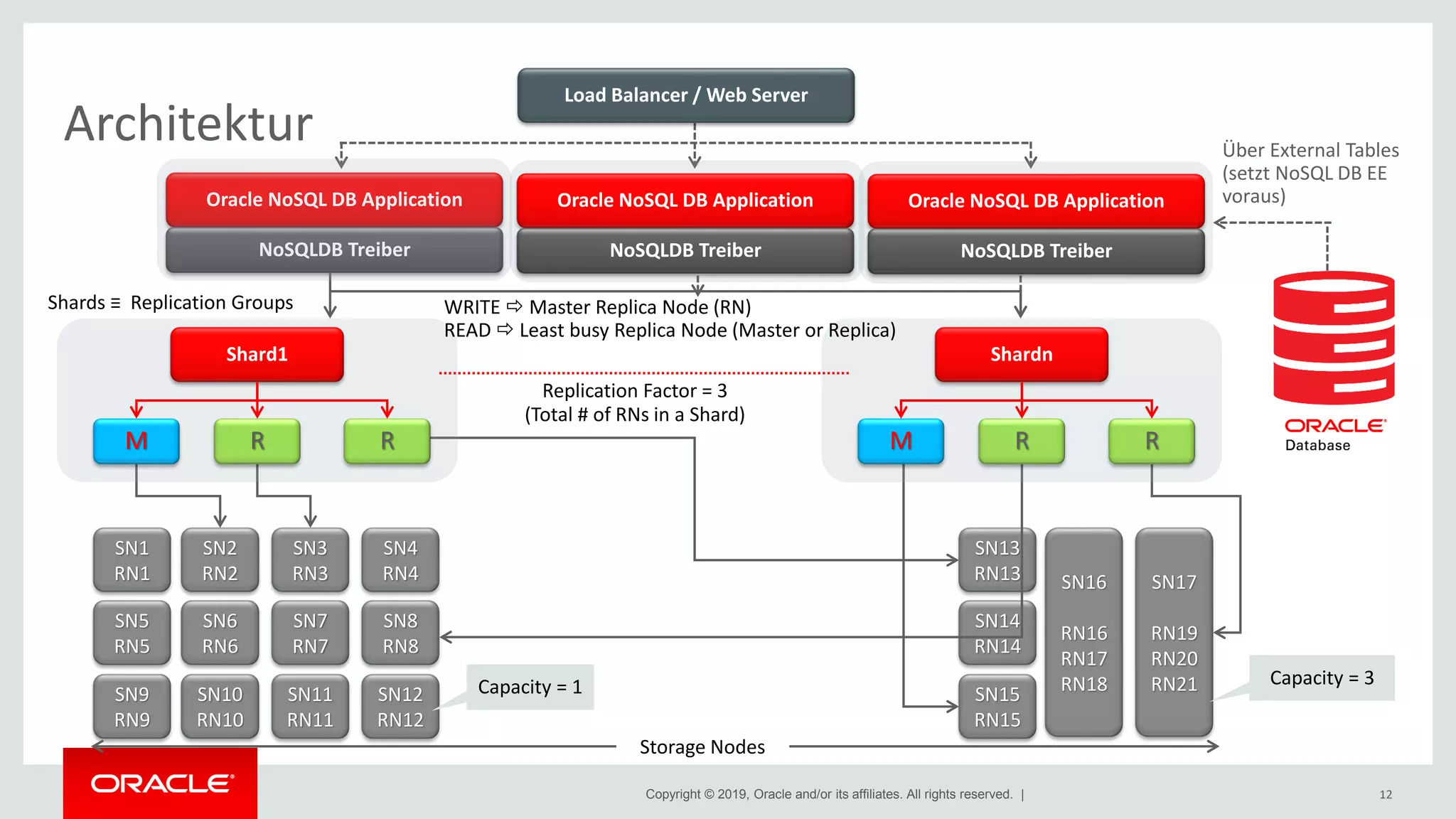
Architektur
Oracle NoSQL DB Application
NoSQLDB Treiber
SN1
RN1
SN5
RN5
SN9
RN9
SN2
RN2
SN6
RN6
SN10
RN10
SN3
RN3
SN7
RN7
SN11
RN11
SN4
RN4
SN8
RN8
SN12
RN12
SN13
RN13
SN14
RN14
SN15
RN15
SN16
RN16
RN17
RN18
SN17
RN19
RN20
RN21
Storage Nodes
Capacity = 1 Capacity = 3
Replication Factor = 3
(Total # of RNs in a Shard)
RM
Shard1 Shardn
R RM R
Shards ≡ Replication Groups WRITE  Master Replica Node (RN)
READ  Least busy Replica Node (Master or Replica)
12
Oracle NoSQL DB Application
NoSQLDB Treiber
Oracle NoSQL DB Application
NoSQLDB Treiber
Load Balancer / Web Server
Über External Tables
(setzt NoSQL DB EE
voraus)
Copyright © 2019, Oracle and/or its affiliates. All rights reserved. |
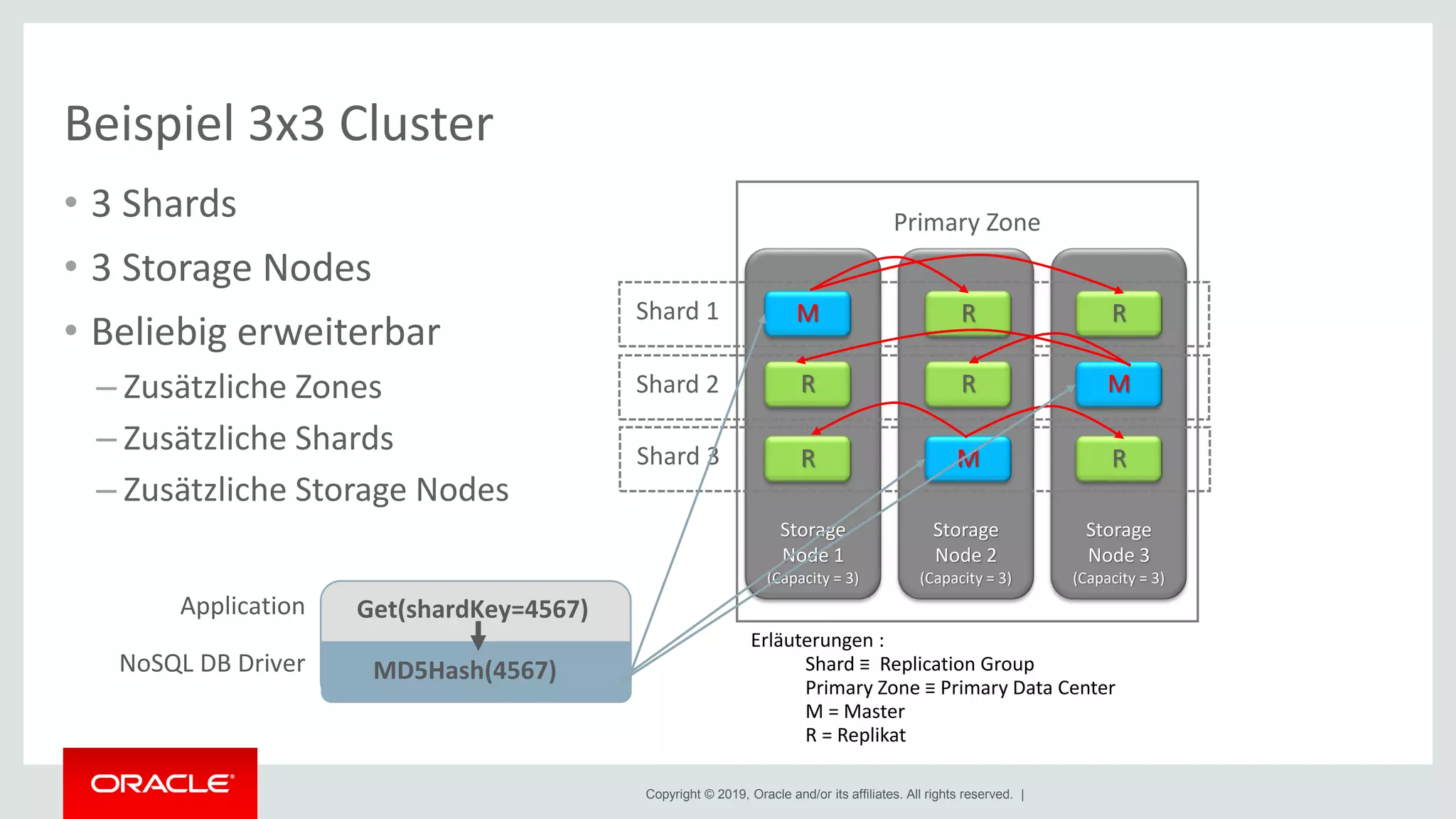
Beispiel 3x3 Cluster
• 3 Shards
• 3 Storage Nodes
• Beliebig erweiterbar
– Zusätzliche Zones
– Zusätzliche Shards
– Zusätzliche Storage Nodes
Storage
Node 3
(Capacity = 3)
Storage
Node 2
(Capacity = 3)
Storage
Node 1
(Capacity = 3)
M R R
M
R
RR
R M
Shard 1
Shard 2
Shard 3
Erläuterungen :
Shard ≡ Replication Group
Primary Zone ≡ Primary Data Center
M = Master
R = Replikat
Primary Zone
Get(shardKey=4567)
MD5Hash(4567)
Application
NoSQL DB Driver
Copyright © 2019, Oracle and/or its affiliates. All rights reserved. |
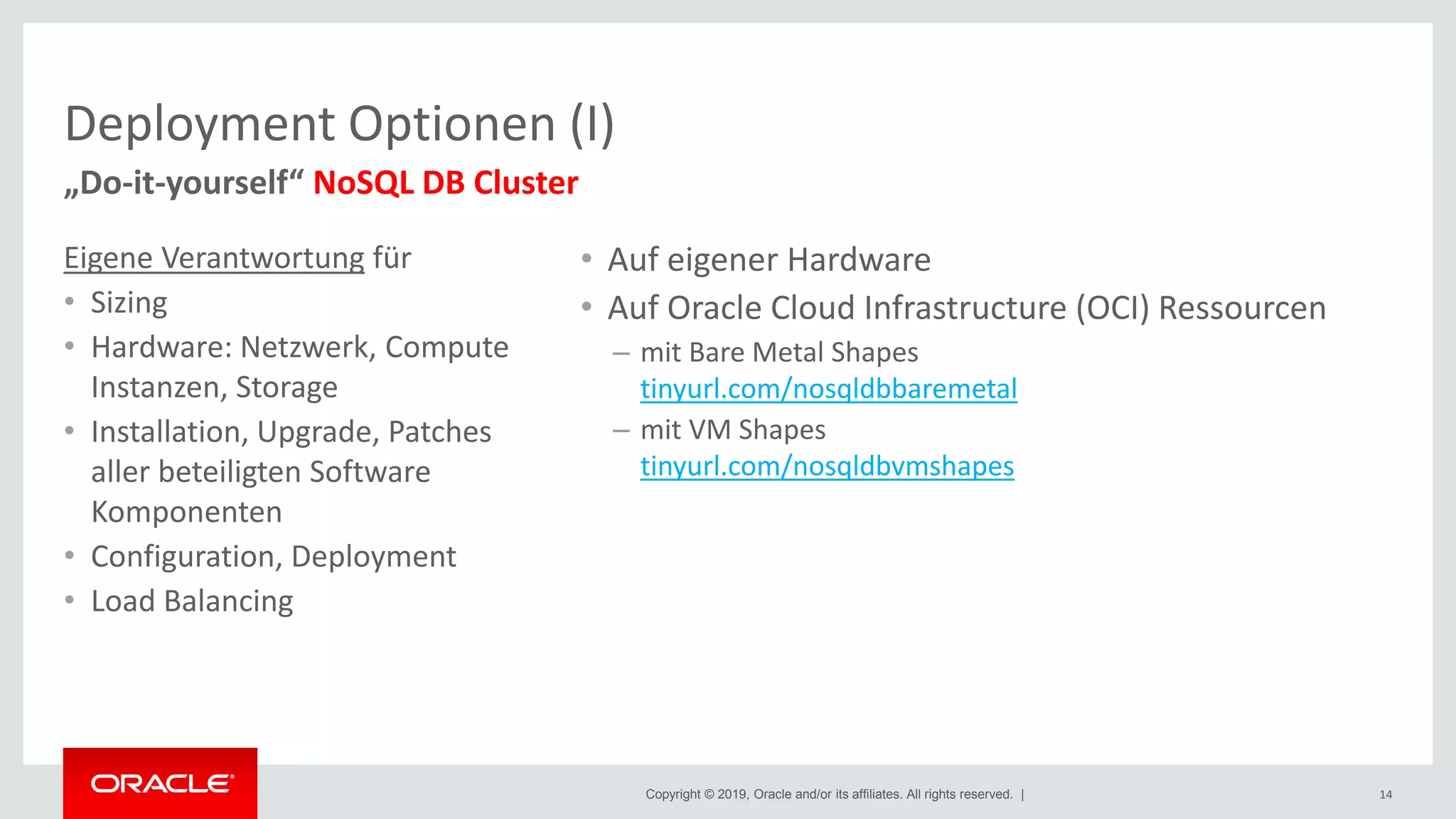
Deployment Optionen (I)
Eigene Verantwortung für
• Sizing
• Hardware: Netzwerk, Compute
Instanzen, Storage
• Installation, Upgrade, Patches
aller beteiligten Software
Komponenten
• Configuration, Deployment
• Load Balancing
14
„Do-it-yourself“ NoSQL DB Cluster
• Auf eigener Hardware
• Auf Oracle Cloud Infrastructure (OCI) Ressourcen
– mit Bare Metal Shapes
tinyurl.com/nosqldbbaremetal
– mit VM Shapes
tinyurl.com/nosqldbvmshapes
Copyright © 2019, Oracle and/or its affiliates. All rights reserved. |
• 3 Compute Instanzen mit je 3 Block Volumes attached
verteilt auf die 3 Availability Domains in Frankfurt
• Freigabe der Ports über Security Lists
[nosql@kp-nosql-db-ad1-0 ~]$ ./pingkvstore.sh
Pinging components of store kvstore based upon topology sequence #136
120 partitions and 3 storage nodes
Time: 2019-03-11 10:40:56 UTC Version: 18.3.10
Shard Status: healthy:3 writable-degraded:0 read-only:0 offline:0 total:3
Admin Status: healthy
Zone [name=Frankfurt id=zn1 type=PRIMARY allowArbiters=false masterAffinity=false] RN
Status: online:9 read-only:0 offline:0 maxDelayMillis:0 maxCatchupTimeSecs:0
Storage Node [sn1] on 10.0.0.4:5000 Zone: [name=Frankfurt id=zn1 type=PRIMARY
allowArbiters=false masterAffinity=false] Status: RUNNING Ver: 18.3.10 2019-01-10
02:48:19 UTC Build id: 2e51533ae0d0 Edition: Enterprise
Admin [admin1] Status: RUNNING,MASTER
Rep Node [rg1-rn1] Status: RUNNING,REPLICA sequenceNumber:498 haPort:5031
available storage size:94 GB delayMillis:0 catchupTimeSecs:0
Rep Node [rg2-rn1] Status: RUNNING,REPLICA sequenceNumber:514 haPort:5032
available storage size:94 GB delayMillis:0 catchupTimeSecs:0
Rep Node [rg3-rn1] Status: RUNNING,MASTER sequenceNumber:500 haPort:5033
available storage size:94 GB
Storage Node [sn2] on 10.0.1.3:5000 Zone: [name=Frankfurt id=zn1 type=PRIMARY
allowArbiters=false masterAffinity=false] Status: RUNNING Ver: 18.3.10 2019-01-10
02:48:19 UTC Build id: 2e51533ae0d0 Edition: Enterprise
Admin [admin2] Status: RUNNING,REPLICA
Rep Node [rg1-rn2] Status: RUNNING,MASTER sequenceNumber:498 haPort:5031
available storage size:94 GB
Rep Node [rg2-rn2] Status: RUNNING,REPLICA sequenceNumber:514 haPort:5032
available storage size:94 GB delayMillis:0 catchupTimeSecs:0
Rep Node [rg3-rn2] Status: RUNNING,REPLICA sequenceNumber:500 haPort:5033
available storage size:94 GB delayMillis:0 catchupTimeSecs:0
Storage Node [sn3] on 10.0.2.3:5000 Zone: [name=Frankfurt id=zn1 type=PRIMARY
allowArbiters=false masterAffinity=false] Status: RUNNING Ver: 18.3.10 2019-01-10
02:48:19 UTC Build id: 2e51533ae0d0 Edition: Enterprise
Admin [admin3] Status: RUNNING,REPLICA
Rep Node [rg1-rn3] Status: RUNNING,REPLICA sequenceNumber:498 haPort:5031
available storage size:94 GB delayMillis:0 catchupTimeSecs:0
Rep Node [rg2-rn3] Status: RUNNING,MASTER sequenceNumber:514 haPort:5032
available storage size:94 GB
Rep Node [rg3-rn3] Status: RUNNING,REPLICA sequenceNumber:500 haPort:5033
available storage size:94 GB delayMillis:0 catchupTimeSecs:0
15
Beispiel: Deployment 3x3 Cluster auf OCI mit VM Shapes
Copyright © 2019, Oracle and/or its affiliates. All rights reserved. |
• Voraussetzungen
– Java 8 oder höher
• Installation
– Download der Software
• Empfehlung: Server & Examples
– Nutzer „nosql“ anlegen
– Auspacken der Software
– Verzeichnisse einrichten
– Umgebungsvariablen setzen
• Deployment in 3 Schritten
1. makebootconfig
2. Starten der Storage Node Agents
3. Topologie deployen
16
Deployment: Ein paar Schritte zum NoSQL DB Cluster
[nosql@kp-nosql-db-ad1-0 scripts]$ cat makebootconfig.sh
#!/bin/bash
# Login as user nosql
# Use the makebootconfig utility to generate the configuration. We do this for each storage node
# -root the KVROOT directory
# -host node hostname or IP address
# -port specifies the registry port used by the Storage Node Agent
# -admin specifies the port used by Administration Service to listen for HTTP connections
# -harange specifies the range port used by the replication nodes and Administration
services
# -capacity specifies number of a Replication Nodes supported by Storage Node
# -num_cpus used when multiple Replication Nodes are configured on a Storage Node. If the
value is 0, the system will attempt to query the Storage Node to determine the number of processors
on the machine.
# -memory_mb total memory available for the cache and heap sizes. If the value is 0, the
store will attempt to determine the amount of memory on the machine, but that value is only
available when the JVM used is the Oracle Hotspot JVM.
# -store-security specifies if security will be used or not. In this example no security is used.
########### Bootstrap Storage Node 1 ##########
java -Xmx64m -Xms64m -jar $KVHOME/lib/kvstore.jar makebootconfig 
-root $KVROOT 
-host 10.0.0.4 
-port 5000 
-admin-web-port 5010 
-servicerange 5015,5025 
-harange 5030,5050 
-capacity 3 
-admindir /disk1/ondb/admin 
-admindirsize 50_GB 
-store-security none 
-memory_mb 6000 
-storagedir /disk1/ondb/data 
-storagedirsize 250_GB 
-storagedir /disk2/ondb/data 
-storagedirsize 250_GB 
-storagedir /disk3/ondb/data 
-storagedirsize 250_GB 
-rnlogdir /disk1/ondb/rnlog 
-rnlogdir /disk2/ondb/rnlog 
-rnlogdir /disk3/ondb/rnlog
echo " Done bootstrapping storage-node 1"
################################################
[nosql@kp-nosql-db-ad1-0 scripts]$
Copyright © 2019, Oracle and/or its affiliates. All rights reserved. |
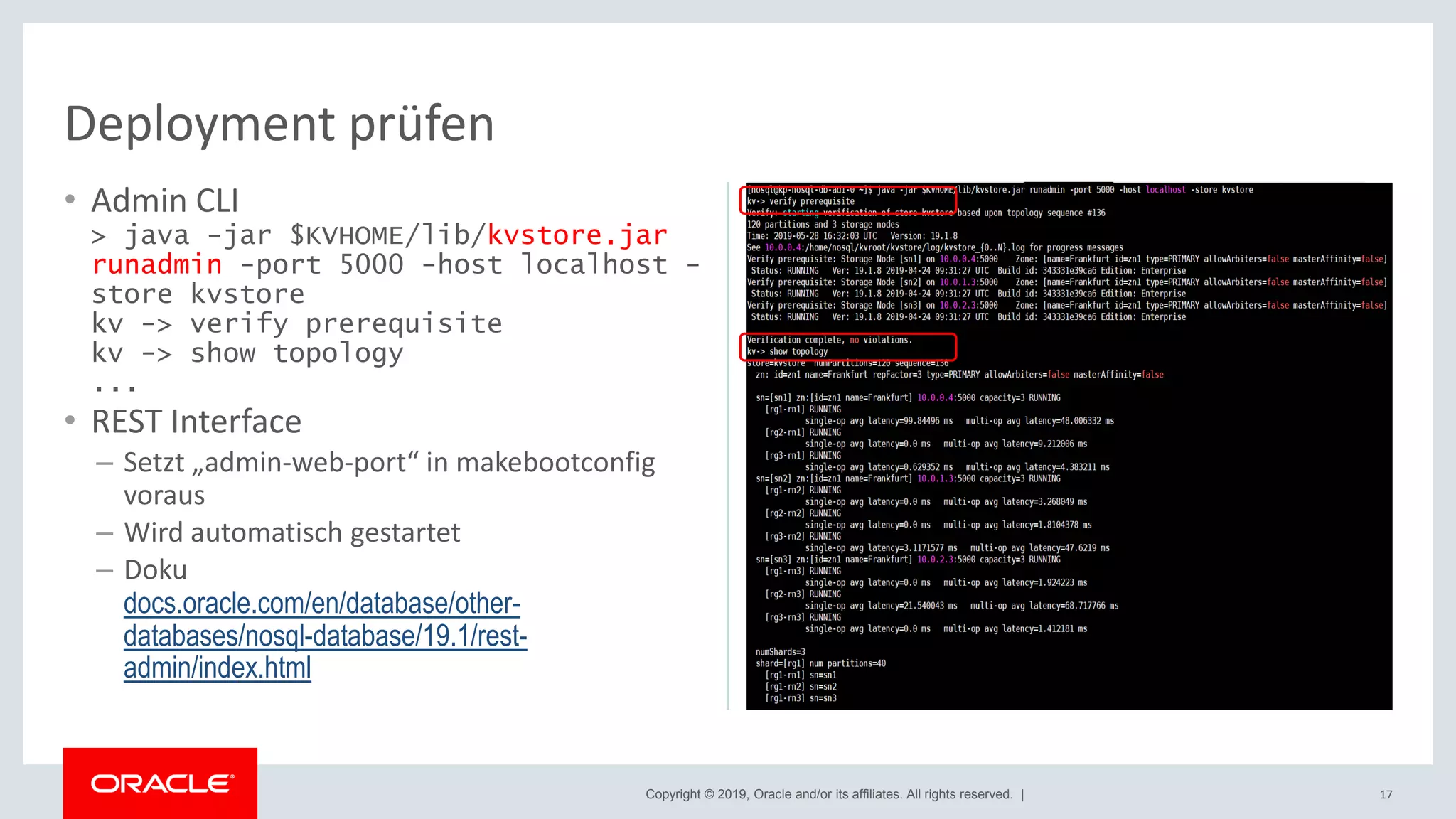
• Admin CLI
> java -jar $KVHOME/lib/kvstore.jar
runadmin -port 5000 -host localhost -
store kvstore
kv -> verify prerequisite
kv -> show topology
...
• REST Interface
– Setzt „admin-web-port“ in makebootconfig
voraus
– Wird automatisch gestartet
– Doku
docs.oracle.com/en/database/other-
databases/nosql-database/19.1/rest-
admin/index.html
17
Deployment prüfen
Copyright © 2019, Oracle and/or its affiliates. All rights reserved. |
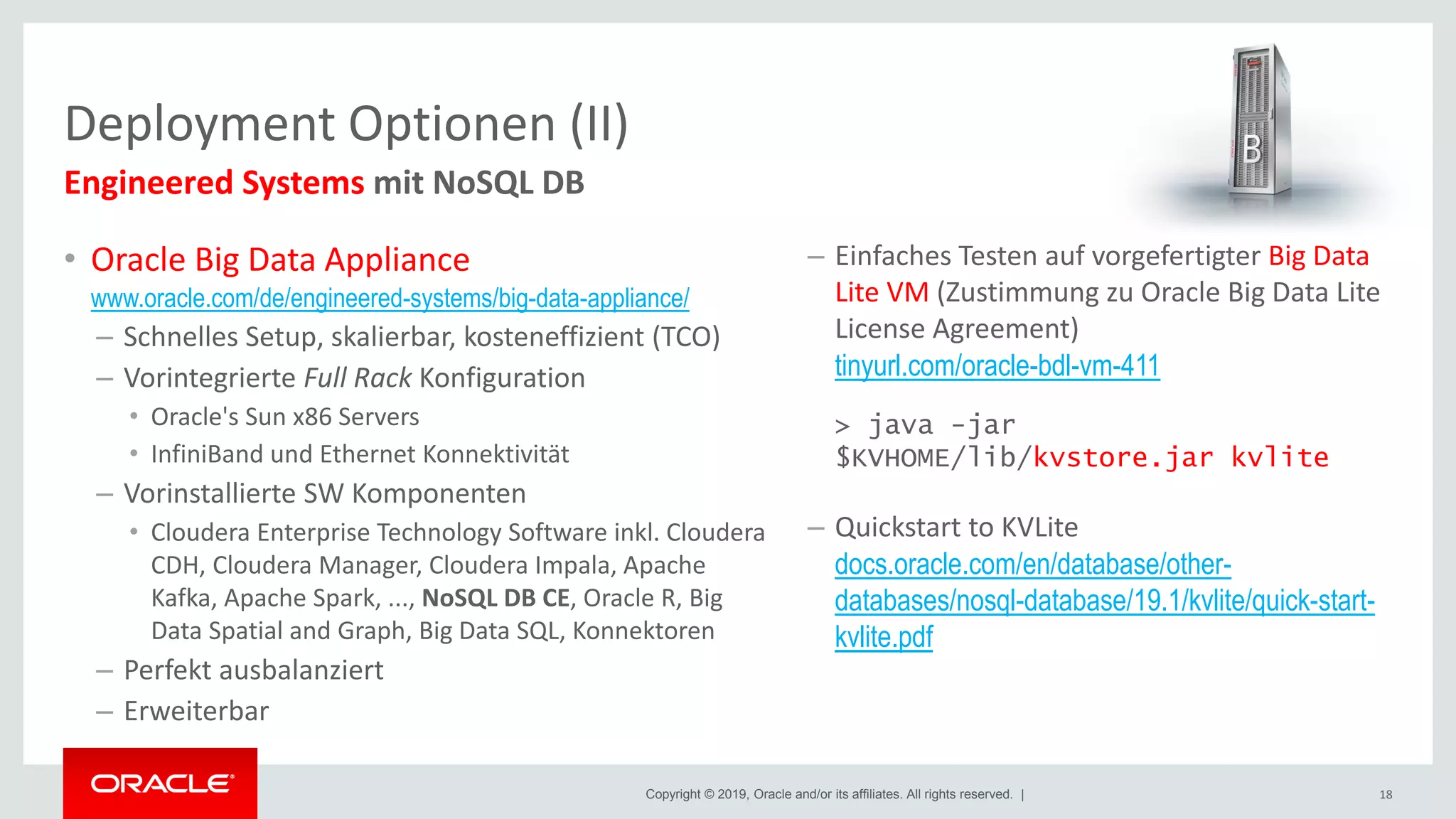
• Oracle Big Data Appliance
www.oracle.com/de/engineered-systems/big-data-appliance/
– Schnelles Setup, skalierbar, kosteneffizient (TCO)
– Vorintegrierte Full Rack Konfiguration
• Oracle's Sun x86 Servers
• InfiniBand und Ethernet Konnektivität
– Vorinstallierte SW Komponenten
• Cloudera Enterprise Technology Software inkl. Cloudera
CDH, Cloudera Manager, Cloudera Impala, Apache
Kafka, Apache Spark, ..., NoSQL DB CE, Oracle R, Big
Data Spatial and Graph, Big Data SQL, Konnektoren
– Perfekt ausbalanziert
– Erweiterbar
Deployment Optionen (II)
18
Engineered Systems mit NoSQL DB
– Einfaches Testen auf vorgefertigter Big Data
Lite VM (Zustimmung zu Oracle Big Data Lite
License Agreement)
tinyurl.com/oracle-bdl-vm-411
> java -jar
$KVHOME/lib/kvstore.jar kvlite
– Quickstart to KVLite
docs.oracle.com/en/database/other-
databases/nosql-database/19.1/kvlite/quick-start-
kvlite.pdf
Copyright © 2019, Oracle and/or its affiliates. All rights reserved. |
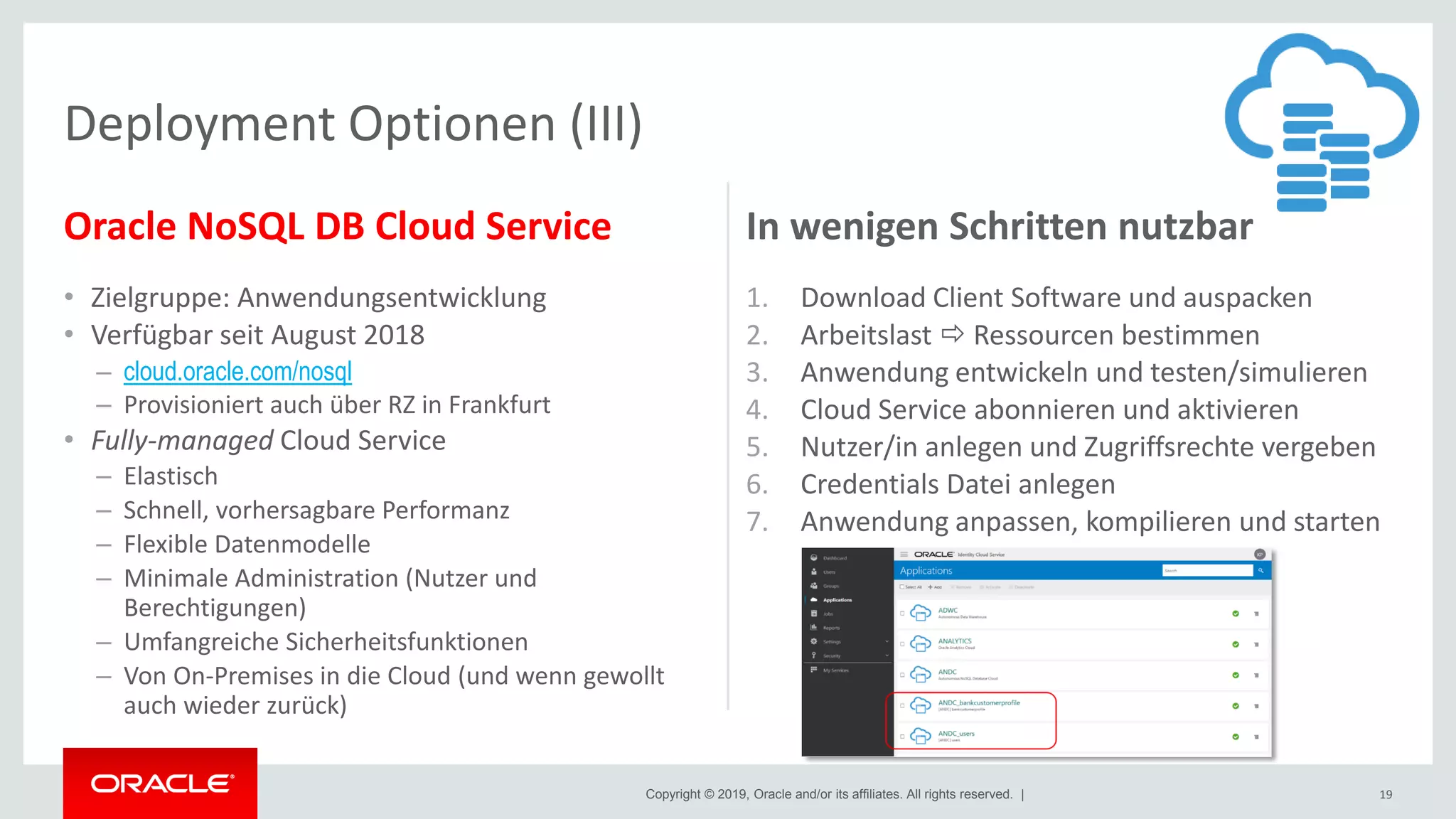
Oracle NoSQL DB Cloud Service
• Zielgruppe: Anwendungsentwicklung
• Verfügbar seit August 2018
– cloud.oracle.com/nosql
– Provisioniert auch über RZ in Frankfurt
• Fully-managed Cloud Service
– Elastisch
– Schnell, vorhersagbare Performanz
– Flexible Datenmodelle
– Minimale Administration (Nutzer und
Berechtigungen)
– Umfangreiche Sicherheitsfunktionen
– Von On-Premises in die Cloud (und wenn gewollt
auch wieder zurück)
In wenigen Schritten nutzbar
1. Download Client Software und auspacken
2. Arbeitslast  Ressourcen bestimmen
3. Anwendung entwickeln und testen/simulieren
4. Cloud Service abonnieren und aktivieren
5. Nutzer/in anlegen und Zugriffsrechte vergeben
6. Credentials Datei anlegen
7. Anwendung anpassen, kompilieren und starten
19
Deployment Optionen (III)
Copyright © 2019, Oracle and/or its affiliates. All rights reserved. |
Deployment Optionen (IV)
• Paketieren, Deployen und Starten von Anwendungen im Container
• Fokus auf Unterstützung der Anwendungsentwicklung
• Oracle NoSQL DB CE – „kvlite“
Single node - Single shard Oracle NoSQL DB Store
$ docker run -d --name=kvlite oracle/nosql
• Überblick
blogs.oracle.com/nosql/oracle-nosql-database-on-docker
• Quickstart Running Oracle NoSQL DB in Docker
hub.docker.com/r/oracle/nosql/
20
Oracle NoSQL DB als Docker Container
Copyright © 2019, Oracle and/or its affiliates. All rights reserved. |
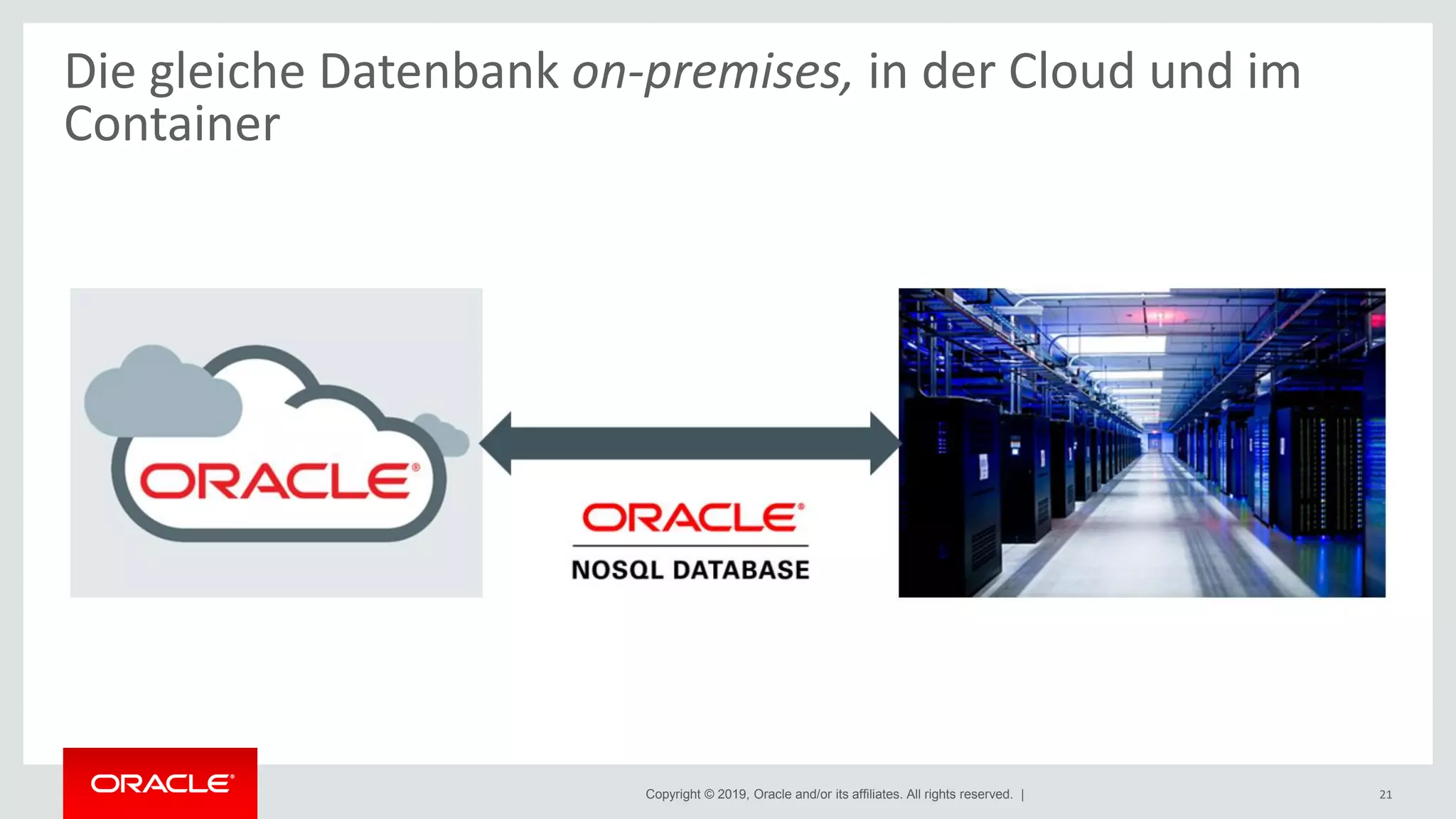
Die gleiche Datenbank on-premises, in der Cloud und im
Container
21
Copyright © 2019, Oracle and/or its affiliates. All rights reserved. |
Typische administrative Aufgaben
22
Copyright © 2019, Oracle and/or its affiliates. All rights reserved. |
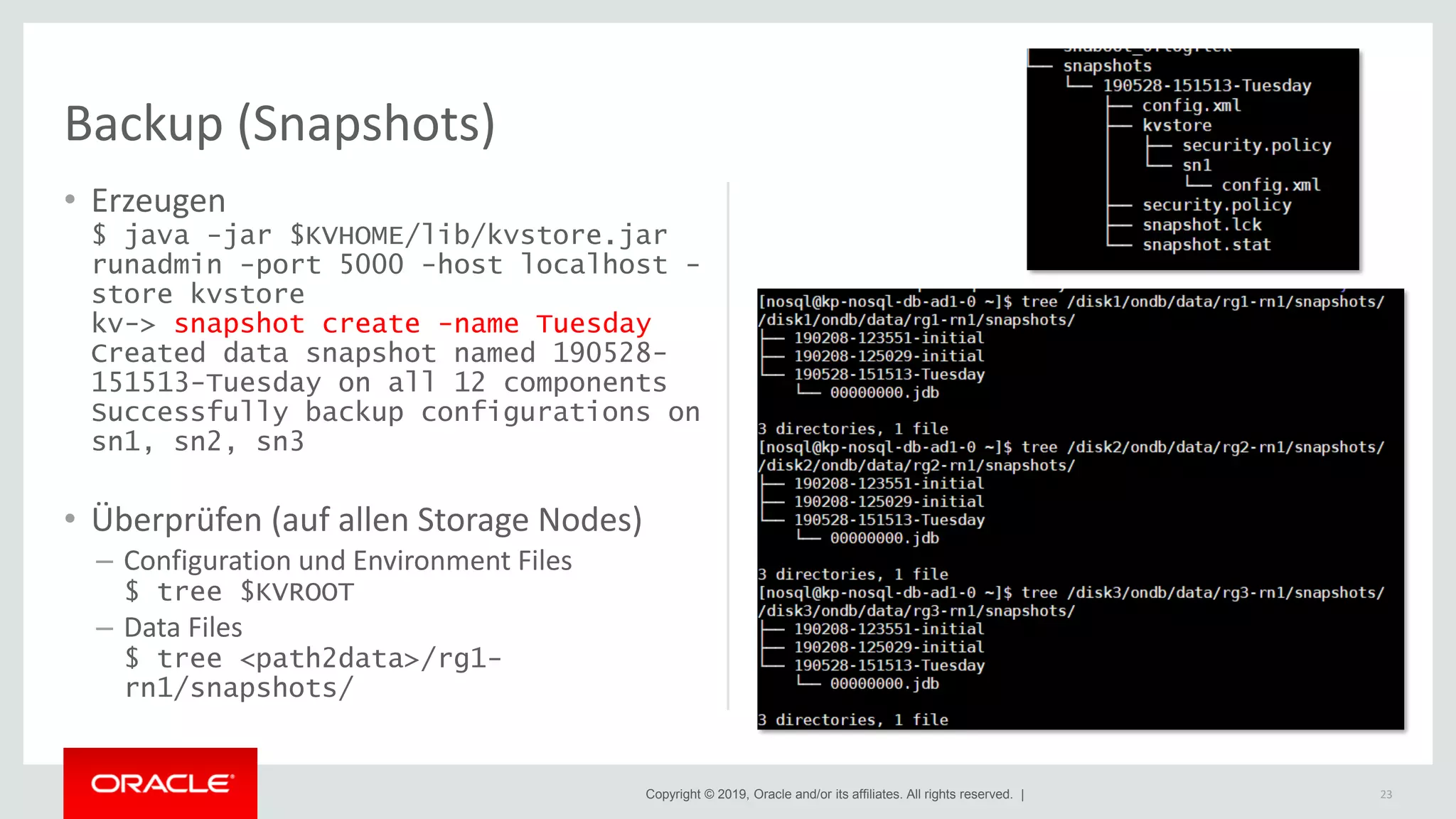
Backup (Snapshots)
• Erzeugen
$ java -jar $KVHOME/lib/kvstore.jar
runadmin -port 5000 -host localhost -
store kvstore
kv-> snapshot create -name Tuesday
Created data snapshot named 190528-
151513-Tuesday on all 12 components
Successfully backup configurations on
sn1, sn2, sn3
• Überprüfen (auf allen Storage Nodes)
– Configuration und Environment Files
$ tree $KVROOT
– Data Files
$ tree <path2data>/rg1-
rn1/snapshots/
23
Copyright © 2019, Oracle and/or its affiliates. All rights reserved. |
Direkt von Snapshots
• Schnellere Methode, aber Restore nur in
die exakt gleiche Topologie wie zum
Zeitpunkt des Snapshots
• 2 Schritte
– Storage Nodes nacheinander stoppen
> java -jar $KVHOME/lib/kvstore.jar
stop –root $KVROOT
– Storage Nodes wieder starten unter Nutzung
der Snapshots
> java -jar $KVHOME/lib/kvstore.jar
start –root $KVROOT –restore-from-
snapshot <snapshot_name> -update-
config [true | false]
Über Load Utility
• Restore inklusive der Metadaten in einen
neuen KVStore
• 5 Schritte
1. Neuen KVStore anlegen, starten und
konfigurieren
2. Alle Snapshot-Verzeichnisse im alten KVStore
lokalisieren
3. Laden der Metadaten in den neuen KVStore
4. Deployment für den neuen KVStore mit den
Metadaten mit Load Utility
5. Daten laden in den neuen KVStore mit Load
Utility
24
Restore
Copyright © 2019, Oracle and/or its affiliates. All rights reserved. |
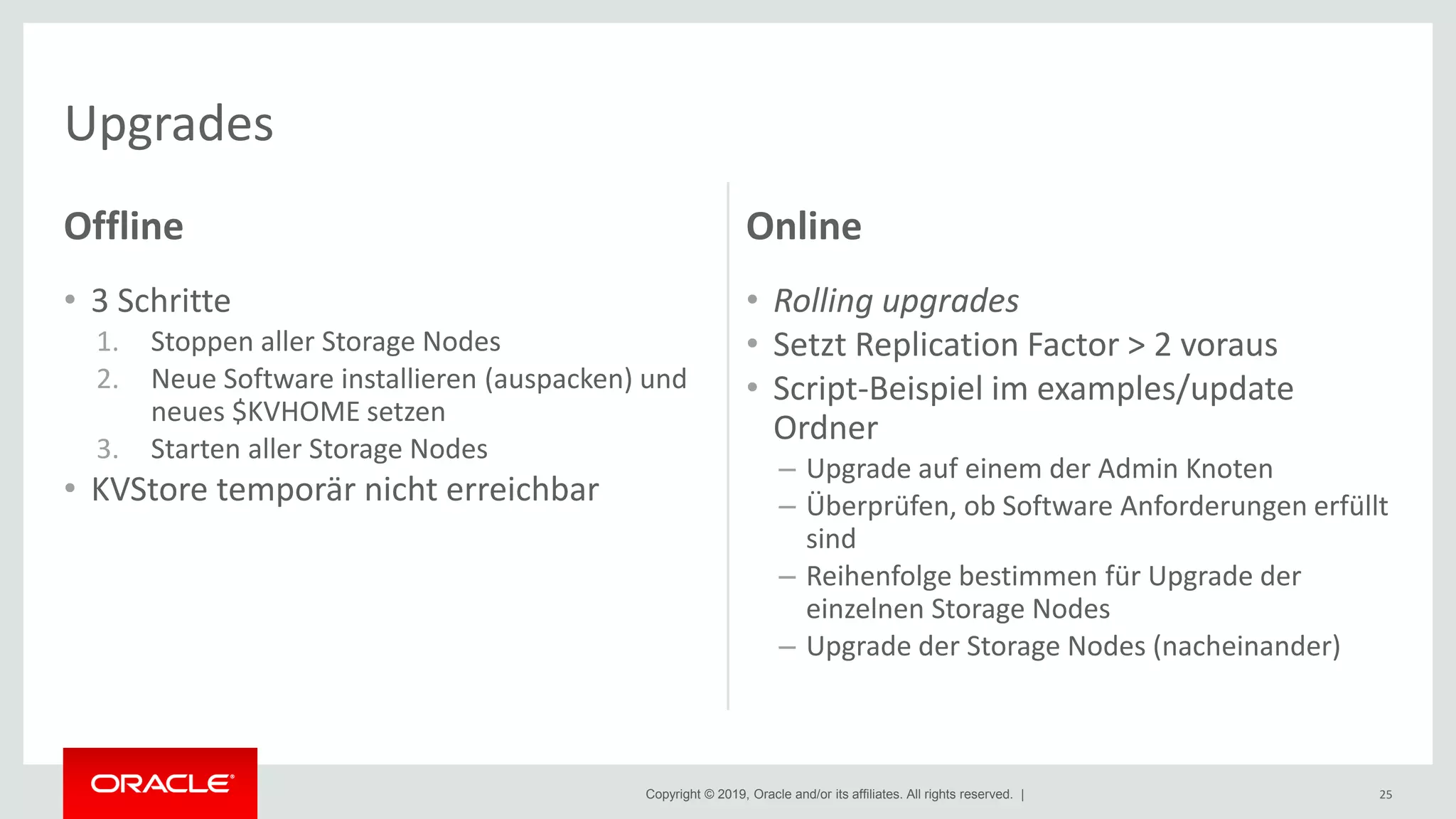
Offline
• 3 Schritte
1. Stoppen aller Storage Nodes
2. Neue Software installieren (auspacken) und
neues $KVHOME setzen
3. Starten aller Storage Nodes
• KVStore temporär nicht erreichbar
Online
• Rolling upgrades
• Setzt Replication Factor > 2 voraus
• Script-Beispiel im examples/update
Ordner
– Upgrade auf einem der Admin Knoten
– Überprüfen, ob Software Anforderungen erfüllt
sind
– Reihenfolge bestimmen für Upgrade der
einzelnen Storage Nodes
– Upgrade der Storage Nodes (nacheinander)
25
Upgrades
Copyright © 2019, Oracle and/or its affiliates. All rights reserved. |
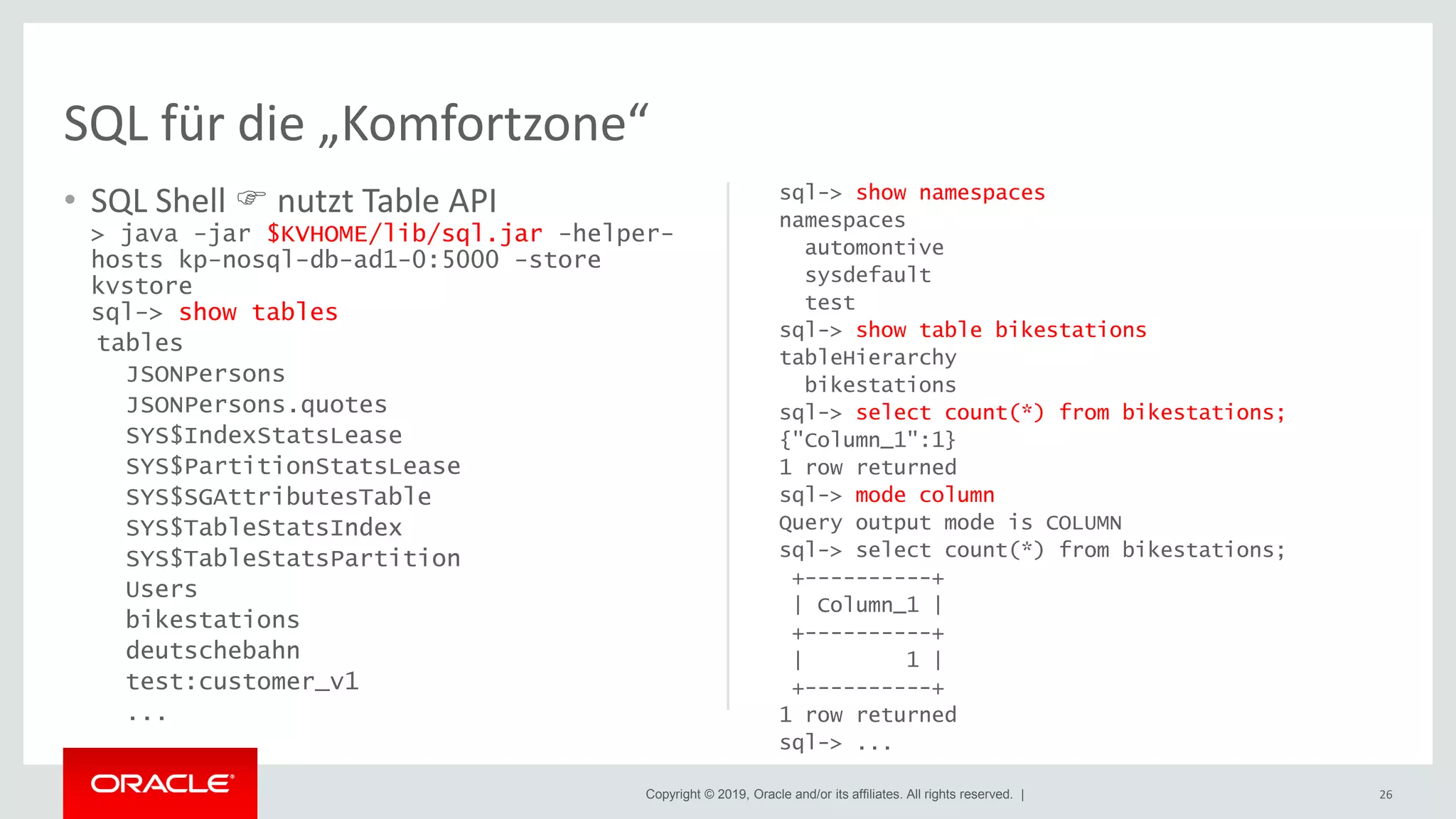
• SQL Shell  nutzt Table API
> java -jar $KVHOME/lib/sql.jar -helper-
hosts kp-nosql-db-ad1-0:5000 -store
kvstore
sql-> show tables
tables
JSONPersons
JSONPersons.quotes
SYS$IndexStatsLease
SYS$PartitionStatsLease
SYS$SGAttributesTable
SYS$TableStatsIndex
SYS$TableStatsPartition
Users
bikestations
deutschebahn
test:customer_v1
...
sql-> show namespaces
namespaces
automontive
sysdefault
test
sql-> show table bikestations
tableHierarchy
bikestations
sql-> select count(*) from bikestations;
{"Column_1":1}
1 row returned
sql-> mode column
Query output mode is COLUMN
sql-> select count(*) from bikestations;
+----------+
| Column_1 |
+----------+
| 1 |
+----------+
1 row returned
sql-> ...
26
SQL für die „Komfortzone“
Copyright © 2019, Oracle and/or its affiliates. All rights reserved. |
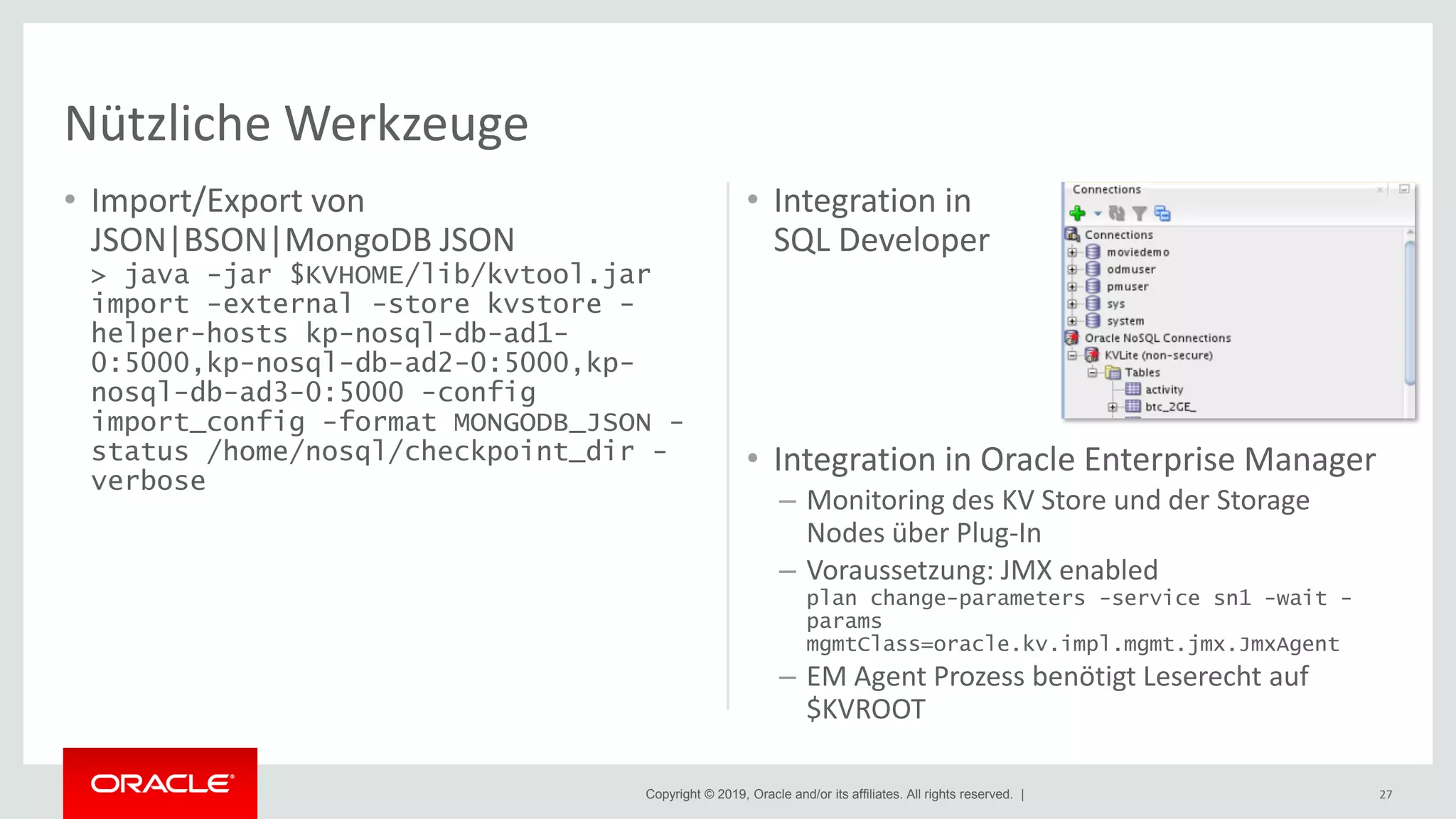
• Import/Export von
JSON|BSON|MongoDB JSON
> java -jar $KVHOME/lib/kvtool.jar
import -external -store kvstore -
helper-hosts kp-nosql-db-ad1-
0:5000,kp-nosql-db-ad2-0:5000,kp-
nosql-db-ad3-0:5000 -config
import_config -format MONGODB_JSON -
status /home/nosql/checkpoint_dir -
verbose
• Integration in
SQL Developer
• Integration in Oracle Enterprise Manager
– Monitoring des KV Store und der Storage
Nodes über Plug-In
– Voraussetzung: JMX enabled
plan change-parameters -service sn1 -wait -
params
mgmtClass=oracle.kv.impl.mgmt.jmx.JmxAgent
– EM Agent Prozess benötigt Leserecht auf
$KVROOT
27
Nützliche Werkzeuge
Copyright © 2019, Oracle and/or its affiliates. All rights reserved. |
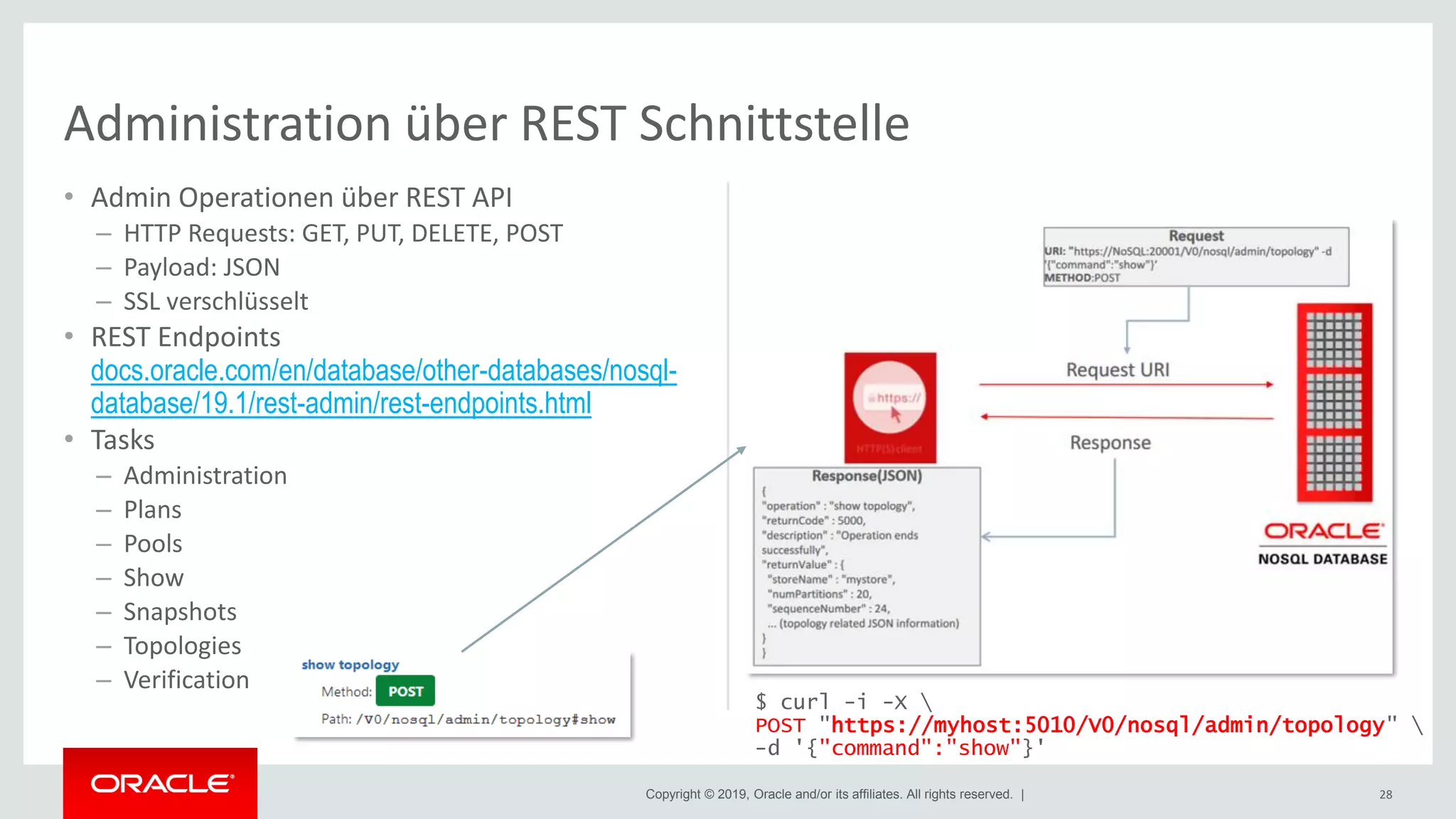
• Admin Operationen über REST API
– HTTP Requests: GET, PUT, DELETE, POST
– Payload: JSON
– SSL verschlüsselt
• REST Endpoints
docs.oracle.com/en/database/other-databases/nosql-
database/19.1/rest-admin/rest-endpoints.html
• Tasks
– Administration
– Plans
– Pools
– Show
– Snapshots
– Topologies
– Verification
28
Administration über REST Schnittstelle
$ curl -i -X 
POST "https://myhost:5010/V0/nosql/admin/topology" 
-d '{"command":"show"}'
Copyright © 2019, Oracle and/or its affiliates. All rights reserved. |
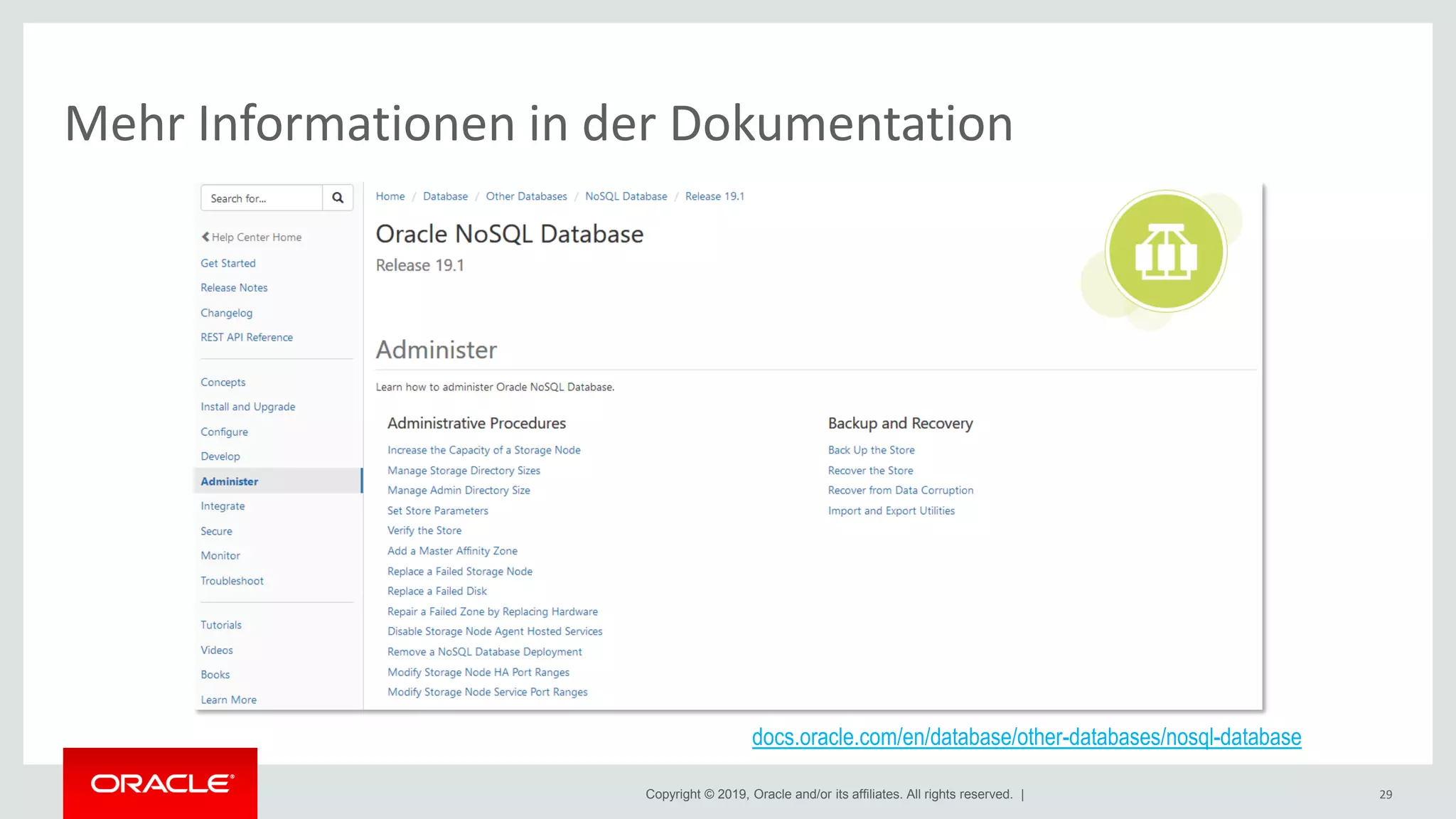
Mehr Informationen in der Dokumentation
29
docs.oracle.com/en/database/other-databases/nosql-database
Copyright © 2019, Oracle and/or its affiliates. All rights reserved. |
Agenda
Kurze Einführung in die Oracle NoSQL DB
Durch die DBA Brille auf die Oracle NoSQL DB geschaut
Was wir heute nicht mehr besprechen (können)
Ihre Fragen
1
2
3
4
30
Copyright © 2019, Oracle and/or its affiliates. All rights reserved. |
• Topologie verändern
– # Storage Nodes anpassen
– # Shards anpassen
– Neues Data Center hinzufügen
• Ports ändern
• Monitoring
– Software
– Hardware
• Sicherheit
– Secure store
– Firewall konfigurieren
– Verschlüsselung
• Sizing
• Tuning
• Mandantenfähigkeit
• Troubleshooting
– Fehlerhafte Storage Nodes ersetzen
– Fehlerhafte Platten ersetzen
– Korrupte Daten erkennen und darauf
reagieren
• Integration mit
– Oracle DB
– Elasticsearch | Logstash | Kibana
31
Weitere Themen
Copyright © 2019, Oracle and/or its affiliates. All rights reserved. |
Agenda
Kurze Einführung in die Oracle NoSQL DB
Durch die DBA Brille auf die Oracle NoSQL DB geschaut
Was wir heute nicht mehr besprechen (können)
Ihre Fragen
1
2
3
4
32
Copyright © 2019, Oracle and/or its affiliates. All rights reserved. | 33
@OracleNoSQL @kpatenge @OracleBUDB
karin.patenge@oracle.com
https://www.linkedin.com/groups/4147754/
Ausgabe 06/2018 (Dezember)
Keine Angst vor Key-Value-Stores: Einblicke in die Oracle NoSQL DB
Vielen Dank!
DWH / Big Data Community Workshops & Seminare über: www.oracle.com/de/database/data-warehouse/community.html
Copyright © 2019, Oracle and/or its affiliates. All rights reserved. | 34

20190604_DOAGDatabase2019_OracleNoSQLDB_for_DBAs

  • 2.
    Copyright © 2019,Oracle and/or its affiliates. All rights reserved. | (Die Oracle) NoSQL DB für DBAs Nicht nur was für Mutige Karin Patenge | karin.patenge@oracle.com | @kpatenge Principal Solution Engineer | BU Cloud & Core Technologies Oracle Deutschland B.V. & Co. KG DOAG 2019 Database | Düsseldorf | 3.-4. Juni 2019 | #DOAGDB19
  • 3.
    Copyright © 2019,Oracle and/or its affiliates. All rights reserved. | Safe Harbor Statement The preceding is intended to outline our general product direction. It is intended for information purposes only, and may not be incorporated into any contract. It is not a commitment to deliver any material, code, or functionality, and should not be relied upon in making purchasing decisions. The development, release, and timing of any features or functionality described for Oracle’s products remains at the sole discretion of Oracle. 3
  • 4.
    Copyright © 2019,Oracle and/or its affiliates. All rights reserved. | Agenda Kurze Einführung in die Oracle NoSQL DB Durch die DBA Brille auf die Oracle NoSQL DB geschaut Was wir heute nicht mehr besprechen (können) Ihre Fragen 1 2 3 4 4
  • 5.
    Copyright © 2019,Oracle and/or its affiliates. All rights reserved. | Kurze Einführung in die Oracle NoSQL DB Durch die DBA Brille auf die Oracle NoSQL DB geschaut Was wir heute nicht mehr besprechen (können) Ihre Fragen 1 2 3 4 5
  • 6.
    Copyright © 2019,Oracle and/or its affiliates. All rights reserved. | 6 NoSQL Datenbanken – Die wichtigsten Kategorien Quelle: www.freecodecamp.org/news/nosql-databases-5f6639ed9574/
  • 7.
    Copyright © 2019,Oracle and/or its affiliates. All rights reserved. | Das Fundament der Oracle NoSQL DB • Key-Value Datenbank  Horizontal-verteilter KV Store – Primär- und Sekundärindizes – Unterstützung auch für JSON (Document Store), Graphen – API für SQL-ähnliche Zugriffe • Basiert auf Oracle Berkeley DB Java Edition High Availability • Datenhaltung – ready for web scale – Parallele Schreibvorgänge auf Masterknoten – Paralleles Lesen von Master- und Replikaknoten – Hochverfügbarkeit per Replikation (Verteilung von Datenkopien auf Replikaknoten) – Konsistenz und Persistenz konfigurierbar (ACID <-> BASE) – Transparentes Loadbalancing KVStore
  • 8.
    Copyright © 2019,Oracle and/or its affiliates. All rights reserved. | Wichtige Merkmale Text Datenbank Kern- Funktionalität Fokus auf Anwendungs- entwicklung Enterprise- Grade Software • Verteilte Datenhaltung (Sharding) • Flexibel, horizontal skalierbar (Shared nothing) • Vorhersagbare, geringe Latenzzeiten • Hoher Durchsatz • Hochverfügbar, ausfallsicher • REST Interface für Administration • Monitoring über JMX • Geringer Administrationsaufwand • Einfach zu erweitern, auch geografisch verteilt • Automatisches Rebalancing • Kerberos, Authentication • Verschüsselte Daten (Transport/Speicherung) • Time-To-Live (Daten mit “Verfallsdatum”) • Mandantenfähigkeit (über Namespaces) • Starke Integration in das Oracle Tech Portfolio 8 • Datenmodelle: • Key-Value (KVStore) • JSON • Table • Graph (über Big Data Spatial and Graph) • Einfache GET/PUT Operationen • Verschiedene Programmier- APIs inklusive SQL • BASE und ACID unterstützt • Sekundärindizes • Freie Community Edition über Apache 2.0 Lizenz • Basic Edition inkludiert in Oracle DB EE Lizenz
  • 9.
    Copyright © 2019,Oracle and/or its affiliates. All rights reserved. | • Als Datenmanagementplattform für Anwendungen, die: – Hohe Datenvolumina produzieren und/oder konsumieren, typischerweise in hoher Geschwindigkeit oder durch die Menge an Datenquellen – Antworten auf Nutzeranfragen in Echtzeit oder nahezu Echtzeit liefern müssen – Sich häufig verändernde Datenmodelle unterstützen müssen – Sich elastisch an dynamische Arbeitslasten anpassen müssen • Branchenübergreifend 9 Und wofür setzen Sie die Datenbank / den KVStore ein?
  • 10.
    Copyright © 2019,Oracle and/or its affiliates. All rights reserved. | Informationen und Download • Aktuelle Version 19.1.8 – Anpassungen an Release Cycle und Versionierung analog der Oracle DB • Oracle Technology Network (OTN) – Download (als .zip bzw. .tar.gz – Server, Examples, Treiber) • Enterprise und Community Edition www.oracle.com/technetwork/database/database-technologies/nosqldb/downloads • Basic Edition edelivery.oracle.com – Dokumentation (Server, Treiber, Get started, Tutorials, Videos, APIs, ...) docs.oracle.com/en/database/other-databases/nosql-database – Community community.oracle.com/community/groundbreakers/database/nosql_database 10
  • 11.
    Copyright © 2019,Oracle and/or its affiliates. All rights reserved. | Agenda Kurze Einführung in die Oracle NoSQL DB Durch die DBA Brille auf die Oracle NoSQL DB geschaut Was wir heute nicht mehr besprechen (können) Ihre Fragen 1 2 3 4 11
  • 12.
    Copyright © 2019,Oracle and/or its affiliates. All rights reserved. | Architektur Oracle NoSQL DB Application NoSQLDB Treiber SN1 RN1 SN5 RN5 SN9 RN9 SN2 RN2 SN6 RN6 SN10 RN10 SN3 RN3 SN7 RN7 SN11 RN11 SN4 RN4 SN8 RN8 SN12 RN12 SN13 RN13 SN14 RN14 SN15 RN15 SN16 RN16 RN17 RN18 SN17 RN19 RN20 RN21 Storage Nodes Capacity = 1 Capacity = 3 Replication Factor = 3 (Total # of RNs in a Shard) RM Shard1 Shardn R RM R Shards ≡ Replication Groups WRITE  Master Replica Node (RN) READ  Least busy Replica Node (Master or Replica) 12 Oracle NoSQL DB Application NoSQLDB Treiber Oracle NoSQL DB Application NoSQLDB Treiber Load Balancer / Web Server Über External Tables (setzt NoSQL DB EE voraus)
  • 13.
    Copyright © 2019,Oracle and/or its affiliates. All rights reserved. | Beispiel 3x3 Cluster • 3 Shards • 3 Storage Nodes • Beliebig erweiterbar – Zusätzliche Zones – Zusätzliche Shards – Zusätzliche Storage Nodes Storage Node 3 (Capacity = 3) Storage Node 2 (Capacity = 3) Storage Node 1 (Capacity = 3) M R R M R RR R M Shard 1 Shard 2 Shard 3 Erläuterungen : Shard ≡ Replication Group Primary Zone ≡ Primary Data Center M = Master R = Replikat Primary Zone Get(shardKey=4567) MD5Hash(4567) Application NoSQL DB Driver
  • 14.
    Copyright © 2019,Oracle and/or its affiliates. All rights reserved. | Deployment Optionen (I) Eigene Verantwortung für • Sizing • Hardware: Netzwerk, Compute Instanzen, Storage • Installation, Upgrade, Patches aller beteiligten Software Komponenten • Configuration, Deployment • Load Balancing 14 „Do-it-yourself“ NoSQL DB Cluster • Auf eigener Hardware • Auf Oracle Cloud Infrastructure (OCI) Ressourcen – mit Bare Metal Shapes tinyurl.com/nosqldbbaremetal – mit VM Shapes tinyurl.com/nosqldbvmshapes
  • 15.
    Copyright © 2019,Oracle and/or its affiliates. All rights reserved. | • 3 Compute Instanzen mit je 3 Block Volumes attached verteilt auf die 3 Availability Domains in Frankfurt • Freigabe der Ports über Security Lists [nosql@kp-nosql-db-ad1-0 ~]$ ./pingkvstore.sh Pinging components of store kvstore based upon topology sequence #136 120 partitions and 3 storage nodes Time: 2019-03-11 10:40:56 UTC Version: 18.3.10 Shard Status: healthy:3 writable-degraded:0 read-only:0 offline:0 total:3 Admin Status: healthy Zone [name=Frankfurt id=zn1 type=PRIMARY allowArbiters=false masterAffinity=false] RN Status: online:9 read-only:0 offline:0 maxDelayMillis:0 maxCatchupTimeSecs:0 Storage Node [sn1] on 10.0.0.4:5000 Zone: [name=Frankfurt id=zn1 type=PRIMARY allowArbiters=false masterAffinity=false] Status: RUNNING Ver: 18.3.10 2019-01-10 02:48:19 UTC Build id: 2e51533ae0d0 Edition: Enterprise Admin [admin1] Status: RUNNING,MASTER Rep Node [rg1-rn1] Status: RUNNING,REPLICA sequenceNumber:498 haPort:5031 available storage size:94 GB delayMillis:0 catchupTimeSecs:0 Rep Node [rg2-rn1] Status: RUNNING,REPLICA sequenceNumber:514 haPort:5032 available storage size:94 GB delayMillis:0 catchupTimeSecs:0 Rep Node [rg3-rn1] Status: RUNNING,MASTER sequenceNumber:500 haPort:5033 available storage size:94 GB Storage Node [sn2] on 10.0.1.3:5000 Zone: [name=Frankfurt id=zn1 type=PRIMARY allowArbiters=false masterAffinity=false] Status: RUNNING Ver: 18.3.10 2019-01-10 02:48:19 UTC Build id: 2e51533ae0d0 Edition: Enterprise Admin [admin2] Status: RUNNING,REPLICA Rep Node [rg1-rn2] Status: RUNNING,MASTER sequenceNumber:498 haPort:5031 available storage size:94 GB Rep Node [rg2-rn2] Status: RUNNING,REPLICA sequenceNumber:514 haPort:5032 available storage size:94 GB delayMillis:0 catchupTimeSecs:0 Rep Node [rg3-rn2] Status: RUNNING,REPLICA sequenceNumber:500 haPort:5033 available storage size:94 GB delayMillis:0 catchupTimeSecs:0 Storage Node [sn3] on 10.0.2.3:5000 Zone: [name=Frankfurt id=zn1 type=PRIMARY allowArbiters=false masterAffinity=false] Status: RUNNING Ver: 18.3.10 2019-01-10 02:48:19 UTC Build id: 2e51533ae0d0 Edition: Enterprise Admin [admin3] Status: RUNNING,REPLICA Rep Node [rg1-rn3] Status: RUNNING,REPLICA sequenceNumber:498 haPort:5031 available storage size:94 GB delayMillis:0 catchupTimeSecs:0 Rep Node [rg2-rn3] Status: RUNNING,MASTER sequenceNumber:514 haPort:5032 available storage size:94 GB Rep Node [rg3-rn3] Status: RUNNING,REPLICA sequenceNumber:500 haPort:5033 available storage size:94 GB delayMillis:0 catchupTimeSecs:0 15 Beispiel: Deployment 3x3 Cluster auf OCI mit VM Shapes
  • 16.
    Copyright © 2019,Oracle and/or its affiliates. All rights reserved. | • Voraussetzungen – Java 8 oder höher • Installation – Download der Software • Empfehlung: Server & Examples – Nutzer „nosql“ anlegen – Auspacken der Software – Verzeichnisse einrichten – Umgebungsvariablen setzen • Deployment in 3 Schritten 1. makebootconfig 2. Starten der Storage Node Agents 3. Topologie deployen 16 Deployment: Ein paar Schritte zum NoSQL DB Cluster [nosql@kp-nosql-db-ad1-0 scripts]$ cat makebootconfig.sh #!/bin/bash # Login as user nosql # Use the makebootconfig utility to generate the configuration. We do this for each storage node # -root the KVROOT directory # -host node hostname or IP address # -port specifies the registry port used by the Storage Node Agent # -admin specifies the port used by Administration Service to listen for HTTP connections # -harange specifies the range port used by the replication nodes and Administration services # -capacity specifies number of a Replication Nodes supported by Storage Node # -num_cpus used when multiple Replication Nodes are configured on a Storage Node. If the value is 0, the system will attempt to query the Storage Node to determine the number of processors on the machine. # -memory_mb total memory available for the cache and heap sizes. If the value is 0, the store will attempt to determine the amount of memory on the machine, but that value is only available when the JVM used is the Oracle Hotspot JVM. # -store-security specifies if security will be used or not. In this example no security is used. ########### Bootstrap Storage Node 1 ########## java -Xmx64m -Xms64m -jar $KVHOME/lib/kvstore.jar makebootconfig -root $KVROOT -host 10.0.0.4 -port 5000 -admin-web-port 5010 -servicerange 5015,5025 -harange 5030,5050 -capacity 3 -admindir /disk1/ondb/admin -admindirsize 50_GB -store-security none -memory_mb 6000 -storagedir /disk1/ondb/data -storagedirsize 250_GB -storagedir /disk2/ondb/data -storagedirsize 250_GB -storagedir /disk3/ondb/data -storagedirsize 250_GB -rnlogdir /disk1/ondb/rnlog -rnlogdir /disk2/ondb/rnlog -rnlogdir /disk3/ondb/rnlog echo " Done bootstrapping storage-node 1" ################################################ [nosql@kp-nosql-db-ad1-0 scripts]$
  • 17.
    Copyright © 2019,Oracle and/or its affiliates. All rights reserved. | • Admin CLI > java -jar $KVHOME/lib/kvstore.jar runadmin -port 5000 -host localhost - store kvstore kv -> verify prerequisite kv -> show topology ... • REST Interface – Setzt „admin-web-port“ in makebootconfig voraus – Wird automatisch gestartet – Doku docs.oracle.com/en/database/other- databases/nosql-database/19.1/rest- admin/index.html 17 Deployment prüfen
  • 18.
    Copyright © 2019,Oracle and/or its affiliates. All rights reserved. | • Oracle Big Data Appliance www.oracle.com/de/engineered-systems/big-data-appliance/ – Schnelles Setup, skalierbar, kosteneffizient (TCO) – Vorintegrierte Full Rack Konfiguration • Oracle's Sun x86 Servers • InfiniBand und Ethernet Konnektivität – Vorinstallierte SW Komponenten • Cloudera Enterprise Technology Software inkl. Cloudera CDH, Cloudera Manager, Cloudera Impala, Apache Kafka, Apache Spark, ..., NoSQL DB CE, Oracle R, Big Data Spatial and Graph, Big Data SQL, Konnektoren – Perfekt ausbalanziert – Erweiterbar Deployment Optionen (II) 18 Engineered Systems mit NoSQL DB – Einfaches Testen auf vorgefertigter Big Data Lite VM (Zustimmung zu Oracle Big Data Lite License Agreement) tinyurl.com/oracle-bdl-vm-411 > java -jar $KVHOME/lib/kvstore.jar kvlite – Quickstart to KVLite docs.oracle.com/en/database/other- databases/nosql-database/19.1/kvlite/quick-start- kvlite.pdf
  • 19.
    Copyright © 2019,Oracle and/or its affiliates. All rights reserved. | Oracle NoSQL DB Cloud Service • Zielgruppe: Anwendungsentwicklung • Verfügbar seit August 2018 – cloud.oracle.com/nosql – Provisioniert auch über RZ in Frankfurt • Fully-managed Cloud Service – Elastisch – Schnell, vorhersagbare Performanz – Flexible Datenmodelle – Minimale Administration (Nutzer und Berechtigungen) – Umfangreiche Sicherheitsfunktionen – Von On-Premises in die Cloud (und wenn gewollt auch wieder zurück) In wenigen Schritten nutzbar 1. Download Client Software und auspacken 2. Arbeitslast  Ressourcen bestimmen 3. Anwendung entwickeln und testen/simulieren 4. Cloud Service abonnieren und aktivieren 5. Nutzer/in anlegen und Zugriffsrechte vergeben 6. Credentials Datei anlegen 7. Anwendung anpassen, kompilieren und starten 19 Deployment Optionen (III)
  • 20.
    Copyright © 2019,Oracle and/or its affiliates. All rights reserved. | Deployment Optionen (IV) • Paketieren, Deployen und Starten von Anwendungen im Container • Fokus auf Unterstützung der Anwendungsentwicklung • Oracle NoSQL DB CE – „kvlite“ Single node - Single shard Oracle NoSQL DB Store $ docker run -d --name=kvlite oracle/nosql • Überblick blogs.oracle.com/nosql/oracle-nosql-database-on-docker • Quickstart Running Oracle NoSQL DB in Docker hub.docker.com/r/oracle/nosql/ 20 Oracle NoSQL DB als Docker Container
  • 21.
    Copyright © 2019,Oracle and/or its affiliates. All rights reserved. | Die gleiche Datenbank on-premises, in der Cloud und im Container 21
  • 22.
    Copyright © 2019,Oracle and/or its affiliates. All rights reserved. | Typische administrative Aufgaben 22
  • 23.
    Copyright © 2019,Oracle and/or its affiliates. All rights reserved. | Backup (Snapshots) • Erzeugen $ java -jar $KVHOME/lib/kvstore.jar runadmin -port 5000 -host localhost - store kvstore kv-> snapshot create -name Tuesday Created data snapshot named 190528- 151513-Tuesday on all 12 components Successfully backup configurations on sn1, sn2, sn3 • Überprüfen (auf allen Storage Nodes) – Configuration und Environment Files $ tree $KVROOT – Data Files $ tree <path2data>/rg1- rn1/snapshots/ 23
  • 24.
    Copyright © 2019,Oracle and/or its affiliates. All rights reserved. | Direkt von Snapshots • Schnellere Methode, aber Restore nur in die exakt gleiche Topologie wie zum Zeitpunkt des Snapshots • 2 Schritte – Storage Nodes nacheinander stoppen > java -jar $KVHOME/lib/kvstore.jar stop –root $KVROOT – Storage Nodes wieder starten unter Nutzung der Snapshots > java -jar $KVHOME/lib/kvstore.jar start –root $KVROOT –restore-from- snapshot <snapshot_name> -update- config [true | false] Über Load Utility • Restore inklusive der Metadaten in einen neuen KVStore • 5 Schritte 1. Neuen KVStore anlegen, starten und konfigurieren 2. Alle Snapshot-Verzeichnisse im alten KVStore lokalisieren 3. Laden der Metadaten in den neuen KVStore 4. Deployment für den neuen KVStore mit den Metadaten mit Load Utility 5. Daten laden in den neuen KVStore mit Load Utility 24 Restore
  • 25.
    Copyright © 2019,Oracle and/or its affiliates. All rights reserved. | Offline • 3 Schritte 1. Stoppen aller Storage Nodes 2. Neue Software installieren (auspacken) und neues $KVHOME setzen 3. Starten aller Storage Nodes • KVStore temporär nicht erreichbar Online • Rolling upgrades • Setzt Replication Factor > 2 voraus • Script-Beispiel im examples/update Ordner – Upgrade auf einem der Admin Knoten – Überprüfen, ob Software Anforderungen erfüllt sind – Reihenfolge bestimmen für Upgrade der einzelnen Storage Nodes – Upgrade der Storage Nodes (nacheinander) 25 Upgrades
  • 26.
    Copyright © 2019,Oracle and/or its affiliates. All rights reserved. | • SQL Shell  nutzt Table API > java -jar $KVHOME/lib/sql.jar -helper- hosts kp-nosql-db-ad1-0:5000 -store kvstore sql-> show tables tables JSONPersons JSONPersons.quotes SYS$IndexStatsLease SYS$PartitionStatsLease SYS$SGAttributesTable SYS$TableStatsIndex SYS$TableStatsPartition Users bikestations deutschebahn test:customer_v1 ... sql-> show namespaces namespaces automontive sysdefault test sql-> show table bikestations tableHierarchy bikestations sql-> select count(*) from bikestations; {"Column_1":1} 1 row returned sql-> mode column Query output mode is COLUMN sql-> select count(*) from bikestations; +----------+ | Column_1 | +----------+ | 1 | +----------+ 1 row returned sql-> ... 26 SQL für die „Komfortzone“
  • 27.
    Copyright © 2019,Oracle and/or its affiliates. All rights reserved. | • Import/Export von JSON|BSON|MongoDB JSON > java -jar $KVHOME/lib/kvtool.jar import -external -store kvstore - helper-hosts kp-nosql-db-ad1- 0:5000,kp-nosql-db-ad2-0:5000,kp- nosql-db-ad3-0:5000 -config import_config -format MONGODB_JSON - status /home/nosql/checkpoint_dir - verbose • Integration in SQL Developer • Integration in Oracle Enterprise Manager – Monitoring des KV Store und der Storage Nodes über Plug-In – Voraussetzung: JMX enabled plan change-parameters -service sn1 -wait - params mgmtClass=oracle.kv.impl.mgmt.jmx.JmxAgent – EM Agent Prozess benötigt Leserecht auf $KVROOT 27 Nützliche Werkzeuge
  • 28.
    Copyright © 2019,Oracle and/or its affiliates. All rights reserved. | • Admin Operationen über REST API – HTTP Requests: GET, PUT, DELETE, POST – Payload: JSON – SSL verschlüsselt • REST Endpoints docs.oracle.com/en/database/other-databases/nosql- database/19.1/rest-admin/rest-endpoints.html • Tasks – Administration – Plans – Pools – Show – Snapshots – Topologies – Verification 28 Administration über REST Schnittstelle $ curl -i -X POST "https://myhost:5010/V0/nosql/admin/topology" -d '{"command":"show"}'
  • 29.
    Copyright © 2019,Oracle and/or its affiliates. All rights reserved. | Mehr Informationen in der Dokumentation 29 docs.oracle.com/en/database/other-databases/nosql-database
  • 30.
    Copyright © 2019,Oracle and/or its affiliates. All rights reserved. | Agenda Kurze Einführung in die Oracle NoSQL DB Durch die DBA Brille auf die Oracle NoSQL DB geschaut Was wir heute nicht mehr besprechen (können) Ihre Fragen 1 2 3 4 30
  • 31.
    Copyright © 2019,Oracle and/or its affiliates. All rights reserved. | • Topologie verändern – # Storage Nodes anpassen – # Shards anpassen – Neues Data Center hinzufügen • Ports ändern • Monitoring – Software – Hardware • Sicherheit – Secure store – Firewall konfigurieren – Verschlüsselung • Sizing • Tuning • Mandantenfähigkeit • Troubleshooting – Fehlerhafte Storage Nodes ersetzen – Fehlerhafte Platten ersetzen – Korrupte Daten erkennen und darauf reagieren • Integration mit – Oracle DB – Elasticsearch | Logstash | Kibana 31 Weitere Themen
  • 32.
    Copyright © 2019,Oracle and/or its affiliates. All rights reserved. | Agenda Kurze Einführung in die Oracle NoSQL DB Durch die DBA Brille auf die Oracle NoSQL DB geschaut Was wir heute nicht mehr besprechen (können) Ihre Fragen 1 2 3 4 32
  • 33.
    Copyright © 2019,Oracle and/or its affiliates. All rights reserved. | 33 @OracleNoSQL @kpatenge @OracleBUDB karin.patenge@oracle.com https://www.linkedin.com/groups/4147754/ Ausgabe 06/2018 (Dezember) Keine Angst vor Key-Value-Stores: Einblicke in die Oracle NoSQL DB Vielen Dank! DWH / Big Data Community Workshops & Seminare über: www.oracle.com/de/database/data-warehouse/community.html
  • 34.
    Copyright © 2019,Oracle and/or its affiliates. All rights reserved. | 34