Integration heterogener verteilter
Systeme mit WS-BPEL – ein Praxisbeispiel


                       Dr. Wolf-Dieter Heinrichs
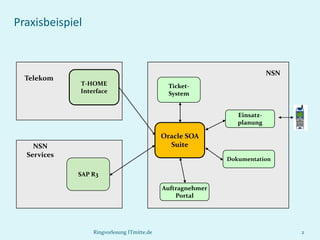
Praxisbeispiel


                                                                          NSN
  Telekom
             T-HOME                           Ticket-
             Interface                        System


                                                               Einsatz-
                                                               planung

                                            Oracle SOA
    NSN                                       Suite
  Services
                                                            Dokumentation

             SAP R3

                                            Auftragnehmer
                                                Portal


                 Ringvorlesung ITmitte.de                                       2
Service (Dienst)

 Ein Service ist eine IT-Repräsentation einer fachlicher Funktionalität.


 Ein Service ist in einem Netzwerk verfügbar.


 Ein Service ist plattformunabhängig und die zugrunde liegende
  Implementierung ist transparent.


                     Ringvorlesung ITmitte.de                               3
Web-Service

 Austausch von in XML serialisierten Nachrichten zwischen Services.


 Transport-Protokoll ist in der Regel HTTP(S). Die Einbettung der Daten in die
  Transport-Schicht wird durch SOAP beschrieben.


 Funktionale Servicebeschreibung durch WSDL (1.1 oder 2.0 – unterstützt
  semantische Erweiterungen).


 Lose Kopplung von Services wird ermöglicht (sync./async., homog./heterog.
  Daten-typen, stat./dyn. Bindung, Transaktion/Kompensation).


                            Ringvorlesung ITmitte.de                          4
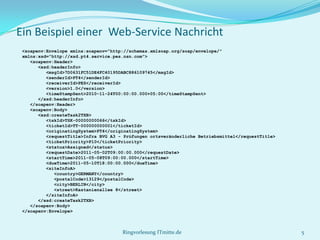
Ein Beispiel einer Web-Service Nachricht
 <soapenv:Envelope xmlns:soapenv="http://schemas.xmlsoap.org/soap/envelope/"
 xmlns:xsd="http://xsd.pt4.service.pes.nsn.com">
    <soapenv:Header>
       <xsd:headerInfo>
          <msgId>7D0631FC51DE4FC40195DABC886109745</msgId>
          <senderId>PT4</senderId>
          <receiverId>PES</receiverId>
          <version>1.0</version>
          <timeStampSent>2010-11-24T00:00:00.000+05:00</timeStampSent>
       </xsd:headerInfo>
    </soapenv:Header>
    <soapenv:Body>
       <xsd:createTask2TXB>
          <tskId>TSK-00000000066</tskId>
          <ticketId>TT-000000000001</ticketId>
          <originatingSystem>PT4</originatingSystem>
          <requestTitle>Infra BVG A3 - Prüfungen ortsveränderliche Betriebsmittel</requestTitle>
          <ticketPriority>P10</ticketPriority>
          <status>Assigned</status>
          <requestDate>2011-05-02T09:00:00.000</requestDate>
          <startTime>2011-05-08T09:00:00.000</startTime>
          <dueTime>2011-05-10T18:00:00.000</dueTime>
          <siteInfoA>
             <country>GERMANY</country>
             <postalCode>13129</postalCode>
             <city>BERLIN</city>
             <street>Kastanienallee 8</street>
          </siteInfoA>
       </xsd:createTask2TXB>
    </soapenv:Body>
 </soapenv:Envelope>


                                      Ringvorlesung ITmitte.de                                     5
Ein Beispiel einer WSDL (Ausschnitt)
<wsdl:message name="createTask2TXB">
  <wsdl:part name="parameters" element="top:createTask2TXB"/>
</wsdl:message>
<wsdl:message name="createTask2TXBResponse">
  <wsdl:part name="parameters" element="top:createTask2TXBResponse"/>
</wsdl:message>
<wsdl:message name="faultInfo">
  <wsdl:part name="parameters" element="top:faultInfo"/>
</wsdl:message>
<!-- ... -->
<wsdl:portType name="PT42PES2TXBTaskPortType">
  <wsdl:operation name="createTask2TXB">
    <wsdl:input message="tns:createTask2TXB"/>
    <wsdl:output message="tns:createTask2TXBResponse"/>
    <wsdl:fault name="fault" message="tns:faultInfo"/>
  </wsdl:operation>
  <!-- ... -->
</wsdl:portType>
<wsdl:binding name="PT42PES2TXBTaskSoapBinding" type="tns:PT42PES2TXBTaskPortType">
  <soap:binding style="document" transport="http://schemas.xmlsoap.org/soap/http"/>
  <wsdl:operation name="createTask2TXB">
    <soap:operation style="document" soapAction="http://pt4.service.pes.nsn.com/createTask2TXB"/>
      <wsdl:input>
        <soap:header message="tns:headerInfo" part="parameters" use="literal"/>
        <soap:body use="literal"/>
      </wsdl:input>
      <!-- ... -->
    </wsdl:operation>
   <!-- ... -->
 </soap:binding>
</wsdl:binding>
<wsdl:service name="PT42PES2TXBTaskService">
    <wsdl:port name="PT42PES2TXBTaskSoap" binding="tns:PT42PES2TXBTaskSoapBinding">
        <soap:address location="https://pes_node:4443/.../pt42pes2txbtask_client_ep"/>
    </wsdl:port>
</wsdl:service>
                                      Ringvorlesung ITmitte.de                                      6
Einführung in WSDL
  Die Struktur eines WSDL Dokuments

  <definitions>

  <types>
    data type definitions....
  </types>

  <message>
    definition of the data being communicated....
  </message>

  <portType>
    set of operations and the messages that are involved....
  </portType>

  <binding>
    protocol and data format specification for each port type....
  </binding>

  </definitions>


                                Ringvorlesung ITmitte.de            7
Das <portType>-Element

  Ein One-Way Operation Beispiel

  <message name="newTermValues">
    <part name="term" type="xs:string"/>
    <part name="value" type="xs:string"/>
  </message>

  <portType name="glossaryTerms">
    <operation name="setTerm">
      <input name="newTerm" message="newTermValues"/>
    </operation>
  </portType >

  Ein Request-Response Operation Beispiel

  <message name="getTermRequest">
    <part name="term" type="xs:string"/>
  </message>

  <message name="getTermResponse">
    <part name="value" type="xs:string"/>
  </message>

  <portType name="glossaryTerms">
    <operation name="getTerm">
      <input message="getTermRequest"/>
      <output message="getTermResponse"/>
    </operation>
  </portType>

                                      Ringvorlesung ITmitte.de   8
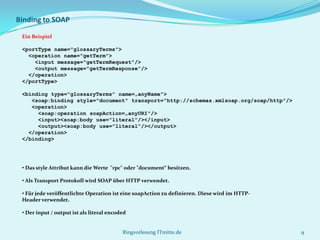
Binding to SOAP

 Ein Beispiel

 <portType name="glossaryTerms">
   <operation name="getTerm">
     <input message="getTermRequest"/>
     <output message="getTermResponse"/>
   </operation>
 </portType>

 <binding type="glossaryTerms" name=„anyName">
    <soap:binding style="document" transport="http://schemas.xmlsoap.org/soap/http"/>
    <operation>
      <soap:operation soapAction=„anyURI"/>
      <input><soap:body use="literal"/></input>
      <output><soap:body use="literal"/></output>
   </operation>
 </binding>


 • Das style Attribut kann die Werte "rpc" oder "document“ besitzen.

 • Als Transport Protokoll wird SOAP über HTTP verwendet.

 • Für jede veröffentlichte Operation ist eine soapAction zu definieren. Diese wird im HTTP-
 Header verwendet.

 • Der input / output ist als literal encoded


                                           Ringvorlesung ITmitte.de                            9
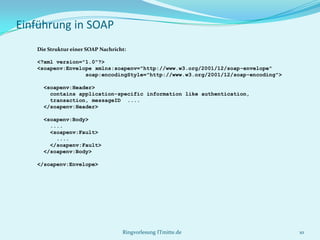
Einführung in SOAP
   Die Struktur einer SOAP Nachricht:

   <?xml version="1.0"?>
   <soapenv:Envelope xmlns:soapenv="http://www.w3.org/2001/12/soap-envelope"
                  soap:encodingStyle="http://www.w3.org/2001/12/soap-encoding">

     <soapenv:Header>
       contains application-specific information like authentication,
       transaction, messageID ....
     </soapenv:Header>

     <soapenv:Body>
       ....
       <soapenv:Fault>
         ....
       </soapenv:Fault>
     </soapenv:Body>

   </soapenv:Envelope>


                                   Ringvorlesung ITmitte.de                       10
Einführung in SOAP
 Eine Beispielnachricht, eingebettet in einen HTTP-Request:

 POST http://www.example.de/soa-infra/services/default/terms_ep HTTP/1.1
 Content-Type: text/xml; charset=utf-8
 Content-Length: nnnn
 SOAPAction: "anyURI"

 <soapenv:Envelope xmlns:soapenv=" http://www.w3.org/2001/12/soap-envelope">
   <soapenv:Header/>
   <soapenv:Body>
     <M:getTerm xmlns:M="anyURI">
       <term>SUN</term>
     </M:getTerm>
   </soapenv:Body>
 </soapenv:Envelope>

 und die darauf erfolgte mögliche Antwort:

 HTTP/1.1 200 OK
 Content-Type: text/xml; charset=utf-8
 Content-Length: nnnn

 <soapenv:Envelope xmlns:soapenv="http://www.w3.org/2001/12/soap-envelope">
   <soapenv:Header/>
   <soapenv:Body>
     <M:getTerm xmlns:M="anyURI">
       <value>107.0</value>
     </M:getTerm>
   </soapenv:Body>
 </soapenv:Envelope>

                                        Ringvorlesung ITmitte.de               11
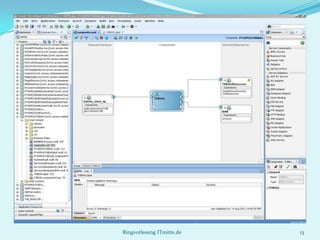
Web Services Business Process Execution Language
(WS-BPEL)

 BPEL ist eine XML-basierte Sprache zur Beschreibung von Geschäftsprozessen
  als Workflows.


 BPEL ist eine Sprache zur Serviceorchestrierung (Programmieren „im Großen“
  - das Spezifizieren der Geschäftslogik im Gegensatz zum Programmieren „im
  Kleinen“ - die Implementierung der Geschäftsfunktionen).


 Prozesse in BPEL importieren und exportieren Informationen über
  Webservices.


 Konzeptionell ein Enterprise Service Bus (ESB).

                             Ringvorlesung ITmitte.de                          12
Ringvorlesung ITmitte.de   13
Ringvorlesung ITmitte.de   14
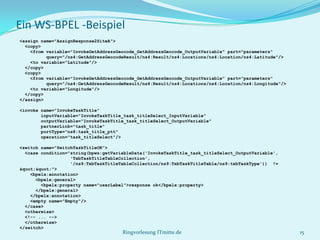
Ein WS-BPEL -Beispiel
<assign name="AssignResponse2SiteA">
  <copy>
    <from variable="InvokeGetAddressGeocode_GetAddressGeocode_OutputVariable" part="parameters"
          query="/ns4:GetAddressGeocodeResult/ns4:Result/ns4:Locations/ns4:Location/ns4:Latitude"/>
    <to variable="Latitude"/>
  </copy>
  <copy>
    <from variable="InvokeGetAddressGeocode_GetAddressGeocode_OutputVariable" part="parameters"
          query="/ns4:GetAddressGeocodeResult/ns4:Result/ns4:Locations/ns4:Location/ns4:Longitude"/>
    <to variable="Longitude"/>
  </copy>
</assign>

<invoke name="InvokeTaskTitle"
        inputVariable="InvokeTaskTitle_task_titleSelect_InputVariable"
        outputVariable="InvokeTaskTitle_task_titleSelect_OutputVariable"
        partnerLink="task_title"
        portType="ns8:task_title_ptt"
        operation="task_titleSelect"/>

<switch name="SwitchTaskTitleOK">
  <case condition="string(bpws:getVariableData('InvokeTaskTitle_task_titleSelect_OutputVariable',
                   'TxbTaskTitleTableCollection',
                   '/ns9:TxbTaskTitleTableCollection/ns9:TxbTaskTitleTable/ns9:txbTaskType')) !=
&quot;&quot;">
    <bpelx:annotation>
      <bpelx:general>
        <bpelx:property name="userLabel">response ok</bpelx:property>
      </bpelx:general>
    </bpelx:annotation>
    <empty name="Empty"/>
  </case>
  <otherwise>
  <!-- ... -->
  </otherwise>
</switch>
                                      Ringvorlesung ITmitte.de                                         15
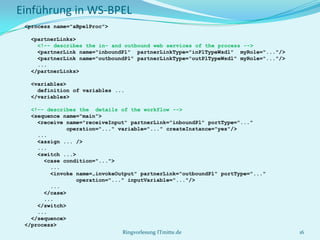
Einführung in WS-BPEL
 <process name="aBpelProc">

  <partnerLinks>
    <!–- describes the in- and outbound web services of the process -->
    <partnerLink name="inboundPl" partnerLinkType="inPlTypeWsdl" myRole="..."/>
    <partnerLink name="outboundPl" partnerLinkType="outPlTypeWsdl" myRole="..."/>
    ...
  </partnerLinks>

  <variables>
    definition of variables ...
  </variables>

   <!–- describes the details of the workflow -->
   <sequence name="main">
     <receive name="receiveInput" partnerLink="inboundPl" portType="..."
               operation="..." variable="..." createInstance="yes"/>
     ...
     <assign ... />
     ...
     <switch ...>
       <case condition="...">
         ...
         <invoke name=„invokeOutput" partnerLink="outboundPl" portType="..."
                  operation="..." inputVariable="..."/>
         ...
       </case>
       ...
     </switch>
     ...
   </sequence>
 </process>
                                Ringvorlesung ITmitte.de                            16
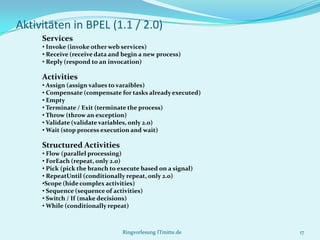
Aktivitäten in BPEL (1.1 / 2.0)
     Services
     • Invoke (invoke other web services)
     • Receive (receive data and begin a new process)
     • Reply (respond to an invocation)

     Activities
     • Assign (assign values to varaibles)
     • Compensate (compensate for tasks already executed)
     • Empty
     • Terminate / Exit (terminate the process)
     • Throw (throw an exception)
     • Validate (validate variables, only 2.0)
     • Wait (stop process execution and wait)

     Structured Activities
     • Flow (parallel processing)
     • ForEach (repeat, only 2.0)
     • Pick (pick the branch to execute based on a signal)
     • RepeatUntil (conditionally repeat, only 2.0)
     •Scope (hide complex activities)
     • Sequence (sequence of activities)
     • Switch / If (make decisions)
     • While (conditionally repeat)


                                 Ringvorlesung ITmitte.de    17

Vorlesung SOA - DIS AG.pptx

  • 1.
    Integration heterogener verteilter Systememit WS-BPEL – ein Praxisbeispiel Dr. Wolf-Dieter Heinrichs
  • 2.
    Praxisbeispiel NSN Telekom T-HOME Ticket- Interface System Einsatz- planung Oracle SOA NSN Suite Services Dokumentation SAP R3 Auftragnehmer Portal Ringvorlesung ITmitte.de 2
  • 3.
    Service (Dienst)  EinService ist eine IT-Repräsentation einer fachlicher Funktionalität.  Ein Service ist in einem Netzwerk verfügbar.  Ein Service ist plattformunabhängig und die zugrunde liegende Implementierung ist transparent. Ringvorlesung ITmitte.de 3
  • 4.
    Web-Service  Austausch vonin XML serialisierten Nachrichten zwischen Services.  Transport-Protokoll ist in der Regel HTTP(S). Die Einbettung der Daten in die Transport-Schicht wird durch SOAP beschrieben.  Funktionale Servicebeschreibung durch WSDL (1.1 oder 2.0 – unterstützt semantische Erweiterungen).  Lose Kopplung von Services wird ermöglicht (sync./async., homog./heterog. Daten-typen, stat./dyn. Bindung, Transaktion/Kompensation). Ringvorlesung ITmitte.de 4
  • 5.
    Ein Beispiel einerWeb-Service Nachricht <soapenv:Envelope xmlns:soapenv="http://schemas.xmlsoap.org/soap/envelope/" xmlns:xsd="http://xsd.pt4.service.pes.nsn.com"> <soapenv:Header> <xsd:headerInfo> <msgId>7D0631FC51DE4FC40195DABC886109745</msgId> <senderId>PT4</senderId> <receiverId>PES</receiverId> <version>1.0</version> <timeStampSent>2010-11-24T00:00:00.000+05:00</timeStampSent> </xsd:headerInfo> </soapenv:Header> <soapenv:Body> <xsd:createTask2TXB> <tskId>TSK-00000000066</tskId> <ticketId>TT-000000000001</ticketId> <originatingSystem>PT4</originatingSystem> <requestTitle>Infra BVG A3 - Prüfungen ortsveränderliche Betriebsmittel</requestTitle> <ticketPriority>P10</ticketPriority> <status>Assigned</status> <requestDate>2011-05-02T09:00:00.000</requestDate> <startTime>2011-05-08T09:00:00.000</startTime> <dueTime>2011-05-10T18:00:00.000</dueTime> <siteInfoA> <country>GERMANY</country> <postalCode>13129</postalCode> <city>BERLIN</city> <street>Kastanienallee 8</street> </siteInfoA> </xsd:createTask2TXB> </soapenv:Body> </soapenv:Envelope> Ringvorlesung ITmitte.de 5
  • 6.
    Ein Beispiel einerWSDL (Ausschnitt) <wsdl:message name="createTask2TXB"> <wsdl:part name="parameters" element="top:createTask2TXB"/> </wsdl:message> <wsdl:message name="createTask2TXBResponse"> <wsdl:part name="parameters" element="top:createTask2TXBResponse"/> </wsdl:message> <wsdl:message name="faultInfo"> <wsdl:part name="parameters" element="top:faultInfo"/> </wsdl:message> <!-- ... --> <wsdl:portType name="PT42PES2TXBTaskPortType"> <wsdl:operation name="createTask2TXB"> <wsdl:input message="tns:createTask2TXB"/> <wsdl:output message="tns:createTask2TXBResponse"/> <wsdl:fault name="fault" message="tns:faultInfo"/> </wsdl:operation> <!-- ... --> </wsdl:portType> <wsdl:binding name="PT42PES2TXBTaskSoapBinding" type="tns:PT42PES2TXBTaskPortType"> <soap:binding style="document" transport="http://schemas.xmlsoap.org/soap/http"/> <wsdl:operation name="createTask2TXB"> <soap:operation style="document" soapAction="http://pt4.service.pes.nsn.com/createTask2TXB"/> <wsdl:input> <soap:header message="tns:headerInfo" part="parameters" use="literal"/> <soap:body use="literal"/> </wsdl:input> <!-- ... --> </wsdl:operation> <!-- ... --> </soap:binding> </wsdl:binding> <wsdl:service name="PT42PES2TXBTaskService"> <wsdl:port name="PT42PES2TXBTaskSoap" binding="tns:PT42PES2TXBTaskSoapBinding"> <soap:address location="https://pes_node:4443/.../pt42pes2txbtask_client_ep"/> </wsdl:port> </wsdl:service> Ringvorlesung ITmitte.de 6
  • 7.
    Einführung in WSDL Die Struktur eines WSDL Dokuments <definitions> <types> data type definitions.... </types> <message> definition of the data being communicated.... </message> <portType> set of operations and the messages that are involved.... </portType> <binding> protocol and data format specification for each port type.... </binding> </definitions> Ringvorlesung ITmitte.de 7
  • 8.
    Das <portType>-Element Ein One-Way Operation Beispiel <message name="newTermValues"> <part name="term" type="xs:string"/> <part name="value" type="xs:string"/> </message> <portType name="glossaryTerms"> <operation name="setTerm"> <input name="newTerm" message="newTermValues"/> </operation> </portType > Ein Request-Response Operation Beispiel <message name="getTermRequest"> <part name="term" type="xs:string"/> </message> <message name="getTermResponse"> <part name="value" type="xs:string"/> </message> <portType name="glossaryTerms"> <operation name="getTerm"> <input message="getTermRequest"/> <output message="getTermResponse"/> </operation> </portType> Ringvorlesung ITmitte.de 8
  • 9.
    Binding to SOAP Ein Beispiel <portType name="glossaryTerms"> <operation name="getTerm"> <input message="getTermRequest"/> <output message="getTermResponse"/> </operation> </portType> <binding type="glossaryTerms" name=„anyName"> <soap:binding style="document" transport="http://schemas.xmlsoap.org/soap/http"/> <operation> <soap:operation soapAction=„anyURI"/> <input><soap:body use="literal"/></input> <output><soap:body use="literal"/></output> </operation> </binding> • Das style Attribut kann die Werte "rpc" oder "document“ besitzen. • Als Transport Protokoll wird SOAP über HTTP verwendet. • Für jede veröffentlichte Operation ist eine soapAction zu definieren. Diese wird im HTTP- Header verwendet. • Der input / output ist als literal encoded Ringvorlesung ITmitte.de 9
  • 10.
    Einführung in SOAP Die Struktur einer SOAP Nachricht: <?xml version="1.0"?> <soapenv:Envelope xmlns:soapenv="http://www.w3.org/2001/12/soap-envelope" soap:encodingStyle="http://www.w3.org/2001/12/soap-encoding"> <soapenv:Header> contains application-specific information like authentication, transaction, messageID .... </soapenv:Header> <soapenv:Body> .... <soapenv:Fault> .... </soapenv:Fault> </soapenv:Body> </soapenv:Envelope> Ringvorlesung ITmitte.de 10
  • 11.
    Einführung in SOAP Eine Beispielnachricht, eingebettet in einen HTTP-Request: POST http://www.example.de/soa-infra/services/default/terms_ep HTTP/1.1 Content-Type: text/xml; charset=utf-8 Content-Length: nnnn SOAPAction: "anyURI" <soapenv:Envelope xmlns:soapenv=" http://www.w3.org/2001/12/soap-envelope"> <soapenv:Header/> <soapenv:Body> <M:getTerm xmlns:M="anyURI"> <term>SUN</term> </M:getTerm> </soapenv:Body> </soapenv:Envelope> und die darauf erfolgte mögliche Antwort: HTTP/1.1 200 OK Content-Type: text/xml; charset=utf-8 Content-Length: nnnn <soapenv:Envelope xmlns:soapenv="http://www.w3.org/2001/12/soap-envelope"> <soapenv:Header/> <soapenv:Body> <M:getTerm xmlns:M="anyURI"> <value>107.0</value> </M:getTerm> </soapenv:Body> </soapenv:Envelope> Ringvorlesung ITmitte.de 11
  • 12.
    Web Services BusinessProcess Execution Language (WS-BPEL)  BPEL ist eine XML-basierte Sprache zur Beschreibung von Geschäftsprozessen als Workflows.  BPEL ist eine Sprache zur Serviceorchestrierung (Programmieren „im Großen“ - das Spezifizieren der Geschäftslogik im Gegensatz zum Programmieren „im Kleinen“ - die Implementierung der Geschäftsfunktionen).  Prozesse in BPEL importieren und exportieren Informationen über Webservices.  Konzeptionell ein Enterprise Service Bus (ESB). Ringvorlesung ITmitte.de 12
  • 13.
  • 14.
  • 15.
    Ein WS-BPEL -Beispiel <assignname="AssignResponse2SiteA"> <copy> <from variable="InvokeGetAddressGeocode_GetAddressGeocode_OutputVariable" part="parameters" query="/ns4:GetAddressGeocodeResult/ns4:Result/ns4:Locations/ns4:Location/ns4:Latitude"/> <to variable="Latitude"/> </copy> <copy> <from variable="InvokeGetAddressGeocode_GetAddressGeocode_OutputVariable" part="parameters" query="/ns4:GetAddressGeocodeResult/ns4:Result/ns4:Locations/ns4:Location/ns4:Longitude"/> <to variable="Longitude"/> </copy> </assign> <invoke name="InvokeTaskTitle" inputVariable="InvokeTaskTitle_task_titleSelect_InputVariable" outputVariable="InvokeTaskTitle_task_titleSelect_OutputVariable" partnerLink="task_title" portType="ns8:task_title_ptt" operation="task_titleSelect"/> <switch name="SwitchTaskTitleOK"> <case condition="string(bpws:getVariableData('InvokeTaskTitle_task_titleSelect_OutputVariable', 'TxbTaskTitleTableCollection', '/ns9:TxbTaskTitleTableCollection/ns9:TxbTaskTitleTable/ns9:txbTaskType')) != &quot;&quot;"> <bpelx:annotation> <bpelx:general> <bpelx:property name="userLabel">response ok</bpelx:property> </bpelx:general> </bpelx:annotation> <empty name="Empty"/> </case> <otherwise> <!-- ... --> </otherwise> </switch> Ringvorlesung ITmitte.de 15
  • 16.
    Einführung in WS-BPEL <process name="aBpelProc"> <partnerLinks> <!–- describes the in- and outbound web services of the process --> <partnerLink name="inboundPl" partnerLinkType="inPlTypeWsdl" myRole="..."/> <partnerLink name="outboundPl" partnerLinkType="outPlTypeWsdl" myRole="..."/> ... </partnerLinks> <variables> definition of variables ... </variables> <!–- describes the details of the workflow --> <sequence name="main"> <receive name="receiveInput" partnerLink="inboundPl" portType="..." operation="..." variable="..." createInstance="yes"/> ... <assign ... /> ... <switch ...> <case condition="..."> ... <invoke name=„invokeOutput" partnerLink="outboundPl" portType="..." operation="..." inputVariable="..."/> ... </case> ... </switch> ... </sequence> </process> Ringvorlesung ITmitte.de 16
  • 17.
    Aktivitäten in BPEL(1.1 / 2.0) Services • Invoke (invoke other web services) • Receive (receive data and begin a new process) • Reply (respond to an invocation) Activities • Assign (assign values to varaibles) • Compensate (compensate for tasks already executed) • Empty • Terminate / Exit (terminate the process) • Throw (throw an exception) • Validate (validate variables, only 2.0) • Wait (stop process execution and wait) Structured Activities • Flow (parallel processing) • ForEach (repeat, only 2.0) • Pick (pick the branch to execute based on a signal) • RepeatUntil (conditionally repeat, only 2.0) •Scope (hide complex activities) • Sequence (sequence of activities) • Switch / If (make decisions) • While (conditionally repeat) Ringvorlesung ITmitte.de 17