
Microsoft Azure 
Platform Azure System Management 
1.Modul : Overview 
Oliver Michalski 
Azure Community Deutschland 
http://wazcommunity.wordpress.com/
About me 
• Oliver Michalski 
• Senior Developer .NET 
• Berlin 
• Moderator des Azure Forums bei MSDN Deutschland 
• Community Leader Azure Community Deutschland 
• Community Leader Azure Community Deutschland – 
User Group (Facebook) 
• Member of the Microsoft Azure Insider Program
• Azure Community Deutschland 
• http://wazcommunity.wordpress.com/ 
• Azure Community Deutschland – User Group 
• http://www.facebook.com/groups/26511597022181 
7/
Modul: 
AZURE SYSTEM MANAGEMENT
• Mit diesem Modul möchte ich euch einen 
Überblick über die Angebote der Azure 
Plattform im Bereich Azure System 
Management (oder Azure Management) 
liefern 
• Level 200 
• Fangen wir an 
1. 
ÜBERBLICK
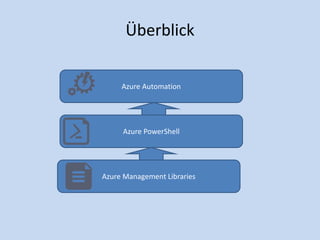
Überblick 
Azure Automation 
Azure PowerShell 
Azure Management Libraries
2. 
AZURE MANAGEMENT LIBRARY
Azure Management Libraries 
Compute Infrastructure Media Services Network 
Scheduler Storage Web Sites Automation 
Express Route Monitoring Common 
Azure Management Libraries 
Common 
Dependencies
Azure Management Libraries (1) 
• Die Azure Management Libraries (MAML) sind eine 
Sammlung von REST-Wrapper-Assemblies, die es euch 
ermöglicht Servicefunktionen wie z.B. Automatisierung, 
Management und ähnliches in euren 
Anwendungen anzubieten
Azure Management Libraries (2) 
• Was bieten die Azure Management Libraries? – Auswahl 
• Support für Portable Class Library (PCL) mit umfangreicher 
Plattformunterstützung 
• Shared Infrastructure für Common Error Handling, Tracing, 
Configuration und HTTP Pipeline Manipulation 
• Build on Top von populären Libraries wie HttpClient und 
Json.NET
Azure Management Libraries (3) 
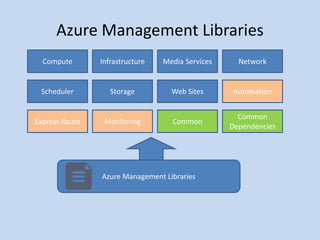
• Alle Bestandteile der Azure Management Libraries, werden 
als NuGet Packages bereitgestellt. Dabei wird zwischen 
Release Builds im Bild blau eingefärbt, Preview Releases im 
Bild orange eingefärbt und Dependencies im Bild grün 
eingefärbt, unterschieden
DEMO 
MAML – Getting Started
3. 
AZURE POWERSHELL
Exkurs: Was ist Windows PowerShell? 
• Windows PowerShell ist eine Alternative zur veralteten 
Windows Kommandozeile (cmd.exe) und zum Windows 
Script Host. 
• Windows PowerShell ist objektorientiert und unterstützt die 
aus der UNIX Welt bekannten Mechanismen Pipes und Filter. 
• Den Kern der Windows PowerShell bilden kleine 
Funktionseinheiten, genannt Cmdlets. Jedes Cmdlet ist eine 
.NET – Klasse, die in der Regel einen Befehlssatz (ein 
Kommando) implementiert. Windows PowerShell verfügt in 
der Grundinstallation über ca. 300 Basis-Cmdlets, kann aber 
über sog. PowerShell Snap-Ins (Sammlungen von 
produktspezifischen oder benutzerdefinierten Cmdlets) 
jederzeit erweitert werden.
• Weitere Funktionalitäten sind: 
• Ausführung von Programmen 
• Ausführung von selbstdefinierte Funktionen 
• Ausführung von Scripts und Batch-Files 
• Zugriff auf WMI-Klassen 
• Zugriff auf COM-Objekte 
• Zugriff auf das gesamte .NET-Framework
• Mit Windows PowerShell 3.0 kommen noch folgende 
Funktionalitäten hinzu: 
• Unterstützung von Workflows basierend auf der Windows 
Workflow Foundation 
• Remote Sessions 
• Zeit- oder eventgesteuerte Ausführung von Skripts
Azure Powershell (1) 
• Azure PowerShell ist eine produktspezifische Sammlung von 
Cmdlets 
• Azure PowerShell ist ein Open Source Projekt und hier 
erhältlich: 
• https://github.com/Azure/azure-sdk-tools 
• Azure PowerShell ist zwar einer der ältesten Bestandteile des 
Azure SDK, trotzdem wurde aber im Oktober 2013 
(V.0.7.0) ein vollständiges Reengineering angesetzt. Seit 
diesem Zeitpunkt wird Azure PowerShell als On Top Package 
zur Azure Management Library weiterentwickelt. Durch 
dieses Reengineering ist das Azure PowerShell Projekt, bisher 
um rund 130000 Codezeilen geschrumpft
Azure Powershell (2) 
• Folgende PowerShell Module und Cmdlets stehen zurzeit zur Verfügung: 
• Account 
– Get and Import Azure Publish Settings 
– Login with Microsoft Account or Organizational Account through 
Microsoft Azure Active Directory 
• Environment 
– Get the different out-of-box Microsoft Azure Environments 
– Add/Set/Remove customized Environments (like your Windows Azure 
Pack Environments) 
– Get Azure publish Settings for a Particular Environment
Azure Powershell (2b) 
• Subscription 
– Manage Azure Subscription 
– Manage AffinityGroup 
• Website 
– Manage Website, such as CRUD, Start and Stop. 
– Manage Slot 
– Manage WebJob 
– Deploy Project via WebDeploy 
– Diagnostics 
• Configure Site and Application Diagnostics 
• Log Streaming 
• Save log
Azure Powershell (2c) 
• Cloud Services 
– Create Scaffolding for Cloud Service and Role. Role Support includes 
Node.js, PHP, Django and Cache. 
– Manage Cloud Service and Role, such as CRUD, Start and Stop. 
– Manage Extension 
– Start/Stop Azure Emulator. 
– Manage Certificate. 
– Manage Cloud Service Extensions 
• Remote Desktop 
• Diagnostics 
• Microsoft Antimalware 
• Windows Azure Diagnostics
Azure Powershell (2e) 
• SQL Database 
– CRUD Support for Database Server, Database and Firewall Rules. 
– Get Database Server Quota. 
– Get/Set Database Server Service Objective. 
– Manage Database Copies and Active Geo-Replication. 
– Get dropped Databases that can be restored. 
– Issue Requests to Restore a live or dropped Database to a Point in 
Time. 
– Issue Requests to Recover a Database from an unavailable Database 
Server. 
• Service Bus 
– Manage Service Bus Namespaces
Azure Powershell (2f) 
• VM 
– Manage VM, such as CRUD, Import/Export and Start/Stop/Restart. 
– Manage VM Image and VM Image Disks. 
– Manage Disk, such as CRUD. 
– Manage VM Endpoint, such as CRUD and ACL. 
– Get/Set VM SubNet. 
– Manage Certificate and SSH Key. 
– PowerShell Remoting
Azure Powershell (2f) 
• VM 
– Manage Extension 
• BG Info 
• Puppet 
• Custom Script 
• Access 
• Microsoft Antimalware 
• PowerShell DSC 
• Windows Azure Diagnostics 
– Public IP, Reserved IP and Internal Load Balancer
Azure Powershell (2g) 
• Deployment 
– Manage Deployment, such as CRUD, Move, Upgrade and Restore. 
– Get/Create DNS Settings of a Deployment. 
• VNet 
– Manage Virtual Network Config, Connection and Gateway. 
– Manage Static IP 
• Azure Media Services 
– Create, Read and Delete Media Services Accounts 
– Generate new Account Keys for Media Services Accounts 
• HDInsight 
– Manage Clusters, such as CRUD, Add/Set Storage 
– Manage Jobs, such as CRUD, Start/Stop/Wait/Invoke 
– Manage HTTP Service Access. such as Grant/Revoke
Azure Powershell (2h) 
• Store 
– View available Microsoft Azure Store Add-On plans. 
– Purchase, View, Upgrade and Remove Microsoft Azure Store Add-On 
Instances. 
• Utility 
– Test whether a Name is available. Currently support Cloud Service 
Name, Storage Account Name and Service Bus Namespace Name. 
– Get the List of Geo Locations supported by Azure. 
– Get the List of OS supported by Azure. 
– Direct you to Azure portal.
Azure Powershell (2i) 
• Windows Azure Pack 
– Web Site: CRUD Website, Deployment, Configure and get Log, 
Start/Stop/Restart/Show Website 
– Service Bus: CRD Namespace 
– VM: CRUD VM, get OS Disk, Size Profile and VM Template, 
Start/Stop/Restart/Suspend/Resume VM 
– VNET: CRUD VNET and Subnet. 
– Cloud Service: CRUD Cloud Service. 
• ExpressRoute 
– Manage dedicated Circuit 
– Manage BGP Peering
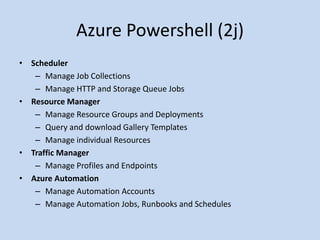
Azure Powershell (2j) 
• Scheduler 
– Manage Job Collections 
– Manage HTTP and Storage Queue Jobs 
• Resource Manager 
– Manage Resource Groups and Deployments 
– Query and download Gallery Templates 
– Manage individual Resources 
• Traffic Manager 
– Manage Profiles and Endpoints 
• Azure Automation 
– Manage Automation Accounts 
– Manage Automation Jobs, Runbooks and Schedules
DEMO 
Azure PowerShell – Getting 
Started
4. 
AZURE AUTOMATION
Azure Automation (1) 
• Azure Automation ist ein Dienst zur Automatisierung von 
Prozessen, die das Cloud-Management vereinfachen. 
• Mit Azure Automation könnt ihr die Erstellung, Bereitstellung, 
Überwachung und Verwaltung von Ressourcen im Azure 
Environment , mit einer hoch skalierbaren und zuverlässigen 
Workflow Execution Engine automatisieren. 
• Alles was ihr dafür machen müsst, ist es ein Runbook 
mithilfe der Windows PowerShell Workflow Syntax zu 
erstellen. 
• Neben der Prozessautomatisierung habt ihr die Möglichkeit 
sog. Checkpoints zu erstellen oder eure Workflows nach 
Fehlern, Abstürzen bzw. Netzwerkprobleme 
automatisch wiederaufzunehmen.
Azure Automation (2) 
• Mithilfe von Azure Automation könnt ihr euch mit jedem 
System verbinden, das eine API über typische Internet 
Protokolle verfügbar macht. 
• Azure Automation bietet eine Out of Box Integration zu 
vielen Azure Dienste, einschließlich: 
 Web-Sites (Management) 
 Cloud-Services (Management) 
 Virtuelle Maschinen (Management und WinRM - 
Unterstützung) 
 Speicher (Management) 
 SQL Server (Management und SQL-Unterstützung)
Azure Automation (3) 
• Ist das schon alles? 
• Nein, natürlich nicht. Ihr könnt auch Lösungen von 
Drittanbietern einbinden. Dafür einfach ein vorhandenen 
PowerShell-Modul importieren oder ein eigenes Modul mit 
C# und Windows PowerShell schreiben.
DEMO 
Azure Automation- Getting 
Started
Q & A

Microsoft Azure Platform - System Management v.0.5

  • 1.
    Microsoft Azure PlatformAzure System Management 1.Modul : Overview Oliver Michalski Azure Community Deutschland http://wazcommunity.wordpress.com/
  • 2.
    About me •Oliver Michalski • Senior Developer .NET • Berlin • Moderator des Azure Forums bei MSDN Deutschland • Community Leader Azure Community Deutschland • Community Leader Azure Community Deutschland – User Group (Facebook) • Member of the Microsoft Azure Insider Program
  • 3.
    • Azure CommunityDeutschland • http://wazcommunity.wordpress.com/ • Azure Community Deutschland – User Group • http://www.facebook.com/groups/26511597022181 7/
  • 4.
  • 5.
    • Mit diesemModul möchte ich euch einen Überblick über die Angebote der Azure Plattform im Bereich Azure System Management (oder Azure Management) liefern • Level 200 • Fangen wir an 
  • 6.
  • 7.
    Überblick Azure Automation Azure PowerShell Azure Management Libraries
  • 8.
  • 9.
    Azure Management Libraries Compute Infrastructure Media Services Network Scheduler Storage Web Sites Automation Express Route Monitoring Common Azure Management Libraries Common Dependencies
  • 10.
    Azure Management Libraries(1) • Die Azure Management Libraries (MAML) sind eine Sammlung von REST-Wrapper-Assemblies, die es euch ermöglicht Servicefunktionen wie z.B. Automatisierung, Management und ähnliches in euren Anwendungen anzubieten
  • 11.
    Azure Management Libraries(2) • Was bieten die Azure Management Libraries? – Auswahl • Support für Portable Class Library (PCL) mit umfangreicher Plattformunterstützung • Shared Infrastructure für Common Error Handling, Tracing, Configuration und HTTP Pipeline Manipulation • Build on Top von populären Libraries wie HttpClient und Json.NET
  • 12.
    Azure Management Libraries(3) • Alle Bestandteile der Azure Management Libraries, werden als NuGet Packages bereitgestellt. Dabei wird zwischen Release Builds im Bild blau eingefärbt, Preview Releases im Bild orange eingefärbt und Dependencies im Bild grün eingefärbt, unterschieden
  • 13.
    DEMO MAML –Getting Started
  • 14.
  • 15.
    Exkurs: Was istWindows PowerShell? • Windows PowerShell ist eine Alternative zur veralteten Windows Kommandozeile (cmd.exe) und zum Windows Script Host. • Windows PowerShell ist objektorientiert und unterstützt die aus der UNIX Welt bekannten Mechanismen Pipes und Filter. • Den Kern der Windows PowerShell bilden kleine Funktionseinheiten, genannt Cmdlets. Jedes Cmdlet ist eine .NET – Klasse, die in der Regel einen Befehlssatz (ein Kommando) implementiert. Windows PowerShell verfügt in der Grundinstallation über ca. 300 Basis-Cmdlets, kann aber über sog. PowerShell Snap-Ins (Sammlungen von produktspezifischen oder benutzerdefinierten Cmdlets) jederzeit erweitert werden.
  • 16.
    • Weitere Funktionalitätensind: • Ausführung von Programmen • Ausführung von selbstdefinierte Funktionen • Ausführung von Scripts und Batch-Files • Zugriff auf WMI-Klassen • Zugriff auf COM-Objekte • Zugriff auf das gesamte .NET-Framework
  • 17.
    • Mit WindowsPowerShell 3.0 kommen noch folgende Funktionalitäten hinzu: • Unterstützung von Workflows basierend auf der Windows Workflow Foundation • Remote Sessions • Zeit- oder eventgesteuerte Ausführung von Skripts
  • 18.
    Azure Powershell (1) • Azure PowerShell ist eine produktspezifische Sammlung von Cmdlets • Azure PowerShell ist ein Open Source Projekt und hier erhältlich: • https://github.com/Azure/azure-sdk-tools • Azure PowerShell ist zwar einer der ältesten Bestandteile des Azure SDK, trotzdem wurde aber im Oktober 2013 (V.0.7.0) ein vollständiges Reengineering angesetzt. Seit diesem Zeitpunkt wird Azure PowerShell als On Top Package zur Azure Management Library weiterentwickelt. Durch dieses Reengineering ist das Azure PowerShell Projekt, bisher um rund 130000 Codezeilen geschrumpft
  • 19.
    Azure Powershell (2) • Folgende PowerShell Module und Cmdlets stehen zurzeit zur Verfügung: • Account – Get and Import Azure Publish Settings – Login with Microsoft Account or Organizational Account through Microsoft Azure Active Directory • Environment – Get the different out-of-box Microsoft Azure Environments – Add/Set/Remove customized Environments (like your Windows Azure Pack Environments) – Get Azure publish Settings for a Particular Environment
  • 20.
    Azure Powershell (2b) • Subscription – Manage Azure Subscription – Manage AffinityGroup • Website – Manage Website, such as CRUD, Start and Stop. – Manage Slot – Manage WebJob – Deploy Project via WebDeploy – Diagnostics • Configure Site and Application Diagnostics • Log Streaming • Save log
  • 21.
    Azure Powershell (2c) • Cloud Services – Create Scaffolding for Cloud Service and Role. Role Support includes Node.js, PHP, Django and Cache. – Manage Cloud Service and Role, such as CRUD, Start and Stop. – Manage Extension – Start/Stop Azure Emulator. – Manage Certificate. – Manage Cloud Service Extensions • Remote Desktop • Diagnostics • Microsoft Antimalware • Windows Azure Diagnostics
  • 22.
    Azure Powershell (2e) • SQL Database – CRUD Support for Database Server, Database and Firewall Rules. – Get Database Server Quota. – Get/Set Database Server Service Objective. – Manage Database Copies and Active Geo-Replication. – Get dropped Databases that can be restored. – Issue Requests to Restore a live or dropped Database to a Point in Time. – Issue Requests to Recover a Database from an unavailable Database Server. • Service Bus – Manage Service Bus Namespaces
  • 23.
    Azure Powershell (2f) • VM – Manage VM, such as CRUD, Import/Export and Start/Stop/Restart. – Manage VM Image and VM Image Disks. – Manage Disk, such as CRUD. – Manage VM Endpoint, such as CRUD and ACL. – Get/Set VM SubNet. – Manage Certificate and SSH Key. – PowerShell Remoting
  • 24.
    Azure Powershell (2f) • VM – Manage Extension • BG Info • Puppet • Custom Script • Access • Microsoft Antimalware • PowerShell DSC • Windows Azure Diagnostics – Public IP, Reserved IP and Internal Load Balancer
  • 25.
    Azure Powershell (2g) • Deployment – Manage Deployment, such as CRUD, Move, Upgrade and Restore. – Get/Create DNS Settings of a Deployment. • VNet – Manage Virtual Network Config, Connection and Gateway. – Manage Static IP • Azure Media Services – Create, Read and Delete Media Services Accounts – Generate new Account Keys for Media Services Accounts • HDInsight – Manage Clusters, such as CRUD, Add/Set Storage – Manage Jobs, such as CRUD, Start/Stop/Wait/Invoke – Manage HTTP Service Access. such as Grant/Revoke
  • 26.
    Azure Powershell (2h) • Store – View available Microsoft Azure Store Add-On plans. – Purchase, View, Upgrade and Remove Microsoft Azure Store Add-On Instances. • Utility – Test whether a Name is available. Currently support Cloud Service Name, Storage Account Name and Service Bus Namespace Name. – Get the List of Geo Locations supported by Azure. – Get the List of OS supported by Azure. – Direct you to Azure portal.
  • 27.
    Azure Powershell (2i) • Windows Azure Pack – Web Site: CRUD Website, Deployment, Configure and get Log, Start/Stop/Restart/Show Website – Service Bus: CRD Namespace – VM: CRUD VM, get OS Disk, Size Profile and VM Template, Start/Stop/Restart/Suspend/Resume VM – VNET: CRUD VNET and Subnet. – Cloud Service: CRUD Cloud Service. • ExpressRoute – Manage dedicated Circuit – Manage BGP Peering
  • 28.
    Azure Powershell (2j) • Scheduler – Manage Job Collections – Manage HTTP and Storage Queue Jobs • Resource Manager – Manage Resource Groups and Deployments – Query and download Gallery Templates – Manage individual Resources • Traffic Manager – Manage Profiles and Endpoints • Azure Automation – Manage Automation Accounts – Manage Automation Jobs, Runbooks and Schedules
  • 29.
    DEMO Azure PowerShell– Getting Started
  • 30.
  • 31.
    Azure Automation (1) • Azure Automation ist ein Dienst zur Automatisierung von Prozessen, die das Cloud-Management vereinfachen. • Mit Azure Automation könnt ihr die Erstellung, Bereitstellung, Überwachung und Verwaltung von Ressourcen im Azure Environment , mit einer hoch skalierbaren und zuverlässigen Workflow Execution Engine automatisieren. • Alles was ihr dafür machen müsst, ist es ein Runbook mithilfe der Windows PowerShell Workflow Syntax zu erstellen. • Neben der Prozessautomatisierung habt ihr die Möglichkeit sog. Checkpoints zu erstellen oder eure Workflows nach Fehlern, Abstürzen bzw. Netzwerkprobleme automatisch wiederaufzunehmen.
  • 32.
    Azure Automation (2) • Mithilfe von Azure Automation könnt ihr euch mit jedem System verbinden, das eine API über typische Internet Protokolle verfügbar macht. • Azure Automation bietet eine Out of Box Integration zu vielen Azure Dienste, einschließlich:  Web-Sites (Management)  Cloud-Services (Management)  Virtuelle Maschinen (Management und WinRM - Unterstützung)  Speicher (Management)  SQL Server (Management und SQL-Unterstützung)
  • 33.
    Azure Automation (3) • Ist das schon alles? • Nein, natürlich nicht. Ihr könnt auch Lösungen von Drittanbietern einbinden. Dafür einfach ein vorhandenen PowerShell-Modul importieren oder ein eigenes Modul mit C# und Windows PowerShell schreiben.
  • 34.
    DEMO Azure Automation-Getting Started
  • 35.