18.04.2016 2
Inhalt
• Infrastructure as Code
– ARM Templates
– Visual Studio Code (VS Code)
– Point to Site VPN Gateway
– Konfiguration: Developer Servers
– Custom Script Extensions
• Automation mittels Azure Automation
– Hinzufügen von Assets
– Anlegen von Service Prinzipal in Azure AD
– Azure Automation Add-on für Powershell ISE
– Installation von Software über Powershell 5
– Restart VMs, Stop VMs, Start VMs
18.04.2016 3
Über mich
• Lennart Passig
• IT-Consultant bei Orange Networks
– Interner Technical Lead Azure
• Derzeit im Projekt als Cloud Architekt
• Mein Blog: https://propassig.de
• Mein Twitter: @lennoert
18.04.2016 4
ARM Templates
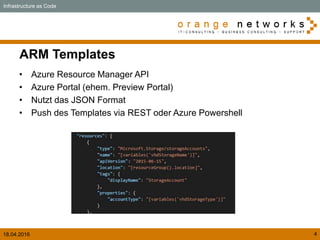
• Azure Resource Manager API
• Azure Portal (ehem. Preview Portal)
• Nutzt das JSON Format
• Push des Templates via REST oder Azure Powershell
Infrastructure as Code
18.04.2016 5
Visualisierung der ARM API/Templates
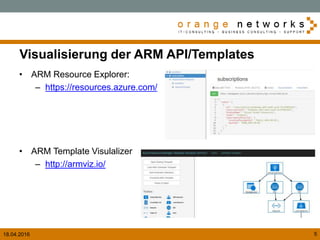
• ARM Resource Explorer:
– https://resources.azure.com/
• ARM Template Visulalizer
– http://armviz.io/
18.04.2016 6
Visual Studio Code
• Optimiert für Cloud und Web Applications
• Slick user interface (Siehe Sublime Text und Atom)
• Über 100 Extensions (Powershell, ARM Tools , Go, Python etc.)
• Kostenlos!
• Plattform:
– Linux
– Mac OSX
– Windows
• Download at:
https://code.visualstudio.com/Docs/?dv=win
• Insider Version:
https://code.visualstudio.com/Docs/?dv=win&build=insiders
Infrastructure as Code
18.04.2016 7
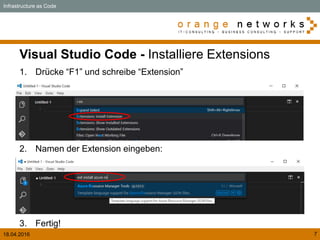
Visual Studio Code - Installiere Extensions
Infrastructure as Code
1. Drücke “F1” und schreibe “Extension”
2. Namen der Extension eingeben:
3. Fertig!
18.04.2016 8
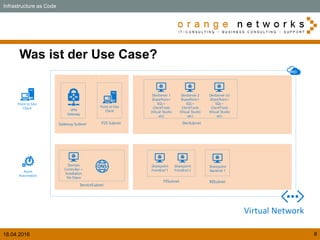
Was ist der Use Case?
Infrastructure as Code
Virtual Network
Domain
Controller +
Installation
file Share
ServiceSubnet
DevSubnet
Sharepoint
FrontEnd 1
Sharepoint
FrontEnd 2
FESubnet
Sharepoint
BackEnd 1
BESubnet
Azure
Automation
DevServer 1
SharePoint+
SQL+
ClientTools
(Visual Studio
etc)
DevServer 2
SharePoint+
SQL+
ClientTools
(Visual Studio
etc)
DevServer (n)
SharePoint+
SQL+
ClientTools
(Visual Studio
etc)
Gateway Subnet
VPN
Gateway
P2S Subnet
Point to Site
Client Point to Site
Client
18.04.2016 9
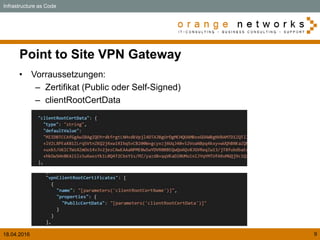
Point to Site VPN Gateway
• Vorraussetzungen:
– Zertifikat (Public oder Self-Signed)
– clientRootCertData
Infrastructure as Code
18.04.2016 10
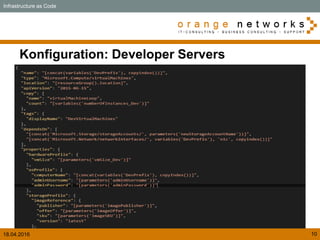
Konfiguration: Developer Servers
Infrastructure as Code
18.04.2016 11
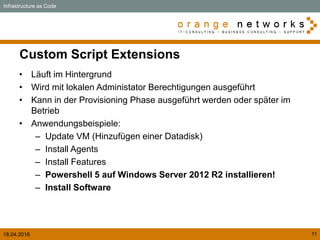
Custom Script Extensions
• Läuft im Hintergrund
• Wird mit lokalen Administator Berechtigungen ausgeführt
• Kann in der Provisioning Phase ausgeführt werden oder später im
Betrieb
• Anwendungsbeispiele:
– Update VM (Hinzufügen einer Datadisk)
– Install Agents
– Install Features
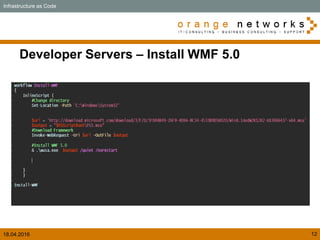
– Powershell 5 auf Windows Server 2012 R2 installieren!
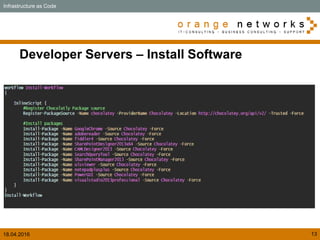
– Install Software
Infrastructure as Code
18.04.2016 12
Developer Servers – Install WMF 5.0
Infrastructure as Code
18.04.2016 13
Developer Servers – Install Software
Infrastructure as Code
18.04.2016 16
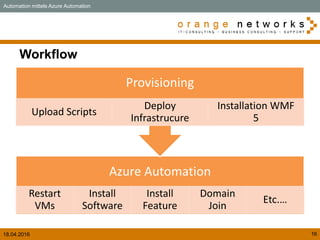
Workflow
Azure Automation
Restart
VMs
Install
Software
Install
Feature
Domain
Join
Etc.…
Provisioning
Upload Scripts
Deploy
Infrastrucure
Installation WMF
5
Automation mittels Azure Automation
18.04.2016 17
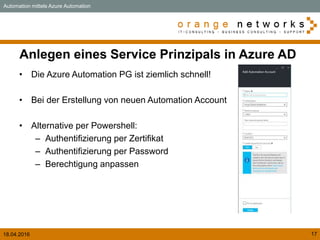
Anlegen eines Service Prinzipals in Azure AD
• Die Azure Automation PG ist ziemlich schnell!
• Bei der Erstellung von neuen Automation Account
• Alternative per Powershell:
– Authentifizierung per Zertifikat
– Authentifizierung per Password
– Berechtigung anpassen
Automation mittels Azure Automation
18.04.2016 18
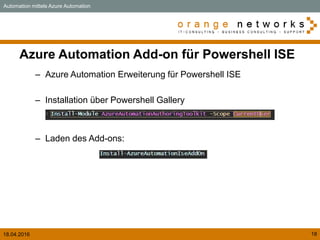
Azure Automation Add-on für Powershell ISE
– Azure Automation Erweiterung für Powershell ISE
– Installation über Powershell Gallery
– Laden des Add-ons:
Automation mittels Azure Automation
18.04.2016 19
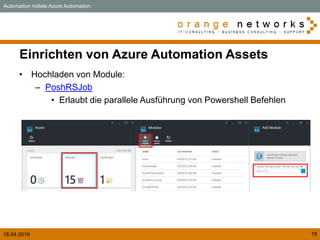
Einrichten von Azure Automation Assets
• Hochladen von Module:
– PoshRSJob
• Erlaubt die parallele Ausführung von Powershell Befehlen
Automation mittels Azure Automation
IT-Consultant - Orange Networks GmbH
E-Mail: l.passig@orangenet.de
Website: http://www.orange-networks.de
Tel.: +49 (0) 40 739 237 20
Handy.: +49 (0) 160 – 14 26 414

Azure Bootcamp Hamburg

  • 2.
    18.04.2016 2 Inhalt • Infrastructureas Code – ARM Templates – Visual Studio Code (VS Code) – Point to Site VPN Gateway – Konfiguration: Developer Servers – Custom Script Extensions • Automation mittels Azure Automation – Hinzufügen von Assets – Anlegen von Service Prinzipal in Azure AD – Azure Automation Add-on für Powershell ISE – Installation von Software über Powershell 5 – Restart VMs, Stop VMs, Start VMs
  • 3.
    18.04.2016 3 Über mich •Lennart Passig • IT-Consultant bei Orange Networks – Interner Technical Lead Azure • Derzeit im Projekt als Cloud Architekt • Mein Blog: https://propassig.de • Mein Twitter: @lennoert
  • 4.
    18.04.2016 4 ARM Templates •Azure Resource Manager API • Azure Portal (ehem. Preview Portal) • Nutzt das JSON Format • Push des Templates via REST oder Azure Powershell Infrastructure as Code
  • 5.
    18.04.2016 5 Visualisierung derARM API/Templates • ARM Resource Explorer: – https://resources.azure.com/ • ARM Template Visulalizer – http://armviz.io/
  • 6.
    18.04.2016 6 Visual StudioCode • Optimiert für Cloud und Web Applications • Slick user interface (Siehe Sublime Text und Atom) • Über 100 Extensions (Powershell, ARM Tools , Go, Python etc.) • Kostenlos! • Plattform: – Linux – Mac OSX – Windows • Download at: https://code.visualstudio.com/Docs/?dv=win • Insider Version: https://code.visualstudio.com/Docs/?dv=win&build=insiders Infrastructure as Code
  • 7.
    18.04.2016 7 Visual StudioCode - Installiere Extensions Infrastructure as Code 1. Drücke “F1” und schreibe “Extension” 2. Namen der Extension eingeben: 3. Fertig!
  • 8.
    18.04.2016 8 Was istder Use Case? Infrastructure as Code Virtual Network Domain Controller + Installation file Share ServiceSubnet DevSubnet Sharepoint FrontEnd 1 Sharepoint FrontEnd 2 FESubnet Sharepoint BackEnd 1 BESubnet Azure Automation DevServer 1 SharePoint+ SQL+ ClientTools (Visual Studio etc) DevServer 2 SharePoint+ SQL+ ClientTools (Visual Studio etc) DevServer (n) SharePoint+ SQL+ ClientTools (Visual Studio etc) Gateway Subnet VPN Gateway P2S Subnet Point to Site Client Point to Site Client
  • 9.
    18.04.2016 9 Point toSite VPN Gateway • Vorraussetzungen: – Zertifikat (Public oder Self-Signed) – clientRootCertData Infrastructure as Code
  • 10.
    18.04.2016 10 Konfiguration: DeveloperServers Infrastructure as Code
  • 11.
    18.04.2016 11 Custom ScriptExtensions • Läuft im Hintergrund • Wird mit lokalen Administator Berechtigungen ausgeführt • Kann in der Provisioning Phase ausgeführt werden oder später im Betrieb • Anwendungsbeispiele: – Update VM (Hinzufügen einer Datadisk) – Install Agents – Install Features – Powershell 5 auf Windows Server 2012 R2 installieren! – Install Software Infrastructure as Code
  • 12.
    18.04.2016 12 Developer Servers– Install WMF 5.0 Infrastructure as Code
  • 13.
    18.04.2016 13 Developer Servers– Install Software Infrastructure as Code
  • 16.
    18.04.2016 16 Workflow Azure Automation Restart VMs Install Software Install Feature Domain Join Etc.… Provisioning UploadScripts Deploy Infrastrucure Installation WMF 5 Automation mittels Azure Automation
  • 17.
    18.04.2016 17 Anlegen einesService Prinzipals in Azure AD • Die Azure Automation PG ist ziemlich schnell! • Bei der Erstellung von neuen Automation Account • Alternative per Powershell: – Authentifizierung per Zertifikat – Authentifizierung per Password – Berechtigung anpassen Automation mittels Azure Automation
  • 18.
    18.04.2016 18 Azure AutomationAdd-on für Powershell ISE – Azure Automation Erweiterung für Powershell ISE – Installation über Powershell Gallery – Laden des Add-ons: Automation mittels Azure Automation
  • 19.
    18.04.2016 19 Einrichten vonAzure Automation Assets • Hochladen von Module: – PoshRSJob • Erlaubt die parallele Ausführung von Powershell Befehlen Automation mittels Azure Automation
  • 22.
    IT-Consultant - OrangeNetworks GmbH E-Mail: l.passig@orangenet.de Website: http://www.orange-networks.de Tel.: +49 (0) 40 739 237 20 Handy.: +49 (0) 160 – 14 26 414