Einheitliche Oberflächen für iOS
Auto Layout
@michaelkotten @_openknowledge #WISSENTEILEN
Michael Kotten (a.k.a. @michaelkotten)
ÜBER MICH
MK
#WISSENTEILEN
• Head of mobile development
• Enterprise & Mobile
• Developer & Speaker
• IOT Fan
• zweifacher Vater, einfacher Ehemann
Branchenneutrale Softwareentwicklung und IT-Beratung
ÜBER OPEN KNOWLEDGE
#WISSENTEILEN
Wo ist das Problem?
#WISSENTEILEN
• User dreht das Device
• Verschiedene Displaygrößen und
Auflösungen
• Unterschiedliche Geräteklassen (iPhone,
iPad)
• Split View (iPad)
• Statusbar bei aktivem Anruf oder GPS
? Äußere Faktoren
Wo ist das Problem?
#WISSENTEILEN
• Angezeigter Content ändert die Größe
• Internationalisierung
• Dynamic Type
? Interne Faktoren
Lösung ?
#WISSENTEILEN
- (BOOL)shouldAutorotateToInterfaceOrientation:
(UIInterfaceOrientation)interfaceOrientation {
return (interfaceOrientation == UIInterfaceOrientationPortrait);
}
Lösung ?
#WISSENTEILEN
BOOL isIPhone = [[UIDevice currentDevice] userInterfaceIdiom] ==
UIUserInterfaceIdiomPhone;
BOOL isIPhone4 = isIPhone && ([[UIScreen mainScreen] bounds].size.height > 480.0);
BOOL isIPhone5 = isIPhone4 && ([[UIScreen mainScreen] bounds].size.height > 960.0);
BOOL isIPhone6 = isIPhone5 && ([[UIScreen mainScreen] bounds].size.height > 1136.0);
BOOL isIPhone6plus = isIPhone6 && ([[UIScreen mainScreen] bounds].size.height > 1334.0);
Autoresizing Masks
#WISSENTEILEN
Autoresizing Masks
#WISSENTEILEN
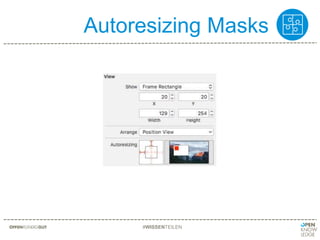
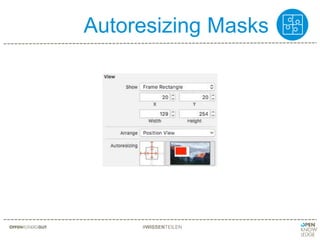
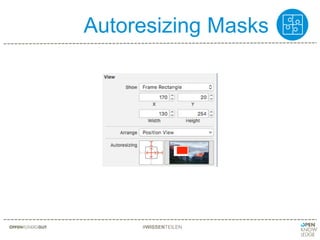
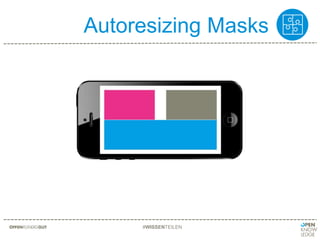
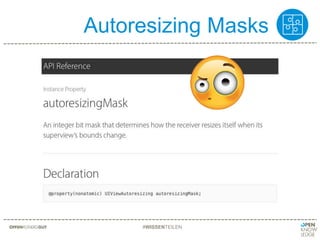
• Definiert das Resizing Verhalten einer View
• Relativ zur Superview
• Einstellung für
• Höhe und Breite
• Abstand zum Rand
• Mögliche Werte sind
• fixed
• flexible
Springs & Struts
#WISSENTEILEN
Springs & Struts
#WISSENTEILEN
Autoresizing Masks
#WISSENTEILEN
Autoresizing Masks
#WISSENTEILEN
Autoresizing Masks
#WISSENTEILEN
Autoresizing Masks
#WISSENTEILEN
Autoresizing Masks
#WISSENTEILEN
Autoresizing Masks
#WISSENTEILEN
Autoresizing Masks
#WISSENTEILEN
#WISSENTEILEN
WTF?!?!
Autoresizing Masks
Probleme mit Autoresizing Masks
#WISSENTEILEN
• Autoresize wird automatisch berechnet,
kann nicht beinflusst werden
• Keine Beziehung zu Nachbar-Views
• Kann programmatisch korrigiert werden
• Großer Aufwand bei versch. Auflösungen
Auto Layout
Auto Layout to the rescue
#WISSENTEILEN
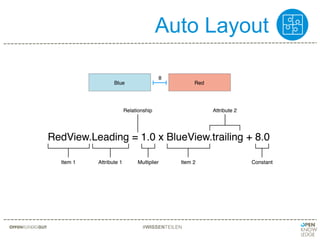
• Beziehung zwischen einzelnen Views
• Relative Größen und Positionen
• Design by intent
• „Mathematische“ Beschreibung
• Wird definiert durch Constraints
• Benötigt Constraints für Größe und Position
Auto Layout
#WISSENTEILEN
Auto Layout
#WISSENTEILEN
Auto Layout
#WISSENTEILEN
Auto Layout
#WISSENTEILEN
Auto Layout
#WISSENTEILEN
Auto Layout
#WISSENTEILEN
Trait variation aka Size Classes
#WISSENTEILEN
Auto Layout
#WISSENTEILEN
Auto Korrektur
#WISSENTEILEN
Auto Korrektur
#WISSENTEILEN
Auto Layout
#WISSENTEILEN
+
Auto Layout
#WISSENTEILEN
Ausrichtung
#WISSENTEILEN
Fehlerquellen
#WISSENTEILEN
Fehlerquellen
#WISSENTEILEN
Fehlerquellen
#WISSENTEILEN
2016-08-19 13:38:21.101780 AutoLayout[94041:23616079] [LayoutConstraints] Unable to simultaneously
satisfy constraints.
Probably at least one of the constraints in the following list is one you don't want.
Try this:
(1) look at each constraint and try to figure out which you don't expect;
(2) find the code that added the unwanted constraint or constraints and fix it.
(
"<NSLayoutConstraint:0x60000008b220 UIView:0x7f8ea0709c90.width == 288 (active)>"
)
Will attempt to recover by breaking constraint
Auto Layout
Fehlerquellen
#WISSENTEILEN
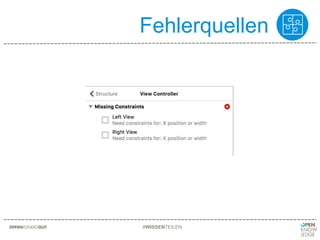
• So wenig Constraints wie möglich, so viele
Constraints wie nötig
• Fehler werden von Interface Builder nicht
immer erkannt
Auto Layout
Intrinsic Content Size
#WISSENTEILEN
• „Innere“ Größe
• Für bestimmte Controls wie z.B. Button oder
Label
• Control bestimmt seine Größe selbst
• Kann überschrieben werden
• Betrifft nur das Control selbst
Intrinsic Content Size
#WISSENTEILEN
Auto Layout
Compression Resistance
#WISSENTEILEN
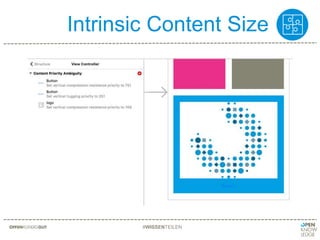
• verhindert das View kleiner als Intrinsic
Content Size wird
• höhere Priorität verhindert, dass View sich
verkleinert
Auto Layout
Content Hugging
#WISSENTEILEN
• verhindert das View größer als Intrinsic
Content Size wird
• höhere Priorität verhindert, dass View wächst
Content Hugging und Compression Resistance
#WISSENTEILEN
Content Hugging und Compression Resistance
#WISSENTEILEN
Content Hugging und Compression Resistance
#WISSENTEILEN
Programmically Auto Layout
#WISSENTEILEN
NSLayoutConstraint(item: redView, attribute: .leading, relatedBy: .equal, toItem: blueView,
attribute: .trailing, multiplier: 1.0, constant: 8.0)
Programmically Auto Layout
#WISSENTEILEN
redView.leadingAnchor.constraint(equalTo: blueView.trailingAnchor, constant: 8.0)
Programmically Auto Layout
#WISSENTEILEN
let views = ["blueView" : blueView, "redView" : redView]
NSLayoutConstraint.constraints(withVisualFormat: "H:[blueView]-20-[redView]", options: [], metrics: nil, views: views)
#WISSENTEILEN
What‘s next?
Autoresizing Masks
#WISSENTEILEN
Auto Layout
Zusammenfassung
#WISSENTEILEN
• Beziehung zwischen einzelnen Views
• Relative Größen und Positionen
• Design by intent
• „Mathematische“ Beschreibung
• Wird definiert durch Constraints
• Benötigt Constraints für Größe und Position
FRAGEN
? ? ?
#WISSENTEILEN
Michael Kotten
Head of mobile development
michael.kotten@openknowledge.de
+49 (0)441 4082 – 0
OFFENKUNDIGGUT
KONTAKT
#WISSENTEILEN
Icons in this presentation designed by “Freepik”, “Nice and
Serious” and “Elegant Themes” from www.flaticon.com
BILDNACHWEISE
#WISSENTEILEN

iOS: einheitliche Oberflächen mit Auto Layout

Hinweis der Redaktion

  • #7 Nur Portrait
  • #9 Apples Lösung für verschiedene Screens und Orientierungen seit iOS 2 bis iOS 6 heisst AutoResizing Masks.
  • #11 Strut = Strebe Abstand zum Rand, auch Margin
  • #12 Höhe und Breite der View
  • #13 Wir haben hier unsere tolle App
  • #14 So soll die App aussehen
  • #15 So siehts leider aus! Was machen wir jetzt?
  • #16 Vorher für alle drei Views
  • #17 Oben links
  • #18 Oben rechts usw.
  • #19 So siehts jetzt aus.
  • #20 Was ist jetzt passiert?
  • #22 Intent = Absicht When you design by intent, you’re expressing what you want to accomplish but not necessarily how it should be accomplished Oberfläche beschreiben
  • #23 Beispiel für die Berechnung
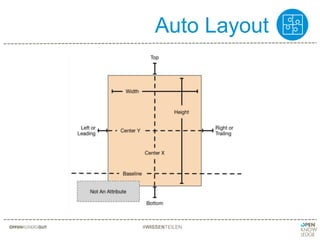
  • #24 Attribute die verwendet werden können auf der rechten Seite der Formel Not an attribute ist der Wert der genutzt wird bei festen Grössen. view.height = 1.0 * Not An Attribute + 30
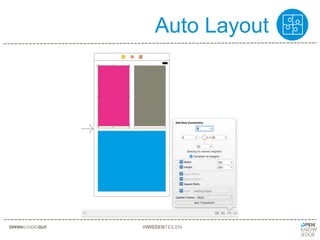
  • #25 Gleiche Breite für beide Views
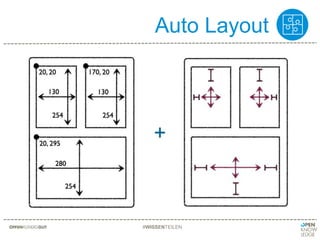
  • #26 Abstand zwischen linker und rechter View. Die restlichen Constraints erklären! untere View: Abstand links, rechts und unten zu Super view, oben zu linker oder rechter View Obere views: oberer Abstand zu Super view Gleiche Höhe für alle Views Wenn nicht alle nötigen Constraints gesetzt sind -> Fehler!
  • #27 So solls am Ende aussehen.
  • #28 Platz nach oben normal
  • #29 Zum testen können hier die verschiedenen Device Typen durchprobiert werden
  • #31 Die Views müssen nicht nach den Constraints gezeichnet werden
  • #32 Update Frames passt die Views an. Update constraints passt die Constraints an
  • #33 Autoresizing masks einstellung
  • #34 Auto Layout einstellung
  • #35 Links und unten an der linken seite ausrichten, alternative zu leading space. Vorteil: nur ein Constraint muss geändert werden.
  • #36 Die Berechung muss am Ende immer X, Y, Höhe und Breite ergeben.
  • #38 Zu viele Constraints, entweder Breite fixed oder Abstand zum Rand
  • #39 Teilweise werden Fehler erst durch andere Bedingungen sichtbar, z.B. neuer Content oder andere Sprache => TESTEN
  • #40 Grundprinzipien von Auto Layout sind jetzt klar
  • #41 Zwei Views die sich automatisch an die Größe ihres Inhalts anpassen. Was passiert wenn die blaue View größer wird?
  • #43 Intent = Absicht When you design by intent, you’re expressing what you want to accomplish but not necessarily how it should be accomplished Oberfläche beschreiben
  • #44 Intent = Absicht When you design by intent, you’re expressing what you want to accomplish but not necessarily how it should be accomplished Oberfläche beschreiben
  • #48 sieht fast aus wie die Formel
  • #49 sieht noch natürlicher aus
  • #50 Bei vielen Constraints kann man auch per Visual Format Language Constraints definieren.
  • #52 Mit Xcode 8 werden wieder Autoresizing Masks eingeführt. Parallel mit Auto Layout nutzbar
  • #53 Intent = Absicht When you design by intent, you’re expressing what you want to accomplish but not necessarily how it should be accomplished Oberfläche beschreiben