Advanced
Continuous Integration
Ein Projektbericht
Wer sind wir?
Richard.Attermeyer@opitz-consulting.com
Twitter: attermr
GitHub: rattermeyer
Stefan.Scheidt@opitz-consulting.com
Twitter: stefanscheidt
GitHub: stefanscheidt
© OPITZ CONSULTING GmbH 2011 Seite 3Mobile JavaScript-Web-Apps
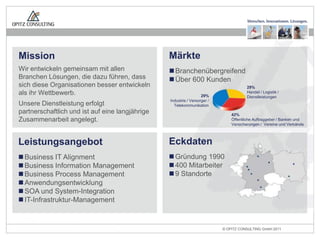
Mission
Wir entwickeln gemeinsam mit allen
Branchen Lösungen, die dazu führen, dass
sich diese Organisationen besser entwickeln
als ihr Wettbewerb.
Unsere Dienstleistung erfolgt
partnerschaftlich und ist auf eine langjährige
Zusammenarbeit angelegt.
Leistungsangebot
Business IT Alignment
Business Information Management
Business Process Management
Anwendungsentwicklung
SOA und System-Integration
IT-Infrastruktur-Management
Märkte
Branchenübergreifend
Über 600 Kunden
29%
Industrie / Versorger /
Telekommunikation
29%
Handel / Logistik /
Dienstleistungen
42%
Öffentliche Auftraggeber / Banken und
Versicherungen / Vereine und Verbände
Eckdaten
Gründung 1990
400 Mitarbeiter
9 Standorte
Wer sind Sie?
Die Herausforderung
Also mussten wir uns beeilen ...
Aber manchmal waren wir zu schnell ...
Abhilfe durch
Continuous Integration
Continuous Integration Process
1. […] wait for it to finish […] work with the rest of the team
to make it green before you check in
2. …
3. Run the build script and tests on your development
machine […]
4. […]
5. Wait for your CI tool to run the build with your changes
6. […]
7. If the build passes, rejoice and move on to your next task
Jez Humble, David Farley, Continuous Delivery
Continuous Integration Process
1. […] wait for it to finish […] work with the rest of the team
to make it green before you check in
2. …
3. Run the build script and tests on your development
machine […]
4. […]
5. Wait for your CI tool to run the build with your changes
6. […]
7. If the build passes, rejoice and move on to your next task
Jez Humble, David Farley, Continuous Delivery
Continuous Integration Process
1. […] wait for it to finish […] work with the rest of the team
to make it green before you check in
2. …
3. Run the build script and tests on your development
machine […]
4. […]
5. Wait for your CI tool to run the build with your changes
6. […]
7. If the build passes, rejoice and move on to your next task
Jez Humble, David Farley, Continuous Delivery
Continuous Integration Process
1. […] wait for it to finish […] work with the rest of the team
to make it green before you check in
2. …
3. Run the build script and tests on your development
machine […]
4. […]
5. Wait for your CI tool to run the build with your changes
6. […]
7. If the build passes, rejoice and move on to your next task
Jez Humble, David Farley, Continuous Delivery
Continuous Integration Process
1. […] wait for it to finish […] work with the rest of the team
to make it green before you check in
2. …
3. Run the build script and tests on your development
machine […]
4. […]
5. Wait for your CI tool to run the build with your changes
6. […]
7. If the build passes, rejoice and move on to your next task
Jez Humble, David Farley, Continuous Delivery
Continuous Integration Process
1. […] wait for it to finish […] work with the rest of the team
to make it green before you check in
2. …
3. Run the build script and tests on your development
machine […]
4. […]
5. Wait for your CI tool to run the build with your changes
6. […]
7. If the build passes, rejoice and move on to your next task
Jez Humble, David Farley, Continuous Delivery
"If everybody on the team follows these simple
steps every time they commit any change, you
will know that your software works on any box
with the same configuration as the CI box at all
times."
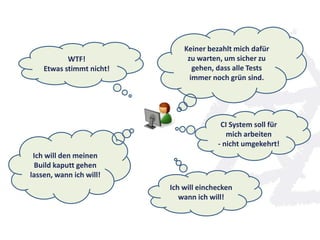
CI System soll für
mich arbeiten
- nicht umgekehrt!
WTF!
Etwas stimmt nicht!
Keiner bezahlt mich dafür
zu warten, um sicher zu
gehen, dass alle Tests
immer noch grün sind.
Ich will einchecken
wann ich will!
Ich will den meinen
Build kaputt gehen
lassen, wann ich will!
Wie kann ein Prozess
aussehen, bei dem ein
kaputter Build kein „stop-
the-line“ bedeutet?
We want TeamCity‘s Feature back:
Pre-Tested Commits
Breaking the build is no crime!
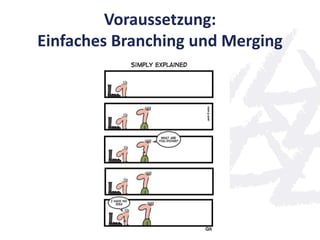
Voraussetzung:
Einfaches Branching und Merging
development
rat/for-development
mis/for-development
mho/for-development
Ein Branch pro Entwickler
Entwicklungsbranch, in den integriert werden soll: Branch pro Entwickler
mit Namenskonvention
Entwicklerbranches werden von development abgespalten
Entwicklerbranches sind „privat“
Entwicklerbranches werden vom CI-System wieder in development integriert
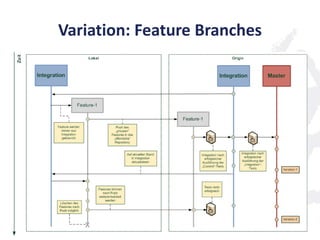
Variation: Feature Branches
Wichtige Punkte
(nicht-offensichtlich)
Abgleich immer über den Integration-Branch
Selbst wenn mehrere Entwickler
am gleichen Feature arbeiten
Kein direkter Merge eines Feature-Branch
in den lokalen Working-Branch
Außer man weiß, was man tut ...
Vorteile
Ich kann unabhängig arbeiten
und zentral sichern
Das CI-System führt die zeit- und
resourcenaufwändigen Tests für mich durch
… während ich schon weiter arbeiten kann
Vorteile
Der Integration-Branch ist immer grün
Durch einen Merge hole ich nur „guten“ Code
Ich kann ziemlich sicher sein, dass der Code
auch nach dem Merge gebaut werden kann
Vorteile
Als Entwickler verbringe ich nicht
unnötig Zeit damit Dinge zu fixen,
die andere kaputt gemacht haben
Eine Umsetzung
+
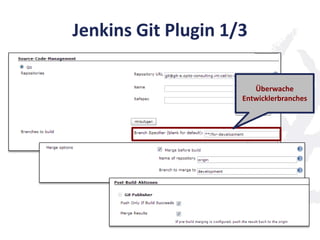
Jenkins Git Plugin 1/3
Überwache
Entwicklerbranches
Jenkins Git Plugin 2/3
Merge Entwickler-Branch
auf Development-Branch
Jenkins Git Plugin 3/3
Push merged
Development-Branch
zurück, wenn Build
erfolgreich
Entwicklungsprozess aus
Entwicklersicht
origin/development
git fetch
git merge orgin/development
git add / commit
git push origin rat/for-development
1. Merge
2. Build
3. Push
Demo ...
Kriterien für „Gut-Genug“
Müssen nur die „echten“ Unit Tests laufen?
Oder müssen alle Tests laufen?
(Unit-, Integrations- und Systemtests)
Lange Feedback-Zyklen
Hohe Latenz, bis Kollegen
von Änderungen profitieren können
Kriterien für „Gut-Genug“
Oder will ich sogar noch
ein echtes Code-Review?
Nicht allein durch Jenkins möglich
Zum Beispiel Gerrit als Review-Tool
Code-Reviews für jeden Commit
bei jungen Projekt sehr aufwändig
Kriterien für „Gut-Genug“
Lesson Learned:
Die Kriterien ändern sich im Projektverlauf
Kriterien für „Gut-Genug“
Anfangs: Alle Tests müssen grün sein
Häufig große Änderungen
Integrationstests hatten deutlich mehr
Aussagekraft als Unit Tests
Später: Unit-Tests müssen grün sein
Weniger „breaking changes“
Integrationstestfehler mit 4h Zeitverzug
entdecken reicht aus
Die Konsequenz ...
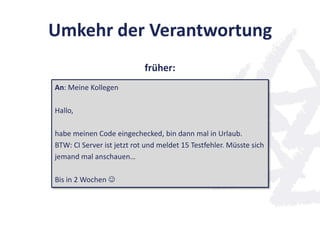
Umkehr der Verantwortung
An: Meine Kollegen
Hallo,
habe meinen Code eingechecked, bin dann mal in Urlaub.
BTW: CI Server ist jetzt rot und meldet 15 Testfehler. Müsste sich
jemand mal anschauen…
Bis in 2 Wochen 
früher:
Umkehr der Verantwortung
An: Meine Kollegen
Hallo,
wollte euch meinen Code noch vor dem Urlaub zu Verfügung
stellen. Hat mich leider noch 2 Stunden gekostet, die 15
Testfehler zu beseitigen. Jenkins hat den Code jetzt aber
erfolgreich gemerged. Alles grün! 
Bis in 2 Wochen.
jetzt:
Dies und das ...
Durchsetzen der Konvention:
Protected Branches
Beispiel: GitLab
Protected branches are designed to prevent
push for all except masters. This ability allows:
• keep stable branches secured
• forced code review before merge to
protected branches
Pull statt fetch/merge
[branch "rat/for-development"]
remote = origin
merge = refs/heads/rat/for-development .git/config
Pull statt fetch/merge
[branch "rat/for-development"]
remote = origin
merge = refs/heads/rat/for-development
[branch "rat/for-development"]
remote = origin
merge = refs/heads/development
.git/config
.git/config
Pull statt fetch/merge
[branch "rat/for-development"]
remote = origin
merge = refs/heads/rat/for-development
[branch "rat/for-development"]
remote = origin
merge = refs/heads/development
$ git pull
From git-e.opitz-consulting.int:cel/oc-days-git-2013
d40fefe..86878f9 development -> origin/development
Already up-to-date.
.git/config
.git/config
Gotchas
Polling durch Jenkings und
mehrere Commits in Zeitfenster
Besser:
post-receive Hook
Web Hooks in Stash und GitLab
Gotchas
„Git hat meine Änderungen verschlampt“
==
„Ich habe nicht gemerkt, dass mein Commit
nicht sauber gemerged werden konnte“
Noch Fragen?
Referenzen
(Attribution Creative Commons)
Dokumentenhaufen:
http://www.flickr.com/photos/katerha/5013886721/
Crashed T14:
http://www.flickr.com/photos/77326563@N06/8652444158/
Question Mark:
http://www.flickr.com/photos/colinkinner/2200500024/
Tractor on the Road:http://en.wikipedia.org/wiki/File:Tractor-
OnTheRoad01.jpg
Geek & Poke:
http://geek-and-poke.com/
http://geekandpoke.typepad.com/.a/6a00d8341d3df553ef017743a8736997
0d-pi
Jail:
http://www.flickr.com/photos/schnaars/3036446157

Advanced Continuous Integration

  • 1.
  • 2.
    Wer sind wir? Richard.Attermeyer@opitz-consulting.com Twitter:attermr GitHub: rattermeyer Stefan.Scheidt@opitz-consulting.com Twitter: stefanscheidt GitHub: stefanscheidt
  • 3.
    © OPITZ CONSULTINGGmbH 2011 Seite 3Mobile JavaScript-Web-Apps Mission Wir entwickeln gemeinsam mit allen Branchen Lösungen, die dazu führen, dass sich diese Organisationen besser entwickeln als ihr Wettbewerb. Unsere Dienstleistung erfolgt partnerschaftlich und ist auf eine langjährige Zusammenarbeit angelegt. Leistungsangebot Business IT Alignment Business Information Management Business Process Management Anwendungsentwicklung SOA und System-Integration IT-Infrastruktur-Management Märkte Branchenübergreifend Über 600 Kunden 29% Industrie / Versorger / Telekommunikation 29% Handel / Logistik / Dienstleistungen 42% Öffentliche Auftraggeber / Banken und Versicherungen / Vereine und Verbände Eckdaten Gründung 1990 400 Mitarbeiter 9 Standorte
  • 4.
  • 5.
  • 6.
    Also mussten wiruns beeilen ...
  • 7.
    Aber manchmal warenwir zu schnell ...
  • 8.
  • 9.
    Continuous Integration Process 1.[…] wait for it to finish […] work with the rest of the team to make it green before you check in 2. … 3. Run the build script and tests on your development machine […] 4. […] 5. Wait for your CI tool to run the build with your changes 6. […] 7. If the build passes, rejoice and move on to your next task Jez Humble, David Farley, Continuous Delivery
  • 10.
    Continuous Integration Process 1.[…] wait for it to finish […] work with the rest of the team to make it green before you check in 2. … 3. Run the build script and tests on your development machine […] 4. […] 5. Wait for your CI tool to run the build with your changes 6. […] 7. If the build passes, rejoice and move on to your next task Jez Humble, David Farley, Continuous Delivery
  • 11.
    Continuous Integration Process 1.[…] wait for it to finish […] work with the rest of the team to make it green before you check in 2. … 3. Run the build script and tests on your development machine […] 4. […] 5. Wait for your CI tool to run the build with your changes 6. […] 7. If the build passes, rejoice and move on to your next task Jez Humble, David Farley, Continuous Delivery
  • 12.
    Continuous Integration Process 1.[…] wait for it to finish […] work with the rest of the team to make it green before you check in 2. … 3. Run the build script and tests on your development machine […] 4. […] 5. Wait for your CI tool to run the build with your changes 6. […] 7. If the build passes, rejoice and move on to your next task Jez Humble, David Farley, Continuous Delivery
  • 13.
    Continuous Integration Process 1.[…] wait for it to finish […] work with the rest of the team to make it green before you check in 2. … 3. Run the build script and tests on your development machine […] 4. […] 5. Wait for your CI tool to run the build with your changes 6. […] 7. If the build passes, rejoice and move on to your next task Jez Humble, David Farley, Continuous Delivery
  • 14.
    Continuous Integration Process 1.[…] wait for it to finish […] work with the rest of the team to make it green before you check in 2. … 3. Run the build script and tests on your development machine […] 4. […] 5. Wait for your CI tool to run the build with your changes 6. […] 7. If the build passes, rejoice and move on to your next task Jez Humble, David Farley, Continuous Delivery "If everybody on the team follows these simple steps every time they commit any change, you will know that your software works on any box with the same configuration as the CI box at all times."
  • 15.
    CI System sollfür mich arbeiten - nicht umgekehrt! WTF! Etwas stimmt nicht! Keiner bezahlt mich dafür zu warten, um sicher zu gehen, dass alle Tests immer noch grün sind. Ich will einchecken wann ich will! Ich will den meinen Build kaputt gehen lassen, wann ich will!
  • 16.
    Wie kann einProzess aussehen, bei dem ein kaputter Build kein „stop- the-line“ bedeutet?
  • 17.
    We want TeamCity‘sFeature back: Pre-Tested Commits
  • 18.
    Breaking the buildis no crime!
  • 19.
  • 20.
    development rat/for-development mis/for-development mho/for-development Ein Branch proEntwickler Entwicklungsbranch, in den integriert werden soll: Branch pro Entwickler mit Namenskonvention Entwicklerbranches werden von development abgespalten Entwicklerbranches sind „privat“ Entwicklerbranches werden vom CI-System wieder in development integriert
  • 21.
  • 22.
    Wichtige Punkte (nicht-offensichtlich) Abgleich immerüber den Integration-Branch Selbst wenn mehrere Entwickler am gleichen Feature arbeiten Kein direkter Merge eines Feature-Branch in den lokalen Working-Branch Außer man weiß, was man tut ...
  • 23.
    Vorteile Ich kann unabhängigarbeiten und zentral sichern Das CI-System führt die zeit- und resourcenaufwändigen Tests für mich durch … während ich schon weiter arbeiten kann
  • 24.
    Vorteile Der Integration-Branch istimmer grün Durch einen Merge hole ich nur „guten“ Code Ich kann ziemlich sicher sein, dass der Code auch nach dem Merge gebaut werden kann
  • 25.
    Vorteile Als Entwickler verbringeich nicht unnötig Zeit damit Dinge zu fixen, die andere kaputt gemacht haben
  • 26.
  • 27.
    Jenkins Git Plugin1/3 Überwache Entwicklerbranches
  • 28.
    Jenkins Git Plugin2/3 Merge Entwickler-Branch auf Development-Branch
  • 29.
    Jenkins Git Plugin3/3 Push merged Development-Branch zurück, wenn Build erfolgreich
  • 30.
    Entwicklungsprozess aus Entwicklersicht origin/development git fetch gitmerge orgin/development git add / commit git push origin rat/for-development 1. Merge 2. Build 3. Push
  • 31.
  • 32.
    Kriterien für „Gut-Genug“ Müssennur die „echten“ Unit Tests laufen? Oder müssen alle Tests laufen? (Unit-, Integrations- und Systemtests) Lange Feedback-Zyklen Hohe Latenz, bis Kollegen von Änderungen profitieren können
  • 33.
    Kriterien für „Gut-Genug“ Oderwill ich sogar noch ein echtes Code-Review? Nicht allein durch Jenkins möglich Zum Beispiel Gerrit als Review-Tool Code-Reviews für jeden Commit bei jungen Projekt sehr aufwändig
  • 34.
    Kriterien für „Gut-Genug“ LessonLearned: Die Kriterien ändern sich im Projektverlauf
  • 35.
    Kriterien für „Gut-Genug“ Anfangs:Alle Tests müssen grün sein Häufig große Änderungen Integrationstests hatten deutlich mehr Aussagekraft als Unit Tests Später: Unit-Tests müssen grün sein Weniger „breaking changes“ Integrationstestfehler mit 4h Zeitverzug entdecken reicht aus
  • 36.
  • 37.
    Umkehr der Verantwortung An:Meine Kollegen Hallo, habe meinen Code eingechecked, bin dann mal in Urlaub. BTW: CI Server ist jetzt rot und meldet 15 Testfehler. Müsste sich jemand mal anschauen… Bis in 2 Wochen  früher:
  • 38.
    Umkehr der Verantwortung An:Meine Kollegen Hallo, wollte euch meinen Code noch vor dem Urlaub zu Verfügung stellen. Hat mich leider noch 2 Stunden gekostet, die 15 Testfehler zu beseitigen. Jenkins hat den Code jetzt aber erfolgreich gemerged. Alles grün!  Bis in 2 Wochen. jetzt:
  • 39.
  • 40.
  • 41.
    Beispiel: GitLab Protected branchesare designed to prevent push for all except masters. This ability allows: • keep stable branches secured • forced code review before merge to protected branches
  • 42.
    Pull statt fetch/merge [branch"rat/for-development"] remote = origin merge = refs/heads/rat/for-development .git/config
  • 43.
    Pull statt fetch/merge [branch"rat/for-development"] remote = origin merge = refs/heads/rat/for-development [branch "rat/for-development"] remote = origin merge = refs/heads/development .git/config .git/config
  • 44.
    Pull statt fetch/merge [branch"rat/for-development"] remote = origin merge = refs/heads/rat/for-development [branch "rat/for-development"] remote = origin merge = refs/heads/development $ git pull From git-e.opitz-consulting.int:cel/oc-days-git-2013 d40fefe..86878f9 development -> origin/development Already up-to-date. .git/config .git/config
  • 45.
    Gotchas Polling durch Jenkingsund mehrere Commits in Zeitfenster Besser: post-receive Hook Web Hooks in Stash und GitLab
  • 46.
    Gotchas „Git hat meineÄnderungen verschlampt“ == „Ich habe nicht gemerkt, dass mein Commit nicht sauber gemerged werden konnte“
  • 47.
  • 48.
    Referenzen (Attribution Creative Commons) Dokumentenhaufen: http://www.flickr.com/photos/katerha/5013886721/ CrashedT14: http://www.flickr.com/photos/77326563@N06/8652444158/ Question Mark: http://www.flickr.com/photos/colinkinner/2200500024/ Tractor on the Road:http://en.wikipedia.org/wiki/File:Tractor- OnTheRoad01.jpg Geek & Poke: http://geek-and-poke.com/ http://geekandpoke.typepad.com/.a/6a00d8341d3df553ef017743a8736997 0d-pi Jail: http://www.flickr.com/photos/schnaars/3036446157