Michael Jendryschik | itemis AG CSS Media Queries Auf Browser und Geräte reagieren
Michael Jendryschik Konzipiert und entwickelt Websites, schreibt und spricht darüber http://jendryschik.de Leiter Webentwicklung http://www.itemis.de Webkraut http://www.webkrauts.de
Es gibt verschiedene Möglichkeiten, den Geltungsbereich von CSS auf bestimmte Medien einzuschränken.
aural  für Sprachbrowser
braille  für Geräte mit Braillezeile
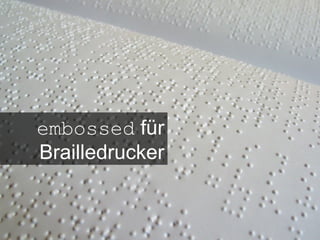
embossed  für Brailledrucker
handheld  für Handcomputer und Mobiltelefone
print  für Drucker
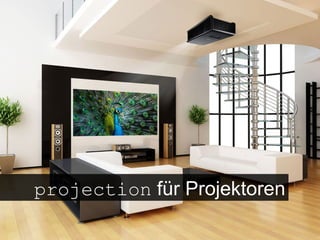
projection  für Projektoren
screen  für Monitore
tty  für Ausgabemedien mit Festbreitenschrift
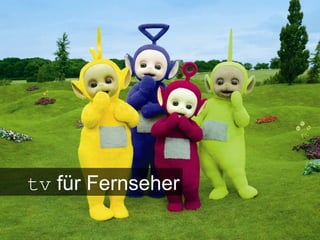
tv  für Fernseher
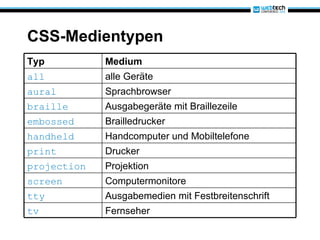
CSS-Medientypen  Typ Medium all alle Geräte aural Sprachbrowser braille Ausgabegeräte mit Braillezeile embossed Brailledrucker handheld Handcomputer und Mobiltelefone print Drucker projection Projektion screen Computermonitore tty Ausgabemedien mit Festbreitenschrift tv Fernseher
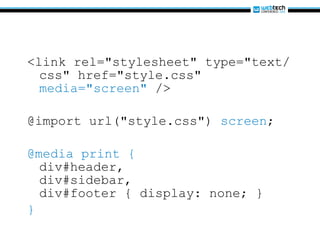
<link rel=&quot;stylesheet&quot; type=&quot;text/css&quot; href=&quot;style.css&quot;  media=&quot;screen&quot;  /> @import url(&quot;style.css&quot;)  screen ;  @media print { div#header, div#sidebar, div#footer { display: none; } }
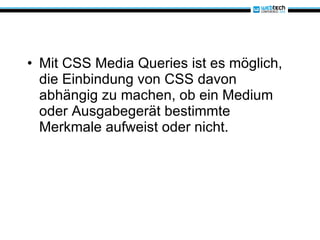
Mit CSS Media Queries ist es möglich, die Einbindung von CSS davon abhängig zu machen, ob ein Medium oder Ausgabegerät bestimmte Merkmale aufweist oder nicht.
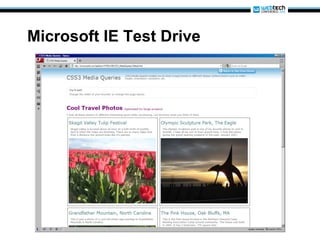
Microsoft IE Test Drive
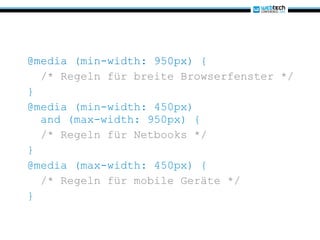
@media (min-width: 950px) { /* Regeln für breite Browserfenster */ } @media (min-width: 450px)   and (max-width: 950px) {    /* Regeln für Netbooks */ } @media (max-width: 450px) { /* Regeln für mobile Geräte */ }
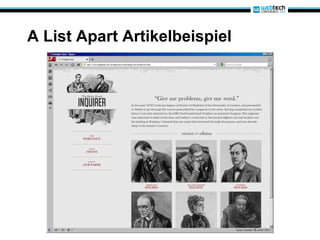
A List Apart Artikelbeispiel
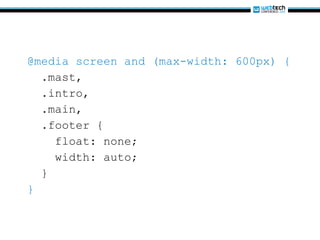
@media screen and (max-width: 600px) { .mast, .intro, .main, .footer { float: none; width: auto; } }
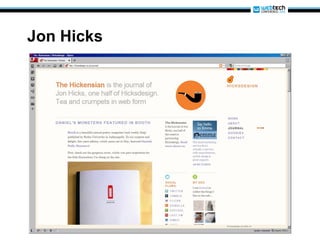
Jon Hicks
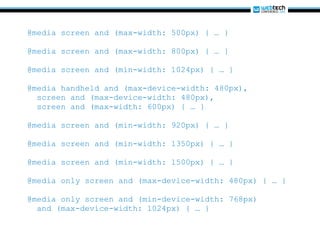
@media screen and (max-width: 500px) { … } @media screen and (max-width: 800px) { … } @media screen and (min-width: 1024px) { … } @media handheld and (max-device-width: 480px), screen and (max-device-width: 480px), screen and (max-width: 600px) { … } @media screen and (min-width: 920px) { … } @media screen and (min-width: 1350px) { … } @media screen and (min-width: 1500px) { … } @media only screen and (max-device-width: 480px) { … } @media only screen and (min-device-width: 768px) and (max-device-width: 1024px) { … }
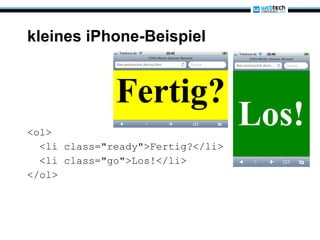
kleines iPhone-Beispiel <ol> <li class=&quot;ready&quot;>Fertig?</li> <li class=&quot;go&quot;>Los!</li> </ol>
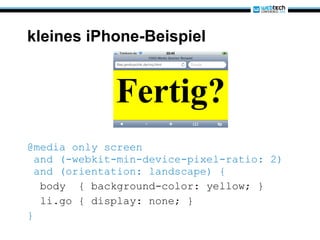
kleines iPhone-Beispiel @media only screen  and (-webkit-min-device-pixel-ratio: 2)  and (orientation: landscape) { body  { background-color: yellow; } li.go { display: none; } }
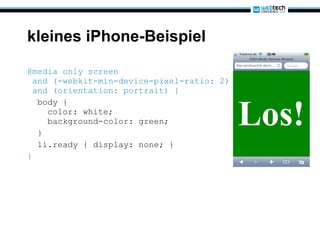
kleines iPhone-Beispiel @media only screen  and (-webkit-min-device-pixel-ratio: 2)  and (orientation: portrait) { body {   color: white;   background-color: green; } li.ready { display: none; } }
 
CSS Media Queries Grundlagen und Syntax
Media Queries sind logische Ausdrücke, die die Angabe von Medientypen und bestimmten Medienmerkmalen miteinander verknüpfen.
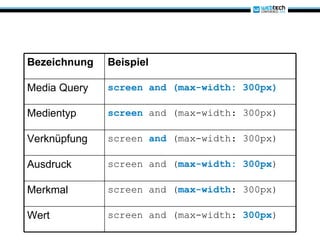
Bezeichnung Beispiel Media Query screen and (max-width: 300px) Medientyp screen   and (max-width: 300px) Verknüpfung screen  and   (max-width: 300px) Ausdruck screen and ( max-width: 300px ) Merkmal screen and ( max-width : 300px) Wert screen and (max-width:  300px )
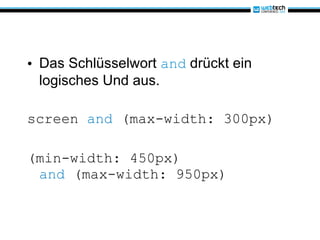
Das Schlüsselwort  and  drückt ein logisches Und aus. screen  and  (max-width: 300px) (min-width: 450px) and  (max-width: 950px)
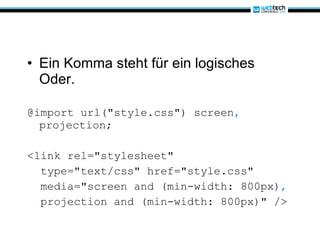
Ein Komma steht für ein logisches Oder. @import url(&quot;style.css&quot;) screen ,  projection; <link rel=&quot;stylesheet&quot; type=&quot;text/css&quot; href=&quot;style.css&quot; media=&quot;screen and (min-width: 800px) ,   projection and (min-width: 800px)&quot; />
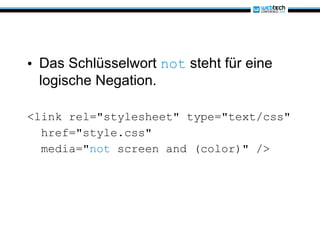
Das Schlüsselwort  not  steht für eine logische Negation. <link rel=&quot;stylesheet&quot; type=&quot;text/css&quot; href=&quot;style.css&quot; media=&quot; not  screen and (color)&quot; />
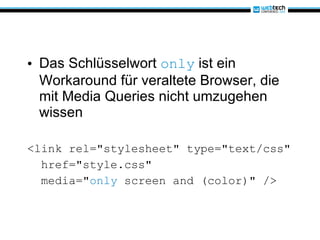
Das Schlüsselwort  only  ist ein Workaround für veraltete Browser, die mit Media Queries nicht umzugehen wissen <link rel=&quot;stylesheet&quot; type=&quot;text/css&quot; href=&quot;style.css&quot; media=&quot; only  screen and (color)&quot; />
CSS Media Queries Medienmerkmale
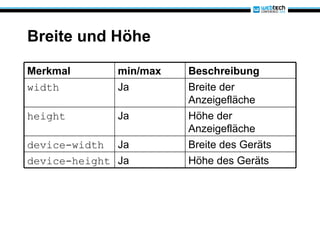
Breite und Höhe Merkmal min/max Beschreibung width Ja Breite der Anzeigefläche height Ja Höhe der Anzeigefläche device-width Ja Breite des Geräts device-height Ja Höhe des Geräts
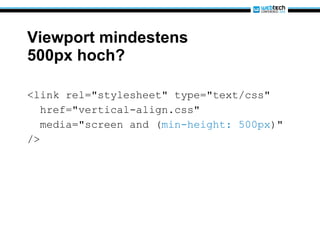
Viewport mindestens 500px hoch? <link rel=&quot;stylesheet&quot; type=&quot;text/css&quot; href=&quot;vertical-align.css&quot; media=&quot;screen and ( min-height: 500px )&quot; />
Smartphone? @media only screen and ( min-device-width: 320px )  and ( max-device-width: 480px ) { … }
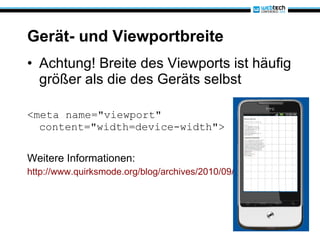
Gerät- und Viewportbreite Achtung! Breite des Viewports ist häufig größer als die des Geräts selbst <meta name=&quot;viewport&quot; content=&quot;width=device-width&quot;> Weitere Informationen: http://www.quirksmode.org/blog/archives/2010/09/combining_meta.html
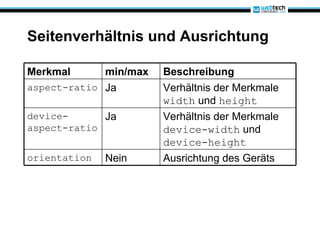
Seitenverhältnis und Ausrichtung Merkmal min/max Beschreibung aspect-ratio Ja Verhältnis der Merkmale  width  und  height device-aspect-ratio Ja Verhältnis der Merkmale  device-width  und  device-height orientation Nein Ausrichtung des Geräts
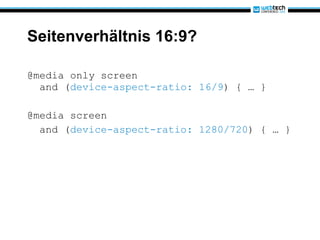
Seitenverhältnis 16:9? @media only screen   and ( device-aspect-ratio: 16/9 ) { … } @media screen and ( device-aspect-ratio: 1280/720 ) { … }
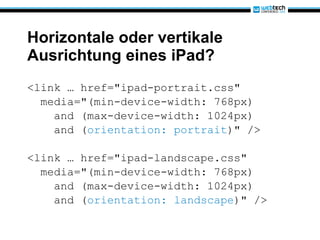
Horizontale oder vertikale Ausrichtung eines iPad? <link … href=&quot;ipad-portrait.css&quot; media=&quot;(min-device-width: 768px) and (max-device-width: 1024px) and ( orientation: portrait )&quot; /> <link … href=&quot;ipad-landscape.css&quot; media=&quot;(min-device-width: 768px) and (max-device-width: 1024px) and ( orientation: landscape )&quot; />
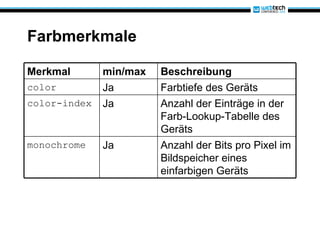
Farbmerkmale Merkmal min/max Beschreibung color Ja Farbtiefe des Geräts color-index Ja Anzahl der Einträge in der Farb-Lookup-Tabelle des Geräts monochrome Ja Anzahl der Bits pro Pixel im Bildspeicher eines einfarbigen Geräts
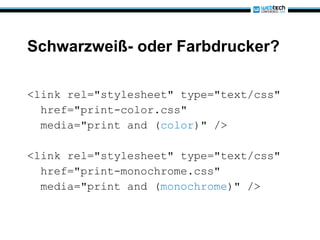
Schwarzweiß- oder Farbdrucker? <link rel=&quot;stylesheet&quot; type=&quot;text/css&quot; href=&quot;print-color.css&quot; media=&quot;print and ( color )&quot; /> <link rel=&quot;stylesheet&quot; type=&quot;text/css&quot; href=&quot;print-monochrome.css&quot; media=&quot;print and ( monochrome )&quot; />
 
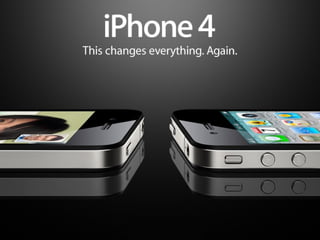
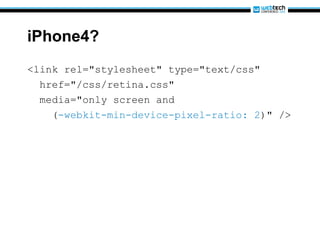
iPhone4? <link rel=&quot;stylesheet&quot; type=&quot;text/css&quot; href=&quot;/css/retina.css&quot; media=&quot;only screen and ( -webkit-min-device-pixel-ratio: 2 )&quot; />
Browserkompatibilität
 
Fragen?
Michael Jendryschik [email_address] [email_address] twitter.com/jendryschik www.facebook.com/jendryschik www.xing.com/profile/Michael_Jendryschik
Beispiele http://ie.microsoft.com/testdrive/HTML5/85CSS3_MediaQueries/Default.html http://www.alistapart.com/d/responsive-web-design/ex/ex-site-larger.html http://hicksdesign.co.uk/ http://files.jendryschik.de/examples/wtc2010/mq.html
Abbildungsnachweis http://www.digitale-chancen.de/transfer/assets/468.jpg http://ceipntrasradelapiedad.files.wordpress.com/2010/03/braille.jpg http://gadgets.boingboing.net/Palm-Pre-Disassembled.jpg http://upload.wikimedia.org/wikipedia/commons/d/dc/Westermann_Druckerei_1890.png http://www.infocus.rbt-pressroom.eu/de/download/der-heimkino-projektor-sp8602-kommt-vielen-hochleistungsfhigen-eigenschaften-auf-den-markt-4.jpg http://upload.wikimedia.org/wikipedia/commons/2/2c/Monitor_in_gutter.jpg http://cmsdata.iucn.org/img/original/iberian_lynx_by_antonio_rivas.jpg http://www.comcast.com/MediaLibrary/1/1/About/PressRoom/Images/LogoAndMediaLibrary/Photography/CableNetworks/Teletubbies-Group2.jpg http://www.audiobooks.at/images/cover/europa/DDF_132_CD.jpg http://www.pm.ruhr-uni-bochum.de/imperia/md/images/pressestelle/einstein.jpg http://img2.fengniao.com/product/28/473/ceOnyLQihT8xg.jpg http://www.apple.com/iphone/ http://wallpapers-diq.net/wallpapers/30/Firefox%2C_The_Browser%2C_Reloaded.jpg

CSS Media Queries (WebTech Conference 2010)

  • 1.
    Michael Jendryschik |itemis AG CSS Media Queries Auf Browser und Geräte reagieren
  • 2.
    Michael Jendryschik Konzipiertund entwickelt Websites, schreibt und spricht darüber http://jendryschik.de Leiter Webentwicklung http://www.itemis.de Webkraut http://www.webkrauts.de
  • 3.
    Es gibt verschiedeneMöglichkeiten, den Geltungsbereich von CSS auf bestimmte Medien einzuschränken.
  • 4.
    aural fürSprachbrowser
  • 5.
    braille fürGeräte mit Braillezeile
  • 6.
    embossed fürBrailledrucker
  • 7.
    handheld fürHandcomputer und Mobiltelefone
  • 8.
    print fürDrucker
  • 9.
    projection fürProjektoren
  • 10.
    screen fürMonitore
  • 11.
    tty fürAusgabemedien mit Festbreitenschrift
  • 12.
    tv fürFernseher
  • 13.
    CSS-Medientypen TypMedium all alle Geräte aural Sprachbrowser braille Ausgabegeräte mit Braillezeile embossed Brailledrucker handheld Handcomputer und Mobiltelefone print Drucker projection Projektion screen Computermonitore tty Ausgabemedien mit Festbreitenschrift tv Fernseher
  • 14.
    <link rel=&quot;stylesheet&quot; type=&quot;text/css&quot;href=&quot;style.css&quot; media=&quot;screen&quot; /> @import url(&quot;style.css&quot;) screen ; @media print { div#header, div#sidebar, div#footer { display: none; } }
  • 15.
    Mit CSS MediaQueries ist es möglich, die Einbindung von CSS davon abhängig zu machen, ob ein Medium oder Ausgabegerät bestimmte Merkmale aufweist oder nicht.
  • 16.
  • 17.
    @media (min-width: 950px){ /* Regeln für breite Browserfenster */ } @media (min-width: 450px) and (max-width: 950px) {   /* Regeln für Netbooks */ } @media (max-width: 450px) { /* Regeln für mobile Geräte */ }
  • 18.
    A List ApartArtikelbeispiel
  • 19.
    @media screen and(max-width: 600px) { .mast, .intro, .main, .footer { float: none; width: auto; } }
  • 20.
  • 21.
    @media screen and(max-width: 500px) { … } @media screen and (max-width: 800px) { … } @media screen and (min-width: 1024px) { … } @media handheld and (max-device-width: 480px), screen and (max-device-width: 480px), screen and (max-width: 600px) { … } @media screen and (min-width: 920px) { … } @media screen and (min-width: 1350px) { … } @media screen and (min-width: 1500px) { … } @media only screen and (max-device-width: 480px) { … } @media only screen and (min-device-width: 768px) and (max-device-width: 1024px) { … }
  • 22.
    kleines iPhone-Beispiel <ol><li class=&quot;ready&quot;>Fertig?</li> <li class=&quot;go&quot;>Los!</li> </ol>
  • 23.
    kleines iPhone-Beispiel @mediaonly screen and (-webkit-min-device-pixel-ratio: 2) and (orientation: landscape) { body { background-color: yellow; } li.go { display: none; } }
  • 24.
    kleines iPhone-Beispiel @mediaonly screen and (-webkit-min-device-pixel-ratio: 2) and (orientation: portrait) { body { color: white; background-color: green; } li.ready { display: none; } }
  • 25.
  • 26.
    CSS Media QueriesGrundlagen und Syntax
  • 27.
    Media Queries sindlogische Ausdrücke, die die Angabe von Medientypen und bestimmten Medienmerkmalen miteinander verknüpfen.
  • 28.
    Bezeichnung Beispiel MediaQuery screen and (max-width: 300px) Medientyp screen and (max-width: 300px) Verknüpfung screen and (max-width: 300px) Ausdruck screen and ( max-width: 300px ) Merkmal screen and ( max-width : 300px) Wert screen and (max-width: 300px )
  • 29.
    Das Schlüsselwort and drückt ein logisches Und aus. screen and (max-width: 300px) (min-width: 450px) and (max-width: 950px)
  • 30.
    Ein Komma stehtfür ein logisches Oder. @import url(&quot;style.css&quot;) screen , projection; <link rel=&quot;stylesheet&quot; type=&quot;text/css&quot; href=&quot;style.css&quot; media=&quot;screen and (min-width: 800px) , projection and (min-width: 800px)&quot; />
  • 31.
    Das Schlüsselwort not steht für eine logische Negation. <link rel=&quot;stylesheet&quot; type=&quot;text/css&quot; href=&quot;style.css&quot; media=&quot; not screen and (color)&quot; />
  • 32.
    Das Schlüsselwort only ist ein Workaround für veraltete Browser, die mit Media Queries nicht umzugehen wissen <link rel=&quot;stylesheet&quot; type=&quot;text/css&quot; href=&quot;style.css&quot; media=&quot; only screen and (color)&quot; />
  • 33.
    CSS Media QueriesMedienmerkmale
  • 34.
    Breite und HöheMerkmal min/max Beschreibung width Ja Breite der Anzeigefläche height Ja Höhe der Anzeigefläche device-width Ja Breite des Geräts device-height Ja Höhe des Geräts
  • 35.
    Viewport mindestens 500pxhoch? <link rel=&quot;stylesheet&quot; type=&quot;text/css&quot; href=&quot;vertical-align.css&quot; media=&quot;screen and ( min-height: 500px )&quot; />
  • 36.
    Smartphone? @media onlyscreen and ( min-device-width: 320px ) and ( max-device-width: 480px ) { … }
  • 37.
    Gerät- und ViewportbreiteAchtung! Breite des Viewports ist häufig größer als die des Geräts selbst <meta name=&quot;viewport&quot; content=&quot;width=device-width&quot;> Weitere Informationen: http://www.quirksmode.org/blog/archives/2010/09/combining_meta.html
  • 38.
    Seitenverhältnis und AusrichtungMerkmal min/max Beschreibung aspect-ratio Ja Verhältnis der Merkmale width und height device-aspect-ratio Ja Verhältnis der Merkmale device-width und device-height orientation Nein Ausrichtung des Geräts
  • 39.
    Seitenverhältnis 16:9? @mediaonly screen and ( device-aspect-ratio: 16/9 ) { … } @media screen and ( device-aspect-ratio: 1280/720 ) { … }
  • 40.
    Horizontale oder vertikaleAusrichtung eines iPad? <link … href=&quot;ipad-portrait.css&quot; media=&quot;(min-device-width: 768px) and (max-device-width: 1024px) and ( orientation: portrait )&quot; /> <link … href=&quot;ipad-landscape.css&quot; media=&quot;(min-device-width: 768px) and (max-device-width: 1024px) and ( orientation: landscape )&quot; />
  • 41.
    Farbmerkmale Merkmal min/maxBeschreibung color Ja Farbtiefe des Geräts color-index Ja Anzahl der Einträge in der Farb-Lookup-Tabelle des Geräts monochrome Ja Anzahl der Bits pro Pixel im Bildspeicher eines einfarbigen Geräts
  • 42.
    Schwarzweiß- oder Farbdrucker?<link rel=&quot;stylesheet&quot; type=&quot;text/css&quot; href=&quot;print-color.css&quot; media=&quot;print and ( color )&quot; /> <link rel=&quot;stylesheet&quot; type=&quot;text/css&quot; href=&quot;print-monochrome.css&quot; media=&quot;print and ( monochrome )&quot; />
  • 43.
  • 44.
    iPhone4? <link rel=&quot;stylesheet&quot;type=&quot;text/css&quot; href=&quot;/css/retina.css&quot; media=&quot;only screen and ( -webkit-min-device-pixel-ratio: 2 )&quot; />
  • 45.
  • 46.
  • 47.
  • 48.
    Michael Jendryschik [email_address][email_address] twitter.com/jendryschik www.facebook.com/jendryschik www.xing.com/profile/Michael_Jendryschik
  • 49.
  • 50.
    Abbildungsnachweis http://www.digitale-chancen.de/transfer/assets/468.jpg http://ceipntrasradelapiedad.files.wordpress.com/2010/03/braille.jpghttp://gadgets.boingboing.net/Palm-Pre-Disassembled.jpg http://upload.wikimedia.org/wikipedia/commons/d/dc/Westermann_Druckerei_1890.png http://www.infocus.rbt-pressroom.eu/de/download/der-heimkino-projektor-sp8602-kommt-vielen-hochleistungsfhigen-eigenschaften-auf-den-markt-4.jpg http://upload.wikimedia.org/wikipedia/commons/2/2c/Monitor_in_gutter.jpg http://cmsdata.iucn.org/img/original/iberian_lynx_by_antonio_rivas.jpg http://www.comcast.com/MediaLibrary/1/1/About/PressRoom/Images/LogoAndMediaLibrary/Photography/CableNetworks/Teletubbies-Group2.jpg http://www.audiobooks.at/images/cover/europa/DDF_132_CD.jpg http://www.pm.ruhr-uni-bochum.de/imperia/md/images/pressestelle/einstein.jpg http://img2.fengniao.com/product/28/473/ceOnyLQihT8xg.jpg http://www.apple.com/iphone/ http://wallpapers-diq.net/wallpapers/30/Firefox%2C_The_Browser%2C_Reloaded.jpg