© 2014 IBM Corporation
© 2009 IBM Corporation
Dnug 2015
Dortmund 11. Juni 2015
Track 5.2: EditLive oder Connections Bordmittel: Was ist der "wahre" Editor? (BP25)
Oliver Kürsten
IBM Deutschland GmbH
Accelerated Value Leader
oliver.kuersten@de.ibm.com
Accelerated Value Program
http://www-01.ibm.com/software/support/acceleratedvalue/index.html
© 2014 IBM Corporation
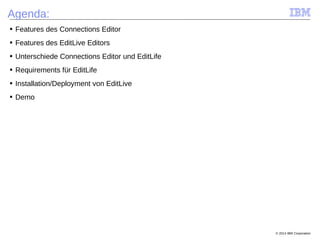
Agenda:
■ Features des Connections Editor
■ Features des EditLive Editors
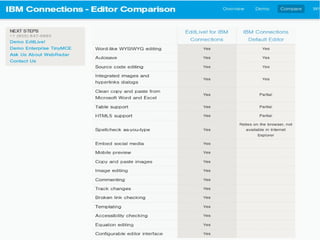
■ Unterschiede Connections Editor und EditLife
■ Requirements für EditLife
■ Installation/Deployment von EditLive
■ Demo
© 2014 IBM Corporation
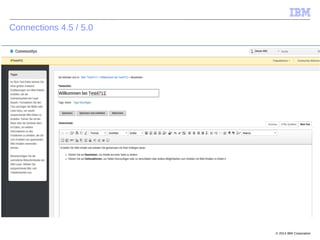
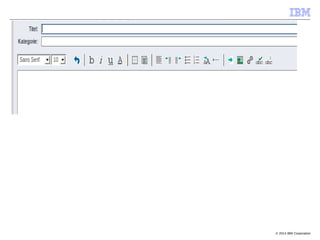
Connections 4.5 / 5.0
© 2014 IBM Corporation
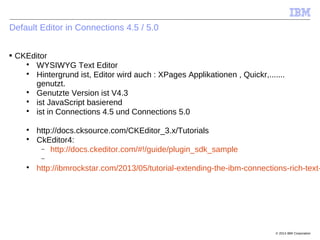
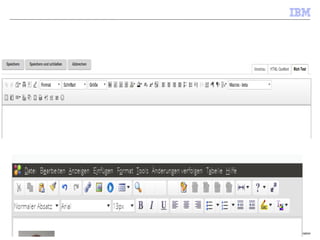
Default Editor in Connections 4.5 / 5.0
■ CKEditor

WYSIWYG Text Editor

Hintergrund ist, Editor wird auch : XPages Applikationen , Quickr,.......
genutzt.

Genutzte Version ist V4.3

ist JavaScript basierend

ist in Connections 4.5 und Connections 5.0

http://docs.cksource.com/CKEditor_3.x/Tutorials

CkEditor4:
 http://docs.ckeditor.com/#!/guide/plugin_sdk_sample


http://ibmrockstar.com/2013/05/tutorial-extending-the-ibm-connections-rich-text-
© 2014 IBM Corporation
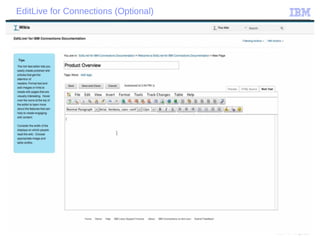
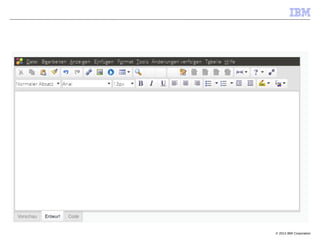
EditLive for Connections (Optional)
© 2014 IBM Corporation
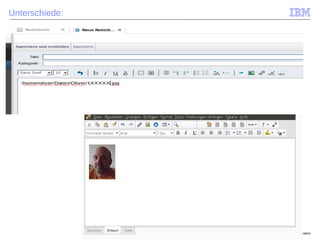
Unterschiede:
© 2014 IBM Corporation
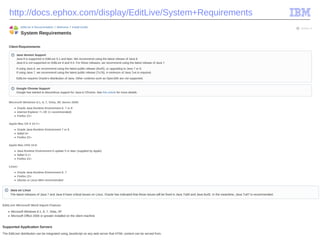
http://docs.ephox.com/display/EditLive/System+Requirements
© 2014 IBM Corporation
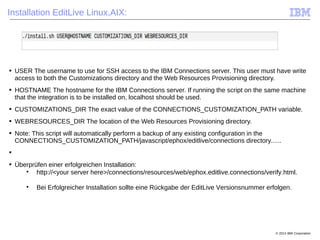
Installation EditLive Linux,AIX:
■ USER The username to use for SSH access to the IBM Connections server. This user must have write
access to both the Customizations directory and the Web Resources Provisioning directory.
■ HOSTNAME The hostname for the IBM Connections server. If running the script on the same machine
that the integration is to be installed on, localhost should be used.
■ CUSTOMIZATIONS_DIR The exact value of the CONNECTIONS_CUSTOMIZATION_PATH variable.
■ WEBRESOURCES_DIR The location of the Web Resources Provisioning directory.
■ Note: This script will automatically perform a backup of any existing configuration in the
CONNECTIONS_CUSTOMIZATION_PATH/javascript/ephox/editlive/connections directory......
■
■ Überprüfen einer erfolgreichen Installation:

http://<your server here>/connections/resources/web/ephox.editlive.connections/verify.html.

Bei Erfolgreicher Installation sollte eine Rückgabe der EditLive Versionsnummer erfolgen.
© 2014 IBM Corporation
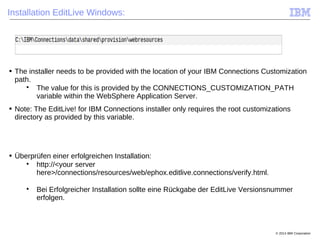
Installation EditLive Windows:
■ The installer needs to be provided with the location of your IBM Connections Customization
path.

The value for this is provided by the CONNECTIONS_CUSTOMIZATION_PATH
variable within the WebSphere Application Server.
■ Note: The EditLive! for IBM Connections installer only requires the root customizations
directory as provided by this variable.
■ Überprüfen einer erfolgreichen Installation:

http://<your server
here>/connections/resources/web/ephox.editlive.connections/verify.html.

Bei Erfolgreicher Installation sollte eine Rückgabe der EditLive Versionsnummer
erfolgen.
© 2014 IBM Corporation
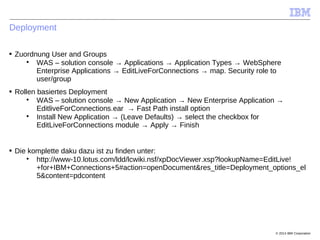
Deployment
■ Zuordnung User and Groups

WAS – solution console → Applications → Application Types → WebSphere
Enterprise Applications → EditLiveForConnections → map. Security role to
user/group
■ Rollen basiertes Deployment

WAS – solution console → New Application → New Enterprise Application →
EditliveForConnections.ear → Fast Path install option

Install New Application → (Leave Defaults) → select the checkbox for
EditLiveForConnections module → Apply → Finish
■ Die komplette daku dazu ist zu finden unter:

http://www-10.lotus.com/ldd/lcwiki.nsf/xpDocViewer.xsp?lookupName=EditLive!
+for+IBM+Connections+5#action=openDocument&res_title=Deployment_options_el
5&content=pdcontent
© 2014 IBM Corporation
Im Supportfall:
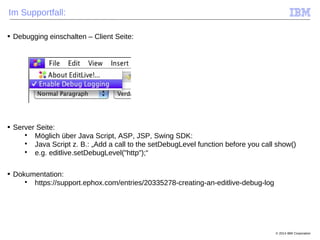
■ Debugging einschalten – Client Seite:
■ Server Seite:

Möglich über Java Script, ASP, JSP, Swing SDK:

Java Script z. B.: „Add a call to the setDebugLevel function before you call show()

e.g. editlive.setDebugLevel("http");“
■ Dokumentation:

https://support.ephox.com/entries/20335278-creating-an-editlive-debug-log
© 2014 IBM Corporation
Roadmap
■ CKEditor

Aktuelle Version ist 4.5

http://ckeditor.com/about
■ Editlive für Connections:

Java Script basierend

HTML5 basierend für Connections geplant. Beta für Ende 2015

Aufnahme von Textbox als „plugin“ in EditLive
 Textbox ist ein WYSIWYG HTML Editor SDK
 Ist geplant für den Einsatz in Mobile und Desktop
© 2014 IBM Corporation
Demo
■ Demo:

CKEditor

EditLive für Connections

Textbox
© 2014 IBM Corporation
Links:
■ Installation Editlive:

http://www-10.lotus.com/ldd/lcwiki.nsf/xpDocViewer.xsp?lookupName=EditLive!
+for+IBM+Connections+5#action=openDocument&res_title=Installing_Editlive_for_AIX_Linux_and_UNIX_e
l5&content=pdcontent
■ Deinstallation EditLive:

http://www-10.lotus.com/ldd/lcwiki.nsf/xpDocViewer.xsp?lookupName=EditLive!
+for+IBM+Connections+5#action=openDocument&res_title=Uninstalling_EditLive_for_IBM_Connections_el
5&content=pdcontent
■ EditLive – EditLive für C5, download , Demo, Dokumentation, :

http://www-10.lotus.com/ldd/lcwiki.nsf/xpDocViewer.xsp?lookupName=EditLive!
+for+IBM+Connections+5#action=openDocument&content=catcontent&ct=prodDoc

http://ephox.com/editlive/ibmconnections

http://ephox.com/editlive/demo

http://ephox.com/editlive

Textbox – Demo, Dokumentation:

http://textbox.io/demo/
■ Youtube:

https://www.youtube.com/watch?v=caChTZQCxhQ
■ Solution Catalog:

https://greenhouse.lotus.com/plugins/plugincatalog.nsf/assetDetails.xsp?
action=editDocument&documentId=06373E7D05303DB685257AEA0002A6DC
© 2014 IBM Corporation
■Vielen Dank:
© 2012 IBM Corporation
Software Solutions | Enterprise Content Management Development
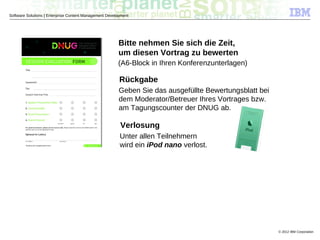
Bitte nehmen Sie sich die Zeit,
um diesen Vortrag zu bewerten
(A6-Block in Ihren Konferenzunterlagen)
Rückgabe
Geben Sie das ausgefüllte Bewertungsblatt bei
dem Moderator/Betreuer Ihres Vortrages bzw.
am Tagungscounter der DNUG ab.
Verlosung
Unter allen Teilnehmern
wird ein iPod nano verlost.

20150611 track5 2_ bp25_edit_life_connections

  • 1.
    © 2014 IBMCorporation
  • 2.
    © 2009 IBMCorporation Dnug 2015 Dortmund 11. Juni 2015 Track 5.2: EditLive oder Connections Bordmittel: Was ist der "wahre" Editor? (BP25) Oliver Kürsten IBM Deutschland GmbH Accelerated Value Leader oliver.kuersten@de.ibm.com Accelerated Value Program http://www-01.ibm.com/software/support/acceleratedvalue/index.html
  • 3.
    © 2014 IBMCorporation Agenda: ■ Features des Connections Editor ■ Features des EditLive Editors ■ Unterschiede Connections Editor und EditLife ■ Requirements für EditLife ■ Installation/Deployment von EditLive ■ Demo
  • 4.
    © 2014 IBMCorporation Connections 4.5 / 5.0
  • 5.
    © 2014 IBMCorporation
  • 6.
    © 2014 IBMCorporation Default Editor in Connections 4.5 / 5.0 ■ CKEditor  WYSIWYG Text Editor  Hintergrund ist, Editor wird auch : XPages Applikationen , Quickr,....... genutzt.  Genutzte Version ist V4.3  ist JavaScript basierend  ist in Connections 4.5 und Connections 5.0  http://docs.cksource.com/CKEditor_3.x/Tutorials  CkEditor4:  http://docs.ckeditor.com/#!/guide/plugin_sdk_sample   http://ibmrockstar.com/2013/05/tutorial-extending-the-ibm-connections-rich-text-
  • 7.
    © 2014 IBMCorporation EditLive for Connections (Optional)
  • 8.
    © 2014 IBMCorporation
  • 9.
    © 2014 IBMCorporation
  • 10.
    © 2014 IBMCorporation Unterschiede:
  • 11.
    © 2014 IBMCorporation
  • 12.
    © 2014 IBMCorporation http://docs.ephox.com/display/EditLive/System+Requirements
  • 13.
    © 2014 IBMCorporation Installation EditLive Linux,AIX: ■ USER The username to use for SSH access to the IBM Connections server. This user must have write access to both the Customizations directory and the Web Resources Provisioning directory. ■ HOSTNAME The hostname for the IBM Connections server. If running the script on the same machine that the integration is to be installed on, localhost should be used. ■ CUSTOMIZATIONS_DIR The exact value of the CONNECTIONS_CUSTOMIZATION_PATH variable. ■ WEBRESOURCES_DIR The location of the Web Resources Provisioning directory. ■ Note: This script will automatically perform a backup of any existing configuration in the CONNECTIONS_CUSTOMIZATION_PATH/javascript/ephox/editlive/connections directory...... ■ ■ Überprüfen einer erfolgreichen Installation:  http://<your server here>/connections/resources/web/ephox.editlive.connections/verify.html.  Bei Erfolgreicher Installation sollte eine Rückgabe der EditLive Versionsnummer erfolgen.
  • 14.
    © 2014 IBMCorporation Installation EditLive Windows: ■ The installer needs to be provided with the location of your IBM Connections Customization path.  The value for this is provided by the CONNECTIONS_CUSTOMIZATION_PATH variable within the WebSphere Application Server. ■ Note: The EditLive! for IBM Connections installer only requires the root customizations directory as provided by this variable. ■ Überprüfen einer erfolgreichen Installation:  http://<your server here>/connections/resources/web/ephox.editlive.connections/verify.html.  Bei Erfolgreicher Installation sollte eine Rückgabe der EditLive Versionsnummer erfolgen.
  • 15.
    © 2014 IBMCorporation Deployment ■ Zuordnung User and Groups  WAS – solution console → Applications → Application Types → WebSphere Enterprise Applications → EditLiveForConnections → map. Security role to user/group ■ Rollen basiertes Deployment  WAS – solution console → New Application → New Enterprise Application → EditliveForConnections.ear → Fast Path install option  Install New Application → (Leave Defaults) → select the checkbox for EditLiveForConnections module → Apply → Finish ■ Die komplette daku dazu ist zu finden unter:  http://www-10.lotus.com/ldd/lcwiki.nsf/xpDocViewer.xsp?lookupName=EditLive! +for+IBM+Connections+5#action=openDocument&res_title=Deployment_options_el 5&content=pdcontent
  • 16.
    © 2014 IBMCorporation Im Supportfall: ■ Debugging einschalten – Client Seite: ■ Server Seite:  Möglich über Java Script, ASP, JSP, Swing SDK:  Java Script z. B.: „Add a call to the setDebugLevel function before you call show()  e.g. editlive.setDebugLevel("http");“ ■ Dokumentation:  https://support.ephox.com/entries/20335278-creating-an-editlive-debug-log
  • 17.
    © 2014 IBMCorporation Roadmap ■ CKEditor  Aktuelle Version ist 4.5  http://ckeditor.com/about ■ Editlive für Connections:  Java Script basierend  HTML5 basierend für Connections geplant. Beta für Ende 2015  Aufnahme von Textbox als „plugin“ in EditLive  Textbox ist ein WYSIWYG HTML Editor SDK  Ist geplant für den Einsatz in Mobile und Desktop
  • 18.
    © 2014 IBMCorporation Demo ■ Demo:  CKEditor  EditLive für Connections  Textbox
  • 19.
    © 2014 IBMCorporation Links: ■ Installation Editlive:  http://www-10.lotus.com/ldd/lcwiki.nsf/xpDocViewer.xsp?lookupName=EditLive! +for+IBM+Connections+5#action=openDocument&res_title=Installing_Editlive_for_AIX_Linux_and_UNIX_e l5&content=pdcontent ■ Deinstallation EditLive:  http://www-10.lotus.com/ldd/lcwiki.nsf/xpDocViewer.xsp?lookupName=EditLive! +for+IBM+Connections+5#action=openDocument&res_title=Uninstalling_EditLive_for_IBM_Connections_el 5&content=pdcontent ■ EditLive – EditLive für C5, download , Demo, Dokumentation, :  http://www-10.lotus.com/ldd/lcwiki.nsf/xpDocViewer.xsp?lookupName=EditLive! +for+IBM+Connections+5#action=openDocument&content=catcontent&ct=prodDoc  http://ephox.com/editlive/ibmconnections  http://ephox.com/editlive/demo  http://ephox.com/editlive  Textbox – Demo, Dokumentation:  http://textbox.io/demo/ ■ Youtube:  https://www.youtube.com/watch?v=caChTZQCxhQ ■ Solution Catalog:  https://greenhouse.lotus.com/plugins/plugincatalog.nsf/assetDetails.xsp? action=editDocument&documentId=06373E7D05303DB685257AEA0002A6DC
  • 20.
    © 2014 IBMCorporation ■Vielen Dank:
  • 21.
    © 2012 IBMCorporation Software Solutions | Enterprise Content Management Development Bitte nehmen Sie sich die Zeit, um diesen Vortrag zu bewerten (A6-Block in Ihren Konferenzunterlagen) Rückgabe Geben Sie das ausgefüllte Bewertungsblatt bei dem Moderator/Betreuer Ihres Vortrages bzw. am Tagungscounter der DNUG ab. Verlosung Unter allen Teilnehmern wird ein iPod nano verlost.