WEBLOGIC FOR DEVOPS

Andreas Koop
Geschäftsführung
& Consulting

DOAG 2013 Konferenz+Ausstellung
Andreas Koop

ÜBER MICH

Geschäftsführung
& Consulting

Beratung, Training Oracle Technologie
ADF Certified Implementation Specialist

Community
DOAG, ADF EMG, ADF German Community, Twitter @multikoop

Blog
Technical http://multikoop.blogspot.com
Sonstiges http://www.enpit.de/blog

2
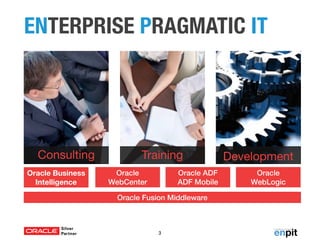
ENTERPRISE PRAGMATIC IT

Consulting
Oracle Business
Intelligence

Training
Oracle
WebCenter

Oracle ADF
ADF Mobile

Oracle Fusion Middleware

3

Development
Oracle
WebLogic
AGENDA
Wer oder Was ist „DevOps“?
WebLogic „DevOps Features“
Silent Install, JMX, WLST, RESTful Services

Automatisierung mit Vagrant und Puppet
Fazit
Andreas Koop

4
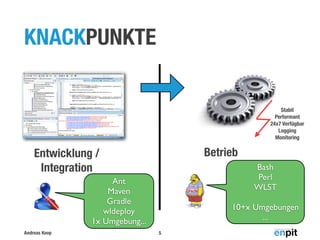
KNACKPUNKTE

Stabil
Performant
24x7 Verfügbar
Logging
Monitoring

Betrieb

Entwicklung /
Integration

Bash
Perl
WLST

Ant
Maven
Gradle
wldeploy
1x Umgebung...
Andreas Koop

10+x Umgebungen
...
5
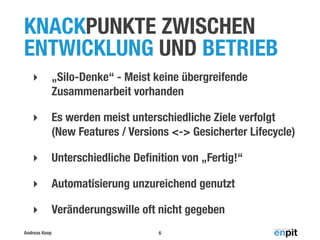
KNACKPUNKTE ZWISCHEN
ENTWICKLUNG UND BETRIEB
‣

„Silo-Denke“ - Meist keine übergreifende
Zusammenarbeit vorhanden

‣

Es werden meist unterschiedliche Ziele verfolgt
(New Features / Versions <-> Gesicherter Lifecycle)

‣

Unterschiedliche Definition von „Fertig!“

‣

Automatisierung unzureichend genutzt

‣

Veränderungswille oft nicht gegeben

Andreas Koop

6
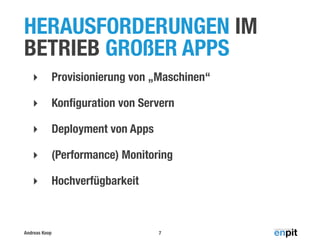
HERAUSFORDERUNGEN IM
BETRIEB GROßER APPS
‣

Provisionierung von „Maschinen“

‣

Konfiguration von Servern

‣

Deployment von Apps

‣

(Performance) Monitoring

‣

Hochverfügbarkeit

Andreas Koop

7
Q

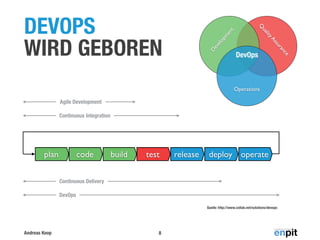
DEVOPS
WIRD GEBOREN
Agile Development
Continuous Integration

plan

code

build

test

release

deploy operate

Continuous Delivery
DevOps
Quelle: http://www.collab.net/solutions/devops

Andreas Koop

8

e

Operations

c
an

ur
ss

yA

D
ev
elo
pm

en
t

lit
ua

DevOps
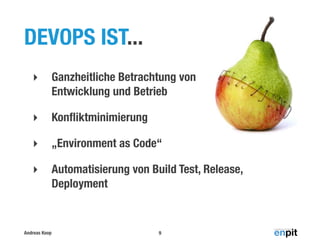
DEVOPS IST...
‣

Ganzheitliche Betrachtung von
Entwicklung und Betrieb

‣

Konfliktminimierung

‣

„Environment as Code“

‣

Automatisierung von Build Test, Release,
Deployment

Andreas Koop

9
AGENDA
Wer oder Was ist „DevOps“?
WebLogic „DevOps Features“
Silent Install, JMX, WLST, RESTful Services

Automatisierung mit Vagrant und Puppet
Fazit
Andreas Koop

10
WEBLOGIC „DEVOPS
FEATURES“
‣

Silent Installation

‣

JMX MBean Zugang

‣

WLST (Scripting Tool)

‣

Deployment Plans

‣

RESTful Management Services

Andreas Koop

11
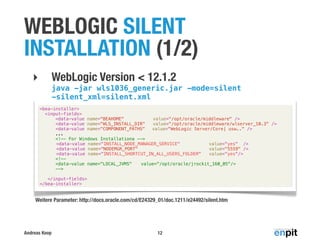
WEBLOGIC SILENT
INSTALLATION (1/2)
WebLogic Version < 12.1.2

‣

java -jar wls1036_generic.jar -mode=silent
-silent_xml=silent.xml
<bea-installer>
<input-fields>
<data-value name="BEAHOME"
value="/opt/oracle/middleware" />
<data-value name="WLS_INSTALL_DIR"
value="/opt/oracle/middleware/wlserver_10.3" />
<data-value name="COMPONENT_PATHS" ! value="WebLogic Server/Core| usw.." />
...
<!-- For Windows Installationa -->
<data-value name="INSTALL_NODE_MANAGER_SERVICE"
value="yes" />
<data-value name="NODEMGR_PORT"
value="5559" />
<data-value name="INSTALL_SHORTCUT_IN_ALL_USERS_FOLDER"
value="yes"/>
<!-<data-value name="LOCAL_JVMS"! value="/opt/oracle/jrockit_160_05"/>
-->
</input-fields>
</bea-installer>

Weitere Parameter: http://docs.oracle.com/cd/E24329_01/doc.1211/e24492/silent.htm

Andreas Koop

12
WEBLOGIC SILENT
INSTALLATION (2/2)
WebLogic Version >= 12.1.2

‣

java -jar wls_121200.jar -silent -response /home/
oracle/install/wls.rsp
[ENGINE]
#DO NOT CHANGE THIS.
Response File Version=1.0.0.0.0
[GENERIC]
#The oracle home location. This can be an existing Oracle Home or a new Oracle Home
ORACLE_HOME=/opt/oracle/middleware
#Set this variable value to the Installation Type selected. e.g. WebLogic Server, Coherence,
Complete with Examples.
INSTALL_TYPE=WebLogic Server
...

Weitere Parameter: http://docs.oracle.com/middleware/1212/core/OUIRF/silent.htm

Andreas Koop

13
JMX MBEANS
‣

Java Management Extension

‣

MBeans haben Attribute und Operationen

‣

WebLogic MBeans bieten Zugang zu
Konfigurations- und Laufzeitdaten

JMX ermöglicht erst die vollständige Automatisierung
von WebLogic Konfigurationen & Monitoring !
Andreas Koop

14
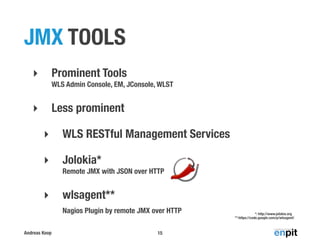
JMX TOOLS
Prominent Tools

‣

WLS Admin Console, EM, JConsole, WLST

Less prominent

‣
‣

WLS RESTful Management Services

‣

Jolokia*
Remote JMX with JSON over HTTP

‣

wlsagent**
Nagios Plugin by remote JMX over HTTP

Andreas Koop

15

*: http://www.jolokia.org
**:https://code.google.com/p/wlsagent/
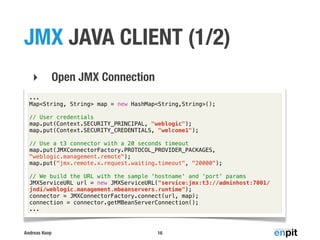
JMX JAVA CLIENT (1/2)
‣

Open JMX Connection

...
Map<String, String> map = new HashMap<String,String>();
// User credentials
map.put(Context.SECURITY_PRINCIPAL, "weblogic");
map.put(Context.SECURITY_CREDENTIALS, "welcome1");
// Use a t3 connector with a 20 seconds timeout
map.put(JMXConnectorFactory.PROTOCOL_PROVIDER_PACKAGES,
"weblogic.management.remote");
map.put("jmx.remote.x.request.waiting.timeout", "20000");
// We build the URL with the sample 'hostname' and 'port' params
JMXServiceURL url = new JMXServiceURL("service:jmx:t3://adminhost:7001/
jndi/weblogic.management.mbeanservers.runtime");
connector = JMXConnectorFactory.connect(url, map);
connection = connector.getMBeanServerConnection();
...

Andreas Koop

16
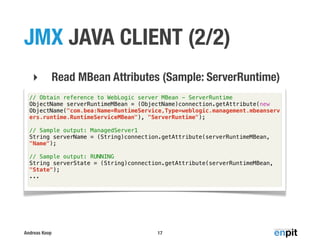
JMX JAVA CLIENT (2/2)
‣

Read MBean Attributes (Sample: ServerRuntime)

// Obtain reference to WebLogic server MBean - ServerRuntime
ObjectName serverRuntimeMBean = (ObjectName)connection.getAttribute(new
ObjectName("com.bea:Name=RuntimeService,Type=weblogic.management.mbeanserv
ers.runtime.RuntimeServiceMBean"), "ServerRuntime");
// Sample output: ManagedServer1
String serverName = (String)connection.getAttribute(serverRuntimeMBean,
"Name");
// Sample output: RUNNING
String serverState = (String)connection.getAttribute(serverRuntimeMBean,
"State");
...

Andreas Koop

17
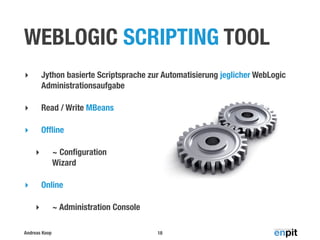
WEBLOGIC SCRIPTING TOOL
‣

Jython basierte Scriptsprache zur Automatisierung jeglicher WebLogic
Administrationsaufgabe

‣

Read / Write MBeans

‣

Offline
~ Configuration
Wizard

‣

Online

‣
‣

Andreas Koop

~ Administration Console
18
DOMAIN ERSTELLEN
readTemplate(os.environ['WL_HOME'] + '/common/templates/
domains/wls.jar')
Current
cd('/')
Management
cmo.setName('my_domain')
cd('Servers/AdminServer') Object
cmo.setListenAddress( 'All Local Addresses' )
cmo.setListenPort( int(ADMIN_PORT) )
cd( '/' )
cd( 'Security/'+DOMAIN_NAME+'/User/' + ADMIN_USER )
cmo.setPassword( ADMIN_PWD )
cd('/')
setOption( 'JavaHome', os.environ['JAVA_HOME'] )
setOption( "ServerStartMode", "prod")
setOption( "OverwriteDomain", "true" )
writeDomain( DOMAIN_DIR )
closeTemplate()
Andreas Koop

19
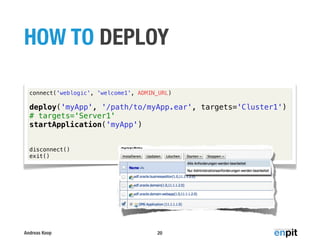
HOW TO DEPLOY
connect('weblogic', 'welcome1', ADMIN_URL)

deploy('myApp', '/path/to/myApp.ear', targets='Cluster1')
# targets='Server1'
startApplication('myApp')
disconnect()
exit()

Andreas Koop

20
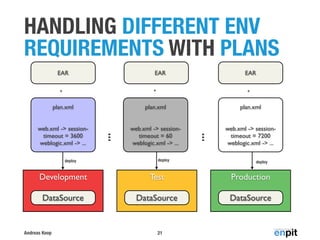
HANDLING DIFFERENT ENV
REQUIREMENTS WITH PLANS
EAR

EAR

EAR

+

+

+

plan.xml

web.xml -> sessiontimeout = 3600
weblogic.xml -> ...

web.xml -> sessiontimeout = 60
weblogic.xml -> ...

web.xml -> sessiontimeout = 7200
weblogic.xml -> ...

deploy

deploy

...

plan.xml

...

plan.xml

deploy

Development

Test

Production

DataSource

DataSource

DataSource

Andreas Koop

21
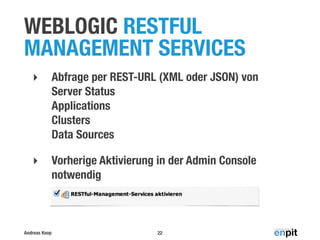
WEBLOGIC RESTFUL
MANAGEMENT SERVICES
‣

Abfrage per REST-URL (XML oder JSON) von
Server Status
Applications
Clusters
Data Sources

‣

Vorherige Aktivierung in der Admin Console
notwendig

Andreas Koop

22
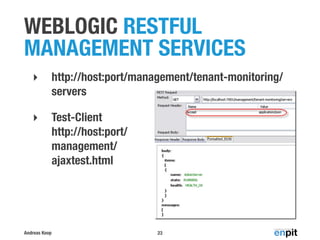
WEBLOGIC RESTFUL
MANAGEMENT SERVICES
‣

http://host:port/management/tenant-monitoring/
servers

‣

Test-Client
http://host:port/
management/
ajaxtest.html

Andreas Koop

23
AGENDA
Wer oder Was ist „DevOps“?
WebLogic „DevOps Features“
Silent Install, JMX, WLST, RESTful Services

Automatisierung mit Vagrant und Puppet
Fazit
Andreas Koop

24
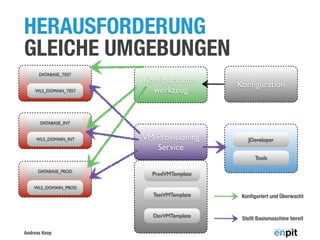
HERAUSFORDERUNG
GLEICHE UMGEBUNGEN
DATABASE_TEST

WLS_DOMAIN_TEST

Konfigurationswerkzeug

Konfiguration

VM Provisioning
Service

JDeveloper

DATABASE_INT

WLS_DOMAIN_INT

Tools
DATABASE_PROD

ProdVMTemplate

WLS_DOMAIN_PROD

TestVMTemplate

DevVMTemplate
Andreas Koop

Konfiguriert und Überwacht

Stellt Basismaschine bereit
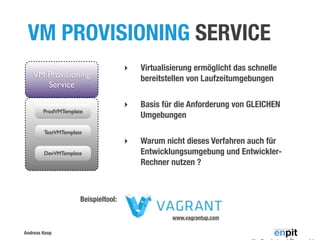
VM PROVISIONING SERVICE

ProdVMTemplate

Virtualisierung ermöglicht das schnelle
bereitstellen von Laufzeitumgebungen

‣

Basis für die Anforderung von GLEICHEN
Umgebungen

‣

VM Provisioning
Service

‣

Warum nicht dieses Verfahren auch für
Entwicklungsumgebung und EntwicklerRechner nutzen ?

TestVMTemplate

DevVMTemplate

Beispieltool:
www.vagrantup.com
Andreas Koop
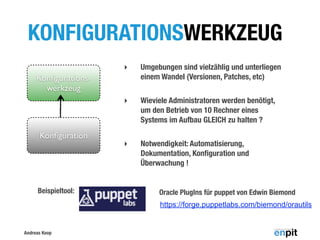
KONFIGURATIONSWERKZEUG
‣

Umgebungen sind vielzählig und unterliegen
einem Wandel (Versionen, Patches, etc)

‣

Wieviele Administratoren werden benötigt,
um den Betrieb von 10 Rechner eines
Systems im Aufbau GLEICH zu halten ?

‣

Notwendigkeit: Automatisierung,
Dokumentation, Konfiguration und
Überwachung !

Konfigurationswerkzeug

Konfiguration

Beispieltool:

Oracle PlugIns für puppet von Edwin Biemond
https://forge.puppetlabs.com/biemond/orautils

Andreas Koop
KONFIGURATIONSMANAGEMENT MIT PUPPET
‣

Automatisierung von Konfigurationen von
Computer Systemen
Users, Groups, Services, Packages, Deployments, etc..

‣

user { 'oracle':
ensure => 'present',
home
=> '/home/oracle',
shell => '/bin/bash'
...
}

Verteilung im Netzwerk
Master

...
Node

Node
Node

host {"node1":
 ip => "10.10.0.101",
 host_aliases =>
['node1.sample.com','node1']
}
...

Andreas Koop

28
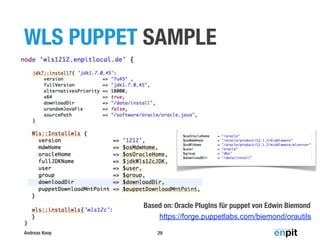
WLS PUPPET SAMPLE

Based on: Oracle PlugIns für puppet von Edwin Biemond
https://forge.puppetlabs.com/biemond/orautils
Andreas Koop

29
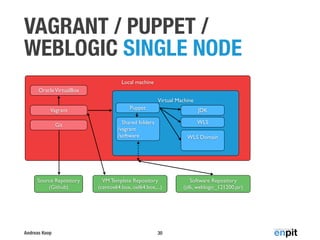
VAGRANT / PUPPET /
WEBLOGIC SINGLE NODE
Local machine
Oracle VirtualBox
Virtual Machine
Vagrant

Puppet

JDK

Git

Shared folders
/vagrant
/software

WLS

Source Repository
(Github)

Andreas Koop

WLS Domain

VM Template Repository
(centos64.box, oel64.box,...)

30

Software Repository
(jdk, weblogic_121200.jar)
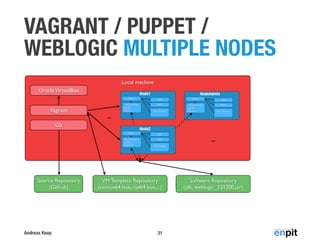
VAGRANT / PUPPET /
WEBLOGIC MULTIPLE NODES
Local machine
Oracle VirtualBox
Vagrant
Git

Node1

NodeAdmin

...
Node2

...

Source Repository
(Github)

Andreas Koop

VM Template Repository
(centos64.box, oel64.box,...)

31

Software Repository
(jdk, weblogic_121200.jar)
MASTER IMAGES MIT PACKER
ERSTELLEN

w w w . p a c k e r. i o

‣

Identische VM Images aus Konfiguration erstellen

‣

Multi-Provider Support
Vagrant Boxes
VMWare Image Templates
Amazon AMI
...

{"builders": [{
"type": "virtualbox",
"iso_url": "...ubuntu-12.04.2-server-amd64.iso" },
...
], [{
"type": "vmware",
"iso_url": "...ubuntu-12.04.2-server-amd64.iso" },
...
], [{
"type": "amazon-instance",
"source_ami": "ami-d9d6a6b0" },
...
],
...
}

Andreas Koop

32

VirtualBox Image
(for Development e.g.)
VMWare Image
(for Development e.g.)
...

Amazon EC2 Image
(for Production e.g.)
...
FAZIT
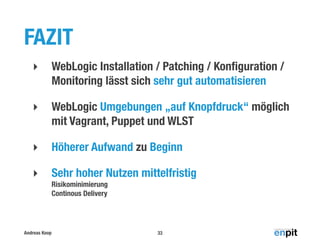
‣

WebLogic Installation / Patching / Konfiguration /
Monitoring lässt sich sehr gut automatisieren

‣

WebLogic Umgebungen „auf Knopfdruck“ möglich
mit Vagrant, Puppet und WLST

‣

Höherer Aufwand zu Beginn

‣

Sehr hoher Nutzen mittelfristig
Risikominimierung
Continous Delivery

Andreas Koop

33
WEITERE INFORMATIONEN
‣

Was ist DevOps?
http://radar.oreilly.com/2012/06/what-is-devops.html

‣

Accessing WebLogic Server MBeans with JMX
http://docs.oracle.com/middleware/1212/wls/JMXCU/accesswls.htm

‣

Oracle RESTful Management Services
http://www.oracle.com/technetwork/articles/soa/oliveira-wls-rest-javafx-1723982.html
http://multikoop.blogspot.de/2011/12/restful-management-services-in-oracle.html

‣

Vagrant / Puppet / WLS
http://multikoop.blogspot.de/2013/11/setup-weblogic-12c-environment-with.html

Andreas Koop

34
VIELEN DANK FÜR IHRE
AUFMERKSAMKEIT

HABEN SIE NOCH FRAGEN?
Oracle WebLogic for DevOps

Oracle WebLogic for DevOps

  • 1.
    WEBLOGIC FOR DEVOPS AndreasKoop Geschäftsführung & Consulting DOAG 2013 Konferenz+Ausstellung
  • 2.
    Andreas Koop ÜBER MICH Geschäftsführung &Consulting Beratung, Training Oracle Technologie ADF Certified Implementation Specialist Community DOAG, ADF EMG, ADF German Community, Twitter @multikoop Blog Technical http://multikoop.blogspot.com Sonstiges http://www.enpit.de/blog 2
  • 3.
    ENTERPRISE PRAGMATIC IT Consulting OracleBusiness Intelligence Training Oracle WebCenter Oracle ADF ADF Mobile Oracle Fusion Middleware 3 Development Oracle WebLogic
  • 4.
    AGENDA Wer oder Wasist „DevOps“? WebLogic „DevOps Features“ Silent Install, JMX, WLST, RESTful Services Automatisierung mit Vagrant und Puppet Fazit Andreas Koop 4
  • 5.
  • 6.
    KNACKPUNKTE ZWISCHEN ENTWICKLUNG UNDBETRIEB ‣ „Silo-Denke“ - Meist keine übergreifende Zusammenarbeit vorhanden ‣ Es werden meist unterschiedliche Ziele verfolgt (New Features / Versions <-> Gesicherter Lifecycle) ‣ Unterschiedliche Definition von „Fertig!“ ‣ Automatisierung unzureichend genutzt ‣ Veränderungswille oft nicht gegeben Andreas Koop 6
  • 7.
    HERAUSFORDERUNGEN IM BETRIEB GROßERAPPS ‣ Provisionierung von „Maschinen“ ‣ Konfiguration von Servern ‣ Deployment von Apps ‣ (Performance) Monitoring ‣ Hochverfügbarkeit Andreas Koop 7
  • 8.
    Q DEVOPS WIRD GEBOREN Agile Development ContinuousIntegration plan code build test release deploy operate Continuous Delivery DevOps Quelle: http://www.collab.net/solutions/devops Andreas Koop 8 e Operations c an ur ss yA D ev elo pm en t lit ua DevOps
  • 9.
    DEVOPS IST... ‣ Ganzheitliche Betrachtungvon Entwicklung und Betrieb ‣ Konfliktminimierung ‣ „Environment as Code“ ‣ Automatisierung von Build Test, Release, Deployment Andreas Koop 9
  • 10.
    AGENDA Wer oder Wasist „DevOps“? WebLogic „DevOps Features“ Silent Install, JMX, WLST, RESTful Services Automatisierung mit Vagrant und Puppet Fazit Andreas Koop 10
  • 11.
    WEBLOGIC „DEVOPS FEATURES“ ‣ Silent Installation ‣ JMXMBean Zugang ‣ WLST (Scripting Tool) ‣ Deployment Plans ‣ RESTful Management Services Andreas Koop 11
  • 12.
    WEBLOGIC SILENT INSTALLATION (1/2) WebLogicVersion < 12.1.2 ‣ java -jar wls1036_generic.jar -mode=silent -silent_xml=silent.xml <bea-installer> <input-fields> <data-value name="BEAHOME" value="/opt/oracle/middleware" /> <data-value name="WLS_INSTALL_DIR" value="/opt/oracle/middleware/wlserver_10.3" /> <data-value name="COMPONENT_PATHS" ! value="WebLogic Server/Core| usw.." /> ... <!-- For Windows Installationa --> <data-value name="INSTALL_NODE_MANAGER_SERVICE" value="yes" /> <data-value name="NODEMGR_PORT" value="5559" /> <data-value name="INSTALL_SHORTCUT_IN_ALL_USERS_FOLDER" value="yes"/> <!-<data-value name="LOCAL_JVMS"! value="/opt/oracle/jrockit_160_05"/> --> </input-fields> </bea-installer> Weitere Parameter: http://docs.oracle.com/cd/E24329_01/doc.1211/e24492/silent.htm Andreas Koop 12
  • 13.
    WEBLOGIC SILENT INSTALLATION (2/2) WebLogicVersion >= 12.1.2 ‣ java -jar wls_121200.jar -silent -response /home/ oracle/install/wls.rsp [ENGINE] #DO NOT CHANGE THIS. Response File Version=1.0.0.0.0 [GENERIC] #The oracle home location. This can be an existing Oracle Home or a new Oracle Home ORACLE_HOME=/opt/oracle/middleware #Set this variable value to the Installation Type selected. e.g. WebLogic Server, Coherence, Complete with Examples. INSTALL_TYPE=WebLogic Server ... Weitere Parameter: http://docs.oracle.com/middleware/1212/core/OUIRF/silent.htm Andreas Koop 13
  • 14.
    JMX MBEANS ‣ Java ManagementExtension ‣ MBeans haben Attribute und Operationen ‣ WebLogic MBeans bieten Zugang zu Konfigurations- und Laufzeitdaten JMX ermöglicht erst die vollständige Automatisierung von WebLogic Konfigurationen & Monitoring ! Andreas Koop 14
  • 15.
    JMX TOOLS Prominent Tools ‣ WLSAdmin Console, EM, JConsole, WLST Less prominent ‣ ‣ WLS RESTful Management Services ‣ Jolokia* Remote JMX with JSON over HTTP ‣ wlsagent** Nagios Plugin by remote JMX over HTTP Andreas Koop 15 *: http://www.jolokia.org **:https://code.google.com/p/wlsagent/
  • 16.
    JMX JAVA CLIENT(1/2) ‣ Open JMX Connection ... Map<String, String> map = new HashMap<String,String>(); // User credentials map.put(Context.SECURITY_PRINCIPAL, "weblogic"); map.put(Context.SECURITY_CREDENTIALS, "welcome1"); // Use a t3 connector with a 20 seconds timeout map.put(JMXConnectorFactory.PROTOCOL_PROVIDER_PACKAGES, "weblogic.management.remote"); map.put("jmx.remote.x.request.waiting.timeout", "20000"); // We build the URL with the sample 'hostname' and 'port' params JMXServiceURL url = new JMXServiceURL("service:jmx:t3://adminhost:7001/ jndi/weblogic.management.mbeanservers.runtime"); connector = JMXConnectorFactory.connect(url, map); connection = connector.getMBeanServerConnection(); ... Andreas Koop 16
  • 17.
    JMX JAVA CLIENT(2/2) ‣ Read MBean Attributes (Sample: ServerRuntime) // Obtain reference to WebLogic server MBean - ServerRuntime ObjectName serverRuntimeMBean = (ObjectName)connection.getAttribute(new ObjectName("com.bea:Name=RuntimeService,Type=weblogic.management.mbeanserv ers.runtime.RuntimeServiceMBean"), "ServerRuntime"); // Sample output: ManagedServer1 String serverName = (String)connection.getAttribute(serverRuntimeMBean, "Name"); // Sample output: RUNNING String serverState = (String)connection.getAttribute(serverRuntimeMBean, "State"); ... Andreas Koop 17
  • 18.
    WEBLOGIC SCRIPTING TOOL ‣ Jythonbasierte Scriptsprache zur Automatisierung jeglicher WebLogic Administrationsaufgabe ‣ Read / Write MBeans ‣ Offline ~ Configuration Wizard ‣ Online ‣ ‣ Andreas Koop ~ Administration Console 18
  • 19.
    DOMAIN ERSTELLEN readTemplate(os.environ['WL_HOME'] +'/common/templates/ domains/wls.jar') Current cd('/') Management cmo.setName('my_domain') cd('Servers/AdminServer') Object cmo.setListenAddress( 'All Local Addresses' ) cmo.setListenPort( int(ADMIN_PORT) ) cd( '/' ) cd( 'Security/'+DOMAIN_NAME+'/User/' + ADMIN_USER ) cmo.setPassword( ADMIN_PWD ) cd('/') setOption( 'JavaHome', os.environ['JAVA_HOME'] ) setOption( "ServerStartMode", "prod") setOption( "OverwriteDomain", "true" ) writeDomain( DOMAIN_DIR ) closeTemplate() Andreas Koop 19
  • 20.
    HOW TO DEPLOY connect('weblogic','welcome1', ADMIN_URL) deploy('myApp', '/path/to/myApp.ear', targets='Cluster1') # targets='Server1' startApplication('myApp') disconnect() exit() Andreas Koop 20
  • 21.
    HANDLING DIFFERENT ENV REQUIREMENTSWITH PLANS EAR EAR EAR + + + plan.xml web.xml -> sessiontimeout = 3600 weblogic.xml -> ... web.xml -> sessiontimeout = 60 weblogic.xml -> ... web.xml -> sessiontimeout = 7200 weblogic.xml -> ... deploy deploy ... plan.xml ... plan.xml deploy Development Test Production DataSource DataSource DataSource Andreas Koop 21
  • 22.
    WEBLOGIC RESTFUL MANAGEMENT SERVICES ‣ Abfrageper REST-URL (XML oder JSON) von Server Status Applications Clusters Data Sources ‣ Vorherige Aktivierung in der Admin Console notwendig Andreas Koop 22
  • 23.
  • 24.
    AGENDA Wer oder Wasist „DevOps“? WebLogic „DevOps Features“ Silent Install, JMX, WLST, RESTful Services Automatisierung mit Vagrant und Puppet Fazit Andreas Koop 24
  • 25.
  • 26.
    VM PROVISIONING SERVICE ProdVMTemplate Virtualisierungermöglicht das schnelle bereitstellen von Laufzeitumgebungen ‣ Basis für die Anforderung von GLEICHEN Umgebungen ‣ VM Provisioning Service ‣ Warum nicht dieses Verfahren auch für Entwicklungsumgebung und EntwicklerRechner nutzen ? TestVMTemplate DevVMTemplate Beispieltool: www.vagrantup.com Andreas Koop
  • 27.
    KONFIGURATIONSWERKZEUG ‣ Umgebungen sind vielzähligund unterliegen einem Wandel (Versionen, Patches, etc) ‣ Wieviele Administratoren werden benötigt, um den Betrieb von 10 Rechner eines Systems im Aufbau GLEICH zu halten ? ‣ Notwendigkeit: Automatisierung, Dokumentation, Konfiguration und Überwachung ! Konfigurationswerkzeug Konfiguration Beispieltool: Oracle PlugIns für puppet von Edwin Biemond https://forge.puppetlabs.com/biemond/orautils Andreas Koop
  • 28.
    KONFIGURATIONSMANAGEMENT MIT PUPPET ‣ Automatisierungvon Konfigurationen von Computer Systemen Users, Groups, Services, Packages, Deployments, etc.. ‣ user { 'oracle': ensure => 'present', home => '/home/oracle', shell => '/bin/bash' ... } Verteilung im Netzwerk Master ... Node Node Node host {"node1":  ip => "10.10.0.101",  host_aliases => ['node1.sample.com','node1'] } ... Andreas Koop 28
  • 29.
    WLS PUPPET SAMPLE Basedon: Oracle PlugIns für puppet von Edwin Biemond https://forge.puppetlabs.com/biemond/orautils Andreas Koop 29
  • 30.
    VAGRANT / PUPPET/ WEBLOGIC SINGLE NODE Local machine Oracle VirtualBox Virtual Machine Vagrant Puppet JDK Git Shared folders /vagrant /software WLS Source Repository (Github) Andreas Koop WLS Domain VM Template Repository (centos64.box, oel64.box,...) 30 Software Repository (jdk, weblogic_121200.jar)
  • 31.
    VAGRANT / PUPPET/ WEBLOGIC MULTIPLE NODES Local machine Oracle VirtualBox Vagrant Git Node1 NodeAdmin ... Node2 ... Source Repository (Github) Andreas Koop VM Template Repository (centos64.box, oel64.box,...) 31 Software Repository (jdk, weblogic_121200.jar)
  • 32.
    MASTER IMAGES MITPACKER ERSTELLEN w w w . p a c k e r. i o ‣ Identische VM Images aus Konfiguration erstellen ‣ Multi-Provider Support Vagrant Boxes VMWare Image Templates Amazon AMI ... {"builders": [{ "type": "virtualbox", "iso_url": "...ubuntu-12.04.2-server-amd64.iso" }, ... ], [{ "type": "vmware", "iso_url": "...ubuntu-12.04.2-server-amd64.iso" }, ... ], [{ "type": "amazon-instance", "source_ami": "ami-d9d6a6b0" }, ... ], ... } Andreas Koop 32 VirtualBox Image (for Development e.g.) VMWare Image (for Development e.g.) ... Amazon EC2 Image (for Production e.g.) ...
  • 33.
    FAZIT ‣ WebLogic Installation /Patching / Konfiguration / Monitoring lässt sich sehr gut automatisieren ‣ WebLogic Umgebungen „auf Knopfdruck“ möglich mit Vagrant, Puppet und WLST ‣ Höherer Aufwand zu Beginn ‣ Sehr hoher Nutzen mittelfristig Risikominimierung Continous Delivery Andreas Koop 33
  • 34.
    WEITERE INFORMATIONEN ‣ Was istDevOps? http://radar.oreilly.com/2012/06/what-is-devops.html ‣ Accessing WebLogic Server MBeans with JMX http://docs.oracle.com/middleware/1212/wls/JMXCU/accesswls.htm ‣ Oracle RESTful Management Services http://www.oracle.com/technetwork/articles/soa/oliveira-wls-rest-javafx-1723982.html http://multikoop.blogspot.de/2011/12/restful-management-services-in-oracle.html ‣ Vagrant / Puppet / WLS http://multikoop.blogspot.de/2013/11/setup-weblogic-12c-environment-with.html Andreas Koop 34
  • 35.
    VIELEN DANK FÜRIHRE AUFMERKSAMKEIT HABEN SIE NOCH FRAGEN?