09.05.2014
SNMP Applied
Sicheres Anwendungs-Monitoring mit SNMP
Gerrit Beine <gerrit.beine@adesso.de>
Short run
► Überlick zu SNMP (ganz kurz)
► Konfiguration und Anwendung von Net-SNMP
► SNMPv3 mit Net-SNMP
► TLS/DTLS mit Net-SNMP
► SNMP von Java aus nutzen
09.05.2014 SNMP Applied3
Grundlegendes zu SNMP
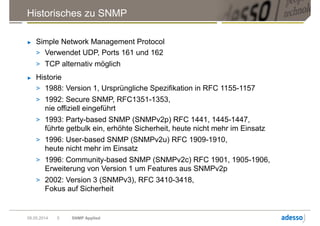
Historisches zu SNMP
► Simple Network Management Protocol
> Verwendet UDP, Ports 161 und 162
> TCP alternativ möglich
► Historie
> 1988: Version 1, Ursprüngliche Spezifikation in RFC 1155-1157
> 1992: Secure SNMP, RFC1351-1353,
nie offiziell eingeführt
> 1993: Party-based SNMP (SNMPv2p) RFC 1441, 1445-1447,
führte getbulk ein, erhöhte Sicherheit, heute nicht mehr im Einsatz
> 1996: User-based SNMP (SNMPv2u) RFC 1909-1910,
heute nicht mehr im Einsatz
> 1996: Community-based SNMP (SNMPv2c) RFC 1901, 1905-1906,
Erweiterung von Version 1 um Features aus SNMPv2p
> 2002: Version 3 (SNMPv3), RFC 3410-3418,
Fokus auf Sicherheit
09.05.2014 SNMP Applied5
Anwendungen von SNMP
► Kontinuierliches Monitoring (Polling)
> Uptime, Load
> Netzwerkverkehr
> Speicherverbrauch (RAM, Festplatten)
> Hardware-Zustand (S.M.A.R.T., Lüfterdrehzahl)
► Information über Ereignisse (SNMP-Traps)
> Fehlersituationen
> Zustandswechsel
09.05.2014 SNMP Applied6
SNMP Begriffswelt
► Agent – SNMP-Daemon, der Informationen via UDP 161 bereitstellt oder
Traps via UDP 162 versendet
► Manager – SNMP-Client, der Informationen via UDP 161 einsammelt
► Trap – SNMP-Nachricht, über UDP 162 versendet
► MIB – Management Information Base
> Dateien mit strukturiertem Text nach ASN.1
> Beschreiben Monitoring-Objekte
> Übersetzen OIDs in Namen und interpretieren der entsprechenden Werte
► OID – Object Identifier
> Identifikatoren in durch ASN.1 definiertem Namensraum
► community – in SNMPv1 und SNMPv2c zur Anmeldung am Agent verwendet
09.05.2014 SNMP Applied7
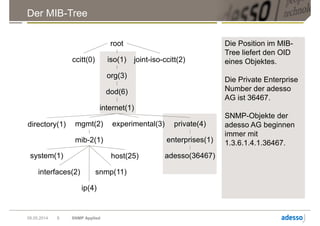
Der MIB-Tree
09.05.2014 SNMP Applied8
Die Position im MIB-
Tree liefert den OID
eines Objektes.
Die Private Enterprise
Number der adesso
AG ist 36467.
SNMP-Objekte der
adesso AG beginnen
immer mit
1.3.6.1.4.1.36467.
root
ccitt(0) iso(1) joint-iso-ccitt(2)
org(3)
dod(6)
internet(1)
directory(1) mgmt(2) experimental(3) private(4)
enterprises(1)
adesso(36467)
mib-2(1)
system(1)
interfaces(2)
ip(4)
snmp(11)
host(25)
OID: Object Identifier
► OIDs sind eindeutige Identifikatoren innerhalb eines Agenten
bzw. eines Gerätes
► OIDs bilden die Navigation durch den MIB-Tree
► Hersteller-spezifische OIDs immer unterhalb von 1.3.6.1.4.1
► Mapping auf Domains
> 1.3.6.1.4.1.36467 –
adesso.enterprises.private.internet.dod.iso.org.
► Unterhalb der OID ist jeder Hersteller frei in seinen Definitionen
► Zuweisung der Enterprise-Identifkation erfolgt durch die IANA:
http://www.iana.org/assignments/enterprise-numbers
09.05.2014 SNMP Applied9
Net-SNMP
Net-SNMP
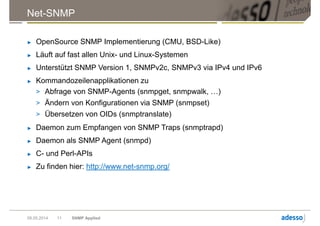
► OpenSource SNMP Implementierung (CMU, BSD-Like)
► Läuft auf fast allen Unix- und Linux-Systemen
► Unterstützt SNMP Version 1, SNMPv2c, SNMPv3 via IPv4 und IPv6
► Kommandozeilenapplikationen zu
> Abfrage von SNMP-Agents (snmpget, snmpwalk, …)
> Ändern von Konfigurationen via SNMP (snmpset)
> Übersetzen von OIDs (snmptranslate)
► Daemon zum Empfangen von SNMP Traps (snmptrapd)
► Daemon als SNMP Agent (snmpd)
► C- und Perl-APIs
► Zu finden hier: http://www.net-snmp.org/
09.05.2014 SNMP Applied11
Net-SNMP snmpd konfigurieren
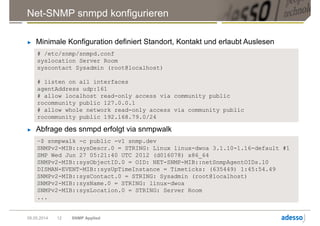
► Minimale Konfiguration definiert Standort, Kontakt und erlaubt Auslesen
09.05.2014 SNMP Applied12
# /etc/snmp/snmpd.conf
syslocation Server Room
syscontact Sysadmin (root@localhost)
# listen on all interfaces
agentAddress udp:161
# allow localhost read-only access via community public
rocommunity public 127.0.0.1
# allow whole network read-only access via community public
rocommunity public 192.168.79.0/24
► Abfrage des snmpd erfolgt via snmpwalk
~$ snmpwalk -c public -v1 snmp.dev
SNMPv2-MIB::sysDescr.0 = STRING: Linux linux-dwoa 3.1.10-1.16-default #1
SMP Wed Jun 27 05:21:40 UTC 2012 (d016078) x86_64
SNMPv2-MIB::sysObjectID.0 = OID: NET-SNMP-MIB::netSnmpAgentOIDs.10
DISMAN-EVENT-MIB::sysUpTimeInstance = Timeticks: (635449) 1:45:54.49
SNMPv2-MIB::sysContact.0 = STRING: Sysadmin (root@localhost)
SNMPv2-MIB::sysName.0 = STRING: linux-dwoa
SNMPv2-MIB::sysLocation.0 = STRING: Server Room
...
09.05.2014 SNMP Applied13
Das Problem:
Das ist alles total unsicher!
Schwächen von SNMPv1 und SNMPv2c
► Autorisierung erfolgt über die IP-Adresse
► Authentifizierung erfolgt über Community
► Einschränkungen der Community gelten jeweils pro IP-Adresse
► Übertragung erfolgt unverschlüsselt
► Standard-Protokoll UDP sicher Datenübertragung nicht ab
09.05.2014 SNMP Applied14
Net-SNMP für SNMPv3 konfigurieren I
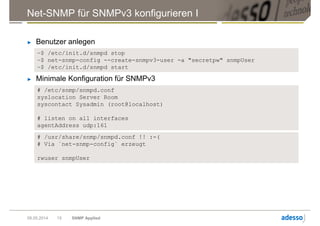
► Benutzer anlegen
09.05.2014 SNMP Applied15
~$ /etc/init.d/snmpd stop
~$ net-snmp-config --create-snmpv3-user -a "secretpw" snmpUser
~$ /etc/init.d/snmpd start
► Minimale Konfiguration für SNMPv3
# /etc/snmp/snmpd.conf
syslocation Server Room
syscontact Sysadmin (root@localhost)
# listen on all interfaces
agentAddress udp:161
# /usr/share/snmp/snmpd.conf !! :-(
# Via `net-snmp-config` erzeugt
rwuser snmpUser
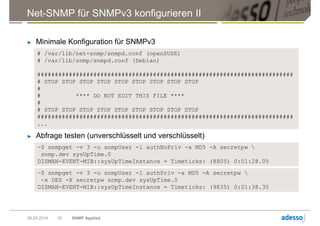
# /var/lib/net-snmp/snmpd.conf (openSUSE)
# /var/lib/snmp/snmpd.conf (Debian)
#########################################################################
# STOP STOP STOP STOP STOP STOP STOP STOP STOP
#
# **** DO NOT EDIT THIS FILE ****
#
# STOP STOP STOP STOP STOP STOP STOP STOP STOP
#########################################################################
...
Net-SNMP für SNMPv3 konfigurieren II
► Minimale Konfiguration für SNMPv3
09.05.2014 SNMP Applied16
► Abfrage testen (unverschlüsselt und verschlüsselt)
~$ snmpget -v 3 -u snmpUser -l authNoPriv -a MD5 -A secretpw 
snmp.dev sysUpTime.0
DISMAN-EVENT-MIB::sysUpTimeInstance = Timeticks: (8805) 0:01:28.05
~$ snmpget -v 3 -u snmpUser -l authPriv -a MD5 -A secretpw 
-x DES -X secretpw snmp.dev sysUpTime.0
DISMAN-EVENT-MIB::sysUpTimeInstance = Timeticks: (9835) 0:01:38.35
Benutzer hinzufügen I
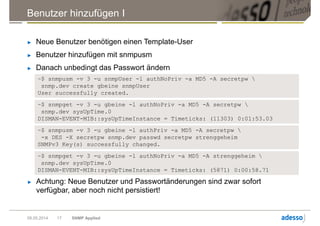
► Neue Benutzer benötigen einen Template-User
► Benutzer hinzufügen mit snmpusm
► Danach unbedingt das Passwort ändern
09.05.2014 SNMP Applied17
~$ snmpusm -v 3 -u gbeine -l authPriv -a MD5 -A secretpw 
-x DES -X secretpw snmp.dev passwd secretpw strenggeheim
SNMPv3 Key(s) successfully changed.
~$ snmpget -v 3 -u gbeine -l authNoPriv -a MD5 -A strenggeheim 
snmp.dev sysUpTime.0
DISMAN-EVENT-MIB::sysUpTimeInstance = Timeticks: (5871) 0:00:58.71
~$ snmpusm -v 3 -u snmpUser -l authNoPriv -a MD5 -A secretpw 
snmp.dev create gbeine snmpUser
User successfully created.
~$ snmpget -v 3 -u gbeine -l authNoPriv -a MD5 -A secretpw 
snmp.dev sysUpTime.0
DISMAN-EVENT-MIB::sysUpTimeInstance = Timeticks: (11303) 0:01:53.03
► Achtung: Neue Benutzer und Passwortänderungen sind zwar sofort
verfügbar, aber noch nicht persistiert!
# /etc/snmp/snmpd.conf
syslocation Server Room
syscontact Sysadmin (root@localhost)
# listen on all interfaces
agentAddress udp:161
# new user
rwuser gbeine
Benutzer hinzufügen II
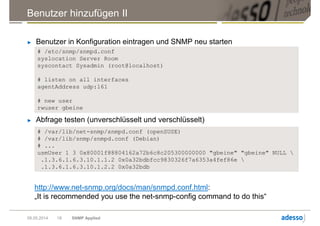
► Benutzer in Konfiguration eintragen und SNMP neu starten
09.05.2014 SNMP Applied18
► Abfrage testen (unverschlüsselt und verschlüsselt)
# /var/lib/net-snmp/snmpd.conf (openSUSE)
# /var/lib/snmp/snmpd.conf (Debian)
# ...
usmUser 1 3 0x80001f88804162a72b6c8c205300000000 "gbeine" "gbeine" NULL 
.1.3.6.1.6.3.10.1.1.2 0x0a32bdbfcc9830326f7a6353a4fef86e 
.1.3.6.1.6.3.10.1.2.2 0x0a32bdb
http://www.net-snmp.org/docs/man/snmpd.conf.html:
„It is recommended you use the net-snmp-config command to do this“
Luxus auf Client-Seite
09.05.2014 SNMP Applied19
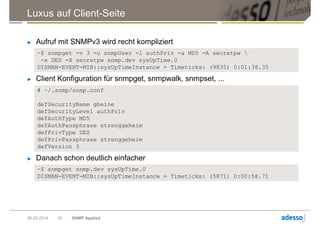
► Aufruf mit SNMPv3 wird recht kompliziert
~$ snmpget -v 3 -u snmpUser -l authPriv -a MD5 -A secretpw 
-x DES -X secretpw snmp.dev sysUpTime.0
DISMAN-EVENT-MIB::sysUpTimeInstance = Timeticks: (9835) 0:01:38.35
► Client Konfiguration für snmpget, snmpwalk, snmpset, ...
# ~/.snmp/snmp.conf
defSecurityName gbeine
defSecurityLevel authPriv
defAuthType MD5
defAuthPassphrase strenggeheim
defPrivType DES
defPrivPassphrase strenggeheim
defVersion 3
► Danach schon deutlich einfacher
~$ snmpget snmp.dev sysUpTime.0
DISMAN-EVENT-MIB::sysUpTimeInstance = Timeticks: (5871) 0:00:58.71
Sicherheit erhöhen
09.05.2014 SNMP Applied20
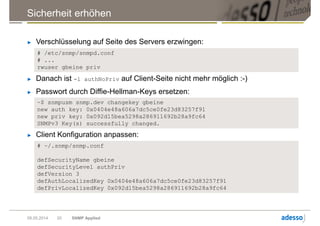
► Verschlüsselung auf Seite des Servers erzwingen:
# /etc/snmp/snmpd.conf
# ...
rwuser gbeine priv
► Danach ist -l authNoPriv auf Client-Seite nicht mehr möglich :-)
► Passwort durch Diffie-Hellman-Keys ersetzen:
~$ snmpusm snmp.dev changekey gbeine
new auth key: 0x0404e48a606a7dc5ce0fe23d83257f91
new priv key: 0x092d15bea5298a286911692b28a9fc64
SNMPv3 Key(s) successfully changed.
► Client Konfiguration anpassen:
# ~/.snmp/snmp.conf
defSecurityName gbeine
defSecurityLevel authPriv
defVersion 3
defAuthLocalizedKey 0x0404e48a606a7dc5ce0fe23d83257f91
defPrivLocalizedKey 0x092d15bea5298a286911692b28a9fc64
Zugriffsbeschränkungen
09.05.2014 SNMP Applied21
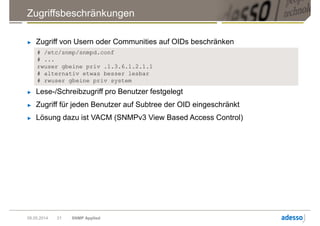
► Zugriff von Usern oder Communities auf OIDs beschränken
# /etc/snmp/snmpd.conf
# ...
rwuser gbeine priv .1.3.6.1.2.1.1
# alternativ etwas besser lesbar
# rwuser gbeine priv system
► Lese-/Schreibzugriff pro Benutzer festgelegt
► Zugriff für jeden Benutzer auf Subtree der OID eingeschränkt
► Lösung dazu ist VACM (SNMPv3 View Based Access Control)
SNMPv3 VACM
09.05.2014 SNMP Applied22
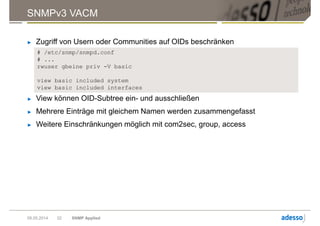
► Zugriff von Usern oder Communities auf OIDs beschränken
# /etc/snmp/snmpd.conf
# ...
rwuser gbeine priv -V basic
view basic included system
view basic included interfaces
► View können OID-Subtree ein- und ausschließen
► Mehrere Einträge mit gleichem Namen werden zusammengefasst
► Weitere Einschränkungen möglich mit com2sec, group, access
Verbesserungen gegenüber SNMPv1 und SNMPv2c
► Authentifizierung erfolgt über Benutzer-Account
► Übertragung kann mit persönlichen Credentials verschlüsselt werden
► Verschlüsselung durch Server erzwungen
► Credentials durch sichere Diffie-Hellman-Keys ausgetauscht
► Beschränkung der Benutzer auf Teilbäume des MIB-Tree
► Festlegung von Lese-/Schreibrechten auf OID-Ebene
09.05.2014 SNMP Applied23
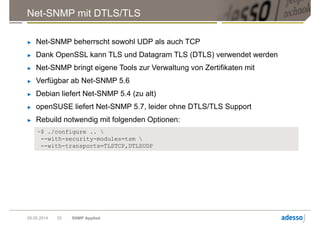
Net-SNMP mit DTLS/TLS
► Net-SNMP beherrscht sowohl UDP als auch TCP
► Dank OpenSSL kann TLS und Datagram TLS (DTLS) verwendet werden
► Net-SNMP bringt eigene Tools zur Verwaltung von Zertifikaten mit
► Verfügbar ab Net-SNMP 5.6
► Debian liefert Net-SNMP 5.4 (zu alt)
► openSUSE liefert Net-SNMP 5.7, leider ohne DTLS/TLS Support
► Rebuild notwendig mit folgenden Optionen:
09.05.2014 SNMP Applied25
~$ ./configure .. 
--with-security-modules=tsm 
--with-transports=TLSTCP,DTLSUDP
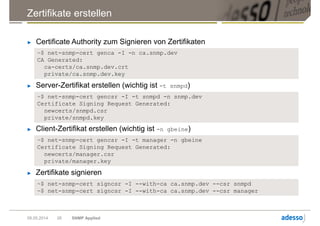
Zertifikate erstellen
09.05.2014 SNMP Applied26
► Certificate Authority zum Signieren von Zertifikaten
~$ net-snmp-cert genca -I -n ca.snmp.dev
CA Generated:
ca-certs/ca.snmp.dev.crt
private/ca.snmp.dev.key
► Server-Zertifikat erstellen (wichtig ist -t snmpd)
~$ net-snmp-cert gencsr -I -t snmpd -n snmp.dev
Certificate Signing Request Generated:
newcerts/snmpd.csr
private/snmpd.key
► Client-Zertifikat erstellen (wichtig ist -n gbeine)
~$ net-snmp-cert gencsr -I -t manager -n gbeine
Certificate Signing Request Generated:
newcerts/manager.csr
private/manager.key
► Zertifikate signieren
~$ net-snmp-cert signcsr -I --with-ca ca.snmp.dev --csr snmpd
~$ net-snmp-cert signcsr -I --with-ca ca.snmp.dev --csr manager
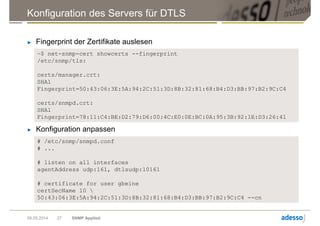
Konfiguration des Servers für DTLS
► Fingerprint der Zertifikate auslesen
09.05.2014 SNMP Applied27
~$ net-snmp-cert showcerts --fingerprint
/etc/snmp/tls:
certs/manager.crt:
SHA1
Fingerprint=50:43:06:3E:5A:94:2C:51:3D:8B:32:81:68:B4:D3:BB:97:B2:9C:C4
certs/snmpd.crt:
SHA1
Fingerprint=78:11:C4:BE:D2:79:D6:00:4C:E0:0E:BC:0A:95:3B:92:1E:D3:26:41
► Konfiguration anpassen
# /etc/snmp/snmpd.conf
# ...
# listen on all interfaces
agentAddress udp:161, dtlsudp:10161
# certificate for user gbeine
certSecName 10 
50:43:06:3E:5A:94:2C:51:3D:8B:32:81:68:B4:D3:BB:97:B2:9C:C4 --cn
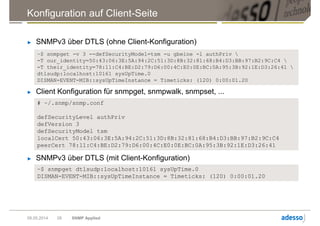
Konfiguration auf Client-Seite
09.05.2014 SNMP Applied28
► SNMPv3 über DTLS (ohne Client-Konfiguration)
~$ snmpget -v 3 --defSecurityModel=tsm -u gbeine -l authPriv 
-T our_identity=50:43:06:3E:5A:94:2C:51:3D:8B:32:81:68:B4:D3:BB:97:B2:9C:C4 
-T their_identity=78:11:C4:BE:D2:79:D6:00:4C:E0:0E:BC:0A:95:3B:92:1E:D3:26:41 
dtlsudp:localhost:10161 sysUpTime.0
DISMAN-EVENT-MIB::sysUpTimeInstance = Timeticks: (120) 0:00:01.20
► Client Konfiguration für snmpget, snmpwalk, snmpset, ...
# ~/.snmp/snmp.conf
defSecurityLevel authPriv
defVersion 3
defSecurityModel tsm
localCert 50:43:06:3E:5A:94:2C:51:3D:8B:32:81:68:B4:D3:BB:97:B2:9C:C4
peerCert 78:11:C4:BE:D2:79:D6:00:4C:E0:0E:BC:0A:95:3B:92:1E:D3:26:41
► SNMPv3 über DTLS (mit Client-Konfiguration)
~$ snmpget dtlsudp:localhost:10161 sysUpTime.0
DISMAN-EVENT-MIB::sysUpTimeInstance = Timeticks: (120) 0:00:01.20
SNMP-Zugriff mit Java
Einfaches SNMP v1 get I
public class SimpleGet {
private static String hostName = "snmp.dev";
private static String port = "161";
// OID via snmptranslate -On -IR sysUpTime.0
private static String oid = ".1.3.6.1.2.1.1.3.0";
private static int snmpVersion = SnmpConstants.version1;
private static String community = "public";
public static void main(String[] args) throws Exception
{
// Create Target Address object
CommunityTarget target = new CommunityTarget();
target.setAddress(new UdpAddress(hostName + "/" + port));
target.setVersion(snmpVersion);
target.setCommunity(new OctetString(community));
// Create the PDU object
PDU pdu = new PDU();
pdu.add(new VariableBinding(new OID(oid)));
pdu.setType(PDU.GET);
// Create TransportMapping and send SNMP get
TransportMapping<UdpAddress>transport = new DefaultUdpTransportMapping();
transport.listen();
Snmp snmp = new Snmp(transport);
ResponseEvent response = snmp.get(pdu, target);
snmp.close();
...
09.05.2014 SNMP Applied30
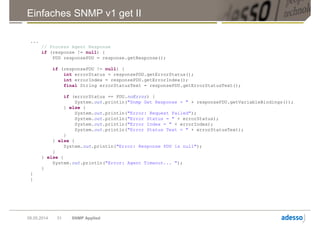
Einfaches SNMP v1 get II
09.05.2014 SNMP Applied31
...
// Process Agent Response
if (response != null) {
PDU responsePDU = response.getResponse();
if (responsePDU != null) {
int errorStatus = responsePDU.getErrorStatus();
int errorIndex = responsePDU.getErrorIndex();
final String errorStatusText = responsePDU.getErrorStatusText();
if (errorStatus == PDU.noError) {
System.out.println("Snmp Get Response = " + responsePDU.getVariableBindings());
} else {
System.out.println("Error: Request Failed");
System.out.println("Error Status = " + errorStatus);
System.out.println("Error Index = " + errorIndex);
System.out.println("Error Status Text = " + errorStatusText);
}
} else {
System.out.println("Error: Response PDU is null");
}
} else {
System.out.println("Error: Agent Timeout... ");
}
}
}
SNMP v3 get mit Authentifizierung und Verschlüsselung I
09.05.2014 SNMP Applied32
public class V3Get {
private static String hostName = "snmp.dev";
private static String port = "161";
private static int snmpVersion = SnmpConstants.version3;
private static int securityLevel = SecurityLevel.AUTH_PRIV;
private static OID securityAuth = AuthMD5.ID;
private static OID securityPriv = PrivDES.ID;
private static String username = "gbeine";
private static String password = "strenggeheim";
// OID via snmptranslate -On -IR sysUpTime.0
private static String oid = ".1.3.6.1.2.1.1.3.0";
public static void main(String[] args) throws Exception
{
final OctetString secUserName = new OctetString(username);
final OctetString secPassword = new OctetString(password);
// Create Target Address object
UserTarget target = new UserTarget();
target.setAddress(new UdpAddress(hostName + "/" + port));
target.setVersion(snmpVersion);
target.setSecurityLevel(securityLevel);
target.setSecurityName(secUserName);
// Create the PDU object
ScopedPDU pdu = new ScopedPDU();
pdu.add(new VariableBinding(new OID(oid)));
pdu.setType(PDU.GET);
...
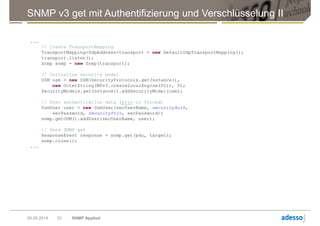
SNMP v3 get mit Authentifizierung und Verschlüsselung II
09.05.2014 SNMP Applied33
...
// Create TransportMapping
TransportMapping<UdpAddress>transport = new DefaultUdpTransportMapping();
transport.listen();
Snmp snmp = new Snmp(transport);
// Initialize security model
USM usm = new USM(SecurityProtocols.getInstance(),
new OctetString(MPv3.createLocalEngineID()), 0);
SecurityModels.getInstance().addSecurityModel(usm);
// User authentication data (priv is forced)
UsmUser user = new UsmUser(secUserName, securityAuth,
secPassword, securityPriv, secPassword);
snmp.getUSM().addUser(secUserName, user);
// Send SNMP get
ResponseEvent response = snmp.get(pdu, target);
snmp.close();
...
SNMP v3 get mit Authentifizierung und Verschlüsselung III
09.05.2014 SNMP Applied34
...
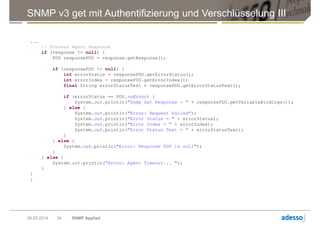
// Process Agent Response
if (response != null) {
PDU responsePDU = response.getResponse();
if (responsePDU != null) {
int errorStatus = responsePDU.getErrorStatus();
int errorIndex = responsePDU.getErrorIndex();
final String errorStatusText = responsePDU.getErrorStatusText();
if (errorStatus == PDU.noError) {
System.out.println("Snmp Get Response = " + responsePDU.getVariableBindings());
} else {
System.out.println("Error: Request Failed");
System.out.println("Error Status = " + errorStatus);
System.out.println("Error Index = " + errorIndex);
System.out.println("Error Status Text = " + errorStatusText);
}
} else {
System.out.println("Error: Response PDU is null");
}
} else {
System.out.println("Error: Agent Timeout... ");
}
}
}
Weiterführendes
Literaturempfehlungen
► Net-SNMP: http://www.net-snmp.org/docs/
► SNMP4J: http://www.snmp4j.org/
► Evan McGinnis, David Perkins: Understanding SNMP Mibs
http://www.amazon.de/Understanding-SNMP-Mibs-Evan-
McGinnis/dp/0134377087/
► Douglas R. Mauro, Kevin J. Schmidt: Essential SNMP
http://www.amazon.de/Essential-SNMP-System-Network-
Administrators/dp/0596008406/
09.05.2014 SNMP Applied36
Viel Spaß noch auf dem LinuxTag 2014!
www.adesso.de
info@adesso.de

SNMP Applied - Sicheres Anwendungs-Monitoring mit SNMP

  • 1.
    09.05.2014 SNMP Applied Sicheres Anwendungs-Monitoringmit SNMP Gerrit Beine <gerrit.beine@adesso.de>
  • 2.
    Short run ► Überlickzu SNMP (ganz kurz) ► Konfiguration und Anwendung von Net-SNMP ► SNMPv3 mit Net-SNMP ► TLS/DTLS mit Net-SNMP ► SNMP von Java aus nutzen 09.05.2014 SNMP Applied3
  • 3.
  • 4.
    Historisches zu SNMP ►Simple Network Management Protocol > Verwendet UDP, Ports 161 und 162 > TCP alternativ möglich ► Historie > 1988: Version 1, Ursprüngliche Spezifikation in RFC 1155-1157 > 1992: Secure SNMP, RFC1351-1353, nie offiziell eingeführt > 1993: Party-based SNMP (SNMPv2p) RFC 1441, 1445-1447, führte getbulk ein, erhöhte Sicherheit, heute nicht mehr im Einsatz > 1996: User-based SNMP (SNMPv2u) RFC 1909-1910, heute nicht mehr im Einsatz > 1996: Community-based SNMP (SNMPv2c) RFC 1901, 1905-1906, Erweiterung von Version 1 um Features aus SNMPv2p > 2002: Version 3 (SNMPv3), RFC 3410-3418, Fokus auf Sicherheit 09.05.2014 SNMP Applied5
  • 5.
    Anwendungen von SNMP ►Kontinuierliches Monitoring (Polling) > Uptime, Load > Netzwerkverkehr > Speicherverbrauch (RAM, Festplatten) > Hardware-Zustand (S.M.A.R.T., Lüfterdrehzahl) ► Information über Ereignisse (SNMP-Traps) > Fehlersituationen > Zustandswechsel 09.05.2014 SNMP Applied6
  • 6.
    SNMP Begriffswelt ► Agent– SNMP-Daemon, der Informationen via UDP 161 bereitstellt oder Traps via UDP 162 versendet ► Manager – SNMP-Client, der Informationen via UDP 161 einsammelt ► Trap – SNMP-Nachricht, über UDP 162 versendet ► MIB – Management Information Base > Dateien mit strukturiertem Text nach ASN.1 > Beschreiben Monitoring-Objekte > Übersetzen OIDs in Namen und interpretieren der entsprechenden Werte ► OID – Object Identifier > Identifikatoren in durch ASN.1 definiertem Namensraum ► community – in SNMPv1 und SNMPv2c zur Anmeldung am Agent verwendet 09.05.2014 SNMP Applied7
  • 7.
    Der MIB-Tree 09.05.2014 SNMPApplied8 Die Position im MIB- Tree liefert den OID eines Objektes. Die Private Enterprise Number der adesso AG ist 36467. SNMP-Objekte der adesso AG beginnen immer mit 1.3.6.1.4.1.36467. root ccitt(0) iso(1) joint-iso-ccitt(2) org(3) dod(6) internet(1) directory(1) mgmt(2) experimental(3) private(4) enterprises(1) adesso(36467) mib-2(1) system(1) interfaces(2) ip(4) snmp(11) host(25)
  • 8.
    OID: Object Identifier ►OIDs sind eindeutige Identifikatoren innerhalb eines Agenten bzw. eines Gerätes ► OIDs bilden die Navigation durch den MIB-Tree ► Hersteller-spezifische OIDs immer unterhalb von 1.3.6.1.4.1 ► Mapping auf Domains > 1.3.6.1.4.1.36467 – adesso.enterprises.private.internet.dod.iso.org. ► Unterhalb der OID ist jeder Hersteller frei in seinen Definitionen ► Zuweisung der Enterprise-Identifkation erfolgt durch die IANA: http://www.iana.org/assignments/enterprise-numbers 09.05.2014 SNMP Applied9
  • 9.
  • 10.
    Net-SNMP ► OpenSource SNMPImplementierung (CMU, BSD-Like) ► Läuft auf fast allen Unix- und Linux-Systemen ► Unterstützt SNMP Version 1, SNMPv2c, SNMPv3 via IPv4 und IPv6 ► Kommandozeilenapplikationen zu > Abfrage von SNMP-Agents (snmpget, snmpwalk, …) > Ändern von Konfigurationen via SNMP (snmpset) > Übersetzen von OIDs (snmptranslate) ► Daemon zum Empfangen von SNMP Traps (snmptrapd) ► Daemon als SNMP Agent (snmpd) ► C- und Perl-APIs ► Zu finden hier: http://www.net-snmp.org/ 09.05.2014 SNMP Applied11
  • 11.
    Net-SNMP snmpd konfigurieren ►Minimale Konfiguration definiert Standort, Kontakt und erlaubt Auslesen 09.05.2014 SNMP Applied12 # /etc/snmp/snmpd.conf syslocation Server Room syscontact Sysadmin (root@localhost) # listen on all interfaces agentAddress udp:161 # allow localhost read-only access via community public rocommunity public 127.0.0.1 # allow whole network read-only access via community public rocommunity public 192.168.79.0/24 ► Abfrage des snmpd erfolgt via snmpwalk ~$ snmpwalk -c public -v1 snmp.dev SNMPv2-MIB::sysDescr.0 = STRING: Linux linux-dwoa 3.1.10-1.16-default #1 SMP Wed Jun 27 05:21:40 UTC 2012 (d016078) x86_64 SNMPv2-MIB::sysObjectID.0 = OID: NET-SNMP-MIB::netSnmpAgentOIDs.10 DISMAN-EVENT-MIB::sysUpTimeInstance = Timeticks: (635449) 1:45:54.49 SNMPv2-MIB::sysContact.0 = STRING: Sysadmin (root@localhost) SNMPv2-MIB::sysName.0 = STRING: linux-dwoa SNMPv2-MIB::sysLocation.0 = STRING: Server Room ...
  • 12.
    09.05.2014 SNMP Applied13 DasProblem: Das ist alles total unsicher!
  • 13.
    Schwächen von SNMPv1und SNMPv2c ► Autorisierung erfolgt über die IP-Adresse ► Authentifizierung erfolgt über Community ► Einschränkungen der Community gelten jeweils pro IP-Adresse ► Übertragung erfolgt unverschlüsselt ► Standard-Protokoll UDP sicher Datenübertragung nicht ab 09.05.2014 SNMP Applied14
  • 14.
    Net-SNMP für SNMPv3konfigurieren I ► Benutzer anlegen 09.05.2014 SNMP Applied15 ~$ /etc/init.d/snmpd stop ~$ net-snmp-config --create-snmpv3-user -a "secretpw" snmpUser ~$ /etc/init.d/snmpd start ► Minimale Konfiguration für SNMPv3 # /etc/snmp/snmpd.conf syslocation Server Room syscontact Sysadmin (root@localhost) # listen on all interfaces agentAddress udp:161 # /usr/share/snmp/snmpd.conf !! :-( # Via `net-snmp-config` erzeugt rwuser snmpUser
  • 15.
    # /var/lib/net-snmp/snmpd.conf (openSUSE) #/var/lib/snmp/snmpd.conf (Debian) ######################################################################### # STOP STOP STOP STOP STOP STOP STOP STOP STOP # # **** DO NOT EDIT THIS FILE **** # # STOP STOP STOP STOP STOP STOP STOP STOP STOP ######################################################################### ... Net-SNMP für SNMPv3 konfigurieren II ► Minimale Konfiguration für SNMPv3 09.05.2014 SNMP Applied16 ► Abfrage testen (unverschlüsselt und verschlüsselt) ~$ snmpget -v 3 -u snmpUser -l authNoPriv -a MD5 -A secretpw snmp.dev sysUpTime.0 DISMAN-EVENT-MIB::sysUpTimeInstance = Timeticks: (8805) 0:01:28.05 ~$ snmpget -v 3 -u snmpUser -l authPriv -a MD5 -A secretpw -x DES -X secretpw snmp.dev sysUpTime.0 DISMAN-EVENT-MIB::sysUpTimeInstance = Timeticks: (9835) 0:01:38.35
  • 16.
    Benutzer hinzufügen I ►Neue Benutzer benötigen einen Template-User ► Benutzer hinzufügen mit snmpusm ► Danach unbedingt das Passwort ändern 09.05.2014 SNMP Applied17 ~$ snmpusm -v 3 -u gbeine -l authPriv -a MD5 -A secretpw -x DES -X secretpw snmp.dev passwd secretpw strenggeheim SNMPv3 Key(s) successfully changed. ~$ snmpget -v 3 -u gbeine -l authNoPriv -a MD5 -A strenggeheim snmp.dev sysUpTime.0 DISMAN-EVENT-MIB::sysUpTimeInstance = Timeticks: (5871) 0:00:58.71 ~$ snmpusm -v 3 -u snmpUser -l authNoPriv -a MD5 -A secretpw snmp.dev create gbeine snmpUser User successfully created. ~$ snmpget -v 3 -u gbeine -l authNoPriv -a MD5 -A secretpw snmp.dev sysUpTime.0 DISMAN-EVENT-MIB::sysUpTimeInstance = Timeticks: (11303) 0:01:53.03 ► Achtung: Neue Benutzer und Passwortänderungen sind zwar sofort verfügbar, aber noch nicht persistiert!
  • 17.
    # /etc/snmp/snmpd.conf syslocation ServerRoom syscontact Sysadmin (root@localhost) # listen on all interfaces agentAddress udp:161 # new user rwuser gbeine Benutzer hinzufügen II ► Benutzer in Konfiguration eintragen und SNMP neu starten 09.05.2014 SNMP Applied18 ► Abfrage testen (unverschlüsselt und verschlüsselt) # /var/lib/net-snmp/snmpd.conf (openSUSE) # /var/lib/snmp/snmpd.conf (Debian) # ... usmUser 1 3 0x80001f88804162a72b6c8c205300000000 "gbeine" "gbeine" NULL .1.3.6.1.6.3.10.1.1.2 0x0a32bdbfcc9830326f7a6353a4fef86e .1.3.6.1.6.3.10.1.2.2 0x0a32bdb http://www.net-snmp.org/docs/man/snmpd.conf.html: „It is recommended you use the net-snmp-config command to do this“
  • 18.
    Luxus auf Client-Seite 09.05.2014SNMP Applied19 ► Aufruf mit SNMPv3 wird recht kompliziert ~$ snmpget -v 3 -u snmpUser -l authPriv -a MD5 -A secretpw -x DES -X secretpw snmp.dev sysUpTime.0 DISMAN-EVENT-MIB::sysUpTimeInstance = Timeticks: (9835) 0:01:38.35 ► Client Konfiguration für snmpget, snmpwalk, snmpset, ... # ~/.snmp/snmp.conf defSecurityName gbeine defSecurityLevel authPriv defAuthType MD5 defAuthPassphrase strenggeheim defPrivType DES defPrivPassphrase strenggeheim defVersion 3 ► Danach schon deutlich einfacher ~$ snmpget snmp.dev sysUpTime.0 DISMAN-EVENT-MIB::sysUpTimeInstance = Timeticks: (5871) 0:00:58.71
  • 19.
    Sicherheit erhöhen 09.05.2014 SNMPApplied20 ► Verschlüsselung auf Seite des Servers erzwingen: # /etc/snmp/snmpd.conf # ... rwuser gbeine priv ► Danach ist -l authNoPriv auf Client-Seite nicht mehr möglich :-) ► Passwort durch Diffie-Hellman-Keys ersetzen: ~$ snmpusm snmp.dev changekey gbeine new auth key: 0x0404e48a606a7dc5ce0fe23d83257f91 new priv key: 0x092d15bea5298a286911692b28a9fc64 SNMPv3 Key(s) successfully changed. ► Client Konfiguration anpassen: # ~/.snmp/snmp.conf defSecurityName gbeine defSecurityLevel authPriv defVersion 3 defAuthLocalizedKey 0x0404e48a606a7dc5ce0fe23d83257f91 defPrivLocalizedKey 0x092d15bea5298a286911692b28a9fc64
  • 20.
    Zugriffsbeschränkungen 09.05.2014 SNMP Applied21 ►Zugriff von Usern oder Communities auf OIDs beschränken # /etc/snmp/snmpd.conf # ... rwuser gbeine priv .1.3.6.1.2.1.1 # alternativ etwas besser lesbar # rwuser gbeine priv system ► Lese-/Schreibzugriff pro Benutzer festgelegt ► Zugriff für jeden Benutzer auf Subtree der OID eingeschränkt ► Lösung dazu ist VACM (SNMPv3 View Based Access Control)
  • 21.
    SNMPv3 VACM 09.05.2014 SNMPApplied22 ► Zugriff von Usern oder Communities auf OIDs beschränken # /etc/snmp/snmpd.conf # ... rwuser gbeine priv -V basic view basic included system view basic included interfaces ► View können OID-Subtree ein- und ausschließen ► Mehrere Einträge mit gleichem Namen werden zusammengefasst ► Weitere Einschränkungen möglich mit com2sec, group, access
  • 22.
    Verbesserungen gegenüber SNMPv1und SNMPv2c ► Authentifizierung erfolgt über Benutzer-Account ► Übertragung kann mit persönlichen Credentials verschlüsselt werden ► Verschlüsselung durch Server erzwungen ► Credentials durch sichere Diffie-Hellman-Keys ausgetauscht ► Beschränkung der Benutzer auf Teilbäume des MIB-Tree ► Festlegung von Lese-/Schreibrechten auf OID-Ebene 09.05.2014 SNMP Applied23
  • 23.
  • 24.
    Net-SNMP mit DTLS/TLS ►Net-SNMP beherrscht sowohl UDP als auch TCP ► Dank OpenSSL kann TLS und Datagram TLS (DTLS) verwendet werden ► Net-SNMP bringt eigene Tools zur Verwaltung von Zertifikaten mit ► Verfügbar ab Net-SNMP 5.6 ► Debian liefert Net-SNMP 5.4 (zu alt) ► openSUSE liefert Net-SNMP 5.7, leider ohne DTLS/TLS Support ► Rebuild notwendig mit folgenden Optionen: 09.05.2014 SNMP Applied25 ~$ ./configure .. --with-security-modules=tsm --with-transports=TLSTCP,DTLSUDP
  • 25.
    Zertifikate erstellen 09.05.2014 SNMPApplied26 ► Certificate Authority zum Signieren von Zertifikaten ~$ net-snmp-cert genca -I -n ca.snmp.dev CA Generated: ca-certs/ca.snmp.dev.crt private/ca.snmp.dev.key ► Server-Zertifikat erstellen (wichtig ist -t snmpd) ~$ net-snmp-cert gencsr -I -t snmpd -n snmp.dev Certificate Signing Request Generated: newcerts/snmpd.csr private/snmpd.key ► Client-Zertifikat erstellen (wichtig ist -n gbeine) ~$ net-snmp-cert gencsr -I -t manager -n gbeine Certificate Signing Request Generated: newcerts/manager.csr private/manager.key ► Zertifikate signieren ~$ net-snmp-cert signcsr -I --with-ca ca.snmp.dev --csr snmpd ~$ net-snmp-cert signcsr -I --with-ca ca.snmp.dev --csr manager
  • 26.
    Konfiguration des Serversfür DTLS ► Fingerprint der Zertifikate auslesen 09.05.2014 SNMP Applied27 ~$ net-snmp-cert showcerts --fingerprint /etc/snmp/tls: certs/manager.crt: SHA1 Fingerprint=50:43:06:3E:5A:94:2C:51:3D:8B:32:81:68:B4:D3:BB:97:B2:9C:C4 certs/snmpd.crt: SHA1 Fingerprint=78:11:C4:BE:D2:79:D6:00:4C:E0:0E:BC:0A:95:3B:92:1E:D3:26:41 ► Konfiguration anpassen # /etc/snmp/snmpd.conf # ... # listen on all interfaces agentAddress udp:161, dtlsudp:10161 # certificate for user gbeine certSecName 10 50:43:06:3E:5A:94:2C:51:3D:8B:32:81:68:B4:D3:BB:97:B2:9C:C4 --cn
  • 27.
    Konfiguration auf Client-Seite 09.05.2014SNMP Applied28 ► SNMPv3 über DTLS (ohne Client-Konfiguration) ~$ snmpget -v 3 --defSecurityModel=tsm -u gbeine -l authPriv -T our_identity=50:43:06:3E:5A:94:2C:51:3D:8B:32:81:68:B4:D3:BB:97:B2:9C:C4 -T their_identity=78:11:C4:BE:D2:79:D6:00:4C:E0:0E:BC:0A:95:3B:92:1E:D3:26:41 dtlsudp:localhost:10161 sysUpTime.0 DISMAN-EVENT-MIB::sysUpTimeInstance = Timeticks: (120) 0:00:01.20 ► Client Konfiguration für snmpget, snmpwalk, snmpset, ... # ~/.snmp/snmp.conf defSecurityLevel authPriv defVersion 3 defSecurityModel tsm localCert 50:43:06:3E:5A:94:2C:51:3D:8B:32:81:68:B4:D3:BB:97:B2:9C:C4 peerCert 78:11:C4:BE:D2:79:D6:00:4C:E0:0E:BC:0A:95:3B:92:1E:D3:26:41 ► SNMPv3 über DTLS (mit Client-Konfiguration) ~$ snmpget dtlsudp:localhost:10161 sysUpTime.0 DISMAN-EVENT-MIB::sysUpTimeInstance = Timeticks: (120) 0:00:01.20
  • 28.
  • 29.
    Einfaches SNMP v1get I public class SimpleGet { private static String hostName = "snmp.dev"; private static String port = "161"; // OID via snmptranslate -On -IR sysUpTime.0 private static String oid = ".1.3.6.1.2.1.1.3.0"; private static int snmpVersion = SnmpConstants.version1; private static String community = "public"; public static void main(String[] args) throws Exception { // Create Target Address object CommunityTarget target = new CommunityTarget(); target.setAddress(new UdpAddress(hostName + "/" + port)); target.setVersion(snmpVersion); target.setCommunity(new OctetString(community)); // Create the PDU object PDU pdu = new PDU(); pdu.add(new VariableBinding(new OID(oid))); pdu.setType(PDU.GET); // Create TransportMapping and send SNMP get TransportMapping<UdpAddress>transport = new DefaultUdpTransportMapping(); transport.listen(); Snmp snmp = new Snmp(transport); ResponseEvent response = snmp.get(pdu, target); snmp.close(); ... 09.05.2014 SNMP Applied30
  • 30.
    Einfaches SNMP v1get II 09.05.2014 SNMP Applied31 ... // Process Agent Response if (response != null) { PDU responsePDU = response.getResponse(); if (responsePDU != null) { int errorStatus = responsePDU.getErrorStatus(); int errorIndex = responsePDU.getErrorIndex(); final String errorStatusText = responsePDU.getErrorStatusText(); if (errorStatus == PDU.noError) { System.out.println("Snmp Get Response = " + responsePDU.getVariableBindings()); } else { System.out.println("Error: Request Failed"); System.out.println("Error Status = " + errorStatus); System.out.println("Error Index = " + errorIndex); System.out.println("Error Status Text = " + errorStatusText); } } else { System.out.println("Error: Response PDU is null"); } } else { System.out.println("Error: Agent Timeout... "); } } }
  • 31.
    SNMP v3 getmit Authentifizierung und Verschlüsselung I 09.05.2014 SNMP Applied32 public class V3Get { private static String hostName = "snmp.dev"; private static String port = "161"; private static int snmpVersion = SnmpConstants.version3; private static int securityLevel = SecurityLevel.AUTH_PRIV; private static OID securityAuth = AuthMD5.ID; private static OID securityPriv = PrivDES.ID; private static String username = "gbeine"; private static String password = "strenggeheim"; // OID via snmptranslate -On -IR sysUpTime.0 private static String oid = ".1.3.6.1.2.1.1.3.0"; public static void main(String[] args) throws Exception { final OctetString secUserName = new OctetString(username); final OctetString secPassword = new OctetString(password); // Create Target Address object UserTarget target = new UserTarget(); target.setAddress(new UdpAddress(hostName + "/" + port)); target.setVersion(snmpVersion); target.setSecurityLevel(securityLevel); target.setSecurityName(secUserName); // Create the PDU object ScopedPDU pdu = new ScopedPDU(); pdu.add(new VariableBinding(new OID(oid))); pdu.setType(PDU.GET); ...
  • 32.
    SNMP v3 getmit Authentifizierung und Verschlüsselung II 09.05.2014 SNMP Applied33 ... // Create TransportMapping TransportMapping<UdpAddress>transport = new DefaultUdpTransportMapping(); transport.listen(); Snmp snmp = new Snmp(transport); // Initialize security model USM usm = new USM(SecurityProtocols.getInstance(), new OctetString(MPv3.createLocalEngineID()), 0); SecurityModels.getInstance().addSecurityModel(usm); // User authentication data (priv is forced) UsmUser user = new UsmUser(secUserName, securityAuth, secPassword, securityPriv, secPassword); snmp.getUSM().addUser(secUserName, user); // Send SNMP get ResponseEvent response = snmp.get(pdu, target); snmp.close(); ...
  • 33.
    SNMP v3 getmit Authentifizierung und Verschlüsselung III 09.05.2014 SNMP Applied34 ... // Process Agent Response if (response != null) { PDU responsePDU = response.getResponse(); if (responsePDU != null) { int errorStatus = responsePDU.getErrorStatus(); int errorIndex = responsePDU.getErrorIndex(); final String errorStatusText = responsePDU.getErrorStatusText(); if (errorStatus == PDU.noError) { System.out.println("Snmp Get Response = " + responsePDU.getVariableBindings()); } else { System.out.println("Error: Request Failed"); System.out.println("Error Status = " + errorStatus); System.out.println("Error Index = " + errorIndex); System.out.println("Error Status Text = " + errorStatusText); } } else { System.out.println("Error: Response PDU is null"); } } else { System.out.println("Error: Agent Timeout... "); } } }
  • 34.
  • 35.
    Literaturempfehlungen ► Net-SNMP: http://www.net-snmp.org/docs/ ►SNMP4J: http://www.snmp4j.org/ ► Evan McGinnis, David Perkins: Understanding SNMP Mibs http://www.amazon.de/Understanding-SNMP-Mibs-Evan- McGinnis/dp/0134377087/ ► Douglas R. Mauro, Kevin J. Schmidt: Essential SNMP http://www.amazon.de/Essential-SNMP-System-Network- Administrators/dp/0596008406/ 09.05.2014 SNMP Applied36
  • 36.
    Viel Spaß nochauf dem LinuxTag 2014! www.adesso.de info@adesso.de