#WISSENTEILEN
Serverless
Lars Röwekamp | open knowledge GmbH
@_openKnowledge | @mobileLarson
The Missing Manual
ÜBER OPEN KNOWLEDGE
Branchenneutrale Softwareentwicklung & IT-Beratung
ÜBER MICH
Wer bin ich - und wenn ja, wie viele?
• CIO New Technologies
• Enterprise & Mobile
• Autor, Speaker, Coach & Mentor
• Snowboard & MTB Enthusiast (a.k.a. “stets bemüht“)
Lars Röwekamp (a.k.a. @mobileLarson)
Was ist die Idee
von Serverless?
#WISSENTEILEN
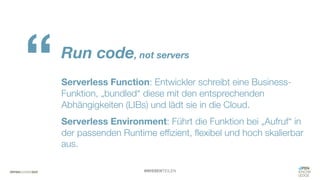
Run code, not servers
Serverless Function: Entwickler schreibt eine Business-
Funktion, „bundled“ diese mit den entsprechenden
Abhängigkeiten (LIBs) und lädt sie in die Cloud.
Serverless Environment: Führt die Funktion bei „Aufruf“ in
der passenden Runtime effizient, flexibel und hoch skalierbar
aus.
“
#WISSENTEILEN
No machines, VMs or containers*
Entwickler: Fokussiert sich ausschließlich auf die
Umsetzung der Business-Logik und das Erstellen des
Function-Bundle.
Cloud Provider: liefert und maintained rundum-sorglos
Umgebung für die Serverless Functions, inklusive etwaiger
Cloud Services (z.B. Storage, DB, Streaming, AI).
“
> Hands-On
AWS Cloud
1
trigger
request
Hands-on: Hello World
AWS Cloud
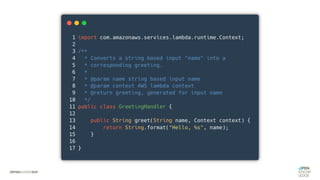
hello world serverless context
1
trigger
request
Hands-on: Hello World
AWS Cloud
hello world serverless context
HelloWorld
Logs
1
trigger
request
2
Hands-on: Hello World
#WISSENTEILEN
“Run your business code
highly-available
in the cloud in response
to events and scale
without any servers to
manage.“*
* AWS Lambda Advertising
#1:
Run your
business code
#2:
No servers to
provision or manage
#3:
Build in high availability
and disaster recovery
#4:
Scale with usage
by design
Management:
“Hmm, ich bin noch
nicht überzeugt!.”
#5:
Never pay idle
(Management: „Ok, I bin definitv dabei!“)
Big
Players?
AWS
Lambda Microsoft
Azure Functions
Oracle Functions
a.k.a. Project FN***
IBM Cloud Functions
a.k.a Apache OpenWhisk**
Google Cloud
Functions
Project Riff
sponsored by Pivotal
Serverless
Szenarien
Szenario
#1
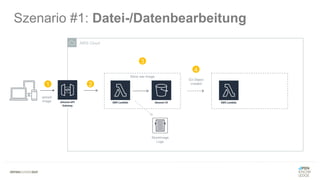
Szenario #1: Datei-/Datenbearbeitung
Datei- oder Datenbearbeitung nach Ablage im Storage System
• Bildbearbeitung
• Thumbnail-Erzeugung
• PDF-Generierung
AWS Cloud
Szenario #1: Datei-/Datenbearbeitung
1
upload
image
AWS Cloud
Szenario #1: Datei-/Datenbearbeitung
1 2
upload
image
AWS Cloud
Store raw Image
Szenario #1: Datei-/Datenbearbeitung
StoreImage
Logs
1 2
3
upload
image
AWS Cloud
Store raw Image
Szenario #1: Datei-/Datenbearbeitung
StoreImage
Logs
S3 Object
created1 2
3
4
upload
image
AWS Cloud
Store raw Image
Szenario #1: Datei-/Datenbearbeitung
StoreImage
Logs
S3 Object
created1 2
3
4
upload
image
AWS Cloud
Create ThumbnailStore raw Image
Szenario #1: Datei-/Datenbearbeitung
StoreImage
Logs
CreateThumbnail
Logs
S3 Object
created1 2
3
4
5
upload
image
Szenario
#2
Szenario #3: Stream Processing
Regelmäßiges Abarbeiten von Streaming Data
• Social Media Trendanalysen
• Sensor Data Monitoring / Anomaly Detection
AWS Cloud
1
sensor data stream is
uploaded to Kinesis
in real-time
Szenario #3: Stream Processing
tons of
very important
sensor data
AWS Cloud
1
sensor data stream is
uploaded to Kinesis
in real-time
Szenario #3: Stream Processing
tons of
very important
sensor data
AWS Cloud
Data Stream Analysis
StreamAnalyzer
Logs
1
sensor data stream is
uploaded to Kinesis
in real-time
2
Lambda runs code to
detect anomalies
Szenario #3: Stream Processing
tons of
very important
sensor data
AWS Cloud
Data Stream Analysis
StreamAnalyzer
Logs
store anomalies
extracted by lambda
function
1
sensor data stream is
uploaded to Kinesis
in real-time
2
3
Lambda runs code to
detect anomalies
Szenario #3: Stream Processing
tons of
very important
sensor data
AWS Cloud
Data Stream Analysis
StreamAnalyzer
Logs
Real-Time Monitoring / Querying
store anomalies
extracted by lambda
function
1
sensor data stream is
uploaded to Kinesis
in real-time
2
3
Lambda runs code to
detect anomalies
4
data immediately
available for interested
parties to query
Szenario #3: Stream Processing
tons of
very important
sensor data
Szenario
#3
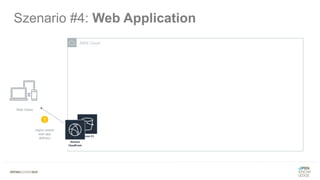
Szenario #4: Web Application
Serverless „all in“ einer Anwendung…
• Ausliefern von statischem Content via CDN
• Authentication / Autorization via BaaS
• Businesslogik via FaaS (unter Verwendung von PaaS)
Szenario #4: Web Application
AWS Cloud
Web Client
region aware
web app
delivery
1
Szenario #4: Web Application
AWS Cloud
Web Client
region aware
web app
delivery
1
login via id/pwd
returns JWT
2
Szenario #4: Web Application
AWS Cloud
Web Client
region aware
web app
delivery
1
login via id/pwd
returns JWT
2
3
REST
call
Szenario #4: Web Application
AWS Cloud
Web Client
region aware
web app
delivery
1
login via id/pwd
returns JWT
2
3
REST
call
4
translated
lambda
trigger
Szenario #4: Web Application
AWS Cloud
Web Client
storage related functions
region aware
web app
delivery
1
login via id/pwd
returns JWT
2
3
REST
call
4
translated
lambda
trigger
5
lambda
@work
Szenario #4: Web Application
AWS Cloud
Web Client
storage related functions
database related functions
region aware
web app
delivery
1
login via id/pwd
returns JWT
2
3
REST
call
4
translated
lambda
trigger
5
lambda
@work
5
lambda
@work
Szenario #4: Web Application
AWS Cloud
Web Client
storage related functions
database related functions
additional functions, e.g.
region aware
web app
delivery
1
login via id/pwd
returns JWT
2
6
3
REST
call
4
translated
lambda
trigger
5
lambda
@work
5
lambda
@work
The Road to the Cloud ...
Der Serverless Showcase
Web Image Gallery
(easy version)
GET ../images/{imageId}
PUT ../images/{imageId}
DELETE ../images/{imageId}
POST ../images/
Web Image Gallery
(not so easy version)
GET ../images/{imageId}
PUT ../images/{imageId}
DELETE ../images/{imageId}
POST ../images/
Web Image Gallery
(real life version)
GET ../images/{imageId}
PUT ../images/{imageId}
DELETE ../images/{imageId}
POST ../images/
Reality Check
The Road to the Cloud ...
Der Serverless Showcase
AWS Cloud
Use-Case: Upload Image
upload image
with additional
information
AWS Cloud
Store raw Image
1
Use-Case: Upload Image
upload image
with additional
information
AWS Cloud
Store raw Image
Store Image Information
1
2
Use-Case: Upload Image
upload image
with additional
information
AWS Cloud
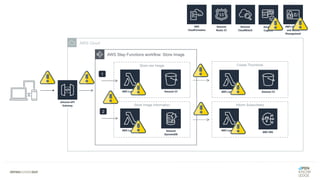
AWS Step Functions workflow: Store Image
Store raw Image
Store Image Information
1
2
Use-Case: Upload Image
upload image
with additional
information
AWS Cloud
AWS Step Functions workflow: Store Image
Create ThumbnailStore raw Image
Store Image Information
1
2
Use-Case: Upload Image
upload image
with additional
information
AWS Cloud
AWS Step Functions workflow: Store Image
Create Thumbnail
Inform Subscribers
Store raw Image
Store Image Information
1
2
Use-Case: Upload Image
upload image
with additional
information
AWS Cloud
AWS Step Functions workflow: Store Image
Create Thumbnail
Inform Subscribers
Store raw Image
Store Image Information
1
2
Use-Case: Upload Image
upload image
with additional
information
AWS Cloud
AWS Step Functions workflow: Store Image
Create Thumbnail
Inform Subscribers
Store raw Image
Store Image Information
1
2
Use-Case: Upload Image
upload image
with additional
information
AWS Cloud
AWS Step Functions workflow: Store Image
Create Thumbnail
Inform Subscribers
Store raw Image
Store Image Information
1
2
Use-Case: Upload Image
upload image
with additional
information
AWS Cloud
AWS Step Functions workflow: Store Image
Create Thumbnail
Inform Subscribers
Store raw Image
Store Image Information
1
2
Use-Case: Upload Image
upload image
with additional
information
„Was kann
da schon
schiefgehen?“
AWS Cloud
AWS Step Functions workflow: Store Image
Create Thumbnail
Inform Subscribers
Store raw Image
Store Image Information
1
2
AWS Cloud
AWS Step Functions workflow: Store Image
Create Thumbnail
Inform Subscribers
Store raw Image
Store Image Information
1
2
AWS Cloud
AWS Step Functions workflow: Store Image
Create Thumbnail
Inform Subscribers
Store raw Image
Store Image Information
1
2
AWS Cloud
AWS Step Functions workflow: Store Image
Create Thumbnail
Inform Subscribers
Store raw Image
Store Image Information
1
2
AWS Cloud
AWS Step Functions workflow: Store Image
Create Thumbnail
Inform Subscribers
Store raw Image
Store Image Information
1
2
AWS Cloud
AWS Step Functions workflow: Store Image
Create Thumbnail
Inform Subscribers
Store raw Image
Store Image Information
1
2
AWS Cloud
AWS Step Functions workflow: Store Image
Create Thumbnail
Inform Subscribers
Store raw Image
Store Image Information
1
2
AWS Cloud
AWS Step Functions workflow: Store Image
Create Thumbnail
Inform Subscribers
Store raw Image
Store Image Information
1
2
AWS Cloud
AWS Step Functions workflow: Store Image
Create Thumbnail
Inform Subscribers
Store raw Image
Store Image Information
1
2
AWS Cloud
AWS Step Functions workflow: Store Image
Create Thumbnail
Inform Subscribers
Store raw Image
Store Image Information
1
2
„Run Code,
not Servers!“
“Run your business code
highly-available
in the cloud in response
to events and scale
without any servers to
manage.“*
*(AWS Lambda product description)
“Run your business code
highly distributed
and event driven in a non
transparent environment
with no single
point of control.“*
*(my personal interpretation)
Wie teste ich?
meine Serverless Application
Was, wann, wie und wo sollte ich testen, um …
• Vertrauen in meinen Code zu gewinnen
• das Risiko von Fehlern zu minimieren*
* vor allem in Produktion
Testen in der traditionellen Welt
Testen in der Serverless Welt
„The biggest complexity is not within
the function itself, but in how it interacts
with other functions and services
(a.k.a. cloud components).“
Testen in der Serverless Welt
Ziele des Testens: „Risiko minimieren“
• Risiko Konfiguration
• Risiko technischer Workflow
• Risiko Businesslogik
• Risiko Integration
Testen in der Serverless Welt
Ziele des Testens: „Risiko minimieren“
• Risiko Konfiguration
• Risiko technischer Workflow
• Risiko Businesslogik
• Risiko Integration
Testen in der Serverless Welt
„Don‘t let your users
test your code!“
„Welche Art von ‚Benchmarks‘ wollen wir für unser Testing?“
• funktionale Änderungen schnell/kosteneffizient testen
• integrative Änderungen schnell/kosteneffizient testen
• integrative Änderungen so „real“ wie möglich testen
• Use-Cases und User-Stories so „real“ wie möglich testen
Testing Best Practices
#1 Trennen von Businesslogik und Infrastruktur
Testing Best Practices
AWS CloudOn-Premise
handler
logic
Kandidat für Unit Tests
e
i
u
Kandidat für Integration Tests
Kandidat für End-to-Ende Tests
u
Infrastructure Business Logic
Business Logic Tests
#2 Cloud-Infrastruktur Komponenten mocken
Testing Best Practices
AWS CloudOn-Premise
handler
logic u
um
Kandidat für Unit Tests
e
i
u
Kandidat für Integration Tests
Kandidat für End-to-Ende Tests
Infrastructure
AWS agnostic logger (log4j2)
fake infrastructure component (Context)
mock infrastructure component (Context)
#3 Lokale Umgebung für funktionale Tests verwenden (z.B. SAM local)
Testing Best Practices
AWS CloudOn-Premise
handler
logic uvia SAM local
via SAM local
SAM
yaml
TEST
u
u
Kandidat für Unit Tests
e
i
u
Kandidat für Integration Tests
Kandidat für End-to-Ende Tests
$ sam local invoke "Greetings" -e event-greeting.json --env-vars env.json
function name payload for function
$ sam local invoke "Greetings" -e event-greeting.json --env-vars env.json
function name payload for function
#4 Lokale Umgebung zum Triggern von Integration Tests verwenden
Testing Best Practices
AWS CloudOn-Premise
handler
logic uvia SAM local
via SAM local
SAM
yaml
TEST
u
u
i
i
Kandidat für Unit Tests
e
i
u
Kandidat für Integration Tests
Kandidat für End-to-Ende Tests
$ sam local start-api –p 8080
#5 Lokale Cloud-Komponenten für Integration Tests*
Testing Best Practices
AWS CloudOn-Premise
handler
logic u
via DynamoDB local
via FakeS3 via SAM local
via SAM local
SAM
yaml
TEST
u
u
i
i
i
i
WARNUNG: lokale Cloud
Komponenten können
lediglich funktionale
Korrektheit sicherstellen,
nicht aber infrastrukturelle,
wie z.B. DLQs, Timeouts,
Throttling, SLAs, …
Kandidat für Unit Tests
e
i
u
Kandidat für Integration Tests
Kandidat für End-to-Ende Tests
$ sam local generate-event [SERVICE] [OPTION]
Simulate Component Event to trigger Lambda
$ sam local generate-event [SERVICE] [OPTION]
Simulate Component Event to trigger Lambda
Simulate Component triggered by Lambda
$ aws –endpoint-url=http://localhost:8000 dynamodb list-tables
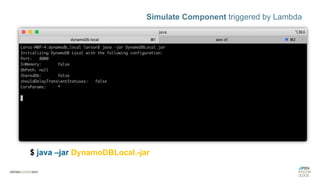
$ java –jar DynamoDBLocal.-jar
Simulate Component triggered by Lambda
$ aws –endpoint-url=http://localhost:8000 dynamodb list-tables
Simulate Component triggered by Lambda
$ aws –endpoint-url=http://localhost:8000 dynamodb list-tables
#6 temporäre Integration-Cloud für partielle Integration Tests
Testing Best Practices
AWS CloudOn-Premise
handler
logic uvia SAM local
via SAM local
SAM
yaml
TEST
u
u
via DynamoDB local
via FakeS3
i
i
Temorary Intregration #Dev1
ii
INT
i
i
Kandidat für Unit Tests
e
i
u
Kandidat für Integration Tests
Kandidat für End-to-Ende Tests
#7 permanente Integration-Cloud für End-to-End Tests
Testing Best Practices
AWS CloudOn-Premise
handler
logic uvia SAM local
via SAM local
SAM
yaml
TEST
u
u
via DynamoDB local
via FakeS3
i
i
Permament IntregrationINT
e
e
e
e
i
i
Kandidat für Unit Tests
e
i
u
Kandidat für Integration Tests
Kandidat für End-to-Ende Tests
„Sind wir endlich
fertig?“
Testing endet nicht
in Produktion!
Testing in Produktion
Ziele des Testens: „Vertrauen gewinnen“
• Outages von Cloud & Cloud-Komponenten
• Outages von 3rd Party Apps
• Bugs / Probleme durch Skalierung
Testing in Produktion
Robustes Monitoring und Error Reporting
• Logging
• Tracing
• Metrics
• Alerting
Vorhersagen von Störungen
inklusive automatischer
Regenerierung!
Testing in Produktion
Chaos Engineering
• bewusst kleine “Probleme“ und „Fehler“
in das System einstreuen!
Wie monitore ich?
meine Serverless Application
Mit einem gut geplantes Monitoring sollten wir in der Lage sein, …
• aufkommende Probleme vorherzusagen
• schnell die Ursache von Problemen zu identifizieren
• automatische Recovery-Prozesse anzustoßen
• notwendige Alarme zu triggern
Real-Life Monitoring
Business
KPI
UX
SLA
“Produkte
pro Bestellung”
“Durchschnittlicher
Bestellwert”
“Abbruchrate”
“Erste Darstellung
von Inhalten”
“Erste sinnvolle
Darstellung"
“Erste
Interaktion”
“Verfügbarkeit”
“Latenz”
“Beständigkeit”
“Konsistenz”
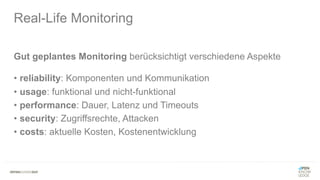
Gut geplantes Monitoring berücksichtigt verschiedene Aspekte
• reliability: Komponenten und Kommunikation
• usage: funktional und nicht-funktional
• performance: Dauer, Latenz und Timeouts
• security: Zugriffsrechte, Attacken
• costs: aktuelle Kosten, Kostenentwicklung
Real-Life Monitoring
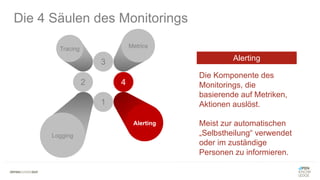
Die 4 Säulen des Monitorings
3
2 4
1
Tracing Metrics
Alerting
Logging
3
2
Tracing Metrics
4
4
Alerting
Die 4 Säulen des Monitorings
Repräsentiert den State
einer Anwendung.
Wenn etwas schiefläuft
benötigen wir LOGs, um
herauszufinden, welche
Änderungen am State den
Fehler verursacht haben.
1
Logging
Logging
3
Metrics
4
1
Alerting
Logging
Die 4 Säulen des Monitorings
Tracing
2
Repräsentiert eine
einzelne „User‘s Journey“
durch den gesamten
Stack der Anwendung.
Tracing wird oft zur
Optimierung des Systems
genutzt.
Tracing
2
Tracing
4
1
Alerting
Logging
Die 4 Säulen des Monitorings
3
Metrics
Repräsentiert einen über
einen Zeitraum
aggregierten Messpunkt.
Hilft dabei, den aktuellen
„Health-Status“ des
Systems sowie dessen
Entwicklung festzustellen.
Metrics
3
2
Tracing Metrics
1
Logging
Die 4 Säulen des Monitorings
4
Alerting
Die Komponente des
Monitorings, die
basierende auf Metriken,
Aktionen auslöst.
Meist zur automatischen
„Selbstheilung“ verwendet
oder im zuständige
Personen zu informieren.
Alerting
Für ein gut geplantes Monitoring, sollten man daher …
• Events loggen, die eine State Transformation anstoßen
• Standard-Metriken sammeln
• Custom-Metriken definieren und sammeln
• Distributed Tracing ermöglichen
• Alarme auf individuellem und aggregierten Level definieren
Serverless Application Monitoring
Monitoring Strategie
AWS Cloud
Logging
Tracing
Metrics
Alerting
Monitoring Strategie: Plattform Services
AWS Cloud
Logging
Logging
Tracing
Metrics
Alerting
Monitoring Strategie: Plattform Services
AWS Cloud
Logging
Alerting
Metrics
“BASIC ALERTING FOR FREE”
“BASIC METRICS FOR FREE”
Logging
Tracing
Metrics
Alerting
Monitoring Strategie: Plattform Services
AWS Cloud
Alarm
Logging
Alerting
Metrics
Logging
Tracing
Metrics
Alerting
Monitoring Strategie: Plattform Services
AWS Cloud
Logging
Alerting
Metrics
Tracing (still DIY)
Alarm
Metrics
Logging
Tracing
Metrics
Alerting
Monitoring Strategie: Plattform Services
AWS Cloud
Alarm
Logging
Tracing
Alerting
Tracing (DIY)
Metrics
Logging
Tracing
Metrics
Alerting
Monitoring Strategie #2: Plattform Services
Logging
Tracing
Metrics
Alerting
Monitoring Strategie #2: Plattform Services
Logging
Tracing
Metrics
Alerting
Monitoring Strategie #2: Plattform Services
Logging
Tracing
Metrics
Alerting
„Welche Art von ‚Benchmarks‘ wollen wir für unser Monitoring?“
• Sammeln von umfangreichen System- und Anwendungsmetriken
• Metriken und Logs sollten keine User-facing Latency verursachen
• Metriken und Logs sollten in Real-Time verfügbar sein
• Metriken und Logs sollten granular und korreliert vorliegen
Monitoring Best Practices
#1 User-facing Latency vermeiden
Monitoring Best Practices
AWS Cloud
My Lambda logs
log
stream
log
data
async
sync
Log Aggregator
log
data
1
very fast and cheap
2
3
time consuming and “expensive”
parse
log stream
#2 umfangreiche System-/Anwendungsmetriken sammeln
Monitoring Best Practices
AWS Cloud
My Lambda logs
log
stream
log
data
async
sync
Log Aggregator
metrics
custom
metrics
custom
metrics
log
data
2
3
1
very fast and cheap
parse
log stream
custom
metrics
#3 unnötige Kosten vermeiden
Monitoring Best Practices
AWS Cloud
My Lambda logs
log
stream
log
data
async
sync
Log Aggregator
metrics
custom
metrics
custom
metrics
log
data
archive
logs
1
2
custom
metrics
#4 Logs und Metriken korrelieren / aggregieren
Monitoring Best Practices
AWS Cloud
My Lambda logs
log
stream
log
data
async
sync
Log Aggregator
metrics
custom
metrics
custom
metrics
log
data
archive
logs
1
correlation
ID
custom
metrics
#5 Logging via ENV Vars an Edge Server enablen/disablen
Monitoring Best Practices
AWS Cloud
My Lambda logs
log
stream
log
data
async
sync
Log Aggregator
metrics
custom
metrics
custom
metrics
log
data
archive
logs
DEBUG
on/off
ENV var
1
2
custom
metrics
Schlussfolgerung: Spaß haben mit
Serverless?
“Find suitable
serverless workload
and apply the correct
integration patterns.”
? ? ?
Lars Röwekamp, @mobileLarson
Kontakt:
lars.roewekamp@openknowledge.de
kontakt@openknowledge.de
Besten Dank! #WISSENTEILEN

Serverless: The Missing Manual

  • 1.
    #WISSENTEILEN Serverless Lars Röwekamp |open knowledge GmbH @_openKnowledge | @mobileLarson The Missing Manual
  • 2.
    ÜBER OPEN KNOWLEDGE BranchenneutraleSoftwareentwicklung & IT-Beratung
  • 3.
    ÜBER MICH Wer binich - und wenn ja, wie viele? • CIO New Technologies • Enterprise & Mobile • Autor, Speaker, Coach & Mentor • Snowboard & MTB Enthusiast (a.k.a. “stets bemüht“) Lars Röwekamp (a.k.a. @mobileLarson)
  • 4.
    Was ist dieIdee von Serverless?
  • 5.
    #WISSENTEILEN Run code, notservers Serverless Function: Entwickler schreibt eine Business- Funktion, „bundled“ diese mit den entsprechenden Abhängigkeiten (LIBs) und lädt sie in die Cloud. Serverless Environment: Führt die Funktion bei „Aufruf“ in der passenden Runtime effizient, flexibel und hoch skalierbar aus. “
  • 6.
    #WISSENTEILEN No machines, VMsor containers* Entwickler: Fokussiert sich ausschließlich auf die Umsetzung der Business-Logik und das Erstellen des Function-Bundle. Cloud Provider: liefert und maintained rundum-sorglos Umgebung für die Serverless Functions, inklusive etwaiger Cloud Services (z.B. Storage, DB, Streaming, AI). “
  • 8.
  • 10.
  • 11.
    AWS Cloud hello worldserverless context 1 trigger request Hands-on: Hello World
  • 12.
    AWS Cloud hello worldserverless context HelloWorld Logs 1 trigger request 2 Hands-on: Hello World
  • 13.
    #WISSENTEILEN “Run your businesscode highly-available in the cloud in response to events and scale without any servers to manage.“* * AWS Lambda Advertising
  • 14.
  • 15.
  • 16.
    #3: Build in highavailability and disaster recovery
  • 17.
  • 18.
    Management: “Hmm, ich binnoch nicht überzeugt!.”
  • 19.
    #5: Never pay idle (Management:„Ok, I bin definitv dabei!“)
  • 20.
  • 21.
    AWS Lambda Microsoft Azure Functions OracleFunctions a.k.a. Project FN*** IBM Cloud Functions a.k.a Apache OpenWhisk** Google Cloud Functions Project Riff sponsored by Pivotal
  • 23.
  • 24.
  • 25.
    Szenario #1: Datei-/Datenbearbeitung Datei-oder Datenbearbeitung nach Ablage im Storage System • Bildbearbeitung • Thumbnail-Erzeugung • PDF-Generierung
  • 26.
    AWS Cloud Szenario #1:Datei-/Datenbearbeitung 1 upload image
  • 27.
    AWS Cloud Szenario #1:Datei-/Datenbearbeitung 1 2 upload image
  • 28.
    AWS Cloud Store rawImage Szenario #1: Datei-/Datenbearbeitung StoreImage Logs 1 2 3 upload image
  • 29.
    AWS Cloud Store rawImage Szenario #1: Datei-/Datenbearbeitung StoreImage Logs S3 Object created1 2 3 4 upload image
  • 30.
    AWS Cloud Store rawImage Szenario #1: Datei-/Datenbearbeitung StoreImage Logs S3 Object created1 2 3 4 upload image
  • 31.
    AWS Cloud Create ThumbnailStoreraw Image Szenario #1: Datei-/Datenbearbeitung StoreImage Logs CreateThumbnail Logs S3 Object created1 2 3 4 5 upload image
  • 32.
  • 33.
    Szenario #3: StreamProcessing Regelmäßiges Abarbeiten von Streaming Data • Social Media Trendanalysen • Sensor Data Monitoring / Anomaly Detection
  • 34.
    AWS Cloud 1 sensor datastream is uploaded to Kinesis in real-time Szenario #3: Stream Processing tons of very important sensor data
  • 35.
    AWS Cloud 1 sensor datastream is uploaded to Kinesis in real-time Szenario #3: Stream Processing tons of very important sensor data
  • 36.
    AWS Cloud Data StreamAnalysis StreamAnalyzer Logs 1 sensor data stream is uploaded to Kinesis in real-time 2 Lambda runs code to detect anomalies Szenario #3: Stream Processing tons of very important sensor data
  • 37.
    AWS Cloud Data StreamAnalysis StreamAnalyzer Logs store anomalies extracted by lambda function 1 sensor data stream is uploaded to Kinesis in real-time 2 3 Lambda runs code to detect anomalies Szenario #3: Stream Processing tons of very important sensor data
  • 38.
    AWS Cloud Data StreamAnalysis StreamAnalyzer Logs Real-Time Monitoring / Querying store anomalies extracted by lambda function 1 sensor data stream is uploaded to Kinesis in real-time 2 3 Lambda runs code to detect anomalies 4 data immediately available for interested parties to query Szenario #3: Stream Processing tons of very important sensor data
  • 39.
  • 40.
    Szenario #4: WebApplication Serverless „all in“ einer Anwendung… • Ausliefern von statischem Content via CDN • Authentication / Autorization via BaaS • Businesslogik via FaaS (unter Verwendung von PaaS)
  • 41.
    Szenario #4: WebApplication AWS Cloud Web Client region aware web app delivery 1
  • 42.
    Szenario #4: WebApplication AWS Cloud Web Client region aware web app delivery 1 login via id/pwd returns JWT 2
  • 43.
    Szenario #4: WebApplication AWS Cloud Web Client region aware web app delivery 1 login via id/pwd returns JWT 2 3 REST call
  • 44.
    Szenario #4: WebApplication AWS Cloud Web Client region aware web app delivery 1 login via id/pwd returns JWT 2 3 REST call 4 translated lambda trigger
  • 45.
    Szenario #4: WebApplication AWS Cloud Web Client storage related functions region aware web app delivery 1 login via id/pwd returns JWT 2 3 REST call 4 translated lambda trigger 5 lambda @work
  • 46.
    Szenario #4: WebApplication AWS Cloud Web Client storage related functions database related functions region aware web app delivery 1 login via id/pwd returns JWT 2 3 REST call 4 translated lambda trigger 5 lambda @work 5 lambda @work
  • 47.
    Szenario #4: WebApplication AWS Cloud Web Client storage related functions database related functions additional functions, e.g. region aware web app delivery 1 login via id/pwd returns JWT 2 6 3 REST call 4 translated lambda trigger 5 lambda @work 5 lambda @work
  • 48.
    The Road tothe Cloud ... Der Serverless Showcase
  • 49.
    Web Image Gallery (easyversion) GET ../images/{imageId} PUT ../images/{imageId} DELETE ../images/{imageId} POST ../images/
  • 50.
    Web Image Gallery (notso easy version) GET ../images/{imageId} PUT ../images/{imageId} DELETE ../images/{imageId} POST ../images/
  • 51.
    Web Image Gallery (reallife version) GET ../images/{imageId} PUT ../images/{imageId} DELETE ../images/{imageId} POST ../images/
  • 52.
  • 53.
    The Road tothe Cloud ... Der Serverless Showcase
  • 54.
    AWS Cloud Use-Case: UploadImage upload image with additional information
  • 55.
    AWS Cloud Store rawImage 1 Use-Case: Upload Image upload image with additional information
  • 56.
    AWS Cloud Store rawImage Store Image Information 1 2 Use-Case: Upload Image upload image with additional information
  • 57.
    AWS Cloud AWS StepFunctions workflow: Store Image Store raw Image Store Image Information 1 2 Use-Case: Upload Image upload image with additional information
  • 58.
    AWS Cloud AWS StepFunctions workflow: Store Image Create ThumbnailStore raw Image Store Image Information 1 2 Use-Case: Upload Image upload image with additional information
  • 59.
    AWS Cloud AWS StepFunctions workflow: Store Image Create Thumbnail Inform Subscribers Store raw Image Store Image Information 1 2 Use-Case: Upload Image upload image with additional information
  • 60.
    AWS Cloud AWS StepFunctions workflow: Store Image Create Thumbnail Inform Subscribers Store raw Image Store Image Information 1 2 Use-Case: Upload Image upload image with additional information
  • 61.
    AWS Cloud AWS StepFunctions workflow: Store Image Create Thumbnail Inform Subscribers Store raw Image Store Image Information 1 2 Use-Case: Upload Image upload image with additional information
  • 62.
    AWS Cloud AWS StepFunctions workflow: Store Image Create Thumbnail Inform Subscribers Store raw Image Store Image Information 1 2 Use-Case: Upload Image upload image with additional information
  • 63.
    AWS Cloud AWS StepFunctions workflow: Store Image Create Thumbnail Inform Subscribers Store raw Image Store Image Information 1 2 Use-Case: Upload Image upload image with additional information
  • 64.
  • 65.
    AWS Cloud AWS StepFunctions workflow: Store Image Create Thumbnail Inform Subscribers Store raw Image Store Image Information 1 2
  • 66.
    AWS Cloud AWS StepFunctions workflow: Store Image Create Thumbnail Inform Subscribers Store raw Image Store Image Information 1 2
  • 67.
    AWS Cloud AWS StepFunctions workflow: Store Image Create Thumbnail Inform Subscribers Store raw Image Store Image Information 1 2
  • 68.
    AWS Cloud AWS StepFunctions workflow: Store Image Create Thumbnail Inform Subscribers Store raw Image Store Image Information 1 2
  • 69.
    AWS Cloud AWS StepFunctions workflow: Store Image Create Thumbnail Inform Subscribers Store raw Image Store Image Information 1 2
  • 70.
    AWS Cloud AWS StepFunctions workflow: Store Image Create Thumbnail Inform Subscribers Store raw Image Store Image Information 1 2
  • 71.
    AWS Cloud AWS StepFunctions workflow: Store Image Create Thumbnail Inform Subscribers Store raw Image Store Image Information 1 2
  • 72.
    AWS Cloud AWS StepFunctions workflow: Store Image Create Thumbnail Inform Subscribers Store raw Image Store Image Information 1 2
  • 73.
    AWS Cloud AWS StepFunctions workflow: Store Image Create Thumbnail Inform Subscribers Store raw Image Store Image Information 1 2
  • 74.
    AWS Cloud AWS StepFunctions workflow: Store Image Create Thumbnail Inform Subscribers Store raw Image Store Image Information 1 2
  • 75.
  • 76.
    “Run your businesscode highly-available in the cloud in response to events and scale without any servers to manage.“* *(AWS Lambda product description)
  • 77.
    “Run your businesscode highly distributed and event driven in a non transparent environment with no single point of control.“* *(my personal interpretation)
  • 79.
    Wie teste ich? meineServerless Application
  • 80.
    Was, wann, wieund wo sollte ich testen, um … • Vertrauen in meinen Code zu gewinnen • das Risiko von Fehlern zu minimieren* * vor allem in Produktion
  • 81.
    Testen in dertraditionellen Welt
  • 82.
    Testen in derServerless Welt „The biggest complexity is not within the function itself, but in how it interacts with other functions and services (a.k.a. cloud components).“
  • 83.
    Testen in derServerless Welt Ziele des Testens: „Risiko minimieren“ • Risiko Konfiguration • Risiko technischer Workflow • Risiko Businesslogik • Risiko Integration
  • 84.
    Testen in derServerless Welt Ziele des Testens: „Risiko minimieren“ • Risiko Konfiguration • Risiko technischer Workflow • Risiko Businesslogik • Risiko Integration
  • 85.
    Testen in derServerless Welt
  • 86.
    „Don‘t let yourusers test your code!“
  • 88.
    „Welche Art von‚Benchmarks‘ wollen wir für unser Testing?“ • funktionale Änderungen schnell/kosteneffizient testen • integrative Änderungen schnell/kosteneffizient testen • integrative Änderungen so „real“ wie möglich testen • Use-Cases und User-Stories so „real“ wie möglich testen Testing Best Practices
  • 89.
    #1 Trennen vonBusinesslogik und Infrastruktur Testing Best Practices AWS CloudOn-Premise handler logic Kandidat für Unit Tests e i u Kandidat für Integration Tests Kandidat für End-to-Ende Tests u
  • 90.
  • 91.
  • 92.
  • 93.
    #2 Cloud-Infrastruktur Komponentenmocken Testing Best Practices AWS CloudOn-Premise handler logic u um Kandidat für Unit Tests e i u Kandidat für Integration Tests Kandidat für End-to-Ende Tests
  • 94.
  • 95.
  • 96.
  • 97.
  • 98.
    #3 Lokale Umgebungfür funktionale Tests verwenden (z.B. SAM local) Testing Best Practices AWS CloudOn-Premise handler logic uvia SAM local via SAM local SAM yaml TEST u u Kandidat für Unit Tests e i u Kandidat für Integration Tests Kandidat für End-to-Ende Tests
  • 100.
    $ sam localinvoke "Greetings" -e event-greeting.json --env-vars env.json function name payload for function
  • 101.
    $ sam localinvoke "Greetings" -e event-greeting.json --env-vars env.json function name payload for function
  • 102.
    #4 Lokale Umgebungzum Triggern von Integration Tests verwenden Testing Best Practices AWS CloudOn-Premise handler logic uvia SAM local via SAM local SAM yaml TEST u u i i Kandidat für Unit Tests e i u Kandidat für Integration Tests Kandidat für End-to-Ende Tests
  • 103.
    $ sam localstart-api –p 8080
  • 104.
    $ sam localstart-api –p 8080
  • 105.
    $ sam localstart-api –p 8080
  • 106.
    #5 Lokale Cloud-Komponentenfür Integration Tests* Testing Best Practices AWS CloudOn-Premise handler logic u via DynamoDB local via FakeS3 via SAM local via SAM local SAM yaml TEST u u i i i i WARNUNG: lokale Cloud Komponenten können lediglich funktionale Korrektheit sicherstellen, nicht aber infrastrukturelle, wie z.B. DLQs, Timeouts, Throttling, SLAs, … Kandidat für Unit Tests e i u Kandidat für Integration Tests Kandidat für End-to-Ende Tests
  • 107.
    $ sam localgenerate-event [SERVICE] [OPTION] Simulate Component Event to trigger Lambda
  • 108.
    $ sam localgenerate-event [SERVICE] [OPTION] Simulate Component Event to trigger Lambda
  • 109.
    Simulate Component triggeredby Lambda $ aws –endpoint-url=http://localhost:8000 dynamodb list-tables $ java –jar DynamoDBLocal.-jar
  • 110.
    Simulate Component triggeredby Lambda $ aws –endpoint-url=http://localhost:8000 dynamodb list-tables
  • 111.
    Simulate Component triggeredby Lambda $ aws –endpoint-url=http://localhost:8000 dynamodb list-tables
  • 112.
    #6 temporäre Integration-Cloudfür partielle Integration Tests Testing Best Practices AWS CloudOn-Premise handler logic uvia SAM local via SAM local SAM yaml TEST u u via DynamoDB local via FakeS3 i i Temorary Intregration #Dev1 ii INT i i Kandidat für Unit Tests e i u Kandidat für Integration Tests Kandidat für End-to-Ende Tests
  • 113.
    #7 permanente Integration-Cloudfür End-to-End Tests Testing Best Practices AWS CloudOn-Premise handler logic uvia SAM local via SAM local SAM yaml TEST u u via DynamoDB local via FakeS3 i i Permament IntregrationINT e e e e i i Kandidat für Unit Tests e i u Kandidat für Integration Tests Kandidat für End-to-Ende Tests
  • 114.
  • 116.
  • 117.
    Testing in Produktion Zieledes Testens: „Vertrauen gewinnen“ • Outages von Cloud & Cloud-Komponenten • Outages von 3rd Party Apps • Bugs / Probleme durch Skalierung
  • 118.
    Testing in Produktion RobustesMonitoring und Error Reporting • Logging • Tracing • Metrics • Alerting Vorhersagen von Störungen inklusive automatischer Regenerierung!
  • 119.
    Testing in Produktion ChaosEngineering • bewusst kleine “Probleme“ und „Fehler“ in das System einstreuen!
  • 120.
    Wie monitore ich? meineServerless Application
  • 121.
    Mit einem gutgeplantes Monitoring sollten wir in der Lage sein, … • aufkommende Probleme vorherzusagen • schnell die Ursache von Problemen zu identifizieren • automatische Recovery-Prozesse anzustoßen • notwendige Alarme zu triggern Real-Life Monitoring
  • 122.
    Real-Life Monitoring Business KPI UX SLA “Produkte pro Bestellung” “Durchschnittlicher Bestellwert” “Abbruchrate” “ErsteDarstellung von Inhalten” “Erste sinnvolle Darstellung" “Erste Interaktion” “Verfügbarkeit” “Latenz” “Beständigkeit” “Konsistenz”
  • 123.
    Gut geplantes Monitoringberücksichtigt verschiedene Aspekte • reliability: Komponenten und Kommunikation • usage: funktional und nicht-funktional • performance: Dauer, Latenz und Timeouts • security: Zugriffsrechte, Attacken • costs: aktuelle Kosten, Kostenentwicklung Real-Life Monitoring
  • 124.
    Die 4 Säulendes Monitorings 3 2 4 1 Tracing Metrics Alerting Logging
  • 125.
    3 2 Tracing Metrics 4 4 Alerting Die 4Säulen des Monitorings Repräsentiert den State einer Anwendung. Wenn etwas schiefläuft benötigen wir LOGs, um herauszufinden, welche Änderungen am State den Fehler verursacht haben. 1 Logging Logging
  • 126.
    3 Metrics 4 1 Alerting Logging Die 4 Säulendes Monitorings Tracing 2 Repräsentiert eine einzelne „User‘s Journey“ durch den gesamten Stack der Anwendung. Tracing wird oft zur Optimierung des Systems genutzt. Tracing
  • 127.
    2 Tracing 4 1 Alerting Logging Die 4 Säulendes Monitorings 3 Metrics Repräsentiert einen über einen Zeitraum aggregierten Messpunkt. Hilft dabei, den aktuellen „Health-Status“ des Systems sowie dessen Entwicklung festzustellen. Metrics
  • 128.
    3 2 Tracing Metrics 1 Logging Die 4Säulen des Monitorings 4 Alerting Die Komponente des Monitorings, die basierende auf Metriken, Aktionen auslöst. Meist zur automatischen „Selbstheilung“ verwendet oder im zuständige Personen zu informieren. Alerting
  • 129.
    Für ein gutgeplantes Monitoring, sollten man daher … • Events loggen, die eine State Transformation anstoßen • Standard-Metriken sammeln • Custom-Metriken definieren und sammeln • Distributed Tracing ermöglichen • Alarme auf individuellem und aggregierten Level definieren Serverless Application Monitoring
  • 130.
  • 131.
    Monitoring Strategie: PlattformServices AWS Cloud Logging Logging Tracing Metrics Alerting
  • 132.
    Monitoring Strategie: PlattformServices AWS Cloud Logging Alerting Metrics “BASIC ALERTING FOR FREE” “BASIC METRICS FOR FREE” Logging Tracing Metrics Alerting
  • 133.
    Monitoring Strategie: PlattformServices AWS Cloud Alarm Logging Alerting Metrics Logging Tracing Metrics Alerting
  • 134.
    Monitoring Strategie: PlattformServices AWS Cloud Logging Alerting Metrics Tracing (still DIY) Alarm Metrics Logging Tracing Metrics Alerting
  • 135.
    Monitoring Strategie: PlattformServices AWS Cloud Alarm Logging Tracing Alerting Tracing (DIY) Metrics Logging Tracing Metrics Alerting
  • 136.
    Monitoring Strategie #2:Plattform Services Logging Tracing Metrics Alerting
  • 137.
    Monitoring Strategie #2:Plattform Services Logging Tracing Metrics Alerting
  • 138.
    Monitoring Strategie #2:Plattform Services Logging Tracing Metrics Alerting
  • 140.
    „Welche Art von‚Benchmarks‘ wollen wir für unser Monitoring?“ • Sammeln von umfangreichen System- und Anwendungsmetriken • Metriken und Logs sollten keine User-facing Latency verursachen • Metriken und Logs sollten in Real-Time verfügbar sein • Metriken und Logs sollten granular und korreliert vorliegen Monitoring Best Practices
  • 141.
    #1 User-facing Latencyvermeiden Monitoring Best Practices AWS Cloud My Lambda logs log stream log data async sync Log Aggregator log data 1 very fast and cheap 2 3 time consuming and “expensive” parse log stream
  • 142.
    #2 umfangreiche System-/Anwendungsmetrikensammeln Monitoring Best Practices AWS Cloud My Lambda logs log stream log data async sync Log Aggregator metrics custom metrics custom metrics log data 2 3 1 very fast and cheap parse log stream custom metrics
  • 143.
    #3 unnötige Kostenvermeiden Monitoring Best Practices AWS Cloud My Lambda logs log stream log data async sync Log Aggregator metrics custom metrics custom metrics log data archive logs 1 2 custom metrics
  • 144.
    #4 Logs undMetriken korrelieren / aggregieren Monitoring Best Practices AWS Cloud My Lambda logs log stream log data async sync Log Aggregator metrics custom metrics custom metrics log data archive logs 1 correlation ID custom metrics
  • 145.
    #5 Logging viaENV Vars an Edge Server enablen/disablen Monitoring Best Practices AWS Cloud My Lambda logs log stream log data async sync Log Aggregator metrics custom metrics custom metrics log data archive logs DEBUG on/off ENV var 1 2 custom metrics
  • 146.
  • 147.
    “Find suitable serverless workload andapply the correct integration patterns.”
  • 148.
  • 149.