FAQs zur Technik 1 | 61
Projekte. Beratung. Spezialisten.
FAQs zur Technik
IKS-Thementag
12.04.2016
Autor: Jan Laußmann
FAQs zur Technik 2 | 61
Agenda
Development
Distribution
Push Notifications
Google Analytics
Security
FAQs zur Technik 3 | 61
Agenda
Development
Distribution
Push Notifications
Google Analytics
Security
Development | Distribution | Push Notifications | Google Analytics | Security | Ende
FAQs zur Technik 4 | 61
Development
Nativ
Cordova / PhoneGap
Xamarin
Development | Distribution | Push Notifications | Google Analytics | Security | Ende
FAQs zur Technik 5 | 61
Native Entwicklung
Android
 Java
 Android Framework
iOS
 Objective-C
 Neuerdings Swift
 Cocoa Touch Framework
Pro Plattform komplette Neuentwicklung
Development | Distribution | Push Notifications | Google Analytics | Security | Ende
FAQs zur Technik 6 | 61
PhoneGap / Cordova
Unterschied PhoneGap und Cordova
 Ursprünglicher Code stammt von dem Unternehmen PhoneGap
 Dieses wurde von Adobe aufgekauft
 Der Code wurde unter dem Namen Cordova als Open-Source-Apache-Projekt
veröffentlicht
Cordova ist jetzt der eigentliche Programm Code, der weiterentwickelt wird
 Bsp. Linux ist der eigentliche Code
PhoneGap ist eine Distribution von Cordova
 Bsp. Ubuntu, Suse, Red Hat sind Distributionen von Linux
Es gibt weitere, relativ unbekannte Cordova-Distributionen
 Intel XDK, Appery.io, …
Development | Distribution | Push Notifications | Google Analytics | Security | Ende
FAQs zur Technik 7 | 61
Ansatz PhoneGap / Cordova
Eine Cordova-App besteht aus:
Web App, typischerweise SPA
 HTML
 JavaScript
 CSS
Verpackung für die Web App (nativer Container)
Plugins (Cordova API)
 Datenbank
 Kamera
 Beschleunigungsmesser
Development | Distribution | Push Notifications | Google Analytics | Security | Ende
FAQs zur Technik 8 | 61
Nativer Container
Den nativen Container kann man sich
als Spezial-Browser vorstellen
Keine URL-Leiste oder ähnliches
Sondern nur der Teil des Browsers,
der die Web App anzeigt
Wird nativ vom Betriebssystem zur
Verfügung gestellt
 WebView Android
 UIWebView iOS
Development | Distribution | Push Notifications | Google Analytics | Security | Ende
FAQs zur Technik 9 | 61
Cordova API
„Brücke“ (API) zwischen Web App und nativen Funktionen
Plugins für viele Smartphone Features werden direkt mitgeliefert
 Adressbuch
 Barcode Scanner
 Beschleunigungssensor
 U.v.m.
Mit der Cordova API kann man leicht eigene Plugins entwickeln
 Muss nativ für jede Plattform programmiert werden
Development | Distribution | Push Notifications | Google Analytics | Security | Ende
FAQs zur Technik 10 | 61
Cordova
Läuft auf allen Geräten, nur 1-mal entwickeln
Gut geeignet, wenn viel JavaScript-Know-how vorhanden ist
Development | Distribution | Push Notifications | Google Analytics | Security | Ende
FAQs zur Technik 11 | 61
Ansatz Xamarin
Von den Entwicklern von „Mono“
Cross-Plattform-Entwicklung mit C#
C#-Code wird zu nativem Code kompiliert
 Java / Android
 Objective-C / iOS
Development | Distribution | Push Notifications | Google Analytics | Security | Ende
FAQs zur Technik 12 | 61
Xamarin.Forms
UI mit Xamarin.Forms
XAML-Code (ähnlich XML)
 von Microsoft entwickelte allgemeine Beschreibungssprache für die
Oberflächengestaltung
Mapping von Xamarin.Forms auf native UI-Elemente
Development | Distribution | Push Notifications | Google Analytics | Security | Ende
FAQs zur Technik 13 | 61
Xamarin.Forms
Plattform-spezifischer Code
Device.OnPlatform(
iOS: () => label.Font = Font.SystemFontOfSize (NamedSize.Micro),
Android: () => label.Font = Font.SystemFontOfSize (NamedSize.Medium)
WinPhone: () => label.Font = Font.SystemFontOfSize (NamedSize.Large)
);
Development | Distribution | Push Notifications | Google Analytics | Security | Ende
FAQs zur Technik 14 | 61
Xamarin
Läuft auf allen Geräten, nur 1-mal entwickeln
Sehr gut geeignet, wenn C#-Know-how vorhanden ist
Development | Distribution | Push Notifications | Google Analytics | Security | Ende
FAQs zur Technik 15 | 61
Vor- und Nachteile: Nativ / Cross-Plattform
Development | Distribution | Push Notifications | Google Analytics | Security | Ende
FAQs zur Technik 16 | 61
Vor- und Nachteile: Nativ / Cross-Plattform
Development | Distribution | Push Notifications | Google Analytics | Security | Ende
FAQs zur Technik 17 | 61
Vor- und Nachteile: Nativ / Cross-Plattform
Development | Distribution | Push Notifications | Google Analytics | Security | Ende
FAQs zur Technik 18 | 61
Vor- und Nachteile: Nativ / Cross-Plattform
Development | Distribution | Push Notifications | Google Analytics | Security | Ende
FAQs zur Technik 19 | 61
Nativ vs. Cross-Plattform: Ressourcenverfügbarkeit
Leichter Android- / iOS-Entwickler zu finden als
Xamarin- / PhoneGap-Entwickler
Mehr Lösungen zu nativer Programmierung
im Internet zu finden, als zu
Cross-Plattform-Entwicklung
Deutlich bessere Tool-Unterstützung bei nativer Entwicklung
durch Google und Apple
Mehr Dokumentation, Tutorials, Beispiele für native Entwicklung
Development | Distribution | Push Notifications | Google Analytics | Security | Ende
FAQs zur Technik 20 | 61
Nativ vs. Cross-Plattform: Programm Bibliotheken
Nativ: Leichter 3rd Party Libs zu finden
 Dokumente scannen
 Push Notifications
 Google Analytics
 Schnittstellen
Vor allem leichter zu integrieren!
Development | Distribution | Push Notifications | Google Analytics | Security | Ende
FAQs zur Technik 21 | 61
Nativ vs. Cross-Plattform: Kompatibilität / Updates
Nativ: Weniger Probleme, wenn das Smartphone-Betriebssystem
aktualisiert wird
Nativ: Keine Probleme, wenn die Entwicklungsumgebung
aktualisiert wird
Nativ geschriebener Code ist im Fehlerfall deutlich
einfacher zu debuggen!
Development | Distribution | Push Notifications | Google Analytics | Security | Ende
FAQs zur Technik 22 | 61
Nativ vs. Cross-Plattform: User Interface
Nativ: Leichter sehr gute User Interfaces zu gestalten
 Macht bei mobilen Apps einen großen Teil des Entwicklungsaufwandes aus
Nativ: Vom Betriebssystem mitgelieferte Unterstützung für verschiedene
Displaygrößen
 Smartphone
 Tablet
 Retina
Development | Distribution | Push Notifications | Google Analytics | Security | Ende
FAQs zur Technik 23 | 61
Vergleich Smartphone vs. Tablet
Development | Distribution | Push Notifications | Google Analytics | Security | Ende
FAQs zur Technik 24 | 61
Nativ vs. Cross-Plattform: User Interface
Nativ: sieht auf jedem Gerät so aus, wie es die Benutzer erwarten
 Man muss drauf achten, auf allen Betriebssystemen dasselbe Wording zu benutzen,
die Benutzbarkeit ähnlich zu halten und alle Funktionen möglichst gleich zu
implementieren
PhoneGap / Cordova: sieht auf allen Geräten gleich aus, verhält sich gleich,
hat dieselben Funktionen
Development | Distribution | Push Notifications | Google Analytics | Security | Ende
FAQs zur Technik 25 | 61
Nativ vs. Cross-Plattform: Kosten
Cross-Plattform
 Kostenvorteil bei der initialen Entwicklung (ca. 25%)
Nativ
 Kostet etwas mehr
 Kann in der Wartung günstiger sein
 Apps in der Regel hochwertiger
Development | Distribution | Push Notifications | Google Analytics | Security | Ende
FAQs zur Technik 26 | 61
Nativ vs. Cross-Plattform: Performance
Performance
 Große Datenmengen (Fotos)
 Maps
 Anspruchsvolle Berechnungen
 Animationen
Nativ: Optimaleren Code als den in der für das Betriebssystem nativen
Programmiersprache gibt es nicht
Bei Xamarin aufgrund des Übersetzens in nativen Code ähnlich gut
 Aber schwerer zu debuggen
Bei Cordova regelmäßig Performance-Probleme
 Speicher
 Geschwindigkeit
Development | Distribution | Push Notifications | Google Analytics | Security | Ende
FAQs zur Technik 27 | 61
Vor- und Nachteile: Nativ / Cross-Plattform
Development | Distribution | Push Notifications | Google Analytics | Security | Ende
FAQs zur Technik 28 | 61
Agenda
Development
Distribution
Push Notifications
Google Analytics
Security
Development | Distribution | Push Notifications | Google Analytics | Security | Ende
FAQs zur Technik 29 | 61
Apple App Store
Apple Developer Account
 Viele Daten für Registrierung notwendig
 Jährlich 99$
 App wird manuell überprüft ~1 Woche
Im Fehlerfall sind Notfall-Updates
bei Apple möglich!
Test Account für Apple
 Wenn die App einen Login-Mechanismus hat, muss ein
Test Account für Apple eingerichtet werden!
Development | Distribution | Push Notifications | Google Analytics | Security | Ende
FAQs zur Technik 30 | 61
Google Play Store
Google Developer Account
 Unkompliziert eingerichtet
 Einmalig 25$
 App wird automatisch veröffentlicht ~1 Stunden
Development | Distribution | Push Notifications | Google Analytics | Security | Ende
FAQs zur Technik 31 | 61
Möglichkeiten eine App zu verteilen
Aber es gibt auch gute Gründe Apps anders zu verteilen
 Testversionen
 Beta-Versionen
 Interne Apps
Development | Distribution | Push Notifications | Google Analytics | Security | Ende
FAQs zur Technik 32 | 61
Ad Hoc / Website / E-Mail
iOS
 Man kann einen speziellen Ad Hoc Build machen und dort die Ids von bis zu 100
Geräten hinterlegen
 Diese App kann dann per Webseite auf allen Geräten installiert werden deren Id im
Build hinterlegt wurde
Android
 Android-Apps können einfach so per Webseite oder auch E-Mail verteilt werden
 Der Benutzer muss dafür auf seinem Gerät einstellen, dass er die Installation aus
„unbekannten Quellen“ erlaubt
Eignet sich sehr gut, um Vorabversionen / Testversionen zu verteilen
Keine automatischen Updates möglich!
Development | Distribution | Push Notifications | Google Analytics | Security | Ende
FAQs zur Technik 33 | 61
Enterprise Rollout (iOS only)
Benötigt Mitgliedschaft im „iOS Developer Enterprise Program”
 Kostet 299$ / Jahr
 Erlaubt nicht die Veröffentlichung im eigentlichen Apple App Store
Verteilung über eigenen App Store
Nur zur Verteilung der App an eigene Unternehmensmitglieder
erlaubt!
Development | Distribution | Push Notifications | Google Analytics | Security | Ende
FAQs zur Technik 34 | 61
Volume Purchasing for Business / B2B (iOS only)
Kostenlose Mitgliedschaft im „Volume Purchasing for Business Program”
Verteilung über Apple App Store
App ist unsichtbar, aber kann durch Freischaltcode sichtbar gemacht
werden
Development | Distribution | Push Notifications | Google Analytics | Security | Ende
FAQs zur Technik 35 | 61
Private Channel (Android only)
Mitgliedschaft im „Google Apps for Work“ Programm
 Kostet 4€ / Nutzer / Monat
Mitarbeiter müssen mit ihrer „Google Apps for Work“-E-Mail-Adresse auf
ihrem Android-Gerät angemeldet sein
Dann können interne Apps nur für
die eigenen Mitarbeiter über den
herkömmlichen Google Play Store
verteilt werden
Development | Distribution | Push Notifications | Google Analytics | Security | Ende
FAQs zur Technik 36 | 61
Agenda
Möglichkeiten der App Entwicklung
Möglichkeiten eine App zu verteilen
Push Notifications
Google Analytics
Security
Development | Distribution | Push Notifications | Google Analytics | Security | Ende
FAQs zur Technik 37 | 61
Push Notifications
Push Notifications sind kurze Nachrichten, die an mobile Geräte gesendet
werden können
 Ähnlich wie SMS nur über das Internet
Bei iOS werden diese als „Apple Push Notification“ bezeichnet
Bei Android läuft das unter dem Namen „Google Cloud Messaging“
Development | Distribution | Push Notifications | Google Analytics | Security | Ende
FAQs zur Technik 38 | 61
Push Notifications
Development | Distribution | Push Notifications | Google Analytics | Security | Ende
FAQs zur Technik 39 | 61
Push Notifications
Nachricht an alle: Broadcast
 Warnmeldungen
 Marketing
 Allgemeine Informationen
Nachricht an spezielles Gerät: Single
 Nachricht nur für dieses Gerät
Nachricht an alle Gerätes eines Benutzers
 Muss man selber implementieren
 Best Practice: Wenn die Nachricht auf einem Gerät gelesen wurde, dann auf den
anderen Geräten des Benutzers löschen
Development | Distribution | Push Notifications | Google Analytics | Security | Ende
FAQs zur Technik 40 | 61
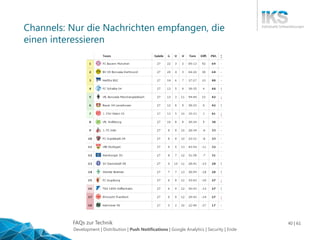
Channels: Nur die Nachrichten empfangen, die
einen interessieren
Development | Distribution | Push Notifications | Google Analytics | Security | Ende
FAQs zur Technik 41 | 61
Agenda
Development
Distribution
Push Notifications
Google Analytics
Security
Development | Distribution | Push Notifications | Google Analytics | Security | Ende
FAQs zur Technik 42 | 61
Google Analytics
Kann sehr einfach in native Apps integriert werden
 Google Analytics Id erstellen
 UA-123456-7
 Bibliothek einbinden
Anonyme Datenerfassung ist einfach so möglich
Personalisierte Datenerfassung ist nur bei expliziter Zustimmung
des Benutzers erlaubt
Auf einer Webseite sind dann die Auswertungen über das
Nutzerverhalten in der App einsehbar
Development | Distribution | Push Notifications | Google Analytics | Security | Ende
FAQs zur Technik 43 | 61
Google Analytics
Development | Distribution | Push Notifications | Google Analytics | Security | Ende
FAQs zur Technik 44 | 61
Google Analytics
Development | Distribution | Push Notifications | Google Analytics | Security | Ende
FAQs zur Technik 45 | 61
Google Analytics
Development | Distribution | Push Notifications | Google Analytics | Security | Ende
FAQs zur Technik 46 | 61
Google Analytics
Development | Distribution | Push Notifications | Google Analytics | Security | Ende
FAQs zur Technik 47 | 61
Google Analytics
Development | Distribution | Push Notifications | Google Analytics | Security | Ende
FAQs zur Technik 48 | 61
Google Analytics
Development | Distribution | Push Notifications | Google Analytics | Security | Ende
FAQs zur Technik 49 | 61
Google Analytics
Development | Distribution | Push Notifications | Google Analytics | Security | Ende
FAQs zur Technik 50 | 61
Google Analytics
Development | Distribution | Push Notifications | Google Analytics | Security | Ende
FAQs zur Technik 51 | 61
Google Analytics
Development | Distribution | Push Notifications | Google Analytics | Security | Ende
FAQs zur Technik 52 | 61
Google Analytics
Development | Distribution | Push Notifications | Google Analytics | Security | Ende
FAQs zur Technik 53 | 61
Google Analytics
Development | Distribution | Push Notifications | Google Analytics | Security | Ende
FAQs zur Technik 54 | 61
Google Analytics
Development | Distribution | Push Notifications | Google Analytics | Security | Ende
FAQs zur Technik 55 | 61
Google Analytics
Development | Distribution | Push Notifications | Google Analytics | Security | Ende
FAQs zur Technik 56 | 61
Google Analytics
Development | Distribution | Push Notifications | Google Analytics | Security | Ende
FAQs zur Technik 57 | 61
Agenda
Development
Distribution
Push Notifications
Google Analytics
Security
Development | Distribution | Push Notifications | Google Analytics | Security | Ende
FAQs zur Technik 58 | 61
Security
Code Obfuscation
 Bei Android sehr einfach möglich
 Bei iOS mit Objective-C möglich / mit Swift noch nicht möglich
Development | Distribution | Push Notifications | Google Analytics | Security | Ende
FAQs zur Technik 59 | 61
Security
OWASP
 M1: Weak Server Side Controls
 M2: Insecure Data Storage
 M3: Insufficient Transport Layer Protection
 M4: Unintended Data Leakage
 M5: Poor Authorization and Authentication
 M6: Broken Cryptography
 M7: Client Side Injection
 M8: Security Decisions Via Untrusted Inputs
 M9: Improper Session Handling
 M10: Lack of Binary Protections
Development | Distribution | Push Notifications | Google Analytics | Security | Ende
FAQs zur Technik 60 | 61
Security
In App Security
 Cache
 History
 Temporäre Dateien
Review durch Dritte
 Zum Beispiel Telefonica
Development | Distribution | Push Notifications | Google Analytics | Security | Ende
WWW.IKS-GMBH.COM

FAQs zur Technik

  • 1.
    FAQs zur Technik1 | 61 Projekte. Beratung. Spezialisten. FAQs zur Technik IKS-Thementag 12.04.2016 Autor: Jan Laußmann
  • 2.
    FAQs zur Technik2 | 61 Agenda Development Distribution Push Notifications Google Analytics Security
  • 3.
    FAQs zur Technik3 | 61 Agenda Development Distribution Push Notifications Google Analytics Security Development | Distribution | Push Notifications | Google Analytics | Security | Ende
  • 4.
    FAQs zur Technik4 | 61 Development Nativ Cordova / PhoneGap Xamarin Development | Distribution | Push Notifications | Google Analytics | Security | Ende
  • 5.
    FAQs zur Technik5 | 61 Native Entwicklung Android  Java  Android Framework iOS  Objective-C  Neuerdings Swift  Cocoa Touch Framework Pro Plattform komplette Neuentwicklung Development | Distribution | Push Notifications | Google Analytics | Security | Ende
  • 6.
    FAQs zur Technik6 | 61 PhoneGap / Cordova Unterschied PhoneGap und Cordova  Ursprünglicher Code stammt von dem Unternehmen PhoneGap  Dieses wurde von Adobe aufgekauft  Der Code wurde unter dem Namen Cordova als Open-Source-Apache-Projekt veröffentlicht Cordova ist jetzt der eigentliche Programm Code, der weiterentwickelt wird  Bsp. Linux ist der eigentliche Code PhoneGap ist eine Distribution von Cordova  Bsp. Ubuntu, Suse, Red Hat sind Distributionen von Linux Es gibt weitere, relativ unbekannte Cordova-Distributionen  Intel XDK, Appery.io, … Development | Distribution | Push Notifications | Google Analytics | Security | Ende
  • 7.
    FAQs zur Technik7 | 61 Ansatz PhoneGap / Cordova Eine Cordova-App besteht aus: Web App, typischerweise SPA  HTML  JavaScript  CSS Verpackung für die Web App (nativer Container) Plugins (Cordova API)  Datenbank  Kamera  Beschleunigungsmesser Development | Distribution | Push Notifications | Google Analytics | Security | Ende
  • 8.
    FAQs zur Technik8 | 61 Nativer Container Den nativen Container kann man sich als Spezial-Browser vorstellen Keine URL-Leiste oder ähnliches Sondern nur der Teil des Browsers, der die Web App anzeigt Wird nativ vom Betriebssystem zur Verfügung gestellt  WebView Android  UIWebView iOS Development | Distribution | Push Notifications | Google Analytics | Security | Ende
  • 9.
    FAQs zur Technik9 | 61 Cordova API „Brücke“ (API) zwischen Web App und nativen Funktionen Plugins für viele Smartphone Features werden direkt mitgeliefert  Adressbuch  Barcode Scanner  Beschleunigungssensor  U.v.m. Mit der Cordova API kann man leicht eigene Plugins entwickeln  Muss nativ für jede Plattform programmiert werden Development | Distribution | Push Notifications | Google Analytics | Security | Ende
  • 10.
    FAQs zur Technik10 | 61 Cordova Läuft auf allen Geräten, nur 1-mal entwickeln Gut geeignet, wenn viel JavaScript-Know-how vorhanden ist Development | Distribution | Push Notifications | Google Analytics | Security | Ende
  • 11.
    FAQs zur Technik11 | 61 Ansatz Xamarin Von den Entwicklern von „Mono“ Cross-Plattform-Entwicklung mit C# C#-Code wird zu nativem Code kompiliert  Java / Android  Objective-C / iOS Development | Distribution | Push Notifications | Google Analytics | Security | Ende
  • 12.
    FAQs zur Technik12 | 61 Xamarin.Forms UI mit Xamarin.Forms XAML-Code (ähnlich XML)  von Microsoft entwickelte allgemeine Beschreibungssprache für die Oberflächengestaltung Mapping von Xamarin.Forms auf native UI-Elemente Development | Distribution | Push Notifications | Google Analytics | Security | Ende
  • 13.
    FAQs zur Technik13 | 61 Xamarin.Forms Plattform-spezifischer Code Device.OnPlatform( iOS: () => label.Font = Font.SystemFontOfSize (NamedSize.Micro), Android: () => label.Font = Font.SystemFontOfSize (NamedSize.Medium) WinPhone: () => label.Font = Font.SystemFontOfSize (NamedSize.Large) ); Development | Distribution | Push Notifications | Google Analytics | Security | Ende
  • 14.
    FAQs zur Technik14 | 61 Xamarin Läuft auf allen Geräten, nur 1-mal entwickeln Sehr gut geeignet, wenn C#-Know-how vorhanden ist Development | Distribution | Push Notifications | Google Analytics | Security | Ende
  • 15.
    FAQs zur Technik15 | 61 Vor- und Nachteile: Nativ / Cross-Plattform Development | Distribution | Push Notifications | Google Analytics | Security | Ende
  • 16.
    FAQs zur Technik16 | 61 Vor- und Nachteile: Nativ / Cross-Plattform Development | Distribution | Push Notifications | Google Analytics | Security | Ende
  • 17.
    FAQs zur Technik17 | 61 Vor- und Nachteile: Nativ / Cross-Plattform Development | Distribution | Push Notifications | Google Analytics | Security | Ende
  • 18.
    FAQs zur Technik18 | 61 Vor- und Nachteile: Nativ / Cross-Plattform Development | Distribution | Push Notifications | Google Analytics | Security | Ende
  • 19.
    FAQs zur Technik19 | 61 Nativ vs. Cross-Plattform: Ressourcenverfügbarkeit Leichter Android- / iOS-Entwickler zu finden als Xamarin- / PhoneGap-Entwickler Mehr Lösungen zu nativer Programmierung im Internet zu finden, als zu Cross-Plattform-Entwicklung Deutlich bessere Tool-Unterstützung bei nativer Entwicklung durch Google und Apple Mehr Dokumentation, Tutorials, Beispiele für native Entwicklung Development | Distribution | Push Notifications | Google Analytics | Security | Ende
  • 20.
    FAQs zur Technik20 | 61 Nativ vs. Cross-Plattform: Programm Bibliotheken Nativ: Leichter 3rd Party Libs zu finden  Dokumente scannen  Push Notifications  Google Analytics  Schnittstellen Vor allem leichter zu integrieren! Development | Distribution | Push Notifications | Google Analytics | Security | Ende
  • 21.
    FAQs zur Technik21 | 61 Nativ vs. Cross-Plattform: Kompatibilität / Updates Nativ: Weniger Probleme, wenn das Smartphone-Betriebssystem aktualisiert wird Nativ: Keine Probleme, wenn die Entwicklungsumgebung aktualisiert wird Nativ geschriebener Code ist im Fehlerfall deutlich einfacher zu debuggen! Development | Distribution | Push Notifications | Google Analytics | Security | Ende
  • 22.
    FAQs zur Technik22 | 61 Nativ vs. Cross-Plattform: User Interface Nativ: Leichter sehr gute User Interfaces zu gestalten  Macht bei mobilen Apps einen großen Teil des Entwicklungsaufwandes aus Nativ: Vom Betriebssystem mitgelieferte Unterstützung für verschiedene Displaygrößen  Smartphone  Tablet  Retina Development | Distribution | Push Notifications | Google Analytics | Security | Ende
  • 23.
    FAQs zur Technik23 | 61 Vergleich Smartphone vs. Tablet Development | Distribution | Push Notifications | Google Analytics | Security | Ende
  • 24.
    FAQs zur Technik24 | 61 Nativ vs. Cross-Plattform: User Interface Nativ: sieht auf jedem Gerät so aus, wie es die Benutzer erwarten  Man muss drauf achten, auf allen Betriebssystemen dasselbe Wording zu benutzen, die Benutzbarkeit ähnlich zu halten und alle Funktionen möglichst gleich zu implementieren PhoneGap / Cordova: sieht auf allen Geräten gleich aus, verhält sich gleich, hat dieselben Funktionen Development | Distribution | Push Notifications | Google Analytics | Security | Ende
  • 25.
    FAQs zur Technik25 | 61 Nativ vs. Cross-Plattform: Kosten Cross-Plattform  Kostenvorteil bei der initialen Entwicklung (ca. 25%) Nativ  Kostet etwas mehr  Kann in der Wartung günstiger sein  Apps in der Regel hochwertiger Development | Distribution | Push Notifications | Google Analytics | Security | Ende
  • 26.
    FAQs zur Technik26 | 61 Nativ vs. Cross-Plattform: Performance Performance  Große Datenmengen (Fotos)  Maps  Anspruchsvolle Berechnungen  Animationen Nativ: Optimaleren Code als den in der für das Betriebssystem nativen Programmiersprache gibt es nicht Bei Xamarin aufgrund des Übersetzens in nativen Code ähnlich gut  Aber schwerer zu debuggen Bei Cordova regelmäßig Performance-Probleme  Speicher  Geschwindigkeit Development | Distribution | Push Notifications | Google Analytics | Security | Ende
  • 27.
    FAQs zur Technik27 | 61 Vor- und Nachteile: Nativ / Cross-Plattform Development | Distribution | Push Notifications | Google Analytics | Security | Ende
  • 28.
    FAQs zur Technik28 | 61 Agenda Development Distribution Push Notifications Google Analytics Security Development | Distribution | Push Notifications | Google Analytics | Security | Ende
  • 29.
    FAQs zur Technik29 | 61 Apple App Store Apple Developer Account  Viele Daten für Registrierung notwendig  Jährlich 99$  App wird manuell überprüft ~1 Woche Im Fehlerfall sind Notfall-Updates bei Apple möglich! Test Account für Apple  Wenn die App einen Login-Mechanismus hat, muss ein Test Account für Apple eingerichtet werden! Development | Distribution | Push Notifications | Google Analytics | Security | Ende
  • 30.
    FAQs zur Technik30 | 61 Google Play Store Google Developer Account  Unkompliziert eingerichtet  Einmalig 25$  App wird automatisch veröffentlicht ~1 Stunden Development | Distribution | Push Notifications | Google Analytics | Security | Ende
  • 31.
    FAQs zur Technik31 | 61 Möglichkeiten eine App zu verteilen Aber es gibt auch gute Gründe Apps anders zu verteilen  Testversionen  Beta-Versionen  Interne Apps Development | Distribution | Push Notifications | Google Analytics | Security | Ende
  • 32.
    FAQs zur Technik32 | 61 Ad Hoc / Website / E-Mail iOS  Man kann einen speziellen Ad Hoc Build machen und dort die Ids von bis zu 100 Geräten hinterlegen  Diese App kann dann per Webseite auf allen Geräten installiert werden deren Id im Build hinterlegt wurde Android  Android-Apps können einfach so per Webseite oder auch E-Mail verteilt werden  Der Benutzer muss dafür auf seinem Gerät einstellen, dass er die Installation aus „unbekannten Quellen“ erlaubt Eignet sich sehr gut, um Vorabversionen / Testversionen zu verteilen Keine automatischen Updates möglich! Development | Distribution | Push Notifications | Google Analytics | Security | Ende
  • 33.
    FAQs zur Technik33 | 61 Enterprise Rollout (iOS only) Benötigt Mitgliedschaft im „iOS Developer Enterprise Program”  Kostet 299$ / Jahr  Erlaubt nicht die Veröffentlichung im eigentlichen Apple App Store Verteilung über eigenen App Store Nur zur Verteilung der App an eigene Unternehmensmitglieder erlaubt! Development | Distribution | Push Notifications | Google Analytics | Security | Ende
  • 34.
    FAQs zur Technik34 | 61 Volume Purchasing for Business / B2B (iOS only) Kostenlose Mitgliedschaft im „Volume Purchasing for Business Program” Verteilung über Apple App Store App ist unsichtbar, aber kann durch Freischaltcode sichtbar gemacht werden Development | Distribution | Push Notifications | Google Analytics | Security | Ende
  • 35.
    FAQs zur Technik35 | 61 Private Channel (Android only) Mitgliedschaft im „Google Apps for Work“ Programm  Kostet 4€ / Nutzer / Monat Mitarbeiter müssen mit ihrer „Google Apps for Work“-E-Mail-Adresse auf ihrem Android-Gerät angemeldet sein Dann können interne Apps nur für die eigenen Mitarbeiter über den herkömmlichen Google Play Store verteilt werden Development | Distribution | Push Notifications | Google Analytics | Security | Ende
  • 36.
    FAQs zur Technik36 | 61 Agenda Möglichkeiten der App Entwicklung Möglichkeiten eine App zu verteilen Push Notifications Google Analytics Security Development | Distribution | Push Notifications | Google Analytics | Security | Ende
  • 37.
    FAQs zur Technik37 | 61 Push Notifications Push Notifications sind kurze Nachrichten, die an mobile Geräte gesendet werden können  Ähnlich wie SMS nur über das Internet Bei iOS werden diese als „Apple Push Notification“ bezeichnet Bei Android läuft das unter dem Namen „Google Cloud Messaging“ Development | Distribution | Push Notifications | Google Analytics | Security | Ende
  • 38.
    FAQs zur Technik38 | 61 Push Notifications Development | Distribution | Push Notifications | Google Analytics | Security | Ende
  • 39.
    FAQs zur Technik39 | 61 Push Notifications Nachricht an alle: Broadcast  Warnmeldungen  Marketing  Allgemeine Informationen Nachricht an spezielles Gerät: Single  Nachricht nur für dieses Gerät Nachricht an alle Gerätes eines Benutzers  Muss man selber implementieren  Best Practice: Wenn die Nachricht auf einem Gerät gelesen wurde, dann auf den anderen Geräten des Benutzers löschen Development | Distribution | Push Notifications | Google Analytics | Security | Ende
  • 40.
    FAQs zur Technik40 | 61 Channels: Nur die Nachrichten empfangen, die einen interessieren Development | Distribution | Push Notifications | Google Analytics | Security | Ende
  • 41.
    FAQs zur Technik41 | 61 Agenda Development Distribution Push Notifications Google Analytics Security Development | Distribution | Push Notifications | Google Analytics | Security | Ende
  • 42.
    FAQs zur Technik42 | 61 Google Analytics Kann sehr einfach in native Apps integriert werden  Google Analytics Id erstellen  UA-123456-7  Bibliothek einbinden Anonyme Datenerfassung ist einfach so möglich Personalisierte Datenerfassung ist nur bei expliziter Zustimmung des Benutzers erlaubt Auf einer Webseite sind dann die Auswertungen über das Nutzerverhalten in der App einsehbar Development | Distribution | Push Notifications | Google Analytics | Security | Ende
  • 43.
    FAQs zur Technik43 | 61 Google Analytics Development | Distribution | Push Notifications | Google Analytics | Security | Ende
  • 44.
    FAQs zur Technik44 | 61 Google Analytics Development | Distribution | Push Notifications | Google Analytics | Security | Ende
  • 45.
    FAQs zur Technik45 | 61 Google Analytics Development | Distribution | Push Notifications | Google Analytics | Security | Ende
  • 46.
    FAQs zur Technik46 | 61 Google Analytics Development | Distribution | Push Notifications | Google Analytics | Security | Ende
  • 47.
    FAQs zur Technik47 | 61 Google Analytics Development | Distribution | Push Notifications | Google Analytics | Security | Ende
  • 48.
    FAQs zur Technik48 | 61 Google Analytics Development | Distribution | Push Notifications | Google Analytics | Security | Ende
  • 49.
    FAQs zur Technik49 | 61 Google Analytics Development | Distribution | Push Notifications | Google Analytics | Security | Ende
  • 50.
    FAQs zur Technik50 | 61 Google Analytics Development | Distribution | Push Notifications | Google Analytics | Security | Ende
  • 51.
    FAQs zur Technik51 | 61 Google Analytics Development | Distribution | Push Notifications | Google Analytics | Security | Ende
  • 52.
    FAQs zur Technik52 | 61 Google Analytics Development | Distribution | Push Notifications | Google Analytics | Security | Ende
  • 53.
    FAQs zur Technik53 | 61 Google Analytics Development | Distribution | Push Notifications | Google Analytics | Security | Ende
  • 54.
    FAQs zur Technik54 | 61 Google Analytics Development | Distribution | Push Notifications | Google Analytics | Security | Ende
  • 55.
    FAQs zur Technik55 | 61 Google Analytics Development | Distribution | Push Notifications | Google Analytics | Security | Ende
  • 56.
    FAQs zur Technik56 | 61 Google Analytics Development | Distribution | Push Notifications | Google Analytics | Security | Ende
  • 57.
    FAQs zur Technik57 | 61 Agenda Development Distribution Push Notifications Google Analytics Security Development | Distribution | Push Notifications | Google Analytics | Security | Ende
  • 58.
    FAQs zur Technik58 | 61 Security Code Obfuscation  Bei Android sehr einfach möglich  Bei iOS mit Objective-C möglich / mit Swift noch nicht möglich Development | Distribution | Push Notifications | Google Analytics | Security | Ende
  • 59.
    FAQs zur Technik59 | 61 Security OWASP  M1: Weak Server Side Controls  M2: Insecure Data Storage  M3: Insufficient Transport Layer Protection  M4: Unintended Data Leakage  M5: Poor Authorization and Authentication  M6: Broken Cryptography  M7: Client Side Injection  M8: Security Decisions Via Untrusted Inputs  M9: Improper Session Handling  M10: Lack of Binary Protections Development | Distribution | Push Notifications | Google Analytics | Security | Ende
  • 60.
    FAQs zur Technik60 | 61 Security In App Security  Cache  History  Temporäre Dateien Review durch Dritte  Zum Beispiel Telefonica Development | Distribution | Push Notifications | Google Analytics | Security | Ende
  • 61.