„Auto off“ Script – Code Explained
  Zürich, 27.01.2011, Sergey Bostandzhyan
„Auto off“ Script – Code Explained


Übersicht


●   Zielsetzung
●   Verfügbare Schnittstellen / API
●   Aufbau
●   Code
„Auto off“ Script – Code Explained


Zielsetzung

Automatisches Abschalten von Licht in
einem Raum nach „X“ Minuten.

●   nur für Szene 1
●   Raum konfigurierbar
●   Timeout konfigurierbar

Beispiel: Treppenhausbeleuchtung
„Auto off“ Script – Code Explained


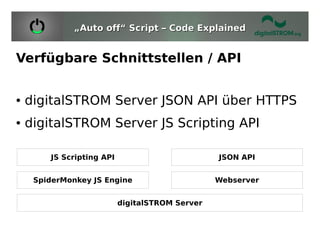
Verfügbare Schnittstellen / API


●   digitalSTROM Server JSON API über HTTPS
●   digitalSTROM Server JS Scripting API

        JS Scripting API                         JSON API


     SpiderMonkey JS Engine                      Webserver


                           digitalSTROM Server
„Auto off“ Script – Code Explained


Verfügbare Schnittstellen - JSON API
JSON API Dokumentation:
http://developer.digitalstrom.org/download/dss/0.9/doc/dss-0.9.0/


●   Informationen über Räume und Geräte
●   Konfiguration
●   Steuerung
●   Events auslösen
●   Zugang zum Property Tree
●   ...
„Auto off“ Script – Code explained


Verfügbare Schnittstellen - JSON API
JSON API Dokumentation:
http://developer.digitalstrom.org/download/dss/0.9/doc/dss-0.9.0/


●   Informationen über Räume und Geräte
●   Konfiguration
●   Steuerung
●   Events auslösen
●   Zugang zum Property Tree
●   ...
„Auto off“ Script – Code Explained


Verfügbare Schnittstellen – JS Scripting
JS Scripting Dokumentation:
http://developer.digitalstrom.org/redmine/projects/dss/wiki/Scripting_inside_the_dSS


●   Informationen über Räume und Geräte
●   Steuerung
●   Events auslösen
●   auf Events reagieren
●   Zugang zum Property Tree
●   TCP Socket Zugriff
●   ...
„Auto off“ Script – Code Explained


Verfügbare Schnittstellen – JS Scripting
JS Scripting Dokumentation:
http://developer.digitalstrom.org/redmine/projects/dss/wiki/Scripting_inside_the_dSS


●   Informationen über Räume und Geräte
●   Steuerung
●   Events auslösen
●   auf Events reagieren
●   Zugang zum Property Tree
●   TCP Socket Zugriff
●   ...
„Auto off“ Script – Code Explained


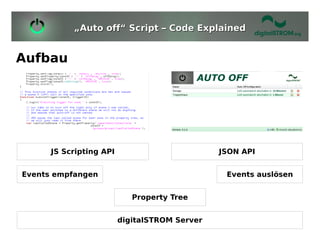
Aufbau


      JS Scripting API                         JSON API


Events empfangen                                Events auslösen


                            Property Tree


                         digitalSTROM Server
„Auto off“ Script – Code Explained


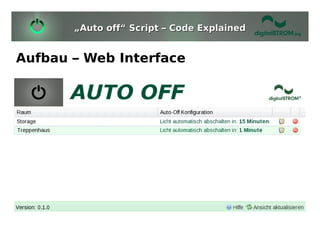
Aufbau – Web Interface
„Auto off“ Script – Code Explained


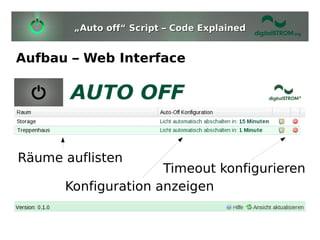
Aufbau – Web Interface


Räume auflisten
                     Timeout konfigurieren
      Konfiguration anzeigen
„Auto off“ Script – Code Explained


Aufbau – Web Interface
Räume auflisten
Request an den dSS:
/json/property/query?
query=/apartment/zones/*(ZoneID,name
)/devices/*(present)

Antwort:
{"ok":true,"result":{"zones":[
{"ZoneID":4,"name":"Treppenhaus","devices":
[{"present":true}]}]}}
„Auto off“ Script – Code Explained


Aufbau – Web Interface
Konfiguration anzeigen
Request an den dSS:
/json/property/query?query=/scripts/auto-
off/*(ZoneID,offDelay)

Antwort:
{"ok":true,"result":
{"auto-off":
[{"ZoneID":4,"offDelay":1}]}}
„Auto off“ Script – Code Explained


Aufbau – Web Interface
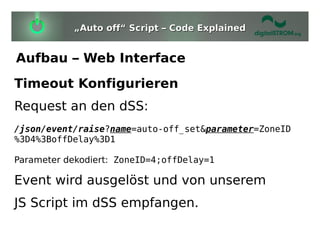
Timeout Konfigurieren
Request an den dSS:
/json/event/raise?name=auto-off_set&parameter=ZoneID
%3D4%3BoffDelay%3D1

Parameter dekodiert: ZoneID=4;offDelay=1

Event wird ausgelöst und von unserem
JS Script im dSS empfangen.
„Auto off“ Script – Code Explained


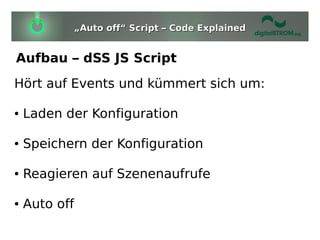
Aufbau – dSS JS Script
Hört auf Events und kümmert sich um:

●   Laden der Konfiguration

●   Speichern der Konfiguration

●   Reagieren auf Szenenaufrufe

●   Auto off
„Auto off“ Script – Code Explained


Aufbau – dSS JS Script
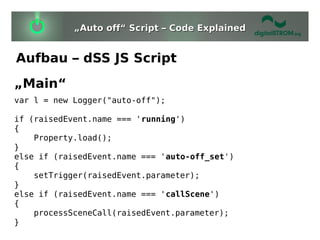
„Main“
var l = new Logger("auto-off");

if (raisedEvent.name === 'running')
{
    Property.load();
}
else if (raisedEvent.name === 'auto-off_set')
{
    setTrigger(raisedEvent.parameter);
}
else if (raisedEvent.name === 'callScene')
{
    processSceneCall(raisedEvent.parameter);
}
„Auto off“ Script – Code Explained


Aufbau – dSS JS Script
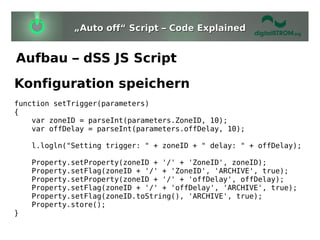
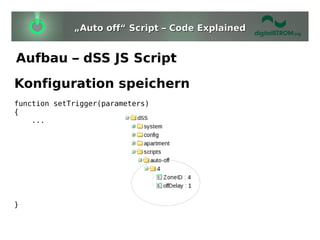
Konfiguration speichern
function setTrigger(parameters)
{
    var zoneID = parseInt(parameters.ZoneID, 10);
    var offDelay = parseInt(parameters.offDelay, 10);

    l.logln("Setting trigger: " + zoneID + " delay: " + offDelay);

    Property.setProperty(zoneID + '/' + 'ZoneID', zoneID);
    Property.setFlag(zoneID + '/' + 'ZoneID', 'ARCHIVE', true);
    Property.setProperty(zoneID + '/' + 'offDelay', offDelay);
    Property.setFlag(zoneID + '/' + 'offDelay', 'ARCHIVE', true);
    Property.setFlag(zoneID.toString(), 'ARCHIVE', true);
    Property.store();
}
„Auto off“ Script – Code Explained


Aufbau – dSS JS Script
Konfiguration speichern
function setTrigger(parameters)
{
    ...


}
„Auto off“ Script – Code Explained


Aufbau – dSS JS Script
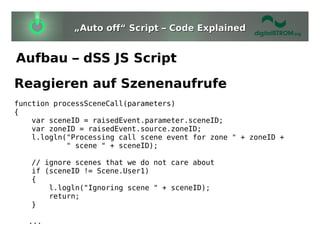
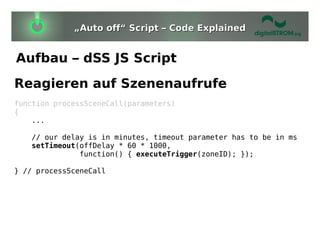
Reagieren auf Szenenaufrufe
function processSceneCall(parameters)
{
    var sceneID = raisedEvent.parameter.sceneID;
    var zoneID = raisedEvent.source.zoneID;
    l.logln("Processing call scene event for zone " + zoneID +
            " scene " + sceneID);

   // ignore scenes that we do not care about
   if (sceneID != Scene.User1)
   {
       l.logln("Ignoring scene " + sceneID);
       return;
   }

   ...
„Auto off“ Script – Code Explained


Aufbau – dSS JS Script
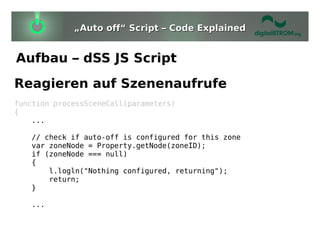
Reagieren auf Szenenaufrufe
function processSceneCall(parameters)
{
    ...

   // check if auto-off is configured for this zone
   var zoneNode = Property.getNode(zoneID);
   if (zoneNode === null)
   {
       l.logln("Nothing configured, returning");
       return;
   }

   ...
„Auto off“ Script – Code Explained


Aufbau – dSS JS Script
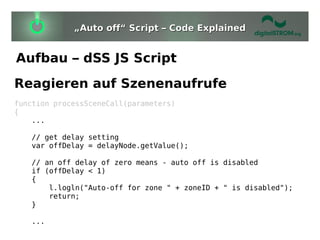
Reagieren auf Szenenaufrufe
function processSceneCall(parameters)
{
    ...

   // get delay setting
   var offDelay = delayNode.getValue();

   // an off delay of zero means - auto off is disabled
   if (offDelay < 1)
   {
       l.logln("Auto-off for zone " + zoneID + " is disabled");
       return;
   }

   ...
„Auto off“ Script – Code Explained


Aufbau – dSS JS Script
Reagieren auf Szenenaufrufe
function processSceneCall(parameters)
{
    ...

   // our delay is in minutes, timeout parameter has to be in ms
   setTimeout(offDelay * 60 * 1000,
              function() { executeTrigger(zoneID); });

} // processSceneCall
„Auto off“ Script – Code Explained


Aufbau – dSS JS Script
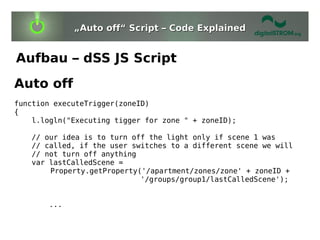
Auto off
function executeTrigger(zoneID)
{
    l.logln("Executing tigger for zone " + zoneID);

   // our idea is to turn off the light only if scene 1 was
   // called, if the user switches to a different scene we will
   // not turn off anything
   var lastCalledScene =
       Property.getProperty('/apartment/zones/zone' + zoneID +
                            '/groups/group1/lastCalledScene');


       ...
„Auto off“ Script – Code Explained


Aufbau – dSS JS Script
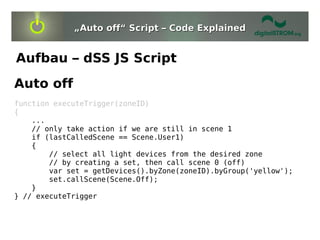
Auto off
function executeTrigger(zoneID)
{
    ...
    // only take action if we are still in scene 1
    if (lastCalledScene == Scene.User1)
    {
        // select all light devices from the desired zone
        // by creating a set, then call scene 0 (off)
        var set = getDevices().byZone(zoneID).byGroup('yellow');
        set.callScene(Scene.Off);
    }
} // executeTrigger
„Auto off“ Script – Code Explained


Aufbau – dSS JS Script
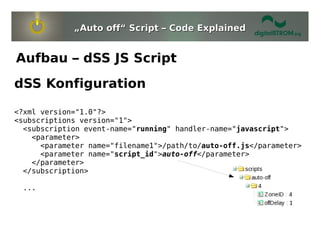
dSS Konfiguration

<?xml version="1.0"?>
<subscriptions version="1">
  <subscription event-name="running" handler-name="javascript">
    <parameter>
      <parameter name="filename1">/path/to/auto-off.js</parameter>
      <parameter name="script_id">auto-off</parameter>
    </parameter>
  </subscription>

 ...
„Auto off“ Script – Code Explained


Aufbau – dSS JS Script
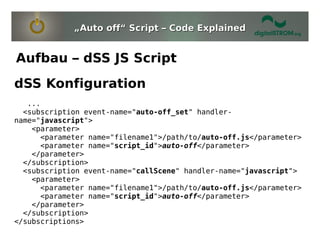
dSS Konfiguration
   ...
  <subscription event-name="auto-off_set" handler-
name="javascript">
    <parameter>
      <parameter name="filename1">/path/to/auto-off.js</parameter>
      <parameter name="script_id">auto-off</parameter>
    </parameter>
  </subscription>
  <subscription event-name="callScene" handler-name="javascript">
    <parameter>
      <parameter name="filename1">/path/to/auto-off.js</parameter>
      <parameter name="script_id">auto-off</parameter>
    </parameter>
  </subscription>
</subscriptions>
„Auto off“ Script – Code Explained


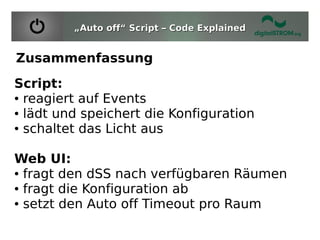
Zusammenfassung
Script:
● reagiert auf Events

● lädt und speichert die Konfiguration

● schaltet das Licht aus


Web UI:
● fragt den dSS nach verfügbaren Räumen

● fragt die Konfiguration ab

● setzt den Auto off Timeout pro Raum
Fragen?
http://developer.digitalstrom.org/

digitalSTROM Developer Day 2011: digitalSTROM-Server-Apps

  • 1.
    „Auto off“ Script– Code Explained Zürich, 27.01.2011, Sergey Bostandzhyan
  • 2.
    „Auto off“ Script– Code Explained Übersicht ● Zielsetzung ● Verfügbare Schnittstellen / API ● Aufbau ● Code
  • 3.
    „Auto off“ Script– Code Explained Zielsetzung Automatisches Abschalten von Licht in einem Raum nach „X“ Minuten. ● nur für Szene 1 ● Raum konfigurierbar ● Timeout konfigurierbar Beispiel: Treppenhausbeleuchtung
  • 4.
    „Auto off“ Script– Code Explained Verfügbare Schnittstellen / API ● digitalSTROM Server JSON API über HTTPS ● digitalSTROM Server JS Scripting API JS Scripting API JSON API SpiderMonkey JS Engine Webserver digitalSTROM Server
  • 5.
    „Auto off“ Script– Code Explained Verfügbare Schnittstellen - JSON API JSON API Dokumentation: http://developer.digitalstrom.org/download/dss/0.9/doc/dss-0.9.0/ ● Informationen über Räume und Geräte ● Konfiguration ● Steuerung ● Events auslösen ● Zugang zum Property Tree ● ...
  • 6.
    „Auto off“ Script– Code explained Verfügbare Schnittstellen - JSON API JSON API Dokumentation: http://developer.digitalstrom.org/download/dss/0.9/doc/dss-0.9.0/ ● Informationen über Räume und Geräte ● Konfiguration ● Steuerung ● Events auslösen ● Zugang zum Property Tree ● ...
  • 7.
    „Auto off“ Script– Code Explained Verfügbare Schnittstellen – JS Scripting JS Scripting Dokumentation: http://developer.digitalstrom.org/redmine/projects/dss/wiki/Scripting_inside_the_dSS ● Informationen über Räume und Geräte ● Steuerung ● Events auslösen ● auf Events reagieren ● Zugang zum Property Tree ● TCP Socket Zugriff ● ...
  • 8.
    „Auto off“ Script– Code Explained Verfügbare Schnittstellen – JS Scripting JS Scripting Dokumentation: http://developer.digitalstrom.org/redmine/projects/dss/wiki/Scripting_inside_the_dSS ● Informationen über Räume und Geräte ● Steuerung ● Events auslösen ● auf Events reagieren ● Zugang zum Property Tree ● TCP Socket Zugriff ● ...
  • 9.
    „Auto off“ Script– Code Explained Aufbau JS Scripting API JSON API Events empfangen Events auslösen Property Tree digitalSTROM Server
  • 10.
    „Auto off“ Script– Code Explained Aufbau – Web Interface
  • 11.
    „Auto off“ Script– Code Explained Aufbau – Web Interface Räume auflisten Timeout konfigurieren Konfiguration anzeigen
  • 12.
    „Auto off“ Script– Code Explained Aufbau – Web Interface Räume auflisten Request an den dSS: /json/property/query? query=/apartment/zones/*(ZoneID,name )/devices/*(present) Antwort: {"ok":true,"result":{"zones":[ {"ZoneID":4,"name":"Treppenhaus","devices": [{"present":true}]}]}}
  • 13.
    „Auto off“ Script– Code Explained Aufbau – Web Interface Konfiguration anzeigen Request an den dSS: /json/property/query?query=/scripts/auto- off/*(ZoneID,offDelay) Antwort: {"ok":true,"result": {"auto-off": [{"ZoneID":4,"offDelay":1}]}}
  • 14.
    „Auto off“ Script– Code Explained Aufbau – Web Interface Timeout Konfigurieren Request an den dSS: /json/event/raise?name=auto-off_set&parameter=ZoneID %3D4%3BoffDelay%3D1 Parameter dekodiert: ZoneID=4;offDelay=1 Event wird ausgelöst und von unserem JS Script im dSS empfangen.
  • 15.
    „Auto off“ Script– Code Explained Aufbau – dSS JS Script Hört auf Events und kümmert sich um: ● Laden der Konfiguration ● Speichern der Konfiguration ● Reagieren auf Szenenaufrufe ● Auto off
  • 16.
    „Auto off“ Script– Code Explained Aufbau – dSS JS Script „Main“ var l = new Logger("auto-off"); if (raisedEvent.name === 'running') { Property.load(); } else if (raisedEvent.name === 'auto-off_set') { setTrigger(raisedEvent.parameter); } else if (raisedEvent.name === 'callScene') { processSceneCall(raisedEvent.parameter); }
  • 17.
    „Auto off“ Script– Code Explained Aufbau – dSS JS Script Konfiguration speichern function setTrigger(parameters) { var zoneID = parseInt(parameters.ZoneID, 10); var offDelay = parseInt(parameters.offDelay, 10); l.logln("Setting trigger: " + zoneID + " delay: " + offDelay); Property.setProperty(zoneID + '/' + 'ZoneID', zoneID); Property.setFlag(zoneID + '/' + 'ZoneID', 'ARCHIVE', true); Property.setProperty(zoneID + '/' + 'offDelay', offDelay); Property.setFlag(zoneID + '/' + 'offDelay', 'ARCHIVE', true); Property.setFlag(zoneID.toString(), 'ARCHIVE', true); Property.store(); }
  • 18.
    „Auto off“ Script– Code Explained Aufbau – dSS JS Script Konfiguration speichern function setTrigger(parameters) { ... }
  • 19.
    „Auto off“ Script– Code Explained Aufbau – dSS JS Script Reagieren auf Szenenaufrufe function processSceneCall(parameters) { var sceneID = raisedEvent.parameter.sceneID; var zoneID = raisedEvent.source.zoneID; l.logln("Processing call scene event for zone " + zoneID + " scene " + sceneID); // ignore scenes that we do not care about if (sceneID != Scene.User1) { l.logln("Ignoring scene " + sceneID); return; } ...
  • 20.
    „Auto off“ Script– Code Explained Aufbau – dSS JS Script Reagieren auf Szenenaufrufe function processSceneCall(parameters) { ... // check if auto-off is configured for this zone var zoneNode = Property.getNode(zoneID); if (zoneNode === null) { l.logln("Nothing configured, returning"); return; } ...
  • 21.
    „Auto off“ Script– Code Explained Aufbau – dSS JS Script Reagieren auf Szenenaufrufe function processSceneCall(parameters) { ... // get delay setting var offDelay = delayNode.getValue(); // an off delay of zero means - auto off is disabled if (offDelay < 1) { l.logln("Auto-off for zone " + zoneID + " is disabled"); return; } ...
  • 22.
    „Auto off“ Script– Code Explained Aufbau – dSS JS Script Reagieren auf Szenenaufrufe function processSceneCall(parameters) { ... // our delay is in minutes, timeout parameter has to be in ms setTimeout(offDelay * 60 * 1000, function() { executeTrigger(zoneID); }); } // processSceneCall
  • 23.
    „Auto off“ Script– Code Explained Aufbau – dSS JS Script Auto off function executeTrigger(zoneID) { l.logln("Executing tigger for zone " + zoneID); // our idea is to turn off the light only if scene 1 was // called, if the user switches to a different scene we will // not turn off anything var lastCalledScene = Property.getProperty('/apartment/zones/zone' + zoneID + '/groups/group1/lastCalledScene'); ...
  • 24.
    „Auto off“ Script– Code Explained Aufbau – dSS JS Script Auto off function executeTrigger(zoneID) { ... // only take action if we are still in scene 1 if (lastCalledScene == Scene.User1) { // select all light devices from the desired zone // by creating a set, then call scene 0 (off) var set = getDevices().byZone(zoneID).byGroup('yellow'); set.callScene(Scene.Off); } } // executeTrigger
  • 25.
    „Auto off“ Script– Code Explained Aufbau – dSS JS Script dSS Konfiguration <?xml version="1.0"?> <subscriptions version="1"> <subscription event-name="running" handler-name="javascript"> <parameter> <parameter name="filename1">/path/to/auto-off.js</parameter> <parameter name="script_id">auto-off</parameter> </parameter> </subscription> ...
  • 26.
    „Auto off“ Script– Code Explained Aufbau – dSS JS Script dSS Konfiguration ... <subscription event-name="auto-off_set" handler- name="javascript"> <parameter> <parameter name="filename1">/path/to/auto-off.js</parameter> <parameter name="script_id">auto-off</parameter> </parameter> </subscription> <subscription event-name="callScene" handler-name="javascript"> <parameter> <parameter name="filename1">/path/to/auto-off.js</parameter> <parameter name="script_id">auto-off</parameter> </parameter> </subscription> </subscriptions>
  • 27.
    „Auto off“ Script– Code Explained Zusammenfassung Script: ● reagiert auf Events ● lädt und speichert die Konfiguration ● schaltet das Licht aus Web UI: ● fragt den dSS nach verfügbaren Räumen ● fragt die Konfiguration ab ● setzt den Auto off Timeout pro Raum
  • 28.