JavaScript-
Testwerkzeuge im
Überblick
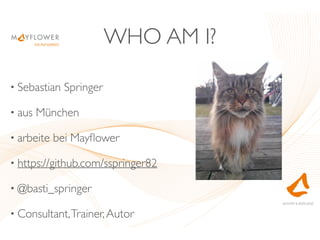
WHO AM I?
• Sebastian Springer
• aus München
• arbeite bei Mayflower
• https://github.com/sspringer82
• @basti_springer
• Consultant,Trainer,Autor
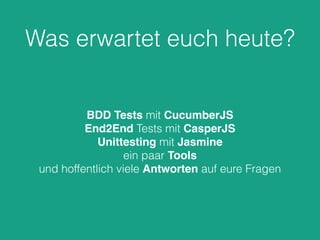
Was erwartet euch heute?
BDD Tests mit CucumberJS
End2End Tests mit CasperJS
Unittesting mit Jasmine
ein paar Tools
und hoffentlich viele Antworten auf eure Fragen
cucumber.js
w.r.wagner / pixelio.de
cucumber.js
Behaviour-Driven Development (BDD) für JavaScript.
Basiert auf Node.js
Port von Cucumber auf JavaScript.
Tests werden in der DSL Gherkin geschrieben und auf der
Kommandozeile ausgeführt.
Getestet mit Node, Firefox, Chrome, Opera, Safari.
Ziel
Formulierung von Tests in menschlicher Sprache. Eigentlich
sollten auch Nicht-Entwickler Tests schreiben können.
Installation
npm install -g cucumber
Aufbau
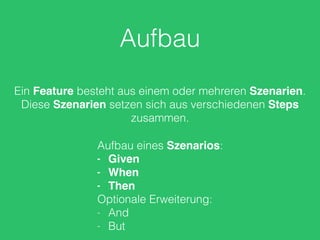
Ein Feature besteht aus einem oder mehreren Szenarien.
Diese Szenarien setzen sich aus verschiedenen Steps
zusammen.
Aufbau eines Szenarios:
- Given
- When
- Then
Optionale Erweiterung:
- And
- But
Aufbau
Die Dateien werden standardmäßig im aktuellen Verzeichnis
in einem Unterverzeichnis features erwartet.
Die Dateien enden auf .feature.
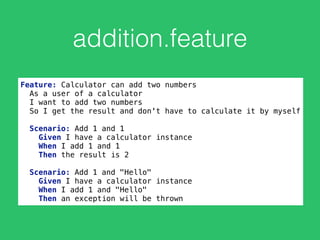
addition.feature
Feature: Calculator can add two numbers

As a user of a calculator

I want to add two numbers

So I get the result and don't have to calculate it by myself


Scenario: Add 1 and 1

Given I have a calculator instance

When I add 1 and 1

Then the result is 2


Scenario: Add 1 and "Hello"

Given I have a calculator instance

When I add 1 and "Hello"

Then an exception will be thrown
Ausführung
I-vista / pixelio.de
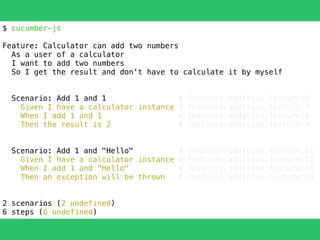
$ cucumber-js
Feature: Calculator can add two numbers
As a user of a calculator
I want to add two numbers
So I get the result and don't have to calculate it by myself
Scenario: Add 1 and 1 # features/addition.feature:6
Given I have a calculator instance # features/addition.feature:7
When I add 1 and 1 # features/addition.feature:8
Then the result is 2 # features/addition.feature:9
Scenario: Add 1 and "Hello" # features/addition.feature:11
Given I have a calculator instance # features/addition.feature:12
When I add 1 and "Hello" # features/addition.feature:13
Then an exception will be thrown # features/addition.feature:14
2 scenarios (2 undefined)
6 steps (6 undefined)
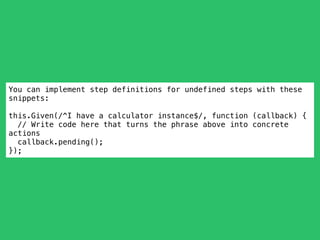
You can implement step definitions for undefined steps with these
snippets:
this.Given(/^I have a calculator instance$/, function (callback) {
// Write code here that turns the phrase above into concrete
actions
callback.pending();
});
Implementierung
Anja Schweppe-Rahe / pixelio.de
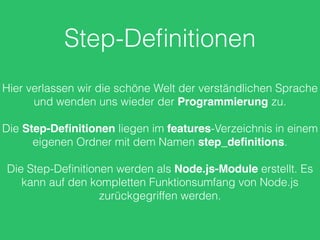
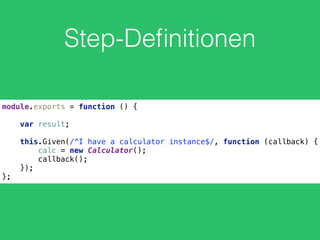
Step-Definitionen
Hier verlassen wir die schöne Welt der verständlichen Sprache
und wenden uns wieder der Programmierung zu.
Die Step-Definitionen liegen im features-Verzeichnis in einem
eigenen Ordner mit dem Namen step_definitions.
Die Step-Definitionen werden als Node.js-Module erstellt. Es
kann auf den kompletten Funktionsumfang von Node.js
zurückgegriffen werden.
Step-Definitionen
module.exports = function () {


var result;


this.Given(/^I have a calculator instance$/, function (callback) {

calc = new Calculator();

callback();

});
};
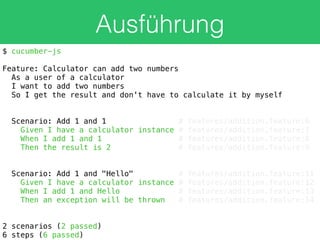
Ausführung
$ cucumber-js
Feature: Calculator can add two numbers
As a user of a calculator
I want to add two numbers
So I get the result and don't have to calculate it by myself
Scenario: Add 1 and 1 # features/addition.feature:6
Given I have a calculator instance # features/addition.feature:7
When I add 1 and 1 # features/addition.feature:8
Then the result is 2 # features/addition.feature:9
Scenario: Add 1 and "Hello" # features/addition.feature:11
Given I have a calculator instance # features/addition.feature:12
When I add 1 and Hello # features/addition.feature:13
Then an exception will be thrown # features/addition.feature:14
2 scenarios (2 passed)
6 steps (6 passed)
Fehlschlag?
Alfred Heiler / pixelio.de
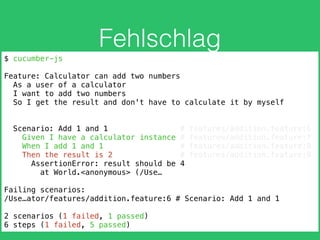
Fehlschlag
$ cucumber-js
Feature: Calculator can add two numbers
As a user of a calculator
I want to add two numbers
So I get the result and don't have to calculate it by myself
Scenario: Add 1 and 1 # features/addition.feature:6
Given I have a calculator instance # features/addition.feature:7
When I add 1 and 1 # features/addition.feature:8
Then the result is 2 # features/addition.feature:9
AssertionError: result should be 4
at World.<anonymous> (/Use…
Failing scenarios:
/Use…ator/features/addition.feature:6 # Scenario: Add 1 and 1
2 scenarios (1 failed, 1 passed)
6 steps (1 failed, 5 passed)
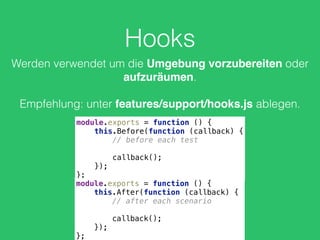
Hooks
Werden verwendet um die Umgebung vorzubereiten oder
aufzuräumen.
Empfehlung: unter features/support/hooks.js ablegen.
module.exports = function () {

this.Before(function (callback) {

// before each test


callback();

});

};
module.exports = function () {

this.After(function (callback) {

// after each scenario


callback();

});

};
Für weitere Informationen:
https://github.com/cucumber/cucumber-js
https://cucumber.io/docs/reference/javascript
CasperJS
https://twitter.com/casperjs_org
CasperJS
Tests für Headless-Browser
PhantomJS - WebKit
SlimerJS - Gecko
Installation
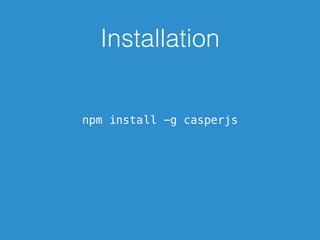
npm install -g casperjs
Engines
Standardmäßig wird PhantomJS verwendet. Mit der Option
--engine=slimerjs kann SlimerJS verwendet werden.
Aufbau
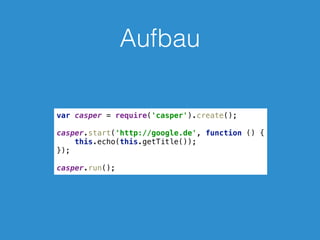
var casper = require('casper').create();


casper.start('http://google.de', function () {

this.echo(this.getTitle());

});


casper.run();
Ausführung
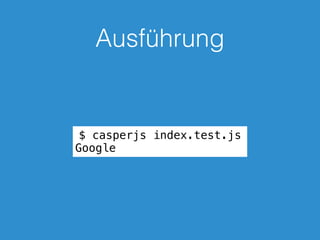
$ casperjs index.test.js
Google
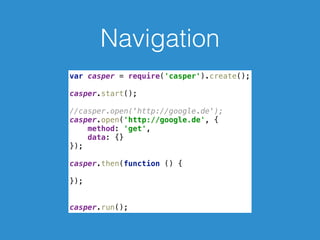
Navigation
var casper = require('casper').create();


casper.start();


//casper.open('http://google.de');

casper.open('http://google.de', {

method: 'get',

data: {}

});


casper.then(function () {


});


casper.run();
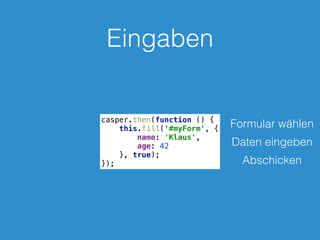
Eingaben
casper.then(function () {

this.fill('#myForm', {

name: 'Klaus',

age: 42

}, true);

});
Formular wählen
Daten eingeben
Abschicken
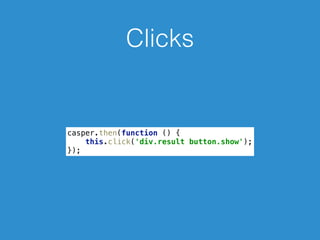
Clicks
casper.then(function () {

this.click('div.result button.show');

});
Evaluate
casper.thenEvaluate(function (searchTerm) {

document.querySelector('input[name="q"]').setAttribute('value',
searchTerm);

document.querySelector('form[name="f"]').submit();

console.log('foo');

}, 'Hello Kitty');
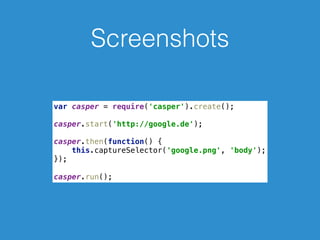
Screenshots
var casper = require('casper').create();


casper.start('http://google.de');


casper.then(function() {

this.captureSelector('google.png', 'body');

});


casper.run();
Test
Rike / pixelio.de
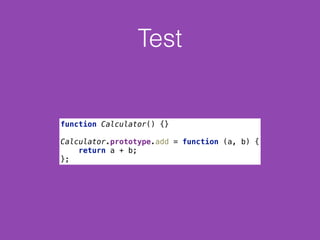
Test
function Calculator() {}


Calculator.prototype.add = function (a, b) {

return a + b;

};
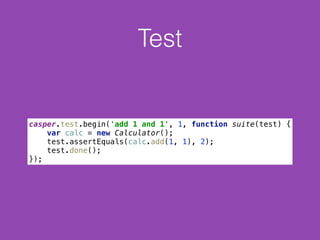
Test
casper.test.begin('add 1 and 1', 1, function suite(test) {

var calc = new Calculator();

test.assertEquals(calc.add(1, 1), 2);

test.done();

});
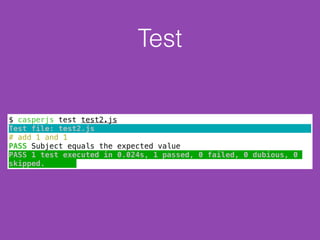
Test
$ casperjs test test2.js
Test file: test2.js
# add 1 and 1
PASS Subject equals the expected value
PASS 1 test executed in 0.024s, 1 passed, 0 failed, 0 dubious, 0
skipped.
Test
casper.test.begin('Submit Google Form', function suite(test) {

casper.start('http://www.google.de', function () {

test.assertExists('input[name="q"]');

this.fill('form', {

q: 'Hello Kitty'

}, true)

});


casper.then(function () {

test.assertTextExists('Hello Kitty – Wikipedia', 'there is a
wiki entry');

});


casper.run(function () {

test.done();

})

});
Test
$ casperjs test test3.js
Test file: test3.js
# Submit Google Form
PASS Find an element matching: input[name="q"]
PASS there is a wiki entry
PASS 2 tests executed in 1.852s, 2 passed, 0 failed, 0 dubious, 0
skipped.
CasperJS
CasperJS hat eine sehr umfangreiche API. Allerdings auch
eine gute Dokumentation mit vielen Beispielen dazu.
http://docs.casperjs.org/
Protractor/Selenium
Protractor/Selenium
End2End Tests für AngularJS. Protractor baut auf Selenium
WebDriver auf. Kann verschiedene Browser steuern.
Protractor/Selenium
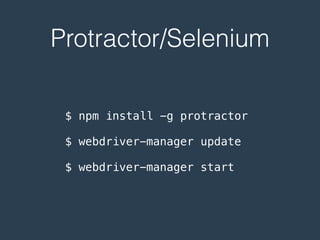
$ npm install -g protractor
$ webdriver-manager update
$ webdriver-manager start
Protractor/Selenium
describe('angularjs homepage todo list', function() {

it('should add a todo', function() {

browser.get('https://angularjs.org');


element(by.model('todoList.todoText')).sendKeys('write 1 protractor test');

element(by.css('[value="add"]')).click();


var todoList = element.all(by.repeater('todo in todoList.todos'));

expect(todoList.count()).toEqual(3);

expect(todoList.get(2).getText()).toEqual('write first protractor test');


// You wrote your first test, cross it off the list

todoList.get(2).element(by.css('input')).click();

var completedAmount = element.all(by.css('.done-true'));

expect(completedAmount.count()).toEqual(2);

});

});
Jasmine
Jasmine
BDD-Framework zur Erstellung von Unittests für
Applikationen.
Sehr weit verbreitet und gute Community-Unterstützung.
Unabhängig von Frameworks.
Alternativen: Mocha, QUnit, …
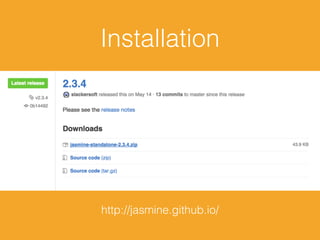
Installation
http://jasmine.github.io/
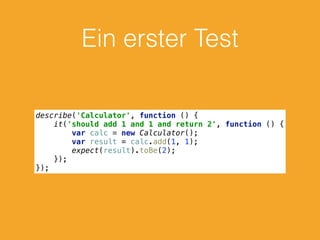
Ein erster Test
describe('Calculator', function () {

it('should add 1 and 1 and return 2', function () {

var calc = new Calculator();

var result = calc.add(1, 1);

expect(result).toBe(2);

});

});
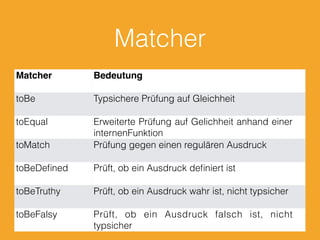
Matcher
Matcher Bedeutung
toBe Typsichere Prüfung auf Gleichheit
toEqual Erweiterte Prüfung auf Gelichheit anhand einer
internenFunktion
toMatch Prüfung gegen einen regulären Ausdruck
toBeDefined Prüft, ob ein Ausdruck definiert ist
toBeTruthy Prüft, ob ein Ausdruck wahr ist, nicht typsicher
toBeFalsy Prüft, ob ein Ausdruck falsch ist, nicht
typsicher
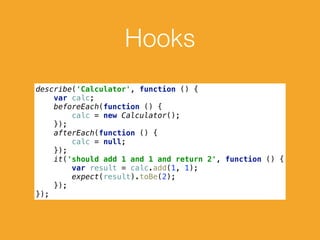
Hooks
describe('Calculator', function () {

var calc;

beforeEach(function () {

calc = new Calculator();

});

afterEach(function () {

calc = null;

});

it('should add 1 and 1 and return 2', function () {

var result = calc.add(1, 1);

expect(result).toBe(2);

});

});
Async?
Erich Westendarp / pixelio.de
Karma
Das Standalone-Release von Jasmine ist für den täglichen
Gebrauch nicht geeignet. Ein Entwickler muss ständig
zwischen IDE und Browser hin und her wechseln.
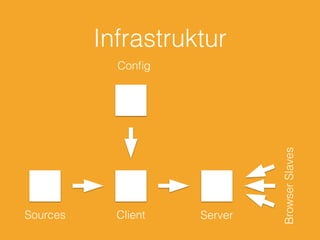
Besser: Infrastruktur und Einbettung in die
Entwicklungsumgebung
Infrastruktur
Sources Client Server
Config
BrowserSlaves
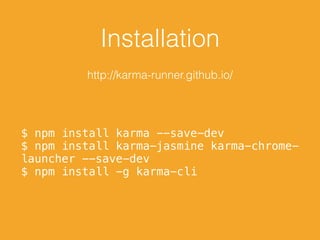
Installation
http://karma-runner.github.io/
$ npm install karma --save-dev
$ npm install karma-jasmine karma-chrome-
launcher --save-dev
$ npm install -g karma-cli
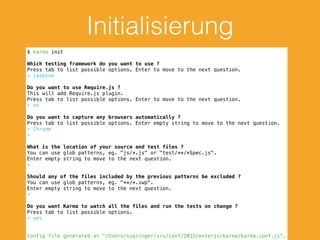
Initialisierung
$ karma init
Which testing framework do you want to use ?
Press tab to list possible options. Enter to move to the next question.
> jasmine
Do you want to use Require.js ?
This will add Require.js plugin.
Press tab to list possible options. Enter to move to the next question.
> no
Do you want to capture any browsers automatically ?
Press tab to list possible options. Enter empty string to move to the next question.
> Chrome
>
What is the location of your source and test files ?
You can use glob patterns, eg. "js/*.js" or "test/**/*Spec.js".
Enter empty string to move to the next question.
>
Should any of the files included by the previous patterns be excluded ?
You can use glob patterns, eg. "**/*.swp".
Enter empty string to move to the next question.
>
Do you want Karma to watch all the files and run the tests on change ?
Press tab to list possible options.
> yes
Config file generated at "/Users/sspringer/srv/conf/2015/enterjs/karma/karma.conf.js".
Sinon.js
Sinon.js
Hilfsbibliothek für Tests mit Unterstützung für Test Doubles.
Test Doubles
Regina Kaute / pixelio.de
Spy
Gabi Eder / pixelio.de
Spy
Wrapper um eine Funktion. Aufrufe werden direkt an die
ursprüngliche Funktion weitergeleitet. Aufrufe werden
aufgezeichnet.
Spy-Objekt kann später abgefragt werden.
Spys sollten später zurückgesetzt werden.
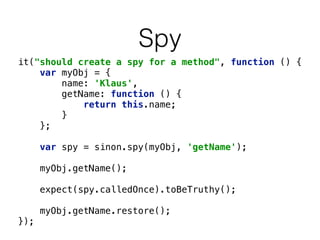
Spy
it("should create a spy for a method", function () {

var myObj = {

name: 'Klaus',

getName: function () {

return this.name;

}

};


var spy = sinon.spy(myObj, 'getName');


myObj.getName();


expect(spy.calledOnce).toBeTruthy();


myObj.getName.restore();

});
Stub
Bernd Kasper / pixelio.de
Stub
Wrapper um eine Funktion wie Spys. Weisen ein definiertes
Verhalten auf. Leiten den Aufruf nicht direkt an die
ursprüngliche Funktion weiter.
Reduzieren Abhängigkeiten und vereinfachen
Testumgebungen.
Stub
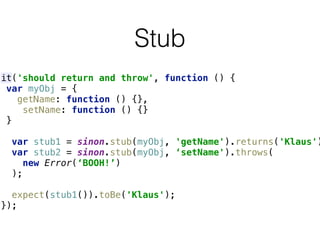
it('should return and throw', function () {

var myObj = {

getName: function () {},

setName: function () {}

}


var stub1 = sinon.stub(myObj, 'getName').returns('Klaus')
var stub2 = sinon.stub(myObj, ‘setName').throws(
new Error(‘BOOH!’)
);


expect(stub1()).toBe('Klaus');

});
Mock
Andreas Morlok / pixelio.de
Mock
Ebenfalls Wrapper um eine Funktion. Dienen dazu, die
korrekte Verwendung einer Funktion sicherzustellen. Wird
die Funktion nicht korrekt verwendet, wird eine Exception
geworfen.
Best Practice: Nicht mehr als ein Mock pro Test.
Mock
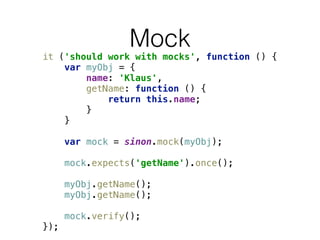
it ('should work with mocks', function () {

var myObj = {

name: 'Klaus',

getName: function () {

return this.name;

}

}


var mock = sinon.mock(myObj);


mock.expects('getName').once();


myObj.getName();

myObj.getName();


mock.verify();

});
Timers
Tim Reckmann / pixelio.de
Timers
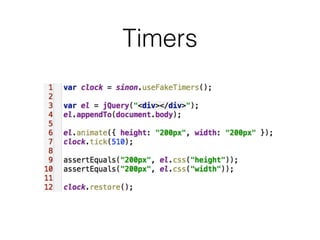
Die Zeit im Browser ist nicht vertrauenswürdig.
Fake Timers für eine stabile Testumgebung.
Bieten Kontrolle über Datum und Zeit.
Timers
Server
cre8tive / pixelio.de
Server
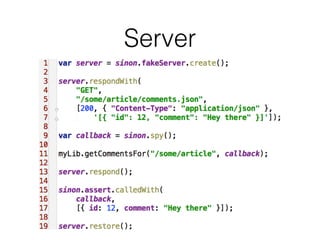
Wrapper um XMLHttpRequest bzw. ActiveXObject. Tests
werden unabhängig von einer Server-Infrastruktur ausgeführt.
Kontrolle über die Antworten des Fake Servers.
Server
Fixtures
Harald Wanetschka / pixelio.de
Fixtures
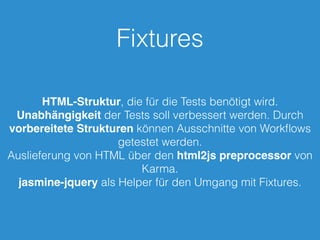
HTML-Struktur, die für die Tests benötigt wird.
Unabhängigkeit der Tests soll verbessert werden. Durch
vorbereitete Strukturen können Ausschnitte von Workflows
getestet werden.
Auslieferung von HTML über den html2js preprocessor von
Karma.
jasmine-jquery als Helper für den Umgang mit Fixtures.
Fixtures
beforeEach(function () {

$('body').append(window.__html__['fixtures/fx.html']);

$('#registerForm').on('submit', validate);

});
it ("should show four messages", function () {

$('#firstname').val('Klaus');

$('#registerForm').submit();

expect($('.message.visible').length).toBe(4);

});
Fragen?
Rainer Sturm / pixelio.de
KONTAKT
Sebastian Springer
sebastian.springer@mayflower.de
Mayflower GmbH
Mannhardtstr. 6
80538 München
Deutschland
@basti_springer
https://github.com/sspringer82

Testing tools

  • 1.
  • 2.
    WHO AM I? •Sebastian Springer • aus München • arbeite bei Mayflower • https://github.com/sspringer82 • @basti_springer • Consultant,Trainer,Autor
  • 4.
    Was erwartet euchheute? BDD Tests mit CucumberJS End2End Tests mit CasperJS Unittesting mit Jasmine ein paar Tools und hoffentlich viele Antworten auf eure Fragen
  • 5.
  • 6.
    cucumber.js Behaviour-Driven Development (BDD)für JavaScript. Basiert auf Node.js Port von Cucumber auf JavaScript. Tests werden in der DSL Gherkin geschrieben und auf der Kommandozeile ausgeführt. Getestet mit Node, Firefox, Chrome, Opera, Safari.
  • 7.
    Ziel Formulierung von Testsin menschlicher Sprache. Eigentlich sollten auch Nicht-Entwickler Tests schreiben können.
  • 8.
  • 9.
    Aufbau Ein Feature bestehtaus einem oder mehreren Szenarien. Diese Szenarien setzen sich aus verschiedenen Steps zusammen. Aufbau eines Szenarios: - Given - When - Then Optionale Erweiterung: - And - But
  • 10.
    Aufbau Die Dateien werdenstandardmäßig im aktuellen Verzeichnis in einem Unterverzeichnis features erwartet. Die Dateien enden auf .feature.
  • 11.
    addition.feature Feature: Calculator canadd two numbers
 As a user of a calculator
 I want to add two numbers
 So I get the result and don't have to calculate it by myself
 
 Scenario: Add 1 and 1
 Given I have a calculator instance
 When I add 1 and 1
 Then the result is 2
 
 Scenario: Add 1 and "Hello"
 Given I have a calculator instance
 When I add 1 and "Hello"
 Then an exception will be thrown
  • 12.
  • 13.
    $ cucumber-js Feature: Calculatorcan add two numbers As a user of a calculator I want to add two numbers So I get the result and don't have to calculate it by myself Scenario: Add 1 and 1 # features/addition.feature:6 Given I have a calculator instance # features/addition.feature:7 When I add 1 and 1 # features/addition.feature:8 Then the result is 2 # features/addition.feature:9 Scenario: Add 1 and "Hello" # features/addition.feature:11 Given I have a calculator instance # features/addition.feature:12 When I add 1 and "Hello" # features/addition.feature:13 Then an exception will be thrown # features/addition.feature:14 2 scenarios (2 undefined) 6 steps (6 undefined)
  • 14.
    You can implementstep definitions for undefined steps with these snippets: this.Given(/^I have a calculator instance$/, function (callback) { // Write code here that turns the phrase above into concrete actions callback.pending(); });
  • 15.
  • 16.
    Step-Definitionen Hier verlassen wirdie schöne Welt der verständlichen Sprache und wenden uns wieder der Programmierung zu. Die Step-Definitionen liegen im features-Verzeichnis in einem eigenen Ordner mit dem Namen step_definitions. Die Step-Definitionen werden als Node.js-Module erstellt. Es kann auf den kompletten Funktionsumfang von Node.js zurückgegriffen werden.
  • 17.
    Step-Definitionen module.exports = function() {
 
 var result;
 
 this.Given(/^I have a calculator instance$/, function (callback) {
 calc = new Calculator();
 callback();
 }); };
  • 18.
    Ausführung $ cucumber-js Feature: Calculatorcan add two numbers As a user of a calculator I want to add two numbers So I get the result and don't have to calculate it by myself Scenario: Add 1 and 1 # features/addition.feature:6 Given I have a calculator instance # features/addition.feature:7 When I add 1 and 1 # features/addition.feature:8 Then the result is 2 # features/addition.feature:9 Scenario: Add 1 and "Hello" # features/addition.feature:11 Given I have a calculator instance # features/addition.feature:12 When I add 1 and Hello # features/addition.feature:13 Then an exception will be thrown # features/addition.feature:14 2 scenarios (2 passed) 6 steps (6 passed)
  • 19.
  • 20.
    Fehlschlag $ cucumber-js Feature: Calculatorcan add two numbers As a user of a calculator I want to add two numbers So I get the result and don't have to calculate it by myself Scenario: Add 1 and 1 # features/addition.feature:6 Given I have a calculator instance # features/addition.feature:7 When I add 1 and 1 # features/addition.feature:8 Then the result is 2 # features/addition.feature:9 AssertionError: result should be 4 at World.<anonymous> (/Use… Failing scenarios: /Use…ator/features/addition.feature:6 # Scenario: Add 1 and 1 2 scenarios (1 failed, 1 passed) 6 steps (1 failed, 5 passed)
  • 21.
    Hooks Werden verwendet umdie Umgebung vorzubereiten oder aufzuräumen. Empfehlung: unter features/support/hooks.js ablegen. module.exports = function () {
 this.Before(function (callback) {
 // before each test
 
 callback();
 });
 }; module.exports = function () {
 this.After(function (callback) {
 // after each scenario
 
 callback();
 });
 };
  • 22.
  • 23.
  • 24.
  • 25.
  • 26.
    Engines Standardmäßig wird PhantomJSverwendet. Mit der Option --engine=slimerjs kann SlimerJS verwendet werden.
  • 27.
    Aufbau var casper =require('casper').create();
 
 casper.start('http://google.de', function () {
 this.echo(this.getTitle());
 });
 
 casper.run();
  • 28.
  • 29.
    Navigation var casper =require('casper').create();
 
 casper.start();
 
 //casper.open('http://google.de');
 casper.open('http://google.de', {
 method: 'get',
 data: {}
 });
 
 casper.then(function () {
 
 });
 
 
 casper.run();
  • 30.
    Eingaben casper.then(function () {
 this.fill('#myForm',{
 name: 'Klaus',
 age: 42
 }, true);
 }); Formular wählen Daten eingeben Abschicken
  • 31.
  • 32.
  • 33.
    Screenshots var casper =require('casper').create();
 
 casper.start('http://google.de');
 
 casper.then(function() {
 this.captureSelector('google.png', 'body');
 }); 
 casper.run();
  • 34.
  • 35.
    Test function Calculator() {}
 
 Calculator.prototype.add= function (a, b) {
 return a + b;
 };
  • 36.
    Test casper.test.begin('add 1 and1', 1, function suite(test) {
 var calc = new Calculator();
 test.assertEquals(calc.add(1, 1), 2);
 test.done();
 });
  • 37.
    Test $ casperjs testtest2.js Test file: test2.js # add 1 and 1 PASS Subject equals the expected value PASS 1 test executed in 0.024s, 1 passed, 0 failed, 0 dubious, 0 skipped.
  • 38.
    Test casper.test.begin('Submit Google Form',function suite(test) {
 casper.start('http://www.google.de', function () {
 test.assertExists('input[name="q"]');
 this.fill('form', {
 q: 'Hello Kitty'
 }, true)
 });
 
 casper.then(function () {
 test.assertTextExists('Hello Kitty – Wikipedia', 'there is a wiki entry');
 });
 
 casper.run(function () {
 test.done();
 })
 });
  • 39.
    Test $ casperjs testtest3.js Test file: test3.js # Submit Google Form PASS Find an element matching: input[name="q"] PASS there is a wiki entry PASS 2 tests executed in 1.852s, 2 passed, 0 failed, 0 dubious, 0 skipped.
  • 40.
    CasperJS CasperJS hat einesehr umfangreiche API. Allerdings auch eine gute Dokumentation mit vielen Beispielen dazu. http://docs.casperjs.org/
  • 41.
  • 42.
    Protractor/Selenium End2End Tests fürAngularJS. Protractor baut auf Selenium WebDriver auf. Kann verschiedene Browser steuern.
  • 43.
    Protractor/Selenium $ npm install-g protractor $ webdriver-manager update $ webdriver-manager start
  • 44.
    Protractor/Selenium describe('angularjs homepage todolist', function() {
 it('should add a todo', function() {
 browser.get('https://angularjs.org');
 
 element(by.model('todoList.todoText')).sendKeys('write 1 protractor test');
 element(by.css('[value="add"]')).click();
 
 var todoList = element.all(by.repeater('todo in todoList.todos'));
 expect(todoList.count()).toEqual(3);
 expect(todoList.get(2).getText()).toEqual('write first protractor test');
 
 // You wrote your first test, cross it off the list
 todoList.get(2).element(by.css('input')).click();
 var completedAmount = element.all(by.css('.done-true'));
 expect(completedAmount.count()).toEqual(2);
 });
 });
  • 45.
  • 46.
    Jasmine BDD-Framework zur Erstellungvon Unittests für Applikationen. Sehr weit verbreitet und gute Community-Unterstützung. Unabhängig von Frameworks. Alternativen: Mocha, QUnit, …
  • 47.
  • 48.
    Ein erster Test describe('Calculator',function () {
 it('should add 1 and 1 and return 2', function () {
 var calc = new Calculator();
 var result = calc.add(1, 1);
 expect(result).toBe(2);
 });
 });
  • 49.
    Matcher Matcher Bedeutung toBe TypsicherePrüfung auf Gleichheit toEqual Erweiterte Prüfung auf Gelichheit anhand einer internenFunktion toMatch Prüfung gegen einen regulären Ausdruck toBeDefined Prüft, ob ein Ausdruck definiert ist toBeTruthy Prüft, ob ein Ausdruck wahr ist, nicht typsicher toBeFalsy Prüft, ob ein Ausdruck falsch ist, nicht typsicher
  • 50.
    Hooks describe('Calculator', function (){
 var calc;
 beforeEach(function () {
 calc = new Calculator();
 });
 afterEach(function () {
 calc = null;
 });
 it('should add 1 and 1 and return 2', function () {
 var result = calc.add(1, 1);
 expect(result).toBe(2);
 });
 });
  • 51.
  • 52.
    Karma Das Standalone-Release vonJasmine ist für den täglichen Gebrauch nicht geeignet. Ein Entwickler muss ständig zwischen IDE und Browser hin und her wechseln. Besser: Infrastruktur und Einbettung in die Entwicklungsumgebung
  • 53.
  • 54.
    Installation http://karma-runner.github.io/ $ npm installkarma --save-dev $ npm install karma-jasmine karma-chrome- launcher --save-dev $ npm install -g karma-cli
  • 55.
    Initialisierung $ karma init Whichtesting framework do you want to use ? Press tab to list possible options. Enter to move to the next question. > jasmine Do you want to use Require.js ? This will add Require.js plugin. Press tab to list possible options. Enter to move to the next question. > no Do you want to capture any browsers automatically ? Press tab to list possible options. Enter empty string to move to the next question. > Chrome > What is the location of your source and test files ? You can use glob patterns, eg. "js/*.js" or "test/**/*Spec.js". Enter empty string to move to the next question. > Should any of the files included by the previous patterns be excluded ? You can use glob patterns, eg. "**/*.swp". Enter empty string to move to the next question. > Do you want Karma to watch all the files and run the tests on change ? Press tab to list possible options. > yes Config file generated at "/Users/sspringer/srv/conf/2015/enterjs/karma/karma.conf.js".
  • 56.
  • 57.
    Sinon.js Hilfsbibliothek für Testsmit Unterstützung für Test Doubles.
  • 58.
  • 59.
    Spy Gabi Eder /pixelio.de
  • 60.
    Spy Wrapper um eineFunktion. Aufrufe werden direkt an die ursprüngliche Funktion weitergeleitet. Aufrufe werden aufgezeichnet. Spy-Objekt kann später abgefragt werden. Spys sollten später zurückgesetzt werden.
  • 61.
    Spy it("should create aspy for a method", function () {
 var myObj = {
 name: 'Klaus',
 getName: function () {
 return this.name;
 }
 };
 
 var spy = sinon.spy(myObj, 'getName');
 
 myObj.getName();
 
 expect(spy.calledOnce).toBeTruthy();
 
 myObj.getName.restore();
 });
  • 62.
  • 63.
    Stub Wrapper um eineFunktion wie Spys. Weisen ein definiertes Verhalten auf. Leiten den Aufruf nicht direkt an die ursprüngliche Funktion weiter. Reduzieren Abhängigkeiten und vereinfachen Testumgebungen.
  • 64.
    Stub it('should return andthrow', function () {
 var myObj = {
 getName: function () {},
 setName: function () {}
 }
 
 var stub1 = sinon.stub(myObj, 'getName').returns('Klaus') var stub2 = sinon.stub(myObj, ‘setName').throws( new Error(‘BOOH!’) );
 
 expect(stub1()).toBe('Klaus');
 });
  • 65.
  • 66.
    Mock Ebenfalls Wrapper umeine Funktion. Dienen dazu, die korrekte Verwendung einer Funktion sicherzustellen. Wird die Funktion nicht korrekt verwendet, wird eine Exception geworfen. Best Practice: Nicht mehr als ein Mock pro Test.
  • 67.
    Mock it ('should workwith mocks', function () {
 var myObj = {
 name: 'Klaus',
 getName: function () {
 return this.name;
 }
 }
 
 var mock = sinon.mock(myObj);
 
 mock.expects('getName').once();
 
 myObj.getName();
 myObj.getName();
 
 mock.verify();
 });
  • 68.
  • 69.
    Timers Die Zeit imBrowser ist nicht vertrauenswürdig. Fake Timers für eine stabile Testumgebung. Bieten Kontrolle über Datum und Zeit.
  • 70.
  • 71.
  • 72.
    Server Wrapper um XMLHttpRequestbzw. ActiveXObject. Tests werden unabhängig von einer Server-Infrastruktur ausgeführt. Kontrolle über die Antworten des Fake Servers.
  • 73.
  • 74.
  • 75.
    Fixtures HTML-Struktur, die fürdie Tests benötigt wird. Unabhängigkeit der Tests soll verbessert werden. Durch vorbereitete Strukturen können Ausschnitte von Workflows getestet werden. Auslieferung von HTML über den html2js preprocessor von Karma. jasmine-jquery als Helper für den Umgang mit Fixtures.
  • 76.
    Fixtures beforeEach(function () {
 $('body').append(window.__html__['fixtures/fx.html']);
 $('#registerForm').on('submit',validate);
 }); it ("should show four messages", function () {
 $('#firstname').val('Klaus');
 $('#registerForm').submit();
 expect($('.message.visible').length).toBe(4);
 });
  • 77.
  • 78.
    KONTAKT Sebastian Springer sebastian.springer@mayflower.de Mayflower GmbH Mannhardtstr.6 80538 München Deutschland @basti_springer https://github.com/sspringer82