Zentrum für
Informations- und
Medientechnologie
Simple Network Management Protocol
(SNMP)
19.05.2016 2
Zentrum für
Informations- und
Medientechnologie
Allgemeines:
● 1988 wurde der SNMPv1 Standard in der RFC1065 definiert
● 1993 SNMPv2 führte Kommunikation zwischen Managern und
den Getbulk-Befehl ein
● 2002 wurde mit SNMPv3 vermehrt Wert auf Sicherheit gelegt. Ist
aber wegen erhöhter Komplexität nicht so weit verbreitet
● Im Uni-Netz wurde bisher hauptsächlich mithilfe von SNMPv2c
gearbeitet.
19.05.2016 3
Zentrum für
Informations- und
Medientechnologie
alexander.kiontke@uni-siegen.de
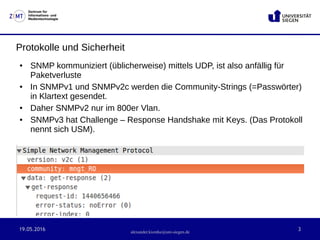
Protokolle und Sicherheit
● SNMP kommuniziert (üblicherweise) mittels UDP, ist also anfällig für
Paketverluste
● In SNMPv1 und SNMPv2c werden die Community-Strings (=Passwörter)
in Klartext gesendet.
● Daher SNMPv2 nur im 800er Vlan.
● SNMPv3 hat Challenge – Response Handshake mit Keys. (Das Protokoll
nennt sich USM).
19.05.2016 4
Zentrum für
Informations- und
Medientechnologie
alexander.kiontke@uni-siegen.de
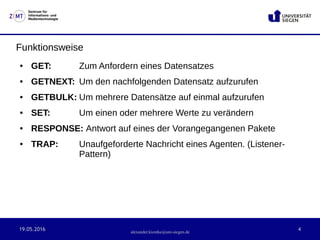
Funktionsweise
● GET: Zum Anfordern eines Datensatzes
● GETNEXT: Um den nachfolgenden Datensatz aufzurufen
● GETBULK: Um mehrere Datensätze auf einmal aufzurufen
● SET: Um einen oder mehrere Werte zu verändern
● RESPONSE: Antwort auf eines der Vorangegangenen Pakete
● TRAP: Unaufgeforderte Nachricht eines Agenten. (Listener-
Pattern)
19.05.2016 5
Zentrum für
Informations- und
Medientechnologie
alexander.kiontke@uni-siegen.de
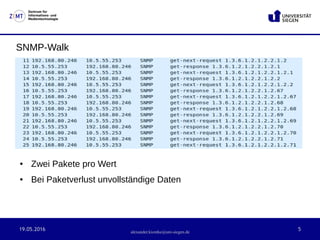
SNMP-Walk
● Zwei Pakete pro Wert
● Bei Paketverlust unvollständige Daten
19.05.2016 6
Zentrum für
Informations- und
Medientechnologie
alexander.kiontke@uni-siegen.de
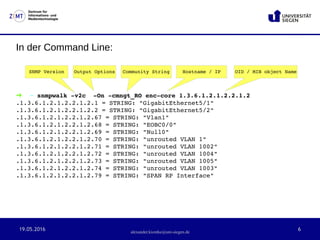
In der Command Line:
➜  ~ snmpwalk ­v2c  ­On ­cmngt_RO enc­core 1.3.6.1.2.1.2.2.1.2 
.1.3.6.1.2.1.2.2.1.2.1 = STRING: "GigabitEthernet5/1"
.1.3.6.1.2.1.2.2.1.2.2 = STRING: "GigabitEthernet5/2"
.1.3.6.1.2.1.2.2.1.2.67 = STRING: "Vlan1"
.1.3.6.1.2.1.2.2.1.2.68 = STRING: "EOBC0/0"
.1.3.6.1.2.1.2.2.1.2.69 = STRING: "Null0"
.1.3.6.1.2.1.2.2.1.2.70 = STRING: "unrouted VLAN 1"
.1.3.6.1.2.1.2.2.1.2.71 = STRING: "unrouted VLAN 1002"
.1.3.6.1.2.1.2.2.1.2.72 = STRING: "unrouted VLAN 1004"
.1.3.6.1.2.1.2.2.1.2.73 = STRING: "unrouted VLAN 1005"
.1.3.6.1.2.1.2.2.1.2.74 = STRING: "unrouted VLAN 1003"
.1.3.6.1.2.1.2.2.1.2.79 = STRING: "SPAN RP Interface"
Output OptionsSNMP Version Community String Hostname / IP OID / MIB object Name
19.05.2016 7
Zentrum für
Informations- und
Medientechnologie
alexander.kiontke@uni-siegen.de
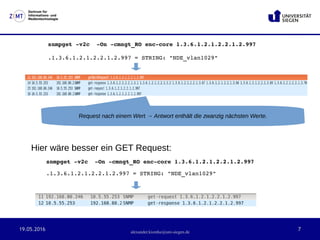
snmpget ­v2c  ­On ­cmngt_RO enc­core 1.3.6.1.2.1.2.2.1.2.997
.1.3.6.1.2.1.2.2.1.2.997 = STRING: "NDE_vlan1029"
Hier wäre besser ein GET Request:
snmpget ­v2c  ­On ­cmngt_RO enc­core 1.3.6.1.2.1.2.2.1.2.997
.1.3.6.1.2.1.2.2.1.2.997 = STRING: "NDE_vlan1029"
19.05.2016 8
Zentrum für
Informations- und
Medientechnologie
alexander.kiontke@uni-siegen.de
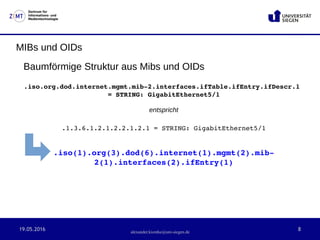
MIBs und OIDs
Baumförmige Struktur aus Mibs und OIDs
.iso.org.dod.internet.mgmt.mib­2.interfaces.ifTable.ifEntry.ifDescr.1 
= STRING: GigabitEthernet5/1
entspricht
.1.3.6.1.2.1.2.2.1.2.1 = STRING: GigabitEthernet5/1
.iso(1).org(3).dod(6).internet(1).mgmt(2).mib­
2(1).interfaces(2).ifEntry(1)
19.05.2016 9
Zentrum für
Informations- und
Medientechnologie
alexander.kiontke@uni-siegen.de
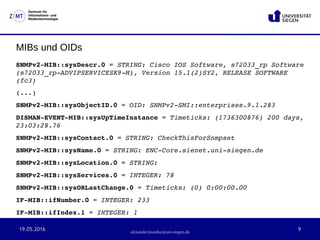
MIBs und OIDs
SNMPv2­MIB::sysDescr.0 = STRING: Cisco IOS Software, s72033_rp Software 
(s72033_rp­ADVIPSERVICESK9­M), Version 15.1(2)SY2, RELEASE SOFTWARE 
(fc3)
(...)
SNMPv2­MIB::sysObjectID.0 = OID: SNMPv2­SMI::enterprises.9.1.283
DISMAN­EVENT­MIB::sysUpTimeInstance = Timeticks: (1736300876) 200 days, 
23:03:28.76
SNMPv2­MIB::sysContact.0 = STRING: CheckThisForSnmpset
SNMPv2­MIB::sysName.0 = STRING: ENC­Core.sienet.uni­siegen.de
SNMPv2­MIB::sysLocation.0 = STRING: 
SNMPv2­MIB::sysServices.0 = INTEGER: 78
SNMPv2­MIB::sysORLastChange.0 = Timeticks: (0) 0:00:00.00
IF­MIB::ifNumber.0 = INTEGER: 233
IF­MIB::ifIndex.1 = INTEGER: 1
19.05.2016 10
Zentrum für
Informations- und
Medientechnologie
alexander.kiontke@uni-siegen.de
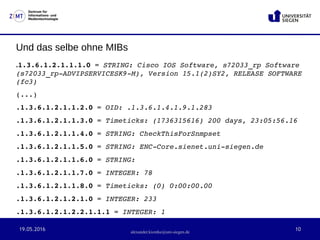
Und das selbe ohne MIBs
.1.3.6.1.2.1.1.1.0 = STRING: Cisco IOS Software, s72033_rp Software 
(s72033_rp­ADVIPSERVICESK9­M), Version 15.1(2)SY2, RELEASE SOFTWARE 
(fc3)
(...)
.1.3.6.1.2.1.1.2.0 = OID: .1.3.6.1.4.1.9.1.283
.1.3.6.1.2.1.1.3.0 = Timeticks: (1736315616) 200 days, 23:05:56.16
.1.3.6.1.2.1.1.4.0 = STRING: CheckThisForSnmpset
.1.3.6.1.2.1.1.5.0 = STRING: ENC­Core.sienet.uni­siegen.de
.1.3.6.1.2.1.1.6.0 = STRING: 
.1.3.6.1.2.1.1.7.0 = INTEGER: 78
.1.3.6.1.2.1.1.8.0 = Timeticks: (0) 0:00:00.00
.1.3.6.1.2.1.2.1.0 = INTEGER: 233
.1.3.6.1.2.1.2.2.1.1.1 = INTEGER: 1
19.05.2016 11
Zentrum für
Informations- und
Medientechnologie
alexander.kiontke@uni-siegen.de
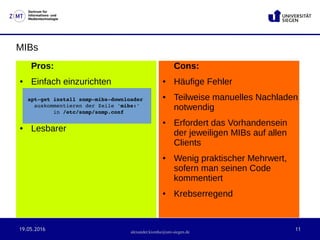
MIBs
Pros:
● Einfach einzurichten
● Lesbarer
Cons:
● Häufige Fehler
● Teilweise manuelles Nachladen
notwendig
● Erfordert das Vorhandensein
der jeweiligen MIBs auf allen
Clients
● Wenig praktischer Mehrwert,
sofern man seinen Code
kommentiert
● Krebserregend
apt­get install snmp­mibs­downloader 
auskommentieren der Zeile 'mibs:'
 in /etc/snmp/snmp.conf
19.05.2016 12
Zentrum für
Informations- und
Medientechnologie
alexander.kiontke@uni-siegen.de
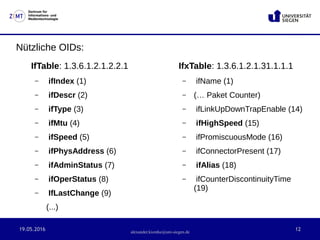
Nützliche OIDs:
IfTable: 1.3.6.1.2.1.2.2.1
– ifIndex (1)
– ifDescr (2)
– ifType (3)
– ifMtu (4)
– ifSpeed (5)
– ifPhysAddress (6)
– ifAdminStatus (7)
– ifOperStatus (8)
– IfLastChange (9)
(...)
IfxTable: 1.3.6.1.2.1.31.1.1.1
– ifName (1)
– (… Paket Counter)
– ifLinkUpDownTrapEnable (14)
– ifHighSpeed (15)
– ifPromiscuousMode (16)
– ifConnectorPresent (17)
– ifAlias (18)
– ifCounterDiscontinuityTime
(19)
19.05.2016 13
Zentrum für
Informations- und
Medientechnologie
alexander.kiontke@uni-siegen.de
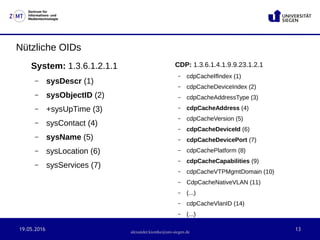
Nützliche OIDs
System: 1.3.6.1.2.1.1
– sysDescr (1)
– sysObjectID (2)
– +sysUpTime (3)
– sysContact (4)
– sysName (5)
– sysLocation (6)
– sysServices (7)
CDP: 1.3.6.1.4.1.9.9.23.1.2.1
– cdpCacheIfIndex (1)
– cdpCacheDeviceIndex (2)
– cdpCacheAddressType (3)
– cdpCacheAddress (4)
– cdpCacheVersion (5)
– cdpCacheDeviceId (6)
– cdpCacheDevicePort (7)
– cdpCachePlatform (8)
– cdpCacheCapabilities (9)
– cdpCacheVTPMgmtDomain (10)
– CdpCacheNativeVLAN (11)
– (...)
– cdpCacheVlanID (14)
– (...)
19.05.2016 14
Zentrum für
Informations- und
Medientechnologie
alexander.kiontke@uni-siegen.de
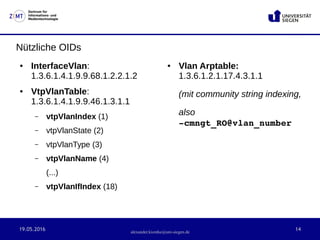
Nützliche OIDs
● InterfaceVlan:
1.3.6.1.4.1.9.9.68.1.2.2.1.2
● VtpVlanTable:
1.3.6.1.4.1.9.9.46.1.3.1.1
– vtpVlanIndex (1)
– vtpVlanState (2)
– vtpVlanType (3)
– vtpVlanName (4)
(...)
– vtpVlanIfIndex (18)
● Vlan Arptable:
1.3.6.1.2.1.17.4.3.1.1
(mit community string indexing,
also  
­cmngt_RO@vlan_number
19.05.2016 15
Zentrum für
Informations- und
Medientechnologie
alexander.kiontke@uni-siegen.de
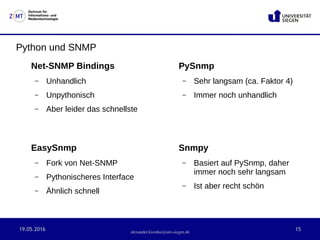
Python und SNMP
Net-SNMP Bindings
– Unhandlich
– Unpythonisch
– Aber leider das schnellste
PySnmp
– Sehr langsam (ca. Faktor 4)
– Immer noch unhandlich
Snmpy
– Basiert auf PySnmp, daher
immer noch sehr langsam
– Ist aber recht schön
EasySnmp
– Fork von Net-SNMP
– Pythonischeres Interface
– Ähnlich schnell
19.05.2016 16
Zentrum für
Informations- und
Medientechnologie
alexander.kiontke@uni-siegen.de
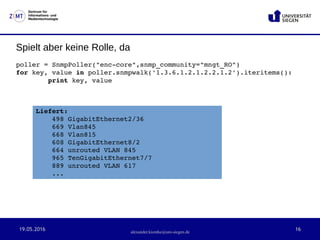
Spielt aber keine Rolle, da
poller = SnmpPoller("enc­core",snmp_community="mngt_RO")
for key, value in poller.snmpwalk('1.3.6.1.2.1.2.2.1.2').iteritems():
        print key, value
Liefert:
498 GigabitEthernet2/36
669 Vlan845
668 Vlan815
608 GigabitEthernet8/2
664 unrouted VLAN 845
965 TenGigabitEthernet7/7
889 unrouted VLAN 617
...

SNMP - Eine kurze Einführung

  • 1.
  • 2.
    19.05.2016 2 Zentrum für Informations-und Medientechnologie Allgemeines: ● 1988 wurde der SNMPv1 Standard in der RFC1065 definiert ● 1993 SNMPv2 führte Kommunikation zwischen Managern und den Getbulk-Befehl ein ● 2002 wurde mit SNMPv3 vermehrt Wert auf Sicherheit gelegt. Ist aber wegen erhöhter Komplexität nicht so weit verbreitet ● Im Uni-Netz wurde bisher hauptsächlich mithilfe von SNMPv2c gearbeitet.
  • 3.
    19.05.2016 3 Zentrum für Informations-und Medientechnologie alexander.kiontke@uni-siegen.de Protokolle und Sicherheit ● SNMP kommuniziert (üblicherweise) mittels UDP, ist also anfällig für Paketverluste ● In SNMPv1 und SNMPv2c werden die Community-Strings (=Passwörter) in Klartext gesendet. ● Daher SNMPv2 nur im 800er Vlan. ● SNMPv3 hat Challenge – Response Handshake mit Keys. (Das Protokoll nennt sich USM).
  • 4.
    19.05.2016 4 Zentrum für Informations-und Medientechnologie alexander.kiontke@uni-siegen.de Funktionsweise ● GET: Zum Anfordern eines Datensatzes ● GETNEXT: Um den nachfolgenden Datensatz aufzurufen ● GETBULK: Um mehrere Datensätze auf einmal aufzurufen ● SET: Um einen oder mehrere Werte zu verändern ● RESPONSE: Antwort auf eines der Vorangegangenen Pakete ● TRAP: Unaufgeforderte Nachricht eines Agenten. (Listener- Pattern)
  • 5.
    19.05.2016 5 Zentrum für Informations-und Medientechnologie alexander.kiontke@uni-siegen.de SNMP-Walk ● Zwei Pakete pro Wert ● Bei Paketverlust unvollständige Daten
  • 6.
    19.05.2016 6 Zentrum für Informations-und Medientechnologie alexander.kiontke@uni-siegen.de In der Command Line: ➜  ~ snmpwalk ­v2c  ­On ­cmngt_RO enc­core 1.3.6.1.2.1.2.2.1.2  .1.3.6.1.2.1.2.2.1.2.1 = STRING: "GigabitEthernet5/1" .1.3.6.1.2.1.2.2.1.2.2 = STRING: "GigabitEthernet5/2" .1.3.6.1.2.1.2.2.1.2.67 = STRING: "Vlan1" .1.3.6.1.2.1.2.2.1.2.68 = STRING: "EOBC0/0" .1.3.6.1.2.1.2.2.1.2.69 = STRING: "Null0" .1.3.6.1.2.1.2.2.1.2.70 = STRING: "unrouted VLAN 1" .1.3.6.1.2.1.2.2.1.2.71 = STRING: "unrouted VLAN 1002" .1.3.6.1.2.1.2.2.1.2.72 = STRING: "unrouted VLAN 1004" .1.3.6.1.2.1.2.2.1.2.73 = STRING: "unrouted VLAN 1005" .1.3.6.1.2.1.2.2.1.2.74 = STRING: "unrouted VLAN 1003" .1.3.6.1.2.1.2.2.1.2.79 = STRING: "SPAN RP Interface" Output OptionsSNMP Version Community String Hostname / IP OID / MIB object Name
  • 7.
    19.05.2016 7 Zentrum für Informations-und Medientechnologie alexander.kiontke@uni-siegen.de snmpget ­v2c  ­On ­cmngt_RO enc­core 1.3.6.1.2.1.2.2.1.2.997 .1.3.6.1.2.1.2.2.1.2.997 = STRING: "NDE_vlan1029" Hier wäre besser ein GET Request: snmpget ­v2c  ­On ­cmngt_RO enc­core 1.3.6.1.2.1.2.2.1.2.997 .1.3.6.1.2.1.2.2.1.2.997 = STRING: "NDE_vlan1029"
  • 8.
    19.05.2016 8 Zentrum für Informations-und Medientechnologie alexander.kiontke@uni-siegen.de MIBs und OIDs Baumförmige Struktur aus Mibs und OIDs .iso.org.dod.internet.mgmt.mib­2.interfaces.ifTable.ifEntry.ifDescr.1  = STRING: GigabitEthernet5/1 entspricht .1.3.6.1.2.1.2.2.1.2.1 = STRING: GigabitEthernet5/1 .iso(1).org(3).dod(6).internet(1).mgmt(2).mib­ 2(1).interfaces(2).ifEntry(1)
  • 9.
    19.05.2016 9 Zentrum für Informations-und Medientechnologie alexander.kiontke@uni-siegen.de MIBs und OIDs SNMPv2­MIB::sysDescr.0 = STRING: Cisco IOS Software, s72033_rp Software  (s72033_rp­ADVIPSERVICESK9­M), Version 15.1(2)SY2, RELEASE SOFTWARE  (fc3) (...) SNMPv2­MIB::sysObjectID.0 = OID: SNMPv2­SMI::enterprises.9.1.283 DISMAN­EVENT­MIB::sysUpTimeInstance = Timeticks: (1736300876) 200 days,  23:03:28.76 SNMPv2­MIB::sysContact.0 = STRING: CheckThisForSnmpset SNMPv2­MIB::sysName.0 = STRING: ENC­Core.sienet.uni­siegen.de SNMPv2­MIB::sysLocation.0 = STRING:  SNMPv2­MIB::sysServices.0 = INTEGER: 78 SNMPv2­MIB::sysORLastChange.0 = Timeticks: (0) 0:00:00.00 IF­MIB::ifNumber.0 = INTEGER: 233 IF­MIB::ifIndex.1 = INTEGER: 1
  • 10.
    19.05.2016 10 Zentrum für Informations-und Medientechnologie alexander.kiontke@uni-siegen.de Und das selbe ohne MIBs .1.3.6.1.2.1.1.1.0 = STRING: Cisco IOS Software, s72033_rp Software  (s72033_rp­ADVIPSERVICESK9­M), Version 15.1(2)SY2, RELEASE SOFTWARE  (fc3) (...) .1.3.6.1.2.1.1.2.0 = OID: .1.3.6.1.4.1.9.1.283 .1.3.6.1.2.1.1.3.0 = Timeticks: (1736315616) 200 days, 23:05:56.16 .1.3.6.1.2.1.1.4.0 = STRING: CheckThisForSnmpset .1.3.6.1.2.1.1.5.0 = STRING: ENC­Core.sienet.uni­siegen.de .1.3.6.1.2.1.1.6.0 = STRING:  .1.3.6.1.2.1.1.7.0 = INTEGER: 78 .1.3.6.1.2.1.1.8.0 = Timeticks: (0) 0:00:00.00 .1.3.6.1.2.1.2.1.0 = INTEGER: 233 .1.3.6.1.2.1.2.2.1.1.1 = INTEGER: 1
  • 11.
    19.05.2016 11 Zentrum für Informations-und Medientechnologie alexander.kiontke@uni-siegen.de MIBs Pros: ● Einfach einzurichten ● Lesbarer Cons: ● Häufige Fehler ● Teilweise manuelles Nachladen notwendig ● Erfordert das Vorhandensein der jeweiligen MIBs auf allen Clients ● Wenig praktischer Mehrwert, sofern man seinen Code kommentiert ● Krebserregend apt­get install snmp­mibs­downloader  auskommentieren der Zeile 'mibs:'  in /etc/snmp/snmp.conf
  • 12.
    19.05.2016 12 Zentrum für Informations-und Medientechnologie alexander.kiontke@uni-siegen.de Nützliche OIDs: IfTable: 1.3.6.1.2.1.2.2.1 – ifIndex (1) – ifDescr (2) – ifType (3) – ifMtu (4) – ifSpeed (5) – ifPhysAddress (6) – ifAdminStatus (7) – ifOperStatus (8) – IfLastChange (9) (...) IfxTable: 1.3.6.1.2.1.31.1.1.1 – ifName (1) – (… Paket Counter) – ifLinkUpDownTrapEnable (14) – ifHighSpeed (15) – ifPromiscuousMode (16) – ifConnectorPresent (17) – ifAlias (18) – ifCounterDiscontinuityTime (19)
  • 13.
    19.05.2016 13 Zentrum für Informations-und Medientechnologie alexander.kiontke@uni-siegen.de Nützliche OIDs System: 1.3.6.1.2.1.1 – sysDescr (1) – sysObjectID (2) – +sysUpTime (3) – sysContact (4) – sysName (5) – sysLocation (6) – sysServices (7) CDP: 1.3.6.1.4.1.9.9.23.1.2.1 – cdpCacheIfIndex (1) – cdpCacheDeviceIndex (2) – cdpCacheAddressType (3) – cdpCacheAddress (4) – cdpCacheVersion (5) – cdpCacheDeviceId (6) – cdpCacheDevicePort (7) – cdpCachePlatform (8) – cdpCacheCapabilities (9) – cdpCacheVTPMgmtDomain (10) – CdpCacheNativeVLAN (11) – (...) – cdpCacheVlanID (14) – (...)
  • 14.
    19.05.2016 14 Zentrum für Informations-und Medientechnologie alexander.kiontke@uni-siegen.de Nützliche OIDs ● InterfaceVlan: 1.3.6.1.4.1.9.9.68.1.2.2.1.2 ● VtpVlanTable: 1.3.6.1.4.1.9.9.46.1.3.1.1 – vtpVlanIndex (1) – vtpVlanState (2) – vtpVlanType (3) – vtpVlanName (4) (...) – vtpVlanIfIndex (18) ● Vlan Arptable: 1.3.6.1.2.1.17.4.3.1.1 (mit community string indexing, also   ­cmngt_RO@vlan_number
  • 15.
    19.05.2016 15 Zentrum für Informations-und Medientechnologie alexander.kiontke@uni-siegen.de Python und SNMP Net-SNMP Bindings – Unhandlich – Unpythonisch – Aber leider das schnellste PySnmp – Sehr langsam (ca. Faktor 4) – Immer noch unhandlich Snmpy – Basiert auf PySnmp, daher immer noch sehr langsam – Ist aber recht schön EasySnmp – Fork von Net-SNMP – Pythonischeres Interface – Ähnlich schnell
  • 16.
    19.05.2016 16 Zentrum für Informations-und Medientechnologie alexander.kiontke@uni-siegen.de Spielt aber keine Rolle, da poller = SnmpPoller("enc­core",snmp_community="mngt_RO") for key, value in poller.snmpwalk('1.3.6.1.2.1.2.2.1.2').iteritems():         print key, value Liefert: 498 GigabitEthernet2/36 669 Vlan845 668 Vlan815 608 GigabitEthernet8/2 664 unrouted VLAN 845 965 TenGigabitEthernet7/7 889 unrouted VLAN 617 ...