Apple MapKit vs. 
Google Maps SDK 
Ortwin Gentz 
@ortwingentz αortwin
Warum Google?

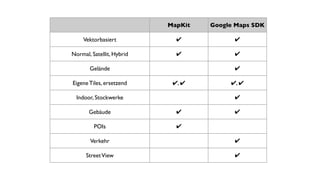
MapKit Google Maps SDK 
Vektorbasiert ✔ ✔ 
Normal, Satellit, Hybrid ✔ ✔ 
Gelände ✔ 
Eigene Tiles, ersetzend ✔, ✔ ✔, ✔ 
Indoor, Stockwerke ✔ 
Gebäude ✔ ✔ 
POIs ✔ 
Verkehr ✔ 
Street View ✔
Steuerung 
Kartenausschnitt
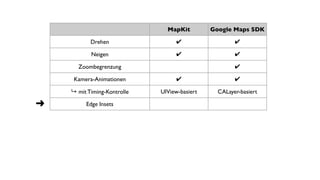
MapKit Google Maps SDK 
Drehen ✔ ✔ 
Neigen ✔ ✔ 
Zoombegrenzung ✔ 
Kamera-Animationen ✔ ✔ 
↳ mit Timing-Kontrolle UIView-basiert CALayer-basiert 
➜ Edge Insets
Hands on
MapKit Google Maps SDK 
Drehen ✔ ✔ 
Neigen ✔ ✔ 
Zoombegrenzung ✔ 
Kamera-Animationen ✔ ✔ 
➜ 
➜ privat ✔ 
↳ mit Timing-Kontrolle UIView-basiert CALayer-basiert 
Edge Insets
Gesten
MapKit Google Maps SDK 
Unterscheidung manuelle und 
programmatische Updates 
bedingt lösbar 
➜ Macoun 2010 ✔ 
Laufende Region-Updates ✔ 
➜ Non-Annotation Tap-Erkennung
Hands on
MapKit Google Maps SDK 
Unterscheidung manuelle und 
programmatische Updates 
bedingt lösbar 
➜ Macoun 2010 
✔ 
Laufende Region-Updates ✔ 
Non-Annotation Tap-Erkennung 
Long-Tap Erkennung lösbar ✔ 
Standort-Tracking ✔ 
➜ 
➜ 
lösbar ✔
Hands on
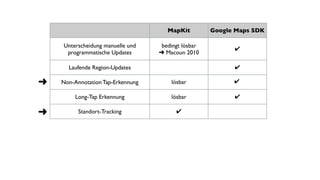
MapKit Google Maps SDK 
Unterscheidung manuelle und 
programmatische Updates 
bedingt lösbar 
➜ Macoun 2010 
✔ 
Laufende Region-Updates ✔ 
Non-Annotation Tap-Erkennung 
Long-Tap Erkennung lösbar ✔ 
Standort-Tracking ✔ 
➜ 
➜ 
lösbar ✔ 
lösbar
Annotations / Marker
title 
subtitle 
color 
image 
animation 
draggable 
UIView 
calloutAccessoryViews 
Custom drawn 
kein Highlighting
Annotations 
erstellen
MapKit Google Maps SDK 
id<MKAnnotation> erstellen id<GMSMarker> erstellen 
[mapView addAnnotation:] marker.map = mapView; 
-[MKMapView:viewForAnnotation:] 
implementieren 
-(UIView*)mapView: markerInfoWindow: 
[mapView removeAnnotation:] marker.map = nil;
Annotation-Taps
MapKit Google Maps SDK 
-(void)mapView: 
didSelectAnnotationView: 
-(BOOL)mapView: 
didTapMarker: 
-(void)mapView: 
annotationView: 
calloutAccessoryControlTapped: 
-(void)mapView: 
didTapInfoWindowOfMarker 
-(void)mapView: 
didDeSelectAnnotationView: 
-(void)mapView: 
didTapAtCoordinate: 
-[MKAnnotationView 
setSelected:animated:]
Draggable Annotations
Demo
MapKit Google Maps SDK 
annotationView.draggable = YES; marker.draggable = YES; 
-mapView:annotationView: 
didChangeDragState:fromOldState: 
-mapView:didBeginDraggingMarker: 
-[MKAnnotationView 
setDragState:animated:] 
-mapView:didDragMarker: 
-mapView:didEndDraggingMarker:
Overlays
MapKit Google Maps SDK 
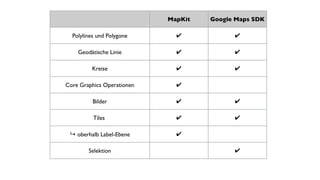
Polylines und Polygone ✔ ✔ 
Geodätische Linie ✔ ✔ 
Kreise ✔ ✔ 
Core Graphics Operationen ✔ 
Bilder ✔ ✔ 
Tiles ✔ ✔ 
↳ oberhalb Label-Ebene ✔ 
Selektion ✔
MapKit Google Maps SDK 
MKOverlay 
MKOverlayRenderer 
GMSOverlay 
Geometrie 
Darstellung 
Geometrie 
Darstellung
MapKit Google Maps SDK 
+[MKPolygon 
polygonWithCoordinates:count:] 
[[GMSPolygon alloc] init] 
polygon.path 
polygon.fillColor/strokeColor 
-[MKMapView addOverlay:] polygon.map = mapView; 
-mapView:rendererForOverlay: 
MKPolygonRenderer. 
fillColor/strokeColor 
polygon.tappable = YES; 
-(void)mapView: 
didTapAtCoordinate:
Tile Overlays
Hands on

Generelle Erwägungen
Generelle Erwägungen 
• Programmierung gegen bekannte Framework-Version 
• Bug-Tracker offen, Google ist responsive 
• Hohes Innovationstempo 
• Terms of Use anschauen
Fragen? Ortwin Gentz 
@ortwingentz · αortwin 
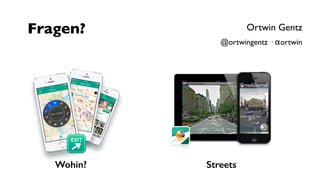
Wohin? Streets

MapKit vs. Google Maps SDK @ Macoun 2014

  • 1.
    Apple MapKit vs. Google Maps SDK Ortwin Gentz @ortwingentz αortwin
  • 2.
  • 3.
  • 5.
    MapKit Google MapsSDK Vektorbasiert ✔ ✔ Normal, Satellit, Hybrid ✔ ✔ Gelände ✔ Eigene Tiles, ersetzend ✔, ✔ ✔, ✔ Indoor, Stockwerke ✔ Gebäude ✔ ✔ POIs ✔ Verkehr ✔ Street View ✔
  • 6.
  • 7.
    MapKit Google MapsSDK Drehen ✔ ✔ Neigen ✔ ✔ Zoombegrenzung ✔ Kamera-Animationen ✔ ✔ ↳ mit Timing-Kontrolle UIView-basiert CALayer-basiert ➜ Edge Insets
  • 8.
  • 9.
    MapKit Google MapsSDK Drehen ✔ ✔ Neigen ✔ ✔ Zoombegrenzung ✔ Kamera-Animationen ✔ ✔ ➜ ➜ privat ✔ ↳ mit Timing-Kontrolle UIView-basiert CALayer-basiert Edge Insets
  • 10.
  • 11.
    MapKit Google MapsSDK Unterscheidung manuelle und programmatische Updates bedingt lösbar ➜ Macoun 2010 ✔ Laufende Region-Updates ✔ ➜ Non-Annotation Tap-Erkennung
  • 12.
  • 13.
    MapKit Google MapsSDK Unterscheidung manuelle und programmatische Updates bedingt lösbar ➜ Macoun 2010 ✔ Laufende Region-Updates ✔ Non-Annotation Tap-Erkennung Long-Tap Erkennung lösbar ✔ Standort-Tracking ✔ ➜ ➜ lösbar ✔
  • 14.
  • 15.
    MapKit Google MapsSDK Unterscheidung manuelle und programmatische Updates bedingt lösbar ➜ Macoun 2010 ✔ Laufende Region-Updates ✔ Non-Annotation Tap-Erkennung Long-Tap Erkennung lösbar ✔ Standort-Tracking ✔ ➜ ➜ lösbar ✔ lösbar
  • 16.
  • 17.
    title subtitle color image animation draggable UIView calloutAccessoryViews Custom drawn kein Highlighting
  • 18.
  • 19.
    MapKit Google MapsSDK id<MKAnnotation> erstellen id<GMSMarker> erstellen [mapView addAnnotation:] marker.map = mapView; -[MKMapView:viewForAnnotation:] implementieren -(UIView*)mapView: markerInfoWindow: [mapView removeAnnotation:] marker.map = nil;
  • 20.
  • 21.
    MapKit Google MapsSDK -(void)mapView: didSelectAnnotationView: -(BOOL)mapView: didTapMarker: -(void)mapView: annotationView: calloutAccessoryControlTapped: -(void)mapView: didTapInfoWindowOfMarker -(void)mapView: didDeSelectAnnotationView: -(void)mapView: didTapAtCoordinate: -[MKAnnotationView setSelected:animated:]
  • 22.
  • 23.
  • 24.
    MapKit Google MapsSDK annotationView.draggable = YES; marker.draggable = YES; -mapView:annotationView: didChangeDragState:fromOldState: -mapView:didBeginDraggingMarker: -[MKAnnotationView setDragState:animated:] -mapView:didDragMarker: -mapView:didEndDraggingMarker:
  • 25.
  • 26.
    MapKit Google MapsSDK Polylines und Polygone ✔ ✔ Geodätische Linie ✔ ✔ Kreise ✔ ✔ Core Graphics Operationen ✔ Bilder ✔ ✔ Tiles ✔ ✔ ↳ oberhalb Label-Ebene ✔ Selektion ✔
  • 27.
    MapKit Google MapsSDK MKOverlay MKOverlayRenderer GMSOverlay Geometrie Darstellung Geometrie Darstellung
  • 28.
    MapKit Google MapsSDK +[MKPolygon polygonWithCoordinates:count:] [[GMSPolygon alloc] init] polygon.path polygon.fillColor/strokeColor -[MKMapView addOverlay:] polygon.map = mapView; -mapView:rendererForOverlay: MKPolygonRenderer. fillColor/strokeColor polygon.tappable = YES; -(void)mapView: didTapAtCoordinate:
  • 29.
  • 30.
  • 31.
  • 32.
  • 33.
    Generelle Erwägungen •Programmierung gegen bekannte Framework-Version • Bug-Tracker offen, Google ist responsive • Hohes Innovationstempo • Terms of Use anschauen
  • 34.
    Fragen? Ortwin Gentz @ortwingentz · αortwin Wohin? Streets