© 2016 Belsoft CollaborationAG | www.belsoft-collaboration.ch
Wer die (Client) Wahl hat, hat die Qual
Sandra Bühler Daniel Luginbühl
© 2016 Belsoft CollaborationAG | www.belsoft-collaboration.ch
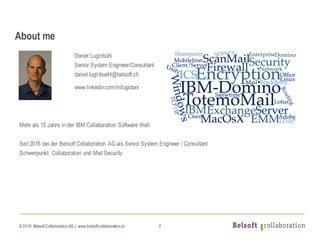
Daniel Luginbühl
Senior System Engineer/Consultant
daniel.luginbuehl@belsoft.ch
www.linkedin.com/in/lugidani
Mehr als 15 Jahre in der IBM Collaboration Software Welt
Seit 2016 bei der Belsoft Collaboration AG als Senior System Engineer / Consultant
Schwerpunkt: Collaboration und Mail Security
About me
2
© 2016 Belsoft CollaborationAG | www.belsoft-collaboration.ch
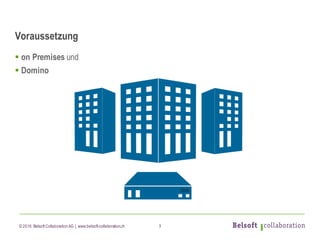
Voraussetzung
§ on Premises und
§ Domino
3
© 2016 Belsoft CollaborationAG | www.belsoft-collaboration.ch
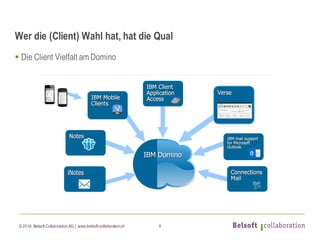
Wer die (Client) Wahl hat, hat die Qual
§ Die Client Vielfalt am Domino
4
© 2016 Belsoft CollaborationAG | www.belsoft-collaboration.ch
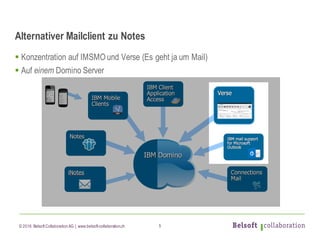
Alternativer Mailclient zu Notes
§ Konzentration auf IMSMO und Verse (Es geht ja um Mail)
§ Auf einem Domino Server
5
© 2016 Belsoft CollaborationAG | www.belsoft-collaboration.ch
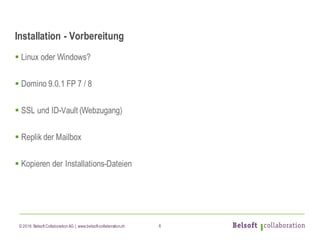
Installation - Vorbereitung
§ Linux oder Windows?
§ Domino 9.0.1 FP 7 / 8
§ SSL und ID-Vault (Webzugang)
§ Replik der Mailbox
§ Kopieren der Installations-Dateien
6
© 2016 Belsoft CollaborationAG | www.belsoft-collaboration.ch
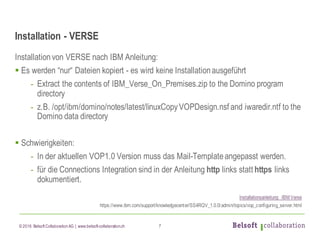
Installation - VERSE
Installationvon VERSE nach IBM Anleitung:
§ Es werden “nur“ Dateien kopiert - es wird keine Installationausgeführt
- Extract the contents of IBM_Verse_On_Premises.zip to the Domino program
directory
- z.B. /opt/ibm/domino/notes/latest/linuxCopyVOPDesign.nsf and iwaredir.ntf to the
Domino data directory
§ Schwierigkeiten:
- In der aktuellen VOP1.0 Version muss das Mail-Templateangepasst werden.
- für die Connections Integration sind in der Anleitung http links statt https links
dokumentiert.
Installationsanleitung IBM Verse
https://www.ibm.com/support/knowledgecenter/SS4RQV_1.0.0/admin/topics/vop_configuring_server.html
7
© 2016 Belsoft CollaborationAG | www.belsoft-collaboration.ch
Installation - IMSMO
Installationvon IMSMO nach IBM Anleitung:
§ Gute Vorbereitung des Domino Server (SSL, SSO, REST und andere)
§ Ausführen der Installation(Ist im Grunde eine Traveler Installation)
§ Einstellungen und Fine-Tuning Domino
§ Outlook starten!
Installationsanleitung IMSA (IBMmail support for Microsoft Outlook[Administering])
https://www.ibm.com/support/knowledgecenter/SSKTMJ_9.0.1/admin_imsmo/adm_toc.html
8
© 2016 Belsoft CollaborationAG | www.belsoft-collaboration.ch
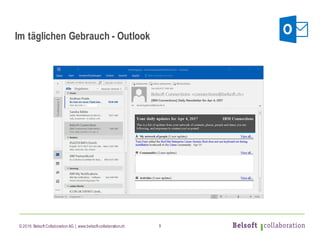
Im täglichen Gebrauch - Outlook
9
© 2016 Belsoft CollaborationAG | www.belsoft-collaboration.ch
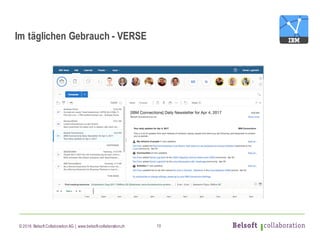
Im täglichen Gebrauch - VERSE
10
© 2016 Belsoft CollaborationAG | www.belsoft-collaboration.ch
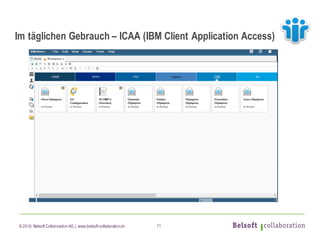
Im täglichen Gebrauch – ICAA (IBM Client Application Access)
11
© 2016 Belsoft CollaborationAG | www.belsoft-collaboration.ch
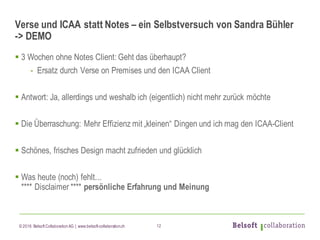
Verse und ICAA statt Notes – ein Selbstversuch von Sandra Bühler
-> DEMO
§ 3 Wochen ohne Notes Client: Geht das überhaupt?
- Ersatz durch Verse on Premises und den ICAA Client
§ Antwort: Ja, allerdings und weshalb ich (eigentlich) nicht mehr zurück möchte
§ Die Überraschung: Mehr Effizienz mit „kleinen“ Dingen und ich mag den ICAA-Client
§ Schönes, frisches Design macht zufrieden und glücklich
§ Was heute (noch) fehlt...
**** Disclaimer **** persönliche Erfahrung und Meinung
12
© 2016 Belsoft CollaborationAG | www.belsoft-collaboration.ch
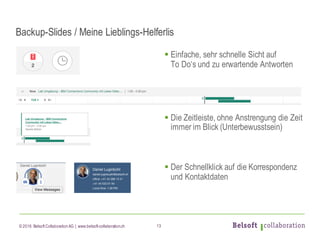
Backup-Slides / Meine Lieblings-Helferlis
§ Einfache, sehr schnelle Sicht auf
To Do‘s und zu erwartende Antworten
§ Die Zeitleiste, ohne Anstrengung die Zeit
immer im Blick (Unterbewusstsein)
§ Der Schnellklick auf die Korrespondenz
und Kontaktdaten
13
© 2016 Belsoft CollaborationAG | www.belsoft-collaboration.ch
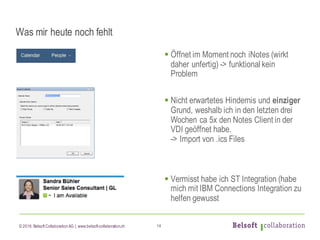
Was mir heute noch fehlt
§ Öffnet im Moment noch iNotes (wirkt
daher unfertig) -> funktional kein
Problem
§ Nicht erwartetes Hindernis und einziger
Grund, weshalb ich in den letzten drei
Wochen ca 5x den Notes Client in der
VDI geöffnet habe.
-> Import von .ics Files
§ Vermisst habe ich ST Integration (habe
mich mit IBM Connections Integration zu
helfen gewusst
14
© 2016 Belsoft CollaborationAG | www.belsoft-collaboration.ch
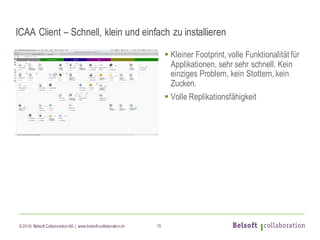
ICAA Client – Schnell, klein und einfach zu installieren
§ Kleiner Footprint, volle Funktionalität für
Applikationen, sehr sehr schnell. Kein
einziges Problem, kein Stottern, kein
Zucken.
§ Volle Replikationsfähigkeit
15
© 2016 Belsoft CollaborationAG | www.belsoft-collaboration.ch
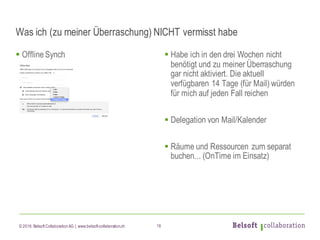
Was ich (zu meiner Überraschung) NICHT vermisst habe
§ OfflineSynch § Habe ich in den drei Wochen nicht
benötigt und zu meiner Überraschung
gar nicht aktiviert. Die aktuell
verfügbaren 14 Tage (für Mail) würden
für mich auf jeden Fall reichen
§ Delegation von Mail/Kalender
§ Räume und Ressourcen zum separat
buchen... (OnTime im Einsatz)
16
© 2016 Belsoft CollaborationAG | www.belsoft-collaboration.ch
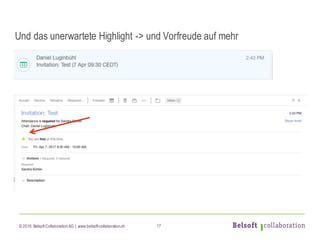
Und das unerwartete Highlight -> und Vorfreude auf mehr
17
© 2016 Belsoft CollaborationAG | www.belsoft-collaboration.ch
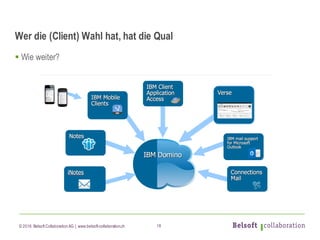
Wer die (Client) Wahl hat, hat die Qual
§ Wie weiter?
18
© 2016 Belsoft CollaborationAG | www.belsoft-collaboration.ch
Fragen zur (Client) Wahl
19

Wer die (Client) Wahl hat, hat die Qual

  • 1.
    © 2016 BelsoftCollaborationAG | www.belsoft-collaboration.ch Wer die (Client) Wahl hat, hat die Qual Sandra Bühler Daniel Luginbühl
  • 2.
    © 2016 BelsoftCollaborationAG | www.belsoft-collaboration.ch Daniel Luginbühl Senior System Engineer/Consultant daniel.luginbuehl@belsoft.ch www.linkedin.com/in/lugidani Mehr als 15 Jahre in der IBM Collaboration Software Welt Seit 2016 bei der Belsoft Collaboration AG als Senior System Engineer / Consultant Schwerpunkt: Collaboration und Mail Security About me 2
  • 3.
    © 2016 BelsoftCollaborationAG | www.belsoft-collaboration.ch Voraussetzung § on Premises und § Domino 3
  • 4.
    © 2016 BelsoftCollaborationAG | www.belsoft-collaboration.ch Wer die (Client) Wahl hat, hat die Qual § Die Client Vielfalt am Domino 4
  • 5.
    © 2016 BelsoftCollaborationAG | www.belsoft-collaboration.ch Alternativer Mailclient zu Notes § Konzentration auf IMSMO und Verse (Es geht ja um Mail) § Auf einem Domino Server 5
  • 6.
    © 2016 BelsoftCollaborationAG | www.belsoft-collaboration.ch Installation - Vorbereitung § Linux oder Windows? § Domino 9.0.1 FP 7 / 8 § SSL und ID-Vault (Webzugang) § Replik der Mailbox § Kopieren der Installations-Dateien 6
  • 7.
    © 2016 BelsoftCollaborationAG | www.belsoft-collaboration.ch Installation - VERSE Installationvon VERSE nach IBM Anleitung: § Es werden “nur“ Dateien kopiert - es wird keine Installationausgeführt - Extract the contents of IBM_Verse_On_Premises.zip to the Domino program directory - z.B. /opt/ibm/domino/notes/latest/linuxCopyVOPDesign.nsf and iwaredir.ntf to the Domino data directory § Schwierigkeiten: - In der aktuellen VOP1.0 Version muss das Mail-Templateangepasst werden. - für die Connections Integration sind in der Anleitung http links statt https links dokumentiert. Installationsanleitung IBM Verse https://www.ibm.com/support/knowledgecenter/SS4RQV_1.0.0/admin/topics/vop_configuring_server.html 7
  • 8.
    © 2016 BelsoftCollaborationAG | www.belsoft-collaboration.ch Installation - IMSMO Installationvon IMSMO nach IBM Anleitung: § Gute Vorbereitung des Domino Server (SSL, SSO, REST und andere) § Ausführen der Installation(Ist im Grunde eine Traveler Installation) § Einstellungen und Fine-Tuning Domino § Outlook starten! Installationsanleitung IMSA (IBMmail support for Microsoft Outlook[Administering]) https://www.ibm.com/support/knowledgecenter/SSKTMJ_9.0.1/admin_imsmo/adm_toc.html 8
  • 9.
    © 2016 BelsoftCollaborationAG | www.belsoft-collaboration.ch Im täglichen Gebrauch - Outlook 9
  • 10.
    © 2016 BelsoftCollaborationAG | www.belsoft-collaboration.ch Im täglichen Gebrauch - VERSE 10
  • 11.
    © 2016 BelsoftCollaborationAG | www.belsoft-collaboration.ch Im täglichen Gebrauch – ICAA (IBM Client Application Access) 11
  • 12.
    © 2016 BelsoftCollaborationAG | www.belsoft-collaboration.ch Verse und ICAA statt Notes – ein Selbstversuch von Sandra Bühler -> DEMO § 3 Wochen ohne Notes Client: Geht das überhaupt? - Ersatz durch Verse on Premises und den ICAA Client § Antwort: Ja, allerdings und weshalb ich (eigentlich) nicht mehr zurück möchte § Die Überraschung: Mehr Effizienz mit „kleinen“ Dingen und ich mag den ICAA-Client § Schönes, frisches Design macht zufrieden und glücklich § Was heute (noch) fehlt... **** Disclaimer **** persönliche Erfahrung und Meinung 12
  • 13.
    © 2016 BelsoftCollaborationAG | www.belsoft-collaboration.ch Backup-Slides / Meine Lieblings-Helferlis § Einfache, sehr schnelle Sicht auf To Do‘s und zu erwartende Antworten § Die Zeitleiste, ohne Anstrengung die Zeit immer im Blick (Unterbewusstsein) § Der Schnellklick auf die Korrespondenz und Kontaktdaten 13
  • 14.
    © 2016 BelsoftCollaborationAG | www.belsoft-collaboration.ch Was mir heute noch fehlt § Öffnet im Moment noch iNotes (wirkt daher unfertig) -> funktional kein Problem § Nicht erwartetes Hindernis und einziger Grund, weshalb ich in den letzten drei Wochen ca 5x den Notes Client in der VDI geöffnet habe. -> Import von .ics Files § Vermisst habe ich ST Integration (habe mich mit IBM Connections Integration zu helfen gewusst 14
  • 15.
    © 2016 BelsoftCollaborationAG | www.belsoft-collaboration.ch ICAA Client – Schnell, klein und einfach zu installieren § Kleiner Footprint, volle Funktionalität für Applikationen, sehr sehr schnell. Kein einziges Problem, kein Stottern, kein Zucken. § Volle Replikationsfähigkeit 15
  • 16.
    © 2016 BelsoftCollaborationAG | www.belsoft-collaboration.ch Was ich (zu meiner Überraschung) NICHT vermisst habe § OfflineSynch § Habe ich in den drei Wochen nicht benötigt und zu meiner Überraschung gar nicht aktiviert. Die aktuell verfügbaren 14 Tage (für Mail) würden für mich auf jeden Fall reichen § Delegation von Mail/Kalender § Räume und Ressourcen zum separat buchen... (OnTime im Einsatz) 16
  • 17.
    © 2016 BelsoftCollaborationAG | www.belsoft-collaboration.ch Und das unerwartete Highlight -> und Vorfreude auf mehr 17
  • 18.
    © 2016 BelsoftCollaborationAG | www.belsoft-collaboration.ch Wer die (Client) Wahl hat, hat die Qual § Wie weiter? 18
  • 19.
    © 2016 BelsoftCollaborationAG | www.belsoft-collaboration.ch Fragen zur (Client) Wahl 19