Das Android Open Source Project
Oder: “Alles, was du schon immer über die
Software auf deinem Android Smartphone
wissen wolltest.”
Stefan Lengfeld Köln, 23. Oktober 2018
Android & Linux Embedded Entwickler
2014-2016: Linux Entwicklung in Mainz
Seit 2017: Linux & Android Entwicklung
bei inovex in Köln
Stefan Lengfeld
Application Development
2
Um was soll es heute gehen?
3
› 1. Teil:
› Geschichte von Android
› Hardware
› Betriebssystem–Komponenten
› Sicherheit
› “Project Treble”
› 2. Teil:
› Development Setup
› Download, building and flashing of the AOSP
4
1. Teil – Theorie
Was ist dieses Betriebsystem,
das 2 Milliarden User verwenden?
5
Quelle: https://en.wikipedia.org/wiki/Android_(operating_system)
Android ist ein Ökosystem und
Trademark von Google.
Das AOSP ist ein Smartphone
Betriebssystem.
6
› “Android Inc. was founded in Palo Alto, California, in
October 2003 Andy Rubin, [....]”
› “In July 2005, Google acquired Android Inc. for at least
$50 million”
› 2007 Open Handset Alliance
› 2013 Andy Rubin verlässt das Android Team und später
Google
› 2016 Pixel und Pixel XL Smartphones
Geschichte von Android
Quelle: https://en.wikipedia.org/wiki/Android_(operating_system)7
8
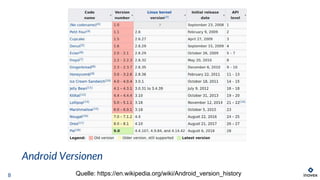
Android Versionen
Quelle: https://en.wikipedia.org/wiki/Android_version_history
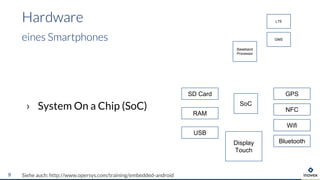
› System On a Chip (SoC)
Hardware
Siehe auch: http://www.opersys.com/training/embedded-android9
eines Smartphones
SoC
Baseband
Processor
Wifi
Bluetooth
GPS
NFC
RAM
Display
Touch
SD Card
USB
LTE
GMS
› Binder IPC
› art Java runtime
› zygote
› Wake Locks
› bionic C library
› HAL vs /dev
› [...]
10
OS Komponenten
Linux-basierend, aber …
Quelle: https://source.android.com/devices/architecture
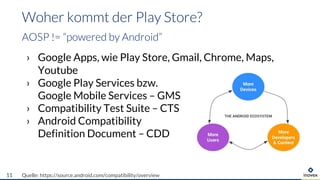
› Google Apps, wie Play Store, Gmail, Chrome, Maps,
Youtube
› Google Play Services bzw.
Google Mobile Services – GMS
› Compatibility Test Suite – CTS
› Android Compatibility
Definition Document – CDD
Woher kommt der Play Store?
AOSP != “powered by Android”
Quelle: https://source.android.com/compatibility/overview11
Das AOSP ist OpenSource,
aber Google kontrolliert
das (App-)Ökosystem.
12
› Kein Root Zugriff
› Unix Dateisystem Rechte und Benutzer, SELinux
für App–App Isolierung
› App Signierung
› App Permissions, Runtime Permissions (Android 6.0)
› “Secure Boot” aka “Verified Boot”
› Benutzerdaten–Verschlüsselung
› Trust Zone, Trusty OS
Security Features
13
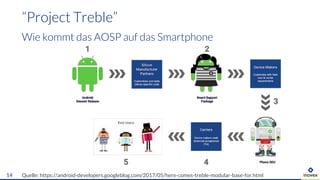
“Project Treble”
Wie kommt das AOSP auf das Smartphone
Quelle: https://android-developers.googleblog.com/2017/05/here-comes-treble-modular-base-for.html14
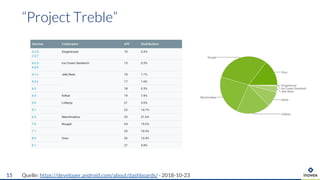
“Project Treble”
Quelle: https://developer.android.com/about/dashboards/ - 2018-10-2315
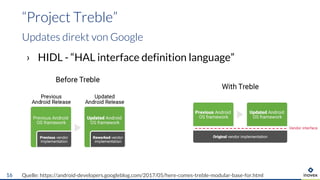
› HIDL - “HAL interface definition language”
“Project Treble”
Updates direkt von Google
Quelle: https://android-developers.googleblog.com/2017/05/here-comes-treble-modular-base-for.html16
2. Teil – Praxis
17
› Learning Embedded Android N Programming
Ivan Morgillo, Stefano Viola
Packt Publishing
https://www.packtpub.com/application-development/learning-embedded-android-programming
› Embedded Android
Karim Yaghmour
O’Reilly
https://www.oreilly.com/library/view/embedded-android/9781449327958/
Books
for embedded Android development
18
Hardware requirements
19
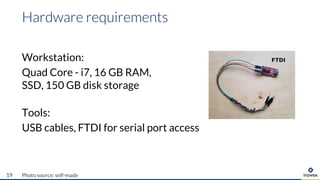
Workstation:
Quad Core - i7, 16 GB RAM,
SSD, 150 GB disk storage
Tools:
USB cables, FTDI for serial port access
Photo source: self-made
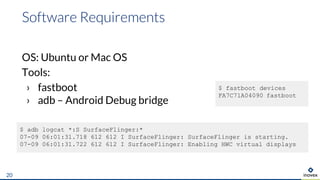
OS: Ubuntu or Mac OS
Tools:
› fastboot
› adb – Android Debug bridge
Software Requirements
20
$ fastboot devices
FA7C71A04090 fastboot
$ adb logcat *:S SurfaceFlinger:*
07-09 06:01:31.718 612 612 I SurfaceFlinger: SurfaceFlinger is starting.
07-09 06:01:31.722 612 612 I SurfaceFlinger: Enabling HWC virtual displays
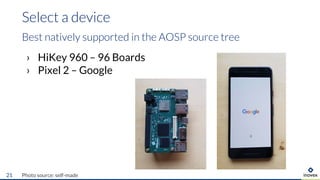
› HiKey 960 – 96 Boards
› Pixel 2 – Google
Select a device
Best natively supported in the AOSP source tree
Photo source: self-made21
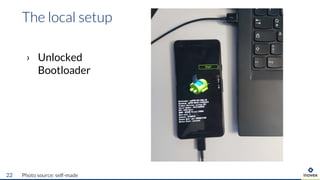
› Unlocked
Bootloader
The local setup
Photo source: self-made22
1. Downloading the AOSP source tree
2. Downloading proprietary binary drivers
3. Make a very tiny modification to the source code
4. Building the AOSP and generation system partitions
5. Flashing the partitions onto your device
6. Boot it
Demo - Goal
What we will do
23
Start here:
https://source.android.com/
Demo – Let’s go
Cloning, building and flashing the AOSP
24
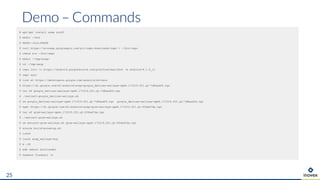
# apt-get install some stuff
$ mkdir ~/bin
$ PATH=~/bin:$PATH
$ curl https://storage.googleapis.com/git-repo-downloads/repo > ~/bin/repo
$ chmod a+x ~/bin/repo
$ mkdir ~/tmp/aosp/
$ cd ~/tmp/asop
$ repo init -u https://android.googlesource.com/platform/manifest -b android-8.1.0_r1
$ repo sync
# look at https://developers.google.com/android/drivers
$ https://dl.google.com/dl/android/aosp/google_devices-walleye-opm4.171019.021.q1-7d8aad26.tgz
$ tar xf google_devices-walleye-opm4.171019.021.q1-7d8aad26.tgz
$ ./extract-google_devices-walleye.sh
$ rm google_devices-walleye-opm4.171019.021.q1-7d8aad26.tgz google_devices-walleye-opm4.171019.021.q1-7d8aad26.tgz
$ wget https://dl.google.com/dl/android/aosp/qcom-walleye-opm4.171019.021.q1-f06ed7da.tgz
$ tar xf qcom-walleye-opm4.171019.021.q1-f06ed7da.tgz
$ ./extract-qcom-walleye.sh
$ rm extract-qcom-walleye.sh qcom-walleye-opm4.171019.021.q1-f06ed7da.tgz
$ source build/envsetup.sh
$ lunch
$ lunch aosp_walleye-eng
$ m -j8
$ adb reboot bootloader
$ fasboot flashall -w
Demo – Commands
25
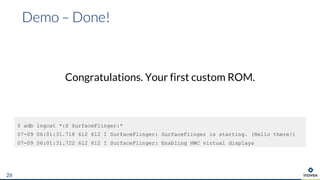
Congratulations. Your first custom ROM.
Demo – Done!
26
$ adb logcat *:S SurfaceFlinger:*
07-09 06:01:31.718 612 612 I SurfaceFlinger: SurfaceFlinger is starting. (Hello there!)
07-09 06:01:31.722 612 612 I SurfaceFlinger: Enabling HWC virtual displays
Vielen Dank
Stefan Lengfeld
Android Embedded
inovex GmbH
Gebäude 1.13
Schanzenstraße 6-20
51063 Köln
stefan.lengfeld@inovex.de
Das Android Open Source Project
Oder “Alles, was du schon immer über die Software auf
deinem Android Smartphone wissen wolltest.”
Das Android Open Source Project, kurz AOSP, ist das Betriebssystem, das auf den meisten heutigen und wahrscheinlich auch
auf deinem Smartphone läuft. Es ist die Basis für das Android App Universum und wird von Millionen Nutzern und Entwicklern
auf der Welt verwendet. Wegen der offenen Verfügbarkeit des Source Codes ist es auch die Basis für bekannte Custom ROMs
wie LineageOS.
Der erste Teil des Talks gibt eine Übersicht über die Architektur des Betriebssystems, das App Ökosystem, den Hardware
Abstraction Layer (HAL), die Sicherheitskonzepte und einige neue Betriebssystem-Entwicklungen, wie Project Treble in Android
8.0.
Im zweiten Teil des Talks schauen wir uns den Quellcode und die Struktur des AOSP näher an: Wie lädt man sich den Source
Code herunter, wie baut man das AOSP für unterstützte Geräte und wie kann man die eigenen ROMs auf ein Smartphone
flashen. Zum Spaß blicken wir vielleicht in einige Implementierungsdetails von Android App API Funktionen, die man als App
Developer schon aufgerufen hat.
28

Das Android Open Source Project

  • 1.
    Das Android OpenSource Project Oder: “Alles, was du schon immer über die Software auf deinem Android Smartphone wissen wolltest.” Stefan Lengfeld Köln, 23. Oktober 2018
  • 2.
    Android & LinuxEmbedded Entwickler 2014-2016: Linux Entwicklung in Mainz Seit 2017: Linux & Android Entwicklung bei inovex in Köln Stefan Lengfeld Application Development 2
  • 3.
    Um was solles heute gehen? 3 › 1. Teil: › Geschichte von Android › Hardware › Betriebssystem–Komponenten › Sicherheit › “Project Treble” › 2. Teil: › Development Setup › Download, building and flashing of the AOSP
  • 4.
  • 5.
    Was ist diesesBetriebsystem, das 2 Milliarden User verwenden? 5 Quelle: https://en.wikipedia.org/wiki/Android_(operating_system)
  • 6.
    Android ist einÖkosystem und Trademark von Google. Das AOSP ist ein Smartphone Betriebssystem. 6
  • 7.
    › “Android Inc.was founded in Palo Alto, California, in October 2003 Andy Rubin, [....]” › “In July 2005, Google acquired Android Inc. for at least $50 million” › 2007 Open Handset Alliance › 2013 Andy Rubin verlässt das Android Team und später Google › 2016 Pixel und Pixel XL Smartphones Geschichte von Android Quelle: https://en.wikipedia.org/wiki/Android_(operating_system)7
  • 8.
  • 9.
    › System Ona Chip (SoC) Hardware Siehe auch: http://www.opersys.com/training/embedded-android9 eines Smartphones SoC Baseband Processor Wifi Bluetooth GPS NFC RAM Display Touch SD Card USB LTE GMS
  • 10.
    › Binder IPC ›art Java runtime › zygote › Wake Locks › bionic C library › HAL vs /dev › [...] 10 OS Komponenten Linux-basierend, aber … Quelle: https://source.android.com/devices/architecture
  • 11.
    › Google Apps,wie Play Store, Gmail, Chrome, Maps, Youtube › Google Play Services bzw. Google Mobile Services – GMS › Compatibility Test Suite – CTS › Android Compatibility Definition Document – CDD Woher kommt der Play Store? AOSP != “powered by Android” Quelle: https://source.android.com/compatibility/overview11
  • 12.
    Das AOSP istOpenSource, aber Google kontrolliert das (App-)Ökosystem. 12
  • 13.
    › Kein RootZugriff › Unix Dateisystem Rechte und Benutzer, SELinux für App–App Isolierung › App Signierung › App Permissions, Runtime Permissions (Android 6.0) › “Secure Boot” aka “Verified Boot” › Benutzerdaten–Verschlüsselung › Trust Zone, Trusty OS Security Features 13
  • 14.
    “Project Treble” Wie kommtdas AOSP auf das Smartphone Quelle: https://android-developers.googleblog.com/2017/05/here-comes-treble-modular-base-for.html14
  • 15.
  • 16.
    › HIDL -“HAL interface definition language” “Project Treble” Updates direkt von Google Quelle: https://android-developers.googleblog.com/2017/05/here-comes-treble-modular-base-for.html16
  • 17.
    2. Teil –Praxis 17
  • 18.
    › Learning EmbeddedAndroid N Programming Ivan Morgillo, Stefano Viola Packt Publishing https://www.packtpub.com/application-development/learning-embedded-android-programming › Embedded Android Karim Yaghmour O’Reilly https://www.oreilly.com/library/view/embedded-android/9781449327958/ Books for embedded Android development 18
  • 19.
    Hardware requirements 19 Workstation: Quad Core- i7, 16 GB RAM, SSD, 150 GB disk storage Tools: USB cables, FTDI for serial port access Photo source: self-made
  • 20.
    OS: Ubuntu orMac OS Tools: › fastboot › adb – Android Debug bridge Software Requirements 20 $ fastboot devices FA7C71A04090 fastboot $ adb logcat *:S SurfaceFlinger:* 07-09 06:01:31.718 612 612 I SurfaceFlinger: SurfaceFlinger is starting. 07-09 06:01:31.722 612 612 I SurfaceFlinger: Enabling HWC virtual displays
  • 21.
    › HiKey 960– 96 Boards › Pixel 2 – Google Select a device Best natively supported in the AOSP source tree Photo source: self-made21
  • 22.
    › Unlocked Bootloader The localsetup Photo source: self-made22
  • 23.
    1. Downloading theAOSP source tree 2. Downloading proprietary binary drivers 3. Make a very tiny modification to the source code 4. Building the AOSP and generation system partitions 5. Flashing the partitions onto your device 6. Boot it Demo - Goal What we will do 23
  • 24.
    Start here: https://source.android.com/ Demo –Let’s go Cloning, building and flashing the AOSP 24
  • 25.
    # apt-get installsome stuff $ mkdir ~/bin $ PATH=~/bin:$PATH $ curl https://storage.googleapis.com/git-repo-downloads/repo > ~/bin/repo $ chmod a+x ~/bin/repo $ mkdir ~/tmp/aosp/ $ cd ~/tmp/asop $ repo init -u https://android.googlesource.com/platform/manifest -b android-8.1.0_r1 $ repo sync # look at https://developers.google.com/android/drivers $ https://dl.google.com/dl/android/aosp/google_devices-walleye-opm4.171019.021.q1-7d8aad26.tgz $ tar xf google_devices-walleye-opm4.171019.021.q1-7d8aad26.tgz $ ./extract-google_devices-walleye.sh $ rm google_devices-walleye-opm4.171019.021.q1-7d8aad26.tgz google_devices-walleye-opm4.171019.021.q1-7d8aad26.tgz $ wget https://dl.google.com/dl/android/aosp/qcom-walleye-opm4.171019.021.q1-f06ed7da.tgz $ tar xf qcom-walleye-opm4.171019.021.q1-f06ed7da.tgz $ ./extract-qcom-walleye.sh $ rm extract-qcom-walleye.sh qcom-walleye-opm4.171019.021.q1-f06ed7da.tgz $ source build/envsetup.sh $ lunch $ lunch aosp_walleye-eng $ m -j8 $ adb reboot bootloader $ fasboot flashall -w Demo – Commands 25
  • 26.
    Congratulations. Your firstcustom ROM. Demo – Done! 26 $ adb logcat *:S SurfaceFlinger:* 07-09 06:01:31.718 612 612 I SurfaceFlinger: SurfaceFlinger is starting. (Hello there!) 07-09 06:01:31.722 612 612 I SurfaceFlinger: Enabling HWC virtual displays
  • 27.
    Vielen Dank Stefan Lengfeld AndroidEmbedded inovex GmbH Gebäude 1.13 Schanzenstraße 6-20 51063 Köln stefan.lengfeld@inovex.de
  • 28.
    Das Android OpenSource Project Oder “Alles, was du schon immer über die Software auf deinem Android Smartphone wissen wolltest.” Das Android Open Source Project, kurz AOSP, ist das Betriebssystem, das auf den meisten heutigen und wahrscheinlich auch auf deinem Smartphone läuft. Es ist die Basis für das Android App Universum und wird von Millionen Nutzern und Entwicklern auf der Welt verwendet. Wegen der offenen Verfügbarkeit des Source Codes ist es auch die Basis für bekannte Custom ROMs wie LineageOS. Der erste Teil des Talks gibt eine Übersicht über die Architektur des Betriebssystems, das App Ökosystem, den Hardware Abstraction Layer (HAL), die Sicherheitskonzepte und einige neue Betriebssystem-Entwicklungen, wie Project Treble in Android 8.0. Im zweiten Teil des Talks schauen wir uns den Quellcode und die Struktur des AOSP näher an: Wie lädt man sich den Source Code herunter, wie baut man das AOSP für unterstützte Geräte und wie kann man die eigenen ROMs auf ein Smartphone flashen. Zum Spaß blicken wir vielleicht in einige Implementierungsdetails von Android App API Funktionen, die man als App Developer schon aufgerufen hat. 28