



Parallelisierte Administration mit
          Marionette Collective


                                       Andreas Schmidt


© 2011 Cassini Consulting GmbH
Andreas Schmidt, 37 Jahre

    Cassini Consulting

    Systems Management-Themen:
      IT-Security
      System- und Netzwerkarchitektur
      Konfigurations- und Deploymentmanagement


3
E          P


    Infrastructure
    Development
4
What‘s on for today?

    Herausforderungen beim Aufbau und Betrieb
    größerer Umgebungen

    Was ist Marionette Collective?

    Wofür kann man es einsetzen?

    Wieso ist Marionette Collective zur
    Administration hilfreich?


5
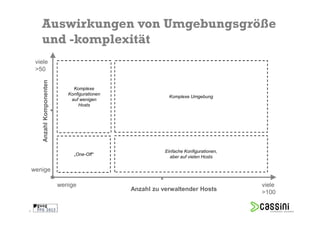
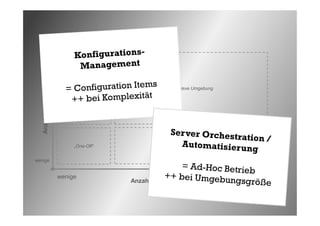
Auswirkungen von Umgebungsgröße
       und -komplexität
     viele
     >50
        Anzahl Komponenten


                                  Komplexe
                                Konfigurationen
                                                               Komplexe Umgebung
                                 auf wenigen
                                     Hosts


                                                             Einfache Konfigurationen,
                                  „One-Off“
                                                               aber auf vielen Hosts

    wenige

                             wenige                                                      viele
                                                  Anzahl zu verwaltender Hosts
                                                                                         >100

6
viele
    >50
        Anzahl Komponenten


                                  Komplexe
                                Konfigurationen
                                                               Komplexe Umgebung
                                 auf wenigen
                                     Hosts


                                                             Einfache Konfigurationen,
                                  „One-Off“
                                                               aber auf vielen Hosts

    wenige


                             wenige                                                      viele
                                                  Anzahl zu verwaltender Hosts
                                                                                         >100


7
„   ssh in a for loop is not a solution

                            - Luke Kanies
                                                     “
8                                     Pro Puppet (APress): Page xvi
Verbindungsaufbau


9
Adressierung
        durch
      Hostnamen


10
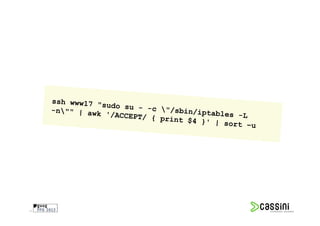
Hang zu One-Linern


11
„
     Give me an API or give me death                                            “
12       http://theagileadmin.com/2010/07/22/give-me-an-api-or-give-me-death/
Real Life
     System Administration


13
Aktiviere ein Content-Update
            auf 200 Servern
             - gleichzeitig


14
Räume das Cache-Verzeichnis
              /tmp/cx0 auf
      - aber nur auf CentOS-Nodes
          mit einer IP-Adresse
               in der DMZ


15
Starte alle Tomcats durch
     - auf denen die Applikation
          iWTF deployed ist.
         (Zuordnung dynamisch)


16
Wie erreiche ich eine größere Anzahl Hosts
               möglichst gleichzeitig?

          Wie kann ich Kommandos sicher
           gestalten und dokumentieren?

       Wie finde ich heraus, welche Hosts für
           meine Abfrage relevant sind?


17
Wie erreiche ich eine größere Anzahl Hosts
               möglichst gleichzeitig?

          Wie kann ich Kommandos sicher
           gestalten und dokumentieren?

       Wie finde ich heraus, welche Hosts für
           meine Abfrage relevant sind?


18
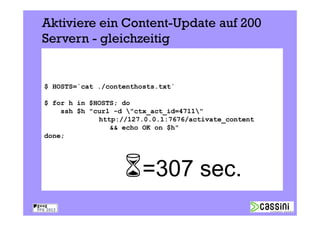
Aktiviere ein Content-Update auf 200
     Servern - gleichzeitig


     $ HOSTS=`cat ./contenthosts.txt`

     $ for h in $HOSTS; do
         ssh $h "curl -d "ctx_act_id=4711"
                  http://127.0.0.1:7676/activate_content
                     && echo OK on $h"
     done;


                             =307 sec.
19
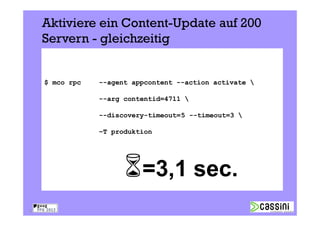
Aktiviere ein Content-Update auf 200
     Servern - gleichzeitig


     $ mco rpc   --agent appcontent --action activate 

                 --arg contentid=4711 

                 --discovery-timeout=5 --timeout=3 

                 –T produktion


                           =3,1 sec.
20
Marionette Collective
              „Server Orchestration Framework“
       „Programmatic execution of system administration
                actions on clusters of servers“
                 Agent-basiert, ruby (1.8.5+)

                        Puppet Labs
                      Apache 2 License

                       Broadcast Paradigm
                Publish-Subscribe Middleware
                (z.B. ActiveMQ oder RabbitMQ)


21
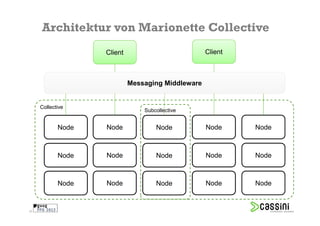
Architektur von Marionette Collective
                   Client                          Client


                            Messaging Middleware


     Collective
                                Subcollective


            Node   Node             Node           Node     Node


            Node   Node             Node           Node     Node


            Node   Node             Node           Node     Node


22
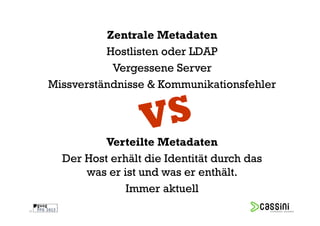
Zentrale Metadaten
               Hostlisten oder LDAP
                Vergessene Server
     Missverständnisse & Kommunikationsfehler


               Verteilte Metadaten
       Der Host erhält die Identität durch das
           was er ist und was er enthält.
                   Immer aktuell
23
Ich facter, also bin ich


[…]


[…]

24
Adressierung der Zielhosts über Facts

     --with-fact    ipaddress_eth1=~^192.168.10.[0-9]+$


     --with-class    mytomcat


        Node         Node        Node        Node         Node


        Node         Node        Node        Node         Node


        Node         Node        Node        Node         Node


25
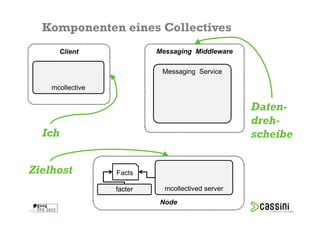
Komponenten eines Collectives
        Client               Messaging Middleware

                              Messaging Service

      mcollective

                                                     Daten-
                                                     dreh-
     Ich                                             scheibe


Zielhost            Facts

                    facter     mcollectived server
                             Node
26
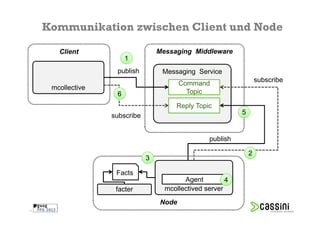
Kommunikation zwischen Client und Node

        Client                      Messaging Middleware
                         1
                     publish         Messaging Service
                                                                      subscribe
                                           Command
      mcollective
                     6                       Topic

                                         Reply Topic
                    subscribe                                 5


                                                    publish

                                                                  2
                                3

                     Facts
                                            Agent         4
                     facter           mcollectived server
                                    Node
27
Beispiel: Ping
     $ mco ping –T test
                                             Collective
     web01a               time=128.38   ms
     app01b               time=131.07   ms
     web01b               time=134.14   ms
     app02a               time=147.42   ms
     app02b               time=152.98   ms
     web01c               time=159.73   ms
     [...]

     ---- ping statistics ----
     24 replies max: 549.12 min: 128.38 avg: 315.18


28
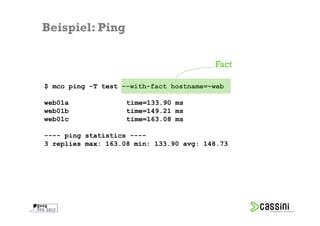
Beispiel: Ping

                                              Fact

     $ mco ping –T test –-with-fact hostname=~web

     web01a              time=133.90 ms
     web01b              time=149.21 ms
     web01c              time=163.08 ms

     ---- ping statistics ----
     3 replies max: 163.08 min: 133.90 avg: 148.73


29
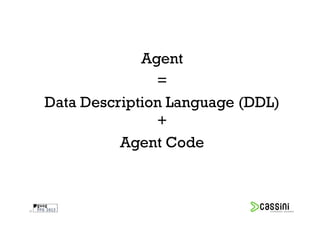
Agent
                    =
     Data Description Language (DDL)
                    +
               Agent Code


30
Beispiel: NRPE-Agent // DDL
                                                                                             selbstbeschreibend
     action "runcommand", :description => "Run a NRPE command" do
         input :command,
               :prompt => "Command",
               :description => "NRPE command to run",
               :type => :string,
               :validation => '^[a-zA-Z0-9_-]+$',
               :optional => false,
               :maxlength => 50                       Validierung
         output :output,
               :description => "Output from the Nagios plugin",
               :display_as => "Output"
     [...]


     https://github.com/puppetlabs/mcollective-plugins/blob/777597f9904e4a8e744d7735415ec517b7a5d5e7/agent/nrpe/agent/nrpe.ddl


31
Beispiel: NRPE-Agent // Agent Code
     module MCollective
       module Agent
         class Nrpe<RPC::Agent
           action "runcommand" do
             validate :command, :shellsafe

                   command = plugin_for_command(request[:command])

     [...]
                   reply[:exitcode] = run(command[:cmd],
                            :stdout => :output, :chomp => true)

                   case reply[:exitcode]
                   when 0
                     reply.statusmsg = "OK"
     [...]
                   when 2
                     reply.fail "CRITICAL"
     [...]
                   else
                     reply.fail "UNKNOWN"
                   end
     [...]

     https://github.com/puppetlabs/mcollective-plugins/blob/777597f9904e4a8e744d7735415ec517b7a5d5e7/agent/nrpe/agent/nrpe.rb

32
Räume das Cache-Verzeichnis /tmp/cx0 auf -
     aber nur auf CentOS- Nodes mit einer IP-Adresse
     in der DMZ
     action “cleanup", :description => “clean up cache" do

        input :cachepart,
              :prompt        =>   “Cache Part",
              :description   =>   “What part of cache to clean",
              :type          =>   :string,
              :validation    =>   '^[a-zA-Z-_d]+$',
              :optional      =>   false,
              :maxlength     =>   30
     [...]


     $ mco rpc    --agent cachemgr --action cleanup 
                  --arg cachepart=cx0 
                  –T produktion 
                  --with-fact operatingsystem=CentOS 
                  --with-fact ipaddress=~192.168.10


33
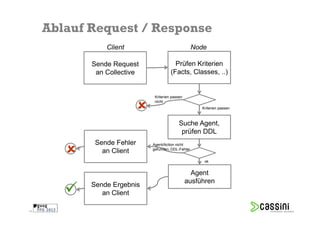
Ablauf Request / Response
                Client                              Node

            Sende Request                Prüfen Kriterien
             an Collective             (Facts, Classes, ..)


                              Kriterien passen
                              nicht
                                                      Kriterien passen


                                            Suche Agent,
                                             prüfen DDL
             Sende Fehler    Agent/Action nicht
                             gefunden, DDL-Fehler
               an Client
                                                       ok


                                                   Agent
                                                 ausführen
            Sende Ergebnis
               an Client

34
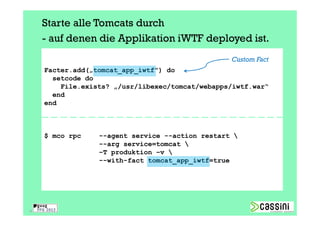
Starte alle Tomcats durch
     - auf denen die Applikation iWTF deployed ist.
                                                  Custom Fact
     Facter.add(„tomcat_app_iwtf") do
       setcode do
         File.exists? „/usr/libexec/tomcat/webapps/iwtf.war“
       end
     end


     $ mco rpc    --agent service --action restart 
                  --arg service=tomcat 
                  –T produktion –v 
                  --with-fact tomcat_app_iwtf=true


35
Wobei hilft mir
     MCollective?


36
Ein API ist
     der Kommandozeile
          überlegen


37
Dashboards und GUIs


38
Dokumentation
           Qualität
     Wiederverwendbarkeit
        Vereinfachung


39
Abstraktion

     Rechte- und Rollentrennung
        (z.B. 2nd / 3rd level)


40
Parallelität
     Geschwindigkeit
      Skalierbarkeit


41
Q& A
Cassini Consulting GmbH
Technology Guidance

Andreas Schmidt
twitter @aschmidt75
andreas.schmidt@cassini.de

Halskestraße 46       T +49 (0)21 02 94 34 737
40880 Ratingen        F +49 (0)21 02 94 34 738
Deutschland           visit www.cassini.de

FFG2012: Parallelisierte Administration mit Marionette Collective

  • 2.
    Parallelisierte Administration mit Marionette Collective Andreas Schmidt © 2011 Cassini Consulting GmbH
  • 3.
    Andreas Schmidt, 37Jahre Cassini Consulting Systems Management-Themen: IT-Security System- und Netzwerkarchitektur Konfigurations- und Deploymentmanagement 3
  • 4.
    E P Infrastructure Development 4
  • 5.
    What‘s on fortoday? Herausforderungen beim Aufbau und Betrieb größerer Umgebungen Was ist Marionette Collective? Wofür kann man es einsetzen? Wieso ist Marionette Collective zur Administration hilfreich? 5
  • 6.
    Auswirkungen von Umgebungsgröße und -komplexität viele >50 Anzahl Komponenten Komplexe Konfigurationen Komplexe Umgebung auf wenigen Hosts Einfache Konfigurationen, „One-Off“ aber auf vielen Hosts wenige wenige viele Anzahl zu verwaltender Hosts >100 6
  • 7.
    viele >50 Anzahl Komponenten Komplexe Konfigurationen Komplexe Umgebung auf wenigen Hosts Einfache Konfigurationen, „One-Off“ aber auf vielen Hosts wenige wenige viele Anzahl zu verwaltender Hosts >100 7
  • 8.
    ssh in a for loop is not a solution - Luke Kanies “ 8 Pro Puppet (APress): Page xvi
  • 9.
  • 10.
    Adressierung durch Hostnamen 10
  • 11.
  • 12.
    Give me an API or give me death “ 12 http://theagileadmin.com/2010/07/22/give-me-an-api-or-give-me-death/
  • 13.
    Real Life System Administration 13
  • 14.
    Aktiviere ein Content-Update auf 200 Servern - gleichzeitig 14
  • 15.
    Räume das Cache-Verzeichnis /tmp/cx0 auf - aber nur auf CentOS-Nodes mit einer IP-Adresse in der DMZ 15
  • 16.
    Starte alle Tomcatsdurch - auf denen die Applikation iWTF deployed ist. (Zuordnung dynamisch) 16
  • 17.
    Wie erreiche icheine größere Anzahl Hosts möglichst gleichzeitig? Wie kann ich Kommandos sicher gestalten und dokumentieren? Wie finde ich heraus, welche Hosts für meine Abfrage relevant sind? 17
  • 18.
    Wie erreiche icheine größere Anzahl Hosts möglichst gleichzeitig? Wie kann ich Kommandos sicher gestalten und dokumentieren? Wie finde ich heraus, welche Hosts für meine Abfrage relevant sind? 18
  • 19.
    Aktiviere ein Content-Updateauf 200 Servern - gleichzeitig $ HOSTS=`cat ./contenthosts.txt` $ for h in $HOSTS; do ssh $h "curl -d "ctx_act_id=4711" http://127.0.0.1:7676/activate_content && echo OK on $h" done; =307 sec. 19
  • 20.
    Aktiviere ein Content-Updateauf 200 Servern - gleichzeitig $ mco rpc --agent appcontent --action activate --arg contentid=4711 --discovery-timeout=5 --timeout=3 –T produktion =3,1 sec. 20
  • 21.
    Marionette Collective „Server Orchestration Framework“ „Programmatic execution of system administration actions on clusters of servers“ Agent-basiert, ruby (1.8.5+) Puppet Labs Apache 2 License Broadcast Paradigm Publish-Subscribe Middleware (z.B. ActiveMQ oder RabbitMQ) 21
  • 22.
    Architektur von MarionetteCollective Client Client Messaging Middleware Collective Subcollective Node Node Node Node Node Node Node Node Node Node Node Node Node Node Node 22
  • 23.
    Zentrale Metadaten Hostlisten oder LDAP Vergessene Server Missverständnisse & Kommunikationsfehler Verteilte Metadaten Der Host erhält die Identität durch das was er ist und was er enthält. Immer aktuell 23
  • 24.
    Ich facter, alsobin ich […] […] 24
  • 25.
    Adressierung der Zielhostsüber Facts --with-fact ipaddress_eth1=~^192.168.10.[0-9]+$ --with-class mytomcat Node Node Node Node Node Node Node Node Node Node Node Node Node Node Node 25
  • 26.
    Komponenten eines Collectives Client Messaging Middleware Messaging Service mcollective Daten- dreh- Ich scheibe Zielhost Facts facter mcollectived server Node 26
  • 27.
    Kommunikation zwischen Clientund Node Client Messaging Middleware 1 publish Messaging Service subscribe Command mcollective 6 Topic Reply Topic subscribe 5 publish 2 3 Facts Agent 4 facter mcollectived server Node 27
  • 28.
    Beispiel: Ping $ mco ping –T test Collective web01a time=128.38 ms app01b time=131.07 ms web01b time=134.14 ms app02a time=147.42 ms app02b time=152.98 ms web01c time=159.73 ms [...] ---- ping statistics ---- 24 replies max: 549.12 min: 128.38 avg: 315.18 28
  • 29.
    Beispiel: Ping Fact $ mco ping –T test –-with-fact hostname=~web web01a time=133.90 ms web01b time=149.21 ms web01c time=163.08 ms ---- ping statistics ---- 3 replies max: 163.08 min: 133.90 avg: 148.73 29
  • 30.
    Agent = Data Description Language (DDL) + Agent Code 30
  • 31.
    Beispiel: NRPE-Agent //DDL selbstbeschreibend action "runcommand", :description => "Run a NRPE command" do input :command, :prompt => "Command", :description => "NRPE command to run", :type => :string, :validation => '^[a-zA-Z0-9_-]+$', :optional => false, :maxlength => 50 Validierung output :output, :description => "Output from the Nagios plugin", :display_as => "Output" [...] https://github.com/puppetlabs/mcollective-plugins/blob/777597f9904e4a8e744d7735415ec517b7a5d5e7/agent/nrpe/agent/nrpe.ddl 31
  • 32.
    Beispiel: NRPE-Agent //Agent Code module MCollective module Agent class Nrpe<RPC::Agent action "runcommand" do validate :command, :shellsafe command = plugin_for_command(request[:command]) [...] reply[:exitcode] = run(command[:cmd], :stdout => :output, :chomp => true) case reply[:exitcode] when 0 reply.statusmsg = "OK" [...] when 2 reply.fail "CRITICAL" [...] else reply.fail "UNKNOWN" end [...] https://github.com/puppetlabs/mcollective-plugins/blob/777597f9904e4a8e744d7735415ec517b7a5d5e7/agent/nrpe/agent/nrpe.rb 32
  • 33.
    Räume das Cache-Verzeichnis/tmp/cx0 auf - aber nur auf CentOS- Nodes mit einer IP-Adresse in der DMZ action “cleanup", :description => “clean up cache" do input :cachepart, :prompt => “Cache Part", :description => “What part of cache to clean", :type => :string, :validation => '^[a-zA-Z-_d]+$', :optional => false, :maxlength => 30 [...] $ mco rpc --agent cachemgr --action cleanup --arg cachepart=cx0 –T produktion --with-fact operatingsystem=CentOS --with-fact ipaddress=~192.168.10 33
  • 34.
    Ablauf Request /Response Client Node Sende Request Prüfen Kriterien an Collective (Facts, Classes, ..) Kriterien passen nicht Kriterien passen Suche Agent, prüfen DDL Sende Fehler Agent/Action nicht gefunden, DDL-Fehler an Client ok Agent ausführen Sende Ergebnis an Client 34
  • 35.
    Starte alle Tomcatsdurch - auf denen die Applikation iWTF deployed ist. Custom Fact Facter.add(„tomcat_app_iwtf") do setcode do File.exists? „/usr/libexec/tomcat/webapps/iwtf.war“ end end $ mco rpc --agent service --action restart --arg service=tomcat –T produktion –v --with-fact tomcat_app_iwtf=true 35
  • 36.
    Wobei hilft mir MCollective? 36
  • 37.
    Ein API ist der Kommandozeile überlegen 37
  • 38.
  • 39.
    Dokumentation Qualität Wiederverwendbarkeit Vereinfachung 39
  • 40.
    Abstraktion Rechte- und Rollentrennung (z.B. 2nd / 3rd level) 40
  • 41.
    Parallelität Geschwindigkeit Skalierbarkeit 41
  • 42.
    Q& A Cassini ConsultingGmbH Technology Guidance Andreas Schmidt twitter @aschmidt75 andreas.schmidt@cassini.de Halskestraße 46 T +49 (0)21 02 94 34 737 40880 Ratingen F +49 (0)21 02 94 34 738 Deutschland visit www.cassini.de