Handy-Programmierung mit Python Symbian S60 Andreas Schreiber < [email_address] > Tech Talk, DLR Köln-Porz, 15.07.2008
Smartphones Kombination aus   Mobiltelefon („Handy“) Personal Digital Assistant (PDA) Viele Funktionen und Protokolle Telefonie, PIM, Web-Browser, SMS, MMS, E-Mail, VoIP, Multimedia, Radio, Digitalkamera, GPS, DVB-H, …  GSM, UMTS, GRPS, HSCSD, WLAN, Bluetooth, IR, USB, … Betriebssystem Smartphones haben vollständige, erweiterbare Betriebssysteme Handys haben vordefinierte Oberfläche; nur begrenzt erweiterbar (z.B. durch Java)
Betriebssysteme für Smartphones Liste: http://de.wikipedia.org/wiki/Smartphone#Betriebssysteme Linux Android Openmoko Mac OS X (Apple iPhone) Palm OS RIM BlackBerry Symbian OS UIQ (Sony Ericsson) Series 80 (Nokia Communicator) Series 60 (Nokia N-series & E-series, Siemens, Samsung, Motorola, Panasonic)  Windows
Symbian OS und S60 Symbian OS Betriebssystem für Smartphones und PDAs Microkernel, 32bit, Single User GUI-zentriertes Applikations-Framework  S60   Benutzeroberfläche für Smartphones Aktuell: S60 3rd Edition Entwicklungsumgebungen C++, Java, Web Widgets (Flash Lite), (Python) Quelle: S60 Platform: Introductory Guide. Nokia Corporation, 2007. http://www.s60.com/business/developers/documents  A schematic diagram of the S60 platform architecture.
Symbian Foundation Schaffung einer einheitlichen Software-Plattform News (24.06.2008): Nokia übernimmt alle Anteile an Symbian Ltd. Gründung einer Symbian Foundation http://www.symbianfoundation.org Nokia: Übergabe von Symbian und S60 Sony Ericsson / Motorola: Übergabe von UIQ Gesamtes Betriebssystem wird innerhalb von zwei Jahren komplett Open-Source (Eclipse-Lizenz) Quellen: Nokia Press Release (June 24, 2008), http://www.nokia.com/A4136001?newsid=1230415 Nokia kauft Symbian (heise news, 24.06.2008), http://www.heise.de/newsticker/meldung/109873
S60 Platform Services Fundamental services Application Framework Services  — providing the basic capabilities for launching applications and servers, state-persistence management, and UI components. UI Framework Services  — providing the concrete look and feel for UI components and handling UI events. Graphics Services  — providing capabilities for the creation of graphics and their drawing to the screen. Location Services  — allowing the S60 platform to be aware of a device’s location. Web-Based Services  — providing services to establish connections and interact with Web-based functionality, including browsing, file download, and messaging. Multimedia Services  — providing the capabilities to play audio and video, as well as support for streaming and speech recognition. Communication Services  — providing support for local and wide area communications, ranging from Bluetooth technology to voice calls.
S60 Application Services Certain basic functionality for S60 applications  PIM Application Services  — providing the fundamental features of PIM applications, including contacts, calendar, and task management, as well as associated functions such as notepad and clock capabilities. Messaging Application Services  — providing support for various messaging types, such as short message service (SMS), multimedia messaging service (MMS), e-mail, BIO messages (smart messaging), and instant messaging (IM). Browser Application Services  — providing the capabilities to view Web content, including support for Flash Lite, video rendering, Scalable Vector Graphics–Tiny (SVG-T) rendering, and audio rendering.
Python for S60 (PyS60) Portierung von Python auf S60-Plattform Entwicklung von NOKIA Open-Source-Lizenz (Apache Version 2 und Python) Verfügbar bei Sourceforge http://sourceforge.net/projects/pys60 Aktuelle Version: 1.4.4 (28.06.2008)
“ Hello World” import  appuifw appuifw.app.title = u „Hello World&quot; appuifw.note(u &quot;Hello   World!&quot; ,  'info' )
Start des Python-Interpreters
Ausführen von Python-Code (1) Skripte (“Run script”)
Ausführen von Python-Code (2) Interaktive Konsole
Ausführen von Python-Code (3) Bluetooth-Konsole
 
Python API Typen und Bibliotheken von PyS60 Alle Built-In-Typen von  Python 2.2.2  sind vorhanden  Python Standard Library Viele der Standard-Module laufen Keine Installation, um Speicherplatz im Handy zu sparen Python-Extensions für S60: Native C++-Erweiterungen Built-in Extensions: e32 : API für die Services der Symbian OS Platform  appuifw : API für das UI Application Framework Dynamisch nachladbare Extensions: sysinfo,   graphics, camera, keycapture, topwindow, gles, glcanvas, sensor,   audio,   telephone,   messaging, inbox, location, positioning, calendar, contacts, e32db, logs Entwicklung eigener Extensions per Python/C API möglich
Python S60-Module (1) Betriebssystem-Zugriff und -Information e32 Zugriff auf Betriebssystem-Funktion von Symbian, die nicht durch GUI-Module oder die Python Standard Library abgedeckt sind, z.B. Scheduler, Process-Management, Drive-Liste, (Py-)S60-Versionen sysinfo Systeminformationen, z.B. aktiviertes Profil, Batteriestatus, Displaygröße, gesamter und freier Speicherplatz, OS Version, Signalstärke
Python S60-Module (2) Benutzerschnittstelle und Grafik (I) appuifw API für das S60 GUI Application Framework graphics Grafik- und Bildfunktionen, z.B. Laden, Speichern, Rotieren & Skalieren von Bildern, Erstellen von Grafiken mit Grafikprimitiven und Screenshots camera Aufnahme von Fotos und Video, Einstellen der Kamera-Parameter keycapture Abfangen von Tastatur-Events topwindow Einblenden von Fenstern über Applikationen, dargestellt wird ein  graphics.Image
Python S60-Module (3) Benutzerschnittstelle und Grafik (II) gles Python API für OpenGL ES 2D/3D Grafik.  Siehe  OpenGL ES Standard bei Khronos ( http://www.khronos.org/opengles / ) glcanvas UI Steuerung für OpenGL ES Grafik sensor Zugriff auf physikalische Sensoren (Bewegung/Acceleration, Antippen/Tapping, Rotation)
Python S60-Module (4) Audio und Kommunikation audio Audio-Funktionen, z.B. Aufnahme, Abspielen von Audio-Dateien, Lautstärkeregelung, Sprachausgabe ( text-to-speech ) telephone Telefonie-Funktionen: Wählen, Auflegen und Rückruf messaging Senden von SMS und MMS inbox Zugriff auf Message-Folder (Inbox, Outbox, Sent und Draft) location Abfrage der GSM-Funkzellen-Informationen positioning Zugriff auf GPS-Empfänger
Python S60-Module (5) Datenmanagement contacts   Zugriff auf Adressbuch ( ContactDb ), z.B. Suchen nach Kontakten, Anzeigen von Gruppen, Ändern von Kontaktinformationen, Import/Export von vCards calendar Zugriff auf die Kalender-Datenbank ( CalendarDb ), z.B. Hinzufügen und Ändern von Terminen, Ereignissen, Geburtstagen und Aufgaben, Behandlung wiederholender Einträge, Import/Export des vCalendar-Formats e32db Schnittstelle zur nativen Symbian Datenbank, z.B. Anlegen von Datenbanken und SQL-Abfragen logs Zugriff auf Telefon-Protokolle, z.B. Anrufe, SMS, Daten, Faxe, Mails
Struktur von Applikationen (1) Visuelles Layout Typisches visuelles Layout von S60-Applikationen Title Navigation Tabs Body Menu Exit Dialog
Struktur von Applikationen (2) Source-Code-Template Import von Modulen Screen Size setzen Applications Menu Exit key handler setzen (Callback function) Application title setzen Application body Active Objects Main Loop import  appuifw import  e32 appuifw.app.screen =  'normal' def  item1(): print   &quot; item1 was selected.” appuifw.app.menu = [(u&quot;item 1&quot;, item1)] def  quit(): appuifw.app.set_exit() app.exit_key_handler=quit appuifw.app.title = u 'Simple   Application' app_lock = e32.Ao_lock() # starts scheduler -> event processing app_lock.wait() Ausführliches Template unter: http://www.mobilenin.com/pys60/resources/app_skeleton_with_mainloop.py
Graphical User Interface ( appuifw )  Basiselemente Dialoge note : popup note query : Texteingabe mit einem Feld multi_query : Texteingabe mit zwei Feldern Menus popup_menu : Einfaches Menu Auswahllisten selection_list : Einfache Listenauswahl (vgl. „Radio buttons“) multi_selection_list : Mehrfachauswahl (vgl. „Check boxes“)
Graphical User Interface ( appuifw )  Screen Size Drei Formate für Applikationen Rotation der Anzeige ist möglich (portrait, landscape) normal large full
Beispiele
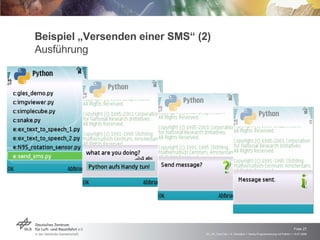
Beispiel „Versenden einer SMS“ (1) Source Code import  appuifw import  messaging data = appuifw.query(u &quot;what are you doing?&quot; ,  &quot;text&quot; ) receiver =  &quot;+49172940****&quot;   if  appuifw.query(u &quot;Send message?&quot; ,  &quot;query&quot; ) ==  True : messaging.sms_send(receiver, data) appuifw.note(u &quot;Message sent.&quot; ,  &quot;info&quot; ) else : appuifw.note( u&quot;Messages   not sent!&quot; ,  &quot;info&quot; ) s60test.send_sms.py
Beispiel „Versenden einer SMS“ (2) Ausführung
Beispiel „Versenden einer SMS“ (3) Erfolgskontrolle beim Empfänger
Beispiel „SMS-Empfang und Sound“ (1) Funktionen Empfang von Befehlen per SMS ( „record“ ,  „stop“ ,  „play“ ,  „clear“ ) Aufzeichnen und Abspielen von Audio
Beispiel „SMS-Empfang und Sound“ (2) Source Code: Sound-Operationen class  SoundRecorder: filename =  'e:\\boo.wav'   # Drive E: is SD card mySound = None def  record(self): self.mySound = audio.Sound.open(self.filename) self.mySound.record() def  play(self): try : self.mySound = audio.Sound.open(self.filename) self.mySound.play() except : appuifw.note(u &quot;No sound recorded!&quot; ,  &quot;error&quot; ) def  stop(self): if  self.mySound:  self.mySound.stop() self.mySound.close() def  clear(self): self.stop() os.remove(self.filename)
Beispiel „SMS-Empfang und Sound“ (3) Source Code: SMS-Empfang recorder = SoundRecorder() def  message_received(msg_id): box = inbox.Inbox() sms_text = box.content(msg_id)  appuifw.note(u &quot;sms content: &quot;  + sms_text ,  &quot;info&quot; ) if  sms_text ==  &quot;play&quot; : recorder.play() elif  sms_text ==  &quot;record&quot; : recorder.record() elif  sms_text ==  &quot;stop&quot; : recorder.stop() elif  sms_text ==  &quot;clear&quot; : recorder.clear() app_lock.signal() box = inbox.Inbox() box.bind(message_received)
Beispiel „Kamera und File-Upload“ (1) Aufnahme von Bildern import  time import  appuifw import  camera filename = time.strftime( &quot;n95-%Y%m%d%H%M%S.jpg&quot; , time.gmtime()) image = camera.take_photo() image.save(filename) appuifw.note(u &quot;Photo   saved to %s&quot;  % filename,  'info' ) if  imageToURL(filename) == 200: appuifw.note(u &quot;Photo   uploaded successfully.&quot; ,  'info' ) else : appuifw.note(u &quot;Photo   upload failed!&quot; ,  'error' )
Kamera-Einstellungen Optionen von camera.take_photo() def  take_photo( mode= 'RGB16' , size=(640, 480), zoom=0, flash= 'none' , exposure= 'auto' , white_balance= 'auto' ):
Beispiel „Kamera und File-Upload“ (2) Hochladen auf Server mit httplib import  httplib, urllib, base64, os.path def  imageToURL(aPath): data = open(aPath,  'rb' ).read()  # read binary data of picture encodedData = base64.encodestring(data)  # encoded it to base64 headers = { &quot;Content-type&quot; :  &quot;application/x-www-form-urlencoded&quot; , &quot;Accept&quot; :  &quot;text/plain&quot; ,} params = urllib.urlencode({u 'fileName' :    os.path.split(aPath)[1], u 'data' :encodedData}) conn = httplib.HTTPConnection( &quot;www.onyame.de&quot; ) conn.request( &quot;POST&quot; ,  &quot;/image_uploader.php&quot; , params, headers) response = conn.getresponse() conn.close() return  response.status  Quelle: http://wiki.forum.nokia.com/index.php/How_to_upload_a_file_to_server_with_application/x-www-form-urlencoded
Beispiel „Kamera und File-Upload“ (3) Hochladen auf Server
Beispiel „Kamera und File-Upload“ (4) Erfolgskontrolle http://www.onyame.de/upload/fb.php
Beispiel „Mandelbrot-Menge“ (1) Rahmenprogramm import  e32 from  appuifw  import  * app.screen =  'full' app.body = canvas = Canvas() width, height = canvas.size xaxis = width/2 yaxis = height/1.5 scale = 60 iterations = 25 # <<iteration>> lock = e32.Ao_lock() app.exit_key_handler = lock.signal lock.wait()
Beispiel „Mandelbrot-Menge“ (2) Iterationsschleife for  y  in  range(height): for  x  in  range(width): magnitude = 0 z = 0+0j c = complex(float(y-yaxis)/scale,    float(x-xaxis)/scale) for  i  in  range(iterations): z = z**2+c if  abs(z) > 2: v = 765*i/iterations if  v > 510: color = (255, 255, v%255) elif  v > 255: color = (255, v%255, 0) else : color = (v%255, 0, 0) break else : color = (0, 0, 0) canvas.point((x, y), color) e32.ao_yield()
Beispiel „Kontakte-Datenbank“ import  contacts db = contacts.open() print u &quot;Searching contacts…&quot; found = db.find( 'guy' )  # search in name, email, etc. for  guy  in  found: firstname = guy.find( 'first_name' )[0].value company = guy.find( 'company_name' )[0].value email_address = guy.find( 'email_address' )[0].value print  u &quot;%s\n  %s\n  %s&quot;  %  (firstname, company, email_address)
Beispiel „Kalender“ Kalender-Abfrage „Python-Events“ Umstellung des Profils bei Terminen
Beispiel „Bewegungssensor“ (1) Abfrage der Beschleunigungssensoren import  sensor sensors = sensor.sensors() # Does this device have Accelerator Sensor if  sensors.has_key( 'AccSensor' ): SENSOR_ACC = True sensor_data = sensors[ 'AccSensor' ] sensor_acc = sensor.Sensor(sensor_data[ 'id' ],  sensor_data[ 'category' ]) sensor_acc.connect(handle_sensor_raw) def  handle_sensor_raw(a_data): if  a_data.has_key( 'data_1' ): acc_data_1 = a_data[ 'data_1' ] acc_data_2 = a_data[ 'data_2' ] acc_data_3 = a_data[ 'data_3' ]
Beispiel „Bewegungssensor“ (2) Graphische Aufbereitung: „Sensor Analyzer“  http://jouni.miettunen.googlepages.com/sensoranalyzer
Beispiel „Location Based Service“ Auswertung der GSM Cell ID Send SMS to someone if caretan cell is near import  location HOME_CELL_ID = u&quot;98521779&quot; WIFE = u&quot;+49173247****“ entries = [u &quot;freu mich auf Dich!&quot; ,  u &quot;hab Hunger.&quot; ,  u &quot;hab schlechte Laune.&quot; ] listbox = appuifw.Listbox(entries, shout)  home = 0 while  home == 0: country, provider, lac, cell = location.gsm_location() if  (cell== HOME_CELL_ID): home = 1 message = u &quot;Bin gleich zuhause und %s&quot;  % mood  messaging.sms_send(WIFE, message)
Links Python for S60 http://opensource.nokia.com/projects/pythonfors60/ http://sourceforge.net/projects/pys60 http://wiki.opensource.nokia.com/projects/Python_for_S60 Symbian S60 http://www.s60.com
Anlaufstellen für Hilfe Python for S60 discussion board  at Forum Nokia http:// discussion.forum.nokia.com/forum/forumdisplay.php?forumid =102 IRC channel  #pys60  bei Freenode.net irc://chat.freenode.net/pys60 Google Group  Python for S60 http://groups.google.com/group/py4S60 Google Group  PythonS60 http://groups.google.com/group/pythons60 Beispiele / Code-Snippets http://wiki.forum.nokia.com/index.php/Category:Python#Code_Examples_for_Python http://snippets.dzone.com/tags/series60
Python für andere mobile Geräte Übersicht Python for Mobile Devices http://www.awaretek.com/pymo.html
Literatur Jürgen Scheible, Ville Tuulos. Mobile Python: Rapid Prototyping of Applications on the Mobile Platform   http://www.mobilepythonbook.org

Handy-Programmierung mit Python

  • 1.
    Handy-Programmierung mit PythonSymbian S60 Andreas Schreiber < [email_address] > Tech Talk, DLR Köln-Porz, 15.07.2008
  • 2.
    Smartphones Kombination aus Mobiltelefon („Handy“) Personal Digital Assistant (PDA) Viele Funktionen und Protokolle Telefonie, PIM, Web-Browser, SMS, MMS, E-Mail, VoIP, Multimedia, Radio, Digitalkamera, GPS, DVB-H, … GSM, UMTS, GRPS, HSCSD, WLAN, Bluetooth, IR, USB, … Betriebssystem Smartphones haben vollständige, erweiterbare Betriebssysteme Handys haben vordefinierte Oberfläche; nur begrenzt erweiterbar (z.B. durch Java)
  • 3.
    Betriebssysteme für SmartphonesListe: http://de.wikipedia.org/wiki/Smartphone#Betriebssysteme Linux Android Openmoko Mac OS X (Apple iPhone) Palm OS RIM BlackBerry Symbian OS UIQ (Sony Ericsson) Series 80 (Nokia Communicator) Series 60 (Nokia N-series & E-series, Siemens, Samsung, Motorola, Panasonic) Windows
  • 4.
    Symbian OS undS60 Symbian OS Betriebssystem für Smartphones und PDAs Microkernel, 32bit, Single User GUI-zentriertes Applikations-Framework S60 Benutzeroberfläche für Smartphones Aktuell: S60 3rd Edition Entwicklungsumgebungen C++, Java, Web Widgets (Flash Lite), (Python) Quelle: S60 Platform: Introductory Guide. Nokia Corporation, 2007. http://www.s60.com/business/developers/documents A schematic diagram of the S60 platform architecture.
  • 5.
    Symbian Foundation Schaffungeiner einheitlichen Software-Plattform News (24.06.2008): Nokia übernimmt alle Anteile an Symbian Ltd. Gründung einer Symbian Foundation http://www.symbianfoundation.org Nokia: Übergabe von Symbian und S60 Sony Ericsson / Motorola: Übergabe von UIQ Gesamtes Betriebssystem wird innerhalb von zwei Jahren komplett Open-Source (Eclipse-Lizenz) Quellen: Nokia Press Release (June 24, 2008), http://www.nokia.com/A4136001?newsid=1230415 Nokia kauft Symbian (heise news, 24.06.2008), http://www.heise.de/newsticker/meldung/109873
  • 6.
    S60 Platform ServicesFundamental services Application Framework Services — providing the basic capabilities for launching applications and servers, state-persistence management, and UI components. UI Framework Services — providing the concrete look and feel for UI components and handling UI events. Graphics Services — providing capabilities for the creation of graphics and their drawing to the screen. Location Services — allowing the S60 platform to be aware of a device’s location. Web-Based Services — providing services to establish connections and interact with Web-based functionality, including browsing, file download, and messaging. Multimedia Services — providing the capabilities to play audio and video, as well as support for streaming and speech recognition. Communication Services — providing support for local and wide area communications, ranging from Bluetooth technology to voice calls.
  • 7.
    S60 Application ServicesCertain basic functionality for S60 applications PIM Application Services — providing the fundamental features of PIM applications, including contacts, calendar, and task management, as well as associated functions such as notepad and clock capabilities. Messaging Application Services — providing support for various messaging types, such as short message service (SMS), multimedia messaging service (MMS), e-mail, BIO messages (smart messaging), and instant messaging (IM). Browser Application Services — providing the capabilities to view Web content, including support for Flash Lite, video rendering, Scalable Vector Graphics–Tiny (SVG-T) rendering, and audio rendering.
  • 8.
    Python for S60(PyS60) Portierung von Python auf S60-Plattform Entwicklung von NOKIA Open-Source-Lizenz (Apache Version 2 und Python) Verfügbar bei Sourceforge http://sourceforge.net/projects/pys60 Aktuelle Version: 1.4.4 (28.06.2008)
  • 9.
    “ Hello World”import appuifw appuifw.app.title = u „Hello World&quot; appuifw.note(u &quot;Hello World!&quot; , 'info' )
  • 10.
  • 11.
    Ausführen von Python-Code(1) Skripte (“Run script”)
  • 12.
    Ausführen von Python-Code(2) Interaktive Konsole
  • 13.
    Ausführen von Python-Code(3) Bluetooth-Konsole
  • 14.
  • 15.
    Python API Typenund Bibliotheken von PyS60 Alle Built-In-Typen von Python 2.2.2 sind vorhanden Python Standard Library Viele der Standard-Module laufen Keine Installation, um Speicherplatz im Handy zu sparen Python-Extensions für S60: Native C++-Erweiterungen Built-in Extensions: e32 : API für die Services der Symbian OS Platform appuifw : API für das UI Application Framework Dynamisch nachladbare Extensions: sysinfo, graphics, camera, keycapture, topwindow, gles, glcanvas, sensor, audio, telephone, messaging, inbox, location, positioning, calendar, contacts, e32db, logs Entwicklung eigener Extensions per Python/C API möglich
  • 16.
    Python S60-Module (1)Betriebssystem-Zugriff und -Information e32 Zugriff auf Betriebssystem-Funktion von Symbian, die nicht durch GUI-Module oder die Python Standard Library abgedeckt sind, z.B. Scheduler, Process-Management, Drive-Liste, (Py-)S60-Versionen sysinfo Systeminformationen, z.B. aktiviertes Profil, Batteriestatus, Displaygröße, gesamter und freier Speicherplatz, OS Version, Signalstärke
  • 17.
    Python S60-Module (2)Benutzerschnittstelle und Grafik (I) appuifw API für das S60 GUI Application Framework graphics Grafik- und Bildfunktionen, z.B. Laden, Speichern, Rotieren & Skalieren von Bildern, Erstellen von Grafiken mit Grafikprimitiven und Screenshots camera Aufnahme von Fotos und Video, Einstellen der Kamera-Parameter keycapture Abfangen von Tastatur-Events topwindow Einblenden von Fenstern über Applikationen, dargestellt wird ein graphics.Image
  • 18.
    Python S60-Module (3)Benutzerschnittstelle und Grafik (II) gles Python API für OpenGL ES 2D/3D Grafik. Siehe OpenGL ES Standard bei Khronos ( http://www.khronos.org/opengles / ) glcanvas UI Steuerung für OpenGL ES Grafik sensor Zugriff auf physikalische Sensoren (Bewegung/Acceleration, Antippen/Tapping, Rotation)
  • 19.
    Python S60-Module (4)Audio und Kommunikation audio Audio-Funktionen, z.B. Aufnahme, Abspielen von Audio-Dateien, Lautstärkeregelung, Sprachausgabe ( text-to-speech ) telephone Telefonie-Funktionen: Wählen, Auflegen und Rückruf messaging Senden von SMS und MMS inbox Zugriff auf Message-Folder (Inbox, Outbox, Sent und Draft) location Abfrage der GSM-Funkzellen-Informationen positioning Zugriff auf GPS-Empfänger
  • 20.
    Python S60-Module (5)Datenmanagement contacts Zugriff auf Adressbuch ( ContactDb ), z.B. Suchen nach Kontakten, Anzeigen von Gruppen, Ändern von Kontaktinformationen, Import/Export von vCards calendar Zugriff auf die Kalender-Datenbank ( CalendarDb ), z.B. Hinzufügen und Ändern von Terminen, Ereignissen, Geburtstagen und Aufgaben, Behandlung wiederholender Einträge, Import/Export des vCalendar-Formats e32db Schnittstelle zur nativen Symbian Datenbank, z.B. Anlegen von Datenbanken und SQL-Abfragen logs Zugriff auf Telefon-Protokolle, z.B. Anrufe, SMS, Daten, Faxe, Mails
  • 21.
    Struktur von Applikationen(1) Visuelles Layout Typisches visuelles Layout von S60-Applikationen Title Navigation Tabs Body Menu Exit Dialog
  • 22.
    Struktur von Applikationen(2) Source-Code-Template Import von Modulen Screen Size setzen Applications Menu Exit key handler setzen (Callback function) Application title setzen Application body Active Objects Main Loop import appuifw import e32 appuifw.app.screen = 'normal' def item1(): print &quot; item1 was selected.” appuifw.app.menu = [(u&quot;item 1&quot;, item1)] def quit(): appuifw.app.set_exit() app.exit_key_handler=quit appuifw.app.title = u 'Simple Application' app_lock = e32.Ao_lock() # starts scheduler -> event processing app_lock.wait() Ausführliches Template unter: http://www.mobilenin.com/pys60/resources/app_skeleton_with_mainloop.py
  • 23.
    Graphical User Interface( appuifw ) Basiselemente Dialoge note : popup note query : Texteingabe mit einem Feld multi_query : Texteingabe mit zwei Feldern Menus popup_menu : Einfaches Menu Auswahllisten selection_list : Einfache Listenauswahl (vgl. „Radio buttons“) multi_selection_list : Mehrfachauswahl (vgl. „Check boxes“)
  • 24.
    Graphical User Interface( appuifw ) Screen Size Drei Formate für Applikationen Rotation der Anzeige ist möglich (portrait, landscape) normal large full
  • 25.
  • 26.
    Beispiel „Versenden einerSMS“ (1) Source Code import appuifw import messaging data = appuifw.query(u &quot;what are you doing?&quot; , &quot;text&quot; ) receiver = &quot;+49172940****&quot; if appuifw.query(u &quot;Send message?&quot; , &quot;query&quot; ) == True : messaging.sms_send(receiver, data) appuifw.note(u &quot;Message sent.&quot; , &quot;info&quot; ) else : appuifw.note( u&quot;Messages not sent!&quot; , &quot;info&quot; ) s60test.send_sms.py
  • 27.
    Beispiel „Versenden einerSMS“ (2) Ausführung
  • 28.
    Beispiel „Versenden einerSMS“ (3) Erfolgskontrolle beim Empfänger
  • 29.
    Beispiel „SMS-Empfang undSound“ (1) Funktionen Empfang von Befehlen per SMS ( „record“ , „stop“ , „play“ , „clear“ ) Aufzeichnen und Abspielen von Audio
  • 30.
    Beispiel „SMS-Empfang undSound“ (2) Source Code: Sound-Operationen class SoundRecorder: filename = 'e:\\boo.wav' # Drive E: is SD card mySound = None def record(self): self.mySound = audio.Sound.open(self.filename) self.mySound.record() def play(self): try : self.mySound = audio.Sound.open(self.filename) self.mySound.play() except : appuifw.note(u &quot;No sound recorded!&quot; , &quot;error&quot; ) def stop(self): if self.mySound: self.mySound.stop() self.mySound.close() def clear(self): self.stop() os.remove(self.filename)
  • 31.
    Beispiel „SMS-Empfang undSound“ (3) Source Code: SMS-Empfang recorder = SoundRecorder() def message_received(msg_id): box = inbox.Inbox() sms_text = box.content(msg_id) appuifw.note(u &quot;sms content: &quot; + sms_text , &quot;info&quot; ) if sms_text == &quot;play&quot; : recorder.play() elif sms_text == &quot;record&quot; : recorder.record() elif sms_text == &quot;stop&quot; : recorder.stop() elif sms_text == &quot;clear&quot; : recorder.clear() app_lock.signal() box = inbox.Inbox() box.bind(message_received)
  • 32.
    Beispiel „Kamera undFile-Upload“ (1) Aufnahme von Bildern import time import appuifw import camera filename = time.strftime( &quot;n95-%Y%m%d%H%M%S.jpg&quot; , time.gmtime()) image = camera.take_photo() image.save(filename) appuifw.note(u &quot;Photo saved to %s&quot; % filename, 'info' ) if imageToURL(filename) == 200: appuifw.note(u &quot;Photo uploaded successfully.&quot; , 'info' ) else : appuifw.note(u &quot;Photo upload failed!&quot; , 'error' )
  • 33.
    Kamera-Einstellungen Optionen voncamera.take_photo() def take_photo( mode= 'RGB16' , size=(640, 480), zoom=0, flash= 'none' , exposure= 'auto' , white_balance= 'auto' ):
  • 34.
    Beispiel „Kamera undFile-Upload“ (2) Hochladen auf Server mit httplib import httplib, urllib, base64, os.path def imageToURL(aPath): data = open(aPath, 'rb' ).read() # read binary data of picture encodedData = base64.encodestring(data) # encoded it to base64 headers = { &quot;Content-type&quot; : &quot;application/x-www-form-urlencoded&quot; , &quot;Accept&quot; : &quot;text/plain&quot; ,} params = urllib.urlencode({u 'fileName' : os.path.split(aPath)[1], u 'data' :encodedData}) conn = httplib.HTTPConnection( &quot;www.onyame.de&quot; ) conn.request( &quot;POST&quot; , &quot;/image_uploader.php&quot; , params, headers) response = conn.getresponse() conn.close() return response.status Quelle: http://wiki.forum.nokia.com/index.php/How_to_upload_a_file_to_server_with_application/x-www-form-urlencoded
  • 35.
    Beispiel „Kamera undFile-Upload“ (3) Hochladen auf Server
  • 36.
    Beispiel „Kamera undFile-Upload“ (4) Erfolgskontrolle http://www.onyame.de/upload/fb.php
  • 37.
    Beispiel „Mandelbrot-Menge“ (1)Rahmenprogramm import e32 from appuifw import * app.screen = 'full' app.body = canvas = Canvas() width, height = canvas.size xaxis = width/2 yaxis = height/1.5 scale = 60 iterations = 25 # <<iteration>> lock = e32.Ao_lock() app.exit_key_handler = lock.signal lock.wait()
  • 38.
    Beispiel „Mandelbrot-Menge“ (2)Iterationsschleife for y in range(height): for x in range(width): magnitude = 0 z = 0+0j c = complex(float(y-yaxis)/scale, float(x-xaxis)/scale) for i in range(iterations): z = z**2+c if abs(z) > 2: v = 765*i/iterations if v > 510: color = (255, 255, v%255) elif v > 255: color = (255, v%255, 0) else : color = (v%255, 0, 0) break else : color = (0, 0, 0) canvas.point((x, y), color) e32.ao_yield()
  • 39.
    Beispiel „Kontakte-Datenbank“ import contacts db = contacts.open() print u &quot;Searching contacts…&quot; found = db.find( 'guy' ) # search in name, email, etc. for guy in found: firstname = guy.find( 'first_name' )[0].value company = guy.find( 'company_name' )[0].value email_address = guy.find( 'email_address' )[0].value print u &quot;%s\n %s\n %s&quot; % (firstname, company, email_address)
  • 40.
    Beispiel „Kalender“ Kalender-Abfrage„Python-Events“ Umstellung des Profils bei Terminen
  • 41.
    Beispiel „Bewegungssensor“ (1)Abfrage der Beschleunigungssensoren import sensor sensors = sensor.sensors() # Does this device have Accelerator Sensor if sensors.has_key( 'AccSensor' ): SENSOR_ACC = True sensor_data = sensors[ 'AccSensor' ] sensor_acc = sensor.Sensor(sensor_data[ 'id' ], sensor_data[ 'category' ]) sensor_acc.connect(handle_sensor_raw) def handle_sensor_raw(a_data): if a_data.has_key( 'data_1' ): acc_data_1 = a_data[ 'data_1' ] acc_data_2 = a_data[ 'data_2' ] acc_data_3 = a_data[ 'data_3' ]
  • 42.
    Beispiel „Bewegungssensor“ (2)Graphische Aufbereitung: „Sensor Analyzer“ http://jouni.miettunen.googlepages.com/sensoranalyzer
  • 43.
    Beispiel „Location BasedService“ Auswertung der GSM Cell ID Send SMS to someone if caretan cell is near import location HOME_CELL_ID = u&quot;98521779&quot; WIFE = u&quot;+49173247****“ entries = [u &quot;freu mich auf Dich!&quot; , u &quot;hab Hunger.&quot; , u &quot;hab schlechte Laune.&quot; ] listbox = appuifw.Listbox(entries, shout) home = 0 while home == 0: country, provider, lac, cell = location.gsm_location() if (cell== HOME_CELL_ID): home = 1 message = u &quot;Bin gleich zuhause und %s&quot; % mood messaging.sms_send(WIFE, message)
  • 44.
    Links Python forS60 http://opensource.nokia.com/projects/pythonfors60/ http://sourceforge.net/projects/pys60 http://wiki.opensource.nokia.com/projects/Python_for_S60 Symbian S60 http://www.s60.com
  • 45.
    Anlaufstellen für HilfePython for S60 discussion board at Forum Nokia http:// discussion.forum.nokia.com/forum/forumdisplay.php?forumid =102 IRC channel #pys60 bei Freenode.net irc://chat.freenode.net/pys60 Google Group Python for S60 http://groups.google.com/group/py4S60 Google Group PythonS60 http://groups.google.com/group/pythons60 Beispiele / Code-Snippets http://wiki.forum.nokia.com/index.php/Category:Python#Code_Examples_for_Python http://snippets.dzone.com/tags/series60
  • 46.
    Python für anderemobile Geräte Übersicht Python for Mobile Devices http://www.awaretek.com/pymo.html
  • 47.
    Literatur Jürgen Scheible,Ville Tuulos. Mobile Python: Rapid Prototyping of Applications on the Mobile Platform http://www.mobilepythonbook.org