Das Canvas-Element in HTML5 Webkongress Erlangen, 4. September 2008 Martin Kliehm, Senior Frontend Engineer http://flickr.com/photos/margolove/2741249831/
Canvas – was ist das? “ It’s like having a little Apple ][ in your browser” http://www.oblomovka.com/wp/2008/08/08/the-edge-at-sxsw/
Canvas – was ist das? Eingeführt für das Apple OS X Dashboard, später in Safari und iTunes integriert
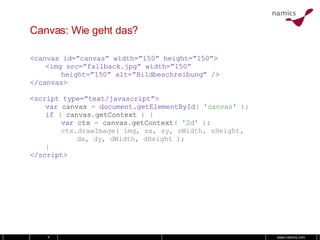
Canvas: Wie geht das? <canvas id=”canvas” width=”150” height=”150”> <img src=”fallback.jpg” width=”150” height=”150” alt=”Bildbeschreibung” /> </canvas> <script type=”text/javascript”> var   canvas   =  document.getElementById (  'canvas'  ); if   (   canvas . getContext   )   { var   ctx   =   canvas . getContext (   '2d'   ); ctx.drawImage( img, sx, sy, sWidth, sHeight, dx, dy, dWidth, dHeight ); } </script>
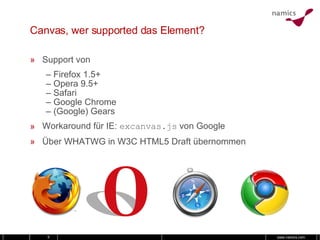
Canvas, wer supported das Element? Support von –  Firefox 1.5+ – Opera 9.5+ – Safari – Google Chrome – (Google) Gears Workaround für IE:  excanvas.js  von Google Über WHATWG in W3C HTML5 Draft übernommen
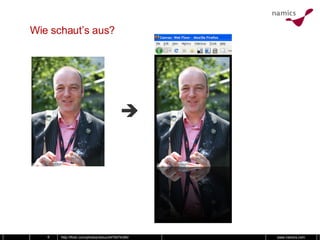
Wie schaut’s aus?  http://flickr.com/photos/redux/2475074390/
Wet Floor var   canvas   = document.getElementById ( 'canvas' ); if   (   canvas . getContext   )   { // Bildobjekt einbringen var   img   =   document . images [ 0 ]; var   effHeight  =  img . height  *  0.5 ; // Kontext setzen var   ctx   =   canvas . getContext (   '2d'   ); /* Bild zeichnen: drawImage(  * image, sx, sy, sWidth, sHeight,  * dx, dy, dWidth, dHeight) */ ctx . drawImage ( img ,  0 ,  0 ,  img . width ,  img . height , 0 ,  0 ,  img . width ,  img . height  ); // Zwischenstand speichern ctx . save (); }
Wet Floor // Original-Bild zeichnen [...] // Spiegelbild zeichnen // Zwischenstand wiederherstellen ctx . restore (); // Bild spiegeln ctx . scale (   1 ,   -1   ); // Bild verschieben ctx . translate (   0 ,   - img . height   ); // Bild zeichnen ctx . drawImage ( img ,   0 ,   0 ,   img . width ,   img . height , 0 ,   - img . height ,   img . width ,   img . height   );
Wet Floor // Original-Bild zeichnen [...] // Spiegelbild zeichnen [...] // Gradient zeichnen ctx . restore (); ctx . scale (   1 ,   -1   ); var   gradient   =   ctx . createLinearGradient ( 0 ,   0 ,   0 ,   effHeight   ); gradient . addColorStop ( 0 ,   'rgba( 0, 0, 0, 0.5 )'   ); gradient . addColorStop ( 1 ,   'rgba( 0, 0, 0, 1.0 )'   ); // Rechteck mit Gradient füllen ctx . fillStyle   =   gradient ; ctx . rect (   0 ,   0 ,   img . width ,   effectHeight   ); ctx . fill ();
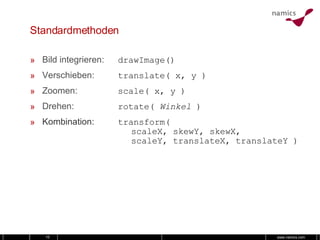
Standardmethoden Bild integrieren: drawImage()‏ Verschieben: translate( x, y )‏ Zoomen: scale( x, y )‏ Drehen: rotate(  Winkel  )‏ Kombination: transform( scaleX, skewY, skewX, scaleY, translateX, translateY )‏
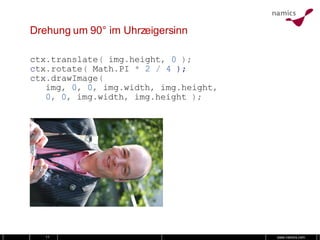
Drehung um 90° im Uhrzeigersinn ctx . translate (   img . height ,   0   ); c tx . rotate (   Math . PI   *   2   /   4  ); ctx . drawImage ( img ,   0 ,   0 ,   img . width ,   img . height , 0 ,   0 ,   img . width ,   img . height   );
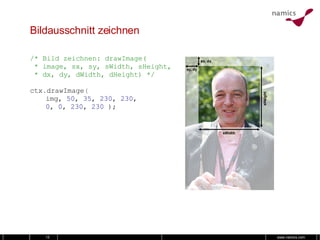
Bildausschnitt zeichnen /* Bild zeichnen: drawImage(  * image, sx, sy, sWidth, sHeight,  * dx, dy, dWidth, dHeight) */ ctx . drawImage ( img,  50 ,  35 ,  230 ,  230 , 0 ,  0 ,  230 ,  230  );
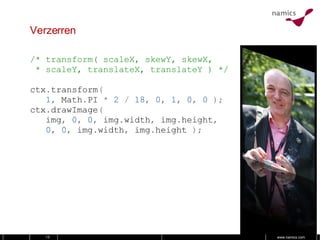
Verzerren /* transform( scaleX, skewY, skewX,  * scaleY, translateX, translateY ) */ ctx . transform ( 1 ,   Math . PI   *   2   /   18 ,   0 ,   1 ,   0 ,   0   ); ctx . drawImage ( img ,   0 ,   0 ,   img . width ,   img . height , 0 ,   0 ,   img . width ,   img . height   );
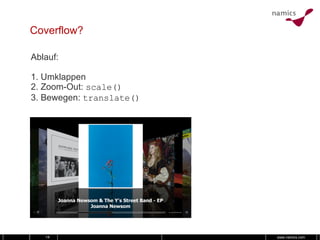
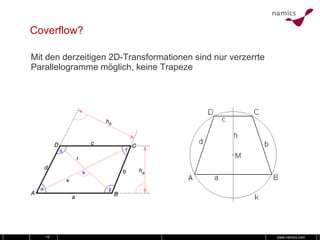
Coverflow? Ablauf: 1. Umklappen 2. Zoom-Out:  scale()‏ 3. Bewegen:  translate()‏
Coverflow? Mit den derzeitigen 2D-Transformationen sind nur verzerrte Parallelogramme möglich, keine Trapeze
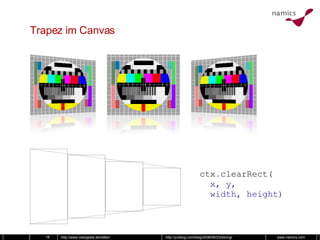
Trapez im Canvas http://www.netzgesta.de/reflex/ http://yuiblog.com/blog/2008/06/23/slicing/ ctx . clearRect(   x, y,   width, height )‏
Canvas-Bilder sind Kopien der gleichen Instanz http://flickr.com/photos/jerizm/2602242647/
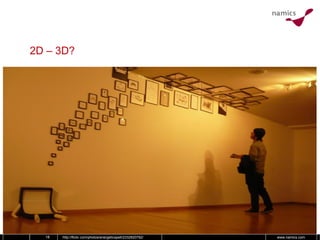
2D – 3D? http://flickr.com/photos/energeticspell/2332820792/
2D – 3D? Mozilla baut 3D-Support ein über OpenGL var   ctx   =   canvas . getContext (   '2d'   ); Opera hat eine Abstraktionsebene dazwischen, um auch Nicht-OpenGL-Plattformen zu unterstützen (wie D3D)‏
Herausforderungen für die Zukunft Vollständiger Support von Canvas, z.B. Schatten 3D-Rendering Barrierefreiheit Abgleich mit anderen Standards, z.B.  CSS Transforms http://flickr.com/photos/veo/226328414/
Beispiele http://flickr.com/photos/tais/2411643409/
Links Mozilla Canvas Tutorial: http://developer.mozilla.org/En/Canvas_tutorial W3C HTML 5 Draft: http://www.w3.org/html/wg/html5/ Ernest Delgado: http://www.ernestdelgado.com/tags/canvas/ http://yuiblog.com/blog/2008/06/23/slicing/ Google ExplorerCanvas: http://excanvas.sourceforge.net/ Opera 3D Canvas: http://my.opera.com/timjoh/blog/2007/11/13/taking-the-canvas-to-another-dimension Ich: http://learningtheworld.eu , martin.kliehm@namics.com

Das Canvas-Element in HTML5

  • 1.
    Das Canvas-Element inHTML5 Webkongress Erlangen, 4. September 2008 Martin Kliehm, Senior Frontend Engineer http://flickr.com/photos/margolove/2741249831/
  • 2.
    Canvas – wasist das? “ It’s like having a little Apple ][ in your browser” http://www.oblomovka.com/wp/2008/08/08/the-edge-at-sxsw/
  • 3.
    Canvas – wasist das? Eingeführt für das Apple OS X Dashboard, später in Safari und iTunes integriert
  • 4.
    Canvas: Wie gehtdas? <canvas id=”canvas” width=”150” height=”150”> <img src=”fallback.jpg” width=”150” height=”150” alt=”Bildbeschreibung” /> </canvas> <script type=”text/javascript”> var canvas = document.getElementById ( 'canvas' ); if ( canvas . getContext ) { var ctx = canvas . getContext ( '2d' ); ctx.drawImage( img, sx, sy, sWidth, sHeight, dx, dy, dWidth, dHeight ); } </script>
  • 5.
    Canvas, wer supporteddas Element? Support von – Firefox 1.5+ – Opera 9.5+ – Safari – Google Chrome – (Google) Gears Workaround für IE: excanvas.js von Google Über WHATWG in W3C HTML5 Draft übernommen
  • 6.
    Wie schaut’s aus? http://flickr.com/photos/redux/2475074390/
  • 7.
    Wet Floor var canvas = document.getElementById ( 'canvas' ); if ( canvas . getContext ) { // Bildobjekt einbringen var img = document . images [ 0 ]; var effHeight = img . height * 0.5 ; // Kontext setzen var ctx = canvas . getContext ( '2d' ); /* Bild zeichnen: drawImage( * image, sx, sy, sWidth, sHeight, * dx, dy, dWidth, dHeight) */ ctx . drawImage ( img , 0 , 0 , img . width , img . height , 0 , 0 , img . width , img . height ); // Zwischenstand speichern ctx . save (); }
  • 8.
    Wet Floor //Original-Bild zeichnen [...] // Spiegelbild zeichnen // Zwischenstand wiederherstellen ctx . restore (); // Bild spiegeln ctx . scale ( 1 , -1 ); // Bild verschieben ctx . translate ( 0 , - img . height ); // Bild zeichnen ctx . drawImage ( img , 0 , 0 , img . width , img . height , 0 , - img . height , img . width , img . height );
  • 9.
    Wet Floor //Original-Bild zeichnen [...] // Spiegelbild zeichnen [...] // Gradient zeichnen ctx . restore (); ctx . scale ( 1 , -1 ); var gradient = ctx . createLinearGradient ( 0 , 0 , 0 , effHeight ); gradient . addColorStop ( 0 , 'rgba( 0, 0, 0, 0.5 )' ); gradient . addColorStop ( 1 , 'rgba( 0, 0, 0, 1.0 )' ); // Rechteck mit Gradient füllen ctx . fillStyle = gradient ; ctx . rect ( 0 , 0 , img . width , effectHeight ); ctx . fill ();
  • 10.
    Standardmethoden Bild integrieren:drawImage()‏ Verschieben: translate( x, y )‏ Zoomen: scale( x, y )‏ Drehen: rotate( Winkel )‏ Kombination: transform( scaleX, skewY, skewX, scaleY, translateX, translateY )‏
  • 11.
    Drehung um 90°im Uhrzeigersinn ctx . translate ( img . height , 0 ); c tx . rotate ( Math . PI * 2 / 4 ); ctx . drawImage ( img , 0 , 0 , img . width , img . height , 0 , 0 , img . width , img . height );
  • 12.
    Bildausschnitt zeichnen /*Bild zeichnen: drawImage( * image, sx, sy, sWidth, sHeight, * dx, dy, dWidth, dHeight) */ ctx . drawImage ( img, 50 , 35 , 230 , 230 , 0 , 0 , 230 , 230 );
  • 13.
    Verzerren /* transform(scaleX, skewY, skewX, * scaleY, translateX, translateY ) */ ctx . transform ( 1 , Math . PI * 2 / 18 , 0 , 1 , 0 , 0 ); ctx . drawImage ( img , 0 , 0 , img . width , img . height , 0 , 0 , img . width , img . height );
  • 14.
    Coverflow? Ablauf: 1.Umklappen 2. Zoom-Out: scale()‏ 3. Bewegen: translate()‏
  • 15.
    Coverflow? Mit denderzeitigen 2D-Transformationen sind nur verzerrte Parallelogramme möglich, keine Trapeze
  • 16.
    Trapez im Canvashttp://www.netzgesta.de/reflex/ http://yuiblog.com/blog/2008/06/23/slicing/ ctx . clearRect( x, y, width, height )‏
  • 17.
    Canvas-Bilder sind Kopiender gleichen Instanz http://flickr.com/photos/jerizm/2602242647/
  • 18.
    2D – 3D?http://flickr.com/photos/energeticspell/2332820792/
  • 19.
    2D – 3D?Mozilla baut 3D-Support ein über OpenGL var ctx = canvas . getContext ( '2d' ); Opera hat eine Abstraktionsebene dazwischen, um auch Nicht-OpenGL-Plattformen zu unterstützen (wie D3D)‏
  • 20.
    Herausforderungen für dieZukunft Vollständiger Support von Canvas, z.B. Schatten 3D-Rendering Barrierefreiheit Abgleich mit anderen Standards, z.B. CSS Transforms http://flickr.com/photos/veo/226328414/
  • 21.
  • 22.
    Links Mozilla CanvasTutorial: http://developer.mozilla.org/En/Canvas_tutorial W3C HTML 5 Draft: http://www.w3.org/html/wg/html5/ Ernest Delgado: http://www.ernestdelgado.com/tags/canvas/ http://yuiblog.com/blog/2008/06/23/slicing/ Google ExplorerCanvas: http://excanvas.sourceforge.net/ Opera 3D Canvas: http://my.opera.com/timjoh/blog/2007/11/13/taking-the-canvas-to-another-dimension Ich: http://learningtheworld.eu , martin.kliehm@namics.com