Adaptive Cards
User Interfaces mit JSON
Christian Nagel
@christiannagel
https://csharp.christiannagel.com
Christian Nagel
• Training
• Coaching
• Consulting
• Development
• Microsoft MVP
• www.cninnovation.com
• csharp.christiannagel.com
Agenda
Warum? Was? Wie?
Warum?
Markup Usages
XML
• Old SOAP
• Old Configuration Files
• HTML
• XAML
JSON
• New API Serialization
• New Configuration Files
• Adaptive Cards
Enter Cards
Kein komplettes
UI
Karten mit vielen
UI Elementen
Reuse mit
unterschiedlichen
Technologien
Cards: Start in Social Media
Und mehr…
Twitter Cards
<meta name="twitter:card" content="summary_large_image" />
<meta name="twitter:site"
content="www.nationalgeographic.com" />
<meta name="twitter:creator" content="@NatGeo" />
<meta name="twitter:title"
content="Your Shot: Nepal Trekking Pictures" />
<meta name="twitter:description"
content="See Nepal Trekking Adventure Photos from
Adventurers Like You" />
<meta name="twitter:image"
content="http://something.com/image.jpg" />
OpenGraph
<meta property="og:url" content="article.html" />
<meta property="og:type" content="article" />
<meta property="og:title"
content="When Great Minds Don’t Think Alike" />
<meta property="og:description"
content=
"How much does culture influence creative thinking?" />
<meta property="og:image"
content="http://nyt.com/summary-image.jpg" />
Facebook Message
Templates
{
"type": "template",
"payload": {
"template_type": "airline_itinerary",
"passenger_info": [
{
"name": "Sarah Hum"
}
],
"flight_info": [
{
"flight_number": "KL9123",
"departure_airport": {
"airport_code": "SFO",
},
"arrival_airport": {
"airport_code": "AMS",
}
}
],
"base_price": "12206",
"tax": "200",
"total_price": "14003“
}
}
Vorteile von
Templates
3rd Party Inhalt kontrolliert
Facebook sieht aus wie
Facebook, Twitter wie Twitter
Cards müssen nur einmal
definiert werden
Nachteile von Templates
• Jedes Template muss für jede Plattform
implementiert werden
• Welche Templates brauchen wir in der Zukunft?
• Inhalte sind limitiert
• Keine Möglichkeiten für eigene Definitionen
Ist HTML die
Lösung?
Nachteile von
HTML
• Performance und Security? Unterschiedliche UI Stacks?
• Konsistenz kann nicht einfach definiert werden
• Design für jeden Host erforderlich
Wir brauchen
etwas
zwischen
fixen
Templates
und HTML
•Komplette
Kontrolle
•Keine Flexibilität
Fixed
Templates
•Keine Konsistenz
•Keine Kontrolle
HTML
Canvas
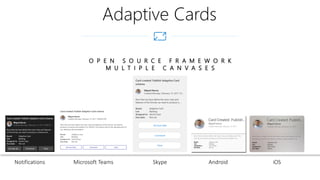
Adaptive Cards
O P E N S O U R C E F R A M E W O R K
M U L T I P L E C A N V A S E S
Notifications Microsoft Teams Skype Android iOS
Was?
Definition in JSON
{
"type": "AdaptiveCard",
"version": "1.1",
"body": [
{
"type": "TextBlock",
"size": "large",
"text": "Hello, Card!"
},
{
"type": "Image",
"size": "large",
"url": "http://adaptivecards.io/content/cats/1.png"
}
]
}
Primary Elements
• Card
• Card elements
• Containers
• Actions
• Inputs
Card Elements
• TextBlock
• Image
• Media
• MediaSource
Container
• Container
• Gruppieren von Items
• ColumnSet / Column
• Regionen in Gruppen teilen
• FactSet / Fact
• Tabular – Name/Wert
• ImageSet
• Sammlung von Bildern, Gallerie
Actions
• Action.OpenUrl
• Starten eines internen oder externen
Browsers
• Action.Submit
• Übernehmen von Inputs
• Action.ShowCard
• Anzeige einer Adaptive Card
Inputs
• Input.Text
• Input.Number
• Input.Date
• Input.Time
• Input.Toggle
• Input.ChoiceSet / Input.Choice
Demo
• Create a Card with .NET
Wie?
Card Designer
• https://adaptivecards.io/designer/
• Tool box
• Tree view
• Property Editor
• Preview
• JSON
Tools, SDKs
• https://adaptivecards.io/
Intro, Samples
• JavaScript
• .NET WPF
• .NET HTML
• Windows UWP
• Android
• iOS
SDKs / Packages
Using Cards
with WPF /
UWP
React React to Action events
Add Add the rendered card as a FrameworkElement child
Render Render the Card
Create Create a Renderer
Load Load the Adaptive Card
Demo
• Render a card with WPF
• Render a card with UWP
Host
Configuration
• User Interface für die Applikation anpassen
• Konfiguration der Renderer
• Define Fonts
• Sizes
• Spacing
• Behaviors
Actions
• Submit
• OpenUrl
• ShowCard
Styling
• Styles für UWP
• https://docs.microsoft.com/en-us/adaptive-
cards/sdk/rendering-cards/uwp/native-styling
• Styles für WPF
• https://docs.microsoft.com/en-us/adaptive-
cards/sdk/rendering-cards/net-wpf/native-
styling
Custom
Rendering
• Eigene Renderers pro Element-Typ setzen
• https://docs.microsoft.com/en-us/adaptive-
cards/sdk/rendering-cards/net-wpf/extensibility
• https://docs.microsoft.com/en-us/adaptive-
cards/sdk/rendering-cards/uwp/extensibility
Features Planned (1.2)
• Accessibility Improvements
• Better inline text formatting
• Input Validation
• Action sentiments (primary / destructive)
• Mehr container styles
• Actions irgendwo in der Card
Data Binding
Planned
Template von den Daten getrennt
Functions
• String (substr, indexOf, toUpper, toLower)
• Number (formatting)
• Date (parsing, formatting)
• Data manipulation (JSON.parse)
• custom
Conditional layout ($when)
Windows Timeline
Windows
Timeline
• User Engagement
• Adaptive Cards Bestandteil der
Windows API
• ActivityCardBuilder
Summary
• UI nur HTML oder XAML
• Cards nicht notwendig
• Unterschiedliche Technologien
• Web, Bot, WPF, UWP, Android, iOS
• Cards für alle
• Windows 10
• Windows Timeline
• Notifications
• API auch mit WPF und .NET Core
3.0 verwendbar
Questions?
More Information
• https://github.com/ProfessionalCSharp
• https://github.com/cninnovation
• https://csharp.christiannagel.com
• https://www.cninnovation.com
• Training & Coaching
• @christiannagel

Adaptive Cards - User Interfaces with JSON