What’s new at
Grafana Labs
● 30y Firefighter - 26y in Monitoring & Observability
● Thinks one bullet point is enough for an intro
https://www.linkedin.com/in/bastischubert
Sebastian Schubert
Solutions Engineer
Grafana Agent
Your
environment
Loki
Logs
Grafana
Visualizations
Tempo
Traces
Mimir
Metrics
Pyroscope
Profiles
Applications
and
Infrastructure
Native
OTel, Prometheus
No lock-in
Open standard
Platform
OSS or commercial
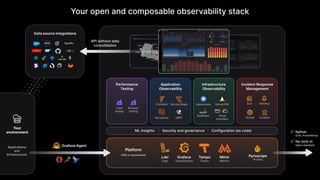
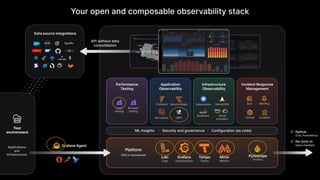
Your open and composable observability stack
eBPF OnCall Incident
Serverless
Application
Observability
ML Insights | Security and governance | Configuration (as code)
Performance
Testing
Infrastructure
Observability
Incident Response
Management
Load
testing
Browser
testing
Frontend Service Maps Kubernetes Server/VM
Cloud
providers
Database
Alerting
SLO
API without data
consolidation
Data source integrations
Grafana Agent
Your
environment
Loki
Logs
Grafana
Visualizations
Tempo
Traces
Mimir
Metrics
Pyroscope
Profiles
Applications
and
Infrastructure
Native
OTel, Prometheus
No lock-in
Open standard
Platform
OSS or commercial
Your open and composable observability stack
eBPF OnCall Incident
Serverless
Application
Observability
ML Insights | Security and governance | Configuration (as code)
Performance
Testing
Infrastructure
Observability
Incident Response
Management
Load
testing
Browser
testing
Frontend Service Maps Kubernetes Server/VM
Cloud
providers
Database
Alerting
SLO
API without data
consolidation
Data source integrations
Grafana
| 5
| 6
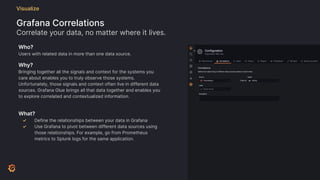
Visualize
Grafana Correlations
Correlate your data, no matter where it lives.
Who?
Users with related data in more than one data source.
Why?
Bringing together all the signals and context for the systems you
care about enables you to truly observe those systems.
Unfortunately, those signals and context often live in different data
sources. Grafana Glue brings all that data together and enables you
to explore correlated and contextualized information.
What?
✓ Define the relationships between your data in Grafana
✓ Use Grafana to pivot between different data sources using
those relationships. For example, go from Prometheus
metrics to Splunk logs for the same application.
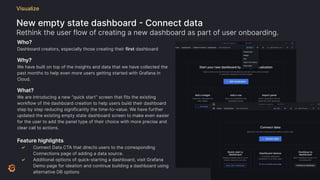
New empty state dashboard - Connect data
Rethink the user flow of creating a new dashboard as part of user onboarding.
Visualize
Who?
Dashboard creators, especially those creating their first dashboard
Why?
We have built on top of the insights and data that we have collected the
past months to help even more users getting started with Grafana in
Cloud.
What?
We are introducing a new “quick start” screen that fits the existing
workflow of the dashboard creation to help users build their dashboard
step by step reducing significantly the time-to-value. We have further
updated the existing empty state dashboard screen to make even easier
for the user to add the panel type of their choice with more precise and
clear call to actions.
Feature highlights
✓ Connect Data CTA that directs users to the corresponding
Connections page of adding a data source.
✓ Additional options of quick-starting a dashboard, visit Grafana
Demo page for ideation and continue building a dashboard using
alternative DB options
New onboarding experience - Revamped, easier Panel Edit side pane
Improve information architecture and user experience for new users
Visualize
Who?
All users creating or editing panels
Why?
Recent user research has shown that new users are not confident in
creating and configuring a visualisation panel that answers their
questions.
What?
Revamp specific areas on the panel edit page to improve
discoverability and task success. This includes an improved sidebar
layout and rethought IA on the top bar options.
Feature highlights
✓ New collapsible side pane that unifies Visualization selector
and settings as well as general settings.
✓ Separation of visualization selection and general settings in
the side pane.
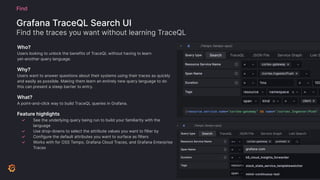
Grafana TraceQL Search UI
Find the traces you want without learning TraceQL
Find
Who?
Users looking to unlock the benefits of TraceQL without having to learn
yet-another query language.
Why?
Users want to answer questions about their systems using their traces as quickly
and easily as possible. Making them learn an entirely new query language to do
this can present a steep barrier to entry.
What?
A point-and-click way to build TraceQL queries in Grafana.
Feature highlights
✓ See the underlying query being run to build your familiarity with the
language
✓ Use drop-downs to select the attribute values you want to filter by
✓ Configure the default attributes you want to surface as filters
✓ Works with for OSS Tempo, Grafana Cloud Traces, and Grafana Enterprise
Traces
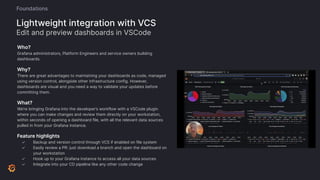
Who?
Grafana administrators, Platform Engineers and service owners building
dashboards.
Why?
There are great advantages to maintaining your dashboards as code, managed
using version control, alongside other infrastructure config. However,
dashboards are visual and you need a way to validate your updates before
committing them.
What?
We’re bringing Grafana into the developer’s workflow with a VSCode plugin
where you can make changes and review them directly on your workstation,
within seconds of opening a dashboard file, with all the relevant data sources
pulled in from your Grafana instance.
Feature highlights
✓ Backup and version control through VCS if enabled on file system
✓ Easily review a PR: just download a branch and open the dashboard on
your workstation
✓ Hook up to your Grafana instance to access all your data sources
✓ Integrate into your CD pipeline like any other code change
Lightweight integration with VCS
Edit and preview dashboards in VSCode
Foundations
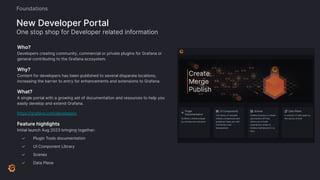
Who?
Developers creating community, commercial or private plugins for Grafana or
general contributing to the Grafana ecosystem.
Why?
Content for developers has been published to several disparate locations,
increasing the barrier to entry for enhancements and extensions to Grafana.
What?
A single portal with a growing set of documentation and resources to help you
easily develop and extend Grafana.
https://grafana.com/developers
Feature highlights
Initial launch Aug 2023 bringing together:
✓ Plugin Tools documentation
✓ UI Component Library
✓ Scenes
✓ Data Plane
New Developer Portal
One stop shop for Developer related information
Foundations
Mimir
| 13
| 14
Mimir
● For Metrics
● Prometheus -> Cortex -> Grafana Enterprise Metrics -> Mimir
● Scales to more than 1,000,000,000 Active Series
● Blazingly fast query performance
● Hard multi-tenancy, access control, and three-way replication
● Can ingest native OpenTelemetry, DataDog, Graphite, and Influx
| 15
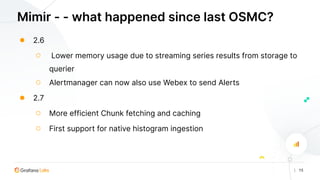
Mimir - - what happened since last OSMC?
● 2.6
○ Lower memory usage due to streaming series results from storage to
querier
○ Alertmanager can now also use Webex to send Alerts
● 2.7
○ More efficient Chunk fetching and caching
○ First support for native histogram ingestion
| 16
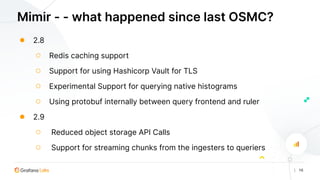
Mimir - - what happened since last OSMC?
● 2.8
○ Redis caching support
○ Support for using Hashicorp Vault for TLS
○ Experimental Support for querying native histograms
○ Using protobuf internally between query frontend and ruler
● 2.9
○ Reduced object storage API Calls
○ Support for streaming chunks from the ingesters to queriers
| 17
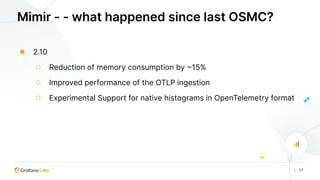
Mimir - - what happened since last OSMC?
● 2.10
○ Reduction of memory consumption by ~15%
○ Improved performance of the OTLP ingestion
○ Experimental Support for native histograms in OpenTelemetry format
Loki
| 18
| 19
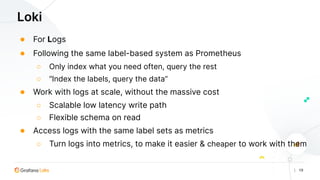
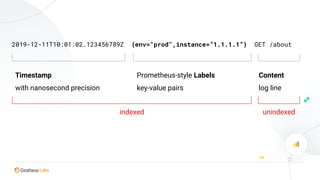
Loki
● For Logs
● Following the same label-based system as Prometheus
○ Only index what you need often, query the rest
○ “Index the labels, query the data”
● Work with logs at scale, without the massive cost
○ Scalable low latency write path
○ Flexible schema on read
● Access logs with the same label sets as metrics
○ Turn logs into metrics, to make it easier & cheaper to work with them
2019-12-11T10:01:02.123456789Z {env="prod",instance=”1.1.1.1”} GET /about
Timestamp
with nanosecond precision
Content
log line
Prometheus-style Labels
key-value pairs
indexed unindexed
| 21
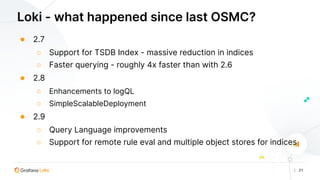
Loki - what happened since last OSMC?
● 2.7
○ Support for TSDB Index - massive reduction in indices
○ Faster querying - roughly 4x faster than with 2.6
● 2.8
○ Enhancements to logQL
○ SimpleScalableDeployment
● 2.9
○ Query Language improvements
○ Support for remote rule eval and multiple object stores for indices
Tempo
| 22
| 23
Tempo
● For Traces
● Historic problem: Traces require extremely rich metadata for analysis
○ Expensive, slow, and mandates sampling
● Exemplars: Leverage the extracted logs & metrics
○ Exemplars work at Google scale, with the ease of Grafana
○ Native to Prometheus, Cortex, Thanos, and Loki
● Index and search by labelsets available for those who need it
● 100% compatible with OpenTelemetry Tracing, Zipkin, Jaeger
| 24
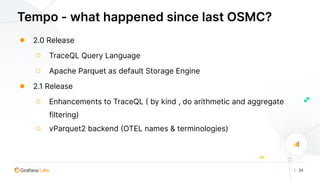
Tempo - what happened since last OSMC?
● 2.0 Release
○ TraceQL Query Language
○ Apache Parquet as default Storage Engine
● 2.1 Release
○ Enhancements to TraceQL ( by kind , do arithmetic and aggregate
filtering)
○ vParquet2 backend (OTEL names & terminologies)
| 25
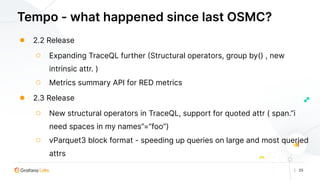
Tempo - what happened since last OSMC?
● 2.2 Release
○ Expanding TraceQL further (Structural operators, group by() , new
intrinsic attr. )
○ Metrics summary API for RED metrics
● 2.3 Release
○ New structural operators in TraceQL, support for quoted attr ( span.”i
need spaces in my names”=”foo”)
○ vParquet3 block format - speeding up queries on large and most queried
attrs
| 26
Grafana Beyla
| 27
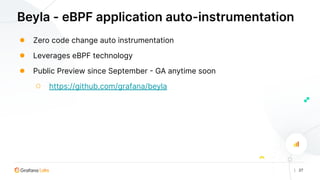
Beyla - eBPF application auto-instrumentation
● Zero code change auto instrumentation
● Leverages eBPF technology
● Public Preview since September - GA anytime soon
○ https://github.com/grafana/beyla
| 28
| 29
Faro
● For Frontend/Browser Monitoring - RealUserMonitoring
● Providing visibility into the performance experience of real users interacting
with your application
○ Expensive, slow, and mandates sampling
● RUM tools bridge the gap between application performance and the impacts
on User Experience
● Understand how your optimizations are improving the UX
| 30
| 31
Pyroscope
● For Profiling
● We announced the acquisition March 15th
○ https://github.com/grafana/pyroscope
● Profiles
○ “How much CPU & RAM am I spending in what areas of the code?”
○ “...and how does this change over time?”
● Go: pprof
● Java: https://github.com/grafana/JPProf
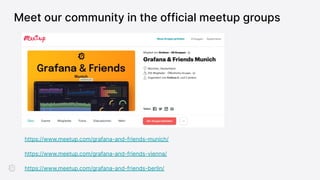
Meet our community in the official meetup groups
https://www.meetup.com/grafana-and-friends-munich/
https://www.meetup.com/grafana-and-friends-vienna/
https://www.meetup.com/grafana-and-friends-berlin/
Interested in working with us?
Scan a QR code to apply online.
Have more questions?
Join us at community.grafana.com
or Grafana public slack #grafana #grafana grafana/ community.grafana.com

OSMC 2023 | What’s new with Grafana Labs’s Open Source Observability stack by Sebastian Schubert

  • 1.
  • 2.
    ● 30y Firefighter- 26y in Monitoring & Observability ● Thinks one bullet point is enough for an intro https://www.linkedin.com/in/bastischubert Sebastian Schubert Solutions Engineer
  • 3.
    Grafana Agent Your environment Loki Logs Grafana Visualizations Tempo Traces Mimir Metrics Pyroscope Profiles Applications and Infrastructure Native OTel, Prometheus Nolock-in Open standard Platform OSS or commercial Your open and composable observability stack eBPF OnCall Incident Serverless Application Observability ML Insights | Security and governance | Configuration (as code) Performance Testing Infrastructure Observability Incident Response Management Load testing Browser testing Frontend Service Maps Kubernetes Server/VM Cloud providers Database Alerting SLO API without data consolidation Data source integrations
  • 4.
    Grafana Agent Your environment Loki Logs Grafana Visualizations Tempo Traces Mimir Metrics Pyroscope Profiles Applications and Infrastructure Native OTel, Prometheus Nolock-in Open standard Platform OSS or commercial Your open and composable observability stack eBPF OnCall Incident Serverless Application Observability ML Insights | Security and governance | Configuration (as code) Performance Testing Infrastructure Observability Incident Response Management Load testing Browser testing Frontend Service Maps Kubernetes Server/VM Cloud providers Database Alerting SLO API without data consolidation Data source integrations
  • 5.
  • 6.
  • 7.
    Visualize Grafana Correlations Correlate yourdata, no matter where it lives. Who? Users with related data in more than one data source. Why? Bringing together all the signals and context for the systems you care about enables you to truly observe those systems. Unfortunately, those signals and context often live in different data sources. Grafana Glue brings all that data together and enables you to explore correlated and contextualized information. What? ✓ Define the relationships between your data in Grafana ✓ Use Grafana to pivot between different data sources using those relationships. For example, go from Prometheus metrics to Splunk logs for the same application.
  • 8.
    New empty statedashboard - Connect data Rethink the user flow of creating a new dashboard as part of user onboarding. Visualize Who? Dashboard creators, especially those creating their first dashboard Why? We have built on top of the insights and data that we have collected the past months to help even more users getting started with Grafana in Cloud. What? We are introducing a new “quick start” screen that fits the existing workflow of the dashboard creation to help users build their dashboard step by step reducing significantly the time-to-value. We have further updated the existing empty state dashboard screen to make even easier for the user to add the panel type of their choice with more precise and clear call to actions. Feature highlights ✓ Connect Data CTA that directs users to the corresponding Connections page of adding a data source. ✓ Additional options of quick-starting a dashboard, visit Grafana Demo page for ideation and continue building a dashboard using alternative DB options
  • 9.
    New onboarding experience- Revamped, easier Panel Edit side pane Improve information architecture and user experience for new users Visualize Who? All users creating or editing panels Why? Recent user research has shown that new users are not confident in creating and configuring a visualisation panel that answers their questions. What? Revamp specific areas on the panel edit page to improve discoverability and task success. This includes an improved sidebar layout and rethought IA on the top bar options. Feature highlights ✓ New collapsible side pane that unifies Visualization selector and settings as well as general settings. ✓ Separation of visualization selection and general settings in the side pane.
  • 10.
    Grafana TraceQL SearchUI Find the traces you want without learning TraceQL Find Who? Users looking to unlock the benefits of TraceQL without having to learn yet-another query language. Why? Users want to answer questions about their systems using their traces as quickly and easily as possible. Making them learn an entirely new query language to do this can present a steep barrier to entry. What? A point-and-click way to build TraceQL queries in Grafana. Feature highlights ✓ See the underlying query being run to build your familiarity with the language ✓ Use drop-downs to select the attribute values you want to filter by ✓ Configure the default attributes you want to surface as filters ✓ Works with for OSS Tempo, Grafana Cloud Traces, and Grafana Enterprise Traces
  • 11.
    Who? Grafana administrators, PlatformEngineers and service owners building dashboards. Why? There are great advantages to maintaining your dashboards as code, managed using version control, alongside other infrastructure config. However, dashboards are visual and you need a way to validate your updates before committing them. What? We’re bringing Grafana into the developer’s workflow with a VSCode plugin where you can make changes and review them directly on your workstation, within seconds of opening a dashboard file, with all the relevant data sources pulled in from your Grafana instance. Feature highlights ✓ Backup and version control through VCS if enabled on file system ✓ Easily review a PR: just download a branch and open the dashboard on your workstation ✓ Hook up to your Grafana instance to access all your data sources ✓ Integrate into your CD pipeline like any other code change Lightweight integration with VCS Edit and preview dashboards in VSCode Foundations
  • 12.
    Who? Developers creating community,commercial or private plugins for Grafana or general contributing to the Grafana ecosystem. Why? Content for developers has been published to several disparate locations, increasing the barrier to entry for enhancements and extensions to Grafana. What? A single portal with a growing set of documentation and resources to help you easily develop and extend Grafana. https://grafana.com/developers Feature highlights Initial launch Aug 2023 bringing together: ✓ Plugin Tools documentation ✓ UI Component Library ✓ Scenes ✓ Data Plane New Developer Portal One stop shop for Developer related information Foundations
  • 13.
  • 14.
    | 14 Mimir ● ForMetrics ● Prometheus -> Cortex -> Grafana Enterprise Metrics -> Mimir ● Scales to more than 1,000,000,000 Active Series ● Blazingly fast query performance ● Hard multi-tenancy, access control, and three-way replication ● Can ingest native OpenTelemetry, DataDog, Graphite, and Influx
  • 15.
    | 15 Mimir -- what happened since last OSMC? ● 2.6 ○ Lower memory usage due to streaming series results from storage to querier ○ Alertmanager can now also use Webex to send Alerts ● 2.7 ○ More efficient Chunk fetching and caching ○ First support for native histogram ingestion
  • 16.
    | 16 Mimir -- what happened since last OSMC? ● 2.8 ○ Redis caching support ○ Support for using Hashicorp Vault for TLS ○ Experimental Support for querying native histograms ○ Using protobuf internally between query frontend and ruler ● 2.9 ○ Reduced object storage API Calls ○ Support for streaming chunks from the ingesters to queriers
  • 17.
    | 17 Mimir -- what happened since last OSMC? ● 2.10 ○ Reduction of memory consumption by ~15% ○ Improved performance of the OTLP ingestion ○ Experimental Support for native histograms in OpenTelemetry format
  • 18.
  • 19.
    | 19 Loki ● ForLogs ● Following the same label-based system as Prometheus ○ Only index what you need often, query the rest ○ “Index the labels, query the data” ● Work with logs at scale, without the massive cost ○ Scalable low latency write path ○ Flexible schema on read ● Access logs with the same label sets as metrics ○ Turn logs into metrics, to make it easier & cheaper to work with them
  • 20.
    2019-12-11T10:01:02.123456789Z {env="prod",instance=”1.1.1.1”} GET/about Timestamp with nanosecond precision Content log line Prometheus-style Labels key-value pairs indexed unindexed
  • 21.
    | 21 Loki -what happened since last OSMC? ● 2.7 ○ Support for TSDB Index - massive reduction in indices ○ Faster querying - roughly 4x faster than with 2.6 ● 2.8 ○ Enhancements to logQL ○ SimpleScalableDeployment ● 2.9 ○ Query Language improvements ○ Support for remote rule eval and multiple object stores for indices
  • 22.
  • 23.
    | 23 Tempo ● ForTraces ● Historic problem: Traces require extremely rich metadata for analysis ○ Expensive, slow, and mandates sampling ● Exemplars: Leverage the extracted logs & metrics ○ Exemplars work at Google scale, with the ease of Grafana ○ Native to Prometheus, Cortex, Thanos, and Loki ● Index and search by labelsets available for those who need it ● 100% compatible with OpenTelemetry Tracing, Zipkin, Jaeger
  • 24.
    | 24 Tempo -what happened since last OSMC? ● 2.0 Release ○ TraceQL Query Language ○ Apache Parquet as default Storage Engine ● 2.1 Release ○ Enhancements to TraceQL ( by kind , do arithmetic and aggregate filtering) ○ vParquet2 backend (OTEL names & terminologies)
  • 25.
    | 25 Tempo -what happened since last OSMC? ● 2.2 Release ○ Expanding TraceQL further (Structural operators, group by() , new intrinsic attr. ) ○ Metrics summary API for RED metrics ● 2.3 Release ○ New structural operators in TraceQL, support for quoted attr ( span.”i need spaces in my names”=”foo”) ○ vParquet3 block format - speeding up queries on large and most queried attrs
  • 26.
  • 27.
    | 27 Beyla -eBPF application auto-instrumentation ● Zero code change auto instrumentation ● Leverages eBPF technology ● Public Preview since September - GA anytime soon ○ https://github.com/grafana/beyla
  • 28.
  • 29.
    | 29 Faro ● ForFrontend/Browser Monitoring - RealUserMonitoring ● Providing visibility into the performance experience of real users interacting with your application ○ Expensive, slow, and mandates sampling ● RUM tools bridge the gap between application performance and the impacts on User Experience ● Understand how your optimizations are improving the UX
  • 30.
  • 31.
    | 31 Pyroscope ● ForProfiling ● We announced the acquisition March 15th ○ https://github.com/grafana/pyroscope ● Profiles ○ “How much CPU & RAM am I spending in what areas of the code?” ○ “...and how does this change over time?” ● Go: pprof ● Java: https://github.com/grafana/JPProf
  • 32.
    Meet our communityin the official meetup groups https://www.meetup.com/grafana-and-friends-munich/ https://www.meetup.com/grafana-and-friends-vienna/ https://www.meetup.com/grafana-and-friends-berlin/
  • 33.
    Interested in workingwith us? Scan a QR code to apply online.
  • 34.
    Have more questions? Joinus at community.grafana.com or Grafana public slack #grafana #grafana grafana/ community.grafana.com