HASAN BİLOKCUOĞLU
TABLE of CONTENTS
What is an E-Portfolio?
A portfolio is a collection
of work developed
across various
contexts over time. The
portfolio can boost
learning by providing
students and/or
faculty with a way to
organise, archive and
demonstrate pieces of
work.
The electronic format allows
faculty and other
professionals to evaluate
student portfolios utilising
technology, which may
involve the Internet, CD-
ROM, video, animation or
audio. E- portfolios are
becoming a popular
alternative to traditional
paper-based portfolios
because they offer
practitioners and peers the
opportunity to review,
communicate and assess
portfolios in an
asynchronous manner
FEATURES OF E-PORTFOLIOS
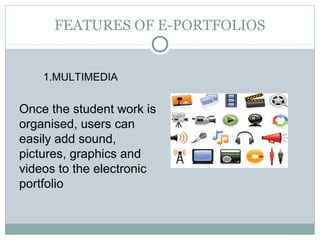
1.MULTIMEDIA
Once the student work is
organised, users can
easily add sound,
pictures, graphics and
videos to the electronic
portfolio
2.COMPUTER SKILLS
Students can gain valuable computer skills, which is
considered to be quite necessary in today’s world,
while developing and editing thier portfolios.
3. ASSESSMENT
E-portfolios directly relate a student’s work to the
defined standards or criteria.E- porftolios exhibit
wider dimensions of learning than just the
traditional methods (paper-pencil reports or
exercises). For instance, within an electronic
portfolio, a student can add digital audio, video,
and graphics to document evidence of learning.
• Because ePortfolios can provide a
means for assessment based on
evidence of an individual’s growth
over time and effort- not a list of test
scores.
 Because evaluating the learner’s work
using a variety of artifacts - graphics,
pictures, multimedia, stories,
journals, or projects - provides a view
into the individual’s mind and
capabilities as well as the teaching
and learning environment
 Because the collection of work
provides a powerful and
comprehensive digital resume of the
multiple intelligences of an
individual, as a linguist, an artist, a
scientist, a mathematician, an athlete,
a reflective learner, a self learner, or a
cooperative learner.
* Because a longitudinal view
of a learner’s work paints a
picture of growth, progress,
and continuity over time that
the learner can collect, select,
and reflect upon to present a
profile of accomplishment
based on evidence
WHY TO USE AN E-PORFOLIO?
TYPES OF E-PORTOLOIOS
1. DEVELOPMENTAL
2. ASSESSMENT
3. SHOWCASE
4. HYBRIDS
demonstrate the advancement and development of
student skills over a period of time. Developmental
portfolios are considered works-in-progress and
include both self-assessment and reflection/feedback
elements. The primary purpose is to provide
communication between students and faculty.
1. DEVELOPMENTAL
demonstrate student competence and skill for
well-defined areas. These may be end-of-
course or program assessments primarily for
evaluating student performance. The primary
purpose is to evaluate student competency as
defined by program standards and outcomes
2.ASSESSMENT
demonstrate exemplary work and student
skills. This type of portfolio is created at the
end of a program to highlight the quality of
student work. Students typically show this
portfolio to potential employers to gain
employment at the end of a degree program.
3. SHOWCASE
Most portfolios are hybrids of the three types
of portfolios listed above. Rarely will you find
a portfolio that is strictly used for assessment,
development or showcase purposes.
Occasionally, you may come across showcase
portfolios that do not show evidence of self-
reflection, rubrics for assessment or feedback.
4. HYBRID
*Student Information: name, contact information,
major, graduation date, etc
 Table of Contents: or various way to display links
to contents of the portfolio
 Learner Goals
 Curricular standards and/or criteria: used to
align the contents of the portfolio to institutional,
departmental or course curriculum (often
accomplished by rubrics)
 Rubrics: can be used to assess student work.
A rubric is a criteria-rating scale, which
provides the instructor with a tool to track
student performance. They also inform
students of the
course/departmental/institutional
expectations
 Guidelines: used to select
appropriate artifacts to keep the
collection from growing
haphazardly
 Artifacts: examples of student
work including documents, images,
video, audio, etc. (can be chosen by
student, instructor or both)
 Instructor feedback
 Self-reflection pieces: a
portfolio without reflections is just
a multimedia presentation or an
electronic resume
what to include?
DEMONSTRATES EFFORT, PROGRESS, AND ACH EVEMENTİ
MAKES CONNECT ONS BETWEEN THEORY AND PRACT CEİ İ
DOCUMENTS YOUR LEARN NG PROGRESS OVER T MEİ İ
PROV DES EV DENCE OF MEET NG PROFESS ONAL STANDARDSİ İ İ İ
ENHANCES COMMUN CAT ON AND ORGAN ZAT ONAL SK LLSİ İ İ İ İ
GREATER AWARENESS OF STRENGTHS AND WEAKNESSES
ENCOURAGES REFLECT VE SELF- NQU RYİ İ İ
LLUSTRATES GOOD TEACH NGİ İ
SUPPORTS PROFESS ONAL GROWTHİ
LEADS TO GOAL PLANN NGİ
V S BLE COLLECT ON OF SK LLS TO PRESENT TO A PROSPECT VEİ İ İ İ İ
EMPLOYER
MPROVES TEACH NGİ İ
OFTEN CONS DERED AUTHENT C ASSESSMENTİ İ
BENEFITS of E-PORTFOLIOS
1. TİME
A professional portfolio requires constant updating to
include the most current projects. Except for graphic
designers or writers whose work is already in digital
format, the process of converting images and projects
into digital files can be very time consuming. The
presentation of the electronic portfolio also needs to stay
current, and this will also require updating. Depending
on how busy you are or how often you add new projects,
older projects may have a short shelf-life, and replacing
them with the most current project examples is essential
before submitting a portfolio to new prospective
employers.
DRAWBACKS
Electronic portfolios may need to be saved in different
formats to prevent compatibility issues with the
prospective employers you email it to. For instance, if
your version of Microsoft Word saves files as .docx
files, the person you send them to may not be able to
open the file. Unless it is specified in advance, there is
no way of knowing whether your electronic portfolio
will be compatible with the person you are sending it
to. Setting up your digital portfolio on a website will
eliminate this drawback.
2. COMPATIBILITY
The convenience of an electronic portfolio
is considered an advantage, although it
also can be a drawback. You can bring a
disc, memory card, or web address to an
interview and expect to be able to present
your portfolio on whatever computer they
have available. You will still need to have a
hard copy with you even if you sent an
electronic copy in advance.
3. PORTABILITY
1. WHO OR WHAT İS BEİNG EVALUATED?
______student
______teacher
______curriculum/program
______school
CHECK LIST
______display best work and current performance
______display growth over time
______determine whether learning goals have been met
______determine quality of instruction
2. What is the purpose of the
evaluation?
______improved attitude towards school work
______learn to evaluate own performance
______increase critical thinking skills by developing evaluative
criteria and using it to select work to include
______improve instruction
______to enjoy the academic area
______improve or demonstrate mastery of specific academic
skills
(list) ______________________
______ to learn processes
______the writing process,
______steps for attacking complex problems
______the scientific method
______how to write a research paper
3. What are additional
purposes?
______students' classroom teacher
______another classroom teacher
______in school panel
______state appointed individuals
______other
__________________________________
5. Who is responsible for
evaluating the portfolios?
______number of school years
______number of subjects
(list) __________________________________
info taken from:
http://712educators.about.com/od/portfolios/a/portfolio_list.htm
4. What is the breadth of
work to be covered?
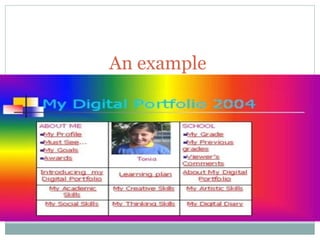
An example
Some Sites for Creating Your Own E-portfolio
 http://foliofor.me/
 http://carbonmade.com/
 http://www.doyoubuzz.com/us/
 http://flavors.me/
 https://www.foliospaces.org/
 http://www.opresume.com/
 http://shownd.com/
 http://www.visualcv.com/www/indexc.html
 http://www.webs.com/
 http://www.weebly.com/index.php?lang=tr
 http://wordpress.org/
 http://tr.wix.com/
E-portfolios are claimed to be the greatest
educational technology developement
since the adoptation of course
management systems. However, albeit
promising, they are not yet a
mainstream higher education
technology.
E-portfolios have recently become a
major method of assessment for
students, faculties, and staff that
document skill sets reflected on
learning, accomplishments, and
prospective goals.
Lately, institutions are beginning to
see that e-porfolios are a feasible
tool that encourage self-study.
Thus, an increasing number of
institutions are now recognising
that they are high-level
implications. Inevitably, as e –
portfolio applications develop,
they will get integrated into
campus systems. That is why, we,
sooner or later, will become a part
of this innovative advance
teaching/learning system.
CONCLUSION
HTTP://ACADEMİC.REGİS.EDU/LAAP/EPORTFOLİO/BAS
İCS.HTM
HTTP://NET.EDUCAUSE.EDU/İR/LİBRARY/PDF/ELİ3001.
PDF
REFERENCES

E portfolio presentation

  • 1.
  • 2.
  • 3.
    What is anE-Portfolio? A portfolio is a collection of work developed across various contexts over time. The portfolio can boost learning by providing students and/or faculty with a way to organise, archive and demonstrate pieces of work. The electronic format allows faculty and other professionals to evaluate student portfolios utilising technology, which may involve the Internet, CD- ROM, video, animation or audio. E- portfolios are becoming a popular alternative to traditional paper-based portfolios because they offer practitioners and peers the opportunity to review, communicate and assess portfolios in an asynchronous manner
  • 4.
    FEATURES OF E-PORTFOLIOS 1.MULTIMEDIA Oncethe student work is organised, users can easily add sound, pictures, graphics and videos to the electronic portfolio
  • 5.
    2.COMPUTER SKILLS Students cangain valuable computer skills, which is considered to be quite necessary in today’s world, while developing and editing thier portfolios.
  • 6.
    3. ASSESSMENT E-portfolios directlyrelate a student’s work to the defined standards or criteria.E- porftolios exhibit wider dimensions of learning than just the traditional methods (paper-pencil reports or exercises). For instance, within an electronic portfolio, a student can add digital audio, video, and graphics to document evidence of learning.
  • 7.
    • Because ePortfolioscan provide a means for assessment based on evidence of an individual’s growth over time and effort- not a list of test scores.  Because evaluating the learner’s work using a variety of artifacts - graphics, pictures, multimedia, stories, journals, or projects - provides a view into the individual’s mind and capabilities as well as the teaching and learning environment  Because the collection of work provides a powerful and comprehensive digital resume of the multiple intelligences of an individual, as a linguist, an artist, a scientist, a mathematician, an athlete, a reflective learner, a self learner, or a cooperative learner. * Because a longitudinal view of a learner’s work paints a picture of growth, progress, and continuity over time that the learner can collect, select, and reflect upon to present a profile of accomplishment based on evidence WHY TO USE AN E-PORFOLIO?
  • 8.
    TYPES OF E-PORTOLOIOS 1.DEVELOPMENTAL 2. ASSESSMENT 3. SHOWCASE 4. HYBRIDS
  • 9.
    demonstrate the advancementand development of student skills over a period of time. Developmental portfolios are considered works-in-progress and include both self-assessment and reflection/feedback elements. The primary purpose is to provide communication between students and faculty. 1. DEVELOPMENTAL
  • 10.
    demonstrate student competenceand skill for well-defined areas. These may be end-of- course or program assessments primarily for evaluating student performance. The primary purpose is to evaluate student competency as defined by program standards and outcomes 2.ASSESSMENT
  • 11.
    demonstrate exemplary workand student skills. This type of portfolio is created at the end of a program to highlight the quality of student work. Students typically show this portfolio to potential employers to gain employment at the end of a degree program. 3. SHOWCASE
  • 12.
    Most portfolios arehybrids of the three types of portfolios listed above. Rarely will you find a portfolio that is strictly used for assessment, development or showcase purposes. Occasionally, you may come across showcase portfolios that do not show evidence of self- reflection, rubrics for assessment or feedback. 4. HYBRID
  • 13.
    *Student Information: name, contactinformation, major, graduation date, etc  Table of Contents: or various way to display links to contents of the portfolio  Learner Goals  Curricular standards and/or criteria: used to align the contents of the portfolio to institutional, departmental or course curriculum (often accomplished by rubrics)  Rubrics: can be used to assess student work. A rubric is a criteria-rating scale, which provides the instructor with a tool to track student performance. They also inform students of the course/departmental/institutional expectations  Guidelines: used to select appropriate artifacts to keep the collection from growing haphazardly  Artifacts: examples of student work including documents, images, video, audio, etc. (can be chosen by student, instructor or both)  Instructor feedback  Self-reflection pieces: a portfolio without reflections is just a multimedia presentation or an electronic resume what to include?
  • 14.
    DEMONSTRATES EFFORT, PROGRESS,AND ACH EVEMENTİ MAKES CONNECT ONS BETWEEN THEORY AND PRACT CEİ İ DOCUMENTS YOUR LEARN NG PROGRESS OVER T MEİ İ PROV DES EV DENCE OF MEET NG PROFESS ONAL STANDARDSİ İ İ İ ENHANCES COMMUN CAT ON AND ORGAN ZAT ONAL SK LLSİ İ İ İ İ GREATER AWARENESS OF STRENGTHS AND WEAKNESSES ENCOURAGES REFLECT VE SELF- NQU RYİ İ İ LLUSTRATES GOOD TEACH NGİ İ SUPPORTS PROFESS ONAL GROWTHİ LEADS TO GOAL PLANN NGİ V S BLE COLLECT ON OF SK LLS TO PRESENT TO A PROSPECT VEİ İ İ İ İ EMPLOYER MPROVES TEACH NGİ İ OFTEN CONS DERED AUTHENT C ASSESSMENTİ İ BENEFITS of E-PORTFOLIOS
  • 15.
    1. TİME A professionalportfolio requires constant updating to include the most current projects. Except for graphic designers or writers whose work is already in digital format, the process of converting images and projects into digital files can be very time consuming. The presentation of the electronic portfolio also needs to stay current, and this will also require updating. Depending on how busy you are or how often you add new projects, older projects may have a short shelf-life, and replacing them with the most current project examples is essential before submitting a portfolio to new prospective employers. DRAWBACKS
  • 16.
    Electronic portfolios mayneed to be saved in different formats to prevent compatibility issues with the prospective employers you email it to. For instance, if your version of Microsoft Word saves files as .docx files, the person you send them to may not be able to open the file. Unless it is specified in advance, there is no way of knowing whether your electronic portfolio will be compatible with the person you are sending it to. Setting up your digital portfolio on a website will eliminate this drawback. 2. COMPATIBILITY
  • 17.
    The convenience ofan electronic portfolio is considered an advantage, although it also can be a drawback. You can bring a disc, memory card, or web address to an interview and expect to be able to present your portfolio on whatever computer they have available. You will still need to have a hard copy with you even if you sent an electronic copy in advance. 3. PORTABILITY
  • 18.
    1. WHO ORWHAT İS BEİNG EVALUATED? ______student ______teacher ______curriculum/program ______school CHECK LIST
  • 19.
    ______display best workand current performance ______display growth over time ______determine whether learning goals have been met ______determine quality of instruction 2. What is the purpose of the evaluation?
  • 20.
    ______improved attitude towardsschool work ______learn to evaluate own performance ______increase critical thinking skills by developing evaluative criteria and using it to select work to include ______improve instruction ______to enjoy the academic area ______improve or demonstrate mastery of specific academic skills (list) ______________________ ______ to learn processes ______the writing process, ______steps for attacking complex problems ______the scientific method ______how to write a research paper 3. What are additional purposes?
  • 21.
    ______students' classroom teacher ______anotherclassroom teacher ______in school panel ______state appointed individuals ______other __________________________________ 5. Who is responsible for evaluating the portfolios?
  • 22.
    ______number of schoolyears ______number of subjects (list) __________________________________ info taken from: http://712educators.about.com/od/portfolios/a/portfolio_list.htm 4. What is the breadth of work to be covered?
  • 23.
  • 24.
    Some Sites forCreating Your Own E-portfolio  http://foliofor.me/  http://carbonmade.com/  http://www.doyoubuzz.com/us/  http://flavors.me/  https://www.foliospaces.org/  http://www.opresume.com/  http://shownd.com/  http://www.visualcv.com/www/indexc.html  http://www.webs.com/  http://www.weebly.com/index.php?lang=tr  http://wordpress.org/  http://tr.wix.com/
  • 25.
    E-portfolios are claimedto be the greatest educational technology developement since the adoptation of course management systems. However, albeit promising, they are not yet a mainstream higher education technology. E-portfolios have recently become a major method of assessment for students, faculties, and staff that document skill sets reflected on learning, accomplishments, and prospective goals. Lately, institutions are beginning to see that e-porfolios are a feasible tool that encourage self-study. Thus, an increasing number of institutions are now recognising that they are high-level implications. Inevitably, as e – portfolio applications develop, they will get integrated into campus systems. That is why, we, sooner or later, will become a part of this innovative advance teaching/learning system. CONCLUSION
  • 26.