Shiny: Make Your R Code
Interactive
Craig Wang
MScin StatisticsatETH
R Programmerat Institutfür MathematikUZH
Zurich R User Group Meetups
December
1
Brief Demo
http://t.uzh.ch/se
2
Zurich R User Group Meetups
December
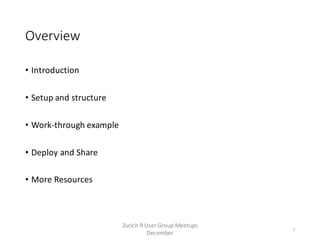
Overview
• Introduction
• Setup and structure
• Work-through example
• Deploy and Share
• More Resources
3
Zurich R User Group Meetups
December
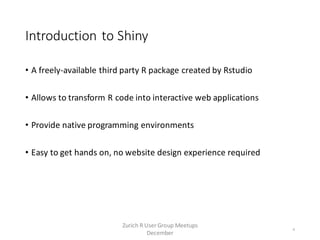
Introduction to Shiny
• A freely-available third party R package created by Rstudio
• Allows to transform R code into interactive web applications
• Provide native programming environments
• Easy to get hands on, no website design experience required
4
Zurich R User Group Meetups
December
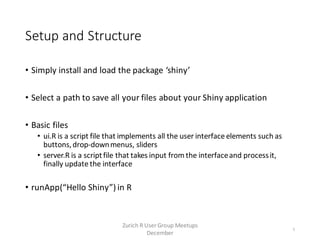
Setup and Structure
• Simply install and load the package ‘shiny’
• Select a path to save all your files about your Shiny application
• Basic files
• ui.R is a script file that implements all the user interface elements such as
buttons,drop-downmenus, sliders
• server.R is a scriptfile that takes input from the interfaceand processit,
finally update the interface
• runApp(“Hello Shiny”) in R
5
Zurich R User Group Meetups
December
Work-through Example
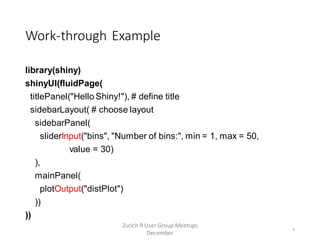
library(shiny)
shinyUI(fluidPage(
titlePanel("Hello Shiny!"), # define title
sidebarLayout( # choose layout
sidebarPanel(
sliderInput("bins", "Number of bins:", min = 1, max = 50,
value = 30)
),
mainPanel(
plotOutput("distPlot")
))
))
6
Zurich R User Group Meetups
December
Work-through Example
x <- faithful[, 2] # Old Faithful Geyser data
bins <- seq(min(x), max(x), length.out = n + 1) # n is number of bins
hist(x, breaks = bins, col = 'darkgray', border = 'white')
7
Zurich R User Group Meetups
December
Work-through Example
x <- faithful[, 2] # Old Faithful Geyser data
bins <- seq(min(x), max(x), length.out = n + 1) # n is number of bins
hist(x, breaks = bins, col = 'darkgray', border = 'white')
x <- faithful[, 2] # Old Faithful Geyser data
bins <- seq(min(x), max(x), length.out = input$bins + 1)
hist(x, breaks = bins, col = 'darkgray', border = 'white')
8
Zurich R User Group Meetups
December
Work-through Example
x <- faithful[, 2] # Old Faithful Geyser data
bins <- seq(min(x), max(x), length.out = n + 1) # n is number of bins
hist(x, breaks = bins, col = 'darkgray', border = 'white')
library(shiny)
shinyServer(function(input, output) {
output$distPlot <- renderPlot({
x <- faithful[, 2] # Old Faithful Geyser data
bins <- seq(min(x), max(x), length.out = input$bins + 1)
hist(x, breaks = bins, col = 'darkgray', border = 'white')
})
})
9
Zurich R User Group Meetups
December
Work-through Example
• runApp(“Hello Shiny”)
10
Zurich R User Group Meetups
December
Deploy and Share
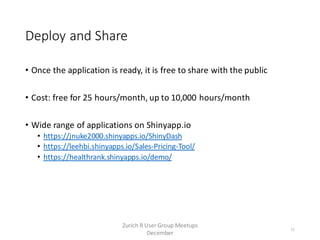
• Once the application is ready, it is free to share with the public
• Cost: free for 25 hours/month, up to 10,000 hours/month
• Wide range of applications on Shinyapp.io
• https://jnuke2000.shinyapps.io/ShinyDash
• https://leehbi.shinyapps.io/Sales-Pricing-Tool/
• https://healthrank.shinyapps.io/demo/
11
Zurich R User Group Meetups
December
More Resources
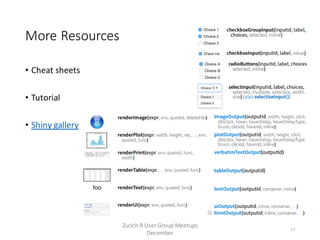
• Cheat sheets
• Tutorial
• Shiny gallery
12
Zurich R User Group Meetups
December
Final Notes
• Demo website: http://t.uzh.ch/se
• My contact: craigwang247@gmail.com
• Thanks Christoph and Heidi for organizing this, also Sanitas for
sponsoring the venue.
13
Zurich R User Group Meetups
December

December 2015 Meetup - Shiny: Make Your R Code Interactive - Craig Wang

  • 1.
    Shiny: Make YourR Code Interactive Craig Wang MScin StatisticsatETH R Programmerat Institutfür MathematikUZH Zurich R User Group Meetups December 1
  • 2.
    Brief Demo http://t.uzh.ch/se 2 Zurich RUser Group Meetups December
  • 3.
    Overview • Introduction • Setupand structure • Work-through example • Deploy and Share • More Resources 3 Zurich R User Group Meetups December
  • 4.
    Introduction to Shiny •A freely-available third party R package created by Rstudio • Allows to transform R code into interactive web applications • Provide native programming environments • Easy to get hands on, no website design experience required 4 Zurich R User Group Meetups December
  • 5.
    Setup and Structure •Simply install and load the package ‘shiny’ • Select a path to save all your files about your Shiny application • Basic files • ui.R is a script file that implements all the user interface elements such as buttons,drop-downmenus, sliders • server.R is a scriptfile that takes input from the interfaceand processit, finally update the interface • runApp(“Hello Shiny”) in R 5 Zurich R User Group Meetups December
  • 6.
    Work-through Example library(shiny) shinyUI(fluidPage( titlePanel("Hello Shiny!"),# define title sidebarLayout( # choose layout sidebarPanel( sliderInput("bins", "Number of bins:", min = 1, max = 50, value = 30) ), mainPanel( plotOutput("distPlot") )) )) 6 Zurich R User Group Meetups December
  • 7.
    Work-through Example x <-faithful[, 2] # Old Faithful Geyser data bins <- seq(min(x), max(x), length.out = n + 1) # n is number of bins hist(x, breaks = bins, col = 'darkgray', border = 'white') 7 Zurich R User Group Meetups December
  • 8.
    Work-through Example x <-faithful[, 2] # Old Faithful Geyser data bins <- seq(min(x), max(x), length.out = n + 1) # n is number of bins hist(x, breaks = bins, col = 'darkgray', border = 'white') x <- faithful[, 2] # Old Faithful Geyser data bins <- seq(min(x), max(x), length.out = input$bins + 1) hist(x, breaks = bins, col = 'darkgray', border = 'white') 8 Zurich R User Group Meetups December
  • 9.
    Work-through Example x <-faithful[, 2] # Old Faithful Geyser data bins <- seq(min(x), max(x), length.out = n + 1) # n is number of bins hist(x, breaks = bins, col = 'darkgray', border = 'white') library(shiny) shinyServer(function(input, output) { output$distPlot <- renderPlot({ x <- faithful[, 2] # Old Faithful Geyser data bins <- seq(min(x), max(x), length.out = input$bins + 1) hist(x, breaks = bins, col = 'darkgray', border = 'white') }) }) 9 Zurich R User Group Meetups December
  • 10.
    Work-through Example • runApp(“HelloShiny”) 10 Zurich R User Group Meetups December
  • 11.
    Deploy and Share •Once the application is ready, it is free to share with the public • Cost: free for 25 hours/month, up to 10,000 hours/month • Wide range of applications on Shinyapp.io • https://jnuke2000.shinyapps.io/ShinyDash • https://leehbi.shinyapps.io/Sales-Pricing-Tool/ • https://healthrank.shinyapps.io/demo/ 11 Zurich R User Group Meetups December
  • 12.
    More Resources • Cheatsheets • Tutorial • Shiny gallery 12 Zurich R User Group Meetups December
  • 13.
    Final Notes • Demowebsite: http://t.uzh.ch/se • My contact: craigwang247@gmail.com • Thanks Christoph and Heidi for organizing this, also Sanitas for sponsoring the venue. 13 Zurich R User Group Meetups December