CSS zweispaltige Layouts
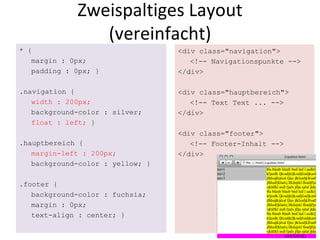
Zweispaltiges Layout (vereinfacht) * { margin : 0px; padding : 0px; } .navigation { width : 200px; background-color : silver; float : left;  } .hauptbereich { margin-left : 200px; background-color : yellow; } .footer { background-color : fuchsia; margin : 0px; text-align : center; } <div class=&quot;navigation&quot;> <!-- Navigationspunkte --> </div> <div class=&quot;hauptbereich&quot;> <!-- Text Text ... --> </div> <div class=&quot;footer&quot;> <!-- Footer-Inhalt --> </div>
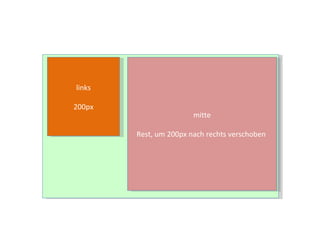
links 200px mitte Rest, um 200px nach rechts verschoben
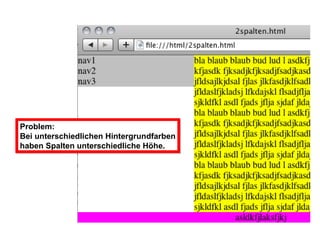
Problem: Bei unterschiedlichen Hintergrundfarben haben Spalten unterschiedliche Höhe.
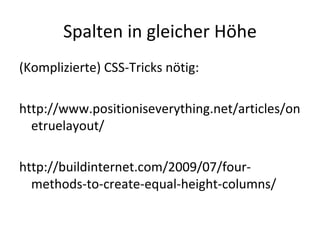
Spalten in gleicher Höhe (Komplizierte) CSS-Tricks nötig: http://www.positioniseverything.net/articles/onetruelayout/ http://buildinternet.com/2009/07/four-methods-to-create-equal-height-columns/
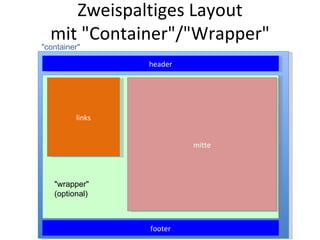
Zweispaltiges Layout mit &quot;Container&quot;/&quot;Wrapper&quot; w links mitte &quot;container&quot; header &quot;wrapper&quot; (optional) footer

CSS: Zweispaltige Layouts

  • 1.
  • 2.
    Zweispaltiges Layout (vereinfacht)* { margin : 0px; padding : 0px; } .navigation { width : 200px; background-color : silver; float : left; } .hauptbereich { margin-left : 200px; background-color : yellow; } .footer { background-color : fuchsia; margin : 0px; text-align : center; } <div class=&quot;navigation&quot;> <!-- Navigationspunkte --> </div> <div class=&quot;hauptbereich&quot;> <!-- Text Text ... --> </div> <div class=&quot;footer&quot;> <!-- Footer-Inhalt --> </div>
  • 3.
    links 200px mitteRest, um 200px nach rechts verschoben
  • 4.
    Problem: Bei unterschiedlichenHintergrundfarben haben Spalten unterschiedliche Höhe.
  • 5.
    Spalten in gleicherHöhe (Komplizierte) CSS-Tricks nötig: http://www.positioniseverything.net/articles/onetruelayout/ http://buildinternet.com/2009/07/four-methods-to-create-equal-height-columns/
  • 6.
    Zweispaltiges Layout mit&quot;Container&quot;/&quot;Wrapper&quot; w links mitte &quot;container&quot; header &quot;wrapper&quot; (optional) footer