Back to Basics 2016: Webinar 2
Ihre erste MongoDB-Anwendung
Benjamin Lorenz
Senior Solutions Architect, EMEA
MongoDB
#back2basics
V1.0
3
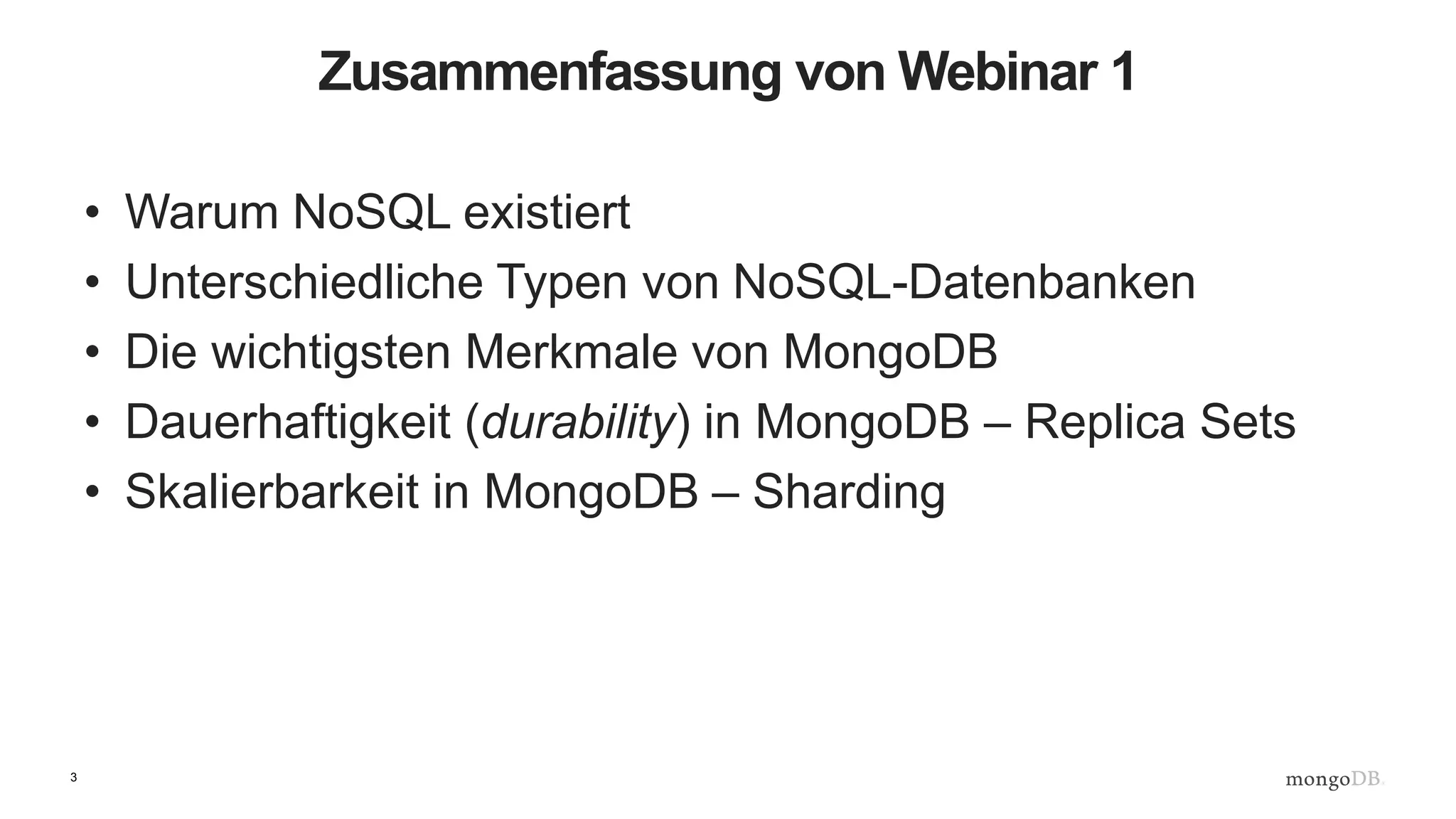
Zusammenfassung von Webinar 1
• Warum NoSQL existiert
• Unterschiedliche Typen von NoSQL-Datenbanken
• Die wichtigsten Merkmale von MongoDB
• Dauerhaftigkeit (durability) in MongoDB – Replica Sets
• Skalierbarkeit in MongoDB – Sharding
4
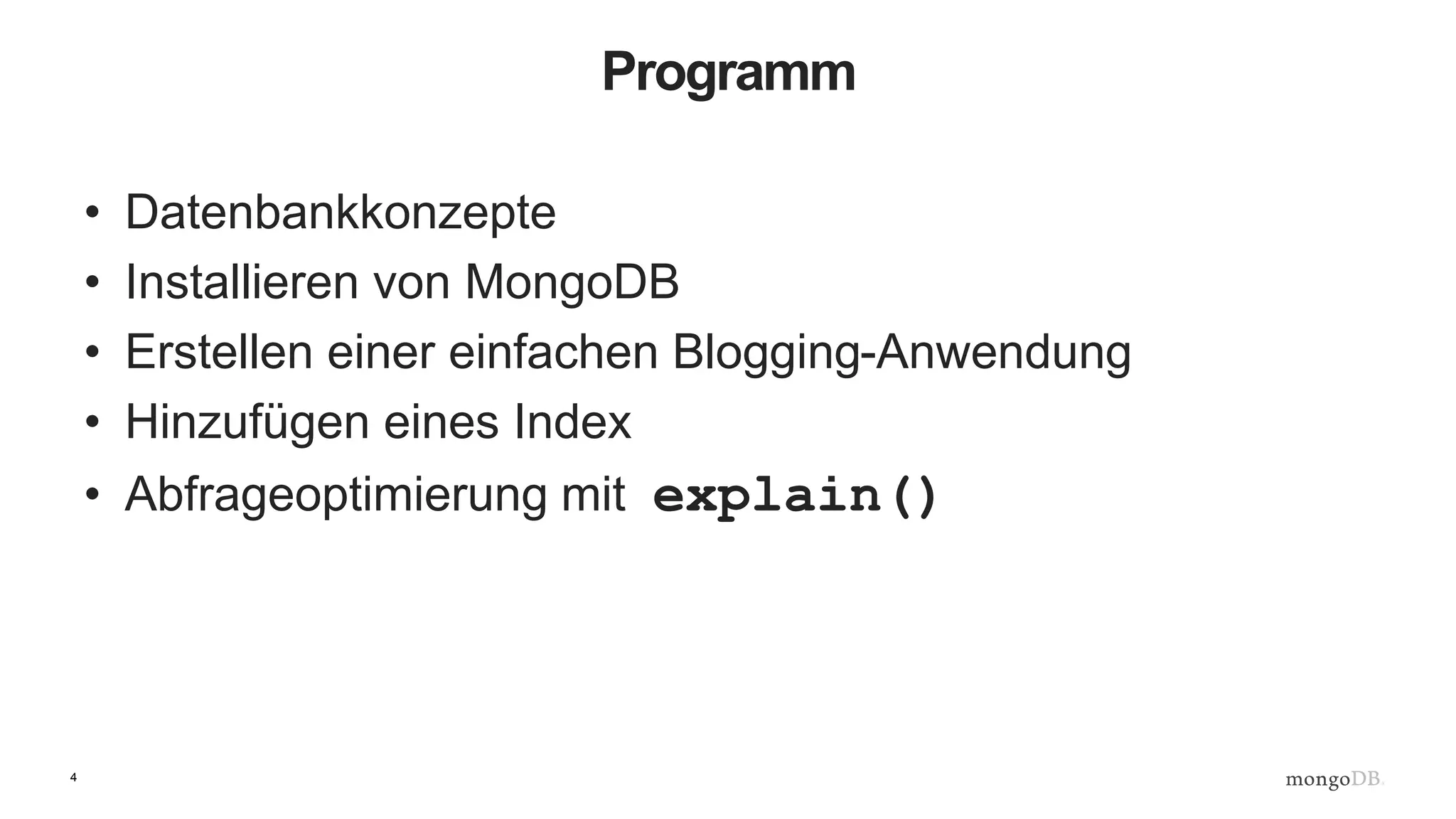
Programm
• Datenbankkonzepte
• Installieren von MongoDB
• Erstellen einer einfachen Blogging-Anwendung
• Hinzufügen eines Index
• Abfrageoptimierung mit explain()
5
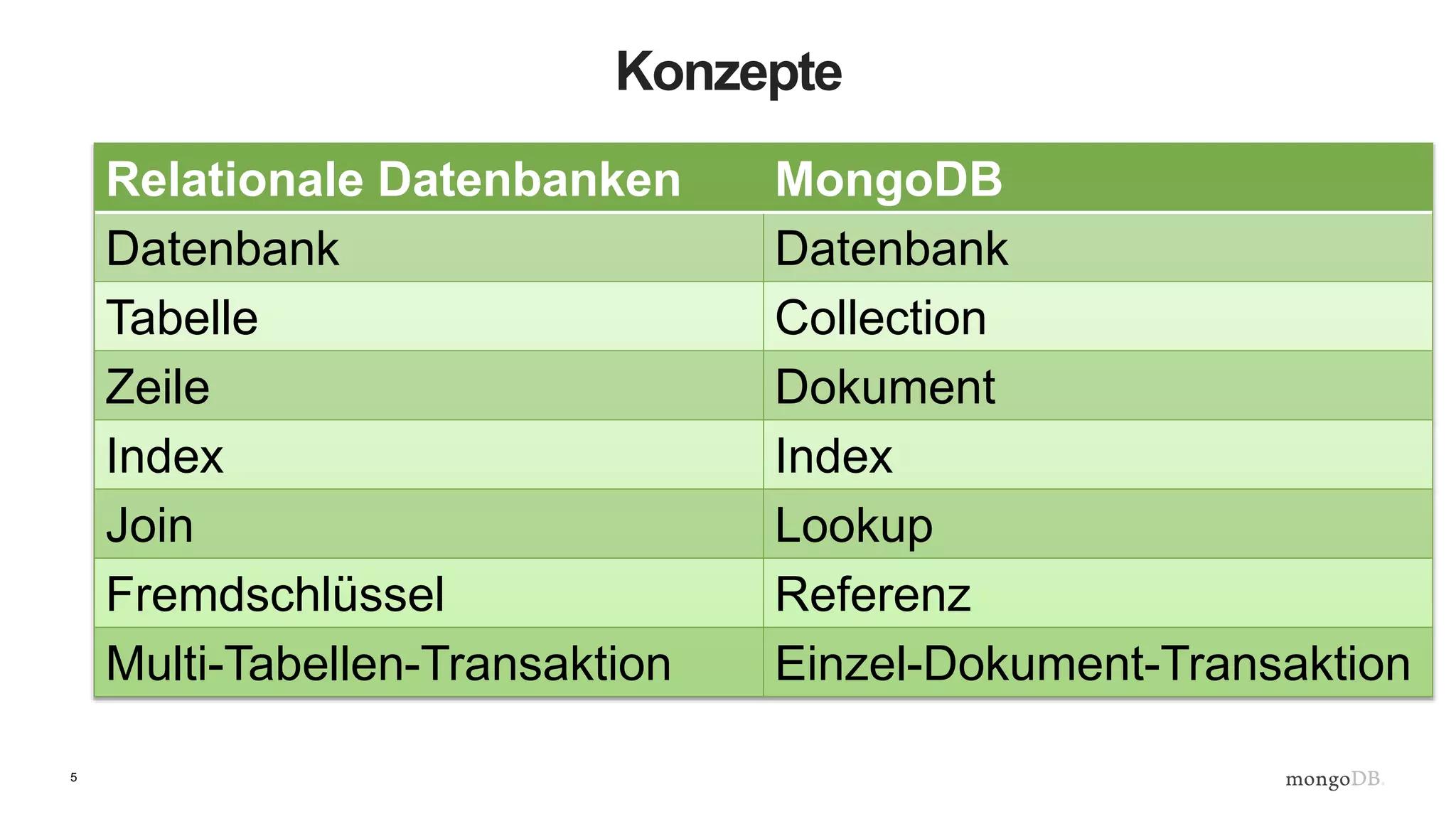
Konzepte
Relationale Datenbanken MongoDB
Datenbank Datenbank
Tabelle Collection
Zeile Dokument
Index Index
Join Lookup
Fremdschlüssel Referenz
Multi-Tabellen-Transaktion Einzel-Dokument-Transaktion
6
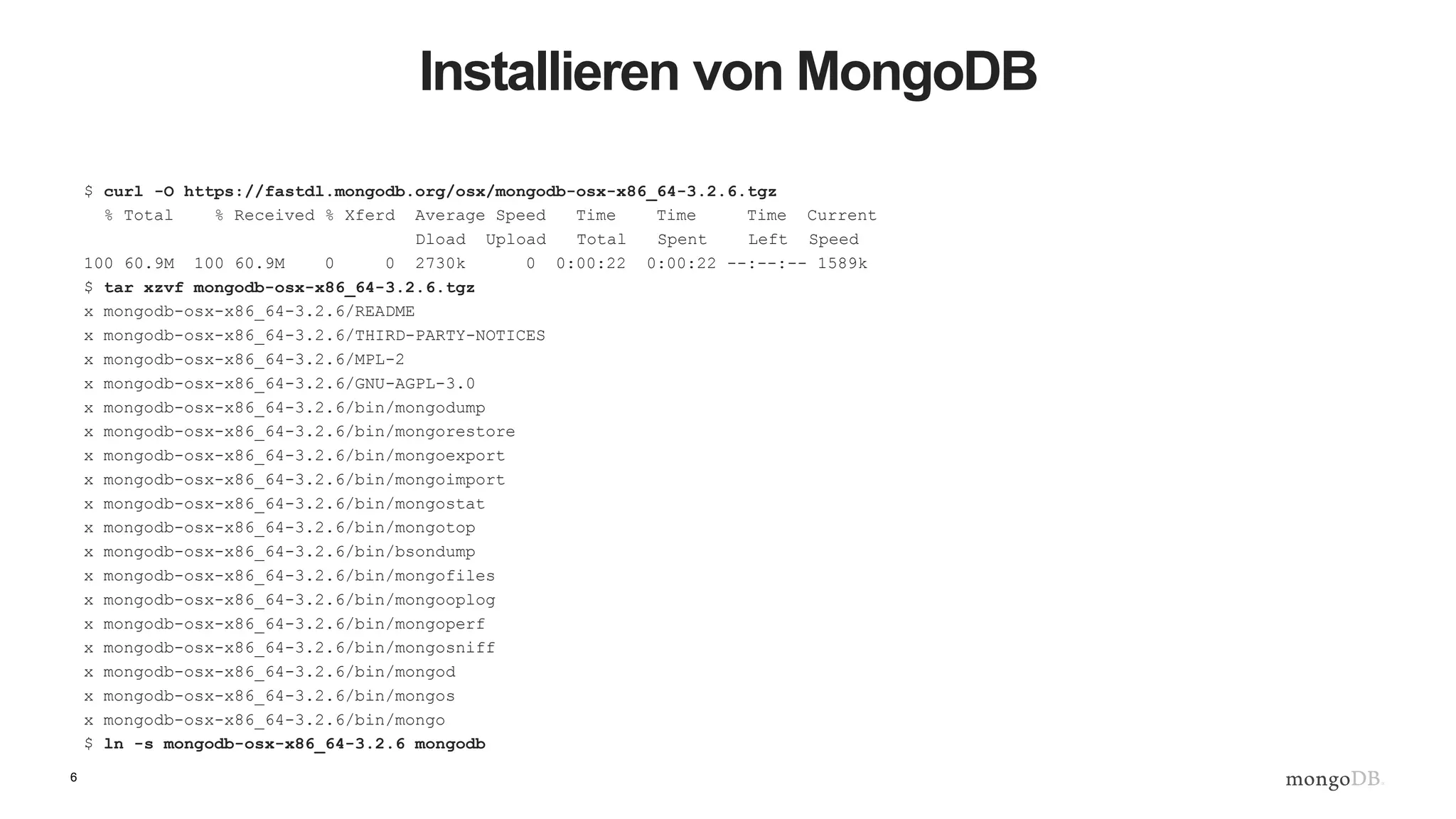
Installieren von MongoDB
$ curl -O https://fastdl.mongodb.org/osx/mongodb-osx-x86_64-3.2.6.tgz
% Total % Received % Xferd Average Speed Time Time Time Current
Dload Upload Total Spent Left Speed
100 60.9M 100 60.9M 0 0 2730k 0 0:00:22 0:00:22 --:--:-- 1589k
$ tar xzvf mongodb-osx-x86_64-3.2.6.tgz
x mongodb-osx-x86_64-3.2.6/README
x mongodb-osx-x86_64-3.2.6/THIRD-PARTY-NOTICES
x mongodb-osx-x86_64-3.2.6/MPL-2
x mongodb-osx-x86_64-3.2.6/GNU-AGPL-3.0
x mongodb-osx-x86_64-3.2.6/bin/mongodump
x mongodb-osx-x86_64-3.2.6/bin/mongorestore
x mongodb-osx-x86_64-3.2.6/bin/mongoexport
x mongodb-osx-x86_64-3.2.6/bin/mongoimport
x mongodb-osx-x86_64-3.2.6/bin/mongostat
x mongodb-osx-x86_64-3.2.6/bin/mongotop
x mongodb-osx-x86_64-3.2.6/bin/bsondump
x mongodb-osx-x86_64-3.2.6/bin/mongofiles
x mongodb-osx-x86_64-3.2.6/bin/mongooplog
x mongodb-osx-x86_64-3.2.6/bin/mongoperf
x mongodb-osx-x86_64-3.2.6/bin/mongosniff
x mongodb-osx-x86_64-3.2.6/bin/mongod
x mongodb-osx-x86_64-3.2.6/bin/mongos
x mongodb-osx-x86_64-3.2.6/bin/mongo
$ ln -s mongodb-osx-x86_64-3.2.6 mongodb
7
Ausführen von Mongod
JD10Gen:mongodb jdrumgoole$ ./bin/mongod --dbpath /data/b2b
2016-05-23T19:21:07.767+0100 I CONTROL [initandlisten] MongoDB starting : pid=49209 port=27017 dbpath=/data/b2b 64-
bit host=JD10Gen.local
2016-05-23T19:21:07.768+0100 I CONTROL [initandlisten] db version v3.2.6
2016-05-23T19:21:07.768+0100 I CONTROL [initandlisten] git version: 05552b562c7a0b3143a729aaa0838e558dc49b25
2016-05-23T19:21:07.768+0100 I CONTROL [initandlisten] allocator: system
2016-05-23T19:21:07.768+0100 I CONTROL [initandlisten] modules: none
2016-05-23T19:21:07.768+0100 I CONTROL [initandlisten] build environment:
2016-05-23T19:21:07.768+0100 I CONTROL [initandlisten] distarch: x86_64
2016-05-23T19:21:07.768+0100 I CONTROL [initandlisten] target_arch: x86_64
2016-05-23T19:21:07.768+0100 I CONTROL [initandlisten] options: { storage: { dbPath: "/data/b2b" } }
2016-05-23T19:21:07.769+0100 I - [initandlisten] Detected data files in /data/b2b created by the 'wiredTiger'
storage engine, so setting the active storage engine to 'wiredTiger'.
2016-05-23T19:21:07.769+0100 I STORAGE [initandlisten] wiredtiger_open config:
create,cache_size=4G,session_max=20000,eviction=(threads_max=4),config_base=false,statistics=(fast),log=(enabled=true
,archive=true,path=journal,compressor=snappy),file_manager=(close_idle_time=100000),checkpoint=(wait=60,log_size=2GB)
,statistics_log=(wait=0),
2016-05-23T19:21:08.837+0100 I CONTROL [initandlisten]
2016-05-23T19:21:08.838+0100 I CONTROL [initandlisten] ** WARNING: soft rlimits too low. Number of files is 256,
should be at least 1000
2016-05-23T19:21:08.840+0100 I NETWORK [HostnameCanonicalizationWorker] Starting hostname canonicalization worker
2016-05-23T19:21:08.840+0100 I FTDC [initandlisten] Initializing full-time diagnostic data capture with directory
'/data/b2b/diagnostic.data'
2016-05-23T19:21:08.841+0100 I NETWORK [initandlisten] waiting for connections on port 27017
2016-05-23T19:21:09.148+0100 I NETWORK [initandlisten] connection accepted from 127.0.0.1:59213 #1 (1 connection now
open)
8
Verbinden über Mongo Shell
$ ./bin/mongo
MongoDB shell version: 3.2.6
connecting to: test
Server has startup warnings:
2016-05-17T11:46:03.516+0100 I CONTROL [initandlisten]
2016-05-17T11:46:03.516+0100 I CONTROL [initandlisten] ** WARNING: soft rlimits too low. Number of
files is 256, should be at least 1000
>
9
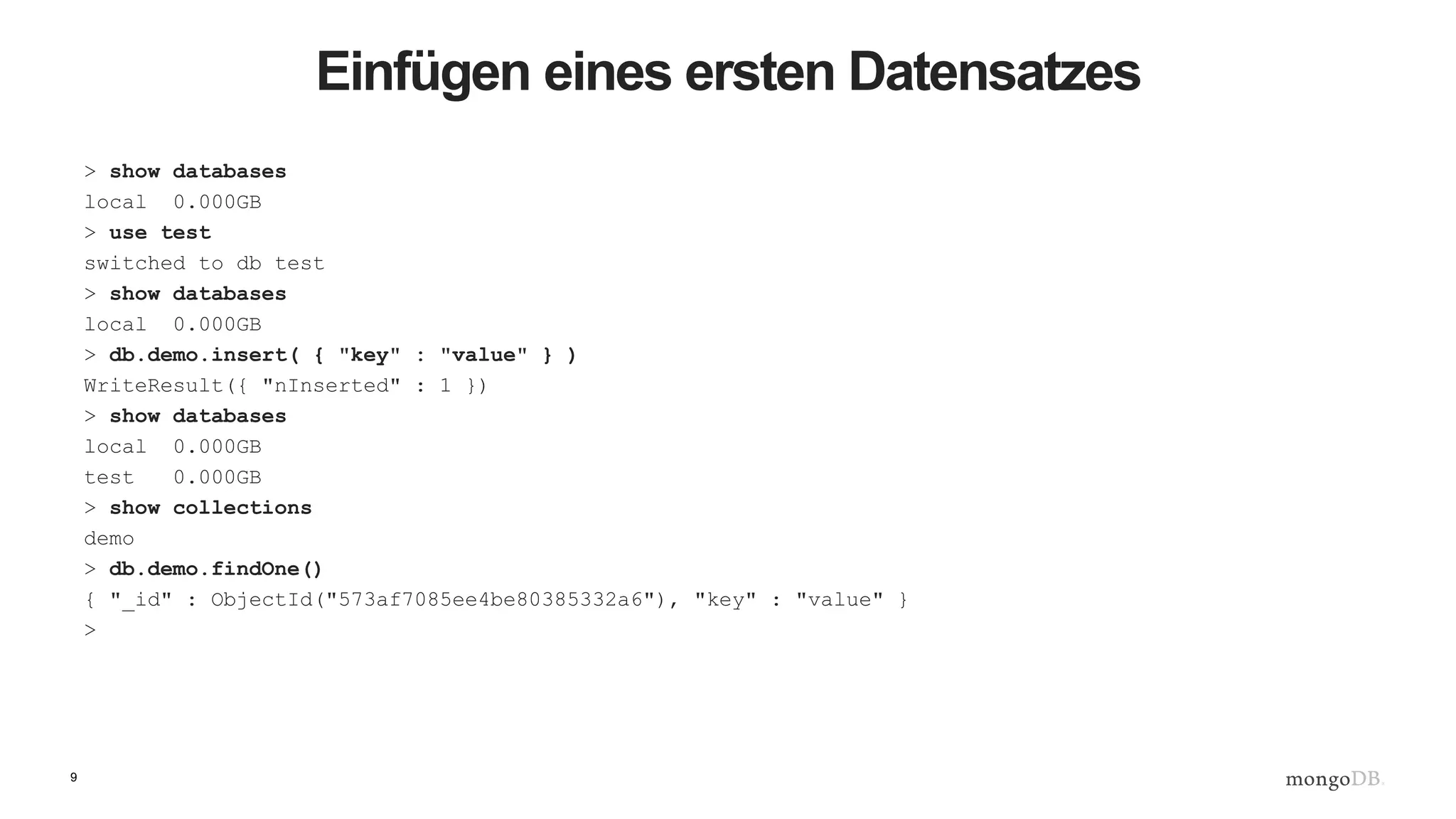
Einfügen eines ersten Datensatzes
> show databases
local 0.000GB
> use test
switched to db test
> show databases
local 0.000GB
> db.demo.insert( { "key" : "value" } )
WriteResult({ "nInserted" : 1 })
> show databases
local 0.000GB
test 0.000GB
> show collections
demo
> db.demo.findOne()
{ "_id" : ObjectId("573af7085ee4be80385332a6"), "key" : "value" }
>
10
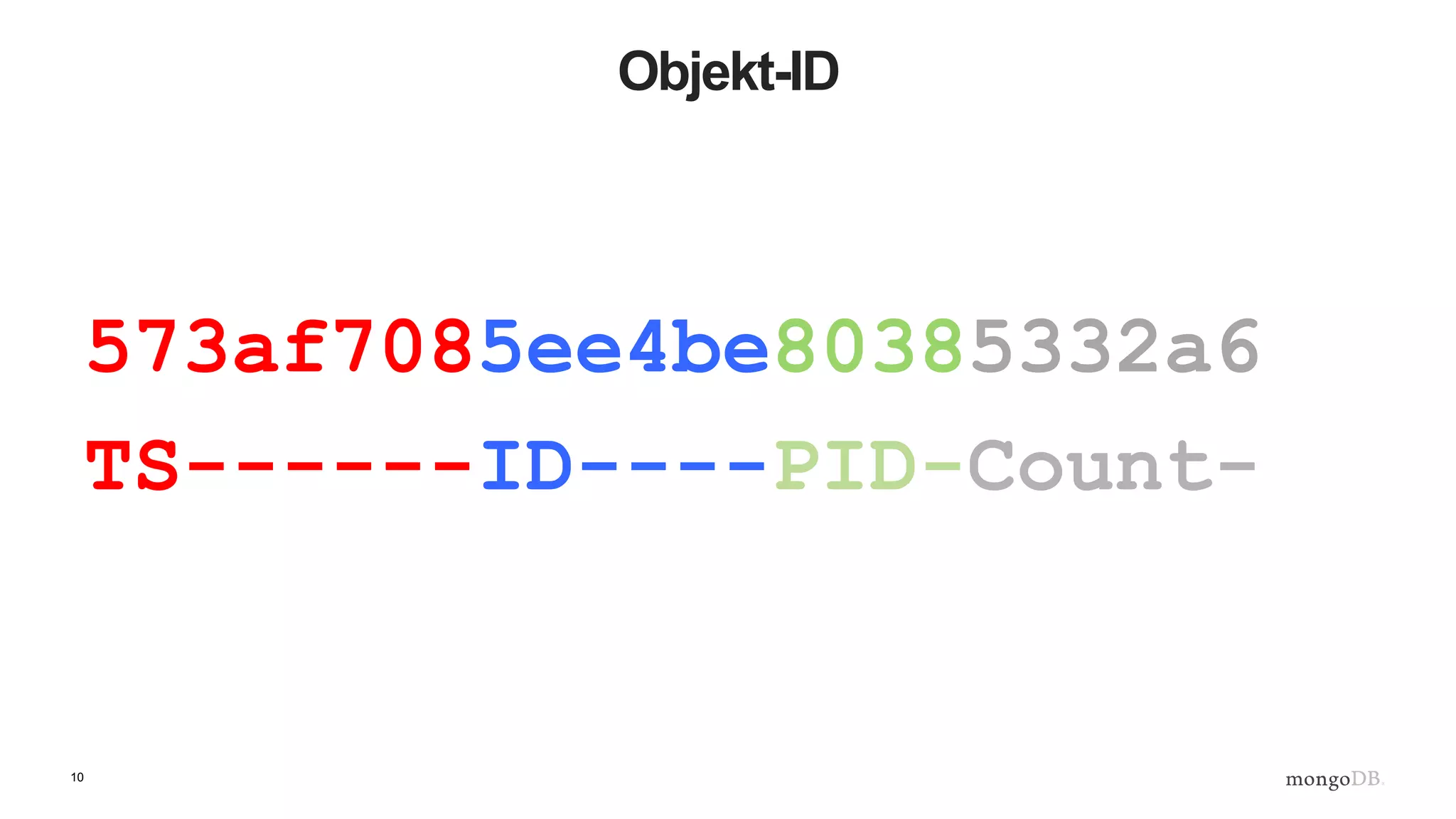
Objekt-ID
573af7085ee4be80385332a6
TS------ID----PID-Count-
11
Eine einfache Blogging-Anwendung
• Wir erstellen einer Blogging-Anwendung mit:
– Artikeln
– Anwendern
– Kommentaren
12
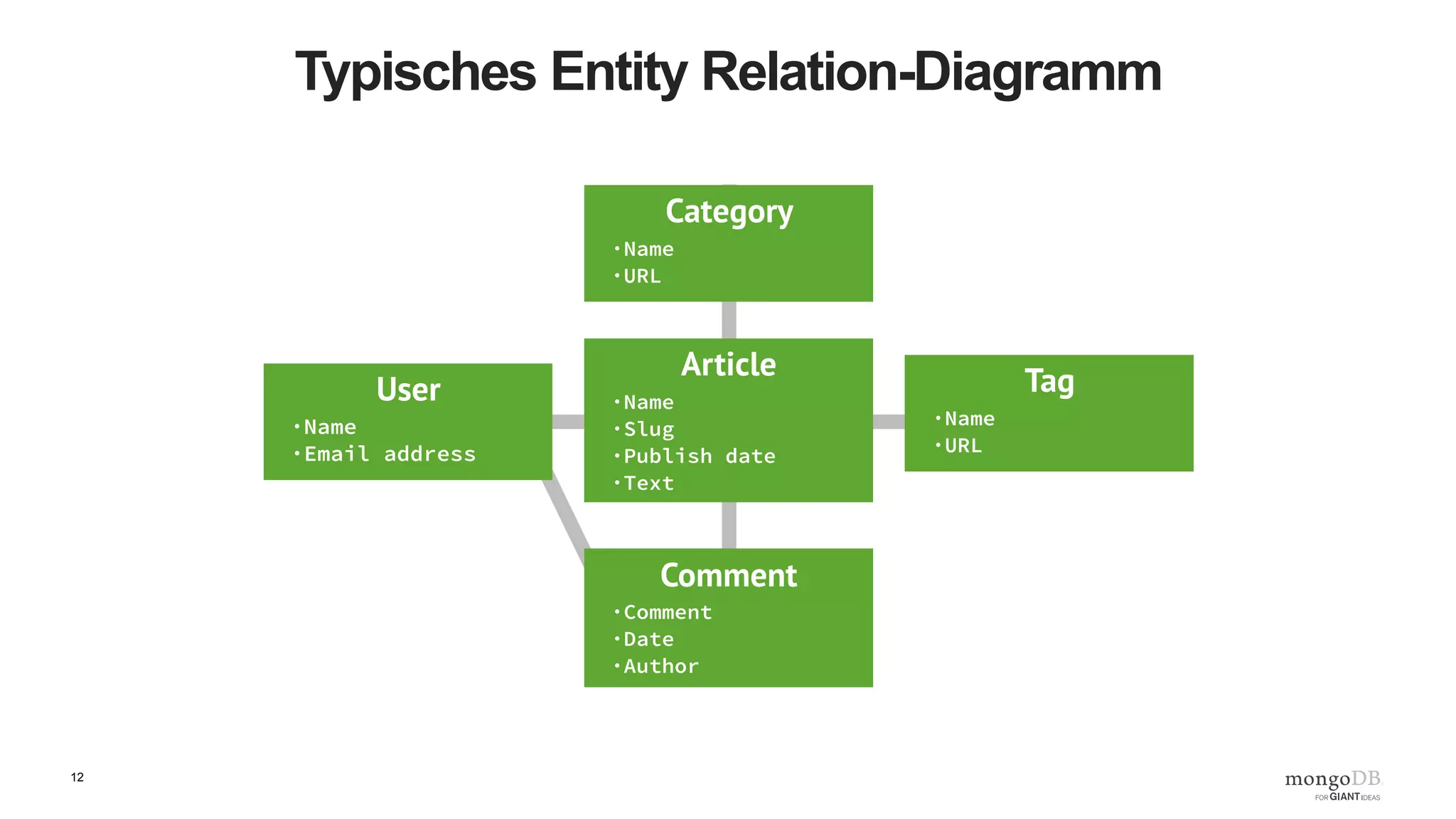
Typisches Entity Relation-Diagramm
13
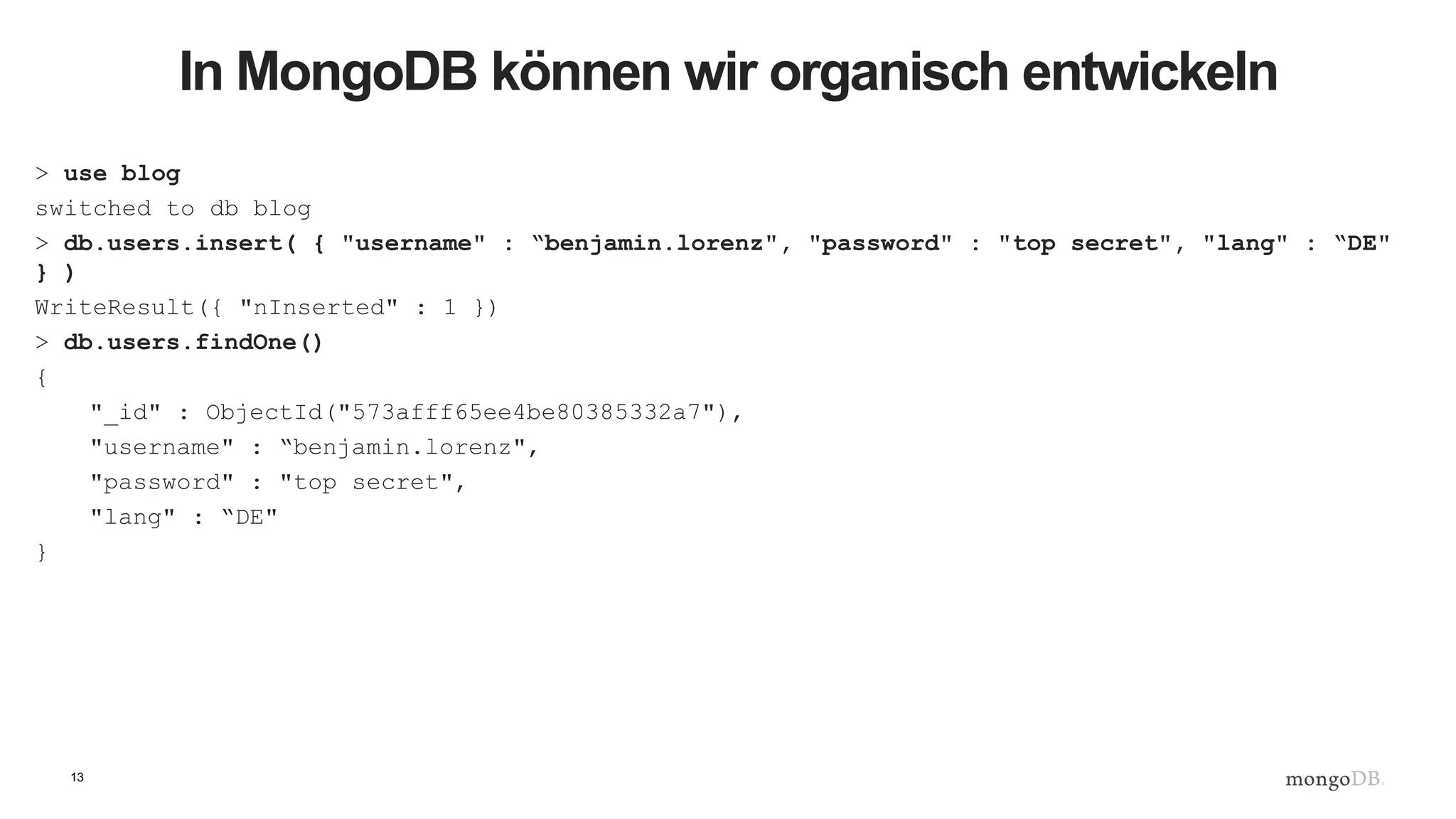
In MongoDB können wir organisch entwickeln
> use blog
switched to db blog
> db.users.insert( { "username" : “benjamin.lorenz", "password" : "top secret", "lang" : “DE"
} )
WriteResult({ "nInserted" : 1 })
> db.users.findOne()
{
"_id" : ObjectId("573afff65ee4be80385332a7"),
"username" : “benjamin.lorenz",
"password" : "top secret",
"lang" : “DE"
}
14
Noch einmal in Python
'''
Created on 16 June 2016
@author: benjamin.lorenz
'''
import pymongo
#
# client defaults to localhost and port 27017. eg MongoClient('localhost', 27017)
client = pymongo.MongoClient()
blogDatabase = client[ "blog" ]
usersCollection = blogDatabase[ "users" ]
usersCollection.insert_one( { "username" : “benjamin.lorenz",
"password" : "top secret",
"lang" : “DE" })
user = usersCollection.find_one()
print( user )
15
Kommen wir zu den Artikeln
…
articlesCollection = blogDatabase[ "articles" ]
author = “benjamin.lorenz"
article = { "title" : “Mein erstes Posting",
"body" : “Hier steht der eigentliche Inhalt. Ein längerer Text kann das sein.",
"author" : author,
"tags" : [ “benjamin", "general", “Germany", "admin" ]
}
#
# Lets check if our author exists
#
if usersCollection.find_one( { "username" : author }) :
articlesCollection.insert_one( article )
else:
raise ValueError( "Author %s does not exist" % author )
16
Ein neuer Artikeltyp
#
# Lets add a new type of article with a posting date and a section
#
author = “benjamin.lorenz"
title = “Ein englisches Posting in MongoDB"
newPost = { "title" : title,
"body" : "MongoDB is the worlds most popular NoSQL database. It is a document database",
"author" : author,
"tags" : [ “benjamin", "mongodb", “Frankfurt" ],
"section" : "technology",
"postDate" : datetime.datetime.now(),
}
#
# Lets check if our author exists
#
if usersCollection.find_one( { "username" : author }) :
articlesCollection.insert_one( newPost )
17
Viele Artikel erstellen, Teil 1
import pymongo
import string
import datetime
import random
def randomString( size, letters = string.letters ):
return "".join( [random.choice( letters ) for _ in xrange( size )] )
client = pymongo.MongoClient()
def makeArticle( count, author, timestamp ):
return { "_id" : count,
"title" : randomString( 20 ),
"body" : randomString( 80 ),
"author" : author,
"postdate" : timestamp }
def makeUser( username ):
return { "username" : username,
"password" : randomString( 10 ) ,
"karma" : random.randint( 0, 500 ),
"lang" : "EN" }
18
Viele Artikel erstellen, Teil 2
blogDatabase = client[ "blog" ]
usersCollection = blogDatabase[ "users" ]
articlesCollection = blogDatabase[ "articles" ]
bulkUsers = usersCollection.initialize_ordered_bulk_op()
bulkArticles = articlesCollection.initialize_ordered_bulk_op()
ts = datetime.datetime.now()
for i in range( 1000000 ) :
#username = randomString( 10, string.ascii_uppercase ) + "_" + str( i )
username = "USER_" + str( i )
bulkUsers.insert( makeUser( username ) )
ts = ts + datetime.timedelta( seconds = 1 )
bulkArticles.insert( makeArticle( i, username, ts ))
if ( i % 500 == 0 ) :
bulkUsers.execute()
bulkArticles.execute()
bulkUsers = usersCollection.initialize_ordered_bulk_op()
bulkArticles = articlesCollection.initialize_ordered_bulk_op()
bulkUsers.execute()
bulkArticles.execute()
19
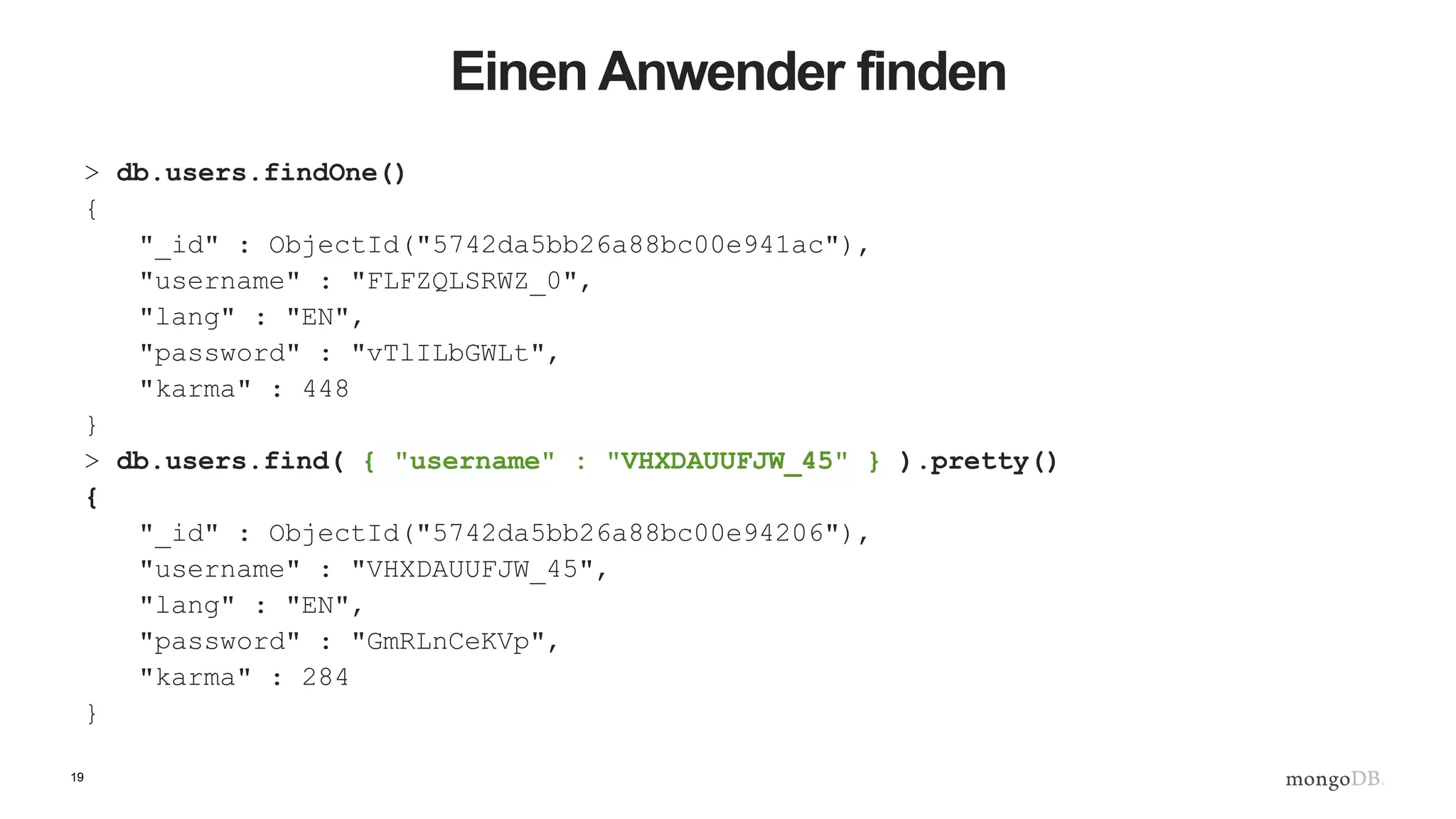
Einen Anwender finden
> db.users.findOne()
{
"_id" : ObjectId("5742da5bb26a88bc00e941ac"),
"username" : "FLFZQLSRWZ_0",
"lang" : "EN",
"password" : "vTlILbGWLt",
"karma" : 448
}
> db.users.find( { "username" : "VHXDAUUFJW_45" } ).pretty()
{
"_id" : ObjectId("5742da5bb26a88bc00e94206"),
"username" : "VHXDAUUFJW_45",
"lang" : "EN",
"password" : "GmRLnCeKVp",
"karma" : 284
}
20
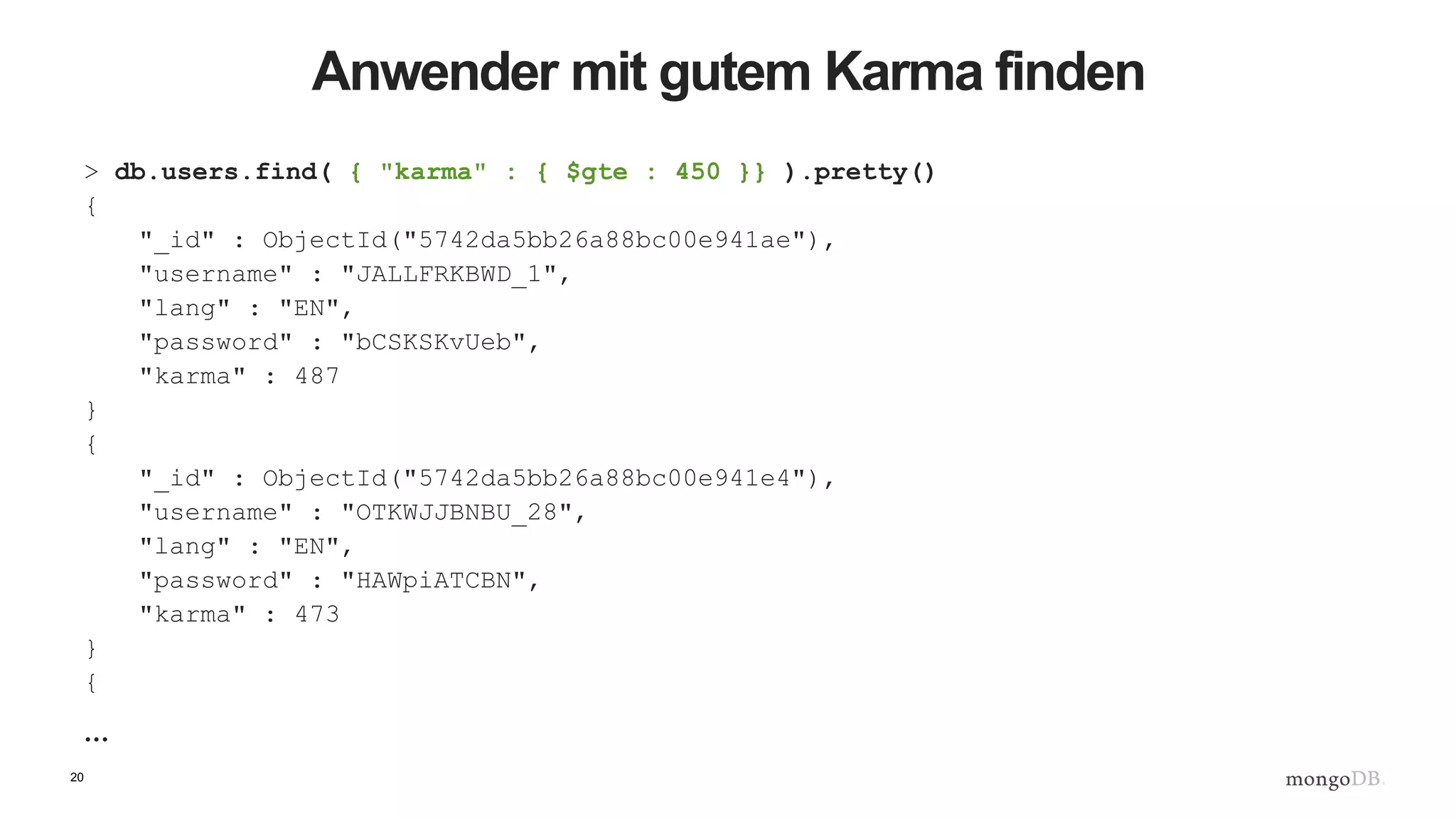
Anwender mit gutem Karma finden
> db.users.find( { "karma" : { $gte : 450 }} ).pretty()
{
"_id" : ObjectId("5742da5bb26a88bc00e941ae"),
"username" : "JALLFRKBWD_1",
"lang" : "EN",
"password" : "bCSKSKvUeb",
"karma" : 487
}
{
"_id" : ObjectId("5742da5bb26a88bc00e941e4"),
"username" : "OTKWJJBNBU_28",
"lang" : "EN",
"password" : "HAWpiATCBN",
"karma" : 473
}
{
…
21
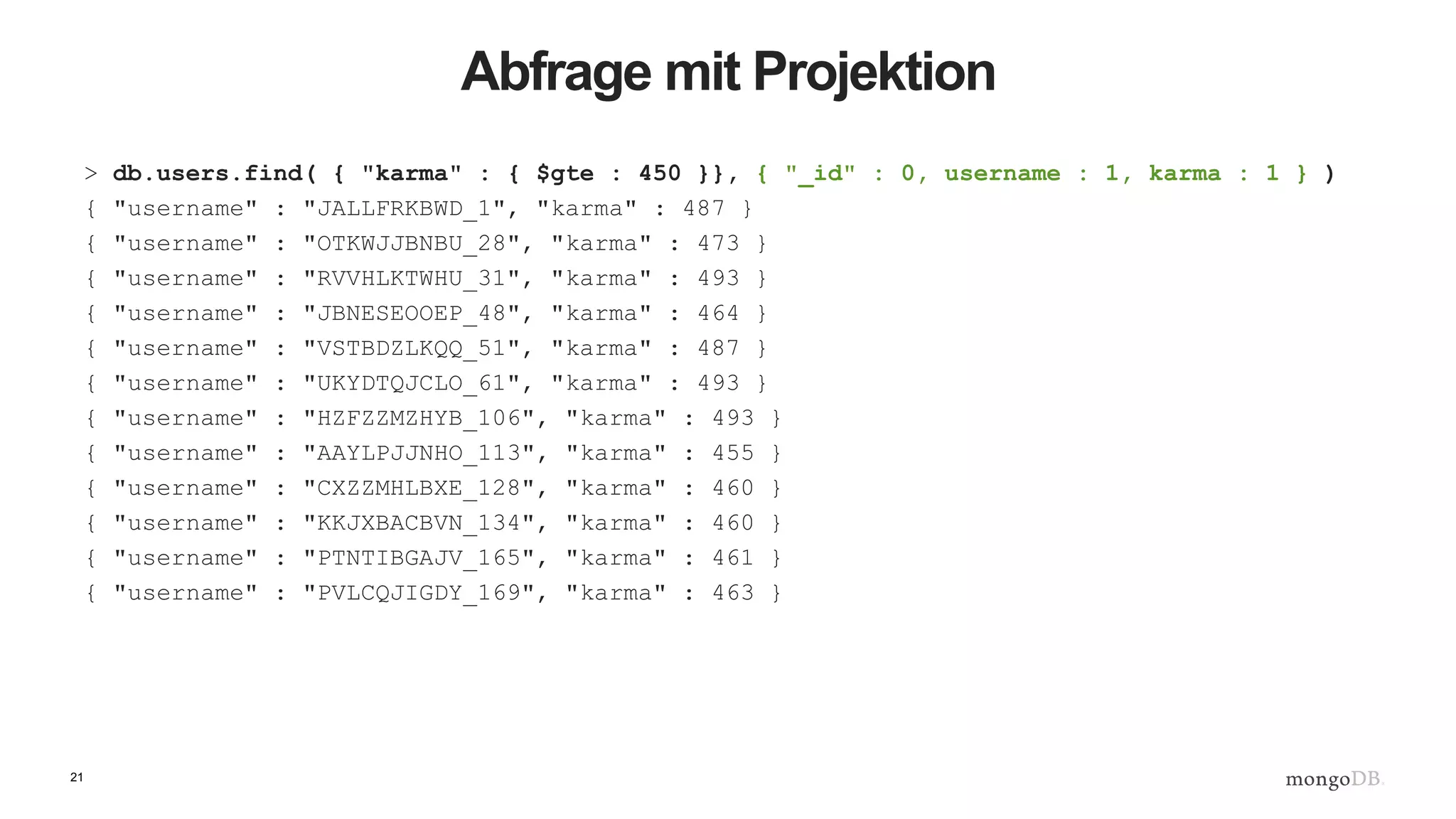
Abfrage mit Projektion
> db.users.find( { "karma" : { $gte : 450 }}, { "_id" : 0, username : 1, karma : 1 } )
{ "username" : "JALLFRKBWD_1", "karma" : 487 }
{ "username" : "OTKWJJBNBU_28", "karma" : 473 }
{ "username" : "RVVHLKTWHU_31", "karma" : 493 }
{ "username" : "JBNESEOOEP_48", "karma" : 464 }
{ "username" : "VSTBDZLKQQ_51", "karma" : 487 }
{ "username" : "UKYDTQJCLO_61", "karma" : 493 }
{ "username" : "HZFZZMZHYB_106", "karma" : 493 }
{ "username" : "AAYLPJJNHO_113", "karma" : 455 }
{ "username" : "CXZZMHLBXE_128", "karma" : 460 }
{ "username" : "KKJXBACBVN_134", "karma" : 460 }
{ "username" : "PTNTIBGAJV_165", "karma" : 461 }
{ "username" : "PVLCQJIGDY_169", "karma" : 463 }
22
Artikel anpassen für Kommentare, Teil 1
> db.articles.find( { "_id" : 19 } ).pretty()
{
"_id" : 19,
"body" :
"nTzOofOcnHKkJxpjKAyqTTnKZMFzzkWFeXtBRuEKsctuGBgWIrEBrYdvFIVHJWaXLUTVUXblOZZgUq
Wu",
"postdate" : ISODate("2016-05-23T12:02:46.830Z"),
"author" : "ASWTOMMABN_19",
"title" : "CPMaqHtAdRwLXhlUvsej"
}
> db.articles.update( { _id : 19 }, { $set : { comments : [] }} )
WriteResult({ "nMatched" : 1, "nUpserted" : 0, "nModified" : 1 })
23
Artikel anpassen für Kommentare, Teil 2
> db.articles.find( { _id :19 } ).pretty()
{
"_id" : 19,
"body" : "KmwFSIMQGcIsRcVJkoMcrIyatoKzeQiKvJkiVSrndXqrALVIYZxGpaMjucgXUV",
"postdate" : ISODate("2016-05-23T16:04:39.497Z"),
"author" : "USER_19",
"title" : "wTLreIEyPfovEkBhJZZe",
"comments" : [ ]
}
>
24
Artikel anpassen für Kommentare, Teil 3
> db.articles.update( { _id : 19 },
{ $push : { comments :
{ username : “benjamin.lorenz", comment : “Hallo, das ist cool! :-)" }
}} )
WriteResult({ "nMatched" : 1, "nUpserted" : 0, "nModified" : 1 })
> db.articles.find( { _id :19 } ).pretty()
{
"_id" : 19,
"body" : "KmwFSIMQGcIsRNTDBFPuclwcVJkoMcrIPwTiSZDYyatoKzeQiKvJkiVSrndXqrALVIYZxGpaMjucgXUV",
"postdate" : ISODate("2016-05-23T16:04:39.497Z"),
"author" : "USER_19",
"title" : "wTLreIEyPfovEkBhJZZe",
"comments" : [
{
"username" : “benjamin.lorenz",
"comment" : “Hallo, das ist cool! :-)"
}
]
}
>
25
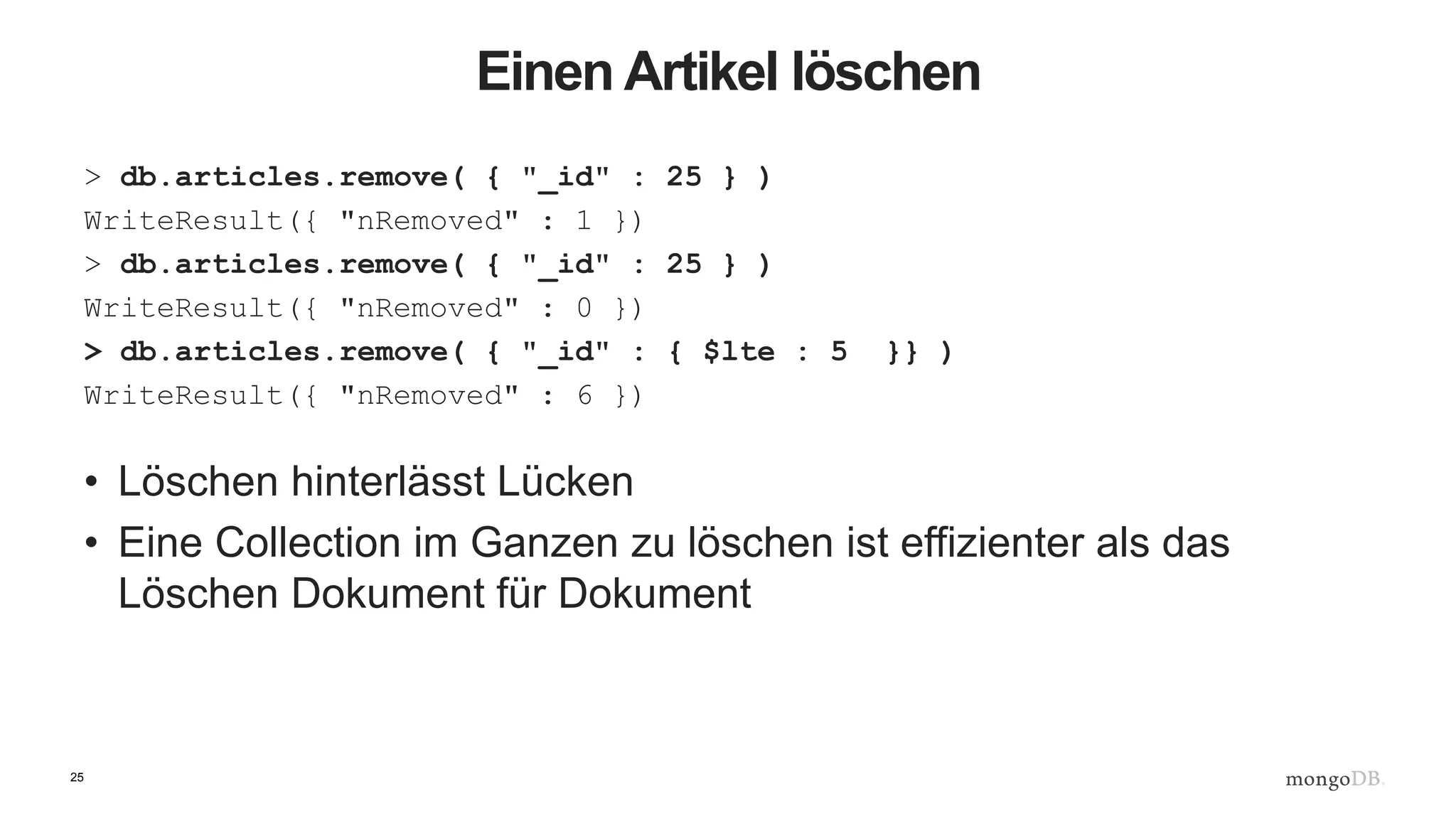
Einen Artikel löschen
> db.articles.remove( { "_id" : 25 } )
WriteResult({ "nRemoved" : 1 })
> db.articles.remove( { "_id" : 25 } )
WriteResult({ "nRemoved" : 0 })
> db.articles.remove( { "_id" : { $lte : 5 }} )
WriteResult({ "nRemoved" : 6 })
• Löschen hinterlässt Lücken
• Eine Collection im Ganzen zu löschen ist effizienter als das
Löschen Dokument für Dokument
26
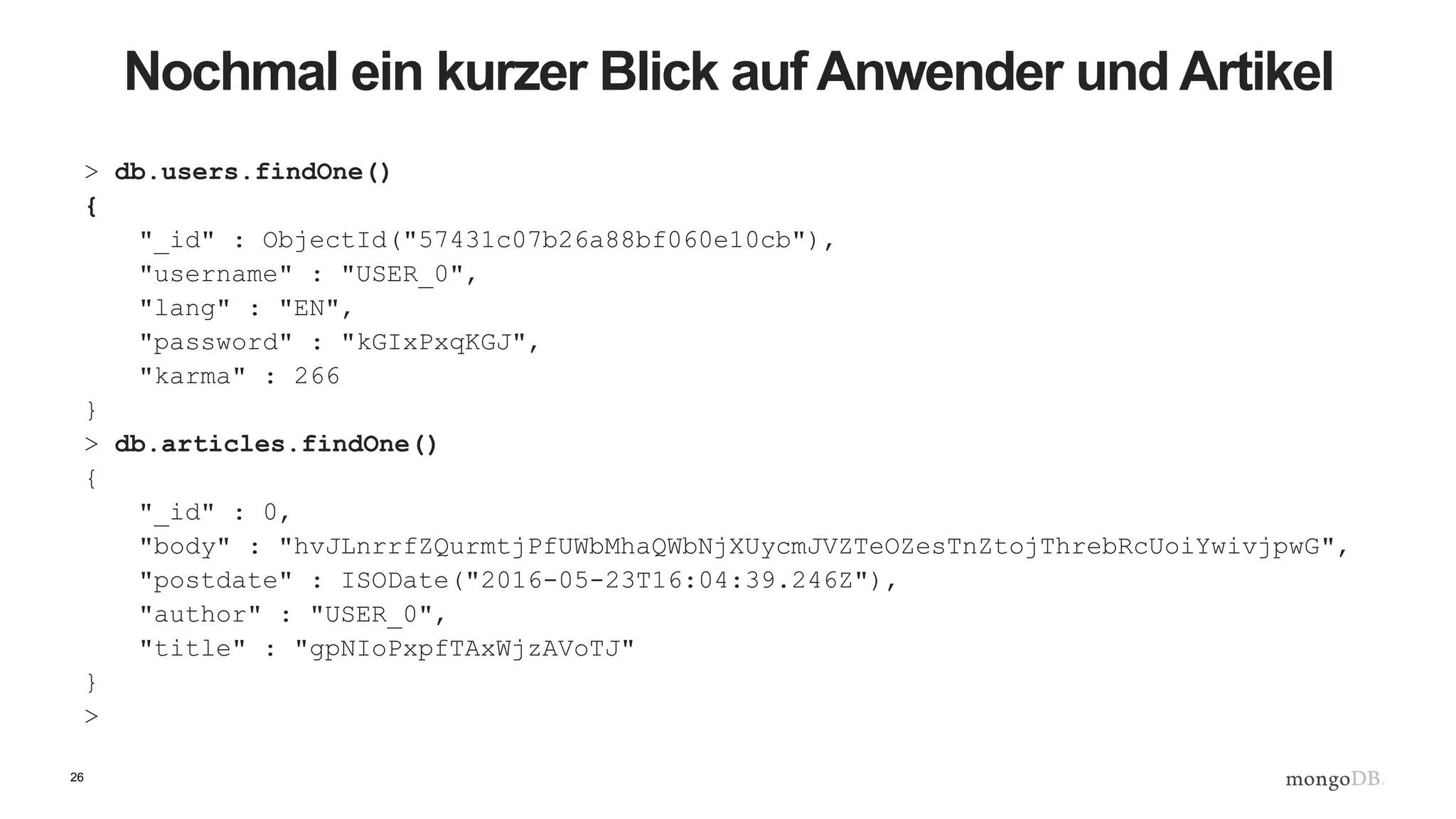
Nochmal ein kurzer Blick auf Anwender und Artikel
> db.users.findOne()
{
"_id" : ObjectId("57431c07b26a88bf060e10cb"),
"username" : "USER_0",
"lang" : "EN",
"password" : "kGIxPxqKGJ",
"karma" : 266
}
> db.articles.findOne()
{
"_id" : 0,
"body" : "hvJLnrrfZQurmtjPfUWbMhaQWbNjXUycmJVZTeOZesTnZtojThrebRcUoiYwivjpwG",
"postdate" : ISODate("2016-05-23T16:04:39.246Z"),
"author" : "USER_0",
"title" : "gpNIoPxpfTAxWjzAVoTJ"
}
>
27
Einen Anwender finden
> db.users.find( { "username" : "ABOXHWKBYS_199" } ).explain()
{
"queryPlanner" : {
"plannerVersion" : 1,
"namespace" : "blog.users",
"indexFilterSet" : false,
"parsedQuery" : {
"username" : {
"$eq" : "ABOXHWKBYS_199"
}
},
"winningPlan" : {
"stage" : "COLLSCAN",
"filter" : {
"username" : {
"$eq" : "ABOXHWKBYS_199"
}
},
"direction" : "forward"
},
"rejectedPlans" : [ ]
},
"serverInfo" : {
"host" : "JD10Gen.local",
"port" : 27017,
"version" : "3.2.6",
"gitVersion" : "05552b562c7a0b3143a729aaa0838e558dc49b25"
},
"ok" : 1
}
28
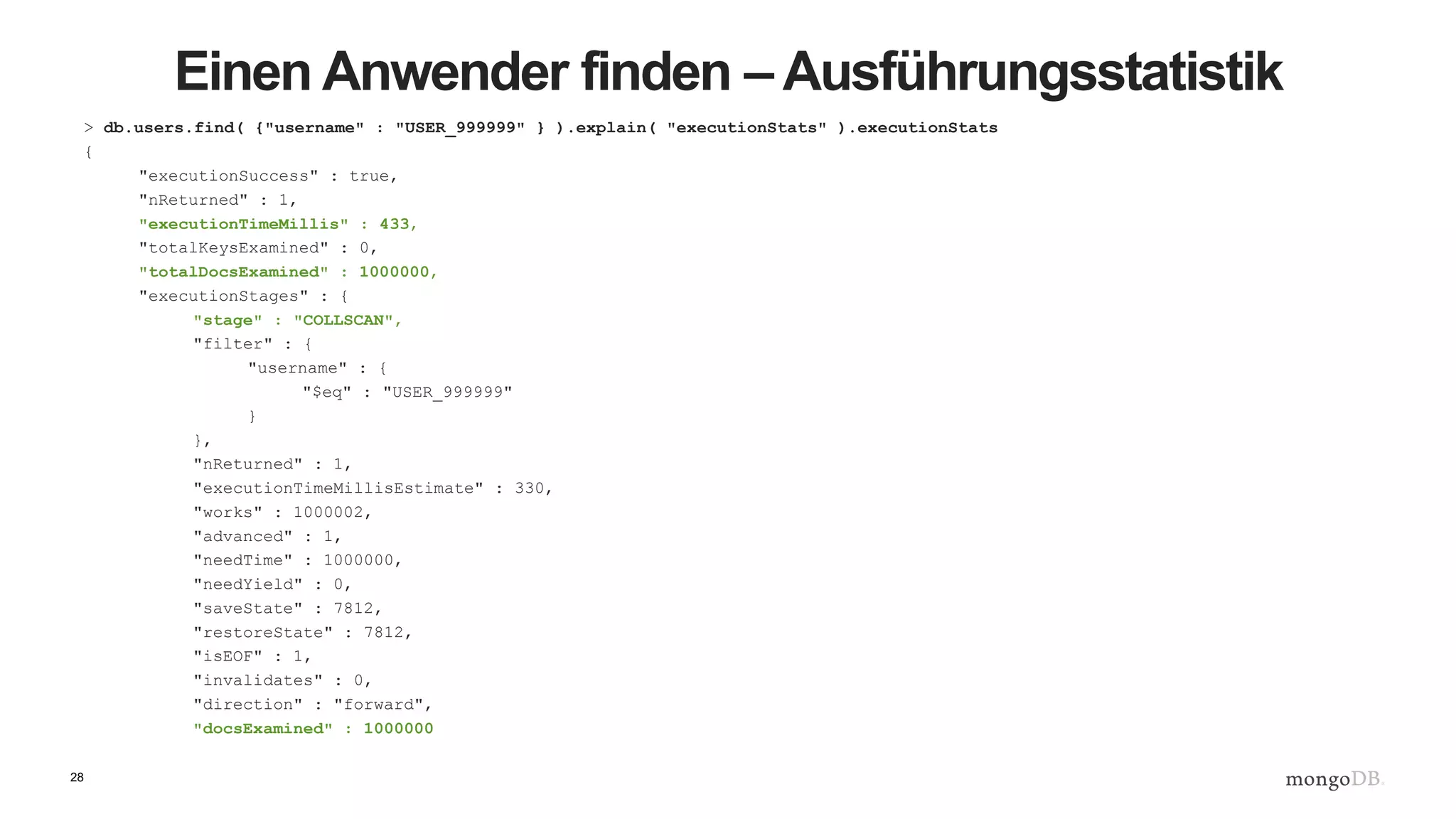
Einen Anwender finden – Ausführungsstatistik
> db.users.find( {"username" : "USER_999999" } ).explain( "executionStats" ).executionStats
{
"executionSuccess" : true,
"nReturned" : 1,
"executionTimeMillis" : 433,
"totalKeysExamined" : 0,
"totalDocsExamined" : 1000000,
"executionStages" : {
"stage" : "COLLSCAN",
"filter" : {
"username" : {
"$eq" : "USER_999999"
}
},
"nReturned" : 1,
"executionTimeMillisEstimate" : 330,
"works" : 1000002,
"advanced" : 1,
"needTime" : 1000000,
"needYield" : 0,
"saveState" : 7812,
"restoreState" : 7812,
"isEOF" : 1,
"invalidates" : 0,
"direction" : "forward",
"docsExamined" : 1000000
29
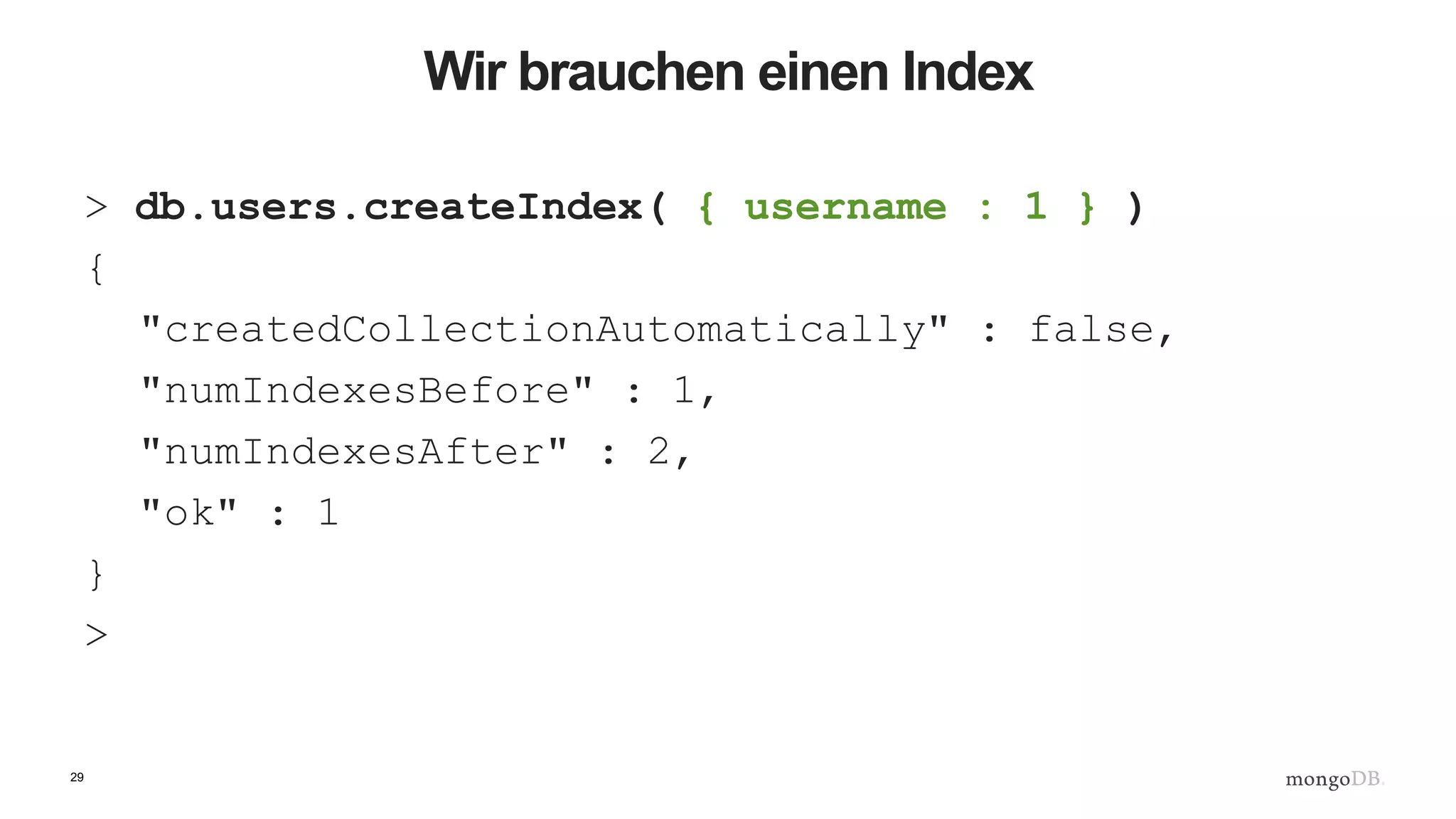
Wir brauchen einen Index
> db.users.createIndex( { username : 1 } )
{
"createdCollectionAutomatically" : false,
"numIndexesBefore" : 1,
"numIndexesAfter" : 2,
"ok" : 1
}
>
30
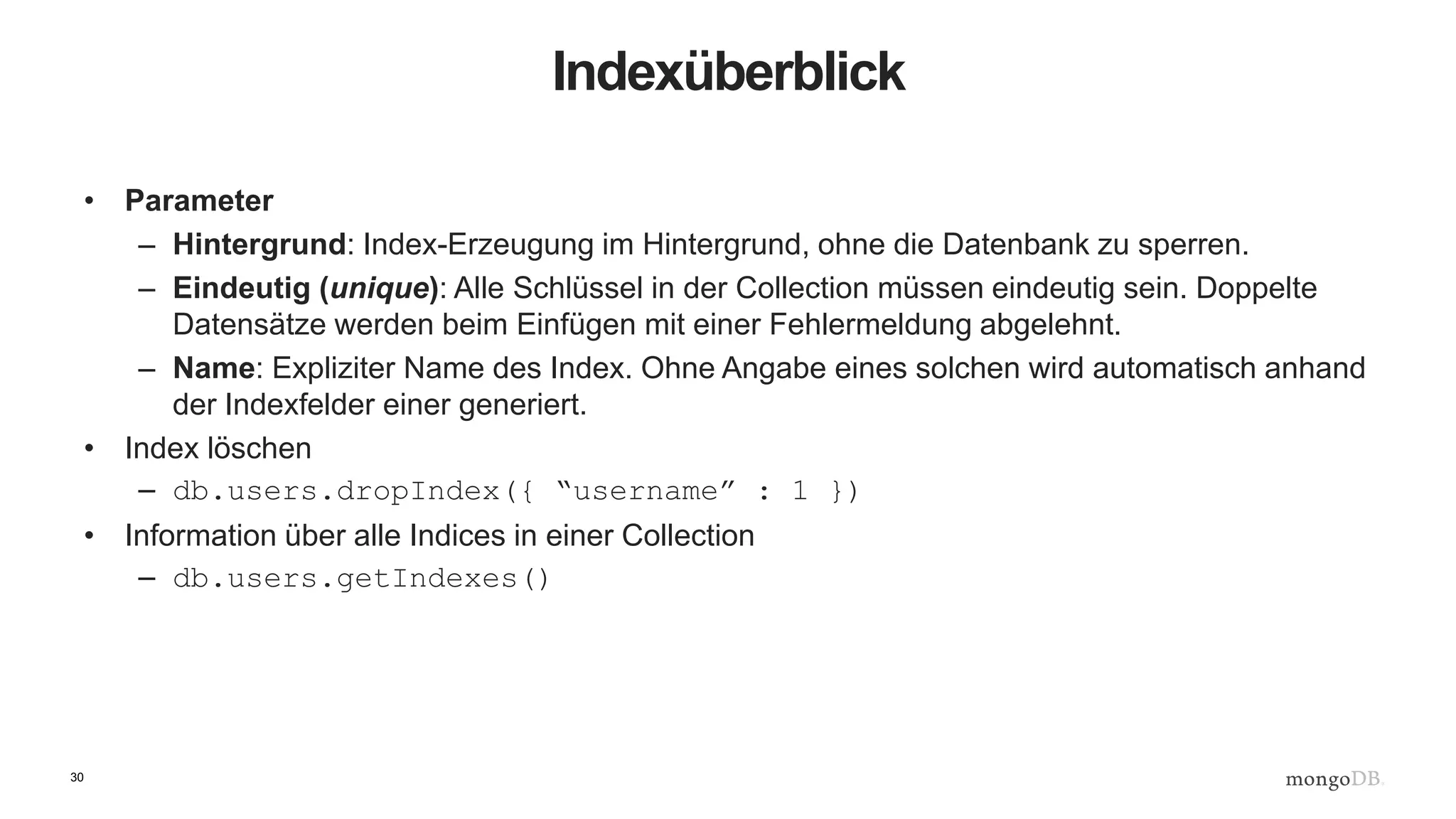
Indexüberblick
• Parameter
– Hintergrund: Index-Erzeugung im Hintergrund, ohne die Datenbank zu sperren.
– Eindeutig (unique): Alle Schlüssel in der Collection müssen eindeutig sein. Doppelte
Datensätze werden beim Einfügen mit einer Fehlermeldung abgelehnt.
– Name: Expliziter Name des Index. Ohne Angabe eines solchen wird automatisch anhand
der Indexfelder einer generiert.
• Index löschen
– db.users.dropIndex({ “username” : 1 })
• Information über alle Indices in einer Collection
– db.users.getIndexes()
31
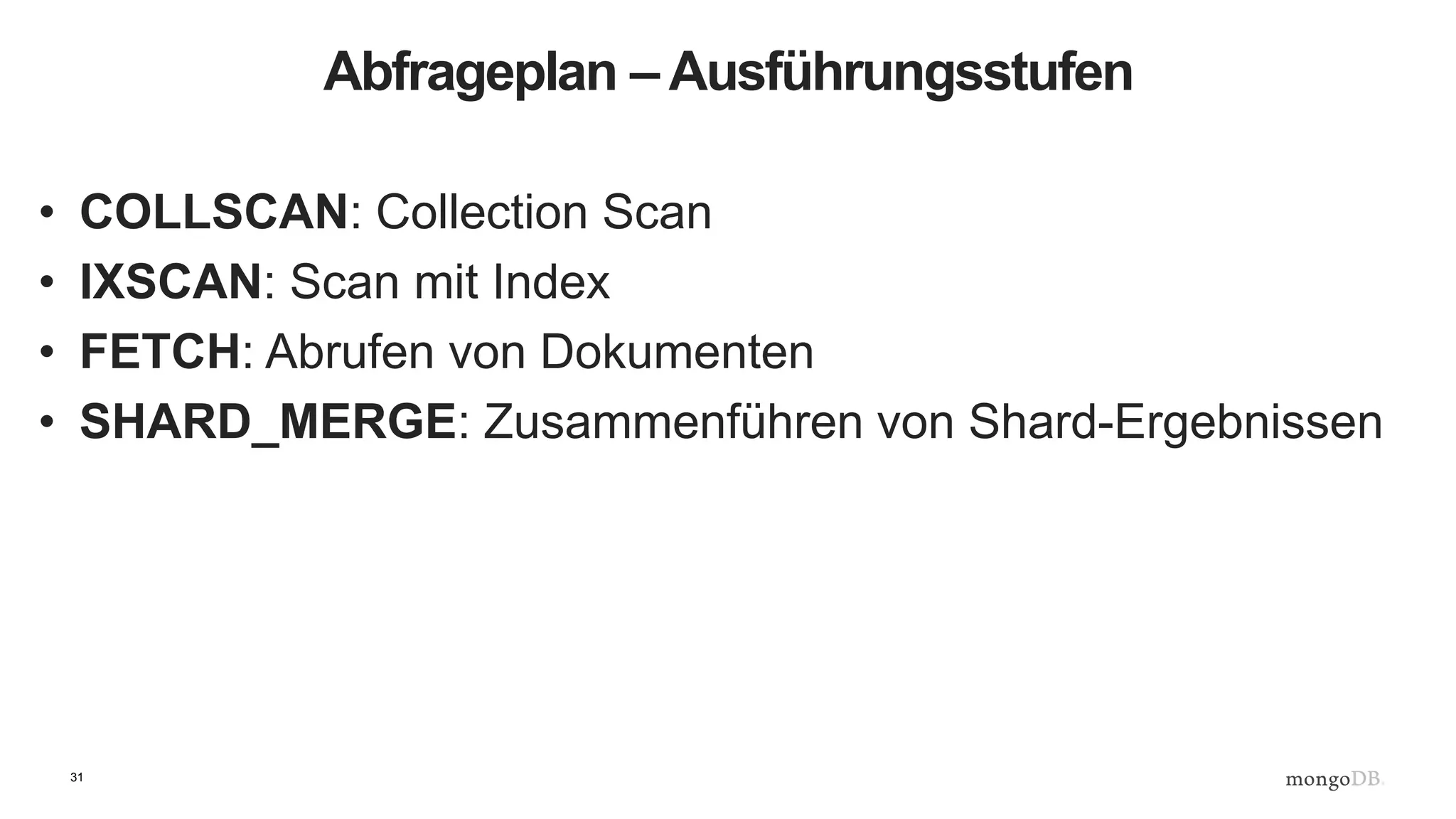
Abfrageplan – Ausführungsstufen
• COLLSCAN: Collection Scan
• IXSCAN: Scan mit Index
• FETCH: Abrufen von Dokumenten
• SHARD_MERGE: Zusammenführen von Shard-Ergebnissen
32
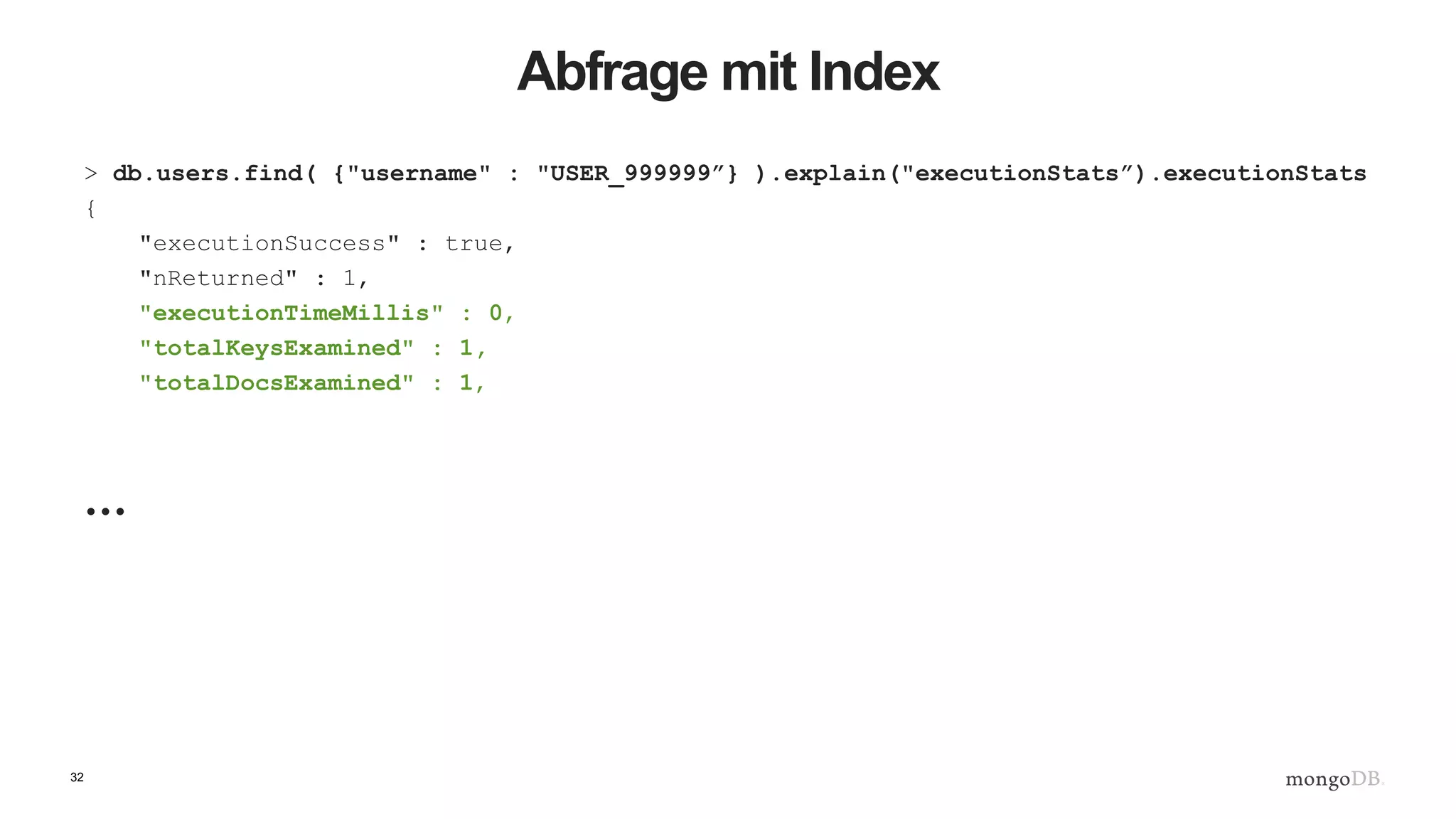
Abfrage mit Index
> db.users.find( {"username" : "USER_999999”} ).explain("executionStats”).executionStats
{
"executionSuccess" : true,
"nReturned" : 1,
"executionTimeMillis" : 0,
"totalKeysExamined" : 1,
"totalDocsExamined" : 1,
…
33
Ausführungsstufen
"executionStages" : {
"stage" : "FETCH",
"nReturned" : 1,
"executionTimeMillisEstimate" : 0,
"docsExamined" : 1,,
"inputStage" : {
"stage" : "IXSCAN",
"nReturned" : 1,
"executionTimeMillisEstimate" : 0,
"keyPattern" : {
"username" : 1
},
"indexName" : "username_1",
"isMultiKey" : false,
"isUnique" : false,
"isSparse" : false,
"isPartial" : false,
"indexVersion" : 1,
"direction" : "forward",
"indexBounds" : {
"username" : [
"["USER_999999", "USER_999999"]"
]
},
"keysExamined" : 1,
"seenInvalidated" : 0
}
}
}
34
Treiber und Frameworks
Morphia
MEAN Stack
35
Wir haben gelernt,
• wie man eine Datenbank und eine Collection erstellt
• wie man Inhalte in diese Collection einfügt
• wie man die Collection abfragt
• wie man ein Dokument aktualisiert
• wie man ein Dokument löscht
• wie man die Effizienz einer Anfrage überprüft
• wie man einen Index hinzufügt
• wie man überprüft, ob ein Index bei einer Anfrage
verwendet wird
36
Nächstes Webinar: Denken in Dokumenten
• Anstelle von Normalisierung betrachten wir einen hybriden
Schema-Ansatz mit kohärentem Mapping zwischen Objekten in
der Anwendung und Objekten in der Datenbank.
• Anschließend optimieren wir dieses Schema zu Abfragezwecken,
ausgehend von den erwarteten Abfragemustern.
• Schließlich zeigen wir, wie dynamische Schemata und Validierung
es ermöglichen, Datentypen kontrolliert zu erweitern.
1. Juli 2016, 14:00 Uhr CEST.
Fragerunde

Back to Basics – Webinar 2: Ihre erste MongoDB-Anwendung

  • 2.
    Back to Basics2016: Webinar 2 Ihre erste MongoDB-Anwendung Benjamin Lorenz Senior Solutions Architect, EMEA MongoDB #back2basics V1.0
  • 3.
    3 Zusammenfassung von Webinar1 • Warum NoSQL existiert • Unterschiedliche Typen von NoSQL-Datenbanken • Die wichtigsten Merkmale von MongoDB • Dauerhaftigkeit (durability) in MongoDB – Replica Sets • Skalierbarkeit in MongoDB – Sharding
  • 4.
    4 Programm • Datenbankkonzepte • Installierenvon MongoDB • Erstellen einer einfachen Blogging-Anwendung • Hinzufügen eines Index • Abfrageoptimierung mit explain()
  • 5.
    5 Konzepte Relationale Datenbanken MongoDB DatenbankDatenbank Tabelle Collection Zeile Dokument Index Index Join Lookup Fremdschlüssel Referenz Multi-Tabellen-Transaktion Einzel-Dokument-Transaktion
  • 6.
    6 Installieren von MongoDB $curl -O https://fastdl.mongodb.org/osx/mongodb-osx-x86_64-3.2.6.tgz % Total % Received % Xferd Average Speed Time Time Time Current Dload Upload Total Spent Left Speed 100 60.9M 100 60.9M 0 0 2730k 0 0:00:22 0:00:22 --:--:-- 1589k $ tar xzvf mongodb-osx-x86_64-3.2.6.tgz x mongodb-osx-x86_64-3.2.6/README x mongodb-osx-x86_64-3.2.6/THIRD-PARTY-NOTICES x mongodb-osx-x86_64-3.2.6/MPL-2 x mongodb-osx-x86_64-3.2.6/GNU-AGPL-3.0 x mongodb-osx-x86_64-3.2.6/bin/mongodump x mongodb-osx-x86_64-3.2.6/bin/mongorestore x mongodb-osx-x86_64-3.2.6/bin/mongoexport x mongodb-osx-x86_64-3.2.6/bin/mongoimport x mongodb-osx-x86_64-3.2.6/bin/mongostat x mongodb-osx-x86_64-3.2.6/bin/mongotop x mongodb-osx-x86_64-3.2.6/bin/bsondump x mongodb-osx-x86_64-3.2.6/bin/mongofiles x mongodb-osx-x86_64-3.2.6/bin/mongooplog x mongodb-osx-x86_64-3.2.6/bin/mongoperf x mongodb-osx-x86_64-3.2.6/bin/mongosniff x mongodb-osx-x86_64-3.2.6/bin/mongod x mongodb-osx-x86_64-3.2.6/bin/mongos x mongodb-osx-x86_64-3.2.6/bin/mongo $ ln -s mongodb-osx-x86_64-3.2.6 mongodb
  • 7.
    7 Ausführen von Mongod JD10Gen:mongodbjdrumgoole$ ./bin/mongod --dbpath /data/b2b 2016-05-23T19:21:07.767+0100 I CONTROL [initandlisten] MongoDB starting : pid=49209 port=27017 dbpath=/data/b2b 64- bit host=JD10Gen.local 2016-05-23T19:21:07.768+0100 I CONTROL [initandlisten] db version v3.2.6 2016-05-23T19:21:07.768+0100 I CONTROL [initandlisten] git version: 05552b562c7a0b3143a729aaa0838e558dc49b25 2016-05-23T19:21:07.768+0100 I CONTROL [initandlisten] allocator: system 2016-05-23T19:21:07.768+0100 I CONTROL [initandlisten] modules: none 2016-05-23T19:21:07.768+0100 I CONTROL [initandlisten] build environment: 2016-05-23T19:21:07.768+0100 I CONTROL [initandlisten] distarch: x86_64 2016-05-23T19:21:07.768+0100 I CONTROL [initandlisten] target_arch: x86_64 2016-05-23T19:21:07.768+0100 I CONTROL [initandlisten] options: { storage: { dbPath: "/data/b2b" } } 2016-05-23T19:21:07.769+0100 I - [initandlisten] Detected data files in /data/b2b created by the 'wiredTiger' storage engine, so setting the active storage engine to 'wiredTiger'. 2016-05-23T19:21:07.769+0100 I STORAGE [initandlisten] wiredtiger_open config: create,cache_size=4G,session_max=20000,eviction=(threads_max=4),config_base=false,statistics=(fast),log=(enabled=true ,archive=true,path=journal,compressor=snappy),file_manager=(close_idle_time=100000),checkpoint=(wait=60,log_size=2GB) ,statistics_log=(wait=0), 2016-05-23T19:21:08.837+0100 I CONTROL [initandlisten] 2016-05-23T19:21:08.838+0100 I CONTROL [initandlisten] ** WARNING: soft rlimits too low. Number of files is 256, should be at least 1000 2016-05-23T19:21:08.840+0100 I NETWORK [HostnameCanonicalizationWorker] Starting hostname canonicalization worker 2016-05-23T19:21:08.840+0100 I FTDC [initandlisten] Initializing full-time diagnostic data capture with directory '/data/b2b/diagnostic.data' 2016-05-23T19:21:08.841+0100 I NETWORK [initandlisten] waiting for connections on port 27017 2016-05-23T19:21:09.148+0100 I NETWORK [initandlisten] connection accepted from 127.0.0.1:59213 #1 (1 connection now open)
  • 8.
    8 Verbinden über MongoShell $ ./bin/mongo MongoDB shell version: 3.2.6 connecting to: test Server has startup warnings: 2016-05-17T11:46:03.516+0100 I CONTROL [initandlisten] 2016-05-17T11:46:03.516+0100 I CONTROL [initandlisten] ** WARNING: soft rlimits too low. Number of files is 256, should be at least 1000 >
  • 9.
    9 Einfügen eines erstenDatensatzes > show databases local 0.000GB > use test switched to db test > show databases local 0.000GB > db.demo.insert( { "key" : "value" } ) WriteResult({ "nInserted" : 1 }) > show databases local 0.000GB test 0.000GB > show collections demo > db.demo.findOne() { "_id" : ObjectId("573af7085ee4be80385332a6"), "key" : "value" } >
  • 10.
  • 11.
    11 Eine einfache Blogging-Anwendung •Wir erstellen einer Blogging-Anwendung mit: – Artikeln – Anwendern – Kommentaren
  • 12.
  • 13.
    13 In MongoDB könnenwir organisch entwickeln > use blog switched to db blog > db.users.insert( { "username" : “benjamin.lorenz", "password" : "top secret", "lang" : “DE" } ) WriteResult({ "nInserted" : 1 }) > db.users.findOne() { "_id" : ObjectId("573afff65ee4be80385332a7"), "username" : “benjamin.lorenz", "password" : "top secret", "lang" : “DE" }
  • 14.
    14 Noch einmal inPython ''' Created on 16 June 2016 @author: benjamin.lorenz ''' import pymongo # # client defaults to localhost and port 27017. eg MongoClient('localhost', 27017) client = pymongo.MongoClient() blogDatabase = client[ "blog" ] usersCollection = blogDatabase[ "users" ] usersCollection.insert_one( { "username" : “benjamin.lorenz", "password" : "top secret", "lang" : “DE" }) user = usersCollection.find_one() print( user )
  • 15.
    15 Kommen wir zuden Artikeln … articlesCollection = blogDatabase[ "articles" ] author = “benjamin.lorenz" article = { "title" : “Mein erstes Posting", "body" : “Hier steht der eigentliche Inhalt. Ein längerer Text kann das sein.", "author" : author, "tags" : [ “benjamin", "general", “Germany", "admin" ] } # # Lets check if our author exists # if usersCollection.find_one( { "username" : author }) : articlesCollection.insert_one( article ) else: raise ValueError( "Author %s does not exist" % author )
  • 16.
    16 Ein neuer Artikeltyp # #Lets add a new type of article with a posting date and a section # author = “benjamin.lorenz" title = “Ein englisches Posting in MongoDB" newPost = { "title" : title, "body" : "MongoDB is the worlds most popular NoSQL database. It is a document database", "author" : author, "tags" : [ “benjamin", "mongodb", “Frankfurt" ], "section" : "technology", "postDate" : datetime.datetime.now(), } # # Lets check if our author exists # if usersCollection.find_one( { "username" : author }) : articlesCollection.insert_one( newPost )
  • 17.
    17 Viele Artikel erstellen,Teil 1 import pymongo import string import datetime import random def randomString( size, letters = string.letters ): return "".join( [random.choice( letters ) for _ in xrange( size )] ) client = pymongo.MongoClient() def makeArticle( count, author, timestamp ): return { "_id" : count, "title" : randomString( 20 ), "body" : randomString( 80 ), "author" : author, "postdate" : timestamp } def makeUser( username ): return { "username" : username, "password" : randomString( 10 ) , "karma" : random.randint( 0, 500 ), "lang" : "EN" }
  • 18.
    18 Viele Artikel erstellen,Teil 2 blogDatabase = client[ "blog" ] usersCollection = blogDatabase[ "users" ] articlesCollection = blogDatabase[ "articles" ] bulkUsers = usersCollection.initialize_ordered_bulk_op() bulkArticles = articlesCollection.initialize_ordered_bulk_op() ts = datetime.datetime.now() for i in range( 1000000 ) : #username = randomString( 10, string.ascii_uppercase ) + "_" + str( i ) username = "USER_" + str( i ) bulkUsers.insert( makeUser( username ) ) ts = ts + datetime.timedelta( seconds = 1 ) bulkArticles.insert( makeArticle( i, username, ts )) if ( i % 500 == 0 ) : bulkUsers.execute() bulkArticles.execute() bulkUsers = usersCollection.initialize_ordered_bulk_op() bulkArticles = articlesCollection.initialize_ordered_bulk_op() bulkUsers.execute() bulkArticles.execute()
  • 19.
    19 Einen Anwender finden >db.users.findOne() { "_id" : ObjectId("5742da5bb26a88bc00e941ac"), "username" : "FLFZQLSRWZ_0", "lang" : "EN", "password" : "vTlILbGWLt", "karma" : 448 } > db.users.find( { "username" : "VHXDAUUFJW_45" } ).pretty() { "_id" : ObjectId("5742da5bb26a88bc00e94206"), "username" : "VHXDAUUFJW_45", "lang" : "EN", "password" : "GmRLnCeKVp", "karma" : 284 }
  • 20.
    20 Anwender mit gutemKarma finden > db.users.find( { "karma" : { $gte : 450 }} ).pretty() { "_id" : ObjectId("5742da5bb26a88bc00e941ae"), "username" : "JALLFRKBWD_1", "lang" : "EN", "password" : "bCSKSKvUeb", "karma" : 487 } { "_id" : ObjectId("5742da5bb26a88bc00e941e4"), "username" : "OTKWJJBNBU_28", "lang" : "EN", "password" : "HAWpiATCBN", "karma" : 473 } { …
  • 21.
    21 Abfrage mit Projektion >db.users.find( { "karma" : { $gte : 450 }}, { "_id" : 0, username : 1, karma : 1 } ) { "username" : "JALLFRKBWD_1", "karma" : 487 } { "username" : "OTKWJJBNBU_28", "karma" : 473 } { "username" : "RVVHLKTWHU_31", "karma" : 493 } { "username" : "JBNESEOOEP_48", "karma" : 464 } { "username" : "VSTBDZLKQQ_51", "karma" : 487 } { "username" : "UKYDTQJCLO_61", "karma" : 493 } { "username" : "HZFZZMZHYB_106", "karma" : 493 } { "username" : "AAYLPJJNHO_113", "karma" : 455 } { "username" : "CXZZMHLBXE_128", "karma" : 460 } { "username" : "KKJXBACBVN_134", "karma" : 460 } { "username" : "PTNTIBGAJV_165", "karma" : 461 } { "username" : "PVLCQJIGDY_169", "karma" : 463 }
  • 22.
    22 Artikel anpassen fürKommentare, Teil 1 > db.articles.find( { "_id" : 19 } ).pretty() { "_id" : 19, "body" : "nTzOofOcnHKkJxpjKAyqTTnKZMFzzkWFeXtBRuEKsctuGBgWIrEBrYdvFIVHJWaXLUTVUXblOZZgUq Wu", "postdate" : ISODate("2016-05-23T12:02:46.830Z"), "author" : "ASWTOMMABN_19", "title" : "CPMaqHtAdRwLXhlUvsej" } > db.articles.update( { _id : 19 }, { $set : { comments : [] }} ) WriteResult({ "nMatched" : 1, "nUpserted" : 0, "nModified" : 1 })
  • 23.
    23 Artikel anpassen fürKommentare, Teil 2 > db.articles.find( { _id :19 } ).pretty() { "_id" : 19, "body" : "KmwFSIMQGcIsRcVJkoMcrIyatoKzeQiKvJkiVSrndXqrALVIYZxGpaMjucgXUV", "postdate" : ISODate("2016-05-23T16:04:39.497Z"), "author" : "USER_19", "title" : "wTLreIEyPfovEkBhJZZe", "comments" : [ ] } >
  • 24.
    24 Artikel anpassen fürKommentare, Teil 3 > db.articles.update( { _id : 19 }, { $push : { comments : { username : “benjamin.lorenz", comment : “Hallo, das ist cool! :-)" } }} ) WriteResult({ "nMatched" : 1, "nUpserted" : 0, "nModified" : 1 }) > db.articles.find( { _id :19 } ).pretty() { "_id" : 19, "body" : "KmwFSIMQGcIsRNTDBFPuclwcVJkoMcrIPwTiSZDYyatoKzeQiKvJkiVSrndXqrALVIYZxGpaMjucgXUV", "postdate" : ISODate("2016-05-23T16:04:39.497Z"), "author" : "USER_19", "title" : "wTLreIEyPfovEkBhJZZe", "comments" : [ { "username" : “benjamin.lorenz", "comment" : “Hallo, das ist cool! :-)" } ] } >
  • 25.
    25 Einen Artikel löschen >db.articles.remove( { "_id" : 25 } ) WriteResult({ "nRemoved" : 1 }) > db.articles.remove( { "_id" : 25 } ) WriteResult({ "nRemoved" : 0 }) > db.articles.remove( { "_id" : { $lte : 5 }} ) WriteResult({ "nRemoved" : 6 }) • Löschen hinterlässt Lücken • Eine Collection im Ganzen zu löschen ist effizienter als das Löschen Dokument für Dokument
  • 26.
    26 Nochmal ein kurzerBlick auf Anwender und Artikel > db.users.findOne() { "_id" : ObjectId("57431c07b26a88bf060e10cb"), "username" : "USER_0", "lang" : "EN", "password" : "kGIxPxqKGJ", "karma" : 266 } > db.articles.findOne() { "_id" : 0, "body" : "hvJLnrrfZQurmtjPfUWbMhaQWbNjXUycmJVZTeOZesTnZtojThrebRcUoiYwivjpwG", "postdate" : ISODate("2016-05-23T16:04:39.246Z"), "author" : "USER_0", "title" : "gpNIoPxpfTAxWjzAVoTJ" } >
  • 27.
    27 Einen Anwender finden >db.users.find( { "username" : "ABOXHWKBYS_199" } ).explain() { "queryPlanner" : { "plannerVersion" : 1, "namespace" : "blog.users", "indexFilterSet" : false, "parsedQuery" : { "username" : { "$eq" : "ABOXHWKBYS_199" } }, "winningPlan" : { "stage" : "COLLSCAN", "filter" : { "username" : { "$eq" : "ABOXHWKBYS_199" } }, "direction" : "forward" }, "rejectedPlans" : [ ] }, "serverInfo" : { "host" : "JD10Gen.local", "port" : 27017, "version" : "3.2.6", "gitVersion" : "05552b562c7a0b3143a729aaa0838e558dc49b25" }, "ok" : 1 }
  • 28.
    28 Einen Anwender finden– Ausführungsstatistik > db.users.find( {"username" : "USER_999999" } ).explain( "executionStats" ).executionStats { "executionSuccess" : true, "nReturned" : 1, "executionTimeMillis" : 433, "totalKeysExamined" : 0, "totalDocsExamined" : 1000000, "executionStages" : { "stage" : "COLLSCAN", "filter" : { "username" : { "$eq" : "USER_999999" } }, "nReturned" : 1, "executionTimeMillisEstimate" : 330, "works" : 1000002, "advanced" : 1, "needTime" : 1000000, "needYield" : 0, "saveState" : 7812, "restoreState" : 7812, "isEOF" : 1, "invalidates" : 0, "direction" : "forward", "docsExamined" : 1000000
  • 29.
    29 Wir brauchen einenIndex > db.users.createIndex( { username : 1 } ) { "createdCollectionAutomatically" : false, "numIndexesBefore" : 1, "numIndexesAfter" : 2, "ok" : 1 } >
  • 30.
    30 Indexüberblick • Parameter – Hintergrund:Index-Erzeugung im Hintergrund, ohne die Datenbank zu sperren. – Eindeutig (unique): Alle Schlüssel in der Collection müssen eindeutig sein. Doppelte Datensätze werden beim Einfügen mit einer Fehlermeldung abgelehnt. – Name: Expliziter Name des Index. Ohne Angabe eines solchen wird automatisch anhand der Indexfelder einer generiert. • Index löschen – db.users.dropIndex({ “username” : 1 }) • Information über alle Indices in einer Collection – db.users.getIndexes()
  • 31.
    31 Abfrageplan – Ausführungsstufen •COLLSCAN: Collection Scan • IXSCAN: Scan mit Index • FETCH: Abrufen von Dokumenten • SHARD_MERGE: Zusammenführen von Shard-Ergebnissen
  • 32.
    32 Abfrage mit Index >db.users.find( {"username" : "USER_999999”} ).explain("executionStats”).executionStats { "executionSuccess" : true, "nReturned" : 1, "executionTimeMillis" : 0, "totalKeysExamined" : 1, "totalDocsExamined" : 1, …
  • 33.
    33 Ausführungsstufen "executionStages" : { "stage": "FETCH", "nReturned" : 1, "executionTimeMillisEstimate" : 0, "docsExamined" : 1,, "inputStage" : { "stage" : "IXSCAN", "nReturned" : 1, "executionTimeMillisEstimate" : 0, "keyPattern" : { "username" : 1 }, "indexName" : "username_1", "isMultiKey" : false, "isUnique" : false, "isSparse" : false, "isPartial" : false, "indexVersion" : 1, "direction" : "forward", "indexBounds" : { "username" : [ "["USER_999999", "USER_999999"]" ] }, "keysExamined" : 1, "seenInvalidated" : 0 } } }
  • 34.
  • 35.
    35 Wir haben gelernt, •wie man eine Datenbank und eine Collection erstellt • wie man Inhalte in diese Collection einfügt • wie man die Collection abfragt • wie man ein Dokument aktualisiert • wie man ein Dokument löscht • wie man die Effizienz einer Anfrage überprüft • wie man einen Index hinzufügt • wie man überprüft, ob ein Index bei einer Anfrage verwendet wird
  • 36.
    36 Nächstes Webinar: Denkenin Dokumenten • Anstelle von Normalisierung betrachten wir einen hybriden Schema-Ansatz mit kohärentem Mapping zwischen Objekten in der Anwendung und Objekten in der Datenbank. • Anschließend optimieren wir dieses Schema zu Abfragezwecken, ausgehend von den erwarteten Abfragemustern. • Schließlich zeigen wir, wie dynamische Schemata und Validierung es ermöglichen, Datentypen kontrolliert zu erweitern. 1. Juli 2016, 14:00 Uhr CEST.
  • 37.

Hinweis der Redaktion

  • #3 Persönliche Vorstellung und Werdegang bei MongoDB
  • #10 Das ist Javascript. Lazy Evaluation. Datenbanken und Collections werden nach Bedarf abgefragt.
  • #11 12-Byte-Wert.