ABAP Course

                Chapter 5 – Dynamic programs


Lecturer: André Bögelsack, UCC Technische Universität München
Author: Valentin Nicolescu, André Bögelsack
                  ABAP Course                     André Bögelsack, Valentin Nicolescu   1
Copyright 2008 UCC TU München
                              All rights reserved
   Weitergabe und Vervielfältigung dieser Publikation oder von Teilen daraus sind, zu welchem Zweck und in welcher Form auch immer, ohne
    die ausdrückliche schriftliche Genehmigung durch HCC TU München nicht gestattet. In dieser Publikation enthaltene Informationen können
    ohne vorherige Ankündigung geändert werden.
   Microsoft®, WINDOWS®, NT®, EXCEL®, Word®, PowerPoint® und SQL Server® sind eingetragene Marken der Microsoft Corporation.
   IBM®, DB2®, OS/2®, DB2/6000®, Parallel Sysplex®, MVS/ESA®, RS/6000®, AIX®, S/390®, AS/400®, OS/390® und OS/400® sind eingetragene
    Marken der IBM Corporation.
   ORACLE® ist eine eingetragene Marke der ORACLE Corporation.
   INFORMIX®-OnLine for SAP und Informix® Dynamic ServerTM sind eingetragene Marken der Informix Software Incorporated.
   UNIX®, X/Open®, OSF/1® und Motif® sind eingetragene Marken der Open Group.
   Citrix®, das Citrix-Logo, ICA®, Program Neighborhood®, MetaFrame®, WinFrame®, VideoFrame®, MultiWin® und andere hier erwähnte
    Namen von Citrix-Produkten sind Marken von Citrix Systems, Inc.
   HTML, DHTML, XML, XHTML sind Marken oder eingetragene Marken des W3C®, World Wide Web Consortium, Massachusetts Institute of
    Technology.
   JAVA® ist eine eingetragene Marke der Sun Microsystems, Inc.
   JAVASCRIPT® ist eine eingetragene Marke der Sun Microsystems, Inc., verwendet unter der Lizenz der von Netscape entwickelten und
    implementierten Technologie.
   SAP, SAP Logo, R/2, RIVA, R/3, SAP ArchiveLink, SAP Business Workflow, WebFlow, SAP EarlyWatch, BAPI, SAPPHIRE, Management Cockpit,
    mySAP, mySAP.com und weitere im Text erwähnte SAP-Produkte und -Dienstleistungen sowie die entsprechenden Logos sind Marken oder
    eingetragene Marken der SAP AG in Deutschland und anderen Ländern weltweit. MarketSet und Enterprise Buyer sind gemeinsame
    Marken von SAP Markets und Commerce One.
   Alle anderen Namen von Produkten und Dienstleistungen sind Marken der jeweiligen Firmen.
   Die Verwendung der Screenshots wurde mit dem jeweiligen Eigner abgesprochen.


                               ABAP Course                                           André Bögelsack, Valentin Nicolescu               2
Agenda

1.   Dynpro attributes
2.   Dynpro runtime
3.   Creation of dynpros
4.   Title and status bar
5.   Entry help in dynpros


               ABAP Course            André Bögelsack, Valentin Nicolescu   3
Dynpro attributes

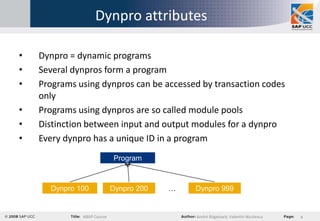
•   Dynpro = dynamic programs
•   Several dynpros form a program
•   Programs using dynpros can be accessed by transaction codes
    only
•   Programs using dynpros are so called module pools
•   Distinction between input and output modules for a dynpro
•   Every dynpro has a unique ID in a program
                            Program


      Dynpro 100            Dynpro 200   …   Dynpro 999


              ABAP Course                    André Bögelsack, Valentin Nicolescu   4
Dynpro attributes

•   Dynpros use their own instructions for coordinating runtime
    behavior  this is no ABAP
•   But: dynpros call modules which are implemented in ABAP
•   Modules called by a dynpro control the runtime behavior


              ABAP Course                 André Bögelsack, Valentin Nicolescu   5
Dynpro attributes
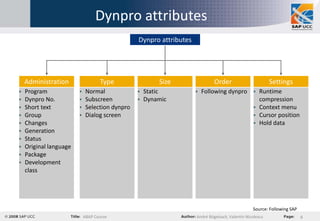
                                                Dynpro attributes


    Administration                 Type                 Size                 Order                        Settings
   Program                 Normal                Static             Following dynpro  Runtime
   Dynpro No.              Subscreen             Dynamic                                compression
   Short text              Selection dynpro                                             Context menu
   Group                   Dialog screen                                                Cursor position
   Changes                                                                               Hold data
   Generation
   Status
   Original language
   Package
   Development
    class


                                                                                                 Source: Following SAP
                            ABAP Course                             André Bögelsack, Valentin Nicolescu                  6
Dynpro attributes

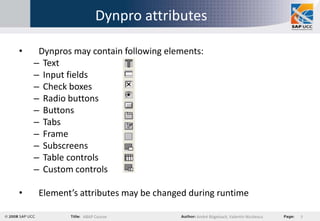
•    Dynpros may contain following elements:
    – Text
    – Input fields
    – Check boxes
    – Radio buttons
    – Buttons
    – Tabs
    – Frame
    – Subscreens
    – Table controls
    – Custom controls

•    Element’s attributes may be changed during runtime

               ABAP Course                André Bögelsack, Valentin Nicolescu   7
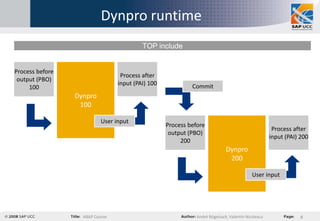
Dynpro runtime
                                          TOP include


Process before
                                  Process after
 output (PBO)
                                 input (PAI) 100            Commit
     100
                 Dynpro
                  100

                           User input
                                                   Process before
                                                                                                     Process after
                                                    output (PBO)
                                                                                                    input (PAI) 200
                                                        200
                                                                             Dynpro
                                                                              200

                                                                                           User input


                   ABAP Course                                André Bögelsack, Valentin Nicolescu               8
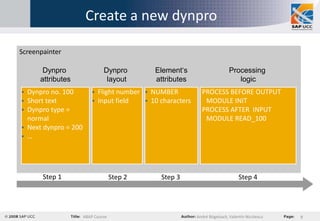
Create a new dynpro

Screenpainter

       Dynpro                  Dynpro          Element‘s                       Processing
      attributes                layout         attributes                         logic
 Dynpro no. 100             Flight number  NUMBER            PROCESS BEFORE OUTPUT
 Short text                 Input field    10 characters      MODULE INIT
 Dynpro type =                                                 PROCESS AFTER INPUT
  normal                                                         MODULE READ_100
 Next dynpro = 200
 …


       Step 1                       Step 2       Step 3                             Step 4


                      ABAP Course                             André Bögelsack, Valentin Nicolescu   9
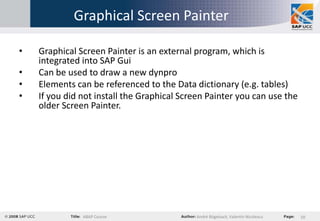
Graphical Screen Painter

•   Graphical Screen Painter is an external program, which is
    integrated into SAP Gui
•   Can be used to draw a new dynpro
•   Elements can be referenced to the Data dictionary (e.g. tables)
•   If you did not install the Graphical Screen Painter you can use the
    older Screen Painter.


               ABAP Course                  André Bögelsack, Valentin Nicolescu   10
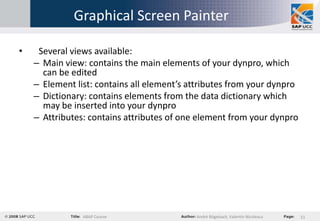
Graphical Screen Painter

•    Several views available:
    – Main view: contains the main elements of your dynpro, which
      can be edited
    – Element list: contains all element’s attributes from your dynpro
    – Dictionary: contains elements from the data dictionary which
      may be inserted into your dynpro
    – Attributes: contains attributes of one element from your dynpro


                ABAP Course                 André Bögelsack, Valentin Nicolescu   11
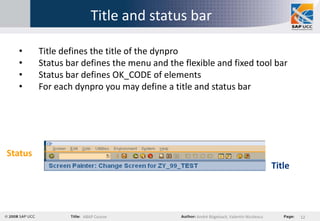
Title and status bar

  •      Title defines the title of the dynpro
  •      Status bar defines the menu and the flexible and fixed tool bar
  •      Status bar defines OK_CODE of elements
  •      For each dynpro you may define a title and status bar


Status
                                                                                       Title


                    ABAP Course                  André Bögelsack, Valentin Nicolescu           12

Abap course chapter 5 dynamic programs

  • 1.
    ABAP Course Chapter 5 – Dynamic programs Lecturer: André Bögelsack, UCC Technische Universität München Author: Valentin Nicolescu, André Bögelsack ABAP Course André Bögelsack, Valentin Nicolescu 1
  • 2.
    Copyright 2008 UCCTU München All rights reserved  Weitergabe und Vervielfältigung dieser Publikation oder von Teilen daraus sind, zu welchem Zweck und in welcher Form auch immer, ohne die ausdrückliche schriftliche Genehmigung durch HCC TU München nicht gestattet. In dieser Publikation enthaltene Informationen können ohne vorherige Ankündigung geändert werden.  Microsoft®, WINDOWS®, NT®, EXCEL®, Word®, PowerPoint® und SQL Server® sind eingetragene Marken der Microsoft Corporation.  IBM®, DB2®, OS/2®, DB2/6000®, Parallel Sysplex®, MVS/ESA®, RS/6000®, AIX®, S/390®, AS/400®, OS/390® und OS/400® sind eingetragene Marken der IBM Corporation.  ORACLE® ist eine eingetragene Marke der ORACLE Corporation.  INFORMIX®-OnLine for SAP und Informix® Dynamic ServerTM sind eingetragene Marken der Informix Software Incorporated.  UNIX®, X/Open®, OSF/1® und Motif® sind eingetragene Marken der Open Group.  Citrix®, das Citrix-Logo, ICA®, Program Neighborhood®, MetaFrame®, WinFrame®, VideoFrame®, MultiWin® und andere hier erwähnte Namen von Citrix-Produkten sind Marken von Citrix Systems, Inc.  HTML, DHTML, XML, XHTML sind Marken oder eingetragene Marken des W3C®, World Wide Web Consortium, Massachusetts Institute of Technology.  JAVA® ist eine eingetragene Marke der Sun Microsystems, Inc.  JAVASCRIPT® ist eine eingetragene Marke der Sun Microsystems, Inc., verwendet unter der Lizenz der von Netscape entwickelten und implementierten Technologie.  SAP, SAP Logo, R/2, RIVA, R/3, SAP ArchiveLink, SAP Business Workflow, WebFlow, SAP EarlyWatch, BAPI, SAPPHIRE, Management Cockpit, mySAP, mySAP.com und weitere im Text erwähnte SAP-Produkte und -Dienstleistungen sowie die entsprechenden Logos sind Marken oder eingetragene Marken der SAP AG in Deutschland und anderen Ländern weltweit. MarketSet und Enterprise Buyer sind gemeinsame Marken von SAP Markets und Commerce One.  Alle anderen Namen von Produkten und Dienstleistungen sind Marken der jeweiligen Firmen.  Die Verwendung der Screenshots wurde mit dem jeweiligen Eigner abgesprochen. ABAP Course André Bögelsack, Valentin Nicolescu 2
  • 3.
    Agenda 1. Dynpro attributes 2. Dynpro runtime 3. Creation of dynpros 4. Title and status bar 5. Entry help in dynpros ABAP Course André Bögelsack, Valentin Nicolescu 3
  • 4.
    Dynpro attributes • Dynpro = dynamic programs • Several dynpros form a program • Programs using dynpros can be accessed by transaction codes only • Programs using dynpros are so called module pools • Distinction between input and output modules for a dynpro • Every dynpro has a unique ID in a program Program Dynpro 100 Dynpro 200 … Dynpro 999 ABAP Course André Bögelsack, Valentin Nicolescu 4
  • 5.
    Dynpro attributes • Dynpros use their own instructions for coordinating runtime behavior  this is no ABAP • But: dynpros call modules which are implemented in ABAP • Modules called by a dynpro control the runtime behavior ABAP Course André Bögelsack, Valentin Nicolescu 5
  • 6.
    Dynpro attributes Dynpro attributes Administration Type Size Order Settings  Program  Normal  Static  Following dynpro  Runtime  Dynpro No.  Subscreen  Dynamic compression  Short text  Selection dynpro  Context menu  Group  Dialog screen  Cursor position  Changes  Hold data  Generation  Status  Original language  Package  Development class Source: Following SAP ABAP Course André Bögelsack, Valentin Nicolescu 6
  • 7.
    Dynpro attributes • Dynpros may contain following elements: – Text – Input fields – Check boxes – Radio buttons – Buttons – Tabs – Frame – Subscreens – Table controls – Custom controls • Element’s attributes may be changed during runtime ABAP Course André Bögelsack, Valentin Nicolescu 7
  • 8.
    Dynpro runtime TOP include Process before Process after output (PBO) input (PAI) 100 Commit 100 Dynpro 100 User input Process before Process after output (PBO) input (PAI) 200 200 Dynpro 200 User input ABAP Course André Bögelsack, Valentin Nicolescu 8
  • 9.
    Create a newdynpro Screenpainter Dynpro Dynpro Element‘s Processing attributes layout attributes logic  Dynpro no. 100  Flight number  NUMBER PROCESS BEFORE OUTPUT  Short text  Input field  10 characters MODULE INIT  Dynpro type = PROCESS AFTER INPUT normal MODULE READ_100  Next dynpro = 200  … Step 1 Step 2 Step 3 Step 4 ABAP Course André Bögelsack, Valentin Nicolescu 9
  • 10.
    Graphical Screen Painter • Graphical Screen Painter is an external program, which is integrated into SAP Gui • Can be used to draw a new dynpro • Elements can be referenced to the Data dictionary (e.g. tables) • If you did not install the Graphical Screen Painter you can use the older Screen Painter. ABAP Course André Bögelsack, Valentin Nicolescu 10
  • 11.
    Graphical Screen Painter • Several views available: – Main view: contains the main elements of your dynpro, which can be edited – Element list: contains all element’s attributes from your dynpro – Dictionary: contains elements from the data dictionary which may be inserted into your dynpro – Attributes: contains attributes of one element from your dynpro ABAP Course André Bögelsack, Valentin Nicolescu 11
  • 12.
    Title and statusbar • Title defines the title of the dynpro • Status bar defines the menu and the flexible and fixed tool bar • Status bar defines OK_CODE of elements • For each dynpro you may define a title and status bar Status Title ABAP Course André Bögelsack, Valentin Nicolescu 12